“How do you charge this mouse? I plugged it in to all the USB ports my PC has and the USB port on my keyboard, and I am not able to see the percentage go up. Once it was down to 86% and I was able to charge it to 100%, but after that, nothing...ugh!!”
Answer This Question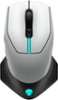
1-4 of 4 Answers
@dell, that was not very helpful at all. The command center does not have anything in settings for charging. It would have been more helpful explaining where in settings to go to.
Sorry, there was a problem. Please try again later.You need to download the alien command center to see the battery percentage on the mouse. Go to the alien fx option and you will see it. The download is free.
Sorry, there was a problem. Please try again later.You should be able to charge it with the cable it comes with. Usually I’ll get a pop up letting me know when my mouse is getting low. The only way I’m able to see the percentage of the mouse is if I go into the Alienware Command Center that you have to download and install in order to change color themes etc. Just go to ‘FX’ when in the command center and click the picture of the mouse on the right side of the application and it’ll show you the percentage. If you’re having trouble seeing the percentage, just unplug the cable and plug it back in
Sorry, there was a problem. Please try again later.We suggest you check the Alienware command center application that will help you control the settings of this mouse.
Sorry, there was a problem. Please try again later.

