A:AnswerMostly yes. Your accounts are with each app vendor and have nothing to do with the Cube, with one exception. I hear you can purchase movies from Apple on their streaming device from your TV within that device's interface. Even though I stream media from the Apple TV app on my Cube, the first time I wanted to purchase a movie that streams only on Apple TV, I had to go to my PC and install iTunes in order to make the purchase.
A:AnswerIf you are referring to loading times when having to stream a movie yes however if the buffering is due to a slow internet speed you will still have some.
A:AnswerHello and thank you for asking this question. The Fire Cube requires a separate WIFI source from a router or hotspot to connect to the internet and stream content. I hope this answers your question and that you have a great day.
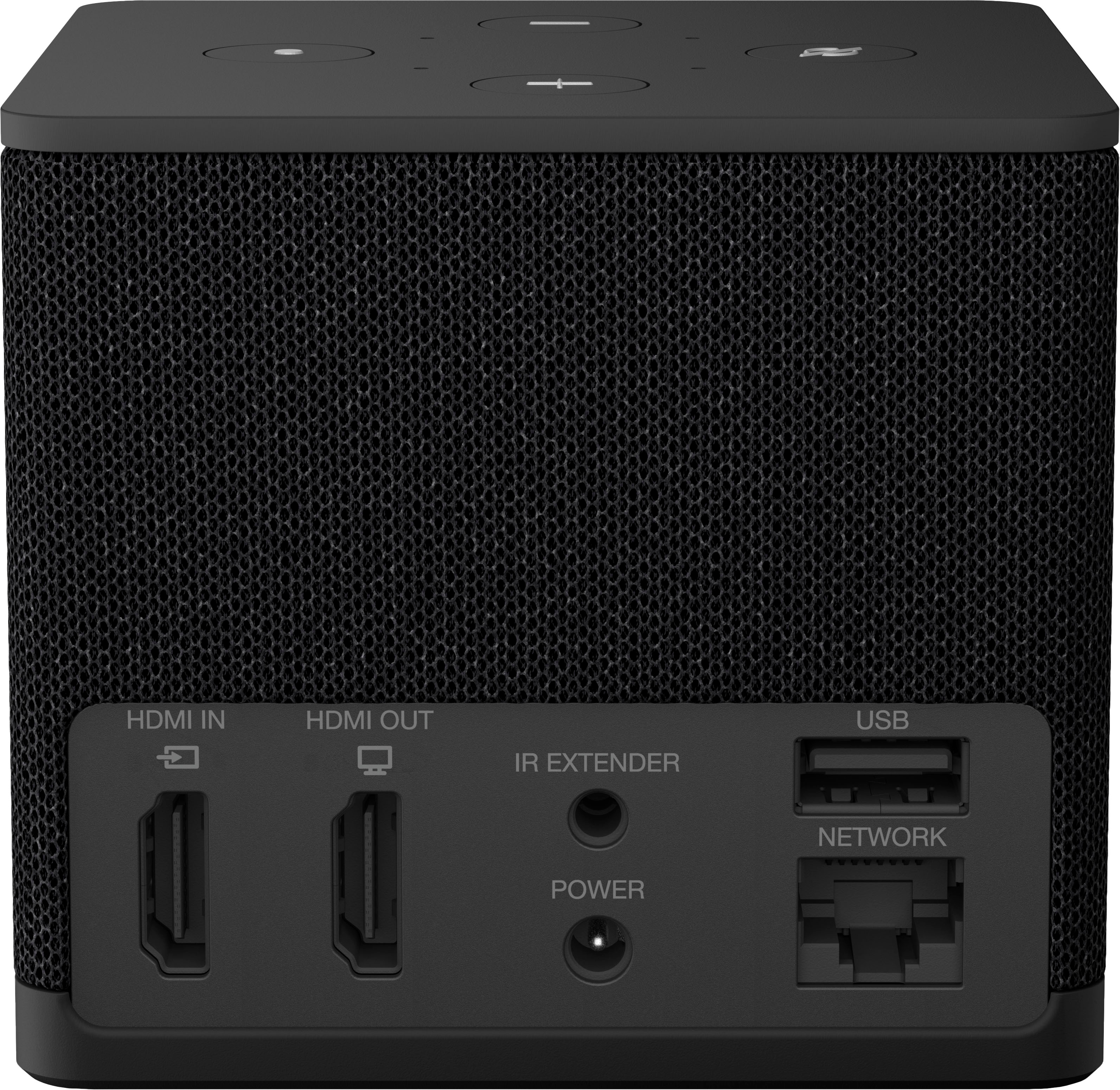
A:AnswerYes the Ethernet port is only 10/100, For that reason I use the WiFi connection for better throughput. On XFinity 1GB network I get approximately 600MB download speeds.
A:AnswerHello BJ, the Amazon Fire TV devices do not allow you to record TV shows. The Amazon Fire TV devices only allow for streaming.
Have a great day!
A:AnswerHello Greg, thank you for your question. Yes, an Amazon Fire TV Cube can be set up to allow your brother to control his Vizio D-series TV using voice commands alone. The Fire TV Cube has far-field microphones, which means it can hear and respond to voice commands from across the room without needing to press any buttons. The Fire TV Cube has Alexa built-in, similar to an Echo speaker. This enables it to function as a hands-free voice control hub for your brother's entertainment system. I hope that helps, have a great day!
A:AnswerHello bigboy and thank you for your question! According to tablos website: "with a Tablo whole-home DVR and the free Tablo app, you can enjoy live and recorded antenna TV and free streaming channels on any of the Amazon Fire TV devices in your home including: Fire TV Sticks. Fire TV Cubes. Fire TV-powered smart TVs." Hope this helps! Have a great day!
A:AnswerHi Todd! The Fire TV Cube 3rd Gen only features a single HDMI-Out port, so if you want to display the same feed on multiple TVs you would need an HDMI splitter. This will allow you to double the signal so that it shows on both TVs. Keep in mind that this can be a bit more complicated than it sounds, due to the way that HDMI is designed to work as 2-way communication tool along with the amount of information being sent. You might have better luck with two dedicated devices (like the Fire TV Stick 4K Max) each streaming separately. This would work fine for something like a live streaming sports game where they'll automatically be synced up once the content is playing, but might be a pain trying to get a movie in the right place and you'll want to ensure that your streaming service allows you to have multiple simultaneous streams going at once. I hope that helps, have a great rest of your day!
A:AnswerThank you for asking Richard! Some of the key differences between the Fire Cube and other Fire sticks are hands free operation and a built in infra red blaster. The Fire Cube had bult in microphones which allow hands free control with Alexa commands such as “Alexa, turn on the tv. Or, Alexa open Netflix” without needing to press a button on the remote. The Fire Cube can also control other devices in your home theater setup with the IR blaster. Upon setup you can tell the cube what sort of tv/receiver/projector the Cube is hooked up to so you can control it all through one remote. I hope this answers your question and that you have a wonderful day!
A:AnswerHi Cici! Often networks like ABC have their own streaming apps which will need to be downloaded in order to watch them, and may restrict local channels to current subscribers. For example where I live I can access ABC News for free without even signing into an account, but my local station requires that I log in with a cable or satellite provider. Looking online NBC's channels are tied to the Peacock app, and CBS seems to currently require a provider login to access anything. This will be the same on a Fire TV Stick or a Fire TV Cube. To download apps: Search for an app by going to Find on the main menu. You can also use the Alexa or microphone button on your remote. Select the app that you want to download. To download the app, select Get or the Shopping Cart icon. Either way, if you'd like to use your Fire TV device for streaming and the antenna for local channels that should work just fine. You should even be able to use your Fire TV Remote to control your TV, and many TVs will allow you to control them with voice controls via Alexa as well. I hope that helps, have a great rest of your day!
A:AnswerYou don't have to add anything more to enable voice commands. They are embedded in the Cumbe. Alexa can hear you and you can speak to Alexa, on the Cube. Also, the Cube/Alexa can talk to you. Tell you notifications, or timers, probably more.
A:AnswerYou can surf the web using the Silk app, watch YouTube videos using the YouTube app and you can even shop on Amazon by saying "Alexa shop for brass outdoor light fixtures". Lots of YouTube videos on using the Fire Cube and less powerful Fire Stick.
A:AnswerHi Jeff! There's no way to connect your antenna to the Fire TV Cube, however you should be able to connect it to your TV as normal. Once you've done that, you'll just change inputs to your antenna like you normally would. With most modern TVs you'll even be able to ask Alexa to change the input on the TV for you! Hope that helps, have a great rest of your day!
A:AnswerHello Will, you want to know what are the monthly fee on the Amazon Fire TV Cube 3rd Gen Streaming Media Player with 4K Ultra HD Wi-Fi 6E and Alexa Voice Remote. The Amazon Fire TV Cube 3rd Gen Streaming Media Player with 4K Ultra HD Wi-Fi 6E and Alexa Voice Remote does not have a monthly fee, however streaming services available may have monthly or yearly fees. Those fees are all different for the streaming services of your liking. Hope this has answered your question. Have an amazing day!
A:AnswerHello Lalo,
Thank you for your question.
Yes! Our new Fire TV Cube supports Wi-Fi 6E + Ethernet port for a direct connection to your router or switch. Ethernet cable not included.
Have a great day!
A:AnswerThe best Amazon device are the 4K, the 4K max, and the cube. The 4K and the 4K max are considered fire sticks. The difference between the fire sticks, and the cube is that the cube is more interactive. You can talk to the cube. You can program the cube to turn on off the TV Via voice command. You can also tell it to turn up or down the volume with the voice command. You can tell it to bring up Netflix with a voice command. So the cube is more interactive. The 4k max and the cube are far superior with Memory. But the cube has slightly more space on it. The fire sticks have about 6 GB. Where the cube has I believe 16 GB.
A:AnswerHi GDLipp,
Here are some steps you can take to check your equipment and connections:
Restart your Fire TV Cube
Use the power adapter and connection equipment that came with your device
Verify that your TV is on and set to the correct HDMI input channel.
Make sure that connected devices (A/V receiver or soundbar) are turned on
Confirm that your TV is HDCP-compliant. Review the video-cable section of the TV owner's manual.
Be sure that the HDMI cable is fully connected to both your TV and Fire TV Cube.
Use a High-Speed HDMI cable.
Try replacing your HDMI cable or HDMI hub with a new one.
Check your TV for firmware updates.
If the above does not help you can also try the following:
Clear app data for Fire TV Cube apps.
Restart your home network devices (for example, modems and routers).
Connect to Ethernet with the included Ethernet-adapter if possible.
Hope that helps!