1-3 of 3 Answers
Yes
Sorry, there was a problem. Please try again later.Yes it will if your laptop has an HDMI out port.
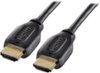
Sorry, there was a problem. Please try again later.Hello Best Buy customer Sumo78! Thanks for asking this question as a somewhat detailed (i.e., step-by-step) answer may help a lot of other Best Buy customers as well. If anyone wants to use this or other Insignia TVs as computer monitors, all they have to do is go into their computer's display settings and select "112" for display "type" and then under scale and layout select "100% (recommended)" and then for resolution select "1366 X 768 (recommended)" and then for multiple displays select "duplicate these settings. To have it so all of the computer's icons fit on the TV screen which are located on the lower task bar and in the left vertical column of the desktop saver screen click onto the TV's menu button and go into the picture column and then scroll down to "advanced settings" and then set the TV's "OVERSCAN" feature to OFF! I was told that it is best to incorporate an HDMI cable that has "chokes" near each end of the cable as this feature is supposed to limit outside electrical interference. I hope that my answer helps you and other Best Buy customers Sumo78!
I would recommend:
Sorry, there was a problem. Please try again later.