A:AnswerGreat question! You can find all of the info you need regarding your unique product key at the following link, where we've collected helpful resources and answers to FAQs. Find everything you need to access your recent purchase, here: https://support.microsoft.com/en-us/office/where-to-enter-your-office-product-key-0a82e5ae-739e-4b92-a6f4-2ec780c185db
A:AnswerWe've made the download and installation process of your new Microsoft 365 Personal subscription simple and easy to navigate. Find a full outline of detailed installation instructions, as well as answers to FAQs, here: https://support.microsoft.com/en-us/office/download-and-install-or-reinstall-microsoft-365-or-office-2021-on-a-pc-or-mac-4414eaaf-0478-48be-9c42-23adc4716658
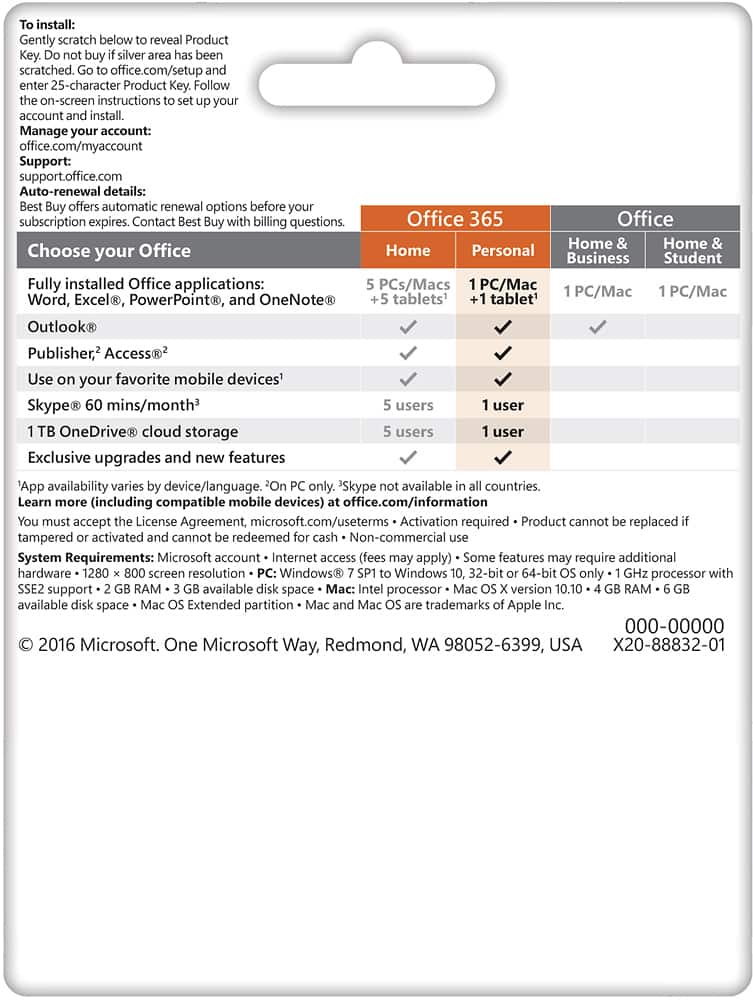
A:AnswerGreat question! The exact system requirements for your new Microsoft 365 Personal subscription depend on the type of device you are using. For a full outline of required components and necessary storage space, visit here: https://www.microsoft.com/en-us/microsoft-365/microsoft-365-and-office-resources?ocid=oo_support_mix_marvel_ups_support_smcofficeinstall_inline&rtc=1#coreui-heading-5dcqxz4
A:AnswerOur users are free to make changes and adjustments to their subscriptions at any time. Find a full outline of detailed instructions and how-to guides on managing your account, here: https://support.microsoft.com/en-us/office/renew-microsoft-365-for-home-58f3d0f8-15c4-4ad8-8c5f-16d682e8b545
A:AnswerMicrosoft 365 Personal requires one of the three most recent versions of macOS in order to operate. As long as this is the case, you should have no issue installing and running your new software. For further guidance, including a full outline of system requirements, visit here: https://www.microsoft.com/en-us/microsoft-365/microsoft-365-and-office-resources?ocid=oo_support_mix_marvel_ups_support_smcofficeinstall_inline&rtc=1#coreui-heading-5dcqxz4
A:AnswerOur users are free to make changes to their subscription at any time. Simply visit your Microsoft account page, where you'll be able to make the desired amendments to your current subscriptions and elections. Find all the info you need, here: https://account.microsoft.com/account
A:AnswerIt prompted me to answer this question… yeah what Microsoft has done is rent out their software and include consistent updates for each program. So pretty much paying yearly to get all the newest updates.
A:AnswerGreat question! Microsoft 365 Personal has been designed to work seamlessly with Windows 11. For a full outline of system requirements, visit here: https://www.microsoft.com/en-us/microsoft-365/microsoft-365-and-office-resources?ocid=oo_support_mix_marvel_ups_support_smcofficeinstall_inline&rtc=1#coreui-heading-5dcqxz4
A:AnswerYou can manage your subscriptions at any time by visiting your Microsoft profile page and selecting "Manage Subscription". For a full outline of detailed, step-by-step instructions, visit here: https://support.microsoft.com/en-us/office/cancel-a-microsoft-365-subscription-46e2634c-c64b-4c65-94b9-2cc9c960e91b
A:AnswerGreat question! Users are free to manage and make adjustments to their subscriptions at any time by visiting their Microsoft profile page. For a full set of detailed, step-by-step instructions, visit here: https://support.microsoft.com/en-us/office/cancel-a-microsoft-365-subscription-46e2634c-c64b-4c65-94b9-2cc9c960e91b