“I have a Vtech IS6200 DECT Cordless headset. I just purchased an AT&T DL72219 Connect to Cell phone which is compatible with this headset. How do I register the IS6200 to my phone?”
Answer This Question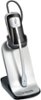
1-1 of 1 Answer
Hi - We are sorry of you had difficulties registering the VTech IS6200 headset on your AT&T telephone system. Here's the instructions on how to register your headset: Step 1: Press and hold the /HANDSET LOCATOR button on the telephone base for about four seconds until the IN USE light turns on, or the base displays "Registering... Please wait." Then, release the button. Step 2: Immediately place the headset in the headset charger. The ON/OFF light on the headset flashes quickly and alternately in red and blue to indicate the registration is in progress. This may take up to five minutes to complete. The ON /OFF light on the headset turns red when it is registered and charged. You hear a confirmation tone. Step 3: Lift the headset, then press ON /OFF key on the headset. If you hear a dial tone, the registration was successful. Hope this helps! ~VTech Support
Sorry, there was a problem. Please try again later.