Customer Ratings & Reviews

- Model:
- SA230 BI
- SKU:
- 6051020
Rating by feature
- Ease of Use
Rating 4.7 out of 5 stars
- Value
Rating 4.7 out of 5 stars
- Quality
Rating 4.6 out of 5 stars
Customers are saying
Customers value the SA230 23" IPS LED FHD Monitor's excellent picture quality, affordable price, and ease of use. Many appreciate the vibrant colors and good size, along with the convenient HDMI connectivity. However, some find the stand to be lacking in adjustability and the absence of built-in speakers to be a drawback. A few users also noted limitations with the refresh rate and tilt functionality.
This summary was generated by AI based on customer reviews.
Decent picture for a fair price.
||Posted . Owned for 1 month when reviewed.This reviewer received promo considerations or sweepstakes entry for writing a review.A basic computer monitor. I didn't realize that it didn't have sound, so I bought a cheap pair of speakers to go with it.
I would recommend this to a friendQuality good however.....
||Posted .This reviewer received promo considerations or sweepstakes entry for writing a review.Screen actually leans slightly in towards user at top. So if your eyes are even or a little above screen it seems off. Will return
No, I would not recommend this to a friendImage isn’t as clear
||Posted . Owned for 1 month when reviewed.This reviewer received promo considerations or sweepstakes entry for writing a review.I needed a second monitor for schoolwork. It is sufficient, but the image is less clear compared to my other monitor.
No, I would not recommend this to a friendProbably ok for gamers
||Posted . Owned for 1 month when reviewed.This reviewer received promo considerations or sweepstakes entry for writing a review.Not thrilled. Screen image drops off bottom and picture is stretched out, distorted. Geek Squad unable to help.
No, I would not recommend this to a friend- Pros mentioned:Picture qualityCons mentioned:Speakers

Crazy Thin, Light, Crisp
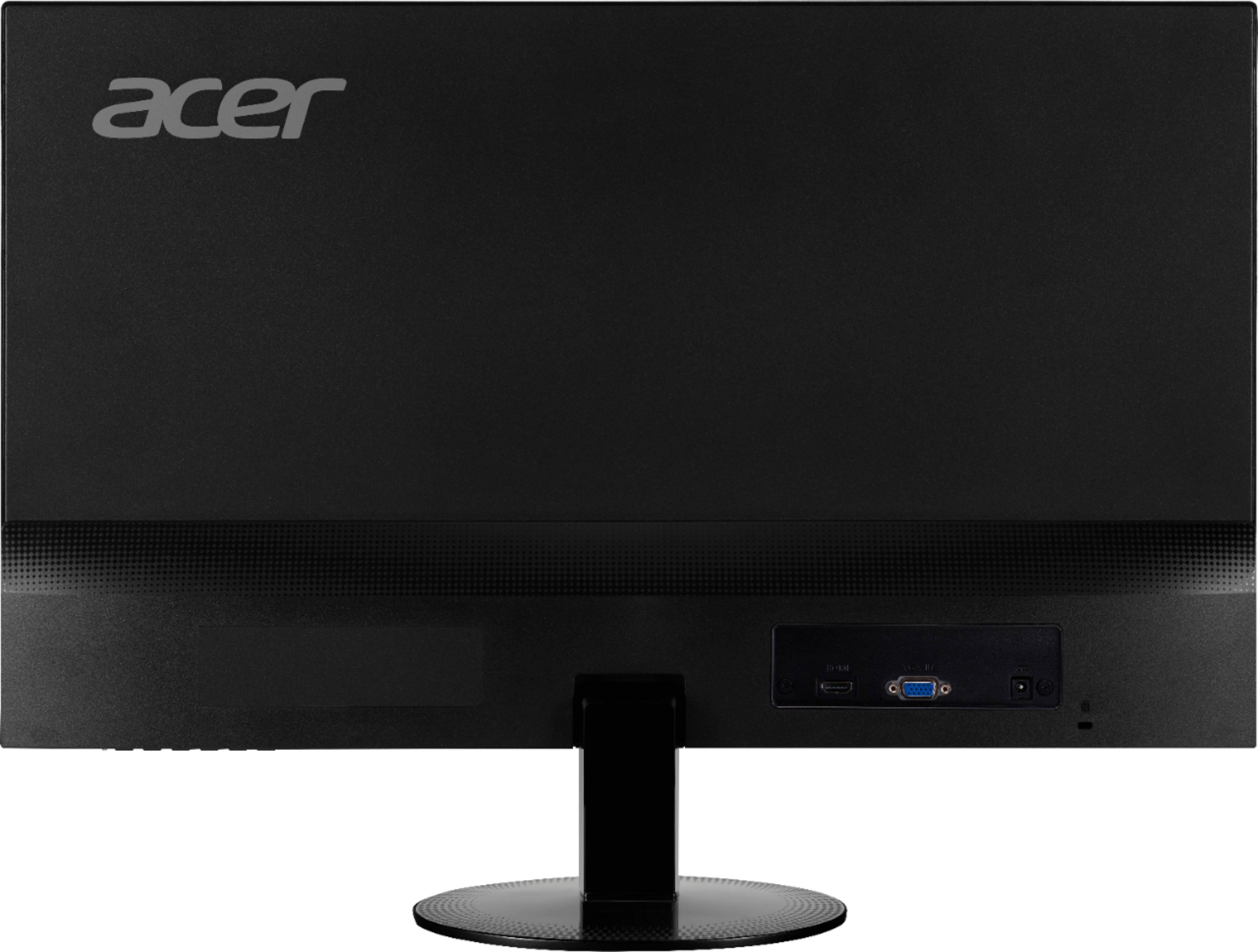
|Posted .This reviewer received promo considerations or sweepstakes entry for writing a review.This is a simple, high quality, wide screen monitor. That's it. It does one thing and it does it WELL. You will pull it out of the box, marvel at how ridiculously thin and light it is, appreciate the simplicity of the connections, the matte finish (if you hate fingerprints and glare like I do), plug it in with the enclosed monitor cable or your own HDMI cable (I used an HDMI), and turn it on. If you have a newer computer with Windows 10, it will "just work" and be beautiful, with your splash image and desktop stretching to fit the lovely wide screen. The colors pop and, for me, most importantly, even with an HDMI connection (which does not always work awesomely for this) text is really easy to read. The really nice matte finish the screen has also noticeably reduced my eyestrain compared to using the glossy screen on my laptop. This screen is not much larger than my old one, but moving to the wider screen means better side-by-side content, which I had previously done using a two-screen configuration. That's not really necessary anymore. For day-to-day work, this screen is just the right size to have a reference document and a working document up side-by-side or open up a big spreadsheet and be able to see the whole thing. I love it. If you are looking for something more complex, this may not be the choice for you. It does not have speakers (so be prepared to hook up a little speaker to your PC or use a soundbar or something--I had previously been using an HDtv/monitor with built in speakers, so I had to hook up a speaker, but I knew that going in); also, there is only one HDMI port and one older pin monitor port, so if you need to connect multiple computers up to this, you may need a port replicator of some kind.
I would recommend this to a friend - Pros mentioned:Picture qualityCons mentioned:Stand
Great monitor at a great price
|Posted .This reviewer received promo considerations or sweepstakes entry for writing a review.I’ve been using the same 20” flat-screen monitor for about the last 12 years, and it still works. However, it was made before HDMI was common, so its main input is VGA. So, I decided it was time to upgrade. This Acer 23” widescreen monitor is a very good value in its price range. It is extremely thin and light, and with a very small bezel, it doesn’t take up any more space than necessary. The monitor comes with power cord, base for the stand, and a VGA cable. I think it’s interesting that Acer chose to include a VGA cable as opposed to an HDMI cable. Fewer and fewer laptops still include a VGA port, so I would have expected them to include an HDMI cable instead. Perhaps the thinking is that most households are more likely to have an HDMI cable than a VGA cable, but I digress. While many people will probably not even look at the included documentation, I decided to do so. There I was surprised to learn that the stand is not detachable and must be straightened in order to use it. Why was that surprising? Because the box contained a base and post for the stand. The post inserts into the back of the monitor and then fits into the base, which can be fastened to the post using the attached screw. While it isn’t immediately apparent, the monitor can be tilted to your desired angle. With the monitor assembled and plugged in, I then went in search of the power button. On the bottom right side of the monitor there are 4 buttons. Unfortunately, they are not labeled, so I just chose to press the one on the far right, figuring that would be the power button. It was, as confirmed by a tiny blue LED that lit up. Since the buttons aren’t labeled, you just have to start pushing them to figure out what they do. It’s not actually a big deal, however, as the on-screen menu is well designed and the controls shown on the screen line up with the buttons, indicating which button does what. It definitely works, but it’s a little cumbersome to use. The screen itself is very bright and clear, with full HD resolution. In fact, it has brightness to spare, which is nice. With an IPS display, the viewing angles are excellent. It features 4 different display modes: standard, graphics, movie and user. Except for user mode, these are pre-set packages of settings such as brightness, contrast, etc. User mode is what you get when you manually change any of the settings. The resolution of this monitor is 1920 x 1080, and it looks very good. I don’t have experience with high-end monitors, so I don’t know if they would be any different, but I noticed that when I viewed text up close on the screen, it didn’t appear to be as sharp as it was on my laptop’s screen. Perhaps that has to do with pixel density, but I’m not sure. It’s a very subtle thing, and does not detract from the image. It’s really a function of how close you sit to the monitor, so perhaps I was a bit too close. Especially at this price range, I would not consider this a drawback. Overall, this is a great monitor at a great price. It’s large enough to provide plenty of work space, so you won’t feel cramped at all.
I would recommend this to a friend Need to be clearer picture
||Posted .This reviewer received promo considerations or sweepstakes entry for writing a review.Price was to high for this product and delivering time was to long. Need to step-up delivering time......
No, I would not recommend this to a friendGreat for the light use .
||Posted . Owned for 1 month when reviewed.This reviewer received promo considerations or sweepstakes entry for writing a review.I would have given this a 5 stars , if this product had the ability to swivel or adjust the screen up and down.
No, I would not recommend this to a friendSo far, so good
||Posted .This reviewer received promo considerations or sweepstakes entry for writing a review.Not sure how this all will turn out.....bought to give/put in someone else's home. Will let all know how it turns out.
I would recommend this to a friendGood for Price
||Posted . Owned for 1.5 years when reviewed.This reviewer received promo considerations or sweepstakes entry for writing a review.Not the best, but good for what it was intended and pricing. quick easy setup and functional.
I would recommend this to a friendWorks ok, no VESA
||Posted . Owned for 1.5 years when reviewed.This reviewer received promo considerations or sweepstakes entry for writing a review.Should have paid a little more to upgrade to a VESA mount. Otherwise a fine, basic monitor.
No, I would not recommend this to a friendPretty good
||Posted . Owned for 3 months when reviewed.This reviewer received promo considerations or sweepstakes entry for writing a review.Good monitor for the price, seems pretty standard if that's all you need. The colors are nice.
I would recommend this to a friendNo VESA mounts
||Posted .This reviewer received promo considerations or sweepstakes entry for writing a review.For a simple display that sits on the desk, its fine. But it doesn't have a VESA mount for wall or floating mounts.
I would recommend this to a friendSo So...
||Posted .This reviewer received promo considerations or sweepstakes entry for writing a review.Decent little monitor but nothing to brag about. Only got it as a second screen so no real issue.
I would recommend this to a friendit’s decent
||Posted . Owned for less than 1 week when reviewed.This reviewer received promo considerations or sweepstakes entry for writing a review.Does not have any audio ports for any gamers out there that want to use speakers
I would recommend this to a friend- Pros mentioned:Picture qualityCons mentioned:Stand
Acer Monitor
|Posted .This reviewer received promo considerations or sweepstakes entry for writing a review.This is a great monitor for the price point. It is full HD 1920x1080 resolution. It has your standard VGA input and also HDMI input which I like. It does come with a VGA cable in the box but no HDMI. The screen size is 23” and it is thin. The bezels on this screen are also very thin which is great when hooking up multiple screens. I do have an issue with the stand it comes with, it is not height adjustable and the tilt is minimum on the screen it barely tilts up and down. Maybe Acer offers other screen stands. Aside from that this is a great monitor to have.
I would recommend this to a friend - Pros mentioned:Picture qualityCons mentioned:Stand
Good HD widescreen monitor
|Posted .This reviewer received promo considerations or sweepstakes entry for writing a review.This is a good widescreen HD monitor with decent brightness and clear colors. There is nothing spectacular to say about this monitor that will put way above the rest. It does have small bezels so almost your entire front surface is visible screen. It is very thin with a basic stand that tilts slightly. I do wish it came with a better stand that could adjust both vertically in height and more of a tilt for better viewing angles. It only comes with a VGA and hdmi input and nothing more. I am using it for a security camera system so it fits the bill perfectly.
I would recommend this to a friend Missing HDMI and cables
||Posted . Owned for 3 weeks when reviewed.This reviewer received promo considerations or sweepstakes entry for writing a review.Good quality for price. I believe Best Buy inadvertently excluded the HDMI cable.
I would recommend this to a friendAverage Monitor
||Posted . Owned for 3 weeks when reviewed.This reviewer received promo considerations or sweepstakes entry for writing a review.I needed a second monitor so this one was fine. Can’t adjust.. has hdmi port and uses 1080p
No, I would not recommend this to a friendShould of bought next model up.
||Posted .This reviewer received promo considerations or sweepstakes entry for writing a review.Just needed a basic monitor. For just a little bit more I could of gotten much newer technology.
I would recommend this to a friend