Customer Ratings & Reviews

- Model:
- SA230 BI
- SKU:
- 6051020
Rating by feature
- Ease of Use
Rating 4.7 out of 5 stars
- Value
Rating 4.7 out of 5 stars
- Quality
Rating 4.6 out of 5 stars
Customers are saying
Customers value the SA230 23" IPS LED FHD Monitor's excellent picture quality, affordable price, and ease of use. Many appreciate the vibrant colors and good size, along with the convenient HDMI connectivity. However, some find the stand to be lacking in adjustability and the absence of built-in speakers to be a drawback. A few users also noted limitations with the refresh rate and tilt functionality.
This summary was generated by AI based on customer reviews.
- Pros mentioned:Picture quality, Price

Great Monitor for Gaming or Office
|Posted .This reviewer received promo considerations or sweepstakes entry for writing a review.This monitor is a great choice for the price, and the quality. It's super thin, bright, and responsive. It has the appropriate inputs for new and old systems. I tested this monitor with both my Windows Desktop gaming rig, and my Macbook as an extended monitor. The color and brightness made every game I played look great! The 4ms response time means there is little lag and I didn't notice any motion blur when watching videos online. For the price, and the quality, I'd highly recommend this for your next gaming PC build, or office.
I would recommend this to a friend Better than nothing
||Posted . Owned for 1 month when reviewed.This reviewer received promo considerations or sweepstakes entry for writing a review.The use of this monitor is poor. I have been wanting to call your Geek Squad to see if they can help.
No, I would not recommend this to a friendBrand response from TeamAcer
Posted .Dear John,
We are sorry to hear you are unhappy with your Acer SA series monitor. While you don't mention your specific issue, we want to work with you to see how we can help improve this experience. If you are located in the US or Canada, please fill out this form so that we can assist you: http://csapps.acer.com/prompt/?key=7be4530259c0daeb3aa391152371ccd6556c23a2
We appreciate you taking the time to write this review.
Regards,
Acer America
- Pros mentioned:Picture quality
Super thing and light
|Posted .This reviewer received promo considerations or sweepstakes entry for writing a review.Wow I was amazed taking this monitor out of the box. It weighted nothing and was so thin!! I was using my 21” Dell monitor that came with my PC and that thing was fat and heavy!! This is such a huge upgrade! Now I have more room on my desk and it looks stunning sitting there. I think 23” is the perfect size for 1080p since anything bigger u might see more and more pixels. Pros: Thin Light 1080p HDMI, VGA ports Mate Screen Cons: No included HDMI cable Easy to tip over screen since it’s so light
I would recommend this to a friend Good monitor but...
||Posted .This reviewer received promo considerations or sweepstakes entry for writing a review.The monitor quality is good but it lacks the VESA standard mounting holes.
No, I would not recommend this to a friendBrand response from TeamAcer
Posted .Hello FarmHand,
Sometimes the product design does not allow for VESA wall mounts on some monitors. Acer offers many monitors with VESA wall mounts and some without this feature. You can view the monitor products at http://www.acer.com/ac/en/US/content/group/monitors. When you find a model you like, click on the Buy Now button and it will display where you can purchase the product.
Best regards,
Acer America
blinks/blacks out after 2 months
||Posted . Owned for 1 month when reviewed.This reviewer received promo considerations or sweepstakes entry for writing a review.It worked okay for the first month or two. Now the monitor screen turns black when I am in the middle of working on something. It happens every 3-5 minutes and it is horrible. I get so frustrated!!! I wish I instead bought a super nice & expensive one & saved myself the headache of this trash quality. You can't rely on it.
No, I would not recommend this to a friendBrand response from TeamAcer
Posted .Dear Flying,
We are sorry to hear you are having problems with the display blinking with your Acer SA series monitor. This is not the experience we want our customers to have and we would like to help you get this resolved. If you are located in the US or Canada, please fill out this form so that we can assist you:
http://csapps.acer.com/prompt/?key=a4656f1f56efdec574c54d3899d82cdae74ea563
We appreciate you taking the time to write this review.
Regards,
Acer America
- Cons mentioned:Speakers
Not very functional
||Posted .This reviewer received promo considerations or sweepstakes entry for writing a review.Monitor offers okay picture. There are no internal speakers.
No, I would not recommend this to a friendBrand response from TeamAcer
Posted .Dear Lfraz,
We are sorry to hear you are unhappy with your Acer SA series monitor.Sometimes the product design won't allow for built in speakers on some monitors. Acer offers many monitors with speakers and some without this feature. You can view monitor products at http://www.acer.com/ac/en/US/content/group/monitors. When you find a model you like, click on the Buy Now button and it will display where you can purchase the product.
We appreciate you taking the time to write this review.
Thank you
Acer America
- Pros mentioned:Picture qualityCons mentioned:Speakers
A monitor that wants to be a TV or vice versa?
|Posted .This reviewer received promo considerations or sweepstakes entry for writing a review.Overall, this is a nice little monitor. It is super thin, and it has a bright, crisp display. It has HDMI, VGA, and DVI ports, but it has no internal speakers!?!?!? I cannot for the life of me figure out why. If you are going to put an HDMI input on the thing, better make sure we can listen to what we are plugging in. This is a pretty big issue for me as it takes what could have been a multi-functional and useful item and turns it into a garden variety computer monitor. That being said, the picture is great.
No, I would not recommend this to a friend Black Screen Every Time I Turn On
||Posted . Owned for 1 month when reviewed.This reviewer received promo considerations or sweepstakes entry for writing a review.I always get a black screen every time I boot up my computer. I have to hard reboot so the display would show. Had no issues with my previous HP monitor until I upgraded to this Acer. While the monitor is on, sometimes it would flick to black. Do not buy this junk! Already passed my 14 days return period.
No, I would not recommend this to a friendBrand response from TeamAcer
Posted .Dear BigSaver,
We are sorry to hear you are having problems with black screes with your Acer SA series monitor. This is not the experience we want our customers to have and we would like to help you get this resolved. If you are located in the US or Canada please fill out this form so that we can assist you:
http://csapps.acer.com/prompt/?key=6c0912a755f84f7de52099fdc4109a1b74b833a1
We appreciate you taking the time to write this review.
Thank you
Acer America
- Pros mentioned:Picture quality
Good moniter
|Posted .This reviewer received promo considerations or sweepstakes entry for writing a review.Set-up: Easy as pie. No instructions needed. Cable supplied not compatable with video card on my computer. However HDMI works great. The stand is in two parts with one screw that no screwdriver is need for and just snapes onto the monitor. Screen: Very bright. Colors: Wonderful. For a 1080P monitor you don't need 4k, it looks that good. Viewing area: There is no bezel to speak of on the sides and top. However, there is a quarter inch area on the sides and top that are not used. My old ACER monitor had that quarter inch bezel to cover the unused area. Played Smash Frenzy 4 from Big Fish games and Big Jig (a jigsaw puzzle) from Lena games. There was a one inch unsable area on the to of the monitor and quarter inch unused area on the side. Drivers: Monitor was in use out of the box. However Set up a log-in on the ACER site to download any driver(s) available. To my surprise and confusion, NO Win10 drivers. Saw Win7 and Win 8 32 bit and 64 bit drivers though. Findings: For a novice user, setup could not be easier and usable straight from the box is an A. Setting up an account with ACER is easy and is an A. Driver update is only useful if you still use Win 7 or 8. That gets an A. BUT for those of us using Win 10 driver update gets an F. Overall, this monitor is a better than a good buy for ease of set-up and usability out of the box. I would rate this monitor a great buy if ACER had drivers for Win10. That might eliminate the unusable area on the sides and top.
I would recommend this to a friend Sucks
||Posted .This reviewer received promo considerations or sweepstakes entry for writing a review.It works but is hinky Doesn't turn on easily and It turns off by itself
No, I would not recommend this to a friendBrand response from TeamAcer
Posted .Hi Jeff,
We are very sorry to hear you are having problems with your Acer S series monitor, and we understand how frustrating this is for you. This is not the experience we want our customers to have and we would like to help you get this resolved. If you are located in the US or Canada please fill out this form so that we can assist you:
http://csapps.acer.com/prompt/?key=104ad30ef3bb7794303b26a3feccc443883888ab
We appreciate you taking the time to write this review and hope to hear from you.
Thank you
Acer America
Bad choice
||Posted .This reviewer received promo considerations or sweepstakes entry for writing a review.Monitors are simple. They use USB, DVI or HDMI. This monitor is not that simple. I have tried all 3 of these ports & it still says “No signal” very disappointed with this product. Taking it back to the store as soon as they open up at 9:00am
No, I would not recommend this to a friendBrand response from TeamAcer
Posted .Dear AnbuAkatsuki,
We are sorry to hear you are having problems setting up your Acer monitor, getting no signal messages when you connect. This is not the experience we want our customers to have and we would like to help you get this resolved. If you are located in the US or Canada, please fill out this form so that we can assist you:
http://csapps.acer.com/prompt/?key=5ac3454879184ab7de526576e642b05fd643ed28
We appreciate you taking the time to write this review.
Regards,
Acer America
- Pros mentioned:Picture quality
Darn Good Display
|Posted .This reviewer received promo considerations or sweepstakes entry for writing a review.I've been using the Acer SA230 for the better part of a week now and I have to admit to being more than a little impressed with how Acer has stepped up its display game the past few years. Most Acer laptops (Windows or Chrome), especially over the past 14 months, have all included excellent built in displays. This monitor continues this trend bringing 23 inches of outstanding IP LED display tech to your desktop computer. Color reproduction is excellent and the display is crisp. The viewing angle is a bit above average for displays in this price range which is a nice little side bonus. Connecting via HDMI or VGA is a breeze and there is no ghosting at all when displaying fast moving content such as an iTunes movie or watching Netflix. And this thing is thinner than just about the rest of the displays in this price range. Clearly Acer has been aiming to turn their budget brand reputation around and in the past 16 months or so they have really stepped up and delivered. I envision using this monitor for years to come and I have no doubt I'll be as satisfied a year from now as I am with it today.
I would recommend this to a friend Great until it wasn't
||Posted . Owned for 1 year when reviewed.This reviewer received promo considerations or sweepstakes entry for writing a review.Worked great until one day about a year after I purchased it, it just shut off and when I tried to unplug it and replug it back in the power port started smoking.
No, I would not recommend this to a friendCracked within two weeks
||Posted .This reviewer received promo considerations or sweepstakes entry for writing a review.Within two weeks the monitor got a crack in it. Tried to use the warranty and apparantly it does not cover cracks. Could not return it either. Grandson bought with his own money and was very disappointed.
No, I would not recommend this to a friendBrand response from TeamAcer
Posted .We are very sorry for the inconvenience this has caused you; we can certainly understand you’re frustrated. Based on your comments it appears the monitor sustained a crack or break of some kind. You can see examples of an internally cracked LCD here: https://us.answers.acer.com/app/answers/detail/a_id/2122
This type of damage does not occur due to age or normal usage of the device therefore this type of damage is not covered under the manufacturer’s warranty. With that said we do understand this is frustrating for you. If you encounter any issues in the future with an Acer product please feel free to reach out to us and we'll see if there is something we can do to help.
We appreciate you taking the time to write this review.
Acer America
- Cons mentioned:Refresh rate
very good and very slim monitor
|Posted .This reviewer received promo considerations or sweepstakes entry for writing a review.This is the first Acer monitor I have ever had, and I was pretty surprised how good it is for the price point. My biggest gripe with monitors in this price range is when viewing off angle, a lot of grey introduced to the screen image, but the viewing range is pretty good on this monitor. The monitor is only HD, 1920x1080, which is ok, but if you are an heavy gamer, you might want more resolution, like 2560x1440, though those monitors tend to cost more, and you will need a more expensive video card to drive video games at that resolution with all the settings turned high up. At 1920x1080, even a GTX 1060 will make most games like Doom run at a very fast rate. I tried Doom, it looked great, though because this monitor is only 60hz, there was screen tearing as it could not keep up at the frame rate my GTX 1060 laptop card could output (which was 90+ frames per second at this resolution). The monitor itself is quite plain, but that was ok with me, as what I really cared about was how thin it was, and it is pretty thin. There is no swivel, or height adjustment either. This is an IPS screen, with a 4ms response time, and I could not see any ghosting to my eyes, either gaming or using windows 10. The monitor does tilt up and down slightly. There are single HDMI, DVI, and VGA ports, but I wish it had included DisplayPort, which it does not. Overall, unless you need a monitor that has Nvidia G-Sync this is a pretty good monitor.
I would recommend this to a friend - Pros mentioned:Color
Nice mid-range monitor
|Posted .This reviewer received promo considerations or sweepstakes entry for writing a review.The thing I love most about this monitor is that it has a matte screen, which greatly reduces glare. So many monitors out now have the glossy screen, which looks great when the lighting is perfect, but suffer a lot from glare and reflections. Won’t have that problem with this monitor. Color seems good, perhaps very moderately subdued, but that can probably be tweaked in the settings. Speaking of settings, they are a little awkward to use, as you have to just feel for them along the bottom of the screen. Can’t tell the power button from the others. Display does have about a ⅜ inch bezel around the top and sides, in addition to the ⅛ inch plastic frame, so effectively there’s a ½ inch bezel around your entire viewing area. Hard to see the ⅜ section from online pics, and even somewhat difficult to see when the monitor is off, so don’t spend 30 minutes trying to adjust the viewing area to ‘fill’ the monitor. The monitor is also crazy thin - perhaps too thin. There was a visible bend to my monitor when I took it out of the box. And it’s thin enough that you can easily bend it, inadvertently, when handling, so be careful. All in all, it’s a decent monitor. Not spectacular, but slightly above average.
I would recommend this to a friend - Pros mentioned:Picture quality, Price
Great For The Price
Posted .This reviewer received promo considerations or sweepstakes entry for writing a review.I was getting eye strain and headaches from an overpriced and over-sized 27 inch 1080p (Full HD) monitor. The text on that monitor looked hideous and found myself using my smaller laptop more and more. Finally broke down and started investigating smaller monitors. Found this so well priced at Bestbuy I had to get it. The text and graphics (after some tinkering with software color, brightness) is much better than the more expensive 27 incher. Generally speaking, this monitor just works and is affordable and has HDMI.
I would recommend this to a friend - Pros mentioned:Picture quality
Good monitor, thin IPS display
Posted .This reviewer received promo considerations or sweepstakes entry for writing a review.I bought this monitor in store to replace an older LCD monitor, and to match an existing Acer LED monitor I had. Out of the box, the monitor has a blue light setting to 50%. I recommend turning it OFF, otherwise it has a very abnormal yellow tint. I DO like very low brightness due to eye strain, but the yellowish tint from the default settings is just pretty odd and makes colors in videos very off. Otherwise, the monitor is an excellent one for the price. It's very thin and the mount is sturdy, tilting with the mount works fairly precise. I've had a very good experience with the Acer LED monitors, and this one was no exception. Better image and build quality than the other brands I've used.
I would recommend this to a friend - Pros mentioned:Picture quality
Nice colors, crisp display, narrow bezel
|Posted .This reviewer received promo considerations or sweepstakes entry for writing a review.This monitor works well for me for typical household/family use. The picture looks good with nice colors and a crisp display. It has a fairly small footprint with it's round stand that has a nice diamond pattern border around the perimeter. I like the narrow bezel around the monitor's screen. The monitor controls are on the underside of the left side of the monitor. Simply push in a button and you can see what the function is. If you're like me once your monitor is set up you basically never touch this stuff again. I'm using the monitor just how it was factory set and it seems fine. The one issue I did have is I could not get the vga connection on the monitor to work. I tried two cords and two different computers. However, this isn't too much of an issue for me since I am using the hdmi input that works just fine. If you can get this monitor for around $100 I'd say it is a good value.
I would recommend this to a friend NO DVI INPUT
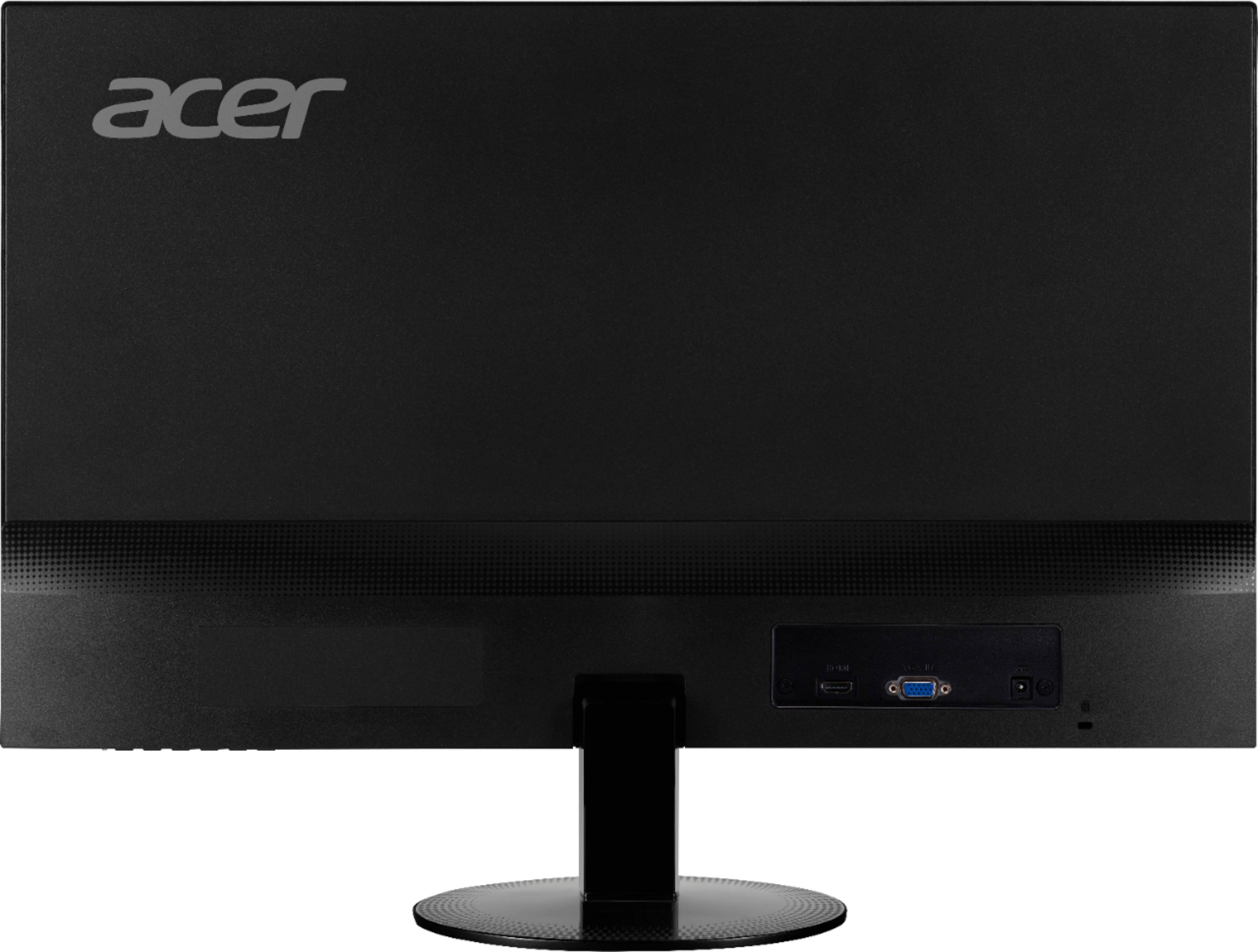
||Posted .This reviewer received promo considerations or sweepstakes entry for writing a review.I bought two of these because they say and picture it having a DVI input.....WRONG DOES NOT!!
No, I would not recommend this to a friendBrand response from TeamAcer
Posted .Dear outdated,
We are sorry you are unhappy with the specs of the Acer SA230 monitor. We are not sure where you see this monitor has a DVI input; the specifications on the Best Buy link and the Acer link show this has HDMI and VGA and does not mention DVI. The picture may show a DVI port but the specifications do not include that feature. We will contact the appropriate team to address the picture on the Best Buy site and make corrections where necessary. If this will not meet your needs please contact Best Buy for your return/exchange options. We apologize for any inconvenience this has caused you.
We appreciate you taking the time to write this review.
Thank you
Acer America