Customer Ratings & Reviews

- Model:
- SA230 BI
- SKU:
- 6051020
Rating by feature
- Ease of Use
Rating 4.7 out of 5 stars
- Value
Rating 4.7 out of 5 stars
- Quality
Rating 4.6 out of 5 stars
Customers are saying
Customers value the SA230 23" IPS LED FHD Monitor's excellent picture quality, affordable price, and ease of use. Many appreciate the vibrant colors and good size, along with the convenient HDMI connectivity. However, some find the stand to be lacking in adjustability and the absence of built-in speakers to be a drawback. A few users also noted limitations with the refresh rate and tilt functionality.
This summary was generated by AI based on customer reviews.

A very good, basic monitor
|Posted .This reviewer received promo considerations or sweepstakes entry for writing a review.This is an excellent monitor for everyday common use. It has excellent contrast and brightness at 100,000,000:1 ratio. Out of the box the brightness, contrast and color correction were fine, but I spent about 5min calibrating the display and arrived at optimum settings for my preferences. Text is clear and sharp. The viewing angle is rather wide. With a 4ms response time I don't notice any ghosting or trailing when watching sports or fast motion movies. For high end gaming this may not be quite good enough, but it is more than adequate for every day use. The monitor has one HDMI and one VGA input. I wish that it had a second HDMI input and a built in speaker.
I would recommend this to a friendA okay monitor, but lacks features
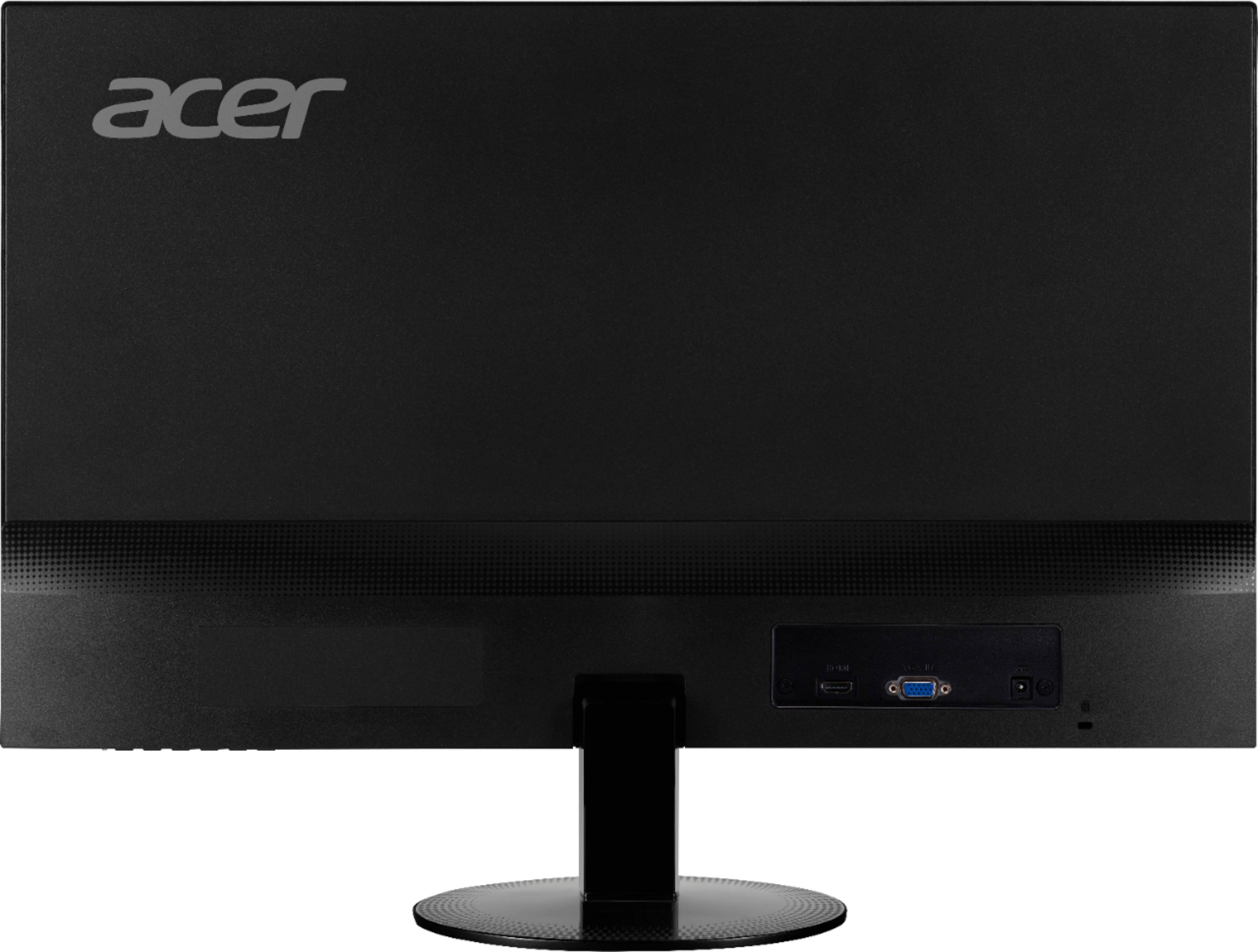
|Posted .This reviewer received promo considerations or sweepstakes entry for writing a review.Disclaimer - I received this product in exchange for my fair and unbiased opinion. Summary: While the Acer SA230 bi is a nice display, there are several shortcoming in my usage scenario that make it slightly disappointing to me. Text is crisp, the screen is bright, and it looks thoroughly modern, but color management, overall color quality, and only two input options are what make it a middling screen at best for me. ------------------------------------------------------------------------- Unboxing and first impressions: The monitor is packaged well. While the box itself is plain, I don't mind that - after all, you don't buy a monitor for its box, right? the interior is efficiently packed and you'll find the following items: The monitor The base pieces (the base screws into the neck with a thumbscrew, and the whole thing snaps into the back of the monitor) Power adapter and AC cord VGA cable Instruction and warranty info packet This is my first disappointment - there is no HDMI cable included. For the price of the monitor, this shouldn't be the case. Monitors I have from other brands usually come with a digital video cable (either DVI, HDMI, or DisplayPort, depending on the monitor, and sometimes more than one of these cables) in the box, along with the VGA cable. And in this day and age, you need a digital video connection (DVI, HDMI, or DisplayPort) to support many streaming video services. The SA230 bi itself hit the modern design cues perfectly - super-thin design, matte surface finishes around the screen, and finishing touches that blend in. However, you won't find the standard VESA mounting holes on this screen. While this is fine for the typical user - you'll just set it on the desk and that's it - those of us that use multi-monitor setups will either need to be awesome at aligning screens or will want to pass on this monitor. This is the biggest drawback of the thin monitor designs as of late, and other manufacturers do this as well. The SA230 bi itself has three ports on it - a power port, a VGA port, and a HDMI port. You won't find a DVI port or DisplayPort port here, so for those of you who have video cards lacking HDMI and VGA ports, you'll need to invest in adapters that allow this screen to work with your video card. One minor ding against this screen is the lack of a line-level or headphone output, a feature which would make this a good screen for use with recent video game consoles, media players, or even for people that want as few cables as possible in their computer setup In terms of performance, it does get the job done, as long as color accuracy isn't something you absolutely need out of your screen. The brightness is there and text looks crisp, but colors - especially blues, cyans, purples, and magentas - seem really washed out when compared to my daily drivers. Using the color calibrator tool in macOS, I was able to get the colors of the Acer closer to my other screens, but blues remained washed out. A neat feature that comes with this Acer is the simulated blue light filter. What it does is it tones out the blue end of the visible light spectrum. Research has shown this is useful for people that tend to use their devices before bedtime (computers, phones, tablets, even TVs). Video performance is just fine. I noticed very little in terms of ghosting, highlights versus shadows were fine for a LCD, and images from both 1080p video and games played at 1920x1080 were crisp and detailed. It's upscaler also worked pretty well to keep lower resolutions readable. One other thing this screen got right is that it's a matte screen. While glossy screens do let through slightly better colors than matte screens, glossy screens also have horrible amounts of glare. This doesn't have that glare. So all in all, the Acer SA230 bi is a decent monitor. Text is crisp and clear, the matte finishes and screen cut down on glare and help you focus on the screen, the blue light features are a nice added touch, and the modern design is nice. Color management and colors are poor compared to other monitors in this size and price class, and the lack of input options - along with the lack of an HDMI cable packed into the box - is detrimental to this screen, however. While I can recommend it if you want a modern-looking screen, there are better options out there for the same amount of money, and some that aren't as expensive. I can't recommend it if you're using a multi-monitor setup, if color management and performance is important to you, and if you plan on using it with more than one computer or other device at your desk.
No, I would not recommend this to a friendCorners were cut, price not compensated
|Posted .This reviewer received promo considerations or sweepstakes entry for writing a review.Acer really cut corners with this monitor, even more than I'd expect from them. This monitor seems to represent a marked step backwards from some of their other models at the same price point, and doesn't stand favorably in the market in general. Be aware that this monitor has a matte screen coating. The unit I received is model SA230 bi which is the same price as the SA230 bid, and has virtually all of the same specifications listed on Acer's website... except that this model lacks a DVI port. It seems odd to list the same price for a product with reduced functionality. I happen to have very similarly priced 23" monitor from Acer which I'd like to use for comparison, the H236HL (manufactured two years ago, and now generally available new at a reduced price, well below the MSRP of the SA320 bi). [ Notable Steps Forward ] - Improvements in color gradients and near-color contrasts - Addition of some color adjustment settings - 4ms response time, improved from 5ms [ Trade-off ] - Colors aren't nearly as vivid, instead having a washed out appearance, lower overall contrast with white looking duller and pure black looking much brighter. This is a side-effect of the matte screen coating, with the trade-off being reduced reflections/glare. [ Noteable Steps Backward ] - Lack of a DVI port - Lack of stereo audio out port - Does not include an HDMI cable - Trashier appearance. The lower border/bezel is taller, sports a larger and bolder Acer logo, and has a very odd looking, square power LED light that protrudes out of the border. The decrease in response time is nice, and 4ms is quite respectable in comparison to the competition, though the type of usage typical of budget monitors won't likely have users noticing the difference. The vast majority of users will probably never bother tampering with the added color adjustment settings. The improvements regarding color gradients and contrasts are generally important, but most users will probably not even notice the difference; these changes are most apparent in tests designed to measure monitor performance. The lack of a DVI port is quite unfortunate for those wanting to make use of a dual-monitor setup, as many if not most motherboards and video cards have a single HDMI port and single DVI port (VGA aside). Lack of a stereo audio output port seems like an odd exclusion, being a feature that seems rather standard. Not including an HDMI cable is heaped onto the list of cut corners. It doesn't feel like these shortcomings are adequately reflected in the price. If you greatly prefer matte screens to glossy, then this monitor isn't a bad option, but it is missing some features that are commonly found at this price point. For those who put a premium on color quality, this monitor should certainly be avoided.
No, I would not recommend this to a friendInexpensive, great picture
|Posted .This reviewer received promo considerations or sweepstakes entry for writing a review.Acer makes fantastic monitors. They make solid budget products that offer great quality. 23" is a sweet spot for a dual monitor setup, and the tiny bezel on this model is perfect for side by side use. No vesa mounting on this model, this is strictly for desktop use. IPS means your viewing angle is pretty much infinite. The footprint of this monitor is very small because the depth is nearly nothing. Tilt, no height adjustment but height was right for me. VGA and HDMI inputs--no DP. Colors are true and vibrant.
I would recommend this to a friend- Pros mentioned:Picture quality
Nice monitor but not audio capable
|Posted .This reviewer received promo considerations or sweepstakes entry for writing a review.I like the size and dimensions of the Acer SA230 bi monitor. It has a very thin profile and provides a great wide screen image. The display depicts colors very well - very comparable with other monitor brands I've used. It offers VGA and HDMI inputs - my one and only issue with this monitor is that when you connect with an HDMI cable from your computer, you will not hear any sounds. On my computer, when an HDMI cable is connected, it routes sound through that connection as well, so when I'm connected to this monitor without speakers, I just don't hear any sound. I reached out to the Acer support using their chat feature and confirmed that my model does not have speakers, but they did not have any suggestion on how I might be able to hear audio from my computer when connected. I suspect that there are ways and will continue to research that in Windows forums, but this is question cannot be one only I am encountering, so it would be advisable for them to find a better answer in my opinion. If you connect with VGA, this issue does not occur as VGA connections only deal with display.
No, I would not recommend this to a friendBrand response from TeamAcer
Posted .Dear BestBuyFanDan,
Thank you for taking the time to write this review. We’re sorry that you are unhappy with your
Acer monitor. In order to get sound from any monitor it must have built-in speakers. Although the monitor you selected does not have internal speakers you should still be able to connect external USB speakers to your PC to get audio.
Best regards,
Acer America
Decent entry-grade monitor
|Posted .This reviewer received promo considerations or sweepstakes entry for writing a review.The Acer SA230 bi 23" Monitor is an attractive, serviceable, entry-grade monitor. The upper portion of the screen unit is only a quarter-inch thick, with a very thin bezel. Its display has about a 3/8” unlit border, and surprisingly there is no Windows 10 driver available. The round base is stable, but a rectangular base would take up less room. And, although the screen can tilt, its height is not adjustable and there is no VESA mounting option. Basic setup is as easy as possible — do some no-tools-needed assembly, plug it in, and connect it to a computer, and you’re good to go. It has ports for both HDMI and VGA cables (no DVI port), but only a VGA (i.e., analog) cable is included. So, if you want a true digital signal — and better image quality — you’ll have to add an HDMI cable. It also does not have built in speakers, so even if you use an HDMI cable, to have sound you’ll have to attach some external speakers to your computer. Making adjustments to the color and other settings is a hassle, because the settings buttons are unmarked, hard to reach, and not at all intuitive. However, if you like what you see without making any adjustments, this will be a non-issue. Speaking of what you see—the image quality of the Acer SA230 is great or not so great, depending upon where you use it, what you use it for, and your eyesight and personal preferences. The matte coating on the screen helps reduce glare, but it also can result in colors that appear less vivid and text that appears less sharp. I have it sitting next to a high-end monitor, and I can tell the difference. However, for email, surfing the Web, and many other uses, it gets the job done.
I would recommend this to a friend- Pros mentioned:Picture quality
Good Monitor for Work
Posted .This reviewer received promo considerations or sweepstakes entry for writing a review.This monitor is not too shabby when it comes to performance and useability. I bought two of these monitor for my Surface Pro 2017 bc the type of work I do requires 2 monitors. It worked perfectly when I received my MS Surface Dock. It connected to it via 2 Mini Display ports so I actually have 3 screens I can use when I'm at home. The SP screen as my main go to screen and then my two 23" external monitors for other apps that needs to bc enlarged. These screens aren't the best in the world but they get the job done. Without these two speakers I would not be able to work from home as much as I do. I would recommend these monitors to anyone looking to expand their screen real estate and be able to multitask and be able to have multiple documents up at the same time.
I would recommend this to a friend Gaming
Posted .This reviewer received promo considerations or sweepstakes entry for writing a review.Amazing monitor for gaming, used it for 5 years and never had an issue
I would recommend this to a friend- Pros mentioned:Ease of use, Picture quality
Pretty Good
Posted .This reviewer received promo considerations or sweepstakes entry for writing a review.Good basic monitor for browsing web. Can't really be mounted without an attachment piece. Something to be wary of.
I would recommend this to a friend - Pros mentioned:Picture quality
Outstanding image quality
Posted .This reviewer received promo considerations or sweepstakes entry for writing a review.I just bought this monitor a few days ago and I'm incredibly pleased with it. The image quality is outstanding and has great color reproduction. The colors are vivid, and it has an incredibly wide viewing angle. The settings are nice and it has an option for blue light reduction which is great for reducing strain on the eyes. The image is set nicely in the slim border and blends right in. Also, it's incredibly lightweight and thin. The response time is great (4ms) and there's virtually no input lag (maybe 10-15ms at most if I had to guess). I highly recommend this monitor for anyone - gamers, artists and business users alike.
I would recommend this to a friend Great Monitor for the price
|Posted .This reviewer received promo considerations or sweepstakes entry for writing a review.For the price this monitor is great. I will purchase 2 more to set up a surround view for gaming and productivity. I was little unsure of the size but the 23" no border is pretty impressive. Great picture quality and easy set up.
I would recommend this to a friendSharp Picture
|Posted .This reviewer received promo considerations or sweepstakes entry for writing a review.Screen resolution is incredible! Great monitor to pair with a computer plus it has HDMI ports so you can run a gaming system or Blu-ray player. Looks great on a desk with simple yet elegant design.
I would recommend this to a friend- Pros mentioned:Picture quality
Good Monitor but no internal speakers
Posted .This reviewer received promo considerations or sweepstakes entry for writing a review.All the previous reviews regarding this monitors slimness, picture quality etc. are all accurate .Used a computer monitor its very good. I don't understand one thing . I know its not meant to be a TV but why have it capable of getting a TV picture such as I did with setting it up to get my DIRECTV picture (HDMI input on monitor using my own HDMI cord) without making it capable of getting sound? What good is watching TV without sound ? It has no internal speakers and no input to use external speakers. I'm not the most tech savvy guy out there so either I'm missing something or that's just a glaring design flaw.
I would recommend this to a friend Great for regular use
|Posted .This reviewer received promo considerations or sweepstakes entry for writing a review.I got this just as a regular monitor for my desktop. I do some gaming but wouldn't recommend it for gaming. This monitor has good brightness and contrast ratio. Very pleased with the monitor overall.
I would recommend this to a friend- Pros mentioned:Picture quality
No sound
Posted .This reviewer received promo considerations or sweepstakes entry for writing a review.While the monitor is a nice size and the graphics are clear, I was disappointed that there was no built in sound. Even more surprising that the salesperson would recommend this monitor when I was purchasing a new computer without suggesting that I'd also need to purchase speakers. Kind of a pain since I had to return the first computer because it didn't work, and had to buy a more expensive one to have it same day. Now I have to go back and buy more. Frustrating!
I would recommend this to a friend Great for basic use; works with Mac and PC
Posted .This reviewer received promo considerations or sweepstakes entry for writing a review.I had used an older Acer monitor (about 5 years old) for both MacBook Pros and my work Dell laptop for years without a hitch. I was issued a new Dell for work, which required HDMI and went from pretty low resolution to 1920 x 1080, so I decided it was time for a new monitor. My desk at home is an IKEA corner desk with hutch, so I was limited to 24" or below size. This new Acer monitor hit the features I wanted the most: -minimum 1920x1080 resolution -HDMI input -small footprint -matte glass -plug & play It took just a few minutes to set up. I plugged my MacBook Pro in, and wow, much sharper image, better colors, and sharper text. If you need a basic monitor, have a small desk, don't need speakers, don't need a variety of inputs/outputs, this is a great bang for the buck. This makes my 4th Acer monitor (1 CRT and 3 flat screens) over the past 25 years. I didn't really intend to keep buying Acer, it just always seemed to hit the price point for the feature set I needed.
I would recommend this to a friend- Pros mentioned:Picture quality
good
Posted .This reviewer received promo considerations or sweepstakes entry for writing a review.Great monitor for playing games and watching tv. good colors and is still working , I bought a warranty that I have not used yet and it is not expensive at all.
I would recommend this to a friend - Pros mentioned:Picture quality
Read description, do not trust pictures
Posted .This reviewer received promo considerations or sweepstakes entry for writing a review.Simple review to warn potential buyers to read the description before considering, and do not fully trust the pictures. The SA230 does not contain a DVI input connection. It only has HDMI and VGA. Otherwise, so far, the quality is great for the amount paid. Worthwhile investment.
I would recommend this to a friend A budget monitor
|Posted .This reviewer received promo considerations or sweepstakes entry for writing a review.If you are on a budget then this monitor is for you. The sharpness is OK and the deep black is about average. The controls to set brightness, contrast, and other settings were confused at first but after a few minutes, it was easy to use. I would only recommend this monitor as an entry level while saving money to get a higher quality monitor later.
No, I would not recommend this to a friend- Pros mentioned:Ease of use
Monitor-great buy
Posted .This reviewer received promo considerations or sweepstakes entry for writing a review.Easy to install and works great; very pleased with purchase.
I would recommend this to a friend