Customer Ratings & Reviews

















- Model:
- ADO951800F114
- SKU:
- 6288072
to a friend
Customers are saying
Customers are delighted by the ease of use and video editing capabilities of Photoshop Elements 2019 & Premiere Elements 2019. Many appreciate the software's intuitive interface and the range of features available, finding it to be good value for the price. While some users experienced occasional performance issues, the overall positive feedback highlights the software's accessibility and effectiveness for photo and video editing.
This summary was generated by AI based on customer reviews.

Definitely fun, engaging, and amazing
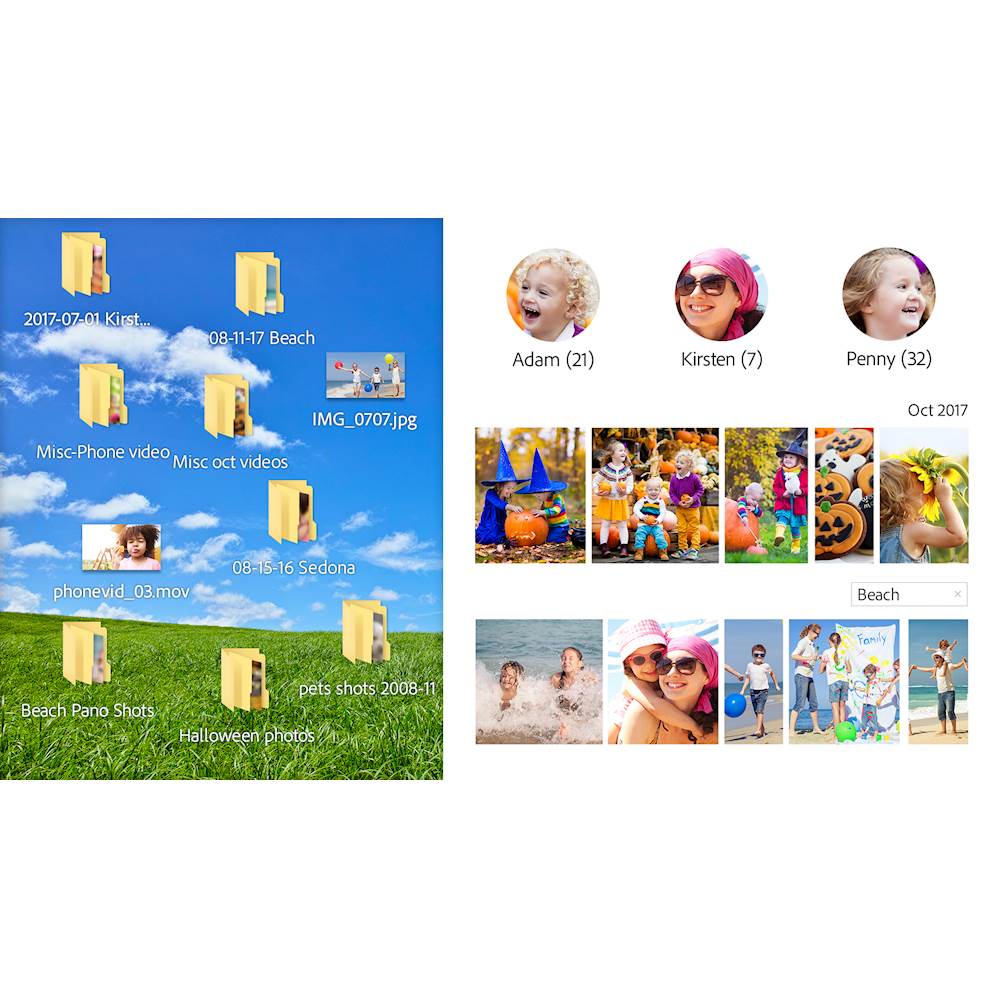
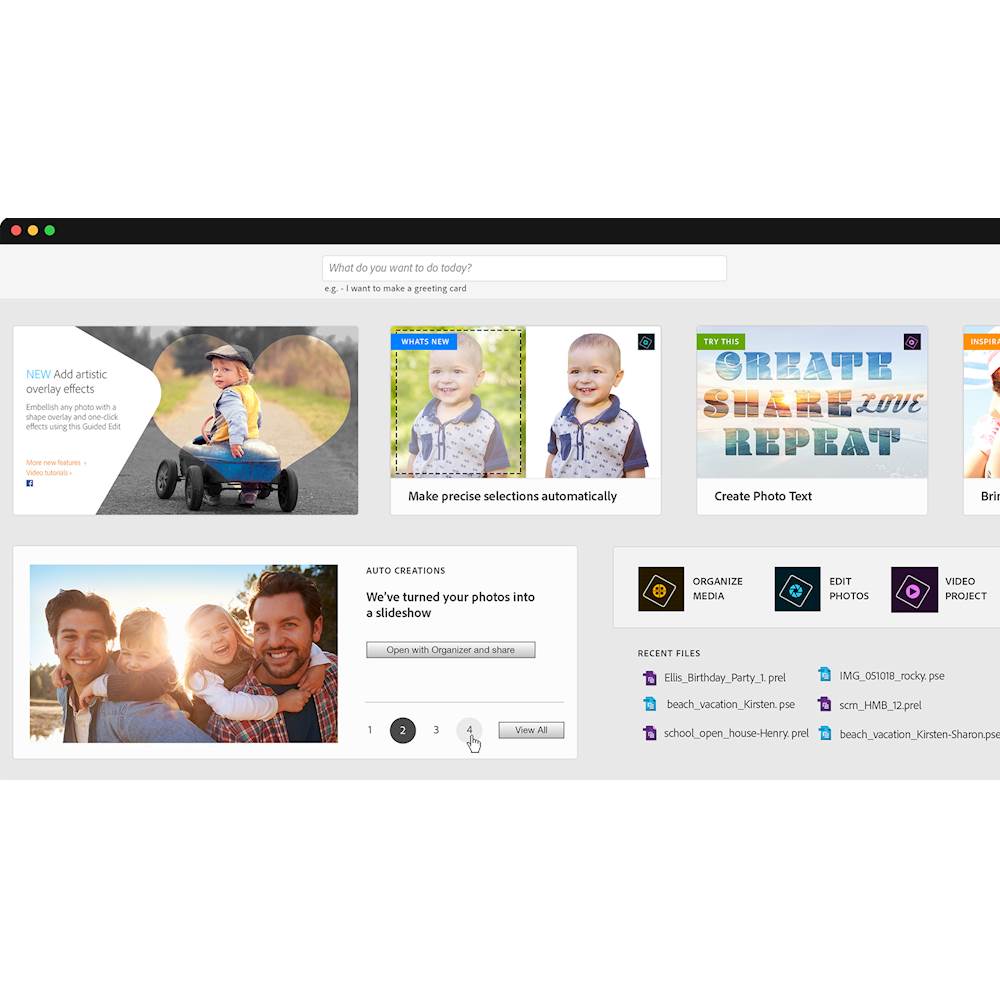
|Posted .This reviewer received promo considerations or sweepstakes entry for writing a review.I’m a relative newcomer to the Photoshop world. While I’ve long enjoyed photography casually, I was more likely to spend money on a new lens than a new piece of software. Since the era of ‘good enough’ cameras on phones, I’ve given up on my DSLR and tried on phone software etc, but never really found something I really liked. I eventually tried Adobe’s vaunted Photoshop and Premier, and I must say, they are powerful pieces of software. The Elements suite includes four main applications for managing your content. First there is the “Home screen”, aptly named, which is your launch pad for activities in the Elements suite. Specifically it highlights capabilities and features available such as creating a slideshow, facial feature modifications, applying filters, etc. It also contains tips for getting the most out of the Elements suite. The “Home screen” also functions as a place to display “Auto Creations” which are stitched together projects using photos/resources from your library. It’s similar to what Google is doing with Photos, but less creepy, as it’s your computer creating this, not Google. Finally there are shortcuts to the other three tools. Frankly it’s overwhelming at first if you’ve never used the Elements suite, but it can be a helpful landing page. The tips are especially helpful if you’re just getting started, and based on what I can see this is new in the 2019 version - which I would surmise is based on the feedback that the Elements suite itself is somewhat overwhelming and having a ‘start here’ kind of page would help people get the most out of the tool. Next there is the organizer, which serves as a library of your images/videos/and projects. It’s pretty cool in that unlike many tools, actually presents your folder hierarchy as a part of library experience allowing you to use it as a filtering criteria. I appreciate this, as traditional file/folder setups are the reality of most people who have managed large libraries of photos. Being able to click one of the organizers filters, like ‘People’ and click a folder to see exactly who is in the folder is really nice. Speaking of the ‘People’ filter, the organizer automatically recognizes faces, and categories them together into groups. You then just simply give the group a name, and all photos in that group are now tagged with that person’s name. You can combine other groups together (there were about 5 groups of photos of me out of 15000+ photos over 15 years) and as you add photos, the organizer will attempt to auto recognize the subjects of the photos. It's actually extremely helpful and quite good. While I didn’t review every photo, in the 30 or 40 groups it provided me to identify it was pretty accurately grouping the same individuals together. Organizer also allows you to use places and events. Places are automatically based on GPS data in the metadata of the photo (for instance from a phone or GPS enabled DSLR). Events require you to group photos together and title the event. All in all it’s a much more powerful tool than Apple’s Photos app, or anything Microsoft has been touting over the past decade. Photoshop almost goes without needing an introduction. It is the primary photo editor and touchup tool. From organizer you can open a photo directly for editing. Once Photoshop is open you’re presented with a vast array of tools available to you. The default is the ‘Quick’ mode (mode selection is found top center just below the menu bar), which provides links to quite a few filters and effects. Where the real fun lies is ‘Guided mode’. In guided mode, there are essentially many different recipes for awesome photo effects. You simply find the effect you want to apply and the right hand bar gives you the steps to apply the effect to your photo. This mode really makes you feel like a photo editing superhero, as you can easily turn a normal photo into something special very quickly. From black and white colorizing to replacing the background in a photo, you can do some pretty amazing things all through a guided tour. There is even a meme generator built in which can apply meme tastic styling a text boxes to a photo in no time. Being a newbie to Photoshop, I found Guided mode to be by far the best when I wanted to get something special done. Expert mode gives you plenty of access to the tools. Filters, effects, layers, it’s all here, and definitely powerful. You’re definitely a bit more on your own, and it helps to have experience with basic image editing software before diving into this mode. What is really cool however is that you are basically using the same tools in Guided mode, so as you use Photoshop more, you can start to see how to apply the effects on your own in Expert mode. There is a definite reason why Photoshop has been used as a verb synonymously with mastering a photo in a creative, profound, funny or amazing way. Premier is a top notch video editing program. It, just like its Photoshop brethren, has a ‘Quick’, ‘Guided’, and ‘Expert’ mode. Unlike Photoshop, the ‘Guided mode’ here is less of a Wizard of existing tools, but more like a tutorial. That said, video editing tends to be more about understanding a timeline and different assets that make up the video. Here Premier excels with it’s excellent timeline and the ability to add tons of tracks easily. It has several canned and downloadable assets, and it makes it quite easy to grab and create a photo slideshow complete with audio. Beyond that you can have as many audio tracks and video tracks as you like. If you add two video tracks they overlay and can be resized/adjusted. You can have separate audio tracks as well. There are plenty of cool effects here, like speeding up or slowing down time, adding lighting effects, and my favorite motion tracking. You can actually identify an object in the video and track it. Once identified the object can have effects applied to it such as a word bubble. You can even create DVD menus and burn it to a disk if that’s your thing. Premier is a super powerful tool, something like Windows Movie Maker (rest its soul) feels like a kiddie bike with training wheels compared to the Premier. Obviously the highlights of the Elements Suite here are in the name: Photoshop and Premier. Both of these tools are the slightly dumbed down versions of their professional counterparts - and here it feel like Adobe did a great job of riding that line. I never feel like I’m using a tool that leaves me stranded or without the ability to accomplish something, but there is also an air of un-refinement. In a tool like this, it’s actually somewhat appropriate: there are many fun tools, silly overlays, and goofy effects that keep the tool lighthearted. Templates abound for almost every effect, tool and approach, so a professional looking outcome is easy to achieve. The software is obviously honed and continuously improved, as while there are things that might feel like warts (custom window chrome/UI) or features that are obsolete (DVD menus) the software really is solid. Never once did the software crash or die on me (although I did have a few slow downs). Not only is it stable, but immensely powerful. So is the Suite worth the money? Undoubtedly you’ll want to question if you need both Photoshop and Premier. If you find yourself just trying to edit photos, Photoshop is your goto obviously, but don’t discount the value of Premier in this toolset. Pulling together videos/photos into a coherent project can be a powerful medium to present (like at a family gathering, work party, etc). You might find yourself wishing you had just gotten both together and saved a bit of money. Either way it's undeniable that both tools are best in class when it comes to consumer tools. Free options do exist for most of the general roles both tools serve, but after going all in on Photoshop, I can’t imagine going back (and a few more videos in I’ll feel the same way about Premier). The 2019 update here adds some cool features and continues to make the Elements Suite relevant. My hat is off to Adobe here, as it isn’t often software surprises, delights, and empowers me (you have to understand here, I have about a thimble of creative blood in me). I highly recommend both products.
I would recommend this to a friend- Pros mentioned:Ease of use
Scrapbooker's helper
|Posted .This reviewer received promo considerations or sweepstakes entry for writing a review.I gotta say this was a bit tough to review because I use all of Adobe's other products almost daily, I came in with doubts that their "easy" button was gonna do what I do but without having to learn everything I've had to... I was mostly right. That "easy" button was actually pretty close to getting results I do with their more expert software. You don't have color profiles and curves, but you do have that levels, saturation, etc. But in one click the Smart Fix made an image that was "meh" to a decently printable piece. Sure on occasion I had to tweak a bit, but overall it made pleasing results. I especially like the Haze removal. It adds contrast and saturation to the areas where the images have been blown out by poor lighting. Premier Elements was a little different story. Making a nice home video was relatively painless and adding effects and transitions are easy as can be. The only problem I had was in the encoding. Under the easy mode there are limited bitrates and low is sometimes higher than the bitrate of some of the videos I have - I have a collection of videos from older devices. So reencoding a video that is 2Mb/s to 6Mb/s makes for a larger file with less quality, but a bigger file. I don't know if many people will go into the advanced settings to tweak on their own but they should take some time learning. Another thing I'd have like to seen is the option to NOT rencode audio. Every time you rencode a file with lossy compression you're going to lose quality. Again, a bunch of my old files are already encoded as MP3 and don't need to be encoded again. With video I'm a little particular about how they're done because there's a lot more time involved. Mistake after mistake can bring a good bit of frustration and for someone as picky as I am... I'll just have to stick with what I know. There are options to share videos with YouTube and Vimeo, but some parts of my personal life don't need to be shared with unknown people running a server. Overall I'm pretty pleased with PS elements and will use this to do quick touch ups of my photos after getting them scanned - I've got a huge batch and almost 1/4 done. Premier elements... I'm nto so sure of. Maybe if I play around with it more it'll grow on me, but right now I don't think this will be my go-to video editor. For other people, it's probably perfect but those people wouldn't be doing dozens of test before finding the perfect settings like do.
I would recommend this to a friend Don't like going online
||Posted .This reviewer received promo considerations or sweepstakes entry for writing a review.Previously, all I had to do was download the program and go. I did not like going online to get everything going
No, I would not recommend this to a friend- Pros mentioned:Ease of use
Intense but Impressive
|Posted .This reviewer received promo considerations or sweepstakes entry for writing a review.I started video editing this year and decided that I needed to upgrade from free programs to something more robust. Adobe Premiere seems to be the perfect program for both the beginner and someone with skills. The program has three modes - Quick, Guided, and Expert. Quick allows the novice to perform some basic functions. Guided teaches people how to do some really impressive work in a step by step fashion. Expert lets you do your thing and assumes you know what you are doing. Compared to other programs I have tried, Premiere comes prepackaged with a ton of effects and even music ready to go. There is no need to go hunting for all kinds of addins or royalty free music if you want to just make a quick video or even something at a professional level. From my perspective, the editing functions are intuitive compared to other editing software I have used. It is also 100 times easier to add a voice narration in Premiere compared to the last program I used. Via guided mode, I learned how to do it in 30 seconds. The reason this review is only four stars is because Photoshop is not nearly as intuitive. I know there is a history of excellence with this program but I am running into a few roadblocks. The program has three modes just like Premiere. However, the guided mode does not work nearly as well. I tried to use it on a few different effects and I got lost. When I clicked "help," I was taken to the dreaded "404 Page Not Found" on the Adobe website. My hope is to eventually learn the program but maybe in time, it will be better. From a video perspective, I am in love. For photo editing, I am unsure. Lastly, check the system requirements before you buy these programs. Both of them are pretty intense. Video editing in general requires a lot of resources including memory, processors, video, and storage capabilities. Just having Premiere open without editing anything, it is using about 1.5 GB of memory. The bigger the file, the more memory and processor power needed.
I would recommend this to a friend Not easy to use, kept trying to force me to use a
||Posted . Owned for 1 month when reviewed.This reviewer received promo considerations or sweepstakes entry for writing a review.Difficult for beginners , new learning curve . Will take getting used to. Not
No, I would not recommend this to a friend- Pros mentioned:Ease of use
When FB and smartphone tools aren't enough
|Posted .This reviewer received promo considerations or sweepstakes entry for writing a review.For anyone who wants to do more than free and easy apps but don't want to spend the time and money to use the full blown Adobe Creative Suite, Photoshop and Premiere Elements provides the perfect combination of power and ease of use. I personally started focusing more on editing and improving my pictures once we had our first child so that we could start enhancing and printing meaningful photos instead of just storing them on our NAS never to look at them again. Adobe Elements are the perfect tools for the novice to intermediate user who wants to accomplish this. Imports and file manipulation are super fast and overall this software performs and scales well depending on your hardware (CPU, GPU and storage speeds). I took off one star because its somewhat annoying this software can only be installed on a single computer at a time and only has 2 installs total before you have to contact Adobe support. I haven't verified this but that is directly from their FAQ. For folks who have multiple PCs and want to be able to get work done from multiple locations, and considering Adobe makes you sign in with an Adobe ID, you would think they would offer more flexibility on how many devices you can use (1 at a time is fine) this software on is slightly annoying. Also, while the tools and capabilities of the software are awesome, the UI is definitely novice level and reminds me of an HP printer suite from 2008.
I would recommend this to a friend - Pros mentioned:Video editing
Often Replicated, Never Duplicated
|Posted .This reviewer received promo considerations or sweepstakes entry for writing a review.Oh Photoshop, how I have missed you! I had not been in the photo editing hobby for some time, but I recently picked it back up as I found myself making overlays for Twitch Streamers and editing in game images for them to use on social media pages. Initially, I was a little offset by the price of Photoshop, as it has been at least a decade since I have owned a copy, so I ended up downloading some similar freeware and it did the job. But it just wasn't the same. It wasn't Photoshop. After coming into possession of the newest and greatest offering from Adobe, I immediately began grabbing photos off of my computer and exploring, which felt like a kid in a candy store. All of the Photoshop-like features that were in the freeware I had been using were immediately dwarfed by the finely tuned software that has become the common namesake of any photo editing software. Like Kleenex to facial tissue, there is a reason that Photoshop is a household name. It is the standard by which all other photo software is measured. And based on the level of difference I have experienced between this software and some of the competition, I have no doubt that Photoshop will continue to be a household name for years to come. Cutting sections of photos, finely tuning colors and effects, blending images, all made extremely simple with this program. Even if you are new to the Photoshop world and feel lost in the vast amount of editing tools included, there are so many communities, YouTube videos, etc that so clearly teach you how to get the most out of the utilities available that you will quickly feel like a pro. I haven't had much time to use the Video Editor bundled with this package yet, but I have my GoPro's charged and a day at the range set up for tomorrow with the boys, so I am sure I will get some great videos to edit and I have no doubt that once again, Adobe will far exceed my expectations. Don't waste your time using inferior products, Photoshop is king. And the king is worth every penny.
I would recommend this to a friend - Pros mentioned:Features, Video editing
Simple to use
|Posted .This reviewer received promo considerations or sweepstakes entry for writing a review.I use premiere elements mainly as i like to do a lot of video and this does not disappoint. I use this on a laptop that uses an MX150 graphics card and the results are really good. Scrubbing is great and allows you to get precisely where you want to be in your timeline to make edits and add transitions. Its pretty feature packed too. I was surprised by this when compared to the Adobe CC version. This is going to work for almost anyone who does YouTube or something like that
I would recommend this to a friend Not a fan.
||Posted .This reviewer received promo considerations or sweepstakes entry for writing a review.Slow to load. Takes a long time to complete a project.
No, I would not recommend this to a friend- Pros mentioned:Ease of use, Video editing
Excellent editing software by Adobe
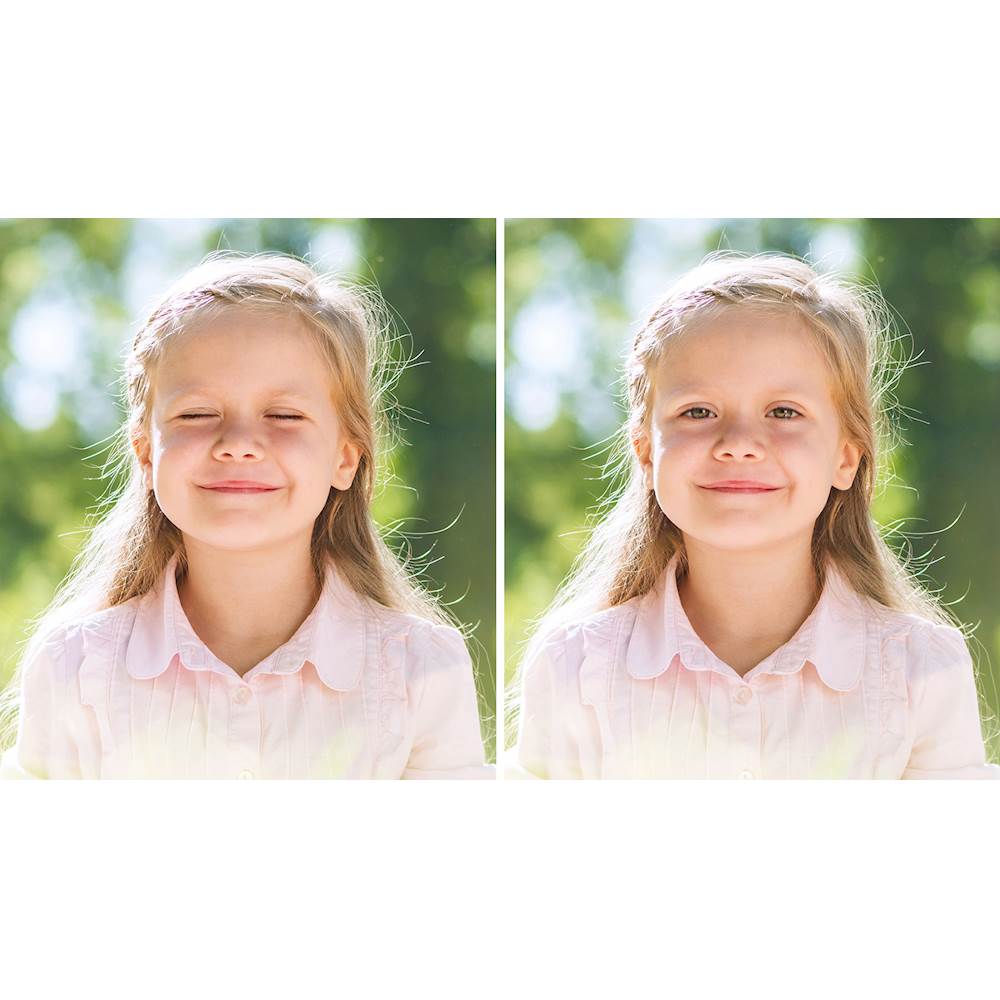
|Posted .This reviewer received promo considerations or sweepstakes entry for writing a review.both the Photo & Premiere Elements software is just amazing. makes adding, fixing, removing problem areas a breeze from your pictures as well as video editing. I haven't purchased picture editing software since 2011, so this to me is pretty amazing. I've been using it to edit pictures taken with my Canon DSLR camera. There's so many options and editing features, you could easily spend all day playing around with its features. I recommend this software to anyone who enjoys correcting they're pictures and or videos. 5 stars to Adobe on this one!
I would recommend this to a friend - Pros mentioned:Ease of use, User interface
Easy, Simple, Effective
|Posted .This reviewer received promo considerations or sweepstakes entry for writing a review.Photoshop Elements and Premier Elements are watered down versions of the full versions of Photoshop and Premier. However, don't take that to mean they can't get the job done for 95% of the potential users. The install and setup was very easy, and the interface intuitive. This product is designed for the average person and not someone who needs in depth professional tools. If you're just dabbling into photo and video editing as a hobby, this is the product for you.
I would recommend this to a friend No iphone videos
||Posted .This reviewer received promo considerations or sweepstakes entry for writing a review.Even though it says HEVC on elements 2019 it will not put my iphone 8 videos into elements. What Geek Squad said was videos were HEVC mov files. Elements needs mp4. So now I have to use a converter to change EVERY video clip before using elements.
No, I would not recommend this to a friendSo not user friendly
||Posted . Owned for 4 months when reviewed.This reviewer received promo considerations or sweepstakes entry for writing a review.By no means am I a professional photographer, but I like playing around and creating family projects. Unfortunately this software does not allow me to do so. To complicated!!
No, I would not recommend this to a friend- Pros mentioned:Ease of use, Features
Adobe has done it again
|Posted .This reviewer received promo considerations or sweepstakes entry for writing a review.You don't think there's a way to improve upon perfection but Adobe manages to do it well. This year's version of Photoshop makes the very first looks like Microsoft Paint from Windows 95. So many more things you can do so many more controls video slides easily navigated, and smart features to help you put things together. I'm only speaking from 10 hours experience I'm sure in the next 90 hours I use this I'm going to be over the moon. Thank you Adobe and keep making superior product.
I would recommend this to a friend - Pros mentioned:Ease of use
More User Friendly Than Previous Versions
|Posted .This reviewer received promo considerations or sweepstakes entry for writing a review.If you’re like me, you have hundreds of photos, contained in dozens of catalogs, that you’ve painstakingly edited and backed up. I upgraded from Photoshop Premier Elements 2015, and I was terrified that my catalogs would not properly convert over to the new version. Thankfully, they converted over easily and flawlessly to the 2019 version. Because my primary use for this program is photo editing, I didn’t delve too heavily into many of the scrapbooking type elements, if you will. I use Lightroom for the bulk of my photo editing, but there are some features that are better performed with Elements. This version seems to load faster than prior iterations; the catalogs also seem to load faster. When dealing with large, or multiple catalogs, Organizer is heaven sent. Because RAW files are considerably larger than Jpegs, they tended to take longer to load in the 2015 version. If you’re into social media, this program will really benefit you. The Meme Maker allows you to quickly, and easily create memes, ready to post on whichever conveyance you happen to favor (Facebook, Instagram, Twitter…). You can Auto Create photo albums that can be saved and shared. Photo Collage will either auto create albums based on the photos you currently have open, or you can add them manually. Many features have tutorials at the ready. Simply type in whichever task you wish to accomplish and Elements will walk you through it. For me, I just want to remove unwanted elements from my photos (like people who mindlessly walk in front of your camera when shooting HDR). I can find the exposure they’re in, and remove them. If Photoshop is too much (money) for you, and you just want to dress up your photos to share with others, this is the program for you. It’s fun, and easier to use than previous iterations. Highly recommended.
I would recommend this to a friend Glitch w program
||Posted . Owned for 7 months when reviewed.This reviewer received promo considerations or sweepstakes entry for writing a review.Spent hours over the phone come to find out there’s a glitch with the program and newer computers. Never found a solution
No, I would not recommend this to a friend- Pros mentioned:Ease of use
a novice's perspective
|Posted .This reviewer received promo considerations or sweepstakes entry for writing a review.The Adobe website documents pretty clearly what the programs are designed to do, and from my perspective, they come through with flying colors. Just make sure that your computer meets or better yet, exceeds the specifications as it's a resource-intense program. I have used various Adobe Photoshop products dating back many years, just as a hobby and with sporadic use. Even so, the Photoshop Elements and Premier Elements 2019 are pretty intuitive even for people like me. I find it easy to get guidance to do what I want to do and there are even prompts or instructions to do things that I didn't even know that I wanted to do! I was glad to see that the Premier Elements can create an automated slide show that one can change and adapt to fit a particular style. I find that the products get better and for the most part, easier to use every year, thereby becoming a better value. Sometimes the biggest challenge is getting the thing downloaded and proving that you actually acquired the software legitimately by putting in all the codes and numbers in the proper spots!
I would recommend this to a friend not easy
||Posted . Owned for 7 months when reviewed.This reviewer received promo considerations or sweepstakes entry for writing a review.this is hard to work. the set up is not easy for people that is new to the program
No, I would not recommend this to a friend- Pros mentioned:Ease of use
Best software for the weekend warrior
|Posted .This reviewer received promo considerations or sweepstakes entry for writing a review.I love Photoshop and Premier Elements, I have been using it since 2015 and decided I wanted to see what changes played ahead. The 2019 software has a new main screen layout and many new quick edit features for fast editing and making even the worst photos look great. I mainly use Photoshop for making racer resumes for ATV riders and it is easy and time saving compared to many other software available. I personally use expert mode for almost everything I do but some of the auto features for quick editing are nice. The layout is classic Photoshop in expert mode, so there is no learning curve at all. Premier is also great, but you honestly need a powerful computer to make large video files, if you do not, the program likes to crash while converting and compressing the video, so be forewarned. The ease of Premier can made the weekend video warrior look like a pro with very minimal knowledge. If you want a great all around software, get this package!
I would recommend this to a friend - Pros mentioned:Ease of use
More Intuitive Than Ever
|Posted .This reviewer received promo considerations or sweepstakes entry for writing a review.Having used previous versions, I know how overwhelming this software can initially be. Adobe has done a great job including a search and how to's. They have made a huge jump into making this a software almost anyone can learn. Elements has really become my go to editor for video and photo projects. From fixing pictures with minor flaws to editing a family video. Or any combination of the above. My aunt sent a bunch of old damaged family photos I have been able to restore or clean up. I now have digital versions of the photos of my great great grand parents. Being able to restore those images and save them digitally is something I can pass down to my kids and theirs afterwards. Thanks for creating such great tools Adobe.
I would recommend this to a friend