Customer Ratings & Reviews





















- Model:
- ADO951800F114
- SKU:
- 6288072
to a friend
Customers are saying
Customers are delighted by the ease of use and video editing capabilities of Photoshop Elements 2019 & Premiere Elements 2019. Many appreciate the software's intuitive interface and the range of features available, finding it to be good value for the price. While some users experienced occasional performance issues, the overall positive feedback highlights the software's accessibility and effectiveness for photo and video editing.
This summary was generated by AI based on customer reviews.

Great all purpose photo and video software.
|Posted .This reviewer received promo considerations or sweepstakes entry for writing a review.Photoshop Elements 2019 & Premiere Elements 2019 – Android/Mac/Windows/iOS is the perfect combination software package to produce professional quality photos and videos. This newer version works with Adobe Sensei AI technology which provides auto-generated photo and video slideshows and collages. There are intelligent editing options for photos and videos that give step by step functionality to create beautiful photos and videos error free. Photoshop Elements 2019 & Premiere Elements 2019 – Android/Mac/Windows/iOS makes a great first choice for photo and video software.
I would recommend this to a friendA Great Value Package for Photo and Video Editing
|Posted .This reviewer received promo considerations or sweepstakes entry for writing a review.I had Photoshop Elements 2018 installed on an older desktop. I was hoping that all my facial tagging would be easily transportable to my new desktop running Photoshop Elements 2019. Sadly that isn't the case. The tagging information is stored locally on the system that did the tagging. It isn't stored in the EXIF data on the photos themselves. That is quite disappointing to me. Instead, I tried to backup the catalog which should preserve the tagging information. Since my photo library is so large, it took about 24 hours for it to evaluate the catalog, about 1 hour to estimate the size of the backup and it came back with about 540 megs for the final backup size. Unfortunately, it errored out while creating the catalog backup and I gave up. I think I'm going to rely on another application to do facial tagging which will also write the tags to EXIF data stored on the photos. That's really the only drawback for Photoshop Elements 2019. On the plus side, it's great for a beginner like me to pick a photo, go through the dozens of guided edit tiles, choose the one that's most appropriate and get a step by step walkthrough of how to improve the photo. While the 2018 version was great, they've added even more guided edits in the 2019 version. I had never played with Premiere Elements but I recently got a GoPro camera. While GoPro comes with the Quik video editing software, I did not like the way it tried to take over creative control. With the Quik mobile app, you select an effect, it crops your video and then automatically selects the effect window. I then tried to use the Quik desktop app and was frustrated trying to apply my effect there too. So I tried Premiere Elements. First of all, Premiere Elements is not able to open the videos from my GoPro camera. GoPro uses a combination of h.264 with HEVC. Premiere Elements doesn't support that codec. So I had to convert my GoPro videos using HandBrake then I could manipulate them in Premiere Elements. While editing my videos, it took me a little bit to get used to the workflow, but once I got into it, it was pretty easy. One thing to note, I had to go back to the beginning of my video several times to check the flow and after the first time, the video would get very choppy. To get around this, there is a Render button that will re-render your video and while you may not get the best resolution during the preview, it does smooth out the playback so you can walk through the video with greater ease. Similar to how Photoshop Elements has several guided edits, Premiere Elements also includes guided edits. This is great for someone like me who is just getting into video editing with Premiere. I would highly suggest using an i5 or greater computer with plenty of RAM and SSD storage in order to render videos quickly. Getting both applications for less than the sum of their retail prices makes this a great value for me.
I would recommend this to a friend- Pros mentioned:Ease of use
New features have some learning curve
|Posted .This reviewer received promo considerations or sweepstakes entry for writing a review.Having bought its 2012 and 2015 version definitely helped me get familiar with its interface. Thank goodness there’s not that much difference so it’s easy to segue from one version to the next. The one thing I did observe is that it’s definitely faster to open up files. It doesn’t open up in an instant, but it’s definitely noticeable so it’s a plus especially when opening huge files. There are also new features which makes this even more fun to use! Opening the eyes of someone is a bit complicated to do, but I’m sure it’s something I just have to get used to.
I would recommend this to a friend - Pros mentioned:Ease of use
Powerful Software Combo!!!
|Posted .This reviewer received promo considerations or sweepstakes entry for writing a review.Adobe has done a great job of enhancing this software in order to create, edit, and enhance photos. Also, combining both Premiere and Photoshop points to a big win for anyone who does or wishes to enhance creativity. The added features are user-friendly and easy to learn. I personally want to do more video enhancements, so this software is a great way to get started. The software does take some time to down load because of the many useful features that it has to offer. The ease of usage is user friendly, no matter if one is at the novice or advance stage. I recommend this software to anyone who wants to create and explore creativity!
I would recommend this to a friend Great software for beginners, and moderate users
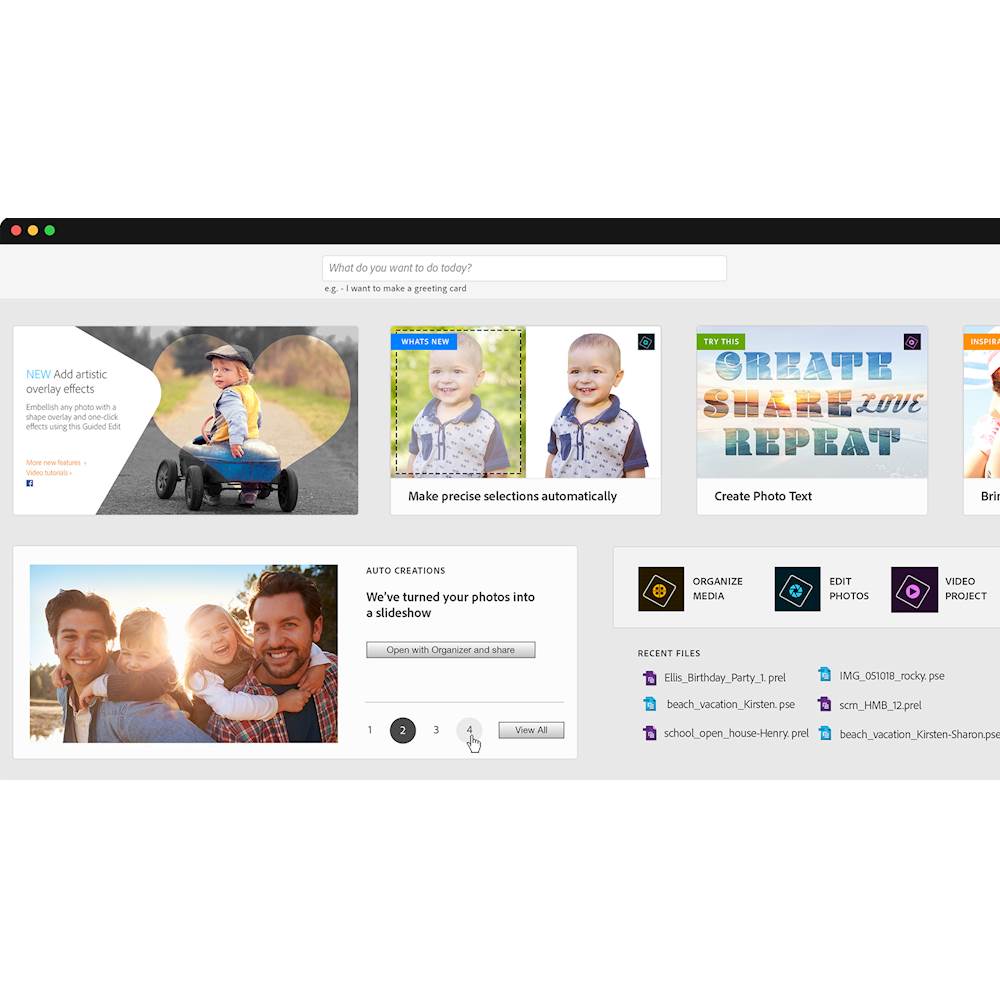
|Posted .This reviewer received promo considerations or sweepstakes entry for writing a review.This software package installs easy with Adobe's new installation process. The process seems very fast and clean. After installation, the app will show you the new features in this version compared to the last version you used, to help you get familiar with the software. Starting the app, takes you to a nice menu interface that highlights tips, and creation suggestions, as well as direct links to Photoshop Elements, Premiere Elements, and an Organizer app. The suggestions and tips seem to be endless, you can continue to click through these if you are interested or, jump right into a project. Both Photoshop and Premiere have great features to edit pictures and videos that might seem a little overwhelming for beginners, but Adobe has done a great job with including a "Guided" feature, that quite simply guides you through the entire process with ease, for any of the editing processes. All edits have real time results, and previews. You can even choose split screen for a "before" and "after" comparison on your edits. Adobe has always been great for editing digital media, and while the elements' versions don't come with all the bells and whistles as Adobe's professional versions, there is enough power here to get pretty much everything done, any regular user would want. Quick and simple edits for ; red eye, pet eye, blemish removal, color and contrast adjustments, text and drawing features, special effect objects, and so much more. It will take a some time to discover all the possibilities and features available, but until then the guided features can help anyone put out results that look like a professional did it. Very impressed with the features and quality, and ease of use!
I would recommend this to a friendImpressive Photo & Video Editing for Home Users
|Posted .This reviewer received promo considerations or sweepstakes entry for writing a review.If you have never used Adobe software before, the Adobe Photoshop Elements 2019 & Adobe Premiere Elements 2019 bundle sets you up for simple but easy photo and video editing plus organizing, perfect for everyday (home and amateur shooters) picture and video taking. However, Photo and Video enthusiasts will better be off with the Adobe Photoshop and Adobe Premiere Pro versions, part of Adobe Creative Cloud, to get state-of-the -art photo and video editing. The bundle installed beautifully after downloading both tools, about 3 GB each, i.e., you definitely want to have a fast Internet connection for this. You'll be prompted to enter the serial number after you have installed and loaded the apps for the first time. You will need an Adobe ID to register your software successfully, and, if you don't have one yet, there's a menu option to create one. Just make sure you remember the ID along with the password you selected. The "Adobe ID" is Adobe's way of doing license management. Both products I felt are quite resource-hungry in terms of CPU and memory usage. My i7-powered laptop with 12GB of RAM and a 500GB SSD did pretty good, overall. A really cool feature in Photoshop is its support for Apple iPhone's new photo file format, HEIF ((High Efficiency Image File). No need to convert these files to JPG and then edit. In terms of the built-in organizer, if you select one folder of photos in the Elements Organizer, the app will scan through the folder to generate photo and video slideshows automatically, and then launches them, which is is really cool. Adobe's "Sensei" engine provides "intelligent" photos and videos choosing, and this is when it becomes tricky: Either you love it (should you be happy with the results of course) or completely dislike it, wondering why the app picked one photo or video over the other, possibly making it necessary to tweak/edit the results. In terms of rating this product, recognizing it's a solution for the amateur/home photo and video taker (and definitely not for the professional folks among us), the Adobe Photoshop Elements 2019 & Adobe Premiere Elements 2019 bundle should suit just fine.
I would recommend this to a friend- Pros mentioned:Ease of use
Photoshop and Premiere Elements 2019
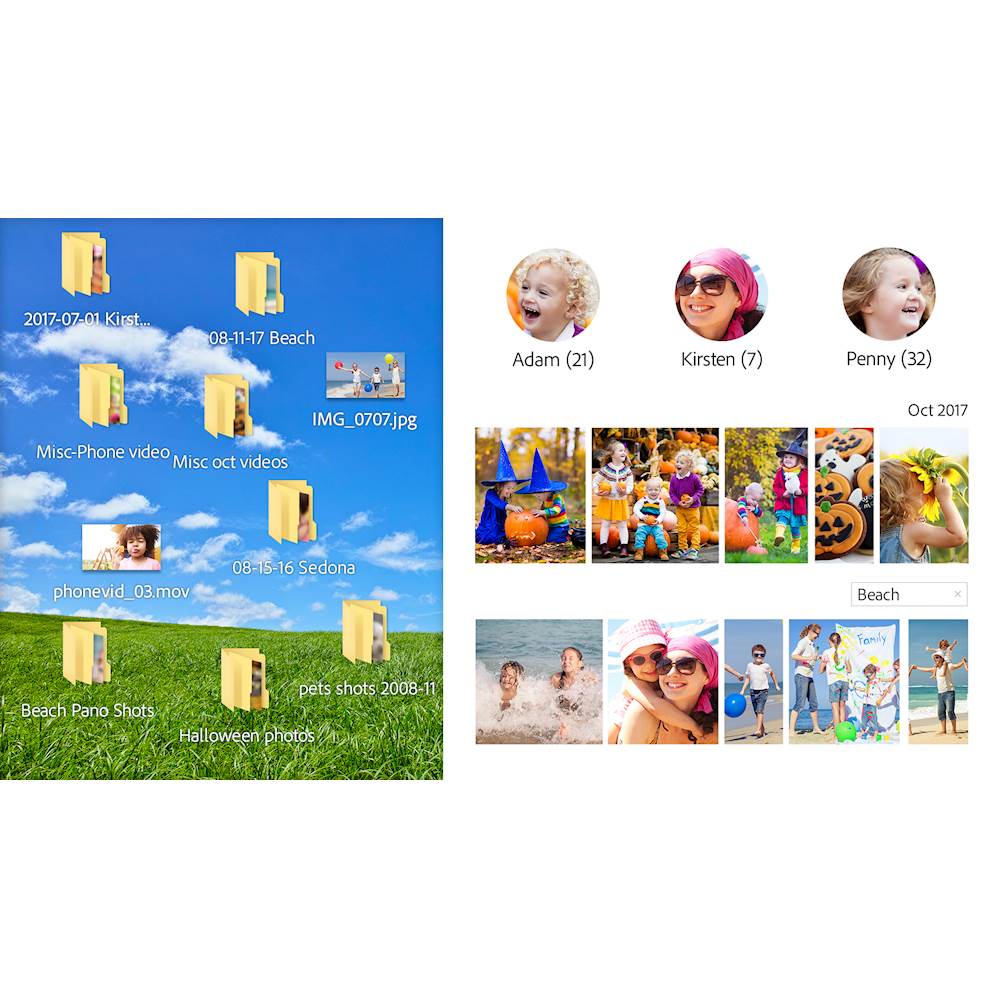
|Posted .This reviewer received promo considerations or sweepstakes entry for writing a review.These are two of my favorite tools to use while managing our home video clips and photos. While the download of each was quite large, it didn't take long to download and install, which was also a breeze. Organizer helps me to find clips of a specific person thanks to the facial recognition, although some family members look very similar sometimes. I take the time to go through and separate them as I add photos to the collection, though. It is quite easy to make small edits to improve each photo.
I would recommend this to a friend - Pros mentioned:Features
The Go-to photo and video editing software
|Posted .This reviewer received promo considerations or sweepstakes entry for writing a review.I am by no means a professional video or photo editor but, I don't think you could get a more robust editing software. There are so many features here that let you tweak and refine your photos. The only downside is this software is a resource hog. But, I understand why, it is doing some serious work to be able to make some of the changes you can do. If you're are looking for photo or video editing software, there really isn't anywhere else you should look.
I would recommend this to a friend Good Automation, But Some Serious Deficiencies
|Posted .This reviewer received promo considerations or sweepstakes entry for writing a review.First, the disclaimer, this is a Windows only review, running on a relatively high end system(I7, 16gig ram, Nvidia 1060, ssd). Premier Elements and Photoshop Elements (2019) are available for both Macs and Windows. There are some differences between the two versions. Adobe has long split it's product line into the home/consumer version (Elements) and the pro/Creative Cloud version. Adobe's pricing for Elements ($100 for either, $150 for the bundle) makes the bundle a no-brainer, especially now with the mix of video and stills produced by phones and action cams. The previous version I've used was several years and versions removed. A lot has changed and there are a lot of new features. The user interface is pretty consistent across the product line, once you figure it out. As with all things Adobe, there's the Windows way, the Mac way, and the Adobe way. The new home screen provides access to all functions and apps, which is very convenient. The new Quick Edit feature streamlines a lot of tedious editing tasks. You can select Smart Trim or SceneLine. Smart Trim can automagically select the most interesting clips in a video stream, which really cut down processing time. The Auto Creations also worked well for me, but it seems to be focused on faces and action. Videos with little motion or face recognition seem to bore it. SceneLine allows you to bring in clips and photos to create a single move and is extremely well done. The built in asset manager app, Organizer, provides a nice way to sort and organize media. The package is not without warts however. It now requires an Adobe Creative Cloud account and login, or it reverts to a trial, which is both intrusive and annoying. It's especially annoying if you use other Creative Cloud apps with a different corporate ID. A couple of codecs (HEIF and HEVC) are missing from the Windows version, which makes GoPro editing a two step process (convert with another program, then edit). There is no 360/VR support or file support for either spherical or rectilinear video. This is a serious failing considering the consumer 360 cameras available (eg., GoPro, Rylo, Insta360, Samsung). There is no support for multicam editing (eg., synchronized video streams from different angles) which would be nice. There is no screen capture or video stream capture capability. And finally, the performance is on the slow side, even with a relatively high powered system. Overall, what the Elements package does, it does well, if a bit slowly. Hopefully, Adobe will address the deficiencies in an update soon and make this a real winner.
I would recommend this to a friendMy go to Photo and Video Editor - Good Stuff
|Posted .This reviewer received promo considerations or sweepstakes entry for writing a review.The new Photoshop Elements 19 is very useful for editing home pictures. Though, not as powerful as the normal Photoshop it has more than enough features for home use. The navigating of Photoshop Elements is a little difficult at first but you will get used to it. Adobe Premiere Elements 19 video editor is like Adobe Premiere 15. Again, like Photoshop, not as many features as the full Adobe Premiere but is great for making home movies. I use this to make videos for my YouTube channel and Photoshop Elements to make thumbnails and they work fine. Many will enjoy the products AI driven creations helping you to create your masterpieces of your last vacation or birthday without all the heavy lifting. Overall, Adobe Premiere and Photoshop Elements 19 are great for home movies and personal photos but if you are looking to do more with your software then I recommend buying the full versions of the software. Being a user of the full Photoshop professional, I find the lighter versions quite adept working with photos and videos. Bottom-line it is easy to work with and delivers excellent results. They are go to products.
I would recommend this to a friend- Pros mentioned:Video editing
Excellent Yet Very Similar to the Last Version
|Posted .This reviewer received promo considerations or sweepstakes entry for writing a review.Photoshop has always been my workhorse for photo editing and enhancing, yet in an everyday hobbiest photographers use I dont find any major difference in this version and the previous one, at least not in the features I use frequently. But if you dont have any Photo Editing Software and are considering a purchase for serious photo editing or creating projects and Meme's this would be a fantastic purchase.
I would recommend this to a friend - Pros mentioned:Video editing
Nice upgrade from 2018
|Posted .This reviewer received promo considerations or sweepstakes entry for writing a review.I have purchased this every year. Each version makes the complicated photo/video editing easier. The only thing I wish is that it bundled a personal version of Lightroom as I edit raw files personally and still need to pay $120yr additional for the whole solution.
I would recommend this to a friend - Pros mentioned:Video editing
Nice update to an outstanding product
|Posted .This reviewer received promo considerations or sweepstakes entry for writing a review.I have used Photoshop elements for a few years now and have been very happy with the product throughout that time. The new updated version has some nice features for video editing, I'm not a power user, but I was very happy with the video in text feature.
I would recommend this to a friend - Pros mentioned:Ease of use
The Best Keeps Getting Better
|Posted .This reviewer received promo considerations or sweepstakes entry for writing a review.As an amateur photographer I have used photoshop elements for many years. I don’t have a need for full photoshop and elements provides everything I need. The price is right and the quality of the pictures never disappoint.
I would recommend this to a friend The parts of greater than the whole
|Posted .This reviewer received promo considerations or sweepstakes entry for writing a review.Adobe is the professional’s choice for many media manipulation products. Their ‘Elements’ versions of Photoshop and Premiere are not merely scaled down versions of the professional products. Instead, Adobe has leveraged their technical know how to help consumers express their creativity without the learning curve of a professional tool. The package comes with 3 separate modules: Elements Organizer (Derivative of Adobe Bridge for media management), Photoshop Elements (Derivative of Adobe Photoshop CC for photo / GIF editing), and Premiere Elements (derivative of Premiere Pro for video editing). Organizer: This is the glue that holds the packages together. Unfortunately, it’s also the weakest link. If you have more than ~ 20,000 media files, this will crash...a lot. When it works, it provides a catalog of files which you can filter and scroll through quickly. It has facial recognition to quickly group photos of the same person together. It can take a while to compile, though. Rather than looking first at your most often photographed subjects (i.e. children, spouse, close family), it tries to catalog everyone. You end up looking at a lot of stanger’s faces and realizing how many background people there are in your vacation photos. Organizer is also where you select photos for the collage tools in Photoshop Elements and the instant videos in Premiere Elements. Unfortunatly, that means those functions are inoperable if your library is too large. Adobe has 2 professional grade options for media management: Lightroom and Bridge. Both are good products for managing large libraries, but they don’t interface with the Elements products. Photoshop: This version of Photoshop Elements added some nice shortcuts and assistants. Photoshop Elements is a great tool as you’re moving into the digital media realm. You can easily erase wrikles, put together a panorama, or fix the tone in a washed out image. This is only the beginning, as PE really is a full photo editor. Compared to GIMP, which is free: They both have layers, text, and transformation tools. PE brings additional assistance helping you to learn how to use the tools. GIMP is a little more powerful in the maniulations you can do, once you know what you’re doing. Photoshop CC (which is not free) is the best of both products: all the power you could want with many of the shortcuts that Elements adds. Corel Paint Shop Pro is another tool I’d highly consider. It’s often for sale for under $50 and brings many of the shortcuts that Elements has. I’ve found the auto tone correction in Paint Shop to generally be better than what Photoshop elements has to offer. Other tools like object remover work better in PE. If you are more often touching up landscapes, Paint Shop is your better bet. If you’re more into people, then start with Photoshop Elements. Premiere: Premiere Elements (PrE) will work well for most editing tasks. It’s easy to get started and integrates nicely with the media organizer. There are a lot of effects out of the box, as well as several asisstants. Many people never share their vacation videos, and PrE has a soluton to that. You can pull in several short clips, and ask PrE for an instant video. The program will splice the clips in an order that makes sense, and it doesn’t leave you dizzy. It will also add music from its library so the scene changes happen in synch. You can select a quick pace to helpe keep your viewers interested. Unfortunately, Premiere Elements has no support for 360 cameras, such as the Samsung Gear 360. While other publishers has embraced the new format, Adobe seems determined t ignore the trend. They’ve concluded that since most videos today are viewed without special glasses, content creators should not need to experiment. If you are among the gadget hungry who have a 360 camera, look elsewhere for editing your footage. Overall: While there are a lot of new guided edits and smart features in the software, it’s sadly inaccessible if you have too much media. Adobe can build software to handle large libraries, but they’ve chosen not to deliver it to the consumer market. Because of that, I’d recommend you pass on this bundle and try one of the many alternatives such as ACDsee or Corel After Shot. These both handle your library and provide popular editing tools. They also do it at a very affordable price.
No, I would not recommend this to a friendBest editing software
|Posted .This reviewer received promo considerations or sweepstakes entry for writing a review.This suite of tools makes editing photos and videos easy for amatuer and pro alike. It also has a media organizer with the software that works great for keeping everything, well, organized! Set up for both was super easy, download the zip, extract, install and then enter the activation numbers! It will take me a long time to learn all the features, but this makes editing photos a breeze. I've not had much of a chance to play with video editing as I don't have too many videos I need to edit. This is a great incentive to create some videos just so I can play with the editor!
I would recommend this to a friendGood for organization, but not as an editor!
|Posted .This reviewer received promo considerations or sweepstakes entry for writing a review.The Photoshop Elements 2019 & Premiere Elements 2019 - Android|Mac|Windows|iOS was a general disappointment for me and my uses. It functions well as a photo organizer and for minor adjustments to photos such as red-eye removal, but it is not a powerful photo or image editor. Adobe is known for their powerful and professional software ranging from webdesign, to image editing, to PDF software, but this software package offered little in ways of upgrade from last year's (or the previous 3 years) edition and really seems pointless unless you really need a digital photo organizer or you like making homemade videos/movies from your photo collection. PROS - Adobe name and support - Good organization for your digital photo collection - Somewhat user friendly video maker for basic level creation - Cost-effective for the basic user CONS - Not a good photo or image editor - Limited upgrade/update from previous editions - Long-term useage or need unclear Get this if you need to auto-organize your digital photo collection. Do not get this if you are looking for a robust photo/image editor or like making videos for publication or online!
No, I would not recommend this to a friendMACosx 10.15 Catalina brakes Photo Premiere 2019
Posted .This reviewer received promo considerations or sweepstakes entry for writing a review.Photoshop Elements 2019 & Premiere Elements 2019 for Mac was working when my MACbook was running OSX Maverick 10.14. Upgraded MACos to Catalina 10.15 and no longer works when accessing Photo or Video Editor. Contacted Adobe tech support and they had no Idea what the problem was and said I had to upgrade to Photoshop Elements 2020 & Premiere Elements 2020 for an Additional $120 dollars. I explained that I had purchased the 2019 version only 6 months ago for $140 dollars. Basically I am no longer going to use Adobe products since Adobe was well aware long time ago that the MACosx Catalina update was not compatible due to 64 bit code restriction.
No, I would not recommend this to a friend