Customer Ratings & Reviews













- Model:
- ADO951800F144
- SKU:
- 6366175
to a friend
Customers are saying
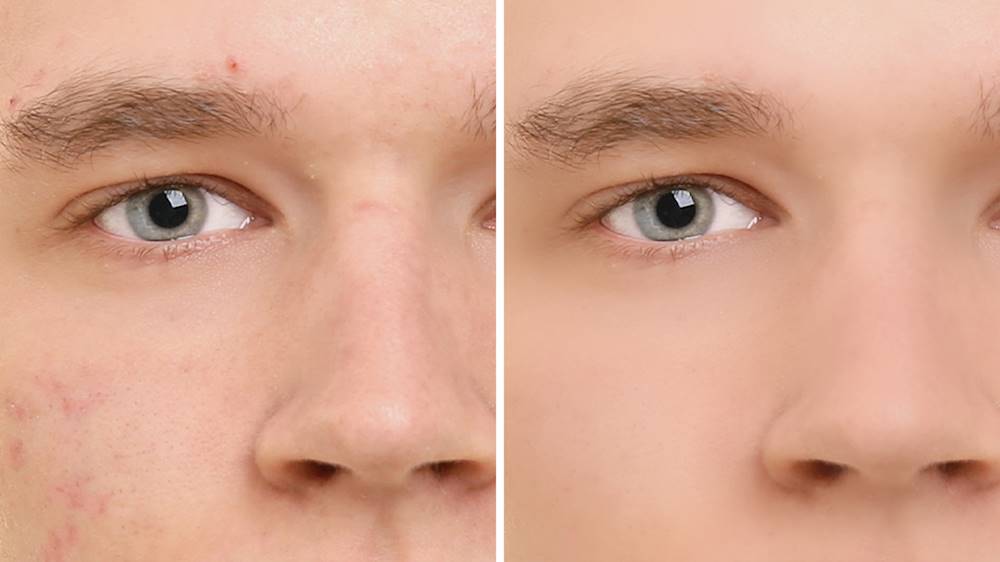
Customers recognize Photoshop Elements 2020 as being easy to use and having powerful photo editing tools. Many appreciate the numerous features, particularly the object removal and skin smoothing capabilities, while some note a learning curve for new users. The software's interface and performance are also generally well-received, with positive comments on its price point.
This summary was generated by AI based on customer reviews.
Great Product
||Posted . Owned for 2 weeks when reviewed.This reviewer received promo considerations or sweepstakes entry for writing a review.Bought this new version to replace my old version.
I would recommend this to a friendGood Product!
||Posted . Owned for 1 week when reviewed.This reviewer received promo considerations or sweepstakes entry for writing a review.It`s a great product,I had to call Adobe to run it.
No, I would not recommend this to a friendGreat program
||Posted . Owned for 2 weeks when reviewed.This reviewer received promo considerations or sweepstakes entry for writing a review.I am still learning to use it. I like the program very much.
I would recommend this to a friendSupersadsituation
||Posted . Owned for 1 year when reviewed.This reviewer received promo considerations or sweepstakes entry for writing a review.Purchased this to replace my old Photoshop. Needed it to make my sons high school, soccer banquet video. Installed it, began to use it. Next thing I know it’s telling me to enter my serial code again to install it. Did it again. Worked for awhile then asked me for serial code again. Needless to say I didn’t make the video. I spent a lot of money on something that really never worked. Now, I don’t have much use for it that my son graduated.
No, I would not recommend this to a friendI didn't find the key number so no photoshop!
||Posted . Owned for 3 weeks when reviewed.This reviewer received promo considerations or sweepstakes entry for writing a review.I thought the info on the front of the bos is what I needed and didn't see the paperwork which must have been there with that info. So I had to purchase it again; paying twice for this product.
I would recommend this to a friendCouldn't get the code to work
||Posted . Owned for 1 week when reviewed.This reviewer received promo considerations or sweepstakes entry for writing a review.Had to return it. Geek squad was very kind and patient but after an hour we still couldn't get the code to work I'm sure the elements 2020 is a good program but I will stick with my 2018 elements
I would recommend this to a friend- Pros mentioned:Object removal, Skin smoothing

New AI Tools for Photoshop Elements
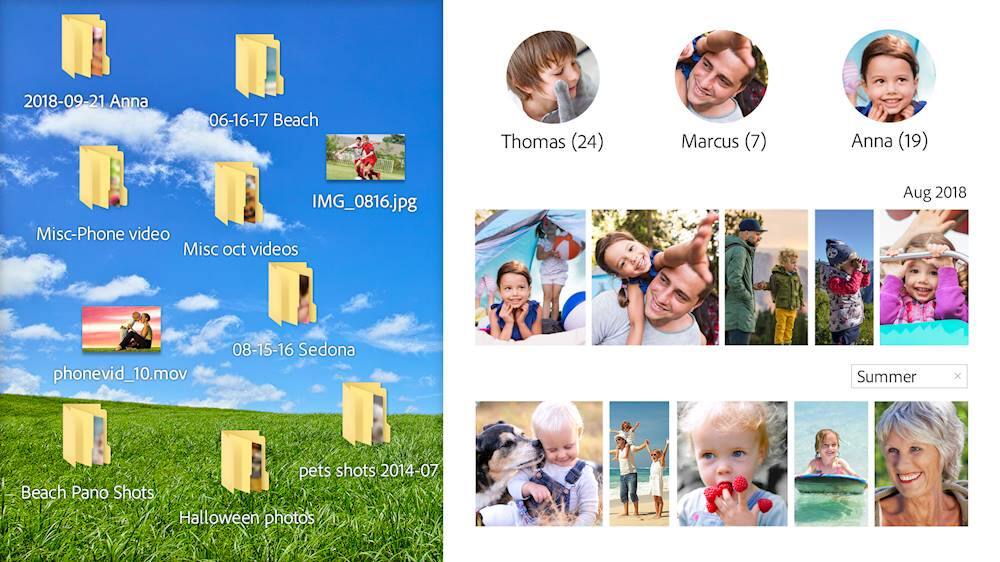
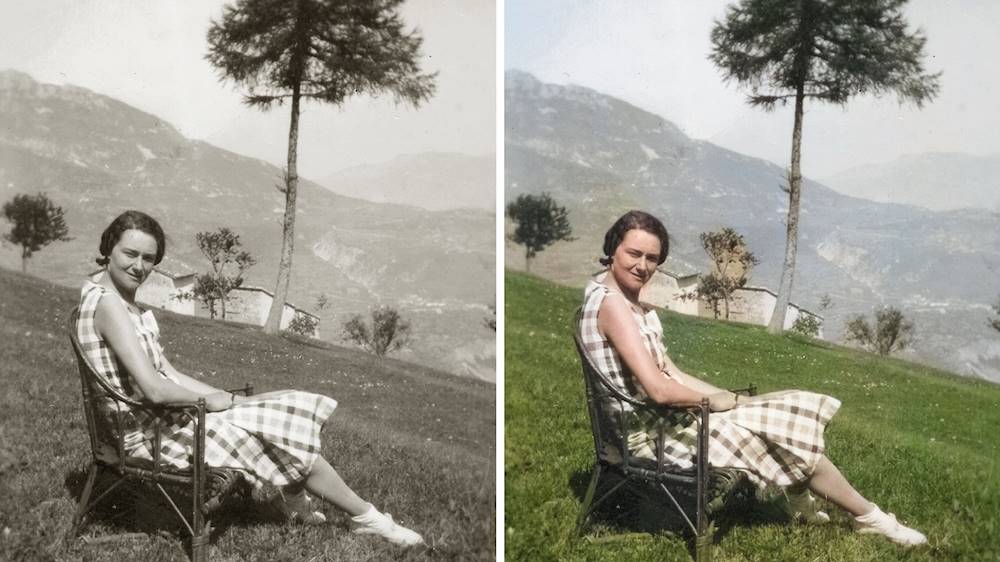
|Posted .This reviewer received promo considerations or sweepstakes entry for writing a review.Adobe Photoshop Elements 2020 is superb photo editing software and always ranks high in its genre. Photoshop Elements is geared towards consumers with many astonishing auto-creations and guided edits. Advanced Shutterbugs will also find very effective power tools for their studio. Utilizing Auto Creations utilizing Adobe Sensei AI, Photoshop Elements automatically generates creations which you can see on the home screen. The same AI powers many other auto features inside the editing software. New standout features include skin smoothing, auto photo colorization, one-click subject selection, auto object removal, and the ability to order prints and gifts using the integrated FUJUFILM Prints and Gifts service. One feature that has great potential is the Auto Removal, in the right picture/setting it does a fantastic job of removing objects from the picture. Tested this in several pictures with remarkable results most the time, like removing a person from a background of buildings and trees. That test did result in some tearing in the grass background, the results however were stunning. Adobe has brought this technology a long way from the early days, 'almost' magic. Not only effective but can be lots of fun is Perfect Portrait mode, where you can smooth the skin, slim down the subject along with other portrait enhancing tools. Smoothing the skin is excellent, slimming down (losing a few lbs.) the subject(s) is achieved by compressing the picture horizontally which works quite well. If you are new to video editing or want to learn something new, there are 55 guided edits to assist you. Photoshop Elements 2020 is a continued evolution of an already mature and capable picture editing package which has added some brilliant features to their product along with some stunning new AI capabilities. Overall, Adobe Photoshop Elements is strong editing software with many beginner and expert features. It is easy to get started in photo editing and when you look deeper will find some pretty amazing tools.
I would recommend this to a friend - Pros mentioned:Ease of use, Photo editing
Nearly Picture Perfect
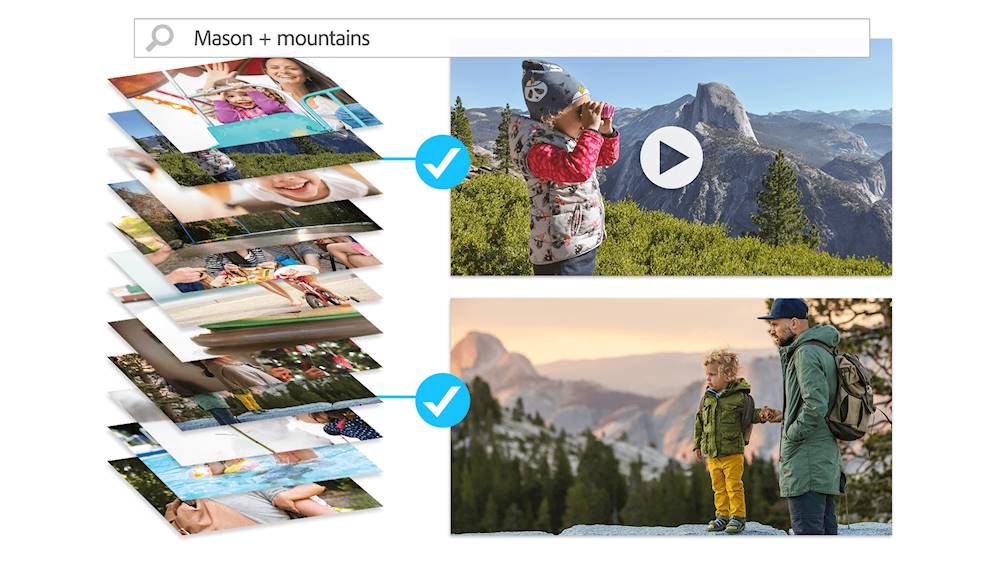
|Posted .This reviewer received promo considerations or sweepstakes entry for writing a review.Having previous experience using an earlier version of Adobe Photoshop Elements, I wanted to compare them and see what had been updated and improved upon, and I can say, there are some notable differences. Good ones. Of course, there are the Basic editing tools, along with Quick / Guided / Expert options. With the software’s ‘intelligent editing,’ you are even able to “magically” open people’s eyes that appear closed in a photo, which is kinda weird, but cool at the same time. There are a variety of photo fixes and fun effects, including B&W options, which is something that appealed to me right away, and quickly became one of my personal favorites. Another really fun and super cool photo effect I’m very much going to be using a lot is the ‘painterly effect’ - which does exactly what it sounds like. Now, I must state that, hands down, the Guided Editing option is the best thing ever! It’s like you literally just select and click to combine pictures or place ‘cut out’ objects onto a new and different background. Totally rad! Although, one of the pictures I tried a few things out on didn’t work so well. Primarily because, the image, while high-quality with optimal resolution, was nonetheless, intentionally blurry in spots, which made using the object removal tools challenging, and didn’t allow me to achieve my desired results. I was unable to completely “grab” the object I wanted to remove, and there remained a ‘ghostly’ shadow which would have taken an added level of finesse and more work put in, to be able to fully remove what was left behind, so as to smooth out and blend in that space within the image. I’m particularly interested in using this software for my work, as an author, to create my own custom self-pub book covers. Previously, when I tried to figure out how to use my other version of Adobe Photoshop Elements, I found it difficult to manage, its features unwieldy and tools cumbersome. So I didn’t bother using it much since I didn’t want to waste my time (time I would rather spend writing), by instead having to watch hour upon hour of online ‘how-to’ videos teaching me how to use the program. Now that won’t be an issue, not with the many improvements in the current iteration of this software. A useful feature worth mentioning, but one I won’t be using, is Smart Organization. This lets you organize your photos into albums by categories, such as people, places or settings, dates, type of objects, etc etc etc. Also, the option to order prints of your creations, as well as, gift items, and other fun products with the images you customize by using the software, is really cool, too! With all that being said, for anyone not entirely comfortable using any type of photo editing software, there is still somewhat of a ‘learning curve,’ but that’s not necessarily a bad thing, as it lets you discover what all Photoshop can do, through simple trial and error. So ya, I most definitely can recommend Adobe Photoshop Elements 2020. The software has many new features, and updates to those features you may already be familiar with from previous versions. Good stuff. Now go get creative!
I would recommend this to a friend Have issues with activation
||Posted .This reviewer received promo considerations or sweepstakes entry for writing a review.Not submitted for publication yet will resubmit if problem is solved Not at all happy. I ordered it from my local Best Buy so I could get help if I needed it. I actually got it from a location in Tennessee (with no Serial number) and I get a message about going on line into a site that is basically never never land and it won't accept the redemption code number supplied that is supposed to give me a serial number. So i t installed but can not be activated with no serial number. You will find all sorts of references to this issue online as well, it isn't just me. So at this point I have just wasted my money unless maybe someone can contact me and Ill give them code number and they can send me the appropriate serial number to activate.you have my Email. I used to use an older version of Photoshop and I've changed Computers numerous times and I was looking to add to this my current Window& Laptop. I'm a 78 year old Veteran and lost my wife of 56 years 2-23-20 and I am trying duplicate and print family pictures I'm not someone trying to pirate your software. RonSr I will have to check no on the other options temporarily but will submit a fair revue if I can get activated.
No, I would not recommend this to a friend- Pros mentioned:Ease of use, Photo editing
VERY CAPABLE EASY TO USE
|Posted .This reviewer received promo considerations or sweepstakes entry for writing a review.VERY CAPABLE EASY TO USE REVIEW: Adobe Photoshop Elements 2020 BEST BUY Tech Insider Network SUMMARY: If you are confused by the zillions of photo editing tools out there, then you owe to yourself to give this a try. I found everything I needed without a lot of hunting around. I was quickly able to remove unwanted subjects and do some quick tweaks to color and effects. Compared to the high-end photo tools, I found this the right mix of features and ease of use. BACKGROUND After my preferred (and paid) 10 year old editing tool stopped working (around Win 8 timeframe), I tried older versions of Premier and found them lacking in the features I wanted (such as removing subjects), and I found the advanced photo editing tools too hard for me to use. I take a ton of pictures, but rarely make time to edit them due to the complexity of both free and paid expensive tools. I’ve been using a very popular shareware product but it really is hard to use. INITIAL IMPRESSIONS: After 15 minutes with Photoshop Elements, I think I am a convert. I could already do everything I wanted to do, quickly and easily. Crop, Color, Remove Objects, etc. I can’t wait to dig into the tool’s more advanced features. I’m not a huge fan of the opening screen, which seems intent on selling other products and services, but that is a minor nit. Once I found the “Edit Photos” ICON I was off and running. PERFORMANCE / EASE OF USE: For now, I still have the training wheels on and am using “GUIDED” mode. But I was able to edit RAW Sony files (without any special software) and JPG files. Again, it is working perfectly, and I can easily outperform the more advanced software out there. SUMMARY: I would recommend this for anyone who needs a good solid photo editing tool that is not overly complex. I’m sure there are features only the more advanced software can accomplish, but it more than meets my current needs. I would recommend it.
I would recommend this to a friend Elements 2020
||Posted . Owned for 1 month when reviewed.This reviewer received promo considerations or sweepstakes entry for writing a review.I haven't gotten to using this Photoshop elements 2020 as of yet. I will give an honest review when I get the chance to try it.
I would recommend this to a friend- Pros mentioned:Ease of use
Photo Editing at it best!
|Posted .This reviewer received promo considerations or sweepstakes entry for writing a review.I was both anxious and interested to give the Adobe Photoshop Elements a test ride, as I personally have used Adobe Lightroom for many productive years, and have had great results with this software program. I found the Photoshop Elements program similar to Adobe Lightroom (a photo editing program) that I used in the past. Photoshop Elements should appeal to most casual users, and perhaps no so much to professional photographers. Use of the software once installed was a breeze and very easy to get a long with. The use of the software did not bog down my system, as other programs have done in the past. For those of you that might be worried about learning the ins and outs, rest assured that there are numerous great tutorials on the internet. Photo editing is a breeze and the program is definitely user friendly. Tweaking your favorite photos, applying special effects, and create all sorts of things. You will now have the ability to fix your precious but poorly photographed subjects and scenery. You no longer have an excuse to delay fixing your photo collection. In closing, Photoshop Elements is not a full version of Photoshop, but most importantly if you are an average user like I am, you will be quite happy with this program. Photo editing at its best! Adobe Photoshop Elements is a winner. Definitely consider purchasing it, as you won't be disappointed.
I would recommend this to a friend not so great
||Posted . Owned for 1 month when reviewed.This reviewer received promo considerations or sweepstakes entry for writing a review.i was disappointed in its slowness to go from one application to another even with a brand new computer ..
No, I would not recommend this to a friendNot much better than 2015
||Posted . Owned for 2 weeks when reviewed.This reviewer received promo considerations or sweepstakes entry for writing a review.Not much better than 2015 version, might be a tad quicker to load.
No, I would not recommend this to a friendPretty difficult to use
||Posted . Owned for 8 months when reviewed.This reviewer received promo considerations or sweepstakes entry for writing a review.Had it for a while but still can’t seem to get the hang of it
I would recommend this to a friendMeeeh
||Posted . Owned for 11 months when reviewed.This reviewer received promo considerations or sweepstakes entry for writing a review.Hard to use. Instructions don’t really explain all the things that this Can do. Wanted it to remove background from pictures for my website, but it was to difficult to figure out. I’m sure it’s easier for someone with this knowledge, but for a novice I would pass on this.
No, I would not recommend this to a friend- Pros mentioned:Ease of use, Photo editing
Great Software for Beginners
|Posted .This reviewer received promo considerations or sweepstakes entry for writing a review.This is my first time using the Adobe Photoshop Elements Suite. I have a pretty nice camera and take a lot of pictures at family/friend/work events. I've always heard great things about Adobe's photo editing software so I thought I'd give this one a try. First, installation was easy. Downloaded the .dmg file from the website, I have a Mac, and installed the software. Took no longer than 10 mins. The layout is pretty intuitive. Navigating the different menus was a breeze. Sometimes it feels like you need to use the software for a few years to figure out what things mean. That was not the case with this one. In the photo editor, there are three levels of which you can perform editing. Ranging from pretty basic to expert, depending on your skill level and familiarity with the software. After looking at a few of the editing tutorial videos, I decided to import a few photos and see what I could do. I have to say, I was pretty impressed. With minimal experience, I was able to transform some photos into better versions of themselves. I can see that I'll be getting plenty of use out of this software in the coming months with the holidays right around the corner.
I would recommend this to a friend Not in use
||Posted . Owned for 1 year when reviewed.This reviewer received promo considerations or sweepstakes entry for writing a review.I bought this, my fairly new Macmini started working horribly, covid hit, and I didn't get my computer back until late October, so this didn't get installed. I finally got a chance last week to try it...but since very few computers have cd drives anymore I had to install through website-which doesn't offer 2020 edition anymore. After following instructions to make codes compatible, I couldn't get it to move past a trial version, which was good, because the download caused my newly wiped and refurbished macmini to completely seize. I finally backed enough stuff off to do a system restore, and now feel like (although it was on-sale) I lit 70 bucks ablaze
No, I would not recommend this to a friend- Cons mentioned:Learning curve
Very useful for beginners.
|Posted .This reviewer received promo considerations or sweepstakes entry for writing a review.Who hasn't heard of the word Photoshop. It is a synonym for photo editing – and it is even more popular in many "apps" to improve one's looks. Cleaning of the skin, making the body thinner, removing parts of the photo (and it could be another person), correcting color balance or exposure can be done with many photo editing programs nowadays and they are not even made by Adobe. (Just like the word Xerox means photocopying to many people, Photoshop means editing digital photos.) To shell out for the full-fledged desktop version of Adobe Photoshop can be quite costly. You can no longer "buy" the program – it is now literally for rent. You pay monthly or yearly for the continuous use of the program. However for a beginner, not only it could be expensive – it is a mammoth program that does so much but is very time-consuming to ** learn ** how to use it. There are classes that teach people how to use Photoshop. The manual is as big as a phone book (and no one I know read it.) Your first airplane that you will want to learn how to fly should be a single engine, and not a Boeing 777. Perhaps this is not an appropriate comparison – because Adobe Photoshop Elements will guide you through what you need to do from its first menu. The price is much lower and you can buy it outright and it is yours (well, licensed you is the more appropriate way of describing software), to keep. Adobe makes Windows and Mac versions so they really are no excuses not to get it – if you need it, that is. Unless you install from a DVD disc, it is a large download of about three gigabytes – and you will need double that space to install. Of course you can delete the installer files when you are done. This concern applies to a smaller (less powerful) computer which you probably don't want to install and run this program anyway. (It will activate up to two computers. If you want to move it to another computer, you have to deactivate it first.) Ideally you need a midrange or a faster computer to run. And just like its older brother, Photoshop Elements 2020 supports the Wacom (drawing tablet) for those who can really draw instead of using a mouse. This is something that is very useful when you want to create something from scratch or if you want to clone an object or erase something. I have an ultra-wide screen and it works fine with it. The program will work for 30 days as a trial so you really don't have anything to lose before shelling out the money. It will nag you every time you start the program, but that is how it is. The opening menu has a few interesting links for many projects. The first thing is the guided edits (and you will be sent to their website, here: https://www.adobe.com/products/photoshop-elements/features.html?trackingid=B4XQ3V9Q&mv=in-product#guided-edits-a ) If you choose other links, the actual Photoshop program opens up and you will be presented with other easy-to-follow guided tours. (You will need to open a photo first before you can actually use the guide.) For example, if you want to correct the skin tone, you would open an image with a person (obviously) and it. In each is simply follow the guide. On the top, there are: "quick", "guided", and "expert". You would make the transition to the expert link when you are more comfortable with the program in due course. If you are familiar with the regular Adobe Photoshop, most of the menus are on the top and are still there. You have to go to the “expert” panel to actually make the "actiions" active. And not all Photoshop actions will work with Photoshop Elements. It comes with a few and fun actions for you to play with. You can download (for free) a 3rd party actions that turns your photos into a Polaroid photo. Other menus are practically the same as the full version of Photoshop. You can work with layers, and other filters, here, too. Adobe Photoshop Elements also comes with Elements Organizer. It is basically a program that you can use to organize your photos. I am not a big fan of such a program because after I edit my photos (taken with the camera), I export them to an external hard drive or burn them onto a DVD or a Blu-ray disc for a permanent archive. Most people are not aware that the "documents" are stored on drive C and if the main hard drive fails, there go your photos. This version of Photoshop Elements is linked to Fujifilm prints and gifts services. Just like many others you can do enlargements, prints, photo cards, and other fun products. You just have to shop carefully and compare the prices to other services out there. But this one makes it very easy to do and you don't have to be a computer expert to upload the photos. There are other programs out there by other manufactures that cost similarly that could give you similar results – you could also try their 30 days trial version, to see which one you are more comfortable with. These programs could get a little annoying once you are good at it because the "guides" often get in the way of doing things. But without them, it could be a very high learning curve for a new user. And there is a very well known open source (this means free) out there which is not too difficult to learn either – so you have to be a smart consumer and choose the right one. Some free program are quite good so while you do get what you pay for when you buy a program, sometimes the free ones are actually workable for many people. But nevertheless – Adobe Photoshop Elements 2020 is a good buy for someone who is starting out with digital photography who wants to do easy and fun editing. You buy it and it's yours. On the other hand, if you take a lot of photos and you have to edit many, many of them, Adobe Lightroom is made just for that. (You also can download the 30 days trial copy to give it a run. Remember, Lightroom is for photographers who work with many photos, and Photoshop is for digital editing (one at a time). Note: Lightroom is now a subscription, i.e. "for rent" just like many Adobe programs out there.)
I would recommend this to a friend Photo Editing
|Posted .This reviewer received promo considerations or sweepstakes entry for writing a review.I have never been much of a photographer, but since having our first child my wife and I decided we needed something to edit pictures of the new little bundle of cuteness. It's been over 15 years since I took a class on Photoshop 7 and so far, this "economy" version of the flagship program seems just as powerful. I like that this product has a one time fee. Some programs are now going with subscription fees to use their services. I also like how Elements doesn't slow my computer down. Granted, I never had a top of the line computer, but Photoshop 7 ran really slow for me. This is not the case with this program. I will say that there's a pretty big learning curve to use this program. It isn't terribly intuitive if you are new to photo editing. But, their website does have some nice walkthroughs for popular editing scenarios. If you're looking for something that is super user-friendly with not a lot of frills, then you can definitely find something at a lower price point that will fill your needs. But, if you like a little more control over your edits then this is a really good option. The price tag seems a bit high at first glance, but once you see the variety of what you can do, it is worth it.
I would recommend this to a friend