Customer Ratings & Reviews

- Model:
- ADO951800F250
- SKU:
- 6593828
to a friend
Customers are saying
Customers are positive about the ease of use, AI features, and video editing capabilities of Photoshop Elements 2025 & Premiere Elements 2025. Many appreciate the AI-powered object removal and color correction tools, finding them effective and time-saving. The streamlined installation process also received praise. However, some customers expressed dissatisfaction with the three-year license term.
This summary was generated by AI based on customer reviews.
- Pros mentioned:Ease of use
The OG Photoshop with the new updates is the best!
||Posted . Owned for 1 month when reviewed.This reviewer received promo considerations or sweepstakes entry for writing a review.I prefer the srandalone Photoshop option for my editing software needs on my desktop. Great software! It's the filter and fix OG with lots of tweaks. Pretty easy to use.
I would recommend this to a friend - Pros mentioned:Ease of use
Great deal on Photoshop Elements
||Posted . Owned for 2 weeks when reviewed.This reviewer received promo considerations or sweepstakes entry for writing a review.Great deal on this 2025 Photoshop Elements and Premier. Not to mention, good for 3 years. Adobe has vast options to edit photos and videos easily...love it!!
I would recommend this to a friend Photoshop
||Posted . Owned for 1 year when reviewed.This reviewer received promo considerations or sweepstakes entry for writing a review.Adobe is my preferred software company for graphic designs and photo editing.
I would recommend this to a friend- Pros mentioned:Ai, Color correction, Video editing

A professional editing suite for everyone
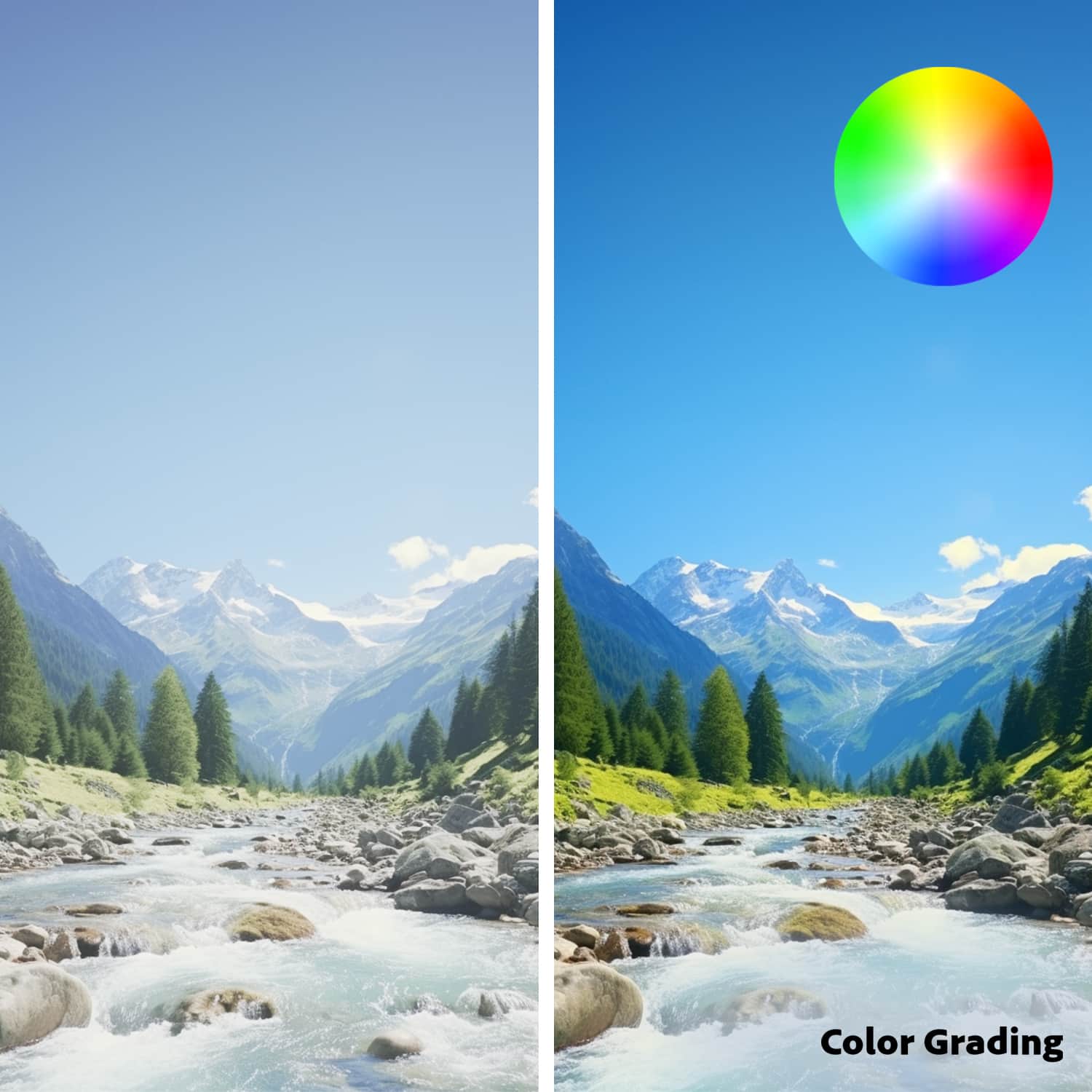
|Posted .This reviewer received promo considerations or sweepstakes entry for writing a review.Introduction: I am no photo or video professional editor by any definition, but I do enjoy editing both. I take a lot of pictures and videos of trips, motorcycle rides, and flying drones. For the drone and motorcycle videos, there is quite a bit of video editing. For this I have mostly been using open-source products. To get the final video, I must remove the noise from the drone and motorcycle, add music, add photos, add transitions and remove unwanted video. This requires numerous websites and A new venture I have started is to record 360° videos on my motorcycle while on rides. This opens an entirely new world of video, but also more editing. Like before, I use a multitude of tools to create the video intros, the video credits, music, and more, and then bring it all together for the final result. I say all of that to say this; I have recently started using Adobe Photoshop Elements and Premiere Elements 2025 for the same projects, and it is changing my life with photo and video editing. The big difference is that I can do all the things I was doing across the numerous different platforms before, on just these two. No more jumping around from program to program to website, etc. to get the same result. I can now do it all in one suite, making my life easier, and ending up with better results. I have considered moving to Adobe many many times in the past, but for what I do, I couldn’t get past the price. But their Elements suite is very inexpensive compared to the other professional suites, making it an obvious choice. I’m not saying that the professional suites are not worth it they are the industry standard. I am an IT engineer, and I support clients who use them. It is very much worth it to the professional. But to a hobbyist or content creator as a side gig, it’s kinda expensive. But Adobe Essentials with a 3-year license is extremely affordable. What’s new with Adobe Photoshop Elements 2025: • Guided Edits • Step-by-Step Editing • Create stylized text. • Add cinematic motion to photos. • One-click subject selection. • Facial features quick touchup. • Collage templates. • Additional filters and effects. • Extend photo backgrounds. • Move, scale, and duplicate objects. What’s new with Adobe Premier Elements 2025: • Titles with text controls. • Color correction tools. • Color grading tools. • Simplified timeline. • Free Adobe stock title templates. • Apple M3 support. • Share results with others via the Mobile app. • One-click Quick Actions for photos in the Mobile app. • Basic photo editing and adjustments for photos in the Mobile app. • 2GB of free cloud storage for your photos and videos. Workflow: When I do 360° video from a motorcycle ride, it is a multi-step process. I go to a subscription website to create the video intro and the credits into 2 videos. Then I go to another website to select the music I want in the final product. I take any images I want to add to the video and edit them. I edit the 360° video in the camera’s 360 video editor to the get video I want to publish. And then, I bring all that into my open-source video editor to bring it all together. With Adobe Photoshop Elements 2025 and Adobe Premiere Elements 2025, I can do all of this in the suite except for the music and 360° editing. I edit the video, select my music, and do everything else in the Adobe Suite, with excellent transitions and very creative intros. The open source and free products I was using before are very good products. I have nothing against them, and they allowed me to create good videos on the cheap for a long time. But at some point, you need to stop and determine how much your time is worth. My previous workflow took a lot longer than my new Adobe workflow, and I’m actually getting the same or better results with Adobe. The AI intelligence built into the Essentials suite makes it so much easier to edit photos and videos. For instance, if I want to change the color of my motorcycle in a photo, I select the motorcycle body and Adobe highlights the entire things without missing parts or adding areas not part of the body. I then select the color and I’m done. But with others, I must spend time going around the borders to clean it up before moving forward. With some images, it took so long to clean up I decided to use other photos. These issues are no longer issues I have. Conclusion: The Adobe Photoshop Elements 2025 & Premiere Elements 2025 is a powerful editing suite for the non-professional who does not need the entire Creative Cloud or Creative Suites. It is the full version of both products given as a bundle for a great price. It is still a subscription, but rather than paying monthly, you pay a one-time low price for a 3-year subscription. For a suite this powerful, it’s a great price. The AI integration brought into the 2025 edition is very effective. It makes selecting objects so much better and color correction so much more realistic. It has cut my editing time significantly. If you are a hobbyist, content creator, or own a small business doing editing, I highly recommend this Adobe suite for you, But the Adobe Photoshop and Premier Elements 2025 suite is really for everyone. Professional photo and video editing has finally come to the regular user, not just for the professional community. I highly recommend this product.
I would recommend this to a friend Photoshop for Windows 11
||Posted . Owned for 1 week when reviewed.This reviewer received promo considerations or sweepstakes entry for writing a review.My earlier version of Adobe Photoshop would not work with Windows 11, but Adobe Photoshop 2025 works fine with Windows 11.
I would recommend this to a friendRecommend photo editing tool
||Posted .This reviewer received promo considerations or sweepstakes entry for writing a review.Best photo slides editing software and easy to use
I would recommend this to a friendNot really impressed
||Posted . Owned for less than 1 week when reviewed.This reviewer received promo considerations or sweepstakes entry for writing a review.Not very impressed.It's ok but you can do just as well with free options.
No, I would not recommend this to a friend- Pros mentioned:Ai, Ease of use, Video editingCons mentioned:License
Nice update with AI to make it beginner friendly
|Posted .This reviewer received promo considerations or sweepstakes entry for writing a review.I’ve always wanted to learn Photoshop and Premiere, but I honestly don’t have a lot of time to do it. I tried using Photoshop on my daughter’s computer since she had a copy she needed for a school class but to be able for me to do anything well just takes too much work. Recently I was motivated again, but not wanting to spend a lot of money on something I didn’t think I cold learn well I decided to try GIMP. It was good and let me do what I wanted, but it was also really complex and a bit too steep of a learning curve. In my latest project I needed to do some video editing and so I decided to give the more updated version of Adobe’s products a try. This newer version is definitely a step up from what I used before as far as ease. I do like the different modes you can choose because it really speeds up the editing process if you’re not really sure what you’re doing. It does have its drawbacks and is a bit like filters are that it does a pretty amazing job of getting you what you want easily, but if what you want is more unusual, it may not really do it “right”. I was able to improve a number of photos from a recent vacation and make them look much better than they were, but it still has a bit left to be desired. For the video editing, it worked really well. It did struggle with a few files from our goPro, but overall it worked well. All the standard things I wanted to do were there, but I’m not a pro so there may have been things missing I didn’t know to look for. Both programs has a certain degree of AI built in. I think that’s what helps it do the simpler modes where it guesses what I wanted to do and then uses AI to do it. Its much better than armature me could do, but its not anything close to the AI expectations some people have. I guess that’s to be expected given the relatively weak computers we’re using compared to the big AI companies use. However, it is a pretty cool glimpse into the possibilities that they’ll come up with in the future. It is a 3 year only license which I was a bit irritated about at first. I always prefer an unlimited one. However, when I wanted to use my daughter’s last version to compare it to, it kept freezing up with the size and complexities of the video files and how old the computer was. I tried to put it a newer more powerful computer, but it wasn’t compatible. So I guess while 3 years seems like a bit of a rip off, the reality is that files keep getting bigger and bigger such that we need more and more powerful computers to do editing, and the programs are probably not compatible anymore after a few years do to OS updates (thanks Microsoft). Overall, Adobe is still the leader for a reason, and I wouldn’t suggest going with anyone else unless you’re really broke and want to try an open-source program along with all the complexities and frustrations that go with it. If you are just a beginner but want to do a little bit yourself, go with Adobe and their cool AI upgrades.
I would recommend this to a friend Lost & found
||Posted . Owned for 1 week when reviewed.This reviewer received promo considerations or sweepstakes entry for writing a review.Hubby had accidentally left this in the cart in his bag. Was super relieved and happy to have it returned to us the next day when we inquired about it at customer service.
I would recommend this to a friendSwift Transition to new Computer
||Posted . Owned for 1 week when reviewed.This reviewer received promo considerations or sweepstakes entry for writing a review.This is working well in my new computer! The Geek Squad assisted with installing new software.
I would recommend this to a friend- Pros mentioned:Ai, Color correction, Object removalCons mentioned:License
2025, the year of AI editing has come
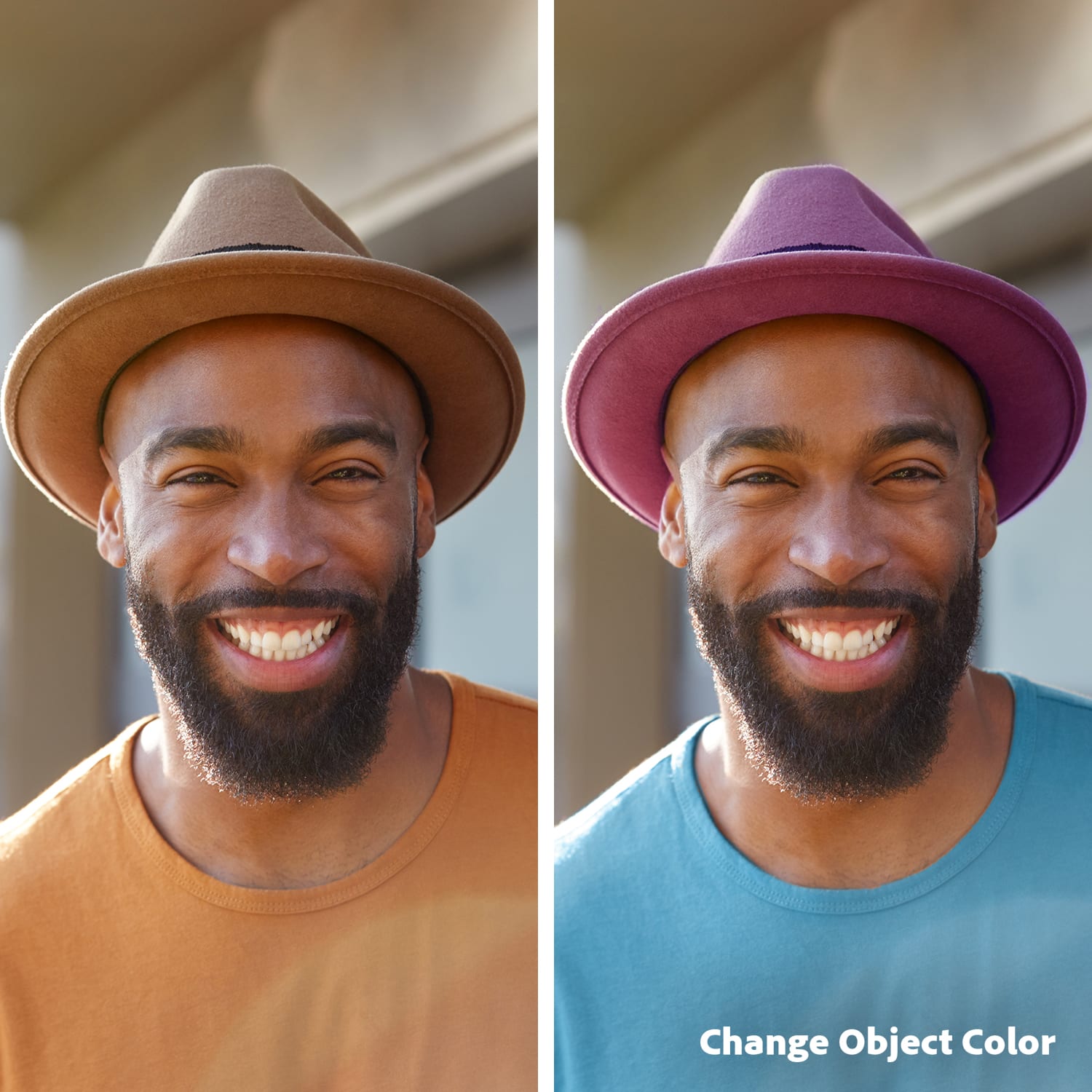
|Posted .This reviewer received promo considerations or sweepstakes entry for writing a review.Adobe recently released a new and improved version of the Adobe Elements collection, something they do every year. In 2025, Photoshop Elements and Premiere Elements will feature an all-new 3-year license and exciting new features not seen in previous versions, including color grading and various AI graphics features. I have been a regular user of Adobe Elements for over a decade; the latest versions I used include Adobe Photoshop Elements 2020 and Premiere Elements 2022. I generally upgrade the software every few years. While I have not yet upgraded to Adobe Lightroom CC (I am still on 6.14) for my RAW processing workflow, Adobe’s Elements line of photo and video editing software have allowed me to get more productive in media production and allowed me to do simple edits while on the road on my laptop. These are not full-fledged software found in the Creative Cloud editions, and you would be right in that assessment. However, for the casual user who wants to post collages, remove ugly objects, use AI effects, or color-grade videos, there is no need for Creative Cloud. That said, the features and specifications of this product line are constantly evolving. Many Creative Cloud features have trickled down to the Elements line of photo and video editors over time. The most significant change I saw in the 2025 version of Adobe Photoshop Elements (from my previous 2020 version) is that they now feature very impressive object removal, object color change, motion effects, replacing sky backgrounds, and the ability to create collages. Considering the upgrades that include AI features, background replacements, and background extensions, this version is the best I have seen. Seriously, there have been so many changes since 2020, and it's hard even to keep up. I have used Photoshop CC occasionally on my friend's computer and it is powerful, but for what I use it for, Adobe Photoshop Elements works fine. As usual, you can use the ‘quick’ guided’ and ‘advanced’ or ‘expert’ menus to edit photographs quickly. The RAW processing is much better than before, and it has updates to all the latest cameras for the latest Adobe Camera RAW. The feature upgrades for Adobe Premiere Elements in 2025 are easier to digest compared to my older 2022 version. There is a lot more leverage of AI in terms of color corrections, artistic effects, AI graphics, and automatic highlight reels. Video editing features are still limited compared to other video editors, but the software is geared towards the casual user. I liked there are now AI highlight reels and AI video collages - features that make video editing a lot more fun. If you plan on using Adobe Premiere Elements to edit your next viral hit video, there is plenty here to help you create that next masterpiece. You have text styling tools, color grading, audio effects, Adobe title templates, and more. Adobe has a new feature with this 2025 version of Adobe Elements, which includes mobile and web-based editing. These features are currently in beta testing, and I cannot access them readily. The new features look very compelling and feature on-the-go editing, among others. The Elements organizer can now geo-code, sort by faces, and share and edit via mobile app, a feature I very much look forward to using in the future. There is so much potential here. There is a lesser need for a Creative Cloud subscription. Still, given that Adobe has moved from a perpetual license to a 3-year license on this new version of Elements 2025, and most users upgrade after 2-3 years, I can see this being a continuing point of frustration for some users who like to own the software. One cannot deny that Adobe has not improved the software; clearly, in the last 5 years they have introduced features that were once on Creative Cloud that have now trickled down to Photoshop Elements and Premiere Elements, and they will continue to improve, it is just that this version of the software will stay in 2025 and not get feature upgrades, and one would need to buy the next iteration to get the latest features. Overall, I feel that the latest Adobe Photoshop and Premiere Elements 2025 version is well worth an upgrade If you haven't upgraded in a few years. This software is worth every penny. If you are just starting and this is a first-time purchase, and if you have never owned this software, I will highly recommend this software. There is plenty here that will help you grow your hobby. I highly suggest that you spend some quality time on the tutorials on Adobe’s website. As a semi-seasoned user, I even had to view the tutorials to figure out how certain features worked.
I would recommend this to a friend Not so great
||Posted .This reviewer received promo considerations or sweepstakes entry for writing a review.Too confusing...and cant get help on how to use it... However price was great!
No, I would not recommend this to a friend- Pros mentioned:Color correction, Ease of use, Object removal
Ideal Software for Social Media Content
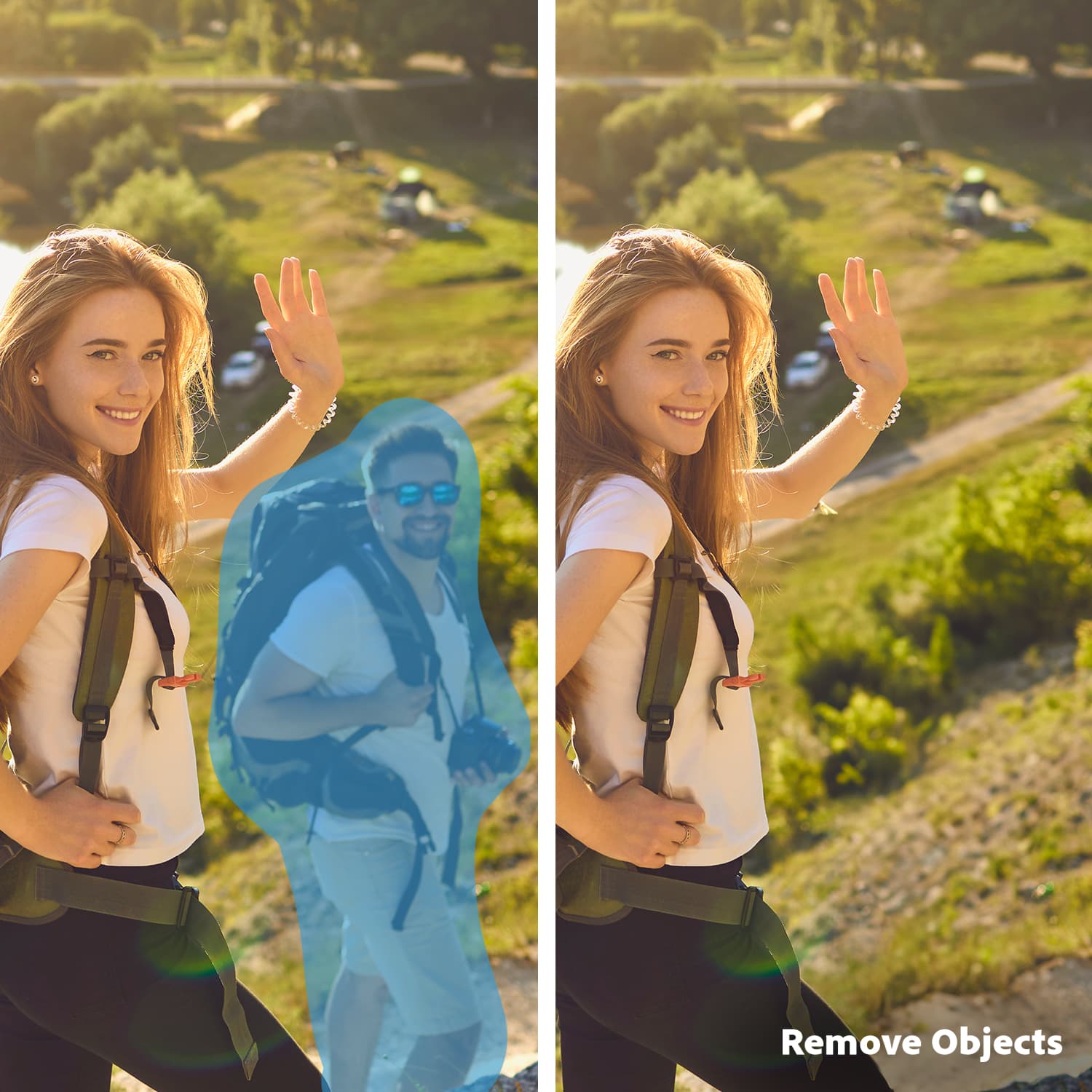
|Posted .This reviewer received promo considerations or sweepstakes entry for writing a review.Whether people like it or not, social media is such a big part of life today. Between all the different platforms, people try to make content better and better. There are many ways to do this. Some use apps on phones. Some use computer programs. I had always heard about Adobe Photoshop and Premiere Elements, but I have never really used them. After trying this software package out, I truly see what all the fuss is about. First off, the software is downloadable. All you really must do is go to the site and put in the redeem code, and the software downloads itself. The effort on your part is very minimal. It will even put two icons on your desktop for easy start up. Click on the icon, and you are on your way. As I said, I had never really used Photoshop or Premiere Elements before. I am comfortable getting around computers and software though. So, for most newcomers to this software package, I believe the learning curve will be quick to get through. The software is very intuitive. Part of the fun is just experimenting with the different capabilities anyway. Besides, the software has many step-by-step guides to help you through the process. The big part of this software is just the amazing bit of power that comes with it. Probably the feature I love most about it is the ability to remove objects/people from pictures. We have all have the occasional phot bomber that has ruined pictures or at least made them less appealing. With Photoshop and Premiere Elements, you can easily remove them from the picture. The process is easy, and it looks great when you are done. Another nice feature is being able to change the color of pretty much anything in the picture. Ever wonder how a shirt or a dress would look in a different color? Now you can see it. And it even keeps the subtle shadowing and texture effects to make it look like it was always that color. It doesn’t look fake. Another nice feature with this software is you can blend images together to form a new image. I always was curious how you could take individual photos of players and make a team photo. With this software, you have the power to do it. You can place certain objects in front of or behind others to give the new image a realistic look and feel. Creating videos is also amazing with this. You can use stock templates from Adobe to help you in your creative process or just make a video the way you like. This software is a powerful tool for making social media content. You can add text to videos, enhance the color in them, and do color correction. This can make an eye-catching difference to your content. In the end, I am so happy with the Adobe Photoshop Elements and Premiere Elements software. I can use it either on Mac or Windows, but it makes amazing content. It has become my go-to editing software for Instagram and Facebook posts. I highly recommend this software for anyone looking to add style and get the most out of their photos and videos.
I would recommend this to a friend Disappointed customer
||Posted . Owned for 1 month when reviewed.This reviewer received promo considerations or sweepstakes entry for writing a review.Terrible. Its a rip off! You can't work with people who do Not speak or Understand English! Its All India based communication. Because of this I was unable to install the program. Best Buy would Not refund me and I lost 179.00. I told Best buy don't carry this product from India! Its a total waste!
No, I would not recommend this to a friendA Photoshop nightmare
||Posted . Owned for 3 weeks when reviewed.This reviewer received promo considerations or sweepstakes entry for writing a review.It was a disastrous experience. The Photoshop Elements which I purchased put Malware on my new MacBook Pro. It took a 3 hour call to AppleCare to have the malware removed from my computer. When the malware was erased it took Photoshop elements with it. Really ugly.
No, I would not recommend this to a friendnot again
||Posted . Owned for 1 month when reviewed.This reviewer received promo considerations or sweepstakes entry for writing a review.Had a terrible time trying to install w/o CD. Got on line failed to install took it back and was told nothing you could do. Finally got on line and was quoted 1.oo fully refundable for help, got no help but was charged 38.oo didn't help and was not refunded.
No, I would not recommend this to a friend- Pros mentioned:Ease of use
It Doesn't Get Any Better Than This!
|Posted .This reviewer received promo considerations or sweepstakes entry for writing a review.I am writing this review for the Adobe Photoshop Elements 25 And Premier Elements 2025 My first experience with Adobe Photoshop was with Photoshop 3, back in the mid-90s. Since then I have been a loyal fan of Adobe, not only with the Photoshop line, but also their other products. A few years ago I decided to lay aside photo editing to pursue other interests. However, I have recently decided to get back into it, and so I was excited about the opportunity to try out Adobe Photoshop Elements 2025 and Premier Elements 2025. The software is available as a download, and from what I have seen, it is available not only from Adobe, but other online retailers as well. The download process was super quick and super easy, as was the installation process. The one question that kept running through my mind was whether it would be possible to install the software on both my laptop and desktop computers. Thankfully the answer is yes, as long as I have the software key, and I don’t have the software open simultaneously on both computers. From what I understand, you are not limited to only two devices, but I’m not sure what the limitations are. But at least you can work on your projects from different locations rather than being bound by having to do everything from only one computer. After downloading, installation was absolutely unremarkable…as typical as it gets, so nothing much to say about that particular subject. And once the software is installed, it’s time to start putting your creativity to work. When you open the program, you are taken to your dashboard. From here you will see the Adobe software you have installed, which with this bundle will be: Organizer, Photo Editor, and Video Editor. You will also see across the top of the dashboard learning suggestions designed to help get you on your way. For example, if you want to learn more about how to remove unwanted objects from a photograph, you hover your mouse above that option, it opens up a box, and then you simply follow the instructions from there. The Organizer helps you to find your photos on your computer. You can choose which individual photos you want, or you can even choose entire folders. Once you have imported your photos, you have the option to rate your photos and videos from one star up to five stars. This comes in handy for when you want to choose photos or videos for a specific project without the hassle of having to sort through all of them again. There are so many things the Organizer can do, and you will find it is a tool you use all the time. You have the ability to assign location tags, date tags, or even add your own tags. It lets you choose the option to show only those photos with people, by location, and even by date. In short, the Organizer does exactly what it is supposed to do…keep your photo and video editing unbelievably organized. On the surface, both Photoshop Elements and Premier Elements appear to be fairly limited in their abilities to create professional looking photos and videos. But as you begin to explore each app you find they give you the ability to utilize a very wide range of tools to do just about anything you can dream up, tools ranging from templates to create a quick photo or video to tools allowing detailed color corrections, restoring old photos, and tons more options. If you want a photo editor or video editor that is easy to use, filled with options to do everything from changing backgrounds, removing objects, adding text, or whatever else you can imagine, Adobe Photoshop Elements and Premier Elements is the app for you. Like I said, it is easy to use, there are step by step instructions, you can keep your media super organized, and you can easily send your creations to your social media pages.
I would recommend this to a friend - Pros mentioned:Ai, Color correction, Ease of use
Great for Photo and Video Editing And So Much More
|Posted .This reviewer received promo considerations or sweepstakes entry for writing a review.This is a great program for beginners and amateurs, because it is so easy to learn to fix/adjust your photos and videos and it does so much more. As a semi-professional on a tight budget and being newer to the detail editing, this is absolutely perfect. You are limited to a 3 year license, when you purchase this product. With AI just really at its beginning stage, I believe anyone would probably want to upgrade to a newer version once your license expires anyway. If you are new to Photoshop, there are guided edits to help you learn and work on your projects. This is great for beginners, giving them step-by-step instructions on fixing/adjusting their photos and videos. You get a number of walkthrough options to help you learn how to use this program and edit your photos and videos to look professional. You can make slideshows, photo collages, print photos, make a photo book and even have your photos on greeting cards. I had a blurry picture that I wanted to bring more into focus and Photoshop helped me do that. If you are not comfortable changing the photos yourself, you can use the “guided” tab. If you are trying to take old photos that you scanned and make them look better, this can definitely help. I had some really old photos that had little black dots from dirt on them when I scanned them. With time and patience it helped me remove all of the marks and made the photo look 100% much better. With AI enhancements you can remove objects from photos completely or even replace that item with something else, so no more photo bombing. You are also able to correct colors and enhance your photos to make them just the way you would like. You don’t like that color shirt in a photo, no problem, change it! Of course there are also the usual things you can do such as crop, resize, brighten and darken photos. You are even able to correct the skin tone, so take off that sunburn you got on vacation and turn it into a good tan and nobody would know the difference. If you have a great picture of your dog inside, but would love to have it look like he is outside, you can combine photos and do that. Just let your imagination run wild. When it comes to videos, there are tools with this product included for you to adjust the white balance to enhance clouds, snow, etc. There is also a new color correction for getting colors more precise to enhance your videos. I really love Photoshop Elements and Premiere. There is so much you can do to enhance your photo and video content. You will be looking like a professional in no time.
I would recommend this to a friend - Pros mentioned:Video editing
Basic tools for small libraries
|Posted .This reviewer received promo considerations or sweepstakes entry for writing a review.I'm not a professional photographer but I know the basics and I have a collection of family pictures that date from the beginnings of digital photography. I use a MacBook Pro (M series) and I must not be the target audience for this. To me it's practically unusable. What I got with this product is a Three year license to use Elements 2025, with both the photo and video editor. After three years it should stop working unless renewed. I checked with a photographer and confirmed that this is in no way related to the professional product line, it’s a separate product developed by a separate division. There are three components to this: the organizer, photo editor and video editor. The organizer I think it's the most lacking of the products: I have a library of about 61K pictures including some videos, all organized in Apple Photos. When first opening the Organizer, it's evident that it's not a modern macOS application: While it is an Apple Silicon application, it feels like it was made decades ago. It was only able to catalog 31K images after two days, as it becomes progressively slower with each image, and most of them are thumbnails created by Photos, so it doesn't really work with Apple Photos. To switch to this product one would have to export all the photos to a separate folder and start again. After two days of waiting I was able to select some pictures to work with the Photoshop Elements Editor. It has some interesting filters but feels very basic and its AI capabilities seem primitive. For example, trying to remove a person from a landscape just smudges incoherent pieces of the surrounding section of the picture, with a blob resembling some landscape where the person was. I was perhaps expecting too much. Other filters like adjusting colors work fine but it's also available on the native applications so not much new. The filters to retouch old scanned pictures works. Premiere is the video editing tool. This is also geared towards beginners. I didn't find it any more capable than iMovie, and just more basic, which can be a good thing for quick work. Overall I cannot recommend this to any macOS user, although I see the value in a Windows user with a moderate library, since there are not a lot of tools provided in Windows and photos are simply organized in folders, which is where Adobe Elements works best.
No, I would not recommend this to a friend - Pros mentioned:Ai, Ease of use
Great Adobe product with new features
|Posted .This reviewer received promo considerations or sweepstakes entry for writing a review.I was very excited to use the new Adobe Photoshop Elements 2025 & Premiere Elements 2025. We love making our own Christmas cards every year, so Adobe applications are critical to having the tools we need to edit the photo or photos we choose to use for our Christmas card. We usually do funny Christmas cards, so it requires more tools than just basic editing to improve a family photo or add our theming for the year. We get super creative. My son also uses Adobe Premiere more heavily for video editing on the videos he creates for his YouTube channel. Overall, I was super excited at the thought of using a 3-year license instead of the monthly subscription I have been using. We normally use the monthly subscription for Adobe Photoshop 2024 & Premiere Pro 2024. We use it annually for the Christmas card, but my son uses it frequently for his video editing. I was surprised that the Elements version varied so much from the versions we usually use. My son was disappointed in the loss of key features that he uses from the Premiere Pro version today. Adobe Photoshop Elements 2025 did offer a different version than our current subscription however it was not as impactful for photo editing as the differences in options we saw for video editing in comparison to Premiere Pro 2024. Setup was easy. We were able to quickly use the code to download the software and connect it with our existing Adobe account. I still love the option of purchasing a 3-year-license, but I need to invest more time in thoroughly understanding the difference between our current monthly subscriptions and the annual licensing options that are available to ensure the product will better meet our needs. We may further explore using a 3-year-license for the pro version instead of using our monthly subscription. This software does provide the basic tools you need for photo and video editing. There is a great AI component and automation component that makes some things easier. The step-by-step guided edits are also helpful with navigating the tool if you are not yet familiar with it. If you do more complex editing or have already been using other versions, I encourage you to keep your needs in mind when considering downgrading to the Elements program. They are great programs, but their effectiveness will really depend on your existing familiarity with other Adobe tools and how in-depth you will be using the products. This is a great introductory product, and I would recommend this for people that are looking for this level of tools. If you need more complex tools I suggest exploring some of Adobe's more complex software. You may want to even consider signing up for a monthly subscription to try out the product to best weigh the options before committing to the cost of a 3 year license.
I would recommend this to a friend