Customer Ratings & Reviews






- Model:
- AWM15R5-A610BLK-PUS
- SKU:
- 6468117
Rating by feature
- Battery Life
Rating 3.9 out of 5 stars
- Speed
Rating 4.7 out of 5 stars
- Display
Rating 4.6 out of 5 stars
Customers are saying
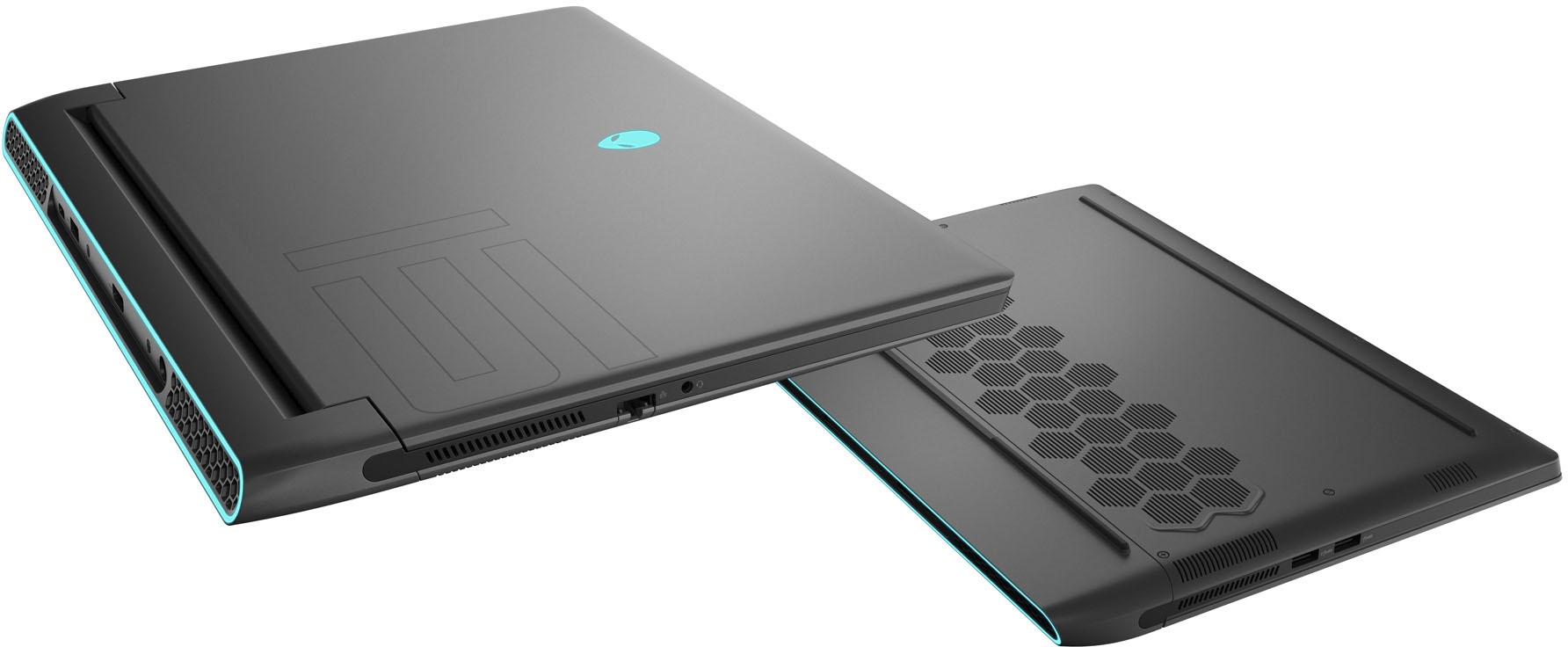
Customers praise the m15 R5 laptop's performance, graphics, and high refresh rate display, highlighting its smooth gameplay and visually stunning experience. However, some users report issues with heat generation, battery life, and occasional fan noise. The price point is also mentioned as a potential drawback for some buyers.
This summary was generated by AI based on customer reviews.
Not worth the money
||Posted . Owned for 2 weeks when reviewed.This reviewer received promo considerations or sweepstakes entry for writing a review.Ran way to hot. Even with a cooling pad it ran 95-100 while gaming. The screen is subpar. Exchanged it for a asus rog zephyrus m16 and im extremely happy now.
No, I would not recommend this to a friendBrand response from YourDellTeam
Posted .Hi Someguy,
We would like to thank you for taking the time to provide us with your feedback. We are sorry to hear that even though you liked the screen of your Alienware m15 gaming laptop you were not happy with it because you of overheating issues and you have ultimately decided to return this system. We will share your comment with our quality team, so future improvements can be made. In the future, we would love the opportunity to help troubleshoot any problems you may be facing.
We are glad to hear that you found the replacement for your initial gaming laptop and that you are happy with it.
If you have any specific questions or need technical support, please don’t hesitate to contact the Dell Support Team at the information provided below.
Best,
Katarina@Dell
Should you need further assistance, you can contact Dell directly with the information below.
Chat or call: https://bit.ly/DellSupportTeam
Phone number to Dell: 1-800-624-9896
Bad security.
||Posted . Owned for 1 month when reviewed.This reviewer received promo considerations or sweepstakes entry for writing a review.Laptop is easy to get hacked into. I've had 10 reinstalls so far and have only had it a month.
No, I would not recommend this to a friendBrand response from YourDellTeam
Posted .Hey There JuanitaL,
Thank you for taking the time to leave us your review. We are sorry to hear that you are experiencing issues with your Alienware M15. It's important for us to hear about inconsistencies in our products for consideration of future development. If you continue to experience issues, please reach out to Dell Support directly by using the information provided below.
Best Regards,
Summer@Dell
Should you need further assistance; you can contact Dell directly with the information below.
Chat or call: https://bit.ly/DellSupportTeam
Phone number to Dell: 1-800-624-9896.
Fast comeputer lacking the simpler things
||Posted . Owned for 1 week when reviewed.This reviewer received promo considerations or sweepstakes entry for writing a review.This laptop is nice but has a few things that are so simple i feel like they should be fixed. Issue 1 is the sound this thing sounds terrible it sounds like im playing music underwater inside a fridge or something. Like for 2k why not fix something as simple and important as the sound quality.
No, I would not recommend this to a friendBrand response from YourDellTeam
Posted .Hello Changes,
We want to thank you for taking the time to leave a review of your Alienware M15 laptop. We are sorry to hear that you are experiencing an issue with your audio being muffled. That is not the type of feedback we like to hear from our customers. Below I have provided troubleshooting steps to help resolve your issue.
1. Click Start and select Settings (gear icon).
2. Click Update & Security and select Troubleshoot.
3. Click Recording Audio and then click Run the troubleshooter.
4. Follow the on-screen instructions to complete the troubleshooting process.
This link can also help when identifying your audio issues: http://bit.ly/3gnBhT3
If you require further assistance, please use the information below to contact Dell Support at your earliest convenience.
Should you need further assistance; we recommend that you contact Dell directly with the information below.
Chat or call: https://bit.ly/DellSupportTeam
Phone number to Dell: 1-800-624-9896.
Best,
Summer@Dell
Overheating and performance issues galore
||Posted . Owned for 1 month when reviewed.This reviewer received promo considerations or sweepstakes entry for writing a review.This thing is awful. Please do yourself a favor and buy something else. The specs and low price point make it tempting but the overheating issues, crap battery, and constant crashing makes me wish I had gone with one of the million other laptops at this price point.
No, I would not recommend this to a friendBrand response from YourDellTeam
Posted .Dear Mason,
Thank you very much for your valued feedback. We are sorry to hear that you are not too happy with your Alienware m15 R5 gaming laptop because it is overheating, performing slowly, and crashing. This is certainly not the experience that we like to hear from our customers. We appreciate your feedback and will use it to help improve our current and future products.
We recommend making sure drivers for this product are updated. I have provided a link to the drivers and downloads page where you can check for any applicable updates.
Drivers and Downloads Page: https://dell.to/3aRewIX
Below I have provided troubleshooting tips with the full article that can help resolve the overheating issue:
1. Make sure the system is in a well-ventilated area.
2. Use laptops on flat surfaces to improve airflow. Hard table tops are recommended and avoid using any type of cloth or any other soft material under the laptop.
3. For desktop systems make sure there is enough clearance around the system to allow the air to flow. If the system is in an enclosure try to move it to a more ventilated area for testing.
4. Check that the air vents are clean and that there is nothing obstructing them.
5. Update your system BIOS to the latest available in Dell Support Site.
6. You can reset your BIOS settings to undo any changes that could be causing the system to overheat.
7. Disable NVIDIA G SYNC and run a stress test using SupportAssist.
8. Navigate to the Thermal Controls in the Alienware Command Center, which is found under the Fusion tab. There you can adjust the thermal control of system fans and change the status of active venting. This link is for the Alienware Command Center Quick Guide, where you can find a video to explain how to use the Manual Mode for the Thermal Controls: https://dell.to/3nZtYDm.
Alienware System Overheats or Shuts Down: https://dell.to/3nmRfiZ
I have also included steps to help improve the battery performance of your laptop:
1. On the taskbar’s notification area, right-click the Battery icon.
2. On the options list, click Power Options.
3. Select a power plan on the battery meter, such as Power Saver or Balanced. Windows 10 has a built-in 'Battery Saver' mode that can be activated to extend your system's battery life. The Battery Saver mode will monitor and limit background activity and other features such as push notifications. You do have the option to enable or disable this mode within settings or within advanced Battery Saver settings, you can customize the mode to best suit your needs.
a) Click on the Action Center icon in the taskbar and select the tile for Battery Saver.
b) If running Cortana then type Battery Saver into the search box and select from the results.
Within the Battery Saver settings page, you will be able to turn on and off the feature and customize the feature to best meet your needs.
c) Turn Battery Saver On or Off.
d) Additional settings available via the Battery use and Battery saver settings links.
e) Battery use shows further info on apps and their power usage.
f) Battery Saver Settings screen allows you to customize further Battery Saver feature.
How to Improve the Performance of a Dell Laptop Battery: http://dell.to/2vfXWf4
For the issues with crashing, I have provided a link below to help troubleshoot and resolve this issue.
Resolutions
1. Run a Computer Diagnostic. To determine if your computer is experiencing a hardware problem, run the Dell Preboot System Assessment (PSA) Diagnostics. For information on how to run Diagnostics, and to determine the issue, refer to Dell Knowledge Base Article: http://dell.to/2iaiujA
2. Check Safe Mode for Symptoms. To boot into safe mode, please follow the instructions below:
a) Start the computer.
b) Tap 'F8' on the keyboard immediately and every one second until the Dell logo screen disappears. From there you will see the Windows Advanced Options Menu on the screen. (If the Windows Advanced Options Menu does not appear, restart the system and try again.)
c) Select Safe mode with Networking and press Enter.
d) Log on as the administrator or as a user with administrative access.
e) Open applications and test the computer in safe mode. If the symptoms exist in safe mode, please continue the troubleshooting steps in this article. If the symptoms do not exist in safe mode, the issue is likely related to a driver or software and you may wish to complete step 3 to see if you are able to resolve the lockups or freezing.
3. Check for Malware. Malware (Virus, Spyware, etc.) can definitely cause a Windows system to lock up or appear to hang. To check for malware on your system and to ensure that your computer is up to date on security software, visit Dell Knowledge Base Article: http://dell.to/2wWP1zI
The computer restarts or shuts down intermittently, locks up, stops responding or an error occurs: https://dell.to/3GX6BVf
If the issues with your computer are still not resolved after utilizing the troubleshooting options above, please contact the Dell Support Team at 1-800-624-9896 for further guidance.
Best,
Katarina@Dell
Should you need further assistance, you can contact Dell directly with the information below.
Chat or call: https://bit.ly/DellSupportTeam
Phone number to Dell: 1-800-624-9896
Broken at 14th night
||Posted . Owned for 1 week when reviewed.This reviewer received promo considerations or sweepstakes entry for writing a review.East to break. loose adhesin at 3 days . Mouse don’t work at 14 days . Return in 14 day, but you found the problem and need to be second days to bring it to return, that is the 15th . GG
No, I would not recommend this to a friendBrand response from YourDellTeam
Posted .Hi Nonon,
We would like to thank you for taking the time to provide us with your feedback. We are sorry to hear about the issues you are having with your Alienware m15 R5 gaming laptop because its touchpad does not work. We recommend making sure you have downloaded the latest system update. I have included a link to the Drivers and Downloads page below where you can check for any applicable updates.
Drivers and Downloads Page: https://dell.to/3aRewIX
If the issue with your computer is still not resolved after utilizing the troubleshooting options above, please contact the Dell Support Team at 1-800-624-9896 for further guidance.
Best,
Katarina@Dell
Should you need further assistance, you can contact Dell directly with the information below.
Chat or call: https://bit.ly/DellSupportTeam
Phone number to Dell 1-800-624-9896
Bad lap top no customer service
||Posted . Owned for 1 month when reviewed.This reviewer received promo considerations or sweepstakes entry for writing a review.Purchased bran new 7/15/2022 now the GPU is busted … too late for an exchange and going though alien ware for warranty seems impossible. The name is just a hype… they build garbage
No, I would not recommend this to a friendBrand response from YourDellTeam
Posted .Hello Jesse,
We would like to thank you for taking the time to provide us with your feedback. We apologize for the issues you have encountered with your new Alienware m15 R5 gaming laptop. This is certainly not the experience that we like to hear from our customers. We appreciate your feedback and will use it to help improve our current and future products.
Please take a moment to contact Dell Support Team at the information provided below so we can help you to resolve this issue to your satisfaction.
Best,
Katarina@Dell
Should you need further assistance, you can contact Dell directly with the information below.
Chat or call: https://bit.ly/DellSupportTeam
Phone number to Dell: 1-800-624-9896
Alienware isn’t a good company in general
||Posted . Owned for 3 weeks when reviewed.This reviewer received promo considerations or sweepstakes entry for writing a review.Alienware isn’t a good computer at all I’d stay away from them. Unless it’s a model that has a lot of notoriety I wouldn’t but it.
No, I would not recommend this to a friendBrand response from YourDellTeam
Posted .Hello Joseph,
We would like to thank you for taking the time to provide us with your feedback. We are sorry to hear that you are not too happy with Alienware brand products and with your Alienware m15 R5 gaming laptop. With a little more information from you, we would like to help you to resolve the issues you may be experiencing with your computer.
Please take a moment to call Dell Support Team at the information provided below at your earliest convenience so we can help you to resolve these issues.
Best,
Katarina@Dell
Should you need further assistance, you can contact Dell directly with the information below.
Chat or call: https://bit.ly/DellSupportTeam
Phone number to Dell: 1-800-624-9896
Needs a way better charger
||Posted . Owned for 7 months when reviewed.This reviewer received promo considerations or sweepstakes entry for writing a review.Charger was too loose. Other than that the laptop itself was good I guess.
No, I would not recommend this to a friendBrand response from YourDellTeam
Posted .Dear Maddy90,
We appreciate you taking the time to leave us your review. We are sorry to hear about the trouble with your charger you have come across because it was too loose to fit your Alienware m15 R5 gaming laptop. This is certainly not the experience that we like to hear from our customers. We appreciate your feedback and will use it to help improve our current and future products.
Please take a moment to contact Dell Support Team at the information provided below at your earliest convenience so we can help you to resolve this issue.
Best,
Katarina@Dell
Should you need further assistance, you can contact Dell directly with the information below.
Chat or call: https://bit.ly/DellSupportTeam
Phone number to Dell: 1-800-624-9896
- Pros mentioned:Graphics
Great computer
Posted .This reviewer received promo considerations or sweepstakes entry for writing a review.Great computer, very well done with graphics and processing speed.
I would recommend this to a friend Alienware is my go to
Posted .This reviewer received promo considerations or sweepstakes entry for writing a review.Have had this laptop for about 3 years and it's given me the best gaming experience I've ever had, I use it for school as well so it's an all in one package
I would recommend this to a friend- Pros mentioned:SpeedCons mentioned:Heat
Best gaming laptop I've had
Posted .This reviewer received promo considerations or sweepstakes entry for writing a review.So far this has been the best gaming laptop I have had. I've owned two MSI gaming laptops with 9th and 10th gen Intel processors previous to this laptop and this one blows them out of the water. This one may run hot, but I have yet to see it throttle the CPU. I have no issue playing the new Battlefield and Halo on my travels. The only issue I have with the laptop is the new Windows OS.
I would recommend this to a friend Best laptop for gaming
Posted .This reviewer received promo considerations or sweepstakes entry for writing a review.Honestly, this is incredible. There are so many positive things to say about this device. First, it's what I call, an anti-lag laptop. You can play any game with multiple things downloaded on your device without having to deal with massive lag. Second, the air cooling and fans are just, amazing. You could play for however long you'd like, and you won't need to worry about your computer "blowing up." Not to mention that there is a button to toggle cooling, which is just outstanding. Think of it as a whole gaming setup piled up into one laptop, but easier to handle.
I would recommend this to a friend- Cons mentioned:Fan noise
Your gaming child will love this laptop!
Posted .This reviewer received promo considerations or sweepstakes entry for writing a review.Good gaming laptop with good specs! Fan is a little noisy but overall powerful and fast processing for the price.
I would recommend this to a friend - Pros mentioned:Graphics
Cuda core not as advertised
Posted .This reviewer received promo considerations or sweepstakes entry for writing a review.Shouldve read the first reveiw but is what it is. Not to happy, has the potential to out perform all gaming laptops but instead they cut back majorly on actual performance limiting the gpu. But still out performs asus m15 with the the 3080 that pulled 20mh out of the box as this AW with 3070 pulls 25mh out of the box on raven , My issue is why put a big gpu in if your just gonna restrict it amd waste my time amd money. Pathetic you cant pay 2k$ for them to limit what your buying with no way of clocking it wjere it needs to be. This should be pulling 65mh as that 3080 should pull 90mh. If your gonna limit it so drasticly why even put a 30 series in it. Just stick with the 2080ti. Idk what yall plan do when the 40 series come out and yall destroy the performance on it as well
No, I would not recommend this to a friendBrand response from YourDellTeam
Posted .Hello Hastings8,
Thank you for taking the time to leave a review and for your feedback. We sincerely apologize for the issues you are experiencing with your Alienware M15 Ryzen Edition R5 Gaming Laptop. Your feedback about discrepancies in our products helps us improve with future developments. Below I have provided troubleshooting instructions with the full article that can help resolve gaming performance issues.
Here are the steps to help resolve your issue:
1. Keep the drivers updated for your graphics card/chip and processor.
2. Adjust your settings in Windows.
3. Disable Windows visual effects.
•In the search bar, type "performance" and select Adjust the appearance and performance of Windows from the results.
•In the Visual Effects tab, select Adjust for best performance. Alternately, select Custom and choose which effects you want to disable.
•Click Apply.
4. Adjust your Settings In-Game.
You can read the full article on solving gaming performance issues here: https://dell.to/3tANyt6
If you still experience this problem after you have finished troubleshooting your system, please reach out to our support team here: 1-800-624-9896.
If you require further assistance, you can contact Dell directly with the information below.
Chat or call: https://bit.ly/DellSupportTeam
Phone number to Dell 1-800-624-9896
Best,
Ashley@Dell
Not like the Alienware's of the past
Posted .This reviewer received promo considerations or sweepstakes entry for writing a review.Alienware fan. Video glitches require a reboot. The membrane-type keyboard is wearing out.
No, I would not recommend this to a friendM15 r5
Posted .This reviewer received promo considerations or sweepstakes entry for writing a review.Fantastic computer at a great price. A bit flimsy on the lid. It is heavy for a 15 inch if you are planning to carry daily. Has a very large power power supply with no wrap for cords.
I would recommend this to a friend"Great on paper, in pratice...Meh"
Posted .This reviewer received promo considerations or sweepstakes entry for writing a review.Bought this laptop in early December on sale. After tweaking and trying to update I am still getting pretty lackluster performance with a Time Spy score of around 9900 - which for a 130W GPU is a bit underwhelming at 1080P. I have seen scores with this system nearing the 11s, but I am not seeing that. I think that is a great system on paper, but I am not sure it is configured correctly.
No, I would not recommend this to a friendBrand response from YourDellTeam
Posted .Hi Magi31.
We appreciate you taking the time to leave us your valued feedback. We apologize for the trouble you are having with the gaming performance of your Alienware M15 R5. I have provided a link to an article to help maximize your gaming performance.
Maximizing your gaming performance: https://dell.to/3k7j7qK
After utilizing the troubleshooting options provided, if the problem is not resolved, please contact our support team here: https:.//bit.ly/DellSupportTeam
Should you require further assistance, you can contact Dell directly with the information below.
Chat or call: https://bit.ly/DellSupportTeam
Phone number to Dell 1-800-624-9896
Best,
Ashley@Dell
Cpu errors over and over
Posted .This reviewer received promo considerations or sweepstakes entry for writing a review.Horrible laptop, cpu error on first one after 2 days of use… returned it and the replacement had the same error out of the box (red and blue flashing)
No, I would not recommend this to a friendBrand response from YourDellTeam
Posted .Hi Bob1031,
We appreciate your valued feedback. We apologize for the trouble you have had with your Alienware M15 R5. To help with the CPU error, I have provided a link to the Service Manual, where you can find the system diagnostic light codes.
Service Manual: https://dell.to/3AUH0dl
After utilizing the troubleshooting options provided, if the problem persists, please reach out to our support team here at your earliest convenience: https://bit.ly/DellSupportTeam.
Best,
Ashley@Dell
Should you need further assistance, you can contact Dell directly with the information below.
Chat or call: https://bit.ly/DellSupportTeam
Phone number to Dell 1-800-624-9896