Customer Ratings & Reviews

- Model:
- B09BZZ3MM7
- SKU:
- 6522377
Rating by feature
- Value
Rating 4.6 out of 5 stars
- Quality
Rating 4.7 out of 5 stars
- Ease of Use
Rating 4.7 out of 5 stars
Customers are saying
Customers consistently note the Fire TV Cube's overall performance, ease of use, and speed as significant advantages, making it a substantial upgrade over previous streaming devices. Many appreciate the voice control functionality and flawless streaming capabilities. While the device is praised for its features, some customers have expressed concerns regarding the price and remote control durability.
This summary was generated by AI based on customer reviews.
Amazing
||Posted . Owned for 1 month when reviewed.This reviewer received promo considerations or sweepstakes entry for writing a review.I've found that I like the Fire Cube better than the Roku. It has better navigation and is more reliable. I especially like the upgrades on the third generation cube.
I would recommend this to a friendTakes control of my TV source.
||Posted . Owned for 1 year when reviewed.This reviewer received promo considerations or sweepstakes entry for writing a review.Keeps taking control of my TV source when I don't want it to. I have it connected on an on off switch so I can turn it off when I don't use it so that it doesn't randomly take control. I know I can disable CEC but when I want to use it, I want it to take control of the video source.
No, I would not recommend this to a friendBrand response from Amazon Devices Customer Support
Posted .Hello Brad! Thank you so much for your feedback and review of your experience with your Fire TV Cube. I can see how your device taking control of your source when you don't want it to can be frustrating. You are correct that you can typically switch off access to your Fire TV Cube from being able to do this through the CEC function of your TV, but as you stated this would prevent you from being able to selectively take control without having to go back into the HDMI setting of your TV. One thing that could assist, is that this device has an HDMI pass through feature that allows you to plug in another source directly through it so that you could potentially not have to change sources for that device. This would limit you to only being able to do this with one additional device unless you were to get an HDMI hub but if you are using only one other device, this may be your best solution. I hope this helps some and that you are able to enjoy everything else about your Fire TV Cube! Thanks again for your feedback and time and I hope you have a great day!

Bad product
||Posted . Owned for 3 weeks when reviewed.This reviewer received promo considerations or sweepstakes entry for writing a review.Not too satisfactory with this product because Alexa don’t play music when I ask for a song said yes Amazon music but it won’t play
No, I would not recommend this to a friendBrand response from Amazon Devices Customer Support
Posted .Hello Dani! I'm sorry to hear about the issues you are facing playing music on the Fire TV Cube. First, make sure the microphone on the Fire TV Cube is on. If it's on and Alexa still doesn't play music from Amazon music, unplug your Fire TV Cube for 10 seconds and plug it back in. Make sure the Fire TV Cube has the most up to date software. If these don't work, make sure you have your music streaming services added in your Alexa app. If you're still facing issues with this, please call Amazon Customer Service for additional support. You can reach them at 1-888-280-4331 and they are available 24/7. Hope this helps and have a great day!
Alexa not responding
||Posted .This reviewer received promo considerations or sweepstakes entry for writing a review.This product is not working with samsung neo qled 8k. I have connected through hdmi cable. My old fire stick was better than this expensive fire tv cube
No, I would not recommend this to a friendBrand response from Amazon Devices Customer Support
Posted .Hello Rakesh. Thank you for your review. I'm sorry to hear the Fire TV Cube 3rd Gen isn't working with your Samsung Neo QLED 8K TV. It's especially frustrating since your previous Fire Stick worked well, and I understand your disappointment. Some quick troubleshooting steps that might help: try using a different HDMI port on your TV, ensure you're using the HDMI cable that came with the Cube, check if both devices have the latest software updates, and make sure the Cube's power adapter is plugged directly into a wall outlet, not a surge protector. If you've already tried these steps, you may want to verify your TV's settings are configured for optimal compatibility with external devices. I hope that helps, and have a great day.
Fire TV Frustrations
||Posted . Owned for 3 weeks when reviewed.This reviewer received promo considerations or sweepstakes entry for writing a review.This fire TV will not work with a Klipsch soundbar
No, I would not recommend this to a friendBrand response from Amazon Devices Customer Support
Posted .Hi ChuckS,
Thank you for sharing your feedback about the Fire TV Cube. I'm sorry to hear you're experiencing compatibility issues with your Klipsch soundbar—that's definitely frustrating when you expect your devices to work together seamlessly.
The Fire TV Cube should be compatible with most soundbars, including Klipsch models, through HDMI-ARC/eARC or optical audio connections. Here are some troubleshooting steps that may help resolve the connection issue:
Check HDMI-ARC connection: Ensure the Fire TV Cube is connected to your TV's HDMI-ARC port, and that your Klipsch soundbar is also connected to the TV's HDMI-ARC port (or optical audio output)
Enable HDMI-CEC: Go to Settings > Display & Sounds > Audio > HDMI-CEC Device Control and make sure it's enabled on both your TV and Fire TV Cube
Adjust audio settings: Go to Settings > Display & Sounds > Audio and try different audio output options (Dolby Digital, Stereo, or Auto)
Update firmware: Ensure both your Fire TV Cube and Klipsch soundbar have the latest firmware updates installed
Try optical connection: If HDMI-ARC isn't working, connect your soundbar to the TV via optical cable instead
If these steps don't resolve the compatibility issue, I'd recommend contacting our support team at 1-888-280-4331 or through the Amazon app. They can help troubleshoot further and may have specific guidance for your Klipsch soundbar model. You might also want to reach out to Klipsch support to ensure your soundbar is configured correctly for external devices.
Your feedback about this compatibility challenge is valuable and helps us identify where additional support or documentation may be needed.
NO KIDS PROFILE!
||Posted . Owned for less than 1 week when reviewed.This reviewer received promo considerations or sweepstakes entry for writing a review.Bought this to upgrade our previous Fire Stick. However for whatever reason it DOES NOT support kids profiles. Will be returning.
No, I would not recommend this to a friendAmazon fire cube
||Posted . Owned for 1 month when reviewed.This reviewer received promo considerations or sweepstakes entry for writing a review.Fire cube is a great idea and we know how it works because we have another one. This one heats up and shuts off! In the middle of a good show or movie and you can’t get it back!
No, I would not recommend this to a friendFire cube
||Posted . Owned for 2 weeks when reviewed.This reviewer received promo considerations or sweepstakes entry for writing a review.You can download different apps and get lots of free tv channels. Same as firestick but more $$$$$ stick with firestick.
No, I would not recommend this to a friendBrand response from Amazon Devices Customer Support
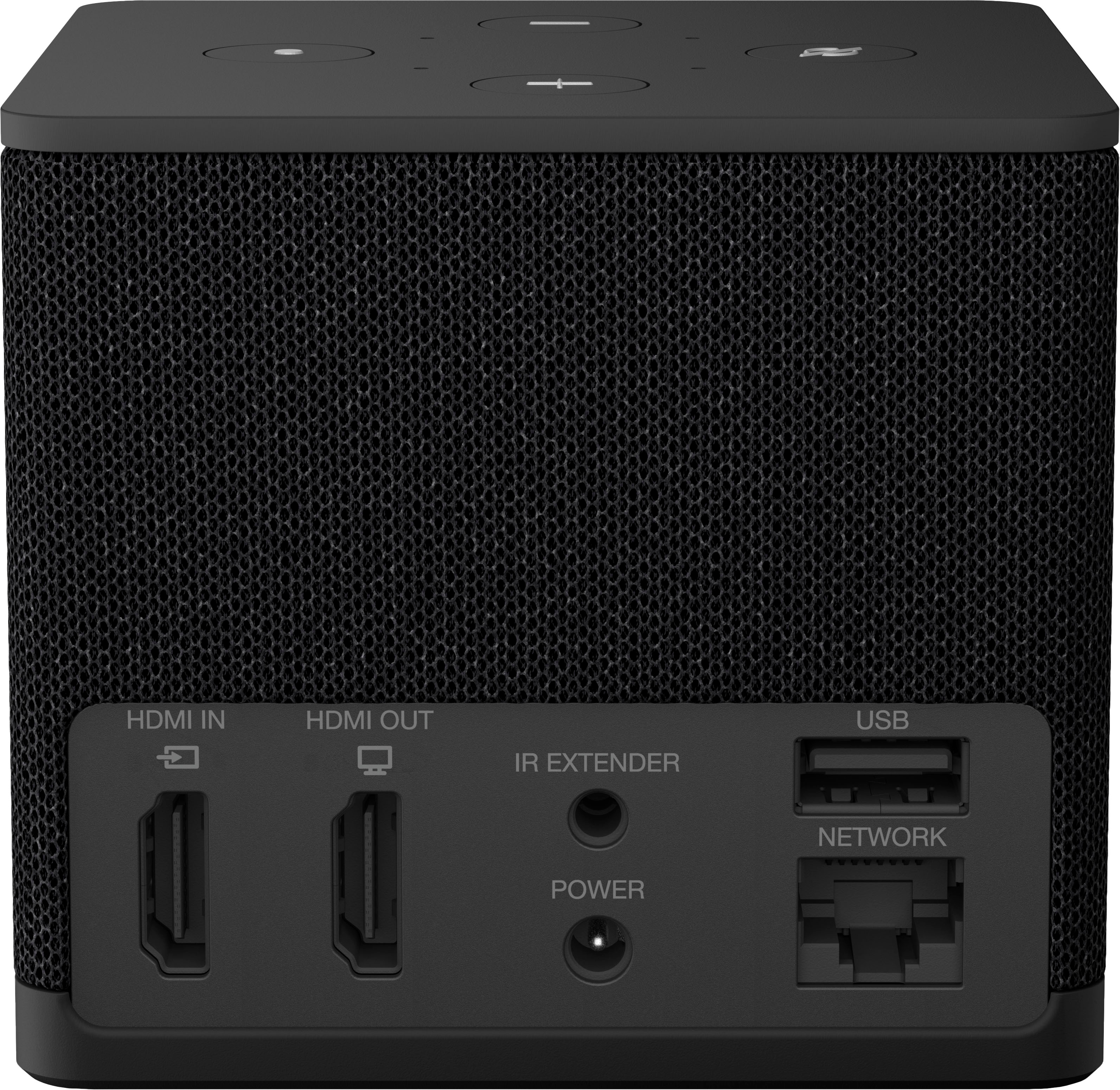
Posted .Hello, JaimeS. Thank you for taking the time to leave a review on the Fire TV Cube. The Fire TV Cube features hands-free Alexa with a built-in mic and speakers - control your compatible TV, soundbar, and receivers with your voice, even from across the room. The Fire TV Cube also features additional ports: an HDMI port so you can connect and control other entertainment devices with just your voice, USB-A 2.0 for added storage, and an Ethernet port 10/100 Mbps for wired access. If you have any questions about the device or need assistance, I recommend reaching out to Amazon Customer Support at 1-888-280-4331. Thank you for providing feedback; have a wonderful day!
Ray
||Posted . Owned for 1 month when reviewed.This reviewer received promo considerations or sweepstakes entry for writing a review.great upgrade it now switches form fire cube to cable seamless, and has beater audio with amazon studio speaker
I would recommend this to a friendNo more cable.
||Posted . Owned for 1 month when reviewed.This reviewer received promo considerations or sweepstakes entry for writing a review.Cut ties to cable. Best decision we could make. More channels to view that we are interested in watching.
I would recommend this to a friendAwsome
||Posted . Owned for 3 weeks when reviewed.This reviewer received promo considerations or sweepstakes entry for writing a review.State of the art equipment, love the look the look. I only wish the company could make a backlight remote
I would recommend this to a friendNo satisfy but could be better.
||Posted . Owned for 2 months when reviewed.This reviewer received promo considerations or sweepstakes entry for writing a review.It keeps blacking out during Netflix program and Dolby vision keeps appearing on screen after intermittent issue.
No, I would not recommend this to a friendBrand response from Amazon Devices Customer Support
Posted .Hello Gojojo. I am so sorry you are having issues with your Fire TV Cube. What you are describing sounds like it is an issue with the Dolby Vision feature on your television set and input rather than the Fire TV Cube itself. I would recommend trying to plug it into a different input to see if that fixes it or try a different HDMI cable. You may also want to ensure that the cable is plugged in firmly to your HDMI ports. If this does not help solve your problem, you can try contacting Amazon Customer Support at 888.280.4331 to troubleshoot further. I hope this helps improve your experience and that you have a great day!
Disappointed
||Posted . Owned for 1.5 years when reviewed.This reviewer received promo considerations or sweepstakes entry for writing a review.Doesn't work like we were told it would. Was not worth the money.
No, I would not recommend this to a friendBrand response from Amazon Devices Customer Support
Posted .Thank you for your feedback CourtneyG.
No
||Posted . Owned for 1 month when reviewed.This reviewer received promo considerations or sweepstakes entry for writing a review.I feel it’s a waste of money. Highly do not recommend!
No, I would not recommend this to a friendGreat new fire box
||Posted . Owned for 1 month when reviewed.This reviewer received promo considerations or sweepstakes entry for writing a review.Very impressed with the new processor. Overall a great product..
I would recommend this to a friendAmazon CUBE has inherent dysfunctions!
||Posted . Owned for less than 1 week when reviewed.This reviewer received promo considerations or sweepstakes entry for writing a review.Bought two CUBES; one for our new 83" LG OLED and another to replace the Firestick on our Sony 65" TV. Both CUBES would shut off continuously and after 2 attempts by Geek Squad, it was decided to revert to the Firesticks, which resolved the issues.
No, I would not recommend this to a friendWonderful
||Posted . Owned for 1 week when reviewed.This reviewer received promo considerations or sweepstakes entry for writing a review.Nice and upgraded love the size and communications
I would recommend this to a friendRemote doesn't work
||Posted . Owned for 1 month when reviewed.This reviewer received promo considerations or sweepstakes entry for writing a review.Need to return this item. The cube works great but the remote input works about 20% of the time.
No, I would not recommend this to a friendBuyer Beware
||Posted . Owned for 1 month when reviewed.This reviewer received promo considerations or sweepstakes entry for writing a review.Got this hoping it would perform better than my outdated firestick. Its actually worse. ALL streaming apps continuously freeze. The only one that works good is the Prime video app, which seems very suspect to me. Just buy a roku. much better
No, I would not recommend this to a friendBrand response from Amazon Devices Customer Support
Posted .Thank you for your feedback Wrong WayFPV. I'm sorry to hear you are having issues with your Amazon Fire TV Cube 3rd gen. Let's try some basic troubleshooting to help resolve the issue. First, let's restart your Fire TV Cube.
Use the power adapter and connection equipment that came with your device.
Verify that your TV is on and set to the correct HDMI input channel.
Make sure that connected devices (A/V receiver or soundbar) are turned on.
Confirm that your TV is HDCP-compliant. Review the video-cable section of the TV owner's manual.
Be sure that the HDMI cable is fully connected to both your TV and Fire TV Cube.
Use a High-Speed HDMI cable.
Try replacing your HDMI cable or HDMI hub with a new one.
Check your TV for firmware updates. If this information does not help, you can reach Amazon Customer service 24/7 for assistance. You can reach them at 1-888-280-4331. I hope this information helps, thank you!
Amazon - Fire TV Cube
||Posted . Owned for 1 week when reviewed.This reviewer received promo considerations or sweepstakes entry for writing a review.I was unable to connect the fire cube to my wifi. I had to use an ethernet cable.
No, I would not recommend this to a friendBrand response from Amazon Devices Customer Support
Posted .Hello ArnoldB,
I'm sorry for your experience with the Fire TV Cube, thank you for your feedback. Here are some things you can do to fix issues with Wi-Fi connections with your device: Select Settings > Network from the Fire TV menu, then Play/Pause on your remote, and follow the recommended steps.
Use the included features to help with troubleshooting:
-Wi-Fi switch: Use the switch to turn off/on the internet connection to your Fire TV device.
-Reboot Fire TV: Use this option to restart your Fire TV device from the Wi-Fi troubleshooting page on the device.
If the connection issue persists try the following:
-Use the connectors and cables that came with your Fire TV device.
-Confirm that you are using a Wi-Fi password and not an Amazon account password.
-Store your Fire TV out of enclosed areas such as closets that block your Wi-Fi signal.
-Restart your Fire TV device and any home network devices like modems or routers.
I hope that has helped! Have a great day!