Customer Ratings & Reviews
- Model:
- MXQT2LL/A
- |
- SKU:
- 10539822
Customer reviews
Rating 4.7 out of 5 stars with 4359 reviews
(4,359 customer reviews)Rating by feature
- Value4.3
Rating 4.3 out of 5 stars
- Quality4.8
Rating 4.8 out of 5 stars
- Ease of Use4.8
Rating 4.8 out of 5 stars
Customers are saying
Customers highly value the Magic Keyboard for iPad Air 11" (M2)'s overall performance and ease of use. The trackpad and connectivity also received positive feedback. Some customers noted the added weight and the inability to rotate to portrait view as drawbacks. Others wished for a designated pencil storage and more viewing angles.
This summary was generated by AI based on customer reviews.
- Pros mentioned:Design, Trackpad performanceCons mentioned:Weight
Rated 5 out of 5 stars
Great Companion to iPad
||Posted . Owned for 6 months when reviewed.This reviewer received promo considerations or sweepstakes entry for writing a review.This is a sharp looking keyboard. The iPad snaps on easily and the tilt holds into place very well. Almost too well, in fact. You need a good amount of effort to change the angle of the iPad. I would love for it to be able to go a little flatter - I believe the max angle is 130 degrees which is good for any desk but doesn’t give you that “canvas” feel if you want to draw using the Apple Pencil. I was surprised to find that the trackpad works great - just as you’d expect with a MacBook. Key travel is amazing - similar to the old MacBook Airs - and a huge step up from the butterfly switches Apple had been using on some of the more recent MacBooks. In order to not have the iPad with keyboard be top heavy, they had to make it be very weighty. Additionally, the keyboard is flush on both sides of the iPad folded up, so the additional width makes it fatter than a MacBook Air. So if you’re looking to travel lighter or thinner than a MacBook Air, this keyboard might not be for you. But it’s absolutely a great addition that gives you much more functionality than just an iPad or MacBook.
This review is from Apple - Magic Keyboard for iPad Air 11" (M2) - Black
I would recommend this to a friend - Pros mentioned:Connectivity, Design, Ease of use
Rated 5 out of 5 stars
Sleek, stylish, functional, and protective.
||Posted . Owned for less than 1 week when reviewed.This reviewer received promo considerations or sweepstakes entry for writing a review.I often need to switch between using a laptop and a tablet for my work. I have a convertible HP laptop, but I find it is too heavy and awkward to handle in tablet mode, so I decided to invest in this keyboard to use my iPad Pro as an alternative to my laptop that meets my needs. This product is sleek, easy to use, and adds an excellent level of protection and functionality to my iPad Pro. While the keyboard really is not necessary to enjoy the iPad Pro, for me I appreciate that if I truly only need the tablet I can disconnect from the keyboard or if I need to type up something quickly I just reattach and go about my work. This is an expensive product, but I imagine if you are wanting to buy an iPad Pro you are probably okay with paying a premium for quality and brand-name recognition. I recommend purchasing an open-box product. You will save some money and it will function well. That's what I did and I have no regrets.
This review is from Apple - Magic Keyboard for iPad Air 11" (M2) - Black
I would recommend this to a friend - Pros mentioned:Connectivity, Trackpad performanceCons mentioned:Weight
Rated 4 out of 5 stars
Preferred Brydge Pro+ to Apple Magic Keyboard.
||Posted . Owned for 9 months when reviewed.This reviewer received promo considerations or sweepstakes entry for writing a review.I bought both the Apple Magic Keyboard and the Brydge Pro+ for my new M1 11” iPad Pro. I took the Magic Keyboard back and kept the Brydge Pro+. I have had Brydge keyboards since my iPad Air and iPad Pro 10.7”. The Brydge is Bluetooth and has to be recharged every few month's but once paired, works as soon as it’s opened. The Magic Keyboard pairs automatically and charges from the iPad. I liked that I could easily ‘Swipe Up” and remove my iPad from the Apple Magic. The ‘hang in the air’ design of the Apple was only good for typing on a table. The Brydge is good everywhere from recliner to sofa to bed and goes from 0 - 180 degrees verses 125 degrees on the Apple. Brydge also has an extra row of function keys which is missing on the Apple. The Brydge trackpads is slightly bigger but the Apple has more multi-touch gestures. The Brydge’s Aluminum design feels more solid but also weighs more than Apple’s. If you want to remove your iPad often and prefer the increased trackpad gestures, get the Apple Magic Keyboard for $249-$299. If you plan to keep it attached and like using it ‘everywhere’, get the Brydge Pro+, which I found on sale at BB for $120 last year.
This review is from Apple - Magic Keyboard for iPad Air 11" (M2) - Black
I would recommend this to a friend - Pros mentioned:Ease of use, Trackpad performanceCons mentioned:Weight
Rated 5 out of 5 stars
Using iPad Even More
||Posted . Owned for 3 weeks when reviewed.This reviewer received promo considerations or sweepstakes entry for writing a review.It's expensive, and it's heavy. But, like all Apple products it works seamless. It's super easy to just place the iPad on it and I love that it just works. No worries about needing bluetooth etc. I've used my iPad a lot more now that I have this keyboard and paired with the Apple Pencil it's increased my ability to do productive tasks and not just fun tasks :). The great thing is because it is heavy it's easy for it to sit on your lap or you it in bed without it tipping over. The angle options for me are great and the trackpad is smooth. You can tweak them too to your liking. I still use my Macbook for some work tasks, but having this makes it my first choice. I was expecting to want to return it, but I love it. The only negative is the material of the case is the same type used on the Apple Smart Cases which means it marks up easy. I know material was probably key on why it doesn't weigh more. It's relatively minor compared to the trade off of ease of use.
This review is from Apple - Magic Keyboard for iPad Air 11" (M2) - Black
I would recommend this to a friend - Pros mentioned:Connectivity, Ease of use, Overall performanceCons mentioned:Weight
Rated 5 out of 5 stars
Keyboard
||Posted .This reviewer received promo considerations or sweepstakes entry for writing a review.Great product for those on the go! I've officially replaced my laptop with the keyboard and ipad combination and it's been amazing thus far. Connects easily and works like a charm. Only downfall is the weight but other than that it's perfect.
This review is from Apple - Magic Keyboard for iPad Air 11" (M2) - Black
I would recommend this to a friend - Pros mentioned:Design, Ease of useCons mentioned:Weight
Rated 5 out of 5 stars
Nice addition to Ipad pro
||Posted . Owned for 4 months when reviewed.This reviewer received promo considerations or sweepstakes entry for writing a review.excellent keyboard. latest magic keyboard, with backlight. very useful. Well designed and great fit. not too heavy. allows me to use ipad like computer when I want. great addition for the Ipad Pro. offers decent protection as well. would buy again.
This review is from Apple - Magic Keyboard for iPad Air 11" (M2) - Black
I would recommend this to a friend Rated 5 out of 5 stars
Apple Magic Keyboard vs. Logitech Combo Keyboard
||Posted . Owned for 1 week when reviewed.This reviewer received promo considerations or sweepstakes entry for writing a review.I will review both the Apple Magic Keyboard and the Logitech Combo Keyboard for iPad Air Gen. 5. Stand: The best and coolest feature of the Apple MK is the floating support for the iPad. It works great if you want to type on the iPad on your lap. The Logitech uses a kickstand and it is not as stable as the Apple MK. Clear winner is the Apple MK. Keyboard and trackpad: Both have nearly identical keyboards, the trackpad on the Logitech is slightly larger. The feel of the keyboard and trackpad is similar on both. The distinguishing feature is that the Logitech has a row of function keys for volume control, brightness control, keyboard brightness control, minimizing current App. These features are very convenient and it is surprising that the Apple MK does not have them. Winner: Logitech Extra USB-c charging port: Apple MK has one and Logitech does not, Winner Apple MK Tablet Mode: The keyboard on the Logitech detaches if you want to use the iPad as a Table. You can also attach the Logitech keyboard in the opposite direction. The Apple MK does not detach, nor does it rotate 180 degrees. The Apple MK can detach easily, however, there is no case protection should you drop the iPad. If Table Mode is important, then the clear winner is the Logitech. Protection: The Apple MK does not have any side protection if you drop the iPad straight down. The Logitech is protected on all 4 sides. Winner Logitech Price: $380 at Best Buy for Apple MK vs. $159 at Best Buy for Logitech Bottom Line: Both are great Keyboard cases. It really depends upon how you plan on using your iPad and how much you want to spend. I personally like the flexibility of Logitech that allows going back and forth from Table Mode to Laptop Mode, and the extra function keys on the Logitech.
This review is from Apple - Magic Keyboard for iPad Air 11" (M2) - Black
I would recommend this to a friend- Pros mentioned:Connectivity, Design
Rated 4 out of 5 stars
Almost Perfect — Except for One Key Issue
||Posted .This reviewer received promo considerations or sweepstakes entry for writing a review.I love the Apple Magic Keyboard for my iPad Pro — it looks sleek, feels premium, and makes typing on the iPad feel like using a real laptop. The backlit keys are super comfortable, and the magnetic connection is strong and smooth. It really elevates the whole iPad experience. BUT… my capitalization key stopped working out of nowhere, which is super frustrating. For something this expensive, I expected a little more reliability. Everything else works flawlessly, but that one key issue (literally) is a pain. Still giving it 4 stars because when it does work, it’s an absolute dream. Just hoping I got a rare dud and not a trend.
This review is from Apple - Magic Keyboard for iPad Air 11" (M2) - Black
I would recommend this to a friend - Pros mentioned:Connectivity, Trackpad performance
Rated 5 out of 5 stars
Changes the way we use our ipads!
||Posted . Owned for less than 1 week when reviewed.This reviewer received promo considerations or sweepstakes entry for writing a review.Finally, a keyboard and trackpad combo that works flawlessly. No more Bluetooth or cheap keyboard keys. I recommend reading up on the gestures to get the most out of the trackpad. When you are utilizing the iPad with the keyboard, you should not need to use the touchscreen at all. Once you want to use it in tablet mode, the iPad comes right off with a slight pull. Compared to most cases i have had, this is much easier. When the case is closed, it feels very secure and the camera is elevated, protecting it from any scratches. Apples best product in a long time, changes the iPad into a more functional device then ever before. It feels like a $300 case/keyboard.
This review is from Apple - Magic Keyboard for iPad Air 11" (M2) - Black
I would recommend this to a friend - Pros mentioned:Design, Ease of use
Rated 5 out of 5 stars
Keyboard for IPad pros & cons
||Posted . Owned for 5 months when reviewed.This reviewer received promo considerations or sweepstakes entry for writing a review.No need for a lap top. It is great and the way it fits onto my I pad pro works duality as a case & a keyboard. It attached the iPad onto the case/keyboard with a magnet. It is a bit heavier than just the iPad but very sturdy and makes sitting the iPad in front of you easy You can adjust the scree tilting it a little bit back too so it opens greater than 90 degrees. I really like having the option of the key board, a case, and a stand all in one. It does make it heavier is the only downside.
This review is from Apple - Magic Keyboard for iPad Air 11" (M2) - Black
I would recommend this to a friend - Pros mentioned:Connectivity, Design, Trackpad performance
Rated 4 out of 5 stars
Good accessory, price is steep
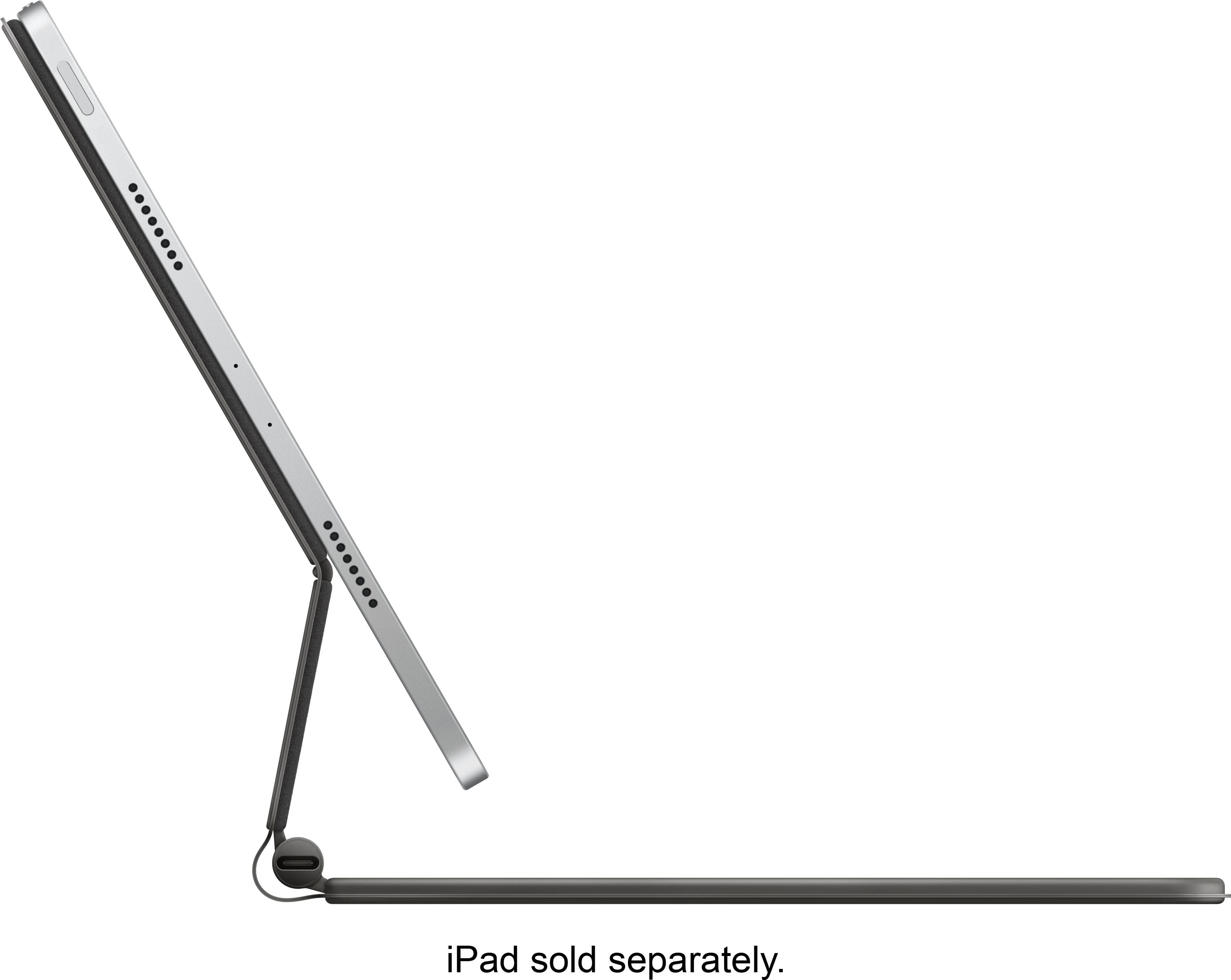
||Posted .This reviewer received promo considerations or sweepstakes entry for writing a review.This accessory is good, but not great. Pros: It is very sturdy and well built (no problem using on an uneven surface). It doubles as a case. The trackpad is great and gestures work great as well. It keeps the iPad locked in via strong magnets and it does not wobble or feel like it will fall off. And it uses the iPad’s smart connector and connects seamlessly and automatically. The keyboard feels great to use when typing (once you get used to a 11 or 12 inch keyboard layout). It keeps the iPad above the keyboard so it’s easier to look at and use than a regular keyboard. Includes a USB-C port so you have your iPads USB-C port free to use for accessories. Cons: This will double the weight of your iPad, easily. No lock mechanism for the Apple Pencil. No function keys or media keys. The adjustability of your iPad is limited to below 145 degrees. The picture shows how far it sits back. For the price (double, or triple the price of third party keyboard cases, there should have been more features. Overall, if you love your iPad like I do, this accessory is worth it for turning the iPad into a better school and work machine. It is still not a computer, but it doesn’t need to be. This is an amazing product if you can afford it, and don’t mind the weight and lack of extra features.
This review is from Apple - Magic Keyboard for iPad Air 11" (M2) - Black
I would recommend this to a friend - Pros mentioned:Trackpad performance
Rated 5 out of 5 stars
Best iPad Air 11 typing experience.
||Posted . Owned for 2 weeks when reviewed.This reviewer received promo considerations or sweepstakes entry for writing a review.This is the best item on the market for typing on the iPad Air 11. The extra USB-C charging port on the device is a game changer. Couple this experience with the new software capabilities of the iPadOS 26, and you truly have a productivity machine. I find myself reaching for the iPad Air more often than the MacBook Air. At some point, I will think about making the move to using an iPad with keyboard in place of a MacBook. The Smart Connector capacity is helpful for charging continuity. This is the most versatile item on the market and I look forward to using an iPad more conveniently. I got this one as an Open Box, excellent item. I am a bit concerned about one of the keys that seems to stick a little. Nevertheless, I do think that was an overall good purchase for me. This particular item was purchased from Best Buy at $70.00.
This review is from Apple - Magic Keyboard for iPad Air 11" (M2) - Black
I would recommend this to a friend - Pros mentioned:Connectivity, Overall performance, Trackpad performance
Rated 5 out of 5 stars
This is it! Best ipad keyboard case EVER!
||Posted . Owned for 1 month when reviewed.This reviewer received promo considerations or sweepstakes entry for writing a review.I have had many keyboards/cases for iPads over the years. So Many! This is by far the best one. No pairing, no charging, backlit keyboard, it works great on a table and in my lap. I miss my shortcut keys but am ok with using the control center that you can easily access and customize! You can use the trackpad cursor and click on the upper right hand corner (where the battery and WiFi indicator shows) to bring it up quickly! The trackpad is a great new feature and this keyboard has made me feel like I have a brand new ipad! I have 1st generation 11” pro. Yes, the price 300! Ouch! But it hurts so good!! I am over 60, my mom is over 80, we are old geeks (and Apple fangirls) and both love this keyboard! Great job Apple!
This review is from Apple - Magic Keyboard for iPad Air 11" (M2) - Black
I would recommend this to a friend - Pros mentioned:Connectivity, Ease of use, Overall performance
Rated 5 out of 5 stars
Worth it
||Posted . Owned for less than 1 week when reviewed.This reviewer received promo considerations or sweepstakes entry for writing a review.Great key board. Easy to use and connect. Also helps protect the iPad. Also gives the iPad the feel of a lap top. Very easy to carry around. I would highly recommend. It is worth the price.
This review is from Apple - Magic Keyboard for iPad Air 11" (M2) - Black
I would recommend this to a friend - Pros mentioned:Connectivity, Ease of use, Overall performance
Rated 5 out of 5 stars
Love it
||Posted . Owned for 10 months when reviewed.This reviewer received promo considerations or sweepstakes entry for writing a review.Love this keyboard. It props up the tablet perfectly when typing. Perfect for setting on the tray table when flying. Love the quick disconnect
This review is from Apple - Magic Keyboard for iPad Air 11" (M2) - Black
I would recommend this to a friend - Pros mentioned:Connectivity, Ease of use, Trackpad performance
Rated 5 out of 5 stars
Power House Case (A Laptop Experience)
||Posted . Owned for 3 weeks when reviewed.This reviewer received promo considerations or sweepstakes entry for writing a review.I have both this and the Logitech keyboard folio with trackpad. While the Logitech is definitely more protective the Apple case has a premium feel in the way it opens and closes smoothly like a MacBook, rather than the Logitech’s resemblance to the surface tablet’s kickstand and flabby keyboard setup. The ability to pickup the entire apparatus from the corner like a laptop and only occupy the footprint of an iPad on the tabletop rather than having to spread out is definitely worth the extra to me. Add to that the larger and more tactile trackpad and the additional USB port on the magic keyboard and it’s literally like an iOS laptop
This review is from Apple - Magic Keyboard for iPad Air 11" (M2) - Black
I would recommend this to a friend - Pros mentioned:Connectivity, Overall performance, Trackpad performance
Rated 5 out of 5 stars
Completes The iPad
||Posted . Owned for 2 months when reviewed.This reviewer received promo considerations or sweepstakes entry for writing a review.This keyboard provides so much additional value to the iPad that I couldn’t imagine using one without it. The latest model works so well, connects easily, and the small trackpad that is included on the keyboard works great. The only drawback is that there is no ESC key, however, there is a workaround to map the CMD + TAB keys within the iOS settings to mimic the ESC key’s function.
This review is from Apple - Magic Keyboard for iPad Air 11" (M2) - Black
I would recommend this to a friend - Cons mentioned:Weight
Rated 5 out of 5 stars
Sleek but versatile. Light but firm.
||Posted . Owned for 2 weeks when reviewed.This reviewer received promo considerations or sweepstakes entry for writing a review.When I was considering if/what version of the iPad Pro I was going to get - i weighed the following specs before I pulled the trigger (see below). However, prior to that discussion, let’s first understand my intended, specific use cases - as this likely varies significantly person-to-person and ultimately should drive which version you choose. —MY USE CASES— (1) Writing & (2) Illustration —SPECS I CONSIDERED— (1) WEIGHT — (how much does the larger screen size and/or adding the magic keyboard effect the usability?) (2) SCREEN SIZE — (Do I need the additional screen size to draw larger illustrations or work more effectively?) (3) STORAGE — (How much space do I REALLY need for my workflow? & What are my options for extended/portable storage?) -WEIGHT &SCREEN SIZE- At first I was heavily leaning towards the 12.9” iPad Pro as I was Thinking that the larger screen size would allow for easier and more effective illustration due to the larger “canvas” to work with. However, upon holding the 12.9” with the magic keyboard I was shocked at how HEAVY it felt. Considering the additional $300 for the larger screen I figured I’d opt for the 11 inch and test it out for a few weeks and reevaluate. That turned out to be the best decision I could have made. Even with the magic keyboard attached the 11” iPad Pro is light weight and extremely versatile. I feel that the 11 inch with the magic keyboard strikes the perfect balance as I can work and draw with it, holding it in my hands, on my lap, etc and only after hours do I start to notice the weight. If it were the 12.9” that could quickly become cumbersome. Additionally, with the Apple silicon M1 chip The screen is extremely snappy and can zoom in very close for illustration purposes. In my opinion this negates the need for the larger screen. You can choose a canvas size that’s larger than the screen of the iPad and zoom in and out to draw, as necessary. Lastly the build quality of the magic keyboard is nothing short of excellent. I can hold it by the corner with the iPad attached and the magic keyboard open and it does not bend, and does not feel like it’s going to break. If you are a writer or simply want a fantastic keyboard to go along with your iPad I would highly recommend grabbing the magic keyboard. -STORAGE- worh the USB-C port on the magic keyboard and one on the iPad itself, it was an easy decision for me to go with the 128GB version. SS drives and HD drives have come down in price drastically over the past few years and will continue to drop - therefore I saw higher value in purchasing storage as I needed , versus paying upfront to get it locked into the iPad.
This review is from Apple - Magic Keyboard for iPad Air 11" (M2) - Black
I would recommend this to a friend - Pros mentioned:Ease of use, Trackpad performanceCons mentioned:Rotation, Weight
Rated 4 out of 5 stars
Good but not not great?
||Posted . Owned for 3 weeks when reviewed.This reviewer received promo considerations or sweepstakes entry for writing a review.Very impressed with how the keys feel when typing. Also really liked the trackpad after I got used to how it worked. While it doesn’t add bulk the keyboard itself feels heavy but still totally slim and portable. Not a fan that you can’t flip this over to use the tablet in portrait mode.
This review is from Apple - Magic Keyboard for iPad Air 11" (M2) - Black
I would recommend this to a friend - Cons mentioned:Weight
Rated 4 out of 5 stars
Is it worth the money?
||Posted .This reviewer received promo considerations or sweepstakes entry for writing a review.So I decided to bite the bullet and give this keyboard a try. However, after only a few days of use, I found that there were a few issues that I had with it. First of all, the price point is just very high. Which is more of the familiar arguments that you hear about this product. But when you can buy a logitech keyboard that does the same thing for almost half the price it’s hard to debate. And second, the weight. Combined with the weight of the iPad it gives a significant amount of weight to have to carry around. Along with that, it is very easy to damage because of the material it’s made of. You would almost want to have a case for the case just to keep it in decent shape. To his credit however, it integrates almost seamlessly with the iPad, and if used often could be a great help In getting work done. As long as you can overcome the aforementioned problems. All in all however, I had to make the decision that it was not worth my money.
This review is from Apple - Magic Keyboard for iPad Air 11" (M2) - Black
No, I would not recommend this to a friend