Customer Ratings & Reviews





- Model:
- GU603VI-G16.I74070
- SKU:
- 6572582
Rating by feature
- Battery Life
Rating 4.2 out of 5 stars
- Speed
Rating 4.7 out of 5 stars
- Display
Rating 4.6 out of 5 stars
Customers are saying
Customers are enthusiastic about the ROG Zephyrus G16's overall performance, battery life, and portability, with many appreciating its lightweight design and fast refresh rate. While the laptop generally receives positive feedback, some users have expressed concerns regarding fan noise and heat. A few others feel that the storage capacity could be improved and have mentioned issues with connectivity.
This summary was generated by AI based on customer reviews.
- Pros mentioned:Battery life, PortabilityCons mentioned:Fan noise
Great if on sale.
||Posted . Owned for 6 months when reviewed.This reviewer received promo considerations or sweepstakes entry for writing a review.Great laptop. It was a school/ game on the go rig and it has performed phenomenally in those aspects. It's not too heavy, not too hot, though it does benefit from increased air flow space. For productivity and school work, no problem and not so flashy that it's an obvious gaming laptop. For gaming, it can run most games at fair FPS and decent graphics. I don't have a cooling pad, propping it up works fine. Fans can be very loud, but you can adjust the fan curve and fix that quite easily. Get rid of armoury crate and get G-helper. By no means does it replace the power of main PC or the couch comfort of a handheld, that said, it is a perfect in between and there'll be a desktop surface available. Decent battery and charges with barrel charger or USB-C PD (lower, but decent).
I would recommend this to a friend - Pros mentioned:Battery life, Overall performanceCons mentioned:Fan noise
perfect entry level gaming pc!!
||Posted . Owned for 2 weeks when reviewed.This reviewer received promo considerations or sweepstakes entry for writing a review.i love this laptop! this is my first gaming pc ever, so i don’t have much to compare it to, but i think it runs flawlessly. i was previously using an asus vivobook that was practically on its deathbed before this one, and this is a very welcome upgrade! i get upwards of 150-180 frames on minecraft with high quality shaders, and i can run triple a games with no problem. the fans are LOUD which could be a distraction but i always have headphones on so it doesn’t bother me. the RGB is fully customizable through the armoury crate program which is really fun to play around with! this laptop is lightning fast which is something i’m seriously not used to, i used to wait 20+ minutes for my old pc to reboot, this one takes less than a minute. the battery life is fair, nothing insane, but it lasts pretty long unplugged. always game plugged in, though. my only concern is the storage, but it can be easily upgraded. i will never buy a non-gaming pc ever again, the zephyrus g16 has fully converted me. if you’re looking for a sign to throw out that old business pc and get yourself a super nice gaming one, this is your sign!! do it!!
I would recommend this to a friend 
Good for gaming, work, and multimedia
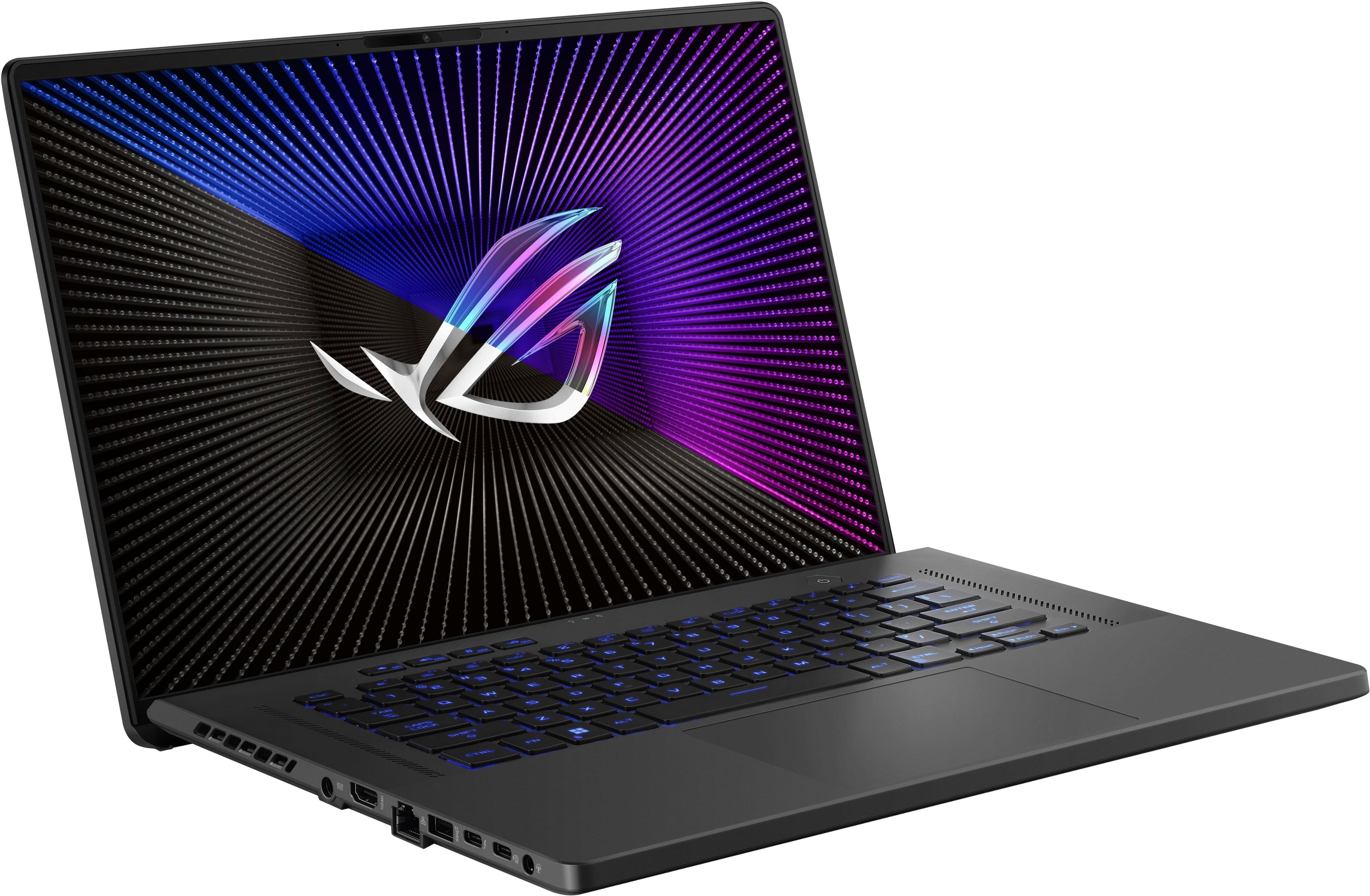
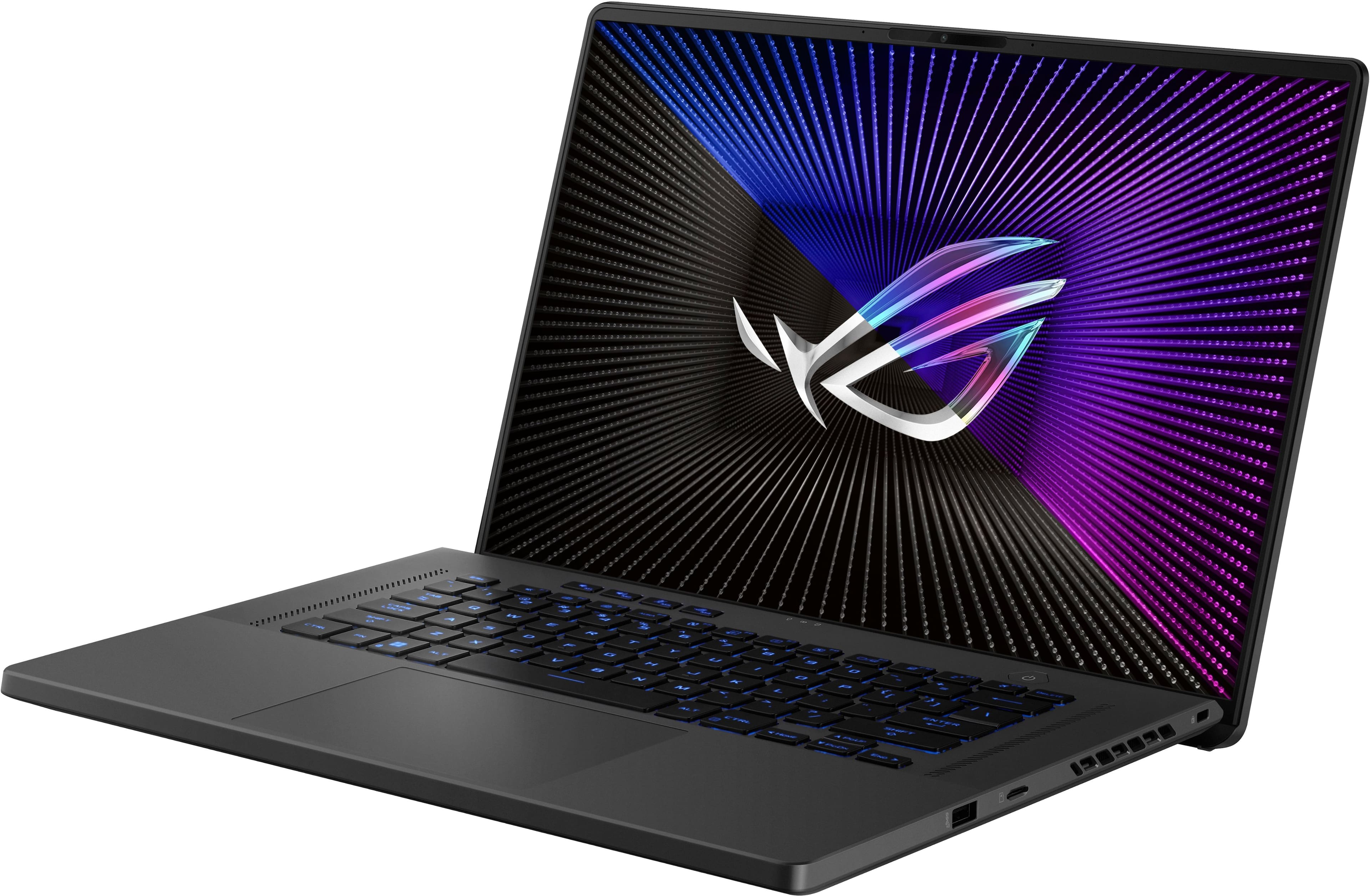
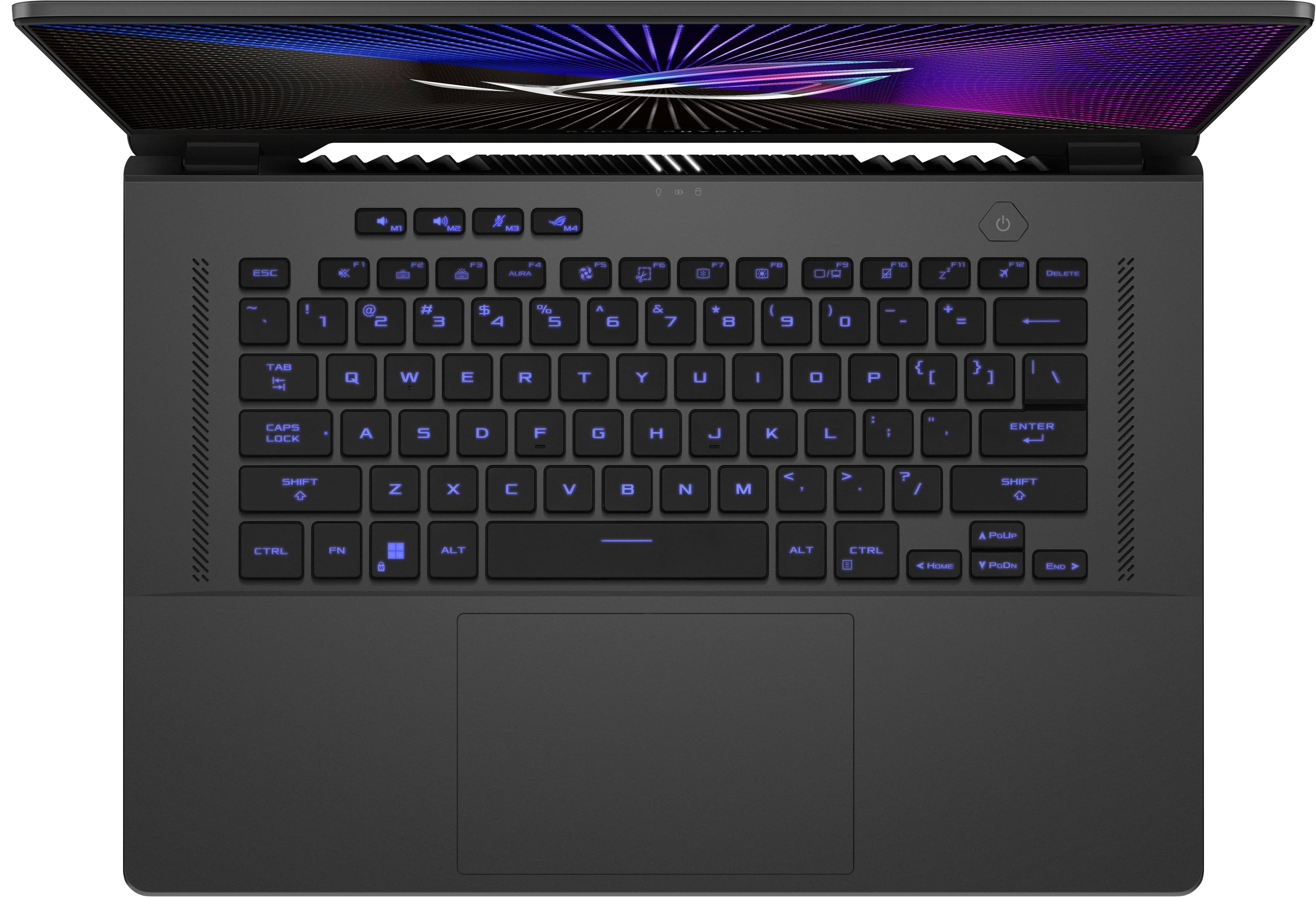
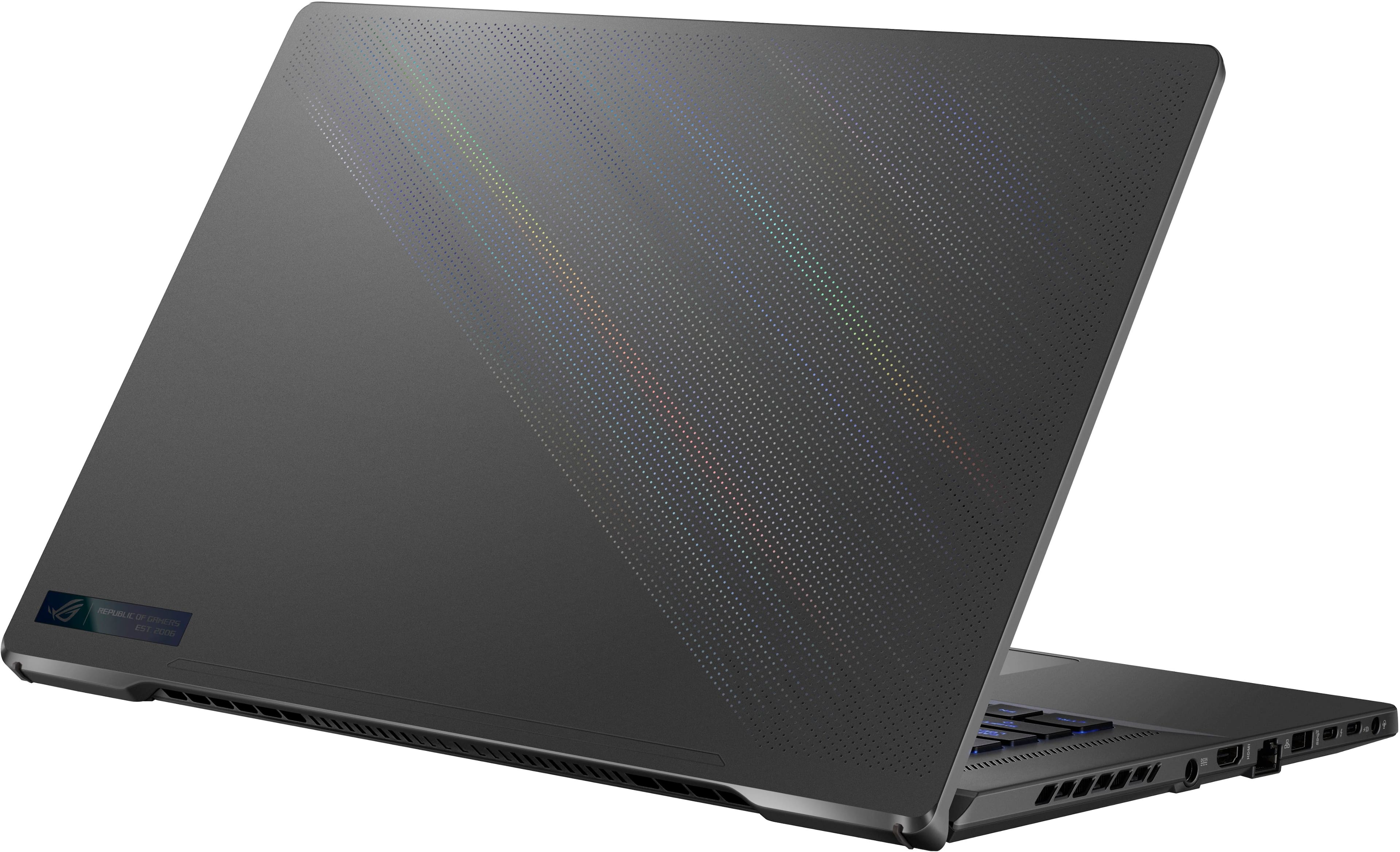
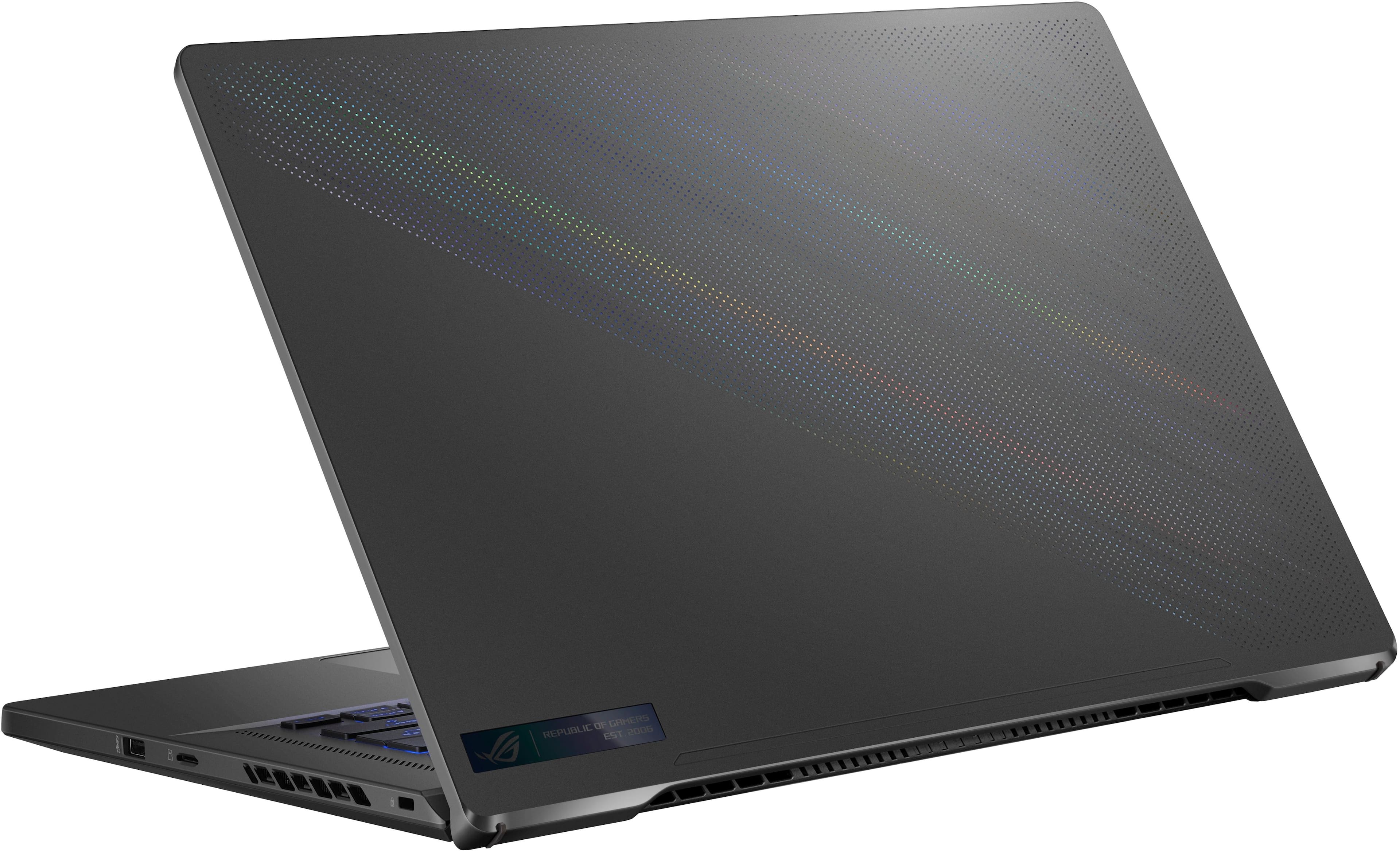
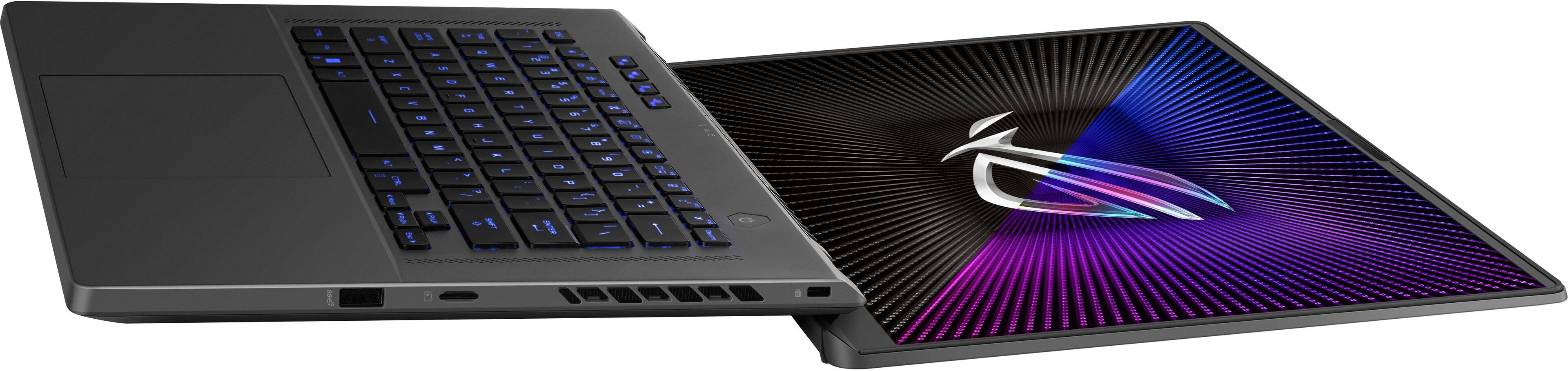
|Posted .This reviewer received promo considerations or sweepstakes entry for writing a review.This is my second Zephyrus gaming laptop from ASUS ROG, and this time I opted for the larger G16 non-OLED version for the extra screen real estate. It comes in two color choices: grey and white. While still compact with a 14” by 9.5” footprint, it’s densely packed but still weighs less than 5 lbs. Just remember that the 240W power brick adds another 1.5 lb. The laptop is about 1.25” thick at the back and tapers down to 0.75” at the front thanks to the raised rubber feet on the bottom. Unlike other models of the Zephyrus, this one does not have LED lighting embedded in the lid, however, there’s a prismatic dot matrix design diagonally across 60% of the shell which gives it a cool "moving" rainbow effect as the light hits it. The status LEDs for power, battery charging, and drive activity are located on the back edge of the laptop, so oddly, they aren’t visible from the front even when the lid is open. The lid opens a full 180° to a lay-flat orientation, though I’m not entirely sure the use case for that, however, I do appreciate the extra range of motion. There’s also a Kensington lock slot at the back right corner and plenty of airflow vents at the back, sides, and bottom. Spec-wise this build has a 13th Gen 10-core Intel i7-13620H CPU with 2.4Ghz base clock, 16 GB 3200MHz DDR4 RAM, 512 GB PCIe Gen 4 m.2 SSD, and dedicated NVIDIA GeForce RTX4070 GPU (in addition to integrated graphics). For I/O there’s an HDMI 2.1, Gigabit Ethernet, combo mic/headphone jack, 2xUSB-A 3.2 Gen 2, and 2xUSB-C 3.2 Gen 2 port (one of which supports Thunderbolt 4). Both USB-C ports also support DisplayPort 1.4 out and Power Delivery charging of the laptop. Inside, there’s an additional RAM slot that can accept a 32 GB chip for a total of 48 GB max capacity. There’s also a second empty m.2 NVMe slot for secondary storage up to 2 GB. If you don’t want to open the laptop up, there’s a microSD slot on the right-hand side for extra removable storage. The display on this laptop is a 16-inch 165Hz IPS screen with a max resolution of 1920x1200 (16:10 aspect ratio). The screen is decently bright, though reportedly only around 270 nits, and has 8-bit RGB color depth covering 100% of the DCI-P3 color space calibrated with Pantone Validation and Dolby Vision HDR support that delivers vibrant, well-saturated colors accurate enough for digital artists and content creators. The panel has thin bezels at the sides, and the chin cleverly dips down behind the back of the deck so that it appears smaller. At the top edge it’s a bit thicker to accommodate the 720p front-facing webcam and dual microphone array. While it’s serviceable for video calls and live streaming, it’s primary purpose, it seems, is for logging in with facial recognition via Windows Hello. I will say that face login is pretty convenient and quick; it even recognizes me with or without glasses on. You can use the Armoury Crate software to set the GPU mode to ‘Ultimate’ which will only use the discrete GPU, but this consumes more battery so it’s recommended to only use this mode while plugged in. All other modes will use integrated graphics or a combination by switching based on the tasks running (MSHybrid). Note that the laptop will need to be restarted when you change modes. While gaming this laptop does a fine job with most games on Medium to High settings, when I tried to max out all video settings to Ultra in Path of Exile, I experience frequent dropped frames and stuttering. In games like Counterstrike and WarFrame, I was able to consistently get 165fps with little to no tearing thanks to V-sync. The fans can get super loud though, which can drown out the sound from the stereo speakers on top, which actually sound pretty good, when you can hear them. The other thing is that the laptop can put out a lot of heat in order to keep the temperature of its components in check, so it's definitely not a use-on-your-lap machine. The other thing I use this laptop for is content creation, as I work with mainly 4K video. This laptop did a nice job with processing and exporting large files, though note that on battery power, it can be a bit more sluggish; though I suppose that’s the price you pay for portability. Speaking of, the 90Watt battery provides about 4 hours of light use at full brightness, but when gaming that drops to about 2 hours. As I mentioned, you'll get reduced performance on battery power and the laptop struggled to keep up with delivering even just 60 fps at med-high graphics for PoE. You can change the lighting pattern of the RGB backlit keyboard in Armoury Crate to a few different animations or a solid color, but the keys themselves are not individually addressable. The lights can also be dimmed or disabled to save battery. The mouse trackpad is pretty large and responsive, though I typically use a wireless mouse instead. Connectivity-wise, it’s got Wi-Fi 6E, utilizing the 160 MHz bandwidth to boost speeds and decrease congestion and latency as well as Bluetooth 5.3 for lag-free video and audio sync when using wireless BT headphones. Internet and network connectivity remained strong and stable during use, and I didn’t experience very long load times when playing cloud connected games. Overall, this Zephyrus G16 is a pretty decent gaming laptop with a sleek design and lots to like in a compact unit. The screen doesn’t 'wow' the way my smaller OLED Zephyrus does, but I’ll take that trade-off just for the extra pixels which make it easier to edit video and multitask. The battery life is decent for a laptop this size, and it works just as well for more casual uses like streaming video and browsing the web.
I would recommend this to a friend- Pros mentioned:Battery life
Gaming Labtop
|Posted .This reviewer received promo considerations or sweepstakes entry for writing a review.The ASUS gaming laptop has a sturdy build that feels durable and reliable. It’s designed to withstand the rigors of regular use, making it a solid choice for gamers on the go. The hotkeys are well-placed, providing convenient access during intense gaming sessions. The keyboard is backlit and offers customizable RGB lighting, which adds a stylish touch and enhances visibility in low-light environments. This laptop maintains a cool temperature even when playing heavy games. Was able to play without any overheating. The battery life was good, with and without the AC adapter. Thought this was nice without having to charge it too quickly. The Display comes with 1920x1200 resolution with a 165Hz refresh rate. The labtop display appears to be high quality which helps with the gaming experience. The audio quality is quite good, however, there were a few times I had to adjust the sound, to get a better experience. The laptop comes equipped with a variety of ports, including: 2 USB-B 2 USB-C MicroSD reader Ethernet HDMI I actually use all of these, so glad to see that. The labtop offers software and a warranty. Overall, the labtop is good. I would recommend this product and was happy to test it. Pros: Display Speed Sounds CPU: Intel Core i7 13620H
I would recommend this to a friend - Pros mentioned:Overall performance, RamCons mentioned:Storage
Great computer overall
||Posted . Owned for 1 month when reviewed.This reviewer received promo considerations or sweepstakes entry for writing a review.Overall I have really been enjoying this device. I have had it for about 2 months now and so far I haven’t had any issues. I have been able to run marvel rivals and fortnite on thus computer with great performance. On medium/low settings i have been getting between 130-180 fps on both of the games. On the downside, the storage could me better. I ended uo adding an additional 16 GB of RAM and I also added a 2 TB SSD. The installation was very easy and simple. Overall this computer has been great with performace and battery life and if you catch this on a sale, its a great deal.
I would recommend this to a friend - Pros mentioned:Battery lifeCons mentioned:Fan noise
Summary of 1 month use
||Posted . Owned for 1 month when reviewed.This reviewer received promo considerations or sweepstakes entry for writing a review.Looks are subjective, it looks clean, slim, and unique, but the badge and pattern on lid may be a bit too much if you use your laptop in public. It is a good performance laptop for the $1100, if you do not mind loud fans. They are louder than some desktops but it is logical since dissapating 280W of power in a thin laptop would make fans work hard. it handles 3D modelling softwares and games pretty good. Preinstalled softwares and drivers makes this laptop worse than my 10 year old laptop, specially the display drivers which cause display freeze, stuttering and display artifacts. You will have to reinstall windows and all the drivers and Asus drivers in order to make this laptop work properly. But when it works it has no problem running anything reasonable. As for rest of the things, keybard is good, clicky but short travel. trackpad is large and quite good. it has all important ports, you wont necessarily need a usb dock. Has a dedicated display out direct from GPU. power adapter is big and heavy fro travel, but its 280W, i cant blame them for it. I would suggest get a powerful enough USB charger for travel but just dont play games when you use it. I usually use it plugged in and rarely use it on battery but on 'Eco' mode, it did last 8 hours and that is good enough for me. Go for it, it is a great laptop for the money specially looking at how expensive laptops are with anything above RTX 4060 and also since increments in features havent been significant enough to pay 3K for newest laptop. Also you may have to use headphone if you want to use it daily.
I would recommend this to a friend - Pros mentioned:Battery life, Portability
Great laptop with good price
||Posted . Owned for less than 1 week when reviewed.This reviewer received promo considerations or sweepstakes entry for writing a review.Initially, I was a bit upset seeing the dirty box and was worried about whether the laptop was new. However, the laptop itself was very clean, and after checking various aspects through the system, I confirmed that it was indeed new. I am not a gamer. I bought it primarily for 3D design and complex simulation as a Mechanical PhD student. I also tried some games, and they ran very smoothly, which I loved. Everything is running very great and smooth. I was ambivalent between the Zephyrus G16 and Lenovo Legion 7i (Core i7, 14700HX, DDR5, RTX 4060). After using the Zephyrus G16 for a few days, I feel it was the right choice due to its superior graphics (RTX 4070), portability, longer battery life (up to 6-7 hours with general use), and lower cost ($1150 vs $1300). The only downsides are the RAM being DDR4 and the display brightness at 250 nits. However, I plan to upgrade the RAM to 32GB, which should compensate for performance somewhat. The laptop does get hot during gaming, but this is normal for all gaming laptops. The fan noise is tolerable to me (not very high). Additionally, I have no issue with the 250 nits brightness as I don't prefer too much brightness. I was also impressed by how well I could set up everything (software, system settings, etc.). Did not make any trouble at all. Only struggling with face recognition Windows hello setup. I don't know if it's because my room lacks light. Overall, I am very impressed with this laptop.
I would recommend this to a friend - Pros mentioned:Overall performanceCons mentioned:Fan noise, Storage
Great performance, but fan can get loud.
||Posted . Owned for 2 months when reviewed.This reviewer received promo considerations or sweepstakes entry for writing a review.Purchased this to replace a desktop that was showing its age. This thing performs really well, but my only complaint is the fan can get ridiculously loud under a demanding load. I know there are ways to change the fan profile to quiet it down a bit, but I don't want to run it to run too hot. I guess I have just been used to desktops since that has been all I've known. Also, my other complaint was the limited storage. The first thing I did was purchase another M2 drive to throw in there since 512GB isn't nearly enough.
I would recommend this to a friend - Cons mentioned:Fan noise, Heat
Great laptop overall BUY BUY BUY
||Posted . Owned for less than 1 week when reviewed.This reviewer received promo considerations or sweepstakes entry for writing a review.This laptop is amazing. From the screen, to the hardware its defining worth it if you can get it on a sale. I got it when it was on sale but had to return to get a refund to help my girlfriend with her payments on her car just to did it for nothing because she changed her mind and now its not on sale as the making of this review. The 4070 was amazing and played all my games on max settings with 1080p. The fans revs constantly with full load but didn't rev then slow like another laptop i had. My laptop cooler helped a ton and really kept this cool. Even without a cooler it didn't get too hot, nothing terrible as long as it wasn't on your lap too long. This was my favorite sweet spot laptop for gaming and overall great laptop overall. Definitely buy this if it goes back on sale below $1300 even open box excellent is a good option so when it goes on sale it will drop to like $1230-ish give or take a bit. Great value for that money.
I would recommend this to a friend - Pros mentioned:Battery life, Weight
Amazing thin and light
||Posted .This reviewer received promo considerations or sweepstakes entry for writing a review.If you have used a MacBook in the past, and want that same feel when using a gaming pc, this hands down has to be the closest thing you can get to everything you want. When I was buying this, I absolutely fell in love with the keyboard, the spacing and key feel was just what I was looking for . It has a light touch of rgb with the keyboard having full array rgb backlit keys. It gives the nice colorful touch, yet not being overbearing. The 16:10 1920x1200 display is GORGEOUS, and the bezels are so thin it’s like they don’t exist when you’re using the laptop. It’s very light, especially when compared to other gaming focused laptops, so it’s very comfortable when carrying it in a backpack. Battery life is above average when considering it’s a gaming laptop. BUT this is more than a gaming laptop, I saw battery life at about 3 hrs , and in game on battery about a hour and a half. For a thin and light it’s a great choice because it doesn’t have many compromises
I would recommend this to a friend - Pros mentioned:PortabilityCons mentioned:Storage
ASUS ROG Zephyrus G16 – Sleek Speed Meets Serious
||Posted .This reviewer received promo considerations or sweepstakes entry for writing a review.- Smooth 165Hz display with great color - Strong CPU/GPU combo for gaming and productivity - Sleek, lightweight design - Solid build quality - Great keyboard and trackpad Cons - 512GB SSD fills up fast with modern games - Battery life is average under heavy load
I would recommend this to a friend - Pros mentioned:Overall performance, Portability, Ram
Great product at a great price
||Posted . Owned for 1 month when reviewed.This reviewer received promo considerations or sweepstakes entry for writing a review.This laptop has been a godsend for me so far. Perfect size, not too heavy, and has excellent performance. The upgradable ram and ssd slots are a plus for me as well. Its a great product that I reccomend to anyone on a budget.
I would recommend this to a friend - Pros mentioned:Overall performance, RamCons mentioned:Fan noise
Great value
||Posted . Owned for 2 months when reviewed.This reviewer received promo considerations or sweepstakes entry for writing a review.This was a 2023 Asus Zephyr bought in 03/2025, i was able to add 32 GB memory and a second 1 TB SSD card for storage. Excellent for my gaming needs (light). It does have noisy fans when running higher demand games that i tested it on. Overall a good buy and great value in this economy.
I would recommend this to a friend - Pros mentioned:Overall performance
Great Price to Performance, Few Quirks to Iron Out
||Posted . Owned for less than 1 week when reviewed.This reviewer received promo considerations or sweepstakes entry for writing a review.This is a great laptop with excellent performance for the price, but BE PREPARED TO SET THINGS UP and if you're like me and want to figure out how everything works, you might be confused at first. I will outline my experience with this laptop chronologically from the date of purchase which was two days ago. PRICEPOINT for the hardware was excellent as it is currently about $500 off, making it just over $1000. This is one of the cheapest RTX 4070 laptops out there with very few compromises made to get to that point. If you're reading this and it's still on sale for that price I would recommend picking it up. UPDATES for the laptop didn't go as smoothly as I would have loved, but that could be chalked up more to a Microsoft issue than an Asus issue. After checking for and installing many updates, I was continuously reminded on the Windows update page that the version of Windows installed was deprecated and would no longer receive support (22H2). I repeatedly checked for updates, but it wasn't seeming to grab the software deployment despite the alert it presented, even after multiple restarts. I had to manually download the most recent windows 11 update image and run it to get to 24H2. SOFTWARE is a bit of a mixed bag. I see what they wanted to do with Armory Crate, but it's just... very bad. It's extremely bloated and convoluted, certain things are just not where you'd expect them to be and the software is resource intensive and slow. I personally used it to update firmware/BIOS/etc and then uninstalled it, opting for G-HELPER software instead. It's a third party tool with no bloat that works much, much better and allows you to set custom fan curves. FAN NOISE as mentioned above was improved by installing G-Helper. Before that, they had three modes that were hard-set and non switchable. Almost off, loud, and insanely loud. Setting the fan speed RPM to about 3800 max helped significantly and now it behaves like a normal laptop while staying relatively cool, ~65C under load. ODD GPU ISSUE here was that I was unable to have the screen output more than 60 frames while unplugged. I would be mid-game playing at 60fps, then plug in the charger and it would instantly go up to around 130fps. Now, you might say "windows power plan! screen Hz limiter! armory crate performance mode! armory crate limiter! Nvidia app Hz limiter!" Well, all of those exist as potential culprits, but none of them were. I was pulling my hair out until I found out that the "Standard" GPU mode (which does utilize the dGPU, or dedicated GPU) actually runs through the integrated graphics before outputting to your screen. It does this when unplugged, but apparently not while plugged in. Essentially, if you want to use the full 165Hz screen and not be limited to 60Hz while unplugged, you must have GPU auto select turned off, optimus turned off, and have "Ultimate" set for the GPU mode. Your battery life will suffer, but if you're like me, then you just want the full performance of the laptop. You paid for it, right??? BATTERY LIFE is pretty much nonexistent if you are gaming on this thing. As others have said, go ahead and turn on all the Eco mode and integrated graphics options and things like that for 8-10 hours of battery life (I have not tested this personally, but the battery estimates seem to think so). If you are playing a heavier Unreal Engine 5 game or similar and you have the GPU option set to ultimate as I had above, you will probably get around an hour and a half or two hours of usage out of it, maybe less. I am honestly fine with that, it's to be expected from this CPU/GPU combo. Especially the CPU, it's fast but not efficient. UNDERVOLTING is not possible with the CPU (at least not in BIOS), however you can set wattage limits in G-Helper (see above). DISPLAY is great, it's a 16" 1920 by 1200 panel at 165Hz. I was worried the pixel density wouldn't be enough but I was wrong. It looks great, and you actually want a normal resolution like that so that you can play your games at that native resolution and get higher framerates. I really think the laptop 4070 would struggle in some titles at higher resolutions but at 1080p you'll get pretty high framerates in pretty much everything you throw at it. TL;DR - Get this for $1000 on sale. Do the updates, uninstall Armory Crate, install G-Helper instead, set fan speeds to max of around 3800 RPM, set to ultimate GPU mode, and then reap the benefits. This laptop absolutely slaps after you get through some of that annoying stuff but it's not too hard and it's worth it.
I would recommend this to a friend - Pros mentioned:Battery lifeCons mentioned:Fan noise
Great laptop, especially for the price!
||Posted . Owned for 3 months when reviewed.This reviewer received promo considerations or sweepstakes entry for writing a review.I want to start this review by stating that I am a power user. I have had several Zephyrus laptops, and this one is like the others; impressive, and well performing. First, the screen resolution on the Best Buy website is INCORRECT. It is actually 1920x1200, meaning it has a 16:10 aspect ratio. In short, the screen is gorgeous. The fans can get loud, but let's be honest, with a 4070 and i7 under the hood, it needs that kind of airflow. The battery life is impressive given the specs. It is DDR4, but you wont notice a difference. I easily dropped in a 16GB stick of Corsair Vengeance to total 32GB as I needed a bit more for some programs I run. Not to mention, the gaming experience (what the laptop was designed for) is flawless!
I would recommend this to a friend It's okay for the price
||Posted . Owned for 1.5 years when reviewed.This reviewer received promo considerations or sweepstakes entry for writing a review.I’ve been using the ASUS ROG Zephyrus G16 with the Intel Core i7 and RTX 4070 configuration for a while now, and overall I’d say it’s a solid gaming laptop if you can find it at the right price. It delivers strong gaming performance and handles productivity tasks well, but there are a few compromises that keep it from being a perfect 5-star machine. The RTX 4070 is definitely the highlight. Modern games run smoothly at high settings, and the 165Hz display makes gameplay feel fluid and responsive. The screen looks good for gaming and everyday use, with decent colors and brightness. For content creation, multitasking, and general productivity, the Intel i7 processor and 16GB of RAM provide more than enough performance. Build quality is good overall, and the laptop has a sleek design compared to many bulky gaming laptops. The keyboard feels comfortable for long gaming sessions and typing, and the cooling system does a reasonable job under load. That said, there are some downsides. The 512GB SSD fills up quickly once you install several modern games, so most users will probably want to upgrade storage. Battery life is average at best, especially when gaming or running demanding applications. The fans can also get noticeably loud during intensive gaming sessions, which is expected but still worth mentioning. What surprised me most was how balanced the system feels. It doesn’t excel in every category, but it provides a good combination of performance, display quality, and portability. If you’re looking for premium features, there are better options available, but they usually cost significantly more. Overall, this is a good gaming laptop that offers strong performance for the money. It’s not perfect, but if you buy it on sale or at a competitive price, it’s easy to recommend for gamers, students, and anyone who needs a powerful laptop without spending top-tier money.
I would recommend this to a friend- Pros mentioned:Ram, Weight
Great gaming laptop limited by a small hard drive
||Posted . Owned for 1 week when reviewed.This reviewer received promo considerations or sweepstakes entry for writing a review.It is a good gaming laptop. It has fantastic cooling for a laptop with a 4070 in it. Plus you can upgrade the RAM to 48 GB which is a rarity today. It is also pretty thin and light weight for a gaming laptop too but still built well. Doesn't feel like a plastic toy. The only reason for 4 stars it is comes with a 512 GB drive. For the money, I would have expected a TB at least. It was easy enough to upgrade the drive and there is an additional NVMe slot to add a second drive as well. All in all, a great laptop for gaming/high demand usage.
I would recommend this to a friend - Pros mentioned:Overall performance
perfect for engineer students!!!
Posted .This reviewer received promo considerations or sweepstakes entry for writing a review.I’ve been using this laptop for two weeks now. I’m an engineering student, and I needed a powerful laptop with a slim design for portability. I highly recommend this laptop if you’re a student too—great performance, fast, and it can definitely run all the programs with no problem at all!
I would recommend this to a friend - Pros mentioned:Overall performance, Ram
Great deal for the price
||Posted . Owned for 1 week when reviewed.This reviewer received promo considerations or sweepstakes entry for writing a review.Upgraded to this from a 2021 ASUS TUF Laptop with an i5 and GeForce RTX 3050 that I bought back on Black Friday that year for $600 bucks. That laptop was great, never had a single problem with it but I wanted something with a better video card. I pulled the additional RAM I purchased and hard drive out of the TUF and put it in the ROG, very simple process, got the BitLocker key for that hard drive from my Microsoft account, laptop booted right up, updated all the drivers and BOOM....done..! Took no time at all and now have 48gb of RAM and (2) 512gb hard drives, I did not have to transfer files or anything at all. Video card is a huge improvement over the 3050, I was getting 30 fps or less on most games, now I'm 70 fps or more and running game graphics at a higher setting.
I would recommend this to a friend - Pros mentioned:Battery life, Overall performance
Great Laptop for the Money
||Posted . Owned for 1 week when reviewed.This reviewer received promo considerations or sweepstakes entry for writing a review.This is an excellent laptop. Very sleek design, snappy performance, powerful GPU, responsive keyboard, beautiful screen, and solid battery life. All this for over $500 off made the purchase a no-brainier.
I would recommend this to a friend