Customer Ratings & Reviews













- Model:
- GA605WI-G16.R94070
- SKU:
- 6583376
Rating by feature
- Battery Life
Rating 4.3 out of 5 stars
- Speed
Rating 4.8 out of 5 stars
- Display
Rating 4.9 out of 5 stars
Customers are saying
Customers frequently mention the exceptional performance, stunning OLED display, and long battery life of the ROG Zephyrus G16. They appreciate the powerful AMD Ryzen AI 9 HX processor, NVIDIA RTX 4070 graphics, and 32GB of memory, which enable smooth and efficient multitasking and gaming. While some users have concerns about overheating, many find that the cooling system is adequate with proper adjustments.
This summary was generated by AI based on customer reviews.
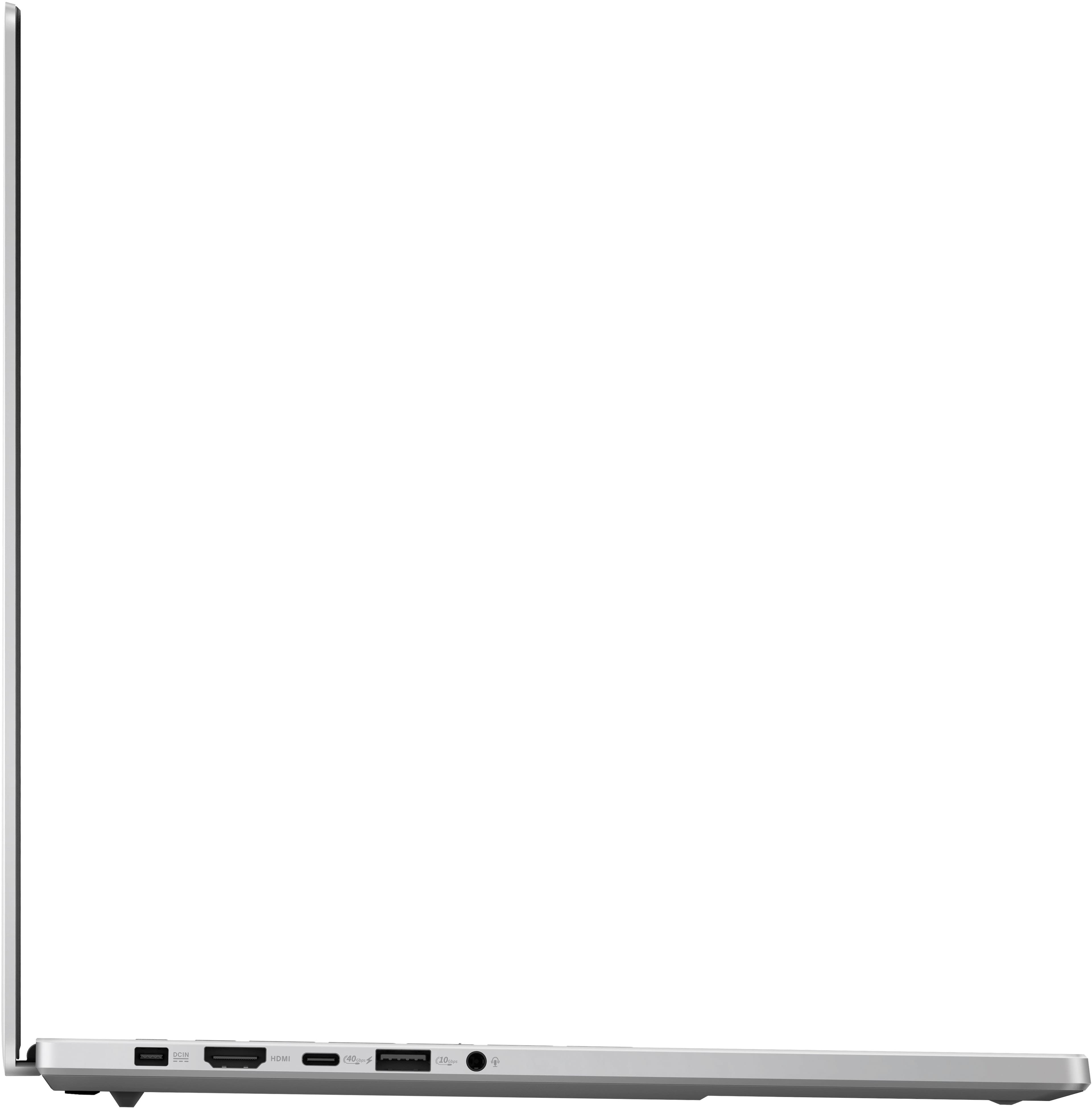
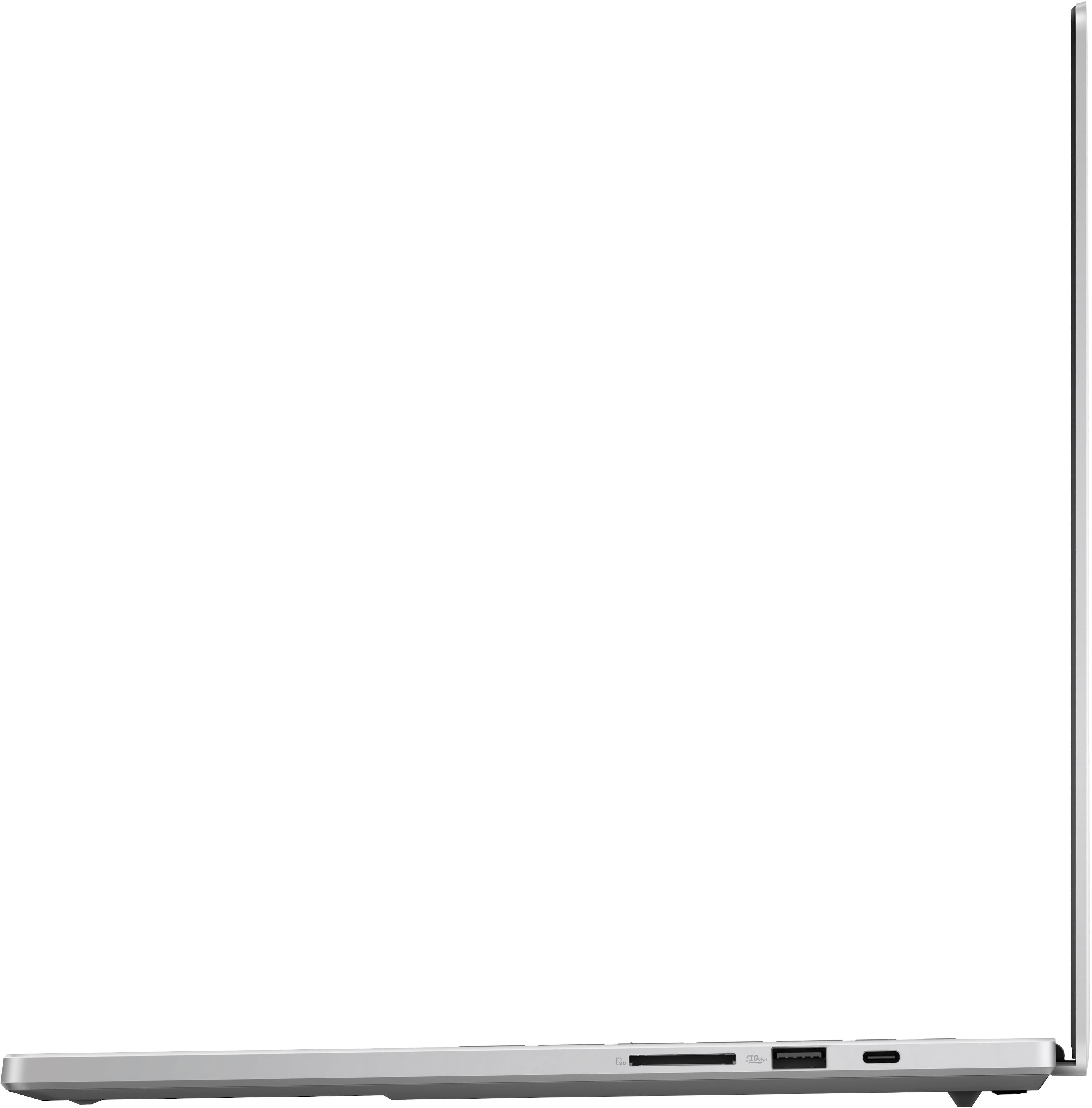
- Pros mentioned:Portability, Processor speed, Screen quality
Good Laptop with Caveats
||Posted . Owned for 2 months when reviewed.This reviewer received promo considerations or sweepstakes entry for writing a review.The best thing about this laptop is the AMD Ryzen AI 9 HX 370 chip. I tried both the Intel and AMD versions and the AMD one outperforms the Intel one by far in terms of efficiency and performance on battery. The build quality on this laptop is lacking, but I really do enjoy the form factor. It is very thin and light and has a great keyboard with surprisingly long key travel distances. I use a Razer Blade 15 for work and that keyboard doesn't even compare to this one. It's lacking in quality in the hinge which creaks, and there is a visible gap between the screen and the main chassis on one side. I think the QA from Asus is definitely lacking and leaves a lot to be desired. The fans are high pitched and whiny when under load. And the thing is that the fans ramp and down so it's really noticeable as compared to if the fan curves were made to only be set to a set speed so you will have to make those customizations yourself. I got the 16 GB version on the Intel one I purchased and that was definitely not enough to operate this computer. I had to choose this one to get the upgraded RAM and also the processor which I believe it necessary for this computer to be useful. Overall I'm satisfied with my purchase because I bought this open box for $1800 incl. tax. It's still a tad more expensive than I would have liked it to be, but I just think of it as paying a premium for the form factor.
No, I would not recommend this to a friendBrand response from ASUS Answers
Posted .Dear Simon,
Thank you for sharing your comments regarding the ASUS ROG Zephyrus G16 Gaming Laptop. We understand that it didn't meet your full expectations, and we sincerely apologize for that as we do understand your concerns. Your feedback is greatly appreciated and will be passed to our Product Team for review.
To troubleshoot the fan issue described, we recommend following the steps in the FAQ below. Should the issue persist, please contact our support team at https://www.asus.com/us/support/CallUs to further investigate the problem.
We stand behind our products and continuously strive to improve our products and processes to achieve customer service excellence. For more information, email us at customerloyalty@asus.com and include the case number "N2408013017-0012" as a reference. We will do our best to resolve your case quickly. Your feedback is very important to us and enables us to improve our support channels. Thank you for choosing ASUS.
Best Regards,
Chantae
ASUS Customer Loyalty US Support
[Windows 11/10] Troubleshooting - Overheating and Fan issues - https://www.asus.com/support/faq/1015064/
- Pros mentioned:Overall performanceCons mentioned:Wifi
Excellent Gaming Laptop but Mediatek Wifi fails it
||Posted .This reviewer received promo considerations or sweepstakes entry for writing a review.The machine is great, performance is superb. The OLED is beautiful. Wifi is very sub-par on this machine it loses connection all the time, and take 20-30 seconds to reconnect constantly. It seems highly susceptible to network congestion. Swapping out the Wifi for a Qualcomm one vastly improved the overall experience.
I would recommend this to a friendBrand response from ASUS Answers
Posted .Dear SeanF,
We’re sorry to hear about the inconvenience you experienced with your Wi-Fi card. At ASUS, we’re committed to delivering products that meet the highest standards through rigorous testing and quality assurance. The issue you encountered was not intentional and does not reflect the level of performance we strive to provide.
We understand that you’ve replaced the original MediaTek Wi-Fi card with a Qualcomm model, and we understand that worked for you. To help us investigate this matter further and ensure a prompt resolution, please provide your case number. You can reach us at customerloyalty@asus.com, and we kindly ask that you include a link to this review for reference.
Your feedback is invaluable as it contributes to continuous improvements in our support channels. For your convenience, here’s the case number: N2408013017-0017.
Thank you for choosing ASUS!
Best Regards,
Schottky
ASUS Customer Loyalty US Support
- Pros mentioned:Screen quality
Perfect hardware, but needs a few fixes
||Posted . Owned for 3 weeks when reviewed.This reviewer received promo considerations or sweepstakes entry for writing a review.Just as I expected, this ASUS laptop is actually better to touch than Razer. Aluminum shell is very well made, almost Apple quality. No fingerprints. Beautiful screen. Great comfy keyboard, much better than Razer. But there were issues out of the box: - Stock Windows install had 2 Trojan viruses. Make sure you install antivirus immediately. - MediaTek WiFi 7 card is ehhh. The only way to upgrade is Qualcomm since AMD is supposedly not compatible with Intel WiFi cards. The only card that is available is MSI Herald desktop card that contains M.2 card inside or get knock-off brands. - Armoury Crate is overbloated bloatware, as expected. Download Ghelper and uninstall Armoury Crate. This actually fixed freezing issue for me when waking up from sleep and clicking on volume icon in Windows. - ASUS BIOS limits SSD size to 2TB on main slot. But there is another slot that will let you install another SSD, but the speed will be limited to 4x2 lanes, which is still decent for storage and running most games. 2TB+2TB = 4TB, which is good.
I would recommend this to a friendBrand response from ASUS Answers
Posted .Dear Nick6877,
Thank you for sharing your feedback on the laptop, and we apologize for the problems you've encountered. At ASUS, we take quality control, testing, and inspections seriously to ensure our products meet high standards. What you've experienced was not intentional. Our top priority is providing our customers with a high level of satisfaction, and we'll forward your feedback to our Product Team for review.
We do stand behind our products and we continuously strive to improve our products and processes to achieve customer service excellence. If you require any further assistance, please send us an email at customerloyalty@asus.com and include the case number "N2408013017-0003" as a reference. We will do our best to resolve your case quickly. Your feedback is very important to us, and it enables us to improve our support channels. Thank you for choosing ASUS.
Best Regards,
Chantae
ASUS Customer Loyalty US Support
Not Significantly Better Than My 3080 RTX
||Posted .This reviewer received promo considerations or sweepstakes entry for writing a review.My old rig was a 3080 RTX with similar specs as this rig and in comparison it is not significantly impressive enough to warrant its price tag. The monitor display is supposedly superior to my last rig but visually I’m not seeing a difference in gaming or movies; at times it’ll just readjust the brightness to dull despite me having manually set my preferences - which is annoying and frankly shouldn’t be happening. The mousepad is slightly bigger on this one, keyboard is low profile so if you’re gaming and need the qwerty/WASD layout, this isn’t great for that. The “white” casing looks better online in pics than it does in person - if you have the option get BLACK. There’s no apparent way to turn off the light feature on the back of the monitor casing and it’s a constant flashing light show which is extremely bright and vivid. I’d say skip this and save your money for a better upgrade if you’re coming from the ASUS Zephyrus 3080 RTX, but if you’re coming from something much lower end, this’ll probably blow you away.
No, I would not recommend this to a friendBrand response from ASUS Answers
Posted .Dear Fairlyfeisty,
Thank you for sharing your comments regarding the ASUS ROG Zephyrus G16 Gaming Laptop. We understand that it didn't meet your full expectations, and we sincerely apologize for that as we do understand your concerns. Your feedback is greatly appreciated and will be passed to our Product Team for review.
To troubleshoot the display issue described, we recommend following the steps in the FAQ below. Should the issue persist, please contact our support team at https://www.asus.com/us/support/CallUs to further investigate the problem.
We stand behind our products and continuously strive to improve our products and processes to achieve customer service excellence. For more information, email us at customerloyalty@asus.com and include the case number "N2408013017-0014" as a reference. We will do our best to resolve your case quickly. Your feedback is very important to us and enables us to improve our support channels. Thank you for choosing ASUS.
Best Regards,
Chantae
ASUS Customer Loyalty US Support
[Windows 11/10] Troubleshooting - Main (Internal) Display problem - https://www.asus.com/support/faq/1015072/
- Cons mentioned:Heat
Beautiful device but inefficient thermals and batt
||Posted . Owned for 1 week when reviewed.This reviewer received promo considerations or sweepstakes entry for writing a review.This device is beautiful but theres a problem with its thermal. Device gets hot even just web browsing. The battery is also not good as it drains 15-20% per hour even on eco mode with the dGPU disabled. Also because this is AMD , it doesnt have thunderbolt 4 but just usbc4 which is finicky with docks if you used docks to connect. I'm returning mine and waiting for the next iteration with better thermals and battery (maybe with Lunar Lake)
No, I would not recommend this to a friendBrand response from ASUS Answers
Posted .Dear Huey,
We sincerely apologize for the issues you've faced with the Gaming Notebook and for the inconvenience caused. What you've experienced was not intentional or representative of our brand. We are committed to providing our customers with the highest quality products, and your feedback will be forwarded to our Product Team for review.
Having returned the notebook, we hope that you were able to obtain a functional replacement.
We do stand behind our products and we continuously strive to improve our products and processes to achieve customer service excellence. If you require any further assistance, please send us an email at customerloyalty@asus.com and include the case number "N2408013017-0008" as a reference. We will do our best to resolve your case quickly. Your feedback is very important to us, and it enables us to improve our support channels. Thank you for choosing ASUS.
Best Regards,
Chantae
ASUS Customer Loyalty US
Torn
||Posted . Owned for less than 1 week when reviewed.This reviewer received promo considerations or sweepstakes entry for writing a review.I drove down to Portland from Seattle to buy this laptop two days ago. Though I haven't had it for long, I'm strongly debating returning it. Unfortunately, I only have 15 days per the return policy to make this decision. This laptop looks, feels, and performs amazingly (for the most part). Spending over $2k on a laptop and running into the bugs that I have so far is both annoying and concerning. I've taken all updates and cycled the power on this machine yet still run into varying issues. 1) When I open the laptop it takes quite some time to get a picture. About half of the time the keyboard lights up, it makes the ROG sound, but no picture on screen. I then have to do a full restart. 2) I've discovered quite a bit of freezing/lag performing very simple tasks such as web browsing. 3) I've had issues with the sound cutting in and out at random. My previous laptop of more than five years was an ASUS ROG and I'm loyal to the brand. I want to keep this but I have to give it some more time. Unfortunately it might to time to look at other models or brands.
No, I would not recommend this to a friendBrand response from ASUS Answers
Posted .Dear Eddie,
We sincerely apologize for the system performance issues you're experiencing with the Gaming Notebook and for the inconvenience caused. This is not the kind of quality to expect from our products and it's not the norm. Before returning the device, we recommend contacting our support team at https://www.asus.com/us/support/CallUs to further investigate the problems.
We stand behind our products and continuously strive to improve our products and processes to achieve customer service excellence. For more information, email us at customerloyalty@asus.com and include the case number "N2408013017-0005" as a reference. We will do our best to resolve your case quickly. Your feedback is very important to us and enables us to improve our support channels. Thank you for choosing ASUS.
Best Regards,
Chantae
ASUS Customer Loyalty US Support
- Cons mentioned:Heat
Asus ROG Zephyrus
||Posted . Owned for 9 months when reviewed.This reviewer received promo considerations or sweepstakes entry for writing a review.When it comes to using it for animation it dies too quickly and it gets very hot! The battery life is just horrible. For the price, it’s okay but not great.
No, I would not recommend this to a friendBrand response from ASUS Answers
Posted .Dear JUANC,
We’re sorry to hear that you’re experiencing battery drain and overheating with your device. To troubleshoot this issue, we recommend following the steps in the FAQ below. Should the issue persist, please contact our support team at https://www.asus.com/us/support/CallUs to further investigate the problem or assist with repairing the device.
We stand behind our products and continuously strive to improve our products and processes to achieve customer service excellence. For more information, email us at customerloyalty@asus.com and include the case number "N2408013017-0015" as a reference. We will do our best to resolve your case quickly. Your feedback is very important to us and enables us to improve our support channels. Thank you for choosing ASUS.
Best Regards,
Schottky
ASUS Customer Loyalty US Support
FAQ: Overheating and Fan issues https://www.asus.com/support/faq/1015064/
Additional FAQ; Troubleshooting - Short Battery Life https://www.asus.com/support/faq/1043914/
Great device if you don't have any issues
||Posted . Owned for 1 week when reviewed.This reviewer received promo considerations or sweepstakes entry for writing a review.I recently picked up an open box of this in fair condition at a good price. It had the usual dings/scratches on the corners but other than that the laptop was in great condition. After using the laptop for over a week now, the laptop would randomly restart at least once a day while I was watching a video or browsing the web. I tried almost all solutions such as, turning off certain settings, changing out the given battery supply unit, and switching out the ssd. I believe the underlying issue could be with the motherboard. I did everything I could to make this laptop work because it's a great device but the random restarts are frustrating and a nuisance.
I would recommend this to a friendBrand response from ASUS Answers
Posted .Dear Phnor,
We sincerely apologize for the auto reboot issue you're experiencing with the ASUS ROG Zephyrus G16 Gaming Laptop and for the inconvenience this may have caused you. This is not the kind of quality to expect from our products and it's not the norm. To troubleshoot the issue described, we recommend following the steps in the FAQ below. Should the issue persist, please contact our support team at https://www.asus.com/us/support/CallUs to further investigate the problem or assist with repairing the device.
We stand behind our products and continuously strive to improve our products and processes to achieve customer service excellence. For more information, email us at customerloyalty@asus.com and include the case number "N2408013017-0013" as a reference. We will do our best to resolve your case quickly. Your feedback is very important to us and enables us to improve our support channels. Thank you for choosing ASUS.
Best Regards,
Chantae
ASUS Customer Loyalty US Support
[Windows 11/10] Troubleshooting - Automatic Shutdown/Restart Issues - https://www.asus.com/support/faq/1046480/
- Cons mentioned:Wifi
Great macheine except the Wifi card
||Posted .This reviewer received promo considerations or sweepstakes entry for writing a review.Wifi card has stability issue. It disconnects every 10 minutes.
I would recommend this to a friendBrand response from ASUS Answers
Posted .Dear Louis Y,
We’re sorry to hear about the Wi-Fi stability issues you’re experiencing with the ASUS GA605WI Laptop. This is not the level of performance we aim to deliver. To help resolve the issue, we recommend reviewing the steps in the troubleshooting guide linked below. If the issue continues, please contact our support team at https://www.asus.com/us/support/CallUs so we can assist you further or arrange repair service if necessary.
We stand behind our products and continuously strive to improve our products and processes to achieve customer service excellence. For more information, email us at customerloyalty@asus.com and include the case number "N2408013017-0018" as a reference. We will do our best to resolve your case quickly. Your feedback is very important to us and enables us to improve our support channels. Thank you for choosing ASUS.
Best Regards,
Chantae
ASUS Customer Loyalty US Support
[Windows 11/10] Troubleshooting - Wireless Network (Wi-Fi) Issues - https://www.asus.com/us/support/faq/1015073/
Decent laptop
||Posted .This reviewer received promo considerations or sweepstakes entry for writing a review.For the price I have not been a big fan of the performance. I mostly bought this laptop as a mobile workstation for my school research. I have not done anything intensive really and the battery life is less than desirable. Otherwise though when plugged in the performance is great the oled screen looks fantastic.
I would recommend this to a friendGet a different model
||Posted . Owned for 3 months when reviewed.This reviewer received promo considerations or sweepstakes entry for writing a review.I have had quite a few issues out of this laptop. The wifi after it sleeps often won't connect to wifi when it wakes back up (I have the orbi 970 $1500 3 node network). If I go into device manager and disable and re-enable the wifi adapter it connects (or reboot) Chrome on this computer has a scrolling page issue. It only happens on this laptop. The page looks all broke up and scrolls while part of the page stays put. Sometimes even with cpu use low the mouse and responsiveness will just lock up and move super slow and like the computer is at 100% cpu. For a computer that costs this much I expect less major problems like this. I was very excited and waited about two months for this model to come out but I've been very disappointed.
No, I would not recommend this to a friendBrand response from ASUS Answers
Posted .Dear Awesome Laptop,
We sincerely apologize for the wireless connectivity and system performance issues you've faced with the Gaming Notebook and for the inconvenience caused. This is not the kind of quality to expect from ASUS products and it's not the norm.
Based on the issues described, we recommend updating the BIOS. Please back up all valuable data before proceeding as this may result in the loss of any current settings, apps, and data. Ensure the unit is plugged in and do not close the lid. The following FAQ below provides the troubleshooting steps.
If you already have the latest BIOS version installed, we recommend contacting our support team at https://www.asus.com/us/support/CallUs to further investigate the problems you're experiencing or to assist with getting the device repaired.
We stand behind our products and we continuously strive to improve our products and processes to achieve customer service excellence. For more information, send us an email at customerloyalty@asus.com and provide the case number "N2408013017-0007" for reference. We’ll do our best to provide a quick resolution to your case. Your feedback is important as it helps with improvements to ASUS Support channels. Thank you for choosing ASUS.
Best Regards,
Chantae
ASUS Customer Loyalty US Support
How to update BIOS in Windows - https://www.asus.com/support/FAQ/1008276/
Bad thermals
||Posted .This reviewer received promo considerations or sweepstakes entry for writing a review.Bad thermals and felt “fragile” due to its minimal design and slim body. Gets to a point of where its extremely uncomfortable to rest your palms and use the keyboard because its burning hot.
No, I would not recommend this to a friendBrand response from ASUS Answers
Posted .Dear Duke S,
Thank you for sharing your experience with the ASUS GA605WI Gaming Laptop. We're sorry to hear about the thermal issues and the discomfort you've experienced while using the device. Your feedback is valuable and will be shared with our product team for further review.
In the meantime, we suggest reviewing the troubleshooting steps outlined in the FAQ guide linked below. If the issue continues, please contact our support team at https://www.asus.com/us/support/CallUs so we can assist you further.
We stand behind our products and continuously strive to improve our products and processes to achieve customer service excellence. For more information, email us at customerloyalty@asus.com and include the case number "N2408013017-0016" as a reference. We will do our best to resolve your case quickly. Your feedback is very important to us and enables us to improve our support channels. Thank you for choosing ASUS.
Best Regards,
Chantae
ASUS Customer Loyalty US Support
[Windows 11/10] Troubleshooting - Overheating and Fan issues - https://www.asus.com/support/faq/1015064/
Zephyrus G16 Review
||Posted . Owned for 2 months when reviewed.This reviewer received promo considerations or sweepstakes entry for writing a review.I wanted to love the laptop, but it seemed to be a defective model - issues with the vpn, some coil whine, latency/lag from keyboard and trackpad input. I exchanged for the same model (I originally bought it open box), hopefully this one gives better luck.
No, I would not recommend this to a friendBrand response from ASUS Answers
Posted .Dear Garrett,
It's our sincere regret to hear that you received a defective product, and we apologize for any inconvenience this may have caused you. This is not the quality of products we aim to provide. Having returned the notebook for a replacement, we hope that it will function normally for you and that you will enjoy using it.
We do stand behind our products and continuously strive to improve our products and processes to achieve customer service excellence. For more information, email us at customerloyalty@asus.com and include the case number "N2408013017-0011" as a reference. We will do our best to resolve your case quickly. Your feedback is important to us and enables us to improve our support channels. Thank you for choosing ASUS.
Best Regards,
Chantae
ASUS Customer Loyalty US Support
Battery life and screen flickering
||Posted . Owned for less than 1 week when reviewed.This reviewer received promo considerations or sweepstakes entry for writing a review.I am very disappointed. I love the laptop. It hardly gets hot. It has very good quality. However, its battery is terrible. It consumes between 20% and 25% per hour. With battery optimization, low brightness at 60 HZ. AND ONLY FOR BROWSING AND YOUTUBE VIDEOS. I return this device
No, I would not recommend this to a friendBrand response from ASUS Answers
Posted .Dear Roger A,
We sincerely apologize for the short battery life issue you've faced with the Gaming Notebook and for the inconvenience caused. Our top priority is providing our customers with high-quality products, and we'll forward your feedback to our Product Team for review. Having returned the notebook, we hope that you were able to obtain a functional replacement.
We do stand behind our products and we continuously strive to improve our products and processes to achieve customer service excellence. If you require any further assistance, please send us an email at customerloyalty@asus.com and include the case number "N2408013017-0006" as a reference. We will do our best to resolve your case quickly. Your feedback is very important to us, and it enables us to improve our support channels. Thank you for choosing ASUS.
Best Regards,
Chantae
ASUS Customer Loyalty US Support
Still has hiccups.
||Posted .This reviewer received promo considerations or sweepstakes entry for writing a review.Great product, but even using the ASUS 100w USB C charger there is a whining that comes from the machine. Plug it into OEM Charger (240W) no whine. I have tried ASUS 100W USB, a NAN 140W IQ Charger, a 240W rated USBC powercable, and still the whine.
No, I would not recommend this to a friendBrand response from ASUS Answers
Posted .Dear Micheal C,
It is our regret to hear that there is an unknown noise coming from the laptop while it is charging, and we are sorry for any inconvenience this may have caused. This is not the kind of quality to expect from our products and it's not the norm. To further investigate this problem, we recommend contacting our support team at https://www.asus.com/us/support/CallUs.
We stand behind our products and continuously strive to improve our products and processes to achieve customer service excellence. For more information, email us at customerloyalty@asus.com and include the case number "N2408013017-0010" as a reference. We will do our best to resolve your case quickly. Your feedback is very important to us and enables us to improve our support channels. Thank you for choosing ASUS.
Best Regards,
Chantae
ASUS Customer Loyalty US Support
Needs drivers
||Posted . Owned for 2 weeks when reviewed.This reviewer received promo considerations or sweepstakes entry for writing a review.New AMD processor doesnt seems to have the right drivers for the usb 3.2 port to work well with docks. Bought multiple docks just trying to get it to display to my monitor.
No, I would not recommend this to a friendBrand response from ASUS Answers
Posted .Dear Nicholas S,
We sincerely apologize for the driver issue you've faced with the notebook and for the inconvenience caused. This is not the kind of quality to expect from our products and it's not the norm. At ASUS, we take quality control, testing, and inspections seriously to ensure our products meet high standards. Please allow us to make your experience with ASUS a better one.
To further investigate the driver issue, we recommend contacting our support team at https://www.asus.com/us/support/CallUs.
We stand behind our products and continuously strive to improve our products and processes to achieve customer service excellence. For more information, email us at customerloyalty@asus.com and include the case number "N2408013017-0002" as a reference. We will do our best to resolve your case quickly. Your feedback is very important to us and enables us to improve our support channels. Thank you for choosing ASUS.
Best Regards,
Chantae
ASUS Customer Loyalty US Support
Speaker Crackling
||Posted . Owned for less than 1 week when reviewed.This reviewer received promo considerations or sweepstakes entry for writing a review.Just got this laptop, and the performance is great, but the left speaker is crackling...
No, I would not recommend this to a friendBrand response from ASUS Answers
Posted .Dear ElGamerMan,
Thank you for sharing your feedback on the laptop, and we apologize for the speaker issue. At ASUS, we take quality control, testing, and inspections seriously to ensure our products meet high standards. What you've experienced was not intentional. The decision to make a purchase can be an important one, and we want to ensure that our customers receive the best products and services. We understand the impression this may have created and we hope this will not be a long-term lasting impression as you have chosen ASUS as a trusted brand for excellence. Please allow us to make your experience with ASUS a better one.
To troubleshoot the speaker issue described, we recommend following the steps in the FAQ below. Should the issue persist, we recommend contacting the place of purchase for an exchange or return if you're still within the window. Please rest assured that if you cannot gain resolution when contacting the place of purchase, we will be glad to provide further assistance.
We do stand behind our products and continuously strive to improve our products and processes to achieve customer service excellence. For more information, email us at customerloyalty@asus.com and include the case number "N2408013017-0001" as a reference. We will do our best to resolve your case quickly. Your feedback is very important to us and enables us to improve our support channels. Thank you for choosing ASUS.
Best Regards,
Chantae
ASUS Customer Loyalty US Support
https://www.asus.com/in/support/faq/1015070/
- Cons mentioned:Heat
Great System, but Runs Hot
Posted .This reviewer received promo considerations or sweepstakes entry for writing a review.Wonderful system, but the system ran pretty hot. I realized I am not a laptop gamer.
I would recommend this to a friendBrand response from ASUS Answers
Posted .Dear Dustin,
We're sorry to hear that the notebook is overheating and we apologize for the inconvenience caused. To troubleshoot this issue, we recommend following the steps in the FAQ below. Should the issue persist, please contact our support team at https://www.asus.com/us/support/CallUs to further investigate the problem or assist with repairing the device.
We stand behind our products and continuously strive to improve our products and processes to achieve customer service excellence. For more information, email us at customerloyalty@asus.com and include the case number "N2408013017-0009" as a reference. We will do our best to resolve your case quickly. Your feedback is very important to us and enables us to improve our support channels. Thank you for choosing ASUS.
Best Regards,
Chantae
ASUS Customer Loyalty US Support
[Windows 11/10] Troubleshooting - Overheating and Fan issues - https://www.asus.com/support/faq/1015064/