Customer Ratings & Reviews
![[TUF] TUF WIFI RYZEN X870-PLUS PLUS TUF XB70 GAMING TUF AMI SE (MISSION 7 - SASEN M.2 TUF GAMING 0 a CMRuE ... GET TUF. GAME TOUGH.](https://pisces.bbystatic.com/image2/BestBuy_US/images/products/a7d82b98-0a4b-40e7-b50c-638cd7adea2a.png)
- Model:
- TUF GAMING X870-PLUS WIFI
- SKU:
- 6601394
Rating by feature
- Value
Rating 4.4 out of 5 stars
- Quality
Rating 4.7 out of 5 stars
- Ease of Use
Rating 4.6 out of 5 stars
to a friend
Customers are saying
Customers are positive about the motherboard's overall performance, Wi-Fi capabilities, and overclocking features. Some customers appreciate the inclusion of USB4 and find the board easy to assemble. However, there are concerns regarding the SSD and price, with some customers feeling it is overpriced. A few customers have also reported issues with the ethernet port.
This summary was generated by AI based on customer reviews.

Serious limitations with the SSD slots.
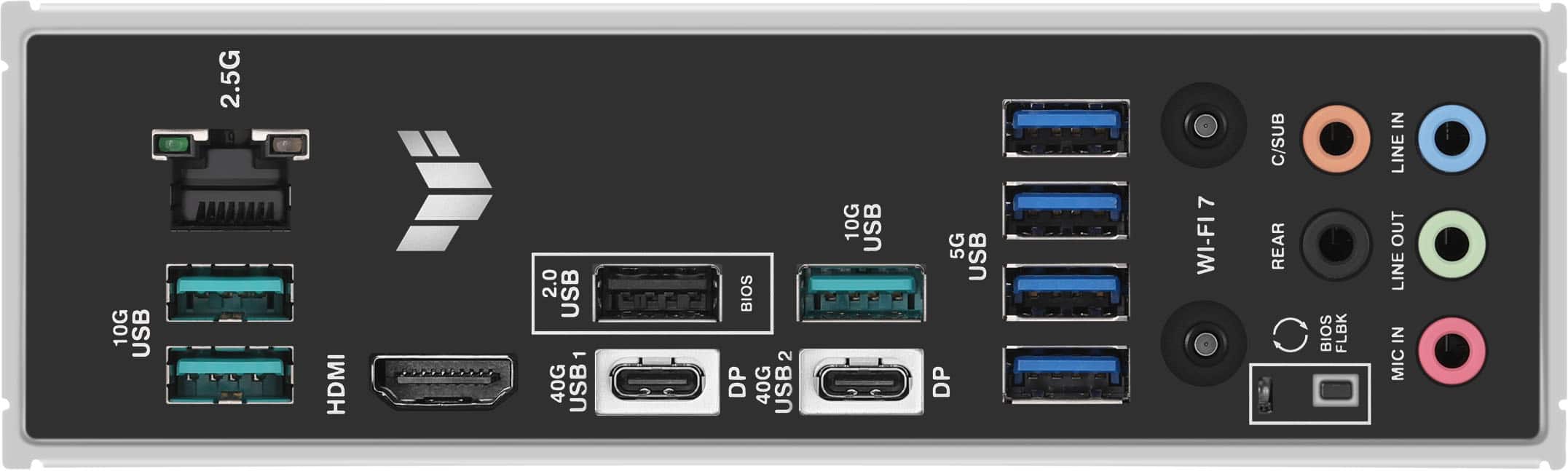
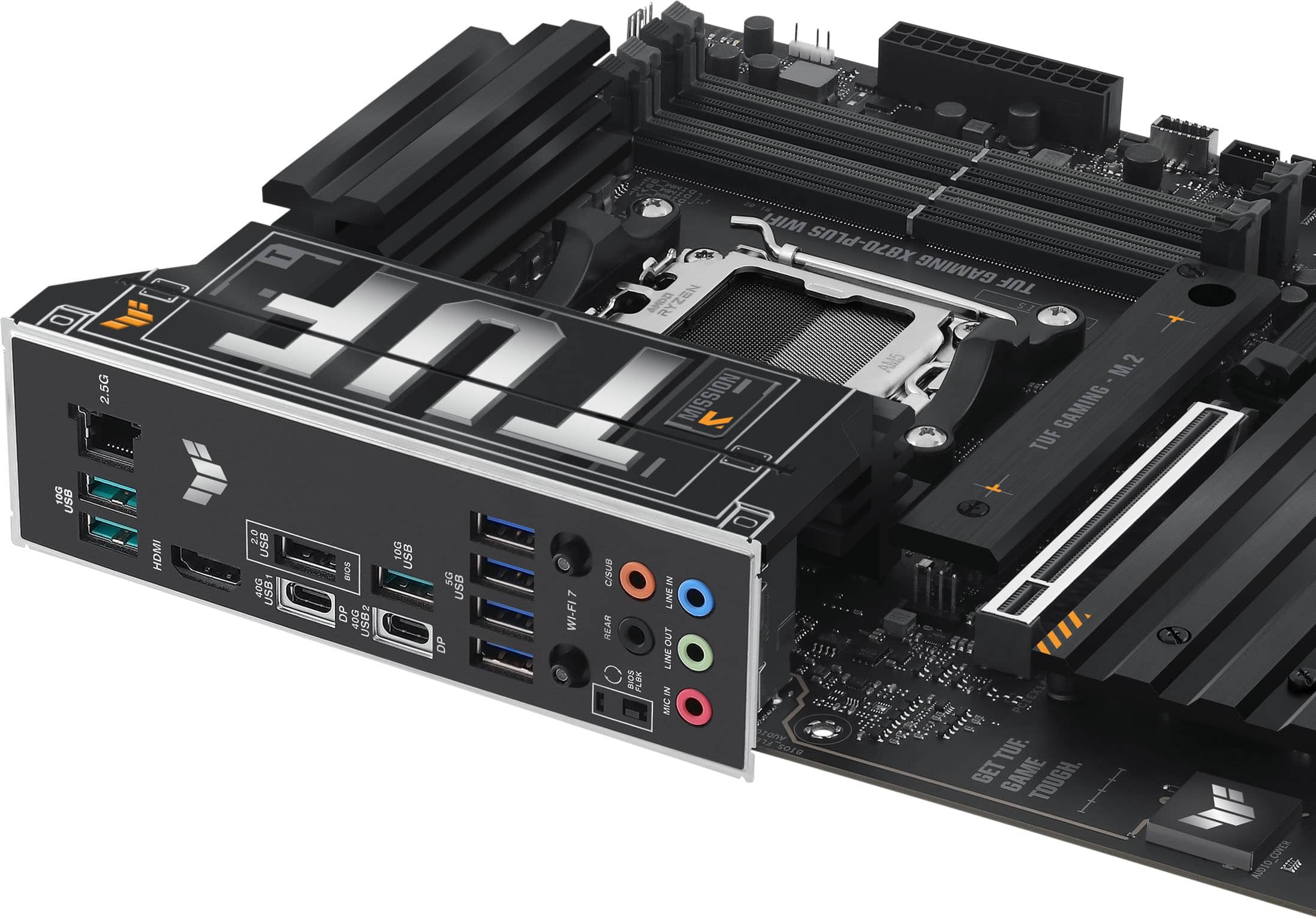
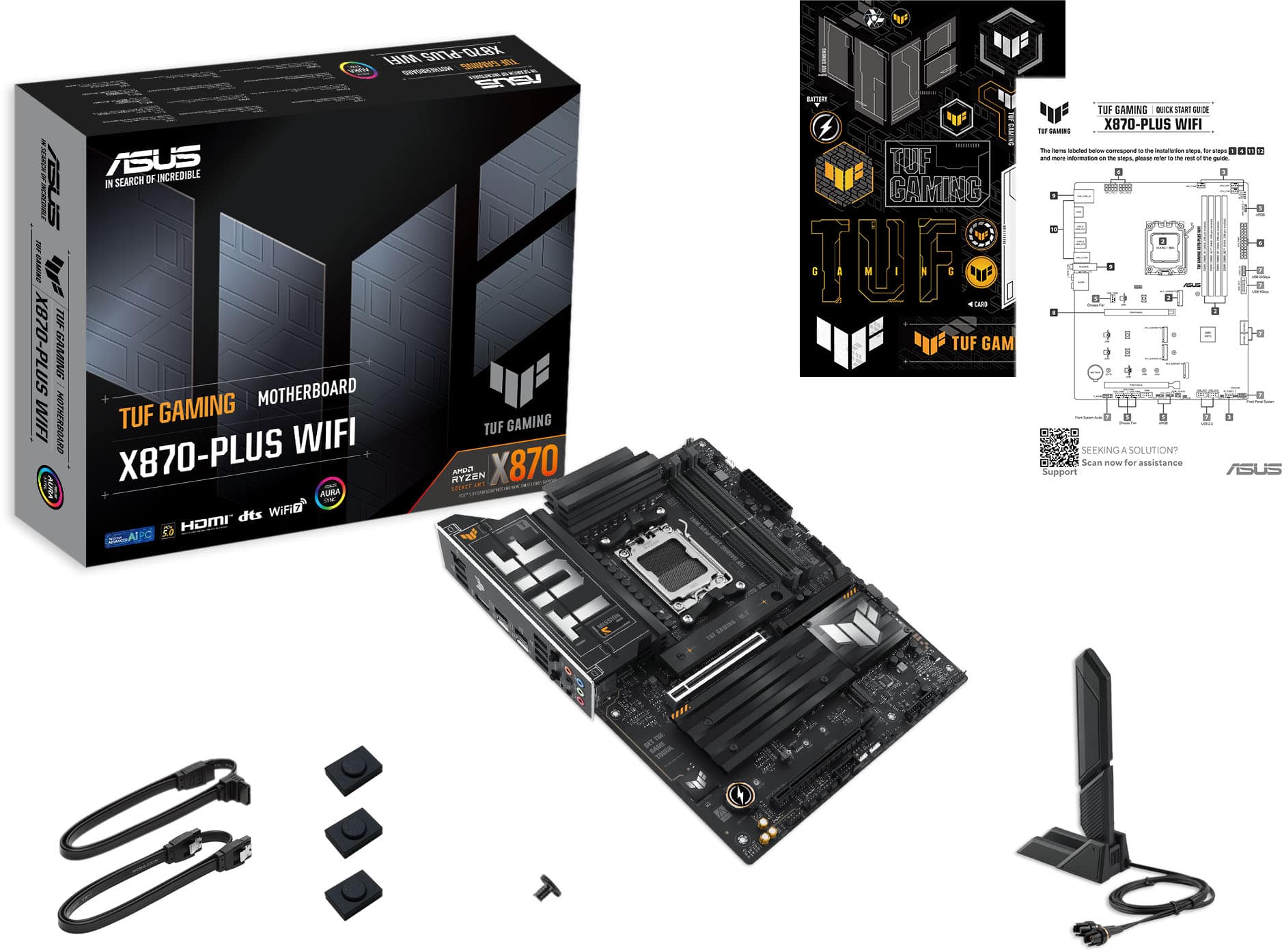
|Posted .This reviewer received promo considerations or sweepstakes entry for writing a review.This replaces the “x670 boards”. Main things you get over the previous boards is USB-4 comes stock on all boards. More support for Gen 5 speeds. But is still VERY limited with a bunch of asterisks. So, before buying make sure to read the fine print. Overall, it’s a good board. Maybe even a great board. But the SSD limitation is a big one for me. Along with just the crazy cost. Motherboards have gotten too expensive. WHAT I LIKE: - Supports USB 3.0 PD. - 2x USB 4 (USB-C) 40 Gbps) ports. - IO Ports are solid. IO is good. Clear labeling. 4x USB “5G”, x3 10G USB x3, 2x USB-C 40 GB that supports display port and power delivery, 1x 2.0 which also works as bios, 2.5 GB wired port, Wi-Fi 7, Bluetooth 5.4. BIOS flashback button. - 2.5 Gb ethernet port. - BIOS flashback button - Wi-Fi 7 instead of screw in plugs in and has a tower for better speeds (hopefully). - Large heatsinks - Easy to release graphics card slot. Great feature. - Overclockable for both CPU and RAM. Max 128 GB RAM and 8000 RAM speed. - LED lights for trouble shooting - Everything on the board is clearly labeled. - Most headers are on the bottom of the board allowing for easier cable management. Also, a bunch of fan and RGB headers. Making building easier. But no legacy headers for RGB. - 16+2+1 power deliver design. - Supports 7000, 8000, and 9000 series AMD CPU’s. WHAT I DISLIKE: - TUF branding is excessive. But some may really like that. - 4 NVME SSD ports. 2x Gen 5 and 2x Gen 4 with quick release latches and 3 of the 4 have heat sinks built in (with thermal pads attached). All those are good. HOWEVER, 2nd gen 5 slot cuts main graphics card slot from x16 to x8. And if you plug one into the 4th SSD slot (gen 4) it disables the second PCIe Slot. Um what? At $309? What? On top of only having two sata ports for old school SSD/HDD’s. - SPDIF is missing for onboard audio. Which many still use for sound systems. - Computer costs are out of control. This is incredibly expensive. Performance is essentially the same as X670 boards except for Wi-Fi 7 (which is big if you have Wi-Fi 7) and USB-4 (which many may not care about). COMES WITH: - Stickers - x1 90 degree to straight sata cable and x1 straight to straight sata cable. - Physical non-colored quick start guide. - x3 m2 rubber - x1 screw for M2 q-latch.
I would recommend this to a friendTUF mid level AMD ATX Motherboard
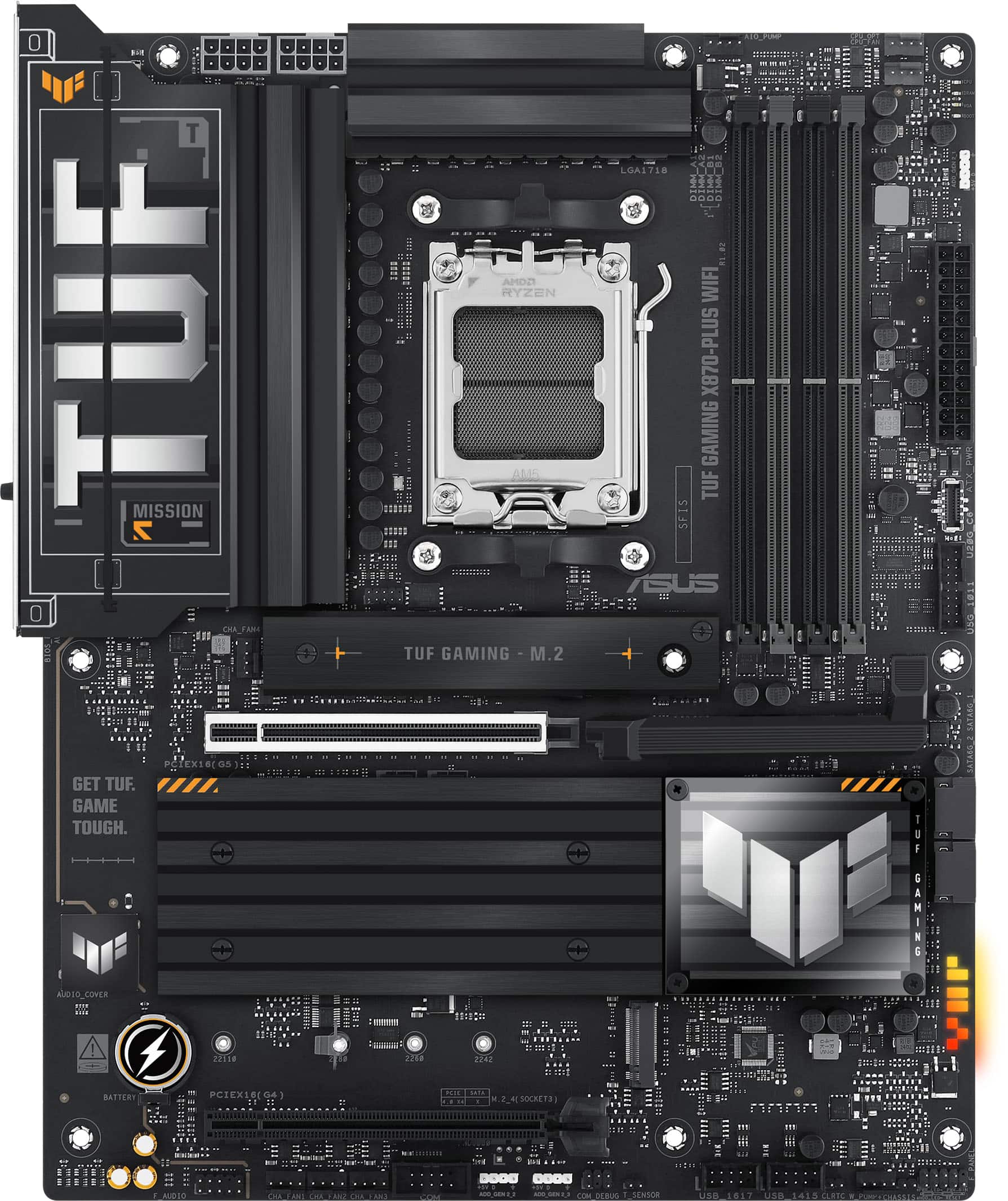
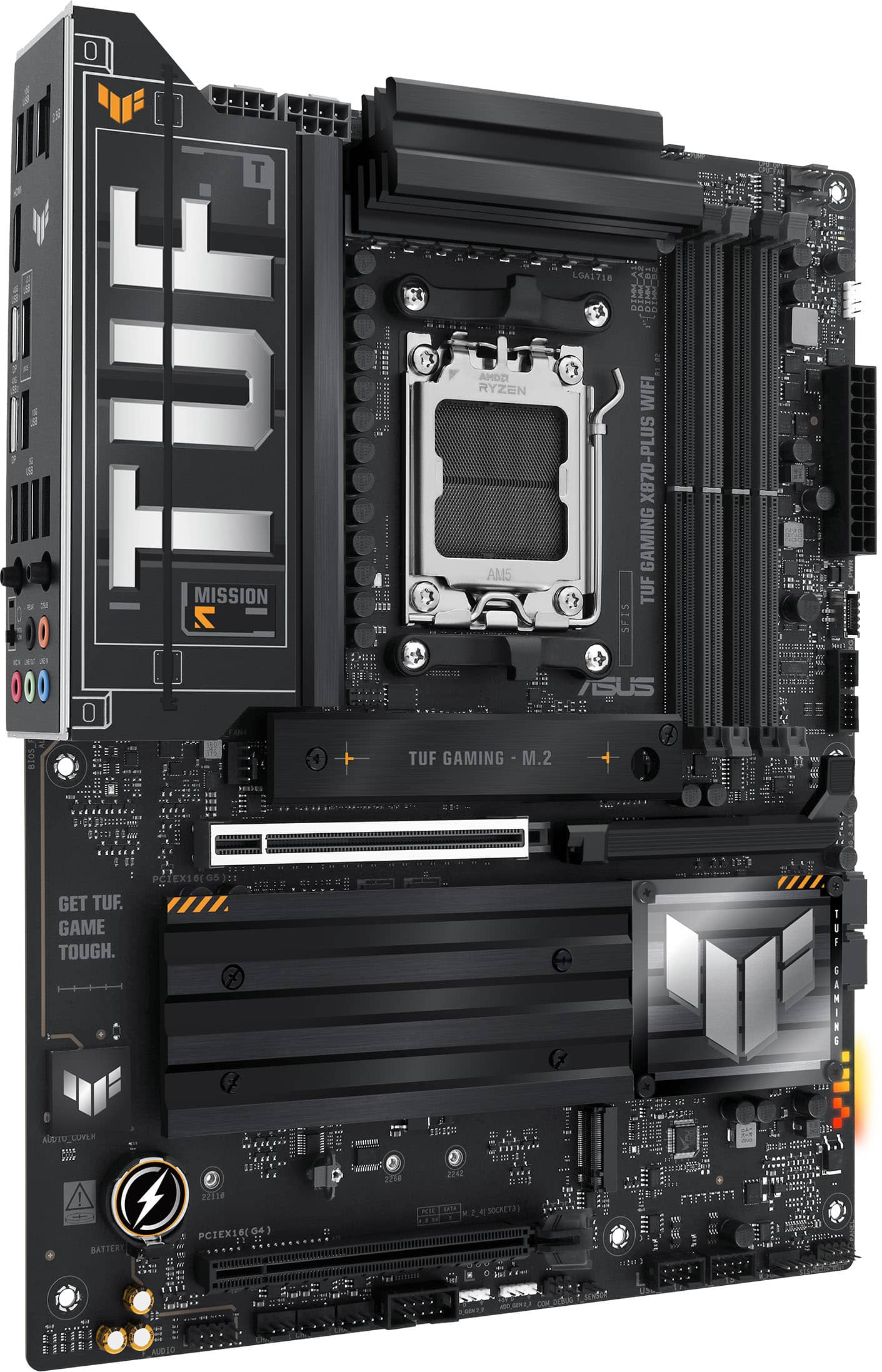
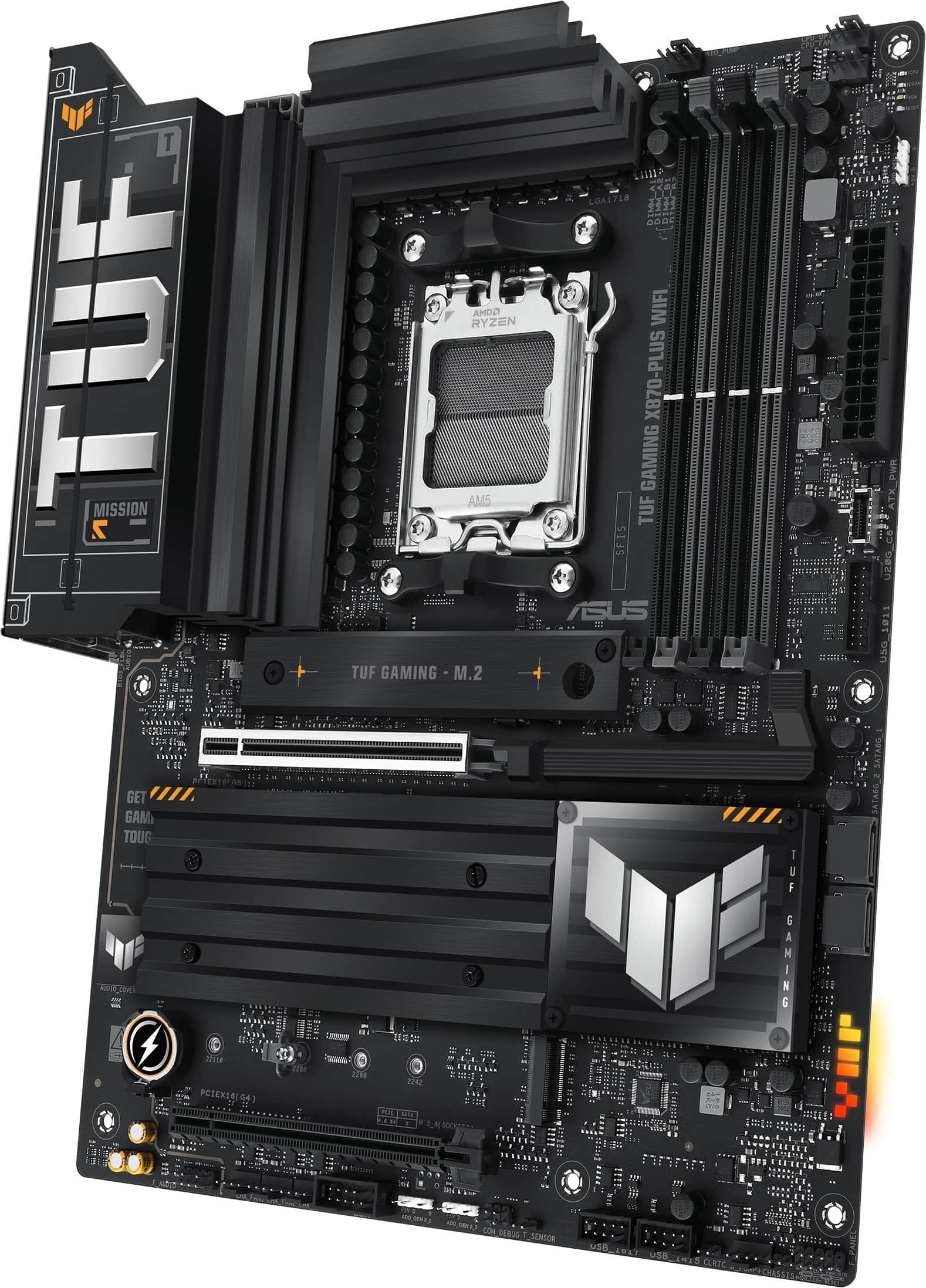
|Posted .This reviewer received promo considerations or sweepstakes entry for writing a review.ASUS - TUF GAMING X870-PLUS WIFI (Socket AM5) AMD X870 ATX DDR5 Wi-Fi 7 Motherboard The ASUS TUF Gaming X870-Plus WiFi 7 is part of the TUF line of ATX form factor motherboards using military-grade components, increased cooling capacity with large effective heat sinks, endurance testing, and military/industrial styling, giving a balance between performance features and a mid-level costing. The TUF line has been one of my go-to line of boards for my gaming machines. All motherboards are complicated and full of components, leading to the possibility of compatibility or other problems. The nice thing about ASUS is they don’t leave you in the gate trying to figure something out. In addition to great support that I have had the occasion to use they provide a lot of charts that are easy to find the tested products that have been certified to work with their motherboards. Just go to the support section of their website (or use the QR code on the quick start guide to get here) and enter the motherboard information, and you will be led to a chart of tested and confirmed components like memory, CPU, HDD drives, Power supplies, and peripherals in an easily searchable matrix. In addition, there are FAQ’s, manuals, drivers, and software tools. In the box is a quick start guide. Use this to support the manual on their website to help gather your components and assemble your new computer system. This model motherboard has the AMD X870 chipset, which was part of the new chipsets announced for the AM5 line of motherboards at COMPUTEX 2024. The big addition was the addition of USB4 as a requirement, and the number of PCIe lanes changes around a bit to allow for features such as Gen5 M.2 connectors and Gen5 PCIe expansion slots. Opening the box revealed a motherboard in an anti-static bag protected by cardboard inserts, a WiFi 7 antenna, two SATA cables, and a couple of packages of rubber bumpers for M.2 slots, along with an M.2 drive mount screw. This model does not include an onboard power button and digital LED readout for troubleshooting, but you do have a set of De-Bug LEDs in the upper right corner to help you in case of boot issues. A big plus is the EZ-Release button (“Q-Release”) for the primary graphics card slot, which works quite well. The motherboard has WiFi 7 by Media Tek and a wired 2.5Gb Realtek ethernet port. It is disappointing that a higher-capacity ethernet hardwire port was not included. There is a 7.1 sound channel with five audio jacks on the I/O panel supplied by the Realtek ALC1220P Codec. The board has four memory slots capable of supporting a total of 192GB of DDR5 memory modules, and the slots have a single latch end. The component spacing is sufficient for most CPU coolers, including most closed-loop AIO coolers. For storage, there are two right-angled 6Gb/s SATA ports and two M.2 Gen5 and two M.2 Gen4 slots. As is typical, there are trade-offs with M.2 storage. The CPU supplies the M.2 #1 and #2 slot lanes. Using the M.2_2, the primary PCIe graphics will be reduced from x16 to x8 speed. The X870 chipset supplies the M.2 #3 and #4 slots. If M.2_4 is utilized, the lower PCIe graphics slot will be disabled. The preinstalled rear I/O panel has a stainless steel motherboard bracket. The rear connections include a BIOS flashback button and a USB 2.0 type A slot for the flashback, a 2.5Gb RJ-45 ethernet port, three USB 3.2 (10Gbps) type A ports, an HDMI port, two USB4 (40Gbps) type C ports, four USB 3.1 (5Gbps) type A ports, Q-Antenna WiFi ports, and five audio jack ports. The ASUS TUF GAMING X870-Plus WiFi uses a standard UEFI BIOS from American Megatrend. ASUS has always provided one of the more straightforward BIOS to navigate, which is a big plus as some BIOS setups can be a pain. Remember to check for BIOS upgrades, as newly released boards will often have new BIOS releases with more supported components and upgraded performance or fixes. With the variety of CPUs, memory, storage, and other components needed to set up a gaming machine or workhorse with this motherboard, things will vary so much that it isn’t advantageous to mention my full-build components. I have had no issues. This well-built board presents a quality gaming and tweaking platform with plenty of muscle for graphics or AI or just your everyday computing needs. My best recommendation is to follow the charts for certified tested components and you will enjoy your system as much as I enjoy mine.
I would recommend this to a friendFantastic Premium AM5 Motherboard
|Posted .This reviewer received promo considerations or sweepstakes entry for writing a review.The ASUS TUF Gaming X870-Plus WIFI motherboard is a socket AM5 ATX motherboard using AMD’s X870 chipset that is designed for AMD Ryzen 9000, 8000, and 7000 Desktop Processors. First Impressions Taking the motherboard out of the box, the first thing I noticed was that it was a little heavier than I expected. The motherboard felt solid with a premium build quality. It’s also a beautiful looking motherboard. The package came with the following items: The ASUS TUF Gaming X870-Plus WIFI motherboard itself 2 x SATA cables An external Wi-Fi Q-Antenna with a magnetic base An M.2 Q-Latch B screw 2 x M.2 rubber pad packages (total of 3 pads) A Quick Install Guide A set of TUF Gaming stickers Feature Set A brief list of the main features of the ASUS TUF Gaming X870-Plus WIFI motherboard are: 4 x DDR5 DIMM slots that support both ECC and Non-ECC memory 1 x PCIe 5.0 x16 slot 1 x PCIe 4.0 x16 slot 4 x M.2 slots 2 x SATA 6Gb/s external ports 2 x USB4 Type-C (40Gbps) external ports 3 x USB Type-A 10Gbps external ports 4 x USB Type-A 5Gbps external ports 1 x USB 2.0 Type-A external port 1 x USB 20 Gbps internal connector 1 x USB 5 Gbps internal header 2 x USB 2.0 internal header 1 x 4-pin CPU Fan header 1 x 4-pin CPU OPT Fan header 1 x 4-pin AIO Pump header 4 x 4-pin Chassis Fan headers 1 x W_PUMP+ header 3 x Addressable Gen2 AuraSync RGB headers 2.5 Gb Realtek Ethernet port Wi-Fi 7 provided by MediaTek MT7925 (supports 2.4/5/6GHz bands) Bluetooth v5.4 BIOS FlashBack button Build Experience I have had previous experience building PCs, so for me, the Quick Install Guide provided adequate instructions into putting everything together. However, I wished the Quick Install Guide mentioned that if you use the M2_4 slot, then the PCIe 4.0 x 16 (G4) is disabled and that the PCIe 5.0 x16 slot will only run at x8 if the M2_2 slot is used. In addition, the M.2_2 slot is not available when an 8000 Series Desktop Processor is installed. This information is available from the User’s Manual available from their website. This was my first experience in building an AM5 system, so I had to watch some YouTube videos for pointers on how to safely install the CPU. I found the build process to be very pleasant with the ASUS TUF Gaming X870-Plus WIFI motherboard. All the mounting holes and screws lined up perfectly in my computer case. Everything was a perfect fit which reinforced my early impressions of the motherboard having an excellent build quality. I used the following components for my build: AMD Ryzen 5 7500F 6-core processor Corsair Vengeance 64GB DDR5 5200MHz memory Fanxiang S880 M.2 2TB SSD Fanxiang S770 M.2 2TB SSD Thermaltake UX200 SE CPU fan and cooler ASRock Arc A770 16GB Phantom Gaming graphics card Corsair RM750e 750-Watt Power Supply I did not encounter any issues or compatibility problems during my build and testing. The motherboard supports ReBAR (resizable BAR) which is necessary for getting the best performance from using Intel ARC series graphics cards. I was a little worried about pairing an Intel graphics card with an AMD based system, but everything seems to be running fine. I have been playing Black Myth Wukong to test the stability of the system. There have been no crashes or lockups. Overall, this system has been rock-solid for me. I am currently running everything at stock speeds and did not really explore overclocking. I generally prefer stability over running everything as fast as possible. The BIOS seemed full featured and user friendly for those that love to tinker with settings. The ASUS TUF Gaming X870-Plus WIFI also has some nice DIY features that help make the build process easier and more pleasant. For example, I really loved the PCIe Slot Q-Release button. During my build, I had to remove the graphics card after I installed it so I could rearrange some cables, and the Q-Release button made this super easy. On other motherboards I have used in the past, I sometimes had an extremely difficult time (to the point where I would start cursing at myself) when trying to remove a large graphics card from the PCIe slot because the large graphics card made it difficult to reach the release lever/button. With the ASUS TUF Gaming X870-Plus WIFI, the release button was easy to reach and press. I also appreciate the screw-less design of the M.2 slots. This makes it easy to install and remove M.2 SSDs. No more dealing with tiny screws with my aging eyes. I also like having 4 M.2 SSDs slots as opposed to having more SATA connectors. This allows you to build a system with lots of storage but less cable clutter. M.2 SSDs do not require any cables and can produce a much cleaner looking build. And finally, I also like the BIOS Flashback feature as that allows you to flash a new bios without having any (or a not yet supported) CPU installed. In summary, I think the ASUS TUF Gaming X870-Plus WIFI is an excellent premium AM5 motherboard. It is full featured, rock-solid stable, and has many features to help make the build process as pleasant as possible. I can strongly recommend this motherboard for anyone wanting to build a new AM5 based computer.
I would recommend this to a friendTUF Enough for the 9800x3D
|Posted .This reviewer received promo considerations or sweepstakes entry for writing a review.I'm a big fan of Asus for decades now from when they had a PegASUS logo and just made great performing and fully featured boards at affordable prices. Since those days, they've launched some additional gaming brands within their lineup like TUF and ROG. While ROG is the top of the line flagship, TUF is their upper midrange sensibly priced option for gamers and enthusiast builders. So the X870 is a refresh of the AM5 socket and B650 with the biggest difference being mandatory USB4. Anecdotally, there are reports of better RAM speed support and fewer USB issues that often give AMD platforms a bad rap. X870-E has another AMD Promontory 21 chipset for more I/O but also raises the price. For most enthusiasts, X870 is going to be plenty fast and featured enough without getting into that higher price range. So how does the board actually compare to the X870 ROG Strix alternatives? I did compare with an Asus X870-A Strix (White) that I had already built my 9800x3D system with and while they are very similar, there are also some clear and distinct differences between the two boards. - Only 1 USB 3.2x2 header for the front of your case. If you have 4 USB ports, that means only 2 will work (1 header = 2 USB ports) - Magnetized WiFi antenna connectors - Realtek 2.5Gb NIC vs. Intel on the Strix - No heatsink covering one of the PCIe m.2 slots on the TUF - No EZ tool-less removable m.2 cooler on the PCIe 5.0 m.2 slot - No CMOS reset buttons, you have to actually short the CLRTC jumpers to reset the BIOS if you make a BIOS change that fails to POST. A lot of these may seem like no big deal, but for the difference in price, that's not a lot more money for a lot of quality of life features. Beyond that there was also an inexplicable difference in performance running a few low res benchmarks. I was surprised and could not replicate the same scores for the TUF, but not a huge deal because I game at 4K so the low res doesn't translate to real world for me. One thing that was annoying however, is that the Strix seemed to handle memory timing changes better, as the Strix would just boot to fail-safe defaults if I got too aggressive on the RAM timing changes, but on the TUF I had to reset CMOS much more frequently. And of course with aesthetics, ROG just gets it right, while TUF is supposed to look military grade or rugged. I much prefer ROG but TUF could be worse, it could be the old Sabretooth lineup from Asus , or some of the weird log and branding like the Aorus eagle thing or the MSI dragon. For those that want to tweak the performance of their 9800x3D, I had no problems running my 2x24GB Team Extreme memory kit at DDR5 6200c28, 3100 Uclk and 2200 Fclk. There's some good guides out there for a 5 minute overclock, which the Asus BIOS makes easy. Overall this is a solid board at a great price point, however, if you are willing to spend a little more money, I would also recommend the Asus X870-A ROG Strix as well.
I would recommend this to a friendTOOO TUF
||Posted . Owned for 2 weeks when reviewed.This reviewer received promo considerations or sweepstakes entry for writing a review.USER REVIEW Absolutely! Here's a user review for the ASUS X870 motherboard: User Review: ASUS X870 Motherboard Rating: ⭐⭐⭐⭐⭐ Review: The ASUS X870 motherboard has exceeded my expectations in every way. As someone who builds custom PCs regularly, I've seen my fair share of motherboards, and this one stands out. Performance: The performance of this motherboard is stellar. It handles my high-end Ryzen processor effortlessly, and the DDR5 support is a game changer. I’ve noticed a significant boost in speed and overall system responsiveness. Build Quality: The build quality is superb. The materials feel premium, and the layout is well thought out. The installation was straightforward, thanks to the user-friendly features like the M.2 Q-Release. Cooling: Cooling has always been a concern for me, but the ASUS X870 has ample fan headers and an efficient cooling system that keeps everything running cool and stable, even under heavy loads. Connectivity: The connectivity options are fantastic. I love the PCIe 5.0 support and the numerous USB ports. The Wi-Fi 7 is incredibly fast, and the overall connectivity experience is seamless. User Experience: The user experience has been smooth. The BIOS is intuitive and packed with features that make overclocking and system tweaks a breeze. The Aura Sync lighting adds a nice touch to my build. Conclusion: If you're looking for a high-performance, reliable, and feature-rich motherboard, the ASUS X870 is a top contender. It's perfect for gamers, enthusiasts, and anyone looking to build a powerhouse PC. Highly recommend it!
No, I would not recommend this to a friendRecommended board for the price
||Posted . Owned for 3 weeks when reviewed.This reviewer received promo considerations or sweepstakes entry for writing a review.Looks great, works great. Board does not feel cheap. Port selection is quite nice, and can appreciate how many options there are for NVMe drives.
I would recommend this to a friendA TUF Backbone
|Posted .This reviewer received promo considerations or sweepstakes entry for writing a review.Alongside your choice of power supply, the motherboard is the most vital component of any PC system build that should not be underestimated. Time and again I’ve seen a great build hamstrung by a cheap motherboard that can’t keep up with the demand of a high-power processor, leaving tons of performance on the table and oftentimes presenting the user with a conundrum on how to connect all the devices, storage, fans, or expansion cards they want. The ASUS X870-Plus TUF Gaming WiFi (X870+ TUF from here on, for short) aims to be a midrange motherboard with a bevy of gaming-forward features and port selections, while offering a good quality power configuration for AMD’s latest and greatest desktop CPUs. Indeed, the X870+ TUF is a competent board that doesn’t break the bank for one of the most feature-filled AM5 chipsets. An important disclaimer: This review will be geared toward PC-building enthusiasts. If you’re a novice user or tinkerer who hasn’t built a custom desktop PC before, you will want to look into guides and videos for how to build a PC before purchasing a motherboard. Best Buy’s Geek Squad can point you in the right direction or offer build services, but by and large if you aren’t sure whether you need this item, then you likely do not. - Unboxing and Setup Since motherboards are the figurative (and sometimes literal) backbone of a PC build, you won’t find much in the way of installation instructions in the packaging. Instead, ASUS ships this board with a user manual showing a basic overview and instructions for installing individual components into the motherboard. The only accessories included are the WiFi antenna, an M.2 screw and rubber spacers for single-sided disks, and two SATA data cables. The I/O shield is integrated. Mercifully, the AM5 generation of processors moved to land-grid array (LGA) layout, so there are no longer pins on the processor to contend with. Much like Blue Team motherboards, AM5 motherboards and the X870+ TUF have a spring-loaded socket with pins protected by a plastic cover to prevent shipping damage. The zero-insertion-force mechanism is intuitive and easy to use. Better yet, the AM5 socket is largely backwards-compatible with AM4 coolers that used the stock AM4 backplate, though coolers that utilize custom backplates will need to be checked for AM5 compatibility or adapters from the vendor. Once I had my system assembled, the first feature I took advantage of was the BIOS Flashback. This allows you to update the motherboard’s firmware (BIOS) without needing to install a CPU or boot the system; simply place a copy of the BIOS file downloaded from ASUS’ website to the root of a [FAT32-formatted] USB disk, connect to the indicated USB slot on the rear, hold the flashback button, and let the system update until the status LEDs finish flashing. This can serve as both an update vector and a CMOS clear (BIOS settings reset) in a pinch if accessing the CMOS battery near the second PCIe slot is difficult due to your build configuration. - Configuration & Feature Set This is a very gaming-focused motherboard that eschews some typical port selections for ones that are more relevant for high-end, single-GPU PC gaming. Only two full-length PCIe slots exist; the upper one is rated for PCI Express 5.0 x16, and the lower one is PCI Express 4.0 x4. The four M.2 SSD slots are split with 2 being PCIe 5.0 x4 and the other 2 being PCIe 4.0 x4, and one of the 4.0 slots is shared with the lower, full-length PCI Express slot. In other words, you have the choice between having one PCIe slot active with 4 M.2 devices, or both PCIe slots active with 3 M.2 devices. Choose accordingly - and know that the first 3 M.2 slots have TUF heatsinks while the last one (the shared one) is bare. Beyond that lane sharing, the X870+ TUF has a great array of ports for modern and legacy connectivity. Two SATA ports offer older storage or optical disc drive (remember those?) connections, 8 USB-A ports comprise 4x 3.2Gen1 ports, 3x 3.2Gen2 ports, and a single USB 2.0 port. The two USB-C ports are USB4 rated for 40Gbps throughput, but are not Thunderbolt certified. For those who are curious or picky about their chipsets: > 2.5G LAN is powered by a Realtek RTL8125BG chipset. > WiFi 7 / Bluetooth is powered by a MediaTek MT7925 chipset. > Onboard audio is powered by a RealTek ALC1220P chipset. There is no S/PDIF audio output. One of my biggest gripes with most midrange and some high-end motherboards are a lack of fan and pump headers…which the X870+ TUF alleviates by offering 8 of them alongside 3 ARGB 5v headers. This should be plenty for most any case and airflow configuration outside large “fishtank” builds, though it would have been nice to see at least one of these headers near the I/O panel for better flexibility with rear-mounted exhaust fans. Still, few complaints here. RAM selection is very flexible on this board, with the Qualified Vendor List (QVL) listing DDR5 memory modules up to 8,000MHz. The board officially supports up to 192GB (4x48) of RAM across its four DDR5 DIMM slots, and up to 256GB (4x64) with Ryzen 8000 series CPUs and newer. Bear in mind that the memory controller of your CPU will likely struggle to reach rated speeds when all four slots are used, and thus in a gaming focused setup you will want to keep to two memory modules for the fastest speeds and best results. - Overclocking Sporting two 8-pin EPS power connectors, the X870+ TUF suggests it can handle high current draw to push an AM5 processor to the limit. Compared to other AM5 motherboards, the 80-amp voltage regulators are configured as doubled 8-phase for VCore and 2+1 phase for SOC & DrMOS, which is a cost-optimized setup compared to higher end boards, but the doubling-up of power phases for the CPU is a good method to maintain voltage stability when overclocking. In simpler terms - the X870+ TUF has a good power configuration for modest overclocking for a daily-used system. You won’t be pushing chips to world record heights with this board, but if your intent is to enable AMD’s Precision Boost Overdrive (PBO) and let the chipset handle performance and voltage adjustment automatically, this board will push the same chip to virtually the same height as a more expensive, overbuilt board - so much so as to be all but unnoticeable outside of benchmark or framerate numbers. This motherboard has all the usual settings for overclocking and voltage adjustments, including the all-important load line calibration. ASUS also advertises their “AI overclocking” feature, but don’t be fooled by the name - it simply increases frequencies and voltages within some set parameters and runs quick internal benchmarks to find stability. I personally did not tweak my CPU settings at a fine level; I simply enabled PBO and threw in a -100mV VCore offset to slightly lower operating temperature in the long run. No stability issues during stress testing. [Disclaimer: overclocking technically voids your CPU and motherboard warranty as you are running both outside their “safe” design specifications. Overclocking is done at your own risk, and the BIOS will notify you of the same prior to enabling.] - Bottom Line If you made it this far into the review, the ASUS X870-Plus TUF Gaming WiFi was likely on your shortlist already, and I hope I could shed some insight into the details of its configuration and limitations with PCIe lane sharing. I’ve been running this board for a few days with an 8400F, intending to upgrade to a 9000X3D series chip down the road. As an upper-midrange board it gets the job done at a reasonable price, and the wide selection of rear ports and four M.2 lanes will allow me to build out an absolute beast of a desktop over the next year. The usual caveat of ASUS’ reputation for quality control and customer service applies, but to date I have not had an issue with any ASUS computer component, including this one. At a $309.99 MSRP, the X870+ TUF comes recommended!
I would recommend this to a friendTOP QUALITY MB- W FEATURES TO MATCH
|Posted .This reviewer received promo considerations or sweepstakes entry for writing a review.This is one of the nicest motherboards I have ever used, I usually don't go for Motherboards over $160 but you can really tell the difference in the build quality. BUILD QUALITY The quality if the board is very apparent as soon as you hold it. It is a stiff board,hefty weight, upon closer inspection the PCIE slot feels solid thru-out and reinforced. The solid PCIE slot will help with the beefier GPU's and keep it from sagging. The secure push lever on the PCIE slot is also a nice design, add a little bit more security. VERSATILITY There are enough connections that you will be able to connect all your fans, ARGB, USB 2.0, 3.0, USB Gen 3.2 Type Einternal header. I really enjoyed the TYPE E header, it allowed me to connect a front USB-C connection with the blazing speeds of 20gbps. I do wish there was another 3.0 internal header but one is enough. I do wish they would put one less USB 2.0 header and add a second USB 3.0 header. There are plenty of USB connections on the rear panel of all sorts of speeds to suit your needs. The USB 3.0 10Gbps allows me to access my external hard drive and transfer files extremely fast and even play long videos from the external drive with zero issues. A.I./BIOS The bios setup was easy, pretty much didn't change too much in the settings except for the AMD EXPO. There is a preset A.I. tweak that gets the most out of your ram, fans and even CPU. I didn't play with the CPU voltages because i'm not that confident but the RAM and COOLING was a breeze with the A.I. feature. CON The only con I have come across which is a decent one is the BT/WIFI do not work if you do not use WINDOWS 11. I personally like WINDOWS 10 and didn't want to upgrade because I didnt see a need nor would I have but if I didn't upgrade I would not be able to use the latest BT or WIFI-7. The CON isn't the requirement but the fact that it isn't really advertised and you have to go digging thru their website specs to see it. I would have thought just add the asterisk and mention it on the main page. OVERALL a very nice MB, has a lot of the bells and whistles without going overboard, It's a ncie upgrade for most users worth enough future proofing to keep it relevant for quite a bit.
I would recommend this to a friendASUS TUF Gaming X870-Plus WiFi – The perfect AM5 b
||Posted .This reviewer received promo considerations or sweepstakes entry for writing a review.Just built my Ryzen 9 9950X + RTX 5090 rig on the ASUS TUF Gaming X870-Plus WiFi and I’m completely in love. This board is a tank: 16+2+2 power stages keep the CPU ice-cold even at full 230 W load, EXPO DDR5-8000+ profiles work instantly with my G.Skill kit (no manual tweaking needed), and the Wi-Fi 7 + 5GbE LAN combo gives me insane speeds – downloads hit 900+ MB/s and Valorant ping dropped 3-4 ms compared to my old X570. BIOS is super polished (ASUS never disappoints), Q-Flash Plus is a lifesaver, and the amount of USB ports (including front-panel USB 20Gbps) is ridiculous. The armored PCIe 5.0 slot feels bulletproof, and the audio (Realtek ALC4080) actually sounds great with my Logitech G Pro X 2 – no need for a separate sound card. Build quality is military-grade as advertised, RGB is subtle but looks clean, and thermals are excellent even under heavy stress. For anyone building a high-end AM5 gaming or productivity PC right now, this is hands-down the best value X870 board on the market. ASUS killed it again. 10/10 – already planning my next build around another TUF board.
I would recommend this to a friendGreat AMD AM5 Gaming Motherboard
|Posted .This reviewer received promo considerations or sweepstakes entry for writing a review.The ASUS TUF GAMING X870-PLUS WIFI is a higher end offering for new AMD AM5 CPUs that supports the latest features for PC gaming. If you’re in the market for a motherboard you probably already have an idea of what you want, so I’m going to keep this review short with some pros and cons, along with my overall impression of the product. Pros: Supports PCIe 5.0 and DDR5 memory So many M.2 slots and SATA ports Fantastic heat sink configuration over just about everything Onboard WiFi 7 Onboard audio is high quality Great overclocking via the UEFI BIOS User friendly M.2 slots and GPU slot Native USB-C and USB 3.2 onboard Solid and thick PCB Cons: Heavy due to all the heat sinks Only 2 internal USB 2.0 headers for accessories Overall: Asus has been around for a long time and are a reputable brand, so it’s no surprise that this motherboard does almost everything right. Sure, you’re definitely paying a little more than other options, but the last thing you want to skimp on is your motherboard for a gaming rig. I fully recommend the ASUS TUF GAMING X870-Plus for anyone looking to step into building a new AM5 based PC.
I would recommend this to a friendFast boot, worked without tinkering, but slow WIFI
||Posted . Owned for 2 weeks when reviewed.This reviewer received promo considerations or sweepstakes entry for writing a review.Pros: This board was easy to install, my 9900X came right up without any fiddling. I was to get my DDR 7200 CL34 kit with tweaked settings up and running with just a simple toggle. Performance wise, I don't have any other X870 boards to compare this to, but my CPU scores seemed to be on par with other X870 and B650 motherboards. Built in wireless so you don't have to waste a slot with a wireless card or deal with USB wireless dongles failing after 9 months. It has 4 NVME slots, but really three as the 4 one takes away your PCI X bandwidth from your GPU. With that said, I have a 2TB WD SN850 and a 4 TB WD SN850X that both get around 6800 MBPS read and about 6300 MBPS write. Cons: Only two sata ports and I have three HDs to go along with my NVME. Plus I have 4k BR burner. This is a problem, and trying a Sata card did not work. So I'm knocking off a star because of the limited SATA options. The WIFI is also slower than my dedicated card. I use to get 918 MBPS with my ASU 2.5 GBPS wireless card, now it's 870 MBPS. My connection is 1.2 GBPS, and only 1 PCI X8 slot my non functioning SATA card is installed. Now the Motherboard was on sale when I purchased for $20 off. It was not my first option, but had good reviews so I pulled the trigger. I'm mostly happy, but need to buy a new Sata card.
I would recommend this to a friendGood value for overclocking, limited PCIe
|Posted .This reviewer received promo considerations or sweepstakes entry for writing a review.At ~$300, this board is on the higher end of x870 offerings. The 16 stage power delivery is far more than sufficient to overclock a 9950x with a custom water cooling loop, and the EPS power connectors use solid pins, which increases their current rating. It includes Asus’ color-coded POST debug LEDs, but at this price,I’d really prefer to see a seven segment debug display. It’s getting harder and harder to find those on motherboards under highly inflated ~$500 price tags. This board is built for overclocking; Why deny one of the most useful features in that department? It’s not the end of the world, since Asus has pretty good recovery for overclock failures, but it’s still something I’d like to see, because pretty good isn’t perfect. There are times when failed settings can still bootloop forever, and there are times when memory training takes a bit longer than usual and it might seem like a failure, but it isn’t. Real seven-segment post codes are helpful in those situations. Asus claims to have validated memory kits up to 8000MHz on this board, with the caveat, of course, that memory performance is dependent on the CPU’s silicon as well, and this is particularly relevant in AMD Ryzen systems. Getting to, or past, 8000MHz on motherboards with four dimm slots is difficult. Silicon lottery is involved with the memory controller on the CPU, and some of them just can’t do it. I have a 2x24GB memory kit from TeamGroup with an 8200MHz XMP profile, which absolutely did not work out of the box. Asus includes a variety of memory overclocking presets in the BIOS, and I was able to pick the 7600MHz 2x24GB Hynix preset and then tune it from there. I eventually got 7800MHz stable, and 8000MHz can boot, and even complete some benchmarks, but hitting it with a full bandwidth test like Prime95 large FFTs will cause the system to reset. The behavior I’m seeing makes me think it’s my CPU tapping out rather than the memory or motherboard, past 7800MHz. Due to the design of the Ryzen memory controller, there’s somewhat of a stepping stone of optimal frequencies. 6000MHz is standard, most CPUs can hit 6200MHz, great ones can hit 6400MHz, and godlike ones can hit 6600MHz - then you get a reduction in performance unless you can run memory at 7800MHz+. In fact 6600MHz would probably be faster than 7800MHz, but I haven’t seen any good benchmarks given that that capability is so rare. This board does boast Asus’ dual-mode OC functionality, as well as some sort of ‘AI’ overclocking, but I can’t comment on the efficacy of either of those as they are not compatible with the 7800x3d. It has locked clock multipliers. All you can do is enable PBO and undervolt via the curve optimizer or curve shaper. I can say that with the load-line calibration at level 1, and with a very conservative -10 on the curve optimizer, the aforementioned 7800MHz memory with vSOC at 1.0v, fclk/uclk synced at 1950MHz, I can maintain just over a 4.8GHz effective clock on all cores in Cinebench R24, with software reporting the CPU package power at 69-71 watts in this scenario. That gives you an incredible amount of thermal headroom, the CPU only reaching 67C in my case, but the lack of asynchronous eclk on this motherboard means that the older locked 3d cache chips can’t really make use of it. Changing the bclk is an option, but it is notoriously unreliable, especially with higher speed PCIe v4/v5 devices. As for general nice/convenient features of the board, the front USB-C header supports USB-C power delivery up to 30 watts, which is great, especially at this price. The NVMe drives snap into place with a new pressure-based clip system rather than finnicky little latches or tiny screws, which is very convenient, particularly if swapping drives with the motherboard in a vertical orientation. The wifi antenna is detached with a magnetic base, and the plugs use an easy push-clip system rather than screw terminals. There’s a COM header, for those who may want a native serial port, and there’s a soldered debug header which sends POST codes, for those with the know-how to hook up to it. I’d still like a seven-segment LED onboard, though! There’s also BIOS flashback, which has been mandated by AMD for a while now, so you can update it for new CPU support without having a CPU installed, if necessary. The wifi/bluetooth module is a realtek one, which some people dislike, but it hasn’t given me any issues thus far. The x870 chipset feels like a bit of an odd move from AMD. By some measures, it’s less capable than x670, and even b650e, while bringing in mandatory support for new features like USB4 and PCIe 5.0 support on the primary expansion slot and at least one NVMe slot. It has a lower number of usable PCIe lanes than x670, which leads to the unfortunate choice on this motherboard between using all four NVMe slots or using the bottom expansion slot, which is limited to x4 4.0 speeds from the chipset.The primary slot must also be bifurcated to x8 to use one of the secondary NVMe slots as well - leaving four of the potential lanes unused. Why didn’t they route them to the third NVMe, offering three slots at 5.0 speeds and using the pair of x4 connections off the chipset on the 4th NVMe and bottom PCIe slot? Probably cost reasons, routing gen 5 lanes is quite expensive, but either way it’s unfortunate to see them unused in that scenario. All in, I feel like this board is best positioned as a sort of no-frills hardcore overclocking board. You get Asus’ excellent voltage regulation and power delivery, which can easily juice a 9950x to the limits of conventional cooling, as well as very good memory OC for a 4-dimm motherboard. Most users only need one GPU and one or two NVMe drives, so the lack of expanded PCIe isn’t an issue for most cases. The aesthetic will fit most types of builds without much fuss and it has some nice-to-have features for the price, and the built-in memory overclocking presets tailored for the board have worked flawlessly for me. They even have tighter timings than you’d expect from most XMP/EXPO presets. For those looking to get the most out of their hardware, that don’t need extensive support in terms of loading their motherboard up to the gills with NVMe drives and add-in cards, it would be hard to go wrong with this board.
I would recommend this to a friendHigh-quality gaming motherboard!
|Posted .This reviewer received promo considerations or sweepstakes entry for writing a review.I had thought about upgrading my PC with an AM5 processor and DDR5 ram, with this Asus motherboard I was able to complete the process which has been satisfying and entertaining. I have been assembling computers since I was very young and as time has gone by it has become easier to do it and it is something that I personally enjoy a lot. In the box comes the motherboard, the Wi-Fi antenna, user manual, stickers, some rubber protectors for the m.2, a screw to secure an m.2 memory and two sata cables. The motherboard has 4 m.2 memory slots and 2 sata ports only, in this sense I think it is enough because normally one or two m.2 memory and a sata ssd are installed in most builds. The easy installation system for the m.2 memory and the graphics card is a plus, it makes things easier. The motherboard has enough connectors for fans and ARGB. Liquid cooling brackets are already installed as well as a special connector for liquid cooling. In my case I used the stock cooler of my processor and then an RGB air cooler that had its own installation kit. It has 4 slots for DDR5 ram memory, of course they can be installed so that you can take advantage of the dual channel, I installed 2 16GB memories 6000Mhz. Regarding the IO ports they are high speed and work without a problem. Using the integrated graphics of my Ryzen 5 8600g CPU I could connect my monitor through the USB-C 40G port with a DisplayPort cable and it works great, I could also connect another monitor via HDMI and the video quality is excellent, if desired I could connect another monitor in the second USB-C 40G port with another DisplayPort cable to have a setup of 3 monitors without problem. Later I installed a RX 6700XT 12GB MECH graphics card in which I can connect 3 monitors by Displayport which is my regular setup, also without any problem. The other USB A ports are 10G and 5G enough for different devices that you want to connect. Regarding the sound I usually only connect headphones and microphone with an audio interface and it works perfect. The Wifi antenna that has its magnetic base to place on top of the cabinet works excellently well, my internet is more than 400gbs and connected the antenna in my room with the door closed can reach 400Mbps something that personally impresses me, normally the connection by Wifi antenna is not so good but this time exceeded my expectations. I have installed 2 memory m.2 of 1TB and 500GB, as well as a 500GB SATA SSD, an m.2 for the operating system, one for games and one more for files and work. Although there is no inconvenience the daily use I had to install the m.2 so that they could take advantage of the maximum bandwidth because despite having 4 ports, 2 of 5 gen and 2 of 4 gen, they share the bandwidth between them and between the PCIe 16x port, in my case everything runs fast, I have not had speed drops, but if you want to install more m.2 if it is important to take this into account. Once everything was installed and the BIOS was configured, I proceeded to install the operating system and then install the necessary drivers for the motherboard. The same system offers the installation of the Asus DriverHub software that detects the installed hardware to download the necessary drivers, even so on the Asus website you can download the necessary drivers for proper operation. From there on it's just a matter of customizing the PC to your liking and start using it. In my case, coming from an AMD Ryzen 7 socket AM4 processor and DDR4 has been a considerable leap, the whole set of components installed on this motherboard X870 Plus Wi-Fi has been quite an experience for me. With the current discount on this motherboard I can definitely recommend it, it is a very complete and solid product.
I would recommend this to a friendGreat Quality and Value!
|Posted .This reviewer received promo considerations or sweepstakes entry for writing a review.To say I was excited about getting the Asus - Tuf Gaming X870-Plus WIFI (Socket AM5) AMD X870 ATX DDR5 Wi-Fi 7 Motherboard in black is an understatement. I have been building computers for years and have built a few with Ausus Motherboards. However, I have never had the pleasure of building on a Motherboard like the X870-Plus. Also, this is only my second build with an AMD chip and I am so excited to have the newest technology. I have always used either Gygabyte or Ausus for Motherboards and I like both. However, if you like a more modern BIOS that is easier to use in easy mode I would recommend Ausus. I really like their UEFI Bios, especially for beginners. I remember the days when you had to update a BIOS from the BIOS and it was a more risky endeavor. These days with companies like Ausus you can update the BIOS right from your desktop. This motherboard is is great for many reasons like for one the four M.2 slots for the fastest ssd hard drives available. In the past I liked running 2 ssd’s in raid 0 for my system drive so I love that now motherboards like the Ausus X-870 a full sized ATX motherboard has Raid 0+1 which offers most of the speed of raid 0 with the piece of mind that you also have the data protection of Raid 1. With the 870-X you can run your system in Raid 0+1 and your storage array in Raid 6 and you can still add some Sata Drives for even more storage or perhaps even set up a dual boot system with something like Windows and a Linux Distro like Ubuntu. For those who do not know you can also set up a computer with two Windows Operating systems and boot into either one. This gives you the ability to recover data in the event you run into to trouble on one. It is nice to have that flexibility with a motherboard that would allow you to have both systems on fast M.2 SSD drives. The Ausus 870-X will also take in my eyes all the ram you want to throw at it. Supporting up to 192 gigabytes of DDR5 ram up to speeds of 8400 mhz overclocked. It also has two PCI-E x16 Slots for top dual GPU performance if you desire. Also, I really like having WIFI and Bluetooth built in. I remember having to buy extra components to get those features a few years back with other motherboards I used. The 870-X also has a nice array of USB ports on the I/O plate with 8 USB type-A ports ranging from USB 2 to 3.2 and speeds up to 10 Gigabytes. Then it has two USB-C ports capable of 40G that will of course handle whatever you throw at them. The heat sink the capacitors and the low and high side MOSFETS for your power needs rated at 80 amps each are all a step above your run-of-the-mill motherboard. Basically, I could go on and on about all of the great features of this Asus motherboard. If you are looking to build a great gaming rig powered by some of the best AMD cpu’s from now and into the future. The Ausus Tuf Gaming X870 is a great choice and while it may technically be a mid to upper mid-range motherboard to me it seems high end and I feel like it delivers a great value for the price point.
I would recommend this to a friendThe vast amount of features
||Posted . Owned for 2 months when reviewed.This reviewer received promo considerations or sweepstakes entry for writing a review.This product is amazing because of the amount of features it has and its clean look.
I would recommend this to a friendBest MOBO for the price
||Posted . Owned for 5 months when reviewed.This reviewer received promo considerations or sweepstakes entry for writing a review.This is a great product for future proofing. With pricing changes constantly happening and “improved” products every other day - I would still recommend this. It performs exactly what I need, doesn’t go crazy on RGB and fits DDR5
I would recommend this to a friendAM5 Ryzen Gaming Motherboard with Style!
|Posted .This reviewer received promo considerations or sweepstakes entry for writing a review.The Asus TUF Gaming Series stands out with its unique range of products. From TUF-branded gaming laptops to motherboards, Asus has it all covered. Introducing the new TUF Series Gaming X870-Plus WIFI 7 Motherboard from Asus. As you pick up the box, the weight of the motherboard is noticeable. Opening the box reveals the X870-Plus Motherboard prominently displayed. Removing the motherboard from the box, the quality of the craftsmanship is immediately apparent. Hefty heatsinks cover the VRM and chipset areas of the board. Beneath the motherboard, you'll find the accessories bag and a quick start guide. Don't forget to remove the Wi-Fi 7 Quick Connect Antenna located inside the left flap. After removing the motherboard from its protective plastic sleeve, the layout's excellence becomes evident. The motherboard boasts four m.2 NVME slots, a rarity these days, with three slots shielded by robust heatsinks that match the rest of the board. The X870 series motherboards feature a novel quick-release lever on the main PCIe slot for the GPU, simplifying the graphics card's removal with a simple push-down mechanism. The X870-Plus Series motherboard is outfitted with RGB lighting on the chipset, 1 x PCIe 5.0 slot and 1 x PCIe 4.0 slot, onboard DTS Sound, built-in Wireless 7, USB-C 40GB Ports and four DDR5 memory slots supporting up to 192GB of RAM. In summary, if you're in the market for a mid-range AMD AM5 gaming motherboard packed with features, the Asus TUF Gaming X870 Plus WI-FI 7 Motherboard is an excellent choice for your next gaming setup. Additionally, the TUF Series Gaming Motherboards are backed by a 3-year warranty.
I would recommend this to a friendVey good midrange motherboard
||Posted . Owned for 2 weeks when reviewed.This reviewer received promo considerations or sweepstakes entry for writing a review.Mid range motherboard that performed as intended out of box. Like all motherboards be sure to download the latest bios updates to ensure stability and product health and download the armory crate and wifi drivers, you will need to get a usb wifi adapter or directly wire to your router so you can download wifi drivers from the site it will prompt for you on start up if you want to use the including on board wifi otherwise it wont work. Being prepaired will lead to an easy instal works great with my ryzen 9 7950x3d without needing to undervolt 5 stars there
I would recommend this to a friendExcellent budget tier X870
||Posted . Owned for 1 month when reviewed.This reviewer received promo considerations or sweepstakes entry for writing a review.I had reservation buying one of the lowest priced X870 boards on the market. I was not disappointed, worked flawlessy out of the box, I paired it with an AMD Ryzen 7 9800X3D and it posted without issue with the out of the box BIOS. It supports GEN 5 PCIE for both the GPU and the first SSD slot with 3 additional m.2 slots for expanded storage. Installation was a breeze for me despite it being my first time building a PC from scratch. Buy with confidence, this is an excellent board at a great price point.
I would recommend this to a friendLove it
||Posted . Owned for 2 weeks when reviewed.This reviewer received promo considerations or sweepstakes entry for writing a review.I recently upgraded to the ASUS TUF GAMING X870-PLUS WIFI motherboard for my new AMD Ryzen build, and I’m beyond impressed. This motherboard has exceeded all my expectations in terms of both performance and features. Build Quality & Design: First off, the build quality is top-notch. The TUF series is known for its durability, and this motherboard definitely feels solid and robust. The matte black finish gives it a sleek, professional look, and the reinforced PCIe slots are a nice touch, especially if you’re running a heavy GPU. Performance: The X870 chipset paired with the latest AMD Ryzen CPUs (AM5 socket) is a powerhouse. Everything runs smoothly, whether I’m gaming, multitasking, or running demanding workloads. I’ve noticed significant improvement in overall system stability and responsiveness compared to my previous motherboard. Wi-Fi 7 & Connectivity: The built-in Wi-Fi 7 support is a game-changer. I’ve been able to take full advantage of faster wireless speeds, and I no longer need to rely on Ethernet for most tasks. The onboard Bluetooth is also a bonus, as it works flawlessly with my wireless peripherals. DDR5 Support: Being able to use DDR5 RAM is another huge plus. Memory speeds are faster, and I’ve noticed better performance in both gaming and productivity applications.
I would recommend this to a friend