Customer Ratings & Reviews

- Model:
- INC004btSGY
- SKU:
- 6452575
Rating by feature
- Value
Rating 4.2 out of 5 stars
- Quality
Rating 4.4 out of 5 stars
- Ease of Use
Rating 4.4 out of 5 stars
Customers are saying
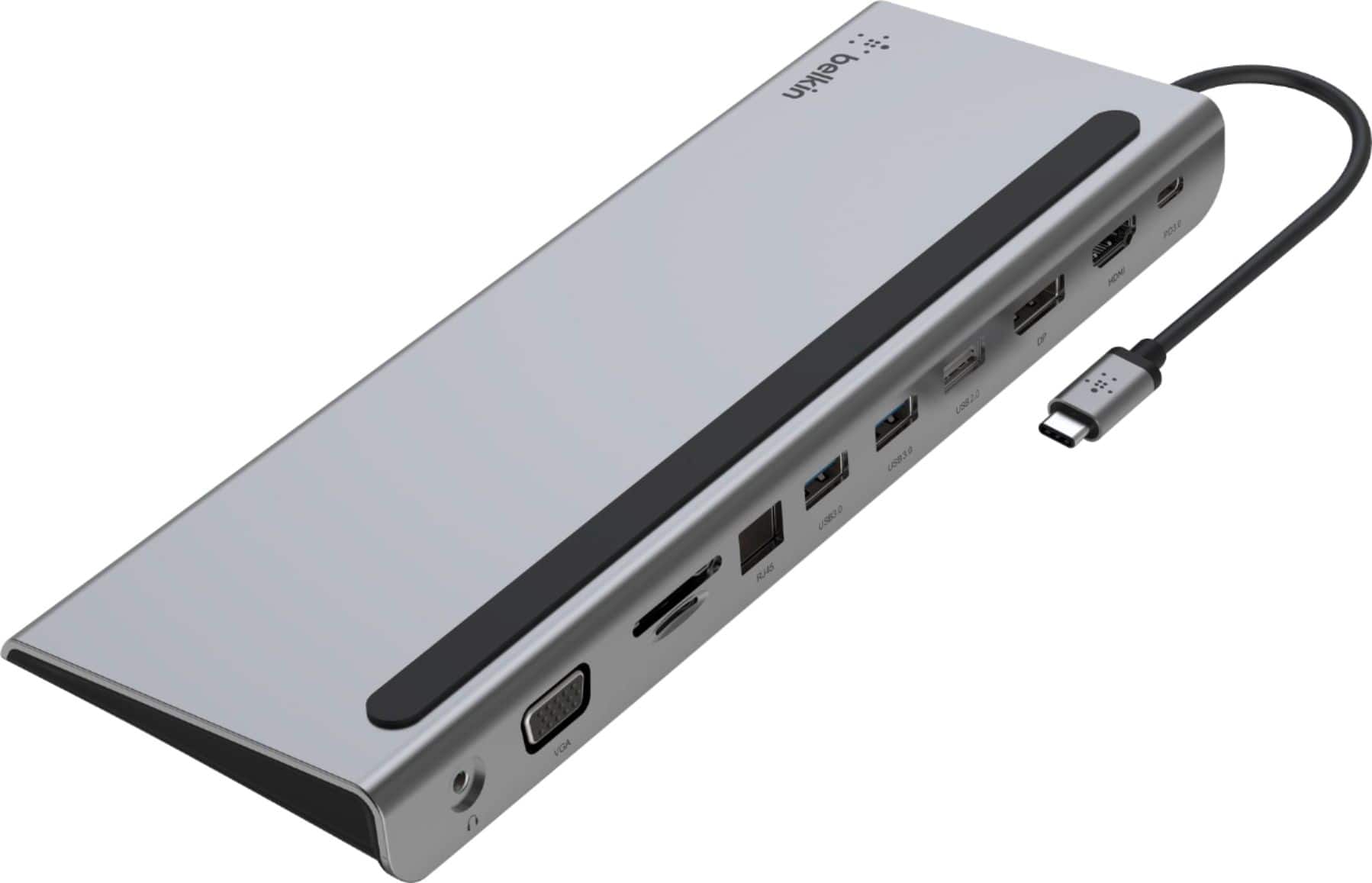
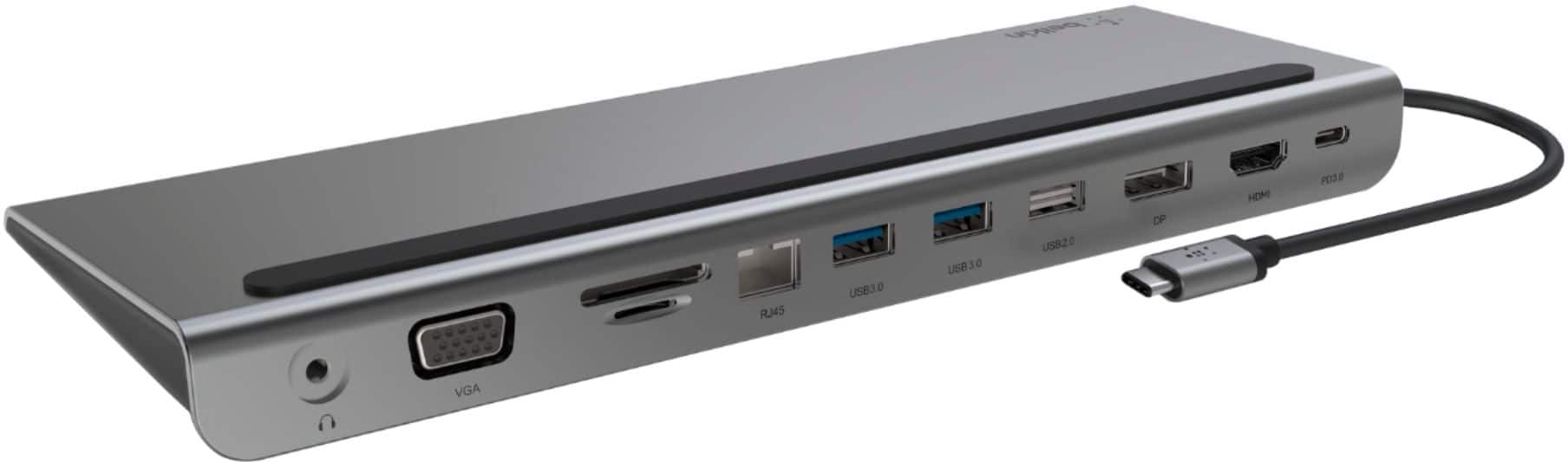
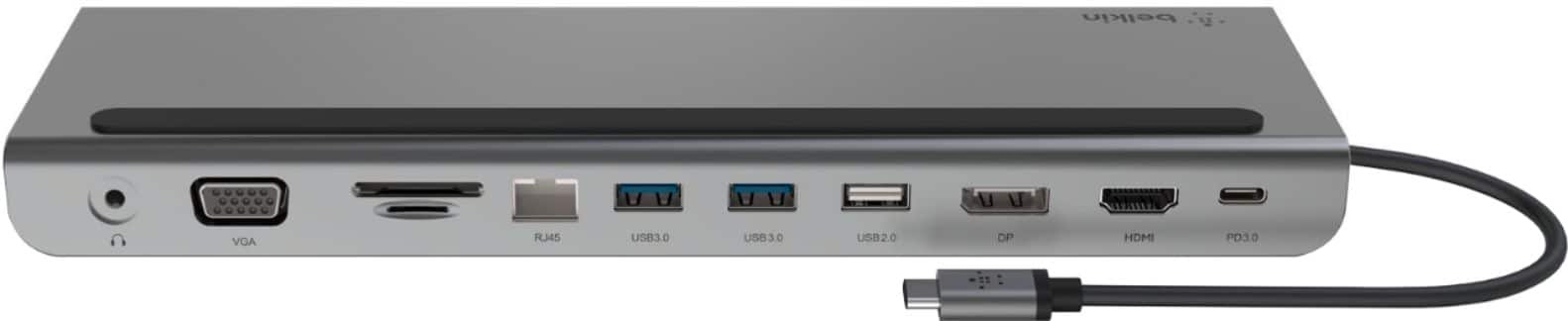
Customers are impressed with the 11-in-1 USB C Hub's versatile HDMI, ease of use, and multiple ports for connecting various electronics, as well as its broad compatibility and overall performance. The hub's connectivity, design, compact size, and reasonable price point also receive positive feedback. However, some customers have expressed concerns regarding the short cable length and the need to purchase a separate power supply.
This summary was generated by AI based on customer reviews.
HUB
||Posted . Owned for 3 months when reviewed.This reviewer received promo considerations or sweepstakes entry for writing a review.ITS OK BUT TOO BULKY AND CLUNKY TO USE. IT SERVES OUR PURPOSE
No, I would not recommend this to a friendGreat Dock
||Posted . Owned for 1 month when reviewed.This reviewer received promo considerations or sweepstakes entry for writing a review.Excellent dock. Works great with my gaming laptop.
I would recommend this to a friendIt’s not a bad product
||Posted . Owned for 2 weeks when reviewed.This reviewer received promo considerations or sweepstakes entry for writing a review.It’s not a bad product it worked but it didn’t work for what I needed I needed a triple monitor display and it did not work it will work great for a dual monitor display.
I would recommend this to a friendProblem products with no return
||Posted . Owned for 1 week when reviewed.This reviewer received promo considerations or sweepstakes entry for writing a review.Stopped working 3 days after install and by the time we could get back to BestBuy, the next weekend, it was past the 14 day limit to return this garbage. Junk products and junk product support!
No, I would not recommend this to a friendBrand response from BelkinStaff
Posted .Hi Cdubnga,
We hear you and are sorry to hear that your experience fell short of your expectations. Please dial our hotline number so we can assist you with this more efficiently. You can find our contact details by clicking the 'Support Center' link at the bottom of our page.
Regards,
Marie
Belkin Support
Multi port
||Posted . Owned for 1 week when reviewed.This reviewer received promo considerations or sweepstakes entry for writing a review.It's working ok, but some of the ports don't seem to connect when it comes to terra drives.
I would recommend this to a friend- Pros mentioned:Compatibility
Would not buy again
||Posted . Owned for 5 months when reviewed.This reviewer received promo considerations or sweepstakes entry for writing a review.I had trouble using this since I got it. It worked okay for a while but now it does not want to function properly. I am using the Belkin - USB-C 11-in-1 with my MacBook Pro 2021.
No, I would not recommend this to a friendBrand response from BelkinStaff
Posted .Hi Garyh,
We have taken note of your feedback on the Belkin INC004 Multiport Dock. Let’s have our support team help you resolve the issues, you’re having with the Belkin dock. To speak with our team, just contact our support hotline, found here: https://www.belkin.com/us/support-article?articleNum=55022.
Regards,
Kyla
Belkin Support
Bummer... nice product features
||Posted . Owned for 3 weeks when reviewed.This reviewer received promo considerations or sweepstakes entry for writing a review.I could not connect docking station to my hp laptop ... connection was in the wrong side of my laptop or the connecting wire was to short to reach the other side of my laptop connection
No, I would not recommend this to a friendBrand response from BelkinStaff
Posted .Hi, PapaG,
We apologize for not meeting your product design expectations. You may reach out to our support so the team can assist you further with this. You may refer to this link for the hotline number: https://www.belkin.com/support-article?articleNum=55022.
Regards,
Marie
Belkin Support
Regards,
Marie
Belkin Support
- Cons mentioned:Cable length
Plenty of ports
||Posted . Owned for 2 weeks when reviewed.This reviewer received promo considerations or sweepstakes entry for writing a review.Plenty of ports and works pretty good overall just wish the cable. For the usb-c connection was a but longer.
I would recommend this to a friend C+ for effort
||Posted . Owned for 3 weeks when reviewed.This reviewer received promo considerations or sweepstakes entry for writing a review.It’s an okay dock, but it does have some issues. Most notably, it’s only able to support 4K at 30 HZ for output, so it’s extremely laggy. Aside from that it doesn’t have a usbc pass through which is annoying. On the bright side it is universal at least
No, I would not recommend this to a friendHorrible - Buyer Beware
||Posted . Owned for 3 weeks when reviewed.This reviewer received promo considerations or sweepstakes entry for writing a review.Complete garbage. I don't know how all these 5 star reviewer got this thing to work. Maybe it works on other computers. On a MacBook, forget it. The only port that works is the card reader. Every other port does not provide enough power to operate external drives AND if the external drive has a power supply of its own it also does not work. I wasted an hour trying various solutions and different external devices. No luck. Do not waste your money.
No, I would not recommend this to a friendBrand response from BelkinStaff
Posted .Hi, JohnOBX! We understand the disappointment that comes with unmet expectations, and we’re sorry for any resulting inconvenience. The Belkin INC004 has been designed to work with computers and devices that can connect over USB-C and ports should work accordingly. If you are open to discussing this further, please let us know. We’re committed to making things right and would appreciate the opportunity to resolve this issue.
- BelkinCares@belkin.com
- https://www.belkin.com/support-center/
Regards,
Maryann
Belkin Support
Belkin 11-in1 USB C Hub Docking Station
||Posted . Owned for 3 weeks when reviewed.This reviewer received promo considerations or sweepstakes entry for writing a review.Product looses HDMI connectivity when using MacBook Pro, charging laptop has also fallen below 10% with normal day to day workload. Returned the product.
No, I would not recommend this to a friendBrand response from BelkinStaff
Posted .Hi, DeniseK,
The behavior of the dock was totally unexpected! We could have checked the unit further before returning it. Should you have any Belkin device in the future and need a helping hand, please don't hesitate to call our phone support team through the hotline numbers listed in this link: https://www.belkin.com/us/support-article?articleNum=55022.
Regards,
Carl
Belkin Support
Docking stations suck... all of them
||Posted . Owned for 1 year when reviewed.This reviewer received promo considerations or sweepstakes entry for writing a review.Just like every other docking station Ive owned... worked great for a couple months then once driver updates started happening things went downhill until it no longer picked up the external monitors. So sick of docking stations
No, I would not recommend this to a friendBrand response from BelkinStaff
Posted .Hi, NicoleG,
We understand your sentiments and we would like to help you with this. Please send us an email at BelkinCares@belkin.com with the details below:
• Copy of the receipt
• Photo of the dock
• Model and OS version of your computer
• Link to this post as reference
Regards,
Jean
Belkin Support
Seems a bit overbuilt
||Posted . Owned for 1 month when reviewed.This reviewer received promo considerations or sweepstakes entry for writing a review.HDMI ports don't fully support 4:3 VGA displays connected via an adapter
No, I would not recommend this to a friendBrand response from BelkinStaff
Posted .Hi, Roostro,
We appreciate the time in posting a review! The HDMI ports can support 1920 x 1080 at 60 Hz via VGA. Please call our phone support team through the hotline numbers listed in this link: https://www.belkin.com/us/support-article?articleNum=55022, so we can check this out further and run diagnosis on your challenges.
Regards,
Carl
Belkin Support
Quit working in 6 months
||Posted . Owned for 6 months when reviewed.This reviewer received promo considerations or sweepstakes entry for writing a review.Displeased with item, After 6 months, item quit working.
No, I would not recommend this to a friendBrand response from BelkinStaff
Posted .Hi Parts,
We have taken note of your feedback on the Belkin INC004 Multiport Dock. Let’s have our support team help you with the troubleshooting of your device. To speak with our team, contact our support hotline, found here: https://www.belkin.com/us/support-article?articleNum=55022.
Regards,
Kyla
Belkin Support
Not quite right
||Posted . Owned for 3 months when reviewed.This reviewer received promo considerations or sweepstakes entry for writing a review.Not exactly what we need. It is missing the port that we we’re actually needing but we us it for a different computer now so it does it’s job
I would recommend this to a friendNot practical
||Posted . Owned for 1 month when reviewed.This reviewer received promo considerations or sweepstakes entry for writing a review.Item wasnt practical and didnt work properly with Macbook Air. The cord either didn’t recognize when it was connected or it would go out in the middle of working.
No, I would not recommend this to a friendBrand response from BelkinStaff
Posted .Hi, ASTUTECSHOU,
The behavior of the hub is far from expected, and we'd like to check this out further. For further diagnosis on the challenges that you have, please call our phone support team through the hotline numbers listed in this link: https://www.belkin.com/us/support-article?articleNum=55022.
They're the best to check the unit realtime, and discuss your options.
Regards,
Carl
Belkin Support
not worth it
||Posted . Owned for 3 months when reviewed.This reviewer received promo considerations or sweepstakes entry for writing a review.Worked great at first, but 3 months later both monitors blink constantly which is really annoying. Had to use rubber bands to hold in the VGA connector because there are no screw holes to properly connect it.
No, I would not recommend this to a friendBrand response from BelkinStaff
Posted .Hi, JM1971,
Have you tested the monitors with a different cable? We recommend trying so if you haven’t yet for isolation purposes. If you still encounter challenge, feel free to ring us so we can assist you better on this. Just check our hotline numbers at the bottom part of our website under Contact Us option.
Regards,
Rosalyn
Belkin Support
Not for Mac
||Posted . Owned for 3 weeks when reviewed.This reviewer received promo considerations or sweepstakes entry for writing a review.Not recommended for Mac. Doesn’t work as advertised.
No, I would not recommend this to a friendBrand response from BelkinStaff
Posted .Hi, SteveD,
Help is here! Please share with us more details of the issue that you are having with the Belkin 11-in-1 USB C Hub by sending us an email at BelkinCares@belkin.com with the link on this review post as reference.
Regards,
Jean
Belkin Support
Great quality - not for Macs
||Posted . Owned for 10 months when reviewed.This reviewer received promo considerations or sweepstakes entry for writing a review.Only some of the ports with work a Macbook Pro. But those ports that do are great.
No, I would not recommend this to a friendBrand response from BelkinStaff
Posted .Hi, CharlesK,
We appreciate your honest review of the device. Please don't hesitate to tap us anytime. Just ring our hotline number, so we can assist you. You can check our contact information by clicking the ‘support-center’ option at the bottom part of our website.
Regards,
Marie
Belkin Support
OK - LIMITED USE
||Posted . Owned for 3 weeks when reviewed.This reviewer received promo considerations or sweepstakes entry for writing a review.DOESN'T WORK VERY WELL WITH MY LAP TOP SINCE THE USB-C CONMNECTION IS ONLY ON THE RIGHT SIDE
No, I would not recommend this to a friendBrand response from BelkinStaff
Posted .Hi,
We hear you. Our Escalation Engineers would love to hear more about your setup. Please email us at BelkinCares@belkin.com with your contact details and the link to this review. Hope to hear from you soon.
Regards,
JC
Belkin Support