Customer Ratings & Reviews



- Model:
- F4U092BTSGY
- SKU:
- 6343827
Rating by feature
- Value
Rating 4.3 out of 5 stars
- Quality
Rating 4.7 out of 5 stars
- Ease of Use
Rating 4.7 out of 5 stars
Customers are saying
Customers are delighted by the 4-Port USB Type-C Hub's numerous USB ports, ease of use, and high-quality build. Many appreciate its compact size and compatibility with various devices, finding it well-designed and practical. However, some users noted that the hub can get warm during use and that the cable could be longer. The product's positive aspects outweigh these minor drawbacks for most customers.
This summary was generated by AI based on customer reviews.
- Pros mentioned:Connectivity, Portability

Great accessory!
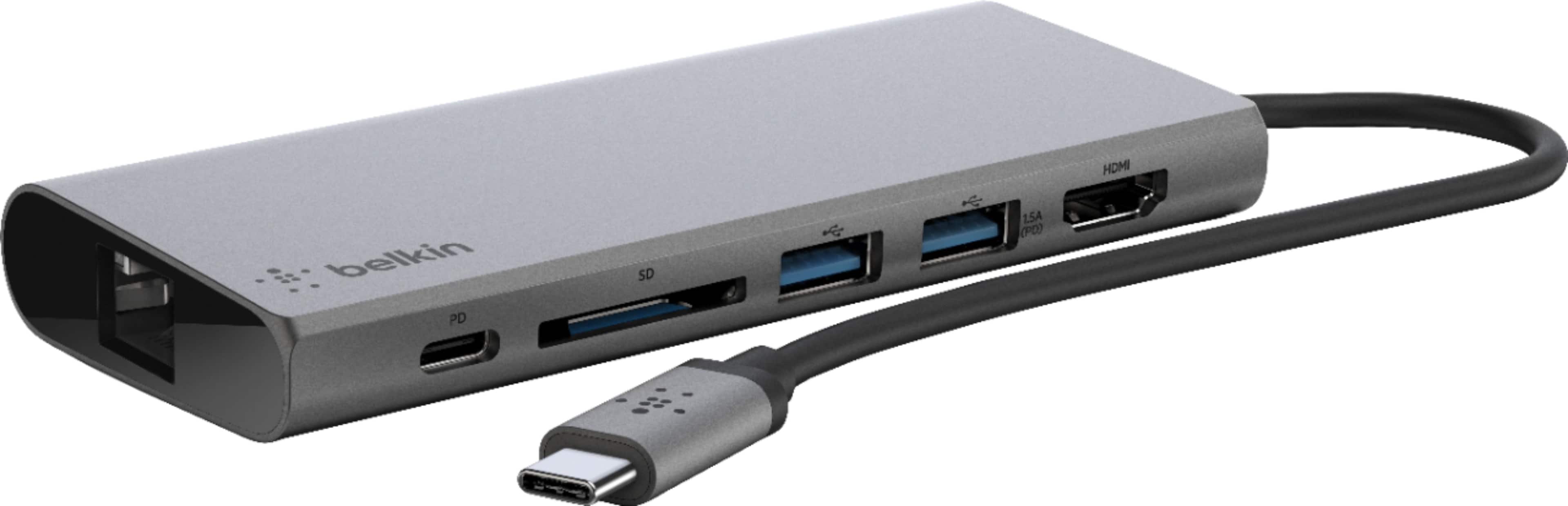
|Posted .This reviewer received promo considerations or sweepstakes entry for writing a review.This Belkin hub unit replaces a bunch of separate accessories that I used to have to lug around. My notebook PC has only USB-C ports and only two of them at that. This hub lets me connect older USB devices with ease - I used to have small adapters to go from the older connectors to the C connector but I kept losing them. This solves that problem. I also used to have a separate USB-C to HDMI adapter which this replaces. I can also keep charging my device. And having an RJ-45 Ethernet port is also useful. I do a lot of presentations and always had to juggle a pocket full of adapters, now I just need this dock and I'm set. Also worth mentioning that the dock feels like a substantial piece of hardware. It's metal and has a very premium feel. It's also much smaller than you might think based on just looking at the pictures.
I would recommend this to a friend Wouldn't recommend for Apple
||Posted . Owned for 10 months when reviewed.This reviewer received promo considerations or sweepstakes entry for writing a review.This hub is somewhat annoying, I've noticed that when I plug in officially Apple products to the dock, it will often not show them as connected.
No, I would not recommend this to a friendIt appeared great!
||Posted . Owned for 2 weeks when reviewed.This reviewer received promo considerations or sweepstakes entry for writing a review.When I picked up the item, I realized it was not exactly what I was looking for. I was look for 7-port ISB type C Hub. This one provided 2 USB ports. I was disappointed.
I would recommend this to a friendjust ok
||Posted . Owned for 8 months when reviewed.This reviewer received promo considerations or sweepstakes entry for writing a review.it's ok but would be better without a cord and if it simply attached onto the machine without hanging from it
No, I would not recommend this to a friend- Pros mentioned:Connectivity, Overall performance, Portability
Solid Hub
|Posted .This reviewer received promo considerations or sweepstakes entry for writing a review.I'm a bit of a gamer. I have a gaming laptop that I take with me for mobility purposes but that I also use for playing games when I'm at home. I use a much nicer keyboard and mouse at home. Enter the Belkin USB-C Hub. I run basically everything through this and plug it directly into my laptop's USB-C port essentially as a docking station. With the HDMI and Ethernet support I can get stronger connection speed with WiFi and hook up to a larger monitor as well. This device works perfectly for this. The only thing holding me back from 5* is some sporadic input lag, but not a large enough problem unless you intend on being a professional at eSports.
I would recommend this to a friend BROKE
||Posted . Owned for 5 months when reviewed.This reviewer received promo considerations or sweepstakes entry for writing a review.I purchased this six months ago, It broke after less than four months but sadly the return period is over. To date I have bought three different kinds like this one and all have either not worked properly or broken. Does anybody know of a brand that has something decent with USB and other outlets to go into a C unit? Because this one as well as the other two I've bought completely suck
No, I would not recommend this to a friendBrand response from BelkinStaff
Posted .Hi, Marm,
This caught our attention and we'd like to check this out further to provide assistance. Please email us at [email protected] with your contact details, the link to this review and the photo of the docks so we can have our Product Experts sort things out for you.
We'll wait for your email.
Regards,
Carl
Belkin Support
To bulky
||Posted . Owned for 3 months when reviewed.This reviewer received promo considerations or sweepstakes entry for writing a review.It is very bulky and heavy and unless your computer is on a flat surface it is annoying
No, I would not recommend this to a friendAvoid purchasing this product if possible!
||Posted . Owned for 1 month when reviewed.This reviewer received promo considerations or sweepstakes entry for writing a review.I purchased this product for use with my MacBook Pro. I primarily use it for my photography business. After about two weeks of use, it would continually eject itself from my computer, no matter which port I used, and caused me to lose an entire catalog of images. The damage that the faultiness of this product can and will cause is something you will want to avoid at all costs. Consider other alternatives.
No, I would not recommend this to a friendBrand response from BelkinStaff
Posted .Hi, Techie2531,
What’s the OS version of the MacBook Pro? We’d like to have our Support Team investigate the challenge. Please get in touch with us at [email protected] along with your contact information and a link to this review as our reference.
Regards,
Rosalyn
Belkin Support
Help
||Posted . Owned for 3 months when reviewed.This reviewer received promo considerations or sweepstakes entry for writing a review.When I plug into my computer, my wireless keyboard will not work most of the time, and other times, I have to keep moving it around to find the right spot to work, and other times, it makes my typing expand letters added to my typing. It is what I need, just cannot figure out why my wireless keyboard will not work when it is plugged in.
I would recommend this to a friendBrand response from BelkinStaff
Posted .Hi, cake,
Is the wireless keyboard working fine when connected directly to your computer? Are the other devices connected into the dock working properly? Let’s have our Escalation Engineers look into this further. Just send us an email at [email protected] along with your contact information and a link to this post as our reference.
Regards,
Rosalyn
Belkin Support
Overpriced and sub par functionality
||Posted . Owned for 3 weeks when reviewed.This reviewer received promo considerations or sweepstakes entry for writing a review.Overpriced for the functionality. True Thunderbold 3 docks are selling in the same price range from vendors such as OWC and Anker. The form and fit could be better. it is really hard to push a USB cables into and pull out of the USB female slots.
No, I would not recommend this to a friend- Pros mentioned:PortabilityCons mentioned:Weight
Great hub to connect to ext hard drives
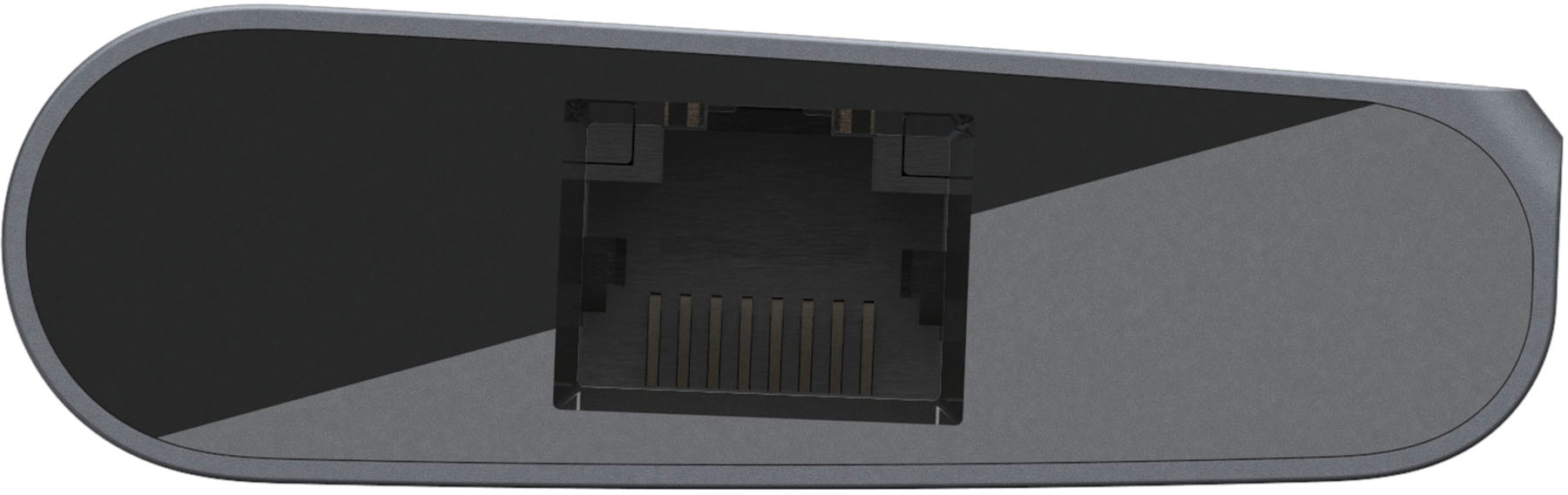
|Posted .This reviewer received promo considerations or sweepstakes entry for writing a review.Hardware configuration: 2x USB-A, 1xUSB C, 1XHDMI (4k 30 Hz), 1 Giga Ethernet port, 1xSD Card and it’s a plug and play device Compact design and handy for travel, a little heavy though. I connected several devices to my surface pro via this USB hub - used a HDMI port for extended monitor/projector during travel, USB ports to talk to external devices and ethernet port to configure network devices, etc. Used my laptop to power this devices and this powers all my other devices that talk to my surface pro and also charged my travel accessories. Had to connect an external hard drive to transfer files and it worked like a champ (fast and easy transfer) - this is where the product stands out compared to other ones in the market. Rest of the functionality is similar to other products you find in the market. HDMI port was amazing - had no issues connecting to high def monitors and projectors. I had no problems connecting to various USB devices (lab instruments for engineering work) and also used the SD card to transfer files from an oscilloscope to my computer via this device. Overall this is a great travel accessory but falls at the higher price range for the functionality it offers. Comes with Belkin Connected Equipment Warranty. For any reason if any device connected to the hub is damaged by an electrical issue, Belkin will repair/replace it up to a value of $2,500. Overall I rate it 5/5 on functionality, but feel its a little pricey for what I need.
I would recommend this to a friend - Pros mentioned:Connectivity, Portability
Good portable dock, great with external power
|Posted .This reviewer received promo considerations or sweepstakes entry for writing a review.This portable dock adds a 1GB Ethernet port, SD reader, 2 USB 3 ports, HDMI (4K), and a power port to any PC or tablet with a USB C port. I tried this on 2 different computers, one with a newer 3.1 USB C Port, and one with an older 3.1 USB C port, Gen 1. Overall it worked fine. I used a 30W power supply for power, the device handles up to 60W. No 3rd party drivers are needed. Just plug in and Windows 10 will setup the device. All of the ports were setup with no issues. The Ethernet port worked at full speed. I was not able to test it with a USB C tablet. On the newer USB C 3.1 machine, everything worked fine whether or not power was plugged in. Phones charged at a slower rate as the limit is 1.8Amp total (for both ports) as stated in the manual when no power is connected. Ethernet, SD cards and HDMI all worked with no problems, and at the same time. Adding or removing power on the fly caused no hiccups. With power, the USB ports went to 3 Amps (total for both ports) and the computer charged at the same time. For the older computer, 3.1 C gen 1 had some issues trying to use all of the ports at once in non-externally powered mode. The Ethernet worked fine, but once I connected a phone to charge, the unit would restart, disconnecting and trying to reconnect. Connecting or removing power caused the unit to restart too. When power was applied, everything worked fine and all ports could be used at once. Apparently, the USB C Gen 1 didn’t have the power to run everything by itself. Everything else I’ve run on the port has been fine. It's a nice dock, compact, has a SD card reader and has the ports you want to charge and connect other devices. To make sure it always works to fully charge all the devices you want at the same time, I’d connect a power source, at least for older Gen 1 USB C ports. 30W worked fine for me all the time. Newer USB C 3.1 machines should have no issues charging at the lower rates.
I would recommend this to a friend Crappy trend
||Posted . Owned for 1 month when reviewed.This reviewer received promo considerations or sweepstakes entry for writing a review.Expensive for something that should come equipped in PCs
No, I would not recommend this to a friendBrand response from BelkinStaff
Posted .Hi, momsbasement,
We appreciate your writing us a review. Please feel free to email us at BelkinCares@belkin.com with your contact details and the link to this post should you need our help in the future. We are available 24/7.
Regards,
Belkin Support
www.belkin.com
Great product!
||Posted .This reviewer received promo considerations or sweepstakes entry for writing a review.Great product has many ports but a little pricey for what I need it for.
I would recommend this to a friend- Pros mentioned:Connectivity, Portability
Replace multiple dongles with this USB-C hub
|Posted .This reviewer received promo considerations or sweepstakes entry for writing a review.Bottom Line: Dongles/hubs are a necessity especially for MacBook owners, since the laptops only have USB-C ports. The Belkin USC-C Multimedia Hub is a compact solution that is well-priced given how many dongles it can replace. Pros: compact size, multiple connections, 60w charging passthrough, easy to use Cons: cable design, 5 Gbps transfer rate Review: I own a 12” MacBook with a sole USB-C port, so I was excited to put this hub in my work bag. The hub itself is designed with an attractive space gray-like finish and is fairly compact (about the size of a small candy bar). Simply connect the hub’s cable to your computer’s USB-C port, and you’ve added connections for Ethernet, USB-A (x2), SD card, HDMI, and USB-C, the latter which supports 60w charging. My big complaint with the design is that the cable cannot be folded easily or removed, which makes storage of the hub in my particular bag difficult. I had no issues connecting devices to the hub. HDMI screen mirroring automatically appeared when I connected an external monitor, internet worked when I connected an Ethernet cable, and USB-C passthrough charged my device. USB-A devices also worked. However, I should note that the hub is bus powered, so you will not be able to connect multiple powered devices. For example, one USB-A portable hard drive worked fine, but the bus couldn’t supply enough power for two (as a result, both received some power but neither were sufficiently powered to operate). Finally, the packaging indicates that the hub supports 5 Gbps transfer speeds, which is consistent with USB 3.0 specifications. Most users should be fine for this throughput for a travel hub, but it will not reach data transfer rates of the higher USB 3.1/USB-C spec.
I would recommend this to a friend Doesn’t sit in Mac well
||Posted . Owned for 4 months when reviewed.This reviewer received promo considerations or sweepstakes entry for writing a review.This was disappointing because design for Mac plugin puts too much weight on it and it disconnected often. Also disappointing because Best Buy wouldn’t take it back open but you don’t know it doesn’t work if you don’t open and try it.
No, I would not recommend this to a friend- Pros mentioned:Connectivity, Portability
Awesome little device!
|Posted .This reviewer received promo considerations or sweepstakes entry for writing a review.This small hub is a great way to expand the capability of just about any modern computer. I have used it on both of my laptops as well as a Samsung Chromebook Plus and it has worked perfectly on all three. The laptops already have HDMI and other ports, but the chromebook only has USB-C ports, so it really helps to be able to connect the chromebook to a larger screen, full size keyboard and real mouse. With the metal housing, it is solid feeling and looks nice since it is a dark grey and black color. I really hate getting white devices that are portable since they tend to collect dust and fingerprints, plus they look cheaply made! The cord is just long enough to be able to get at it, but not too long to be in the way. Since USB-C can be plugged in either way, it is always sitting upright, no matter which side your ports are on. I have had my eyes open for a small hub like this for some time and was very happy to get this one. The SD card reader and wired ethernet just add to the functionality, making it a great mini-docking station.
I would recommend this to a friend - Pros mentioned:Connectivity, Portability
Expand your limited ports on any computer
|Posted .This reviewer received promo considerations or sweepstakes entry for writing a review.The Belkin 4-Port USB Type-C Hub with Gigabit Ethernet Adapter helps bridge the gap between smaller and thinner laptops that have a limited selection of onboard ports. Typically you might find yourself stuck with only one or two USB-C ports and once in a blue moon, you find a laptop that has a one or two regular USB 2.0/3.0 ports. Even finding laptops with full-sized HDMI ports or an Ethernet port is becoming more difficult. With the single USB-C connector, the Belkin 4-Port USB Type-C Hub with Gigabit Ethernet Adapter allows you to connect a total of 2 USB 3.0 devices, one HDMI output, SD card slot for SD, SDHC, and SDXC format cards, USB-C port which doubles as a passthrough for charging (for those devices that only have one dedicated USB-C port/supports up to 60W of power) and the Gigabit Ethernet port. The size of the Hub is super small and can easily fit in a slim fit laptop case and doesn't add too much weight or bulk to your laptop bag or backpack.
I would recommend this to a friend Wear and Tear Easily
||Posted . Owned for 6 months when reviewed.This reviewer received promo considerations or sweepstakes entry for writing a review.That Belmont product functions as expected however, the cord frayed easily. The usb-c isn’t very durable or compact. Would the come other alternatives.
No, I would not recommend this to a friendGreat all in one dock
|Posted .This reviewer received promo considerations or sweepstakes entry for writing a review.The Belkin travel multimedia dock is a very useful product, which comes in handy quite a bit. I have to say that I am very impressed with the build quality of this dongle. It’s made of a durable stainless steel and feels really well built. The fact that the Belkin dock can turn one USB C port into multiple functions, is a big win. It has ethernet, HDMI, a memory card reader etc, all work extremely well. I connected the dock to my iPad pro 11” just to see what it can do, and to my surprise, the ethernet actually works with it. The HDMI port also works too. Unfortunately, with no fault of Belkin the memory card slot won’t let me move files. This is purely a limitation on the ipad itself and IOS. Overall, this is a fantastic little device that I would highly recommend to anyone that has a laptop or tablet with the new USB C connection. This will make your life so much easier.
I would recommend this to a friend