Customer Ratings & Reviews


- Model:
- F4U098BT
- SKU:
- 6343826
Rating by feature
- Value
Rating 3.7 out of 5 stars
- Quality
Rating 3.9 out of 5 stars
- Ease of Use
Rating 4.1 out of 5 stars
Customers are saying
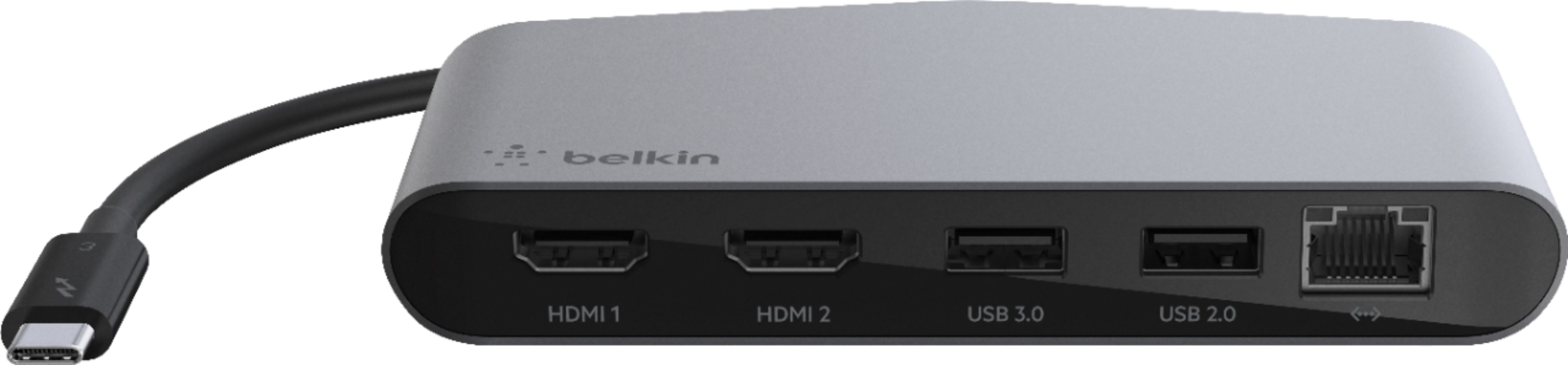
Customers enjoy the Thunderbolt 3 Docking Station's multiple HDMI ports, compact size convenient for travel, and its ability to support multiple monitors. Many appreciate the build quality and performance, although some find the price high and the cable could be longer. A few users experienced compatibility issues or excessive heat. The docking station's numerous ports are also a plus for many users.
This summary was generated by AI based on customer reviews.
it does its thang... it has cat6 :-)
||Posted . Owned for 3 weeks when reviewed.This reviewer received promo considerations or sweepstakes entry for writing a review.it does its thang... it has cat6 :-) it has usb ports... they work ... nice
I would recommend this to a friend- Pros mentioned:Hdmi, Size

Solid performing portable dock
|Posted .This reviewer received promo considerations or sweepstakes entry for writing a review.The Belkin Thunderbolt 3 mini dock is a good dock for travel and serves it's purpose pretty well. Because it's Thunderbolt 3, it supports higher data transfer speeds than USB C, and I have experienced pretty consistent transfers with USB 3 devices connected. Unfortunately, because this is the mini-dock without external power, it doesn't supply power over USB C. Belkin also opted for one USB 3 and one USB 2 where it would have been preferable to have two USB 3 ports on the front. The gigabit ethernet port performs well and consistent, making full use of the gigabit speeds on my internal network, and as close as possible for my gigabit fiber connection. My monitors are not 4k, but I do run 4 of them off my laptop when at my desk, so reliability is key. I haven't had any issue with the display ports, and I haven't noticed any lag, which can sometimes be present in USB video adapters. Size wise, this dock is pretty small, sizing up pretty close to a smartphone, only a bit fatter. It's a good size for traveling. The catch with a dock like this is that it's nice to plug all your devices in and only have to deal with one cable to connect everything back to your machine when you come back to it. But being a mini-dock made for traveling, you have to unplug everything anyways if you travel with it. Ultimately, I found myself appreciating the stationary dock approach with everything staying plugged into the dock, and leaving it behind when I traveled. I then found myself missing the ability to charge over USB C. The biggest drawbacks I have with this device are the glossy black front and the USB 2 port. I travel with several USB 3 devices, and my laptop only has 2 ports, so I play musical USB ports when I need to use multiple USB 3 devices at a time. The glossy black front seems trivial, but it collects dust and dirt easily. A matte finish might have made that a bit better, as I constantly find myself wanting to wipe it off even just sitting on the desk. Overall it's a fine dock, and it performs as well as I have needed it to. I have even used it on another laptop that doesn't support Thunderbolt 3 over USB, and while it didn't support the video output, the ethernet and USB connectivity performed as expected for non-Thunderbolt USB C. My biggest regret, though, given how often I leave it on my desk now, is that I didn't get the one with power over USB C.
I would recommend this to a friend - Pros mentioned:Hdmi, Monitor support
Simple to use, good build quality
|Posted .This reviewer received promo considerations or sweepstakes entry for writing a review.The Belkin ThunderBolt 3 Mini Dock came into my life at just the right time. My old laptop was recently stolen and I tried to live without one for a while. I finally gave in and ordered a workhorse that I hope I don’t carry too often. With this new laptop, I still aspired to simplify my connections and lighten my load. The Belkin does the job. ThunderBolt 3 simplicity and speeds connect me with up to two 4K (or below) monitors, as well as my network (gigabit Ethernet) and two more devices (USB-A 3.0 and 2.0, respectively). The ports are labeled and the connections are solid. I like the matte aluminum and piano black enclosure. Nice feel and durability. Bonus? Belkin provides a $2,500 warranty if your equipment is damaged while connected to the dock!
I would recommend this to a friend - Pros mentioned:Build qualityCons mentioned:Compatibility, Price
A Decent Docking Station with Room for Improvemen
||Posted . Owned for 2 months when reviewed.This reviewer received promo considerations or sweepstakes entry for writing a review.The Belkin Thunderbolt 3 Docking Station offers a convenient solution for expanding connectivity options for laptops and desktops with Thunderbolt 3 support. While it provides several useful features, it falls short in some areas, making it a decent but not exceptional choice. Pros: 1. Versatile Connectivity (4/5): The docking station offers a range of ports, including USB-A, USB-C, HDMI, DisplayPort, Ethernet, and audio jacks. This versatility makes it suitable for connecting various peripherals, monitors, and external storage devices. 2. Thunderbolt 3 Support (4/5): The inclusion of Thunderbolt 3 support ensures high-speed data transfer and charging capabilities for compatible devices, making it a suitable choice for professionals and power users. 3. Solid Build Quality (3/5): The docking station feels well-built and durable, with a sturdy design that can withstand regular use. 4. Single-Cable Connection (4/5): The single-cable connection simplifies the setup process and reduces cable clutter on your desk, enhancing overall workspace organization. Cons: 1. Limited Compatibility (2/5): The Belkin Thunderbolt 3 Docking Station is primarily compatible with Thunderbolt 3-enabled devices, limiting its usability for users with non-Thunderbolt laptops or desktops. 2. Price (3/5): The cost of this docking station is relatively high, especially when considering its compatibility limitations. Users may expect more extensive compatibility at this price point. 3. Power Delivery (3/5): While it provides power delivery capabilities, the wattage may not be sufficient to charge certain high-powered laptops at their maximum speed. Users should verify compatibility before purchasing. 4. Software and Firmware Issues (2/5): Some users have reported occasional software or firmware-related issues, such as compatibility problems with specific devices or issues with updates. These issues can be frustrating and impact the overall user experience. Conclusion: In conclusion, the Belkin Thunderbolt 3 Docking Station offers a range of connectivity options for Thunderbolt 3-enabled laptops and desktops. It provides versatile connectivity, solid build quality, and the convenience of a single-cable connection. However, its limited compatibility, relatively high price, power delivery limitations, and occasional software/firmware issues may leave some users seeking alternatives. If you have a Thunderbolt 3-compatible device and require a docking station for streamlined connectivity, the Belkin docking station may meet your needs. However, users with devices outside this compatibility range or those seeking a more budget-friendly solution may want to explore other docking station options available in the market.
No, I would not recommend this to a friend - Pros mentioned:Hdmi, Size
Compact and convienent
|Posted .This reviewer received promo considerations or sweepstakes entry for writing a review.The Belkin Thunderbolt 3 Docking Station is a very compact device that allows the ThunderBolt port on your device to become a convienent docking station... giving you 2 HDMI ports, 1-USB 3 port, 1-USB 2 port, and an Ethernet port. I'm not sure how useful this would be if you're travelling without access to external monitors, but for me, this device is perfect. Setup (for me) really isn't worth mentioning, but I took it out of the box and plugged it in to my Dell XPS 13. The Dell XPS is a nice machine, but the screen is way too small for me to use for a long period of time. I travel between a few different houses, so I have monitors scattered over a few locations. With the addition of this docking station, I'm able to use the dual monitor setups I have at two of my houses, and with the addition of a simple 4-port USB hub, I can use all of the peripherals that I usually use with my desktops (keyboard, mouse, sync cables, etc). None of my monitors are 4k, but I was able to run two 28" 2560x1440 monitors with no trouble.... which is quite a bit different that a single 13" screen. I'm not sure why Belkin didn't make both ports USB 3, or choose to make one of them another USB C port, but other than that, the device is perfect for my scenario. I would definitely recommend this to anyone in a similar situation as I'm in.
I would recommend this to a friend - Pros mentioned:Hdmi, Performance
Decluttering all of my cables and adaptors
|Posted .This reviewer received promo considerations or sweepstakes entry for writing a review.Finally, this Belkin decluttered my several peripherals I have purchased to be able to use flash drives, hardwire connection to internet, and dual display. This dock- mini hub serves as all in one, USB-C cable fits well in my MacBook Pro, providing various ports to connect ranges from 2 HDMI supports 4K, USB type A 2.0 and 3.0, in addition to Gigabit ethernet that enables my Mac to test speed my Gigabit internet speed. Very convenient and solid piece of elegant aluminum. High quality and fast performance. I am so happy the color of this dock matches my Space gray MacBook.
I would recommend this to a friend - Pros mentioned:Build quality, SizeCons mentioned:Cable length
May meet your needs but
||Posted . Owned for 1 week when reviewed.This reviewer received promo considerations or sweepstakes entry for writing a review.This is a nice solution if it meets your needs. It seems well-built. The cable is just too short, six inches including the connector. The worst thing is that the doc says it supports PCs and Windows, but few PCs have Thunderbolt ports, just USB-C. They don't mention on the FAQs that if you attach to a non-Thunderbolt USB-C port, the HDMI ports on the dock will not work at all (per Belkin support). It has one USB-A 2.0 port and one USB-A 3.0 port. This is fewer than many hubs and docks provide. But this device is too small for more ports, so that's the trade off. It is certainly a convenient size.
I would recommend this to a friend Perfectly Connected; Max Performance
|Posted .This reviewer received promo considerations or sweepstakes entry for writing a review.Belkin ThunderBolt 3 Mini Dock. For a MacBook Pro (2017, 4 Thunderbolt 3 ports) user, those Thunderbolt ports have immense capability that often goes un-exploited. And, it doesn't take too many accessories to have you agonizing over which device to disconnect. This Mini-dock solution addresses a few of these port demands. I’ve got one of LG’s new 4k HDR monitors and an LG 4K TV that I like to occasionally connect for family gatherings. The Belkin Mini Dock allowed the MacBook Pro to connect to both monitors with typical HDMI cables and no additional adapters at full 40 Gb/s speeds. My posted photo shows my 2 LGs (TV in the background and Monitor in the foreground), while my laptop is out of the scene. The Belkin mini dock was photographed after I disconnected the TV HDMI. I even compared up/down connection speed using the Belkin vs. a nice ethernet adapter connection I’ve been using. I achieved an increase of 30mb/s both up and down using the Belkin Thunderbolt 3 mini dock. (Averaged results of 8 trials for both devices, Google Fiber, desktop SpeedTest.) I’m only using the USB ports for my keyboard and a Logitech mouse controller, but both were fully recognized. This is a nice product that leaves you confident that you’re getting maximum performance.
I would recommend this to a friend- Pros mentioned:Hdmi, PerformanceCons mentioned:Cable length
After 2 years, still working!
||Posted . Owned for more than 2 years when reviewed.This reviewer received promo considerations or sweepstakes entry for writing a review.I’ve had this for 2 years and it works exactly as needed. The cable is a but short so I had to make some adjustments on my desk since I have a raised laptop, but I have no complaints otherwise. I have 1 monitor connected but have tested 2 and use both USB porta.
I would recommend this to a friend - Pros mentioned:Hdmi
Thin-Profile and Easy Use
|Posted .This reviewer received promo considerations or sweepstakes entry for writing a review.I was nervous that this could be more difficult to use than I thought but I didn’t have as much trouble as I thought. The various ports (USB and HDMI) make it easy to charge and connect dual screens. My favorite part is that the dock connects using a USB-C wire which provides lots of power. Side note, you’ll enjoy this sleek and low profile design that can be nestled behind or away from creating messy desktops.
I would recommend this to a friend - Pros mentioned:Hdmi
Simple to use just plug in.
|Posted .This reviewer received promo considerations or sweepstakes entry for writing a review.I use two (2) monitors at work, so this makes hooking up my laptop easy and fast. Also has a ethernet port for faster connection speeds.
I would recommend this to a friend - Pros mentioned:Build quality, Hdmi
Works as advertised
||Posted . Owned for 1 month when reviewed.This reviewer received promo considerations or sweepstakes entry for writing a review.It seems Apple (who I believe, make great products)n also creates cottage industries due to their design ideas. I don't like the fact that ports aren't built in to computers these days, like a simple HDMI plug however when you are running a multi-display set up obviously you would have to use an additional piece of equipment and especially if you have legacy USB devices. That all being said this product works fine for a 2 monitor set-up with some extra connectivity for earlier generation USB plugs. The problem I have with this device is that it is still a little limiting. But, for the price, you can't beat it. Quality of construction is great and it works. I generally do like Belkin products.
I would recommend this to a friend - Cons mentioned:Heat, Price
This thing runs realllllly hot, and the price.....
||Posted . Owned for 1 week when reviewed.This reviewer received promo considerations or sweepstakes entry for writing a review.Pros - It works... So far. Everything we plugged in was detected on a win 10 laptop without having to install any additional drivers. Cons - The price. 140.00 is a lot for what you get. You can get a pluggable with a ton more usb ports and other connections for the same price or cheaper. The lack of ports. You're probably going to need to add a usb hub at some point if you have more than two usb 2 or 3 devices to plug in - keep in mind that if you're getting this for a computer that has usb-c (thunderbolt) you may not have a ton of older usb ports on that computer to support older usb 2 and 4 devices. The heat. This thing runs realllllly hot with two hdmi monitors, a keyboard and a mouse connected via usb-c. Very hot to the touch to the point I'm not convinced it's going to last for the long haul but it was in stock at a store which is a plus, and we needed it in a pinch. The price. Oh yeah I alredy mentioned but this thing should be 49 bucks tops.
No, I would not recommend this to a friend - Pros mentioned:Size
this is a perfect item for the surface pro
||Posted . Owned for 2 weeks when reviewed.This reviewer received promo considerations or sweepstakes entry for writing a review.this is a great compact accessory for someone using 1 extra monitor. it's compact size makes it easy to travel with while being able to maximize the use of other ports.
I would recommend this to a friend - Pros mentioned:Monitor supportCons mentioned:Price
Best mobil docking station for a MacBook Pro
||Posted . Owned for less than 1 week when reviewed.This reviewer received promo considerations or sweepstakes entry for writing a review.I needed a product that will allow me to have 2 monitors with my MacBook. It is a wonderful product. I am ale to work on a project on one screen and look at a movie on the other it is great. this docking station is great. It was very expensive though. That is the one downfall. I could have ordered something from Amazon, but how do I know it would be better than this Belkin. I am happy with my purchase.
I would recommend this to a friend - Pros mentioned:Hdmi
Works as advertised
||Posted . Owned for 4 months when reviewed.This reviewer received promo considerations or sweepstakes entry for writing a review.I have now owned this hub for 4 months. It is a little bit pricey, but it does exactly what is advertised. I have two side by side Samsung 26 inch monitors plugged into it via HDMI and a USB toggle for my mouse. I have had no issues with it, so despite the high price tag, I am satisfied that it performs as advertised. I tried a few knockoff brands from amazon and none were satisfactory. I would recommend this product.
I would recommend this to a friend - Cons mentioned:Heat
no problems so far, but feels like it over heats
||Posted . Owned for 3 weeks when reviewed.This reviewer received promo considerations or sweepstakes entry for writing a review.The docking station came with simple instructions. I do music recording on my MacBook Pro and I have an external monitor, an interface plugged into it. While using a high end recording software (Ableton). I have had no problems with it and I bought it on may 1st and everything runs on it with no problems. But it gets really hot after using it for several hours. So just a little concerned about it breaking and that hasn't happened.
No, I would not recommend this to a friend - Pros mentioned:Hdmi
Flakey ethernet on Macbook Pro.
||Posted . Owned for 9 months when reviewed.This reviewer received promo considerations or sweepstakes entry for writing a review.I've had this since shortly after I started WFH ~March 2020. It works great most of the time. It stays plugged in 24x7. About 50% of the time I have to unplug and re-plug it to get the Ethernet port to work with my MacBook Pro (15-inch, 2019). This happens after a full reboot, sleep, or if I manually unplug it. Sometimes multiple unplug/replug attempts are required. Once it's all up and running it works great. 1440p monitor and 1080p monitor connected via HDMI, gigabit Ethernet, and USB ports with webcam and keyboard/mouse all work. It's not quite annoying enough for me to replace with a different brand, but it sort of defeats the usefulness as a laptop doc. I almost never unplug it to take the laptop to another room/outside because I'd rather not waste time fiddling with reconnecting it.
No, I would not recommend this to a friend - Pros mentioned:Hdmi, Monitor support
Doesn't function
||Posted . Owned for less than 1 week when reviewed.This reviewer received promo considerations or sweepstakes entry for writing a review.I plugged in the dock expecting it be plug & play, but found that my computer didn't recognize that I had plugged anything in. I went through and made sure that I had the latest BIOS & firmware installed, which I did, and even changed the thunderbolt settings in my BIOS to remove the need to authorize the device, in case that was screwing things up somehow. Still nothing. Thinking that maybe it was my thunderbolt port, I decided to try it with my sister's laptop, which did the same thing. That is to say, nothing. Was really hoping to use this so that I could have my drawing tablet & secondary monitor plugged in at the same time, since my laptop only has one HDMI port, and the extra USB hubs & potential for yet another monitor was appealing. Need to return it, and I'll just order a USB-C to HDMI adapter, since I know that'll work as expected, and cost me far less money, even if it doesn't give me the same flexibility as this dock would have.
No, I would not recommend this to a friendBrand response from BelkinStaff
Posted .Hi, Natalie,
Make sure that the driver on your computer is updated and see if it will detect the dock. Let us know the result at BelkinCares@belkin.com with your case number and the link to this review for our reference so we can assist you further.
Regards,
Jan
Belkin Support
- Pros mentioned:Hdmi, Size
Portable and works reliably
||Posted . Owned for 3 months when reviewed.This reviewer received promo considerations or sweepstakes entry for writing a review.Bought this to connect my MacBook Pro M1 Max to my desk setup and it works great. Two 1080P monitors, a USB 3 hub, and a gigabit ethernet all connect to this dock and I love how small it is.
I would recommend this to a friend