Customer Ratings & Reviews


- Model:
- F4U098BT
- SKU:
- 6343826
Rating by feature
- Value
Rating 3.7 out of 5 stars
- Quality
Rating 3.9 out of 5 stars
- Ease of Use
Rating 4.1 out of 5 stars
Customers are saying
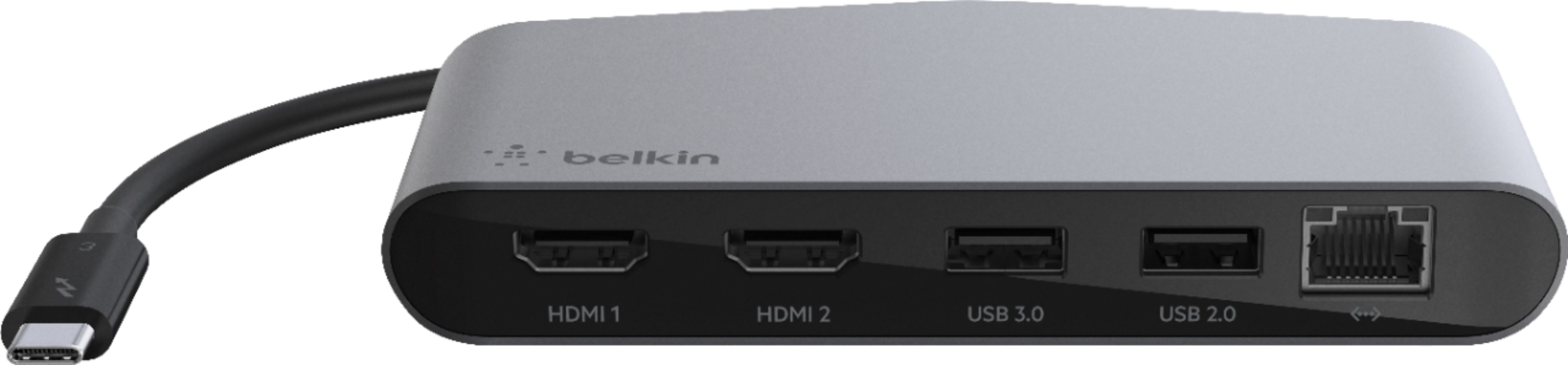
Customers enjoy the Thunderbolt 3 Docking Station's multiple HDMI ports, compact size convenient for travel, and its ability to support multiple monitors. Many appreciate the build quality and performance, although some find the price high and the cable could be longer. A few users experienced compatibility issues or excessive heat. The docking station's numerous ports are also a plus for many users.
This summary was generated by AI based on customer reviews.
Expanded the functionality of my new laptop
||Posted . Owned for 1 week when reviewed.This reviewer received promo considerations or sweepstakes entry for writing a review.I needed to expand the number and type of ports on my new laptop and this fit the bill. Super happy to have two additional HDMI ports, as well as ethernet!
I would recommend this to a friendExcellent docking station for reasonable price.
||Posted . Owned for 1 month when reviewed.This reviewer received promo considerations or sweepstakes entry for writing a review.Works exactlh like it is supposed to. I love it. It provides me the capability tohave multiple monitors while working for home a few days a week. Exactly what i needed at a reasonable price.
I would recommend this to a friendaccountant
||Posted .This reviewer received promo considerations or sweepstakes entry for writing a review.Defective out of box Did not work period ! wasted time & money having IT to set up system, when nothing could be installed without a dock!
No, I would not recommend this to a friendTwo touch monitors solution!
||Posted . Owned for 3 weeks when reviewed.This reviewer received promo considerations or sweepstakes entry for writing a review.The hub ended up being the perfect low cost solution. I needed to add two HDMI touch monitors, and not only did they display, but the touch worked as well on both.
I would recommend this to a friend- Pros mentioned:Build quality, Hdmi

Thunderbolt
|Posted .This reviewer received promo considerations or sweepstakes entry for writing a review.First things first. A few PSA's for those shopping for a mini-dock. PSA 1: WARNING: Thunderbolt and USB-C are not the same. If your USB-C port does not have a lightning bolt arrow symbol, check your documentation, then it likely will not work with this mini-dock. The Thunderbolt emblem looks like a KISS "S" with an arrow head at the bottom. A quick web search will show you the differences in USB-C and Thunderbolt 3. This mini-dock is Thunderbolt 3. PSA 2: WARNING: IF you have a setup similar to my desk, there is something with the Logitech G Pro Mouse that causes a "power surge" warning to Windows when connected with the wireless configuration. This disables the USB ports on the mini-dock. HDMI continues to work. The wireless configuration is with the dongle or the PowerPlay charging mouse pad. Wired has no issues. PSA 3: WARNING: IF you are using this with Windows laptops, make sure USB host controller drivers are updated. This will save headaches initially, especially if ASMedia is the USB host controller. Now to the review... This mini-dock is a very sturdy build, as expected from a company like Belkin. There is no USB charging pass-through with this dock. You have 2 HDMI( up to 4K), 2 USB ports (2.0 and 3.0) and a Ethernet port. I only have Windows and Chromebooks to test with, sorry Apple fans. After updating my drivers, this dock worked as expected with everything but my G Pro mouse wireless connection. Wired, it worked fine. I suspect a future firmware or driver update will fix this. As a repeat of the PSAs, this is not a USB-C dock. It will show as a unknown device if you try with a non-Thunderbolt 3 port. If you charge your laptop over the USB-C port, it is a better than 50% chance it is a Thunderbolt 3 port. Newer Macbooks should be safe, this is Thunderbolt 3 that looks like a USB-C connector. I tried with one Chromebook and was surprised it worked without issue, the port has the Thunderbolt emblem. Setup is simple. If the USB Host Controller is current drivers, plug in and wait for the device drivers to be found and the generic Thunderbolt drivers install. You are good to go. I dropped a star for a couple reasons. First, it would be nice to have pass-through power. Just a nice to have and was surprised it was not part of it. Second, concerned over device compatibility, concerned may be a strong term. The fact I found a device that causes headaches with what is my preferred mouse. I suspect there could be other devices, but all my backup mice had no issues even the other mice that are wireless dongle connections. Apple fans will love this. Chromebook user should be happy if they have Thunderbolt port. Windows users, after driver checks and updates, will be happy with this also. Belkin has a solid mini-dock offering with a couple of PSAs required.
I would recommend this to a friend Good hub
||Posted . Owned for 1 month when reviewed.This reviewer received promo considerations or sweepstakes entry for writing a review.The usb c hub works as advertised. I use it to do 3 screens (2 plugged in plus the laptop screen) on Mac and windows laptops
I would recommend this to a friendLook for other options for dual 4k monitors.
||Posted . Owned for 9 months when reviewed.This reviewer received promo considerations or sweepstakes entry for writing a review.Didn’t work to power two 4k monitors even though they advertise that it does. Kept it but should have returned it.
No, I would not recommend this to a friend- Pros mentioned:Hdmi, Monitor support, Size
Useful docking station for newer computers.
|Posted .This reviewer received promo considerations or sweepstakes entry for writing a review.The Belkin Thunderbolt 3 Docking Station has allowed me to connect an extra 4k monitor to my Macbook Air. It would allow me to connect up to two additional monitors as it has 2 HDMI ports that support dual 4K 60Hz displays. In addition to the monitors it has two USB ports that support a mouse and my external hard drive or whatever peripherals you would need to connect. The last input allows you to connect to a router for high-speed Internet using the Ethernet port. This unit is much smaller than other docking stations I have used in the past and is quite useful for my work set-up. Please note this is only for computers that have a thunderbolt input. You can buy an adapter if your computer does not have the input. This was very easy to set-up. Really just plug and play.
I would recommend this to a friend Needs power
||Posted . Owned for 1 week when reviewed.This reviewer received promo considerations or sweepstakes entry for writing a review.This doc worked great and did what it needed. Just remember you’ll need a power source with this one still
I would recommend this to a friendNot what I needed
||Posted . Owned for 1 month when reviewed.This reviewer received promo considerations or sweepstakes entry for writing a review.Not what I needed. Return policy is not very clear for online ordering and curbside pick up. Need my money back
No, I would not recommend this to a friendDo not buy this device
||Posted . Owned for 3 weeks when reviewed.This reviewer received promo considerations or sweepstakes entry for writing a review.I was not able to connect to my laptop to the device... no advisor or IT specialist could either...
No, I would not recommend this to a friendIt works when it wants to.
||Posted . Owned for 1 month when reviewed.This reviewer received promo considerations or sweepstakes entry for writing a review.It works when it wants to. I know longer have the original packaging so returning is not an option.
No, I would not recommend this to a friendBrand response from BelkinStaff
Posted .Hi, Melissa,
The Belkin Thunderbolt 3 Dock Mini HD allows you to connect two 4K monitors to your laptop and use a keyboard, mouse, or other peripherals via the USB-A 3.0 and USB-A 2.0 ports. The dock also features a reliable network connection through the gigabit Ethernet port. For isolation, please try to connect the dock on a different laptop, and see if it will work properly.
For further assistance, please share more details at [email protected] with the link to this review for our reference.
Regards,
Jan
Belkin Support
Did not work with my HP computer
||Posted . Owned for 9 months when reviewed.This reviewer received promo considerations or sweepstakes entry for writing a review.It did not work with my computer. Associate recommended another company that worked like a champ
No, I would not recommend this to a friendMust Have!
||Posted . Owned for 3 months when reviewed.This reviewer received promo considerations or sweepstakes entry for writing a review.Perfect addition to my MacBook Pro and iPad Pro...expands my capabilities with both devices and all of my apps!
I would recommend this to a friendBUY THE EXTRA WARINTY!!!
||Posted . Owned for 5 months when reviewed.This reviewer received promo considerations or sweepstakes entry for writing a review.$140.00 and died in less than 6 months leaving me proper up a creek without a paddle.
No, I would not recommend this to a friendAlmost
||Posted . Owned for 1 week when reviewed.This reviewer received promo considerations or sweepstakes entry for writing a review.Issue with USB ports that manufacturer is working on. Built in cord a little too short.
No, I would not recommend this to a friendDats mines
||Posted . Owned for 2 months when reviewed.This reviewer received promo considerations or sweepstakes entry for writing a review.Makes having a Mac less painful. Allows you to use a standard keyboard with rooms for lots of gadgets.
I would recommend this to a friendfair, unreliable
||Posted . Owned for 1 month when reviewed.This reviewer received promo considerations or sweepstakes entry for writing a review.constantly having my equipment dropping off. will return when store opens back up.
No, I would not recommend this to a friendBrand response from BelkinStaff
Posted .Hi,
This is definitely not the experience we want for our customers. There could be multiple factors that are causing the intermittent connection from the dock. We'd like to have our Product Experts check this out for further isolation and troubleshooting to get the dock working as expected.
Just send us your contact details at [email protected] so that we can escalate your case. Don't forget to include the link to this post as a reference.
We hope to hear from you soon.
Regards,
Thaddeus
Belkin Support
Great for Work
||Posted . Owned for 1 month when reviewed.This reviewer received promo considerations or sweepstakes entry for writing a review.Works great for what I need it for. Easy to transport as well
I would recommend this to a friend- Pros mentioned:Hdmi, Monitor support, Size
Turns Your Laptop into a Multi-Media System
|Posted .This reviewer received promo considerations or sweepstakes entry for writing a review.The Belkin ThunderBolt 3 Mini Dock is a wonderful addition to my laptop (2016 MacBook Pro 15"). It's small, compact and very well designed, making it easy to transport when you are on the go. I typically have multiple windows open on my computer as I am usually doing several tasks at one time and even with an external monitor I find myself running out of space on the screen. Thanks to the Belkin Thunderbolt3 mini dock, I can add an additional 4K monitor to my laptop and increase efficiency by operating multiple applications without the need to sort through windows that are buried behind each other. In addition to the multi-monitor support, the Belkin thunderbolt3 mini dock increases the number of peripherals (printers, hard drives, mobile phones, cameras, etc.) that you can attach to your computer with two USB 3.0 ports and a gigabit ethernet port. I primarily use wireless networking on my laptop as it does not have a built-in ethernet adapter, but thanks to the Belkin Thunderbolt3 mini dock I can connect to ethernet capable networks and leverage line rate gigabit speeds. The dual monitor support is amazing! I have two 4K monitors connected via HDMI to the Thunderbolt3 mini dock. The picture quality is outstanding being sourced from the laptop through the thunderbolt3 mini dock. There are no issues with rendering, image lag, pixelation or distortion. Smooth, crisp imagery ever time. I recommend the Belkin Thunderbolt3 mini dock.
I would recommend this to a friend