Customer Ratings & Reviews


- Model:
- F4U098BT
- SKU:
- 6343826
Rating by feature
- Value
Rating 3.7 out of 5 stars
- Quality
Rating 3.9 out of 5 stars
- Ease of Use
Rating 4.1 out of 5 stars
Customers are saying
Customers enjoy the Thunderbolt 3 Docking Station's multiple HDMI ports, compact size convenient for travel, and its ability to support multiple monitors. Many appreciate the build quality and performance, although some find the price high and the cable could be longer. A few users experienced compatibility issues or excessive heat. The docking station's numerous ports are also a plus for many users.
This summary was generated by AI based on customer reviews.
well worth the money
||Posted . Owned for 3 months when reviewed.This reviewer received promo considerations or sweepstakes entry for writing a review.no issue connecting what I needed to new laptop with this!!
I would recommend this to a friendWorked like a charm
||Posted . Owned for 5 months when reviewed.This reviewer received promo considerations or sweepstakes entry for writing a review.Everything thing you need in dongle for you new apple products
I would recommend this to a friendDock rocks
||Posted . Owned for 6 months when reviewed.This reviewer received promo considerations or sweepstakes entry for writing a review.Use with MacBook Pro. Helps connect peripherals to machine.
I would recommend this to a friend- Pros mentioned:Build quality, Hdmi

Compact Docking Solution
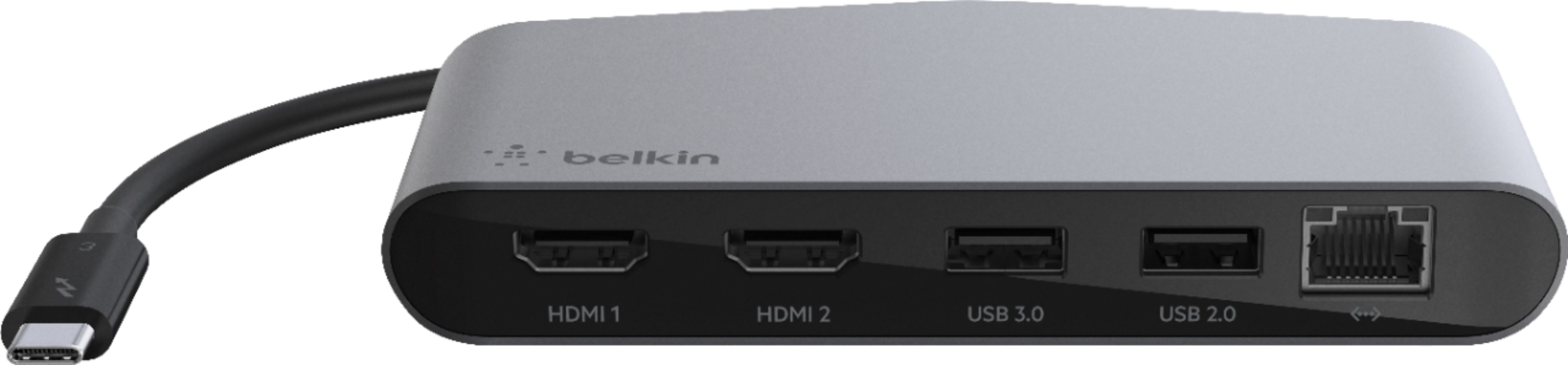
|Posted .This reviewer received promo considerations or sweepstakes entry for writing a review.First thing’s first: this device does not pass power through it, so you cannot use it to charge your laptop. If you have a laptop that has only one USB-C/Thunderbolt port that is also used for charging, this might be an awkward solution for you. Moving on, the Belkin Thunderbolt 3 Dock Mini is a near-perfect solution for expanding your I/O capabilities for your laptop. With just one connection into your laptop via the Thunderbolt 3 (USB-C) cable, you instantly have access to an array of ports: 2-HDMI ports that support dual 4K 60Hz monitors (a real plus IMO), 2 USB-A ports (one 3.0 and one 2.0), and one gigabit ethernet port (also another BIG plus). The display performance via the HDMI ports works as well. I didn’t have any issues running my 2019 Dell XPS 13 with this, although I only used one port to connect to a 27” Dell UltraSharp monitor. The USB-A ports worked fine as well, but I wonder why Belkin didn’t choose to make both ports 3.0 compatible, or even better 3.1 for faster data transfer capabilities? Regardless, as I mentioned, the ports worked well. I was able to connect my iPhone XS for iTunes backup and a WD external hard drive. I briefly tried out the ethernet port by connecting it to my router, and as you can imagine, it worked well. The benefit of this could be for those who need to connect to networks and can transfer large data back and forth with reliability (as opposed to using WIFI). Overall, given the tiny size of this device, I was impressed with its performance. It is a fantastic I/O expansion solution for decluttering your desktop or for road warriors who need a compact docking solution on-the-go. I only wish there was an option to pass power through it for making it the ultimate docking solution for power and I/O – especially for its steep price. By the way, the build quality of the dock mini is awesome, and its aluminum body makes it feel premium and like it would last for quite a while.
I would recommend this to a friend Extension
||Posted . Owned for 1 month when reviewed.This reviewer received promo considerations or sweepstakes entry for writing a review.Nice extension since new computers have different inputs.
I would recommend this to a friendGreat dock
||Posted . Owned for 1 month when reviewed.This reviewer received promo considerations or sweepstakes entry for writing a review.Worked perfect for my application. Would purchase again
I would recommend this to a friendUseless. Hyper is a better product
||Posted . Owned for 2 weeks when reviewed.This reviewer received promo considerations or sweepstakes entry for writing a review.I purchased this for use with M1 MacBook Pro, I was very disappointed that every time I tried plugging my external hd in it was useless unless my charger was also plugged in. Poor design.
No, I would not recommend this to a friendBrand response from BelkinStaff
Posted .Hi, EZ210,
The setback is very uncommon and our Product Experts would like to check this out further. Please send an email at BelkinCares@belkin.com along with your contact details and the link to this review for our easy reference so they can better assist forward.
Let's continue from there.
Regards,
Carl
Belkin Support
Didn't Work.
||Posted . Owned for 1 month when reviewed.This reviewer received promo considerations or sweepstakes entry for writing a review.I never got the docking station to work and ended up taking it back. I was super excited when I first got it, but it didn't work. I figured it was user error, but there were no instructions, so it seemed to be plug and go type tech. I googled for hours with no luck on a solution. I tried changing out cords on my monitors and laptop, but it didn't help. There is no on/off button or light that I could find to indicate it was working or not.
No, I would not recommend this to a friend- Cons mentioned:Compatibility
Cheap
||Posted . Owned for 1 month when reviewed.This reviewer received promo considerations or sweepstakes entry for writing a review.Stopped working after 50 days and will no longer recognize monitors. Tested on monitors at home and doesn't work either.
No, I would not recommend this to a friendBrand response from BelkinStaff
Posted .Hi Bizbuy,
Thanks for sharing your feedback. We would like to have our Product Experts assist you with the troubleshooting of your Belkin F4U098. Please send us more details along with the link to this review at BelkinCares@belkin.com for our reference.
Regards,
Kyla
Belkin Support
- Pros mentioned:Hdmi, Performance
Good ports if your machine supports it
|Posted .This reviewer received promo considerations or sweepstakes entry for writing a review.You have to know your specs to know which Adapter to get. Belkin’s model has no power pass through, a big miss at this price. There are cheaper docking stations, but they don’t all work the same way. The Belkin Mini Doc supports two HDMI connections SIMULTANEOUSLY. Many of the cheaper USB-C connected adapters have multiple monitor outputs, but they don’t work simultaneously. Video output requires significant bandwidth and hardware capable of using that bandwidth. The hardware aspect also requires the right connection on your computer. Newer machines generally ship with Thunderbolt 3. Older machines may use a Thunderbolt 2, even though it has the same USB–C connector. On my older Lenovo Thinkpad, this mini-dock only powered 1 monitor. It also had trouble keeping up with the USB 2.0 port. An older adapter I have, which was designed for the slower port actually worked better in that regard. My newer Samsung Notebook 9 used the ports seamlessly. One other issue is power for your PC. This adapter lacks a power pass through port. That means you will need a separate place on your PC to plug in when your battery gets low. If you only have a single USB-C port, you’ll have to decide what you want to plug in there. This seems like a glaring omission in this price range. While this delivers some nice performance, overall I think this adapter misses the mark.
No, I would not recommend this to a friend - Cons mentioned:Compatibility
Doesn’t run two monitors on an M1 Mac.
||Posted .This reviewer received promo considerations or sweepstakes entry for writing a review.Does not work with an M1 Mac. I hooked up two HDMI monitors hoping to run them both. No dice. Doesn’t work.
No, I would not recommend this to a friendBrand response from BelkinStaff
Posted .Hi, Mitrius,
The Belkin line of Thunderbolt 3 docks including the Pro, Plus, and Core versions are compatible with the new M1-based Mac computers from Apple and support charging, extensions to different peripherals including keyboards and mice, and hard drives. However, the M1-based Mac computers cannot support dual extended displays through the Thunderbolt 3 port, therefore the Belkin Thunderbolt 3 docks are unable to support a second display. You may check out this link for more info about it: https://www.belkin.com/us/support-article?articleNum=317939.
In case you have future concern with any of our products, please feel free to communicate with us over email at BelkinCares@belkin.com with your contact info and the link of this review, for our reference.
Regards,
Elyza
Belkin Support
- Pros mentioned:Build quality, Hdmi, PerformanceCons mentioned:Cable length
Thunderbolt Docking Station is a necessity for me.
Posted .This reviewer received promo considerations or sweepstakes entry for writing a review.Compact unit that you just plug in and it's ready to go. Works well with my new 24 inch iMac and adds the option to plug in thumb drives and different cables from older electronics. I've only had the docking station for a month or so but it seems to be well built. My only complaint is I wish the connecting cable was a little longer. With the iMac the Thunderbolt ports are on the backside of the desktop which leave very few options on where to place the docking station on my desk.
I would recommend this to a friend - Cons mentioned:Compatibility
Dissatisfied
||Posted . Owned for 1 month when reviewed.This reviewer received promo considerations or sweepstakes entry for writing a review.Was not compatible with Windows 10 and support was unavailable
No, I would not recommend this to a friendBrand response from BelkinStaff
Posted .Hi,
We appreciate your feedback, but the F4U098 should work with Windows 10 as it was tested for compatibility with Windows 8 or higher. Please email us at BelkinCares@belkin.com with your contact details and the link to this review. Our Escalation Engineers would love to hear more about the setback.
Regards,
JC
Belkin Support
- Pros mentioned:Build quality, Hdmi
Sturdy laptop dock for Thunderbolt 3
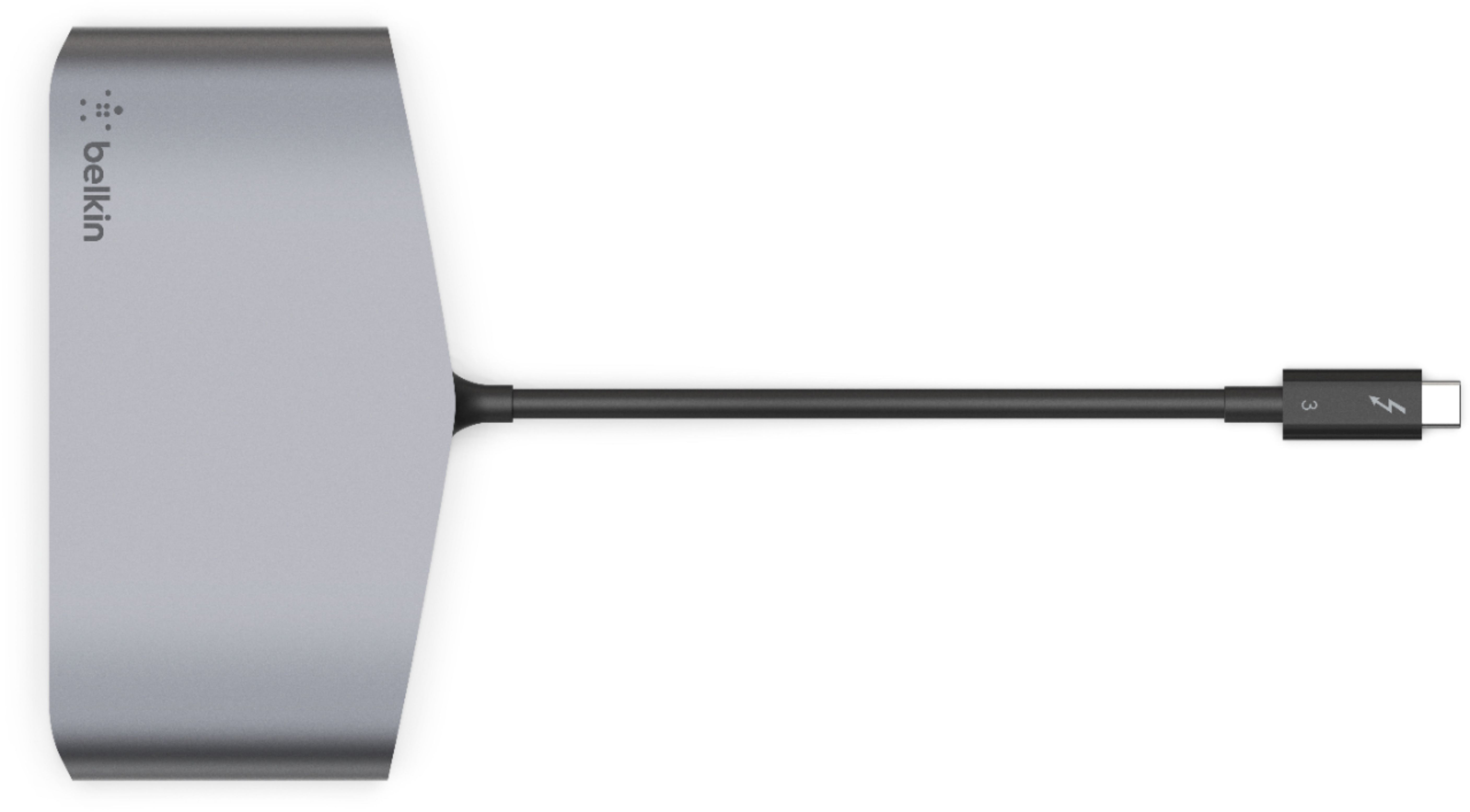
|Posted .This reviewer received promo considerations or sweepstakes entry for writing a review.Even though I have a laptop, I mostly use it as a desktop, hooking it up to a monitor, keyboard, mouse & external hard drive for backup. This dock has the latest Thunderbolt 3 tech, it has spots for 2 HDMI cables (up to 4K), a USB 3 port and a USB 2 port, and an Ethernet port. Another plus is it draws its power from the Thunderbolt 3 connector, no extra power cord required. The dock itself is very solid, compared with some that feel plastic and cheap. The one drawback for me is that the cord going from the Thunderbolt 3 connector to the dock is only 7 inches long, pretty much meaning the dock will be on the desk next to or on top of your laptop. I usually like a longer cord, so I can put the dock on a shelf on my desk to connect all the other cords to it. As Thunderbolt 3 becomes more popular, I'm sure there will be extension cables. Performance-wise, the dock does as advertised. Good connectivity, fast transfer speeds (assuming the hard drives and internet connection you have are speedy). A welcome addition to my desk.
I would recommend this to a friend - Cons mentioned:Compatibility
Its a No Go
||Posted . Owned for 7 months when reviewed.This reviewer received promo considerations or sweepstakes entry for writing a review.Didnt work at all, had to return. Just buy something else.
No, I would not recommend this to a friendBrand response from BelkinStaff
Posted .Hi, Reymond,
We appreciate your honest review. We could have our Product Experts look on the setback further. Thus, if you have any Belkin products, email your contact details and the link to this post at BelkinCares@belkin.com. Our Team will be glad to assist you. We hope to hear from you soon.
Regards,
Rhea
Belkin Support
Too Short for the Task
||Posted . Owned for 2 months when reviewed.This reviewer received promo considerations or sweepstakes entry for writing a review.The USB-C connecting cord should be about 3-5 inches longer. Unuseable in the necessary location.
No, I would not recommend this to a friendBrand response from BelkinStaff
Posted .Hi, BMKM,
The Belkin F4U098 has an attached Thunderbolt 3 cable it is in 6.6 in / 16.5 cm long. Thus, we appreciate your review on this and if in case you have future concern with it or any of our products, please feel free to reach out to us over email at BelkinCares@belkin.com with your contact info and the link of this review, for our reference.
Regards,
Elyza
Belkin Support
not great
||Posted . Owned for 3 weeks when reviewed.This reviewer received promo considerations or sweepstakes entry for writing a review.the usb ports don't work on most devices, but the hdmi ports work. haven't tried the ethernet
No, I would not recommend this to a friendBrand response from BelkinStaff
Posted .Hi,
We’d like to discuss more about your experience as the USB ports are expected to work. Let us know what USB devices are not detected at BelkinCares@belkin.com so our Product Experts can check what happened. Don’t forget to include other relevant details, your contact information, and a link to this review as our reference when you reach out.
Regards,
Rosalyn
Belkin Support
Wouldn't stay connected
||Posted . Owned for 1 month when reviewed.This reviewer received promo considerations or sweepstakes entry for writing a review.Wouldn't stay plugged in, the slightest movement would cause the monitor to disconnect. Not great
No, I would not recommend this to a friendBelkin - Thunderbolt 3 Docking Station
||Posted . Owned for 1 month when reviewed.This reviewer received promo considerations or sweepstakes entry for writing a review.Returning item because it is not really user friendly
No, I would not recommend this to a friendBrand response from BelkinStaff
Posted .Hi, KB1498,
We appreciate the time in posting a review. We could have tapped our Product Experts to check the unit and provide further diagnosis before returning it. Should you have any Linksys products in the future and need a helping hand, please don't hesitate to get in touch with us at BelkinCares@belkin.com. We're eager to help.
Regards,
Carl
Belkin Support
dissapointed
||Posted . Owned for 1 week when reviewed.This reviewer received promo considerations or sweepstakes entry for writing a review.Tried another one but it also did not have consistently functioning USB ports. Returned it and got a lower level model from another manufacturer that uses USB-c port instead. The HDMI rated for slower speeds though.
No, I would not recommend this to a friendBrand response from BelkinStaff
Posted .Hi,
The Belkin F4U098 Thunderbolt 3 Dock Mini HD should let you connect peripherals via the USB-A 3.0 and USB-A 2.0 ports. We could have tried to connect a different Thunderbolt 3-enabled computer for isolation and connect another USB device to see if it will work.
Should you need assistance with other Belkin devices, you can reach out to us at BelkinCares@belkin.com with the link to this review for our reference.
Regards,
Jan
Belkin Support