Customer Ratings & Reviews


- Model:
- F4U098BT
- SKU:
- 6343826
Rating by feature
- Value
Rating 3.7 out of 5 stars
- Quality
Rating 3.9 out of 5 stars
- Ease of Use
Rating 4.1 out of 5 stars
Customers are saying
Customers enjoy the Thunderbolt 3 Docking Station's multiple HDMI ports, compact size convenient for travel, and its ability to support multiple monitors. Many appreciate the build quality and performance, although some find the price high and the cable could be longer. A few users experienced compatibility issues or excessive heat. The docking station's numerous ports are also a plus for many users.
This summary was generated by AI based on customer reviews.
- Cons mentioned:Price

Very Useful product
|Posted .This reviewer received promo considerations or sweepstakes entry for writing a review.I enjoyed my time using the Belkin Thunderbolt 3 Mini Dock. It made adding extra functionality to my MSI Laptop. It just works as long as your laptop supports Thunderbolt because it's not backwards compatible to just run off a USB-C port. The only thing I wish it had was an SD Card reader for the price of $200 because you can get so many others with the same or more function for way cheaper. Outside of that, it's been a blast to use. I would recommend to friends and colleagues if the price was no object and they were committed to Belkin or Apple-centric third-party peripherals.
I would recommend this to a friend Overpriced junk!
||Posted . Owned for 1 month when reviewed.This reviewer received promo considerations or sweepstakes entry for writing a review.My knock off brand ring light required too much power for this USB adapter???? Tried plugging in my cell phone to charge, while the light indicated it was on, the charge power was very low. The $14 one for sale works great. This expensive one is garbage.
No, I would not recommend this to a friendBrand response from BelkinStaff
Posted .Hi, JenninTenn,
The Thunderbolt 3 Docking Station is not designed for charging smartphones or tablet. Please get in touch with us at BelkinCares@belkin.com so we can discuss more about how you can maximize the use of the dock. Just include a link to this review as our reference when you reach out.
Regards,
Rosalyn
Belkin Support
- Pros mentioned:Hdmi
Near Perfect Travel Option
|Posted .This reviewer received promo considerations or sweepstakes entry for writing a review.I travel a lot for work and use a 13" MacBook Pro with USB-C ports. I usually carry an adapter that connects my laptop to HDMI, USB-A and power through a single dongle. There have been several times that connecting to multiple monitors was required and I was looking for a solution that would allow me to connect to multiple monitors over HDMI from my MacBook. I picked this up and was pretty surprised by all the functionality that Belkin packed into a smaller hub. For the record, this is a smaller, travel sized version of their larger, beefier TB3 dock. I was able to drive 2 monitors using HDMI and ethernet using this dock. The dock also comes with a single USB-A v2 port and a single USB-A v3 port for connecting accessories. I was able to connect my iPhone using the USB-A v2 port and an external HD using the USB-A v3 port. My one gripe with all of this seems like an obvious omission: there's no option to pass power through this device. That means that you'll have this dock connected as well as another USB-C plug for power. It seems like an odd choice since so many USB-C accessories have a USB-C port to charge your MacBook at the same time. I was also able to use this dock on my new 2019 iMac which also uses TB3 / USB-C ports. Transferring data between MacBook and iMac using this dock and my external drive is a breeze. If you're a traveller and want something a little beefier than Apple provides, then you need to check this out.
I would recommend this to a friend Not plug and play
||Posted . Owned for 1 month when reviewed.This reviewer received promo considerations or sweepstakes entry for writing a review.Terrible. Still can’t get it to work. I asked ahead of time if it would work with my laptop and it does not. And you have to rip the box to get in so I can’t return it. Not happy.
No, I would not recommend this to a friendBrand response from BelkinStaff
Posted .Hi Shar,
We have taken note of your feedback. Let’s have our Product Experts assist you further with your concern. Please send us the relevant details and the link to this review at BelkinCares@belkin.com for our reference.
Regards,
Kyla
Belkin Support
- Pros mentioned:Build quality, Hdmi
Belkin Thunderbolt 3 Mini Dock Station
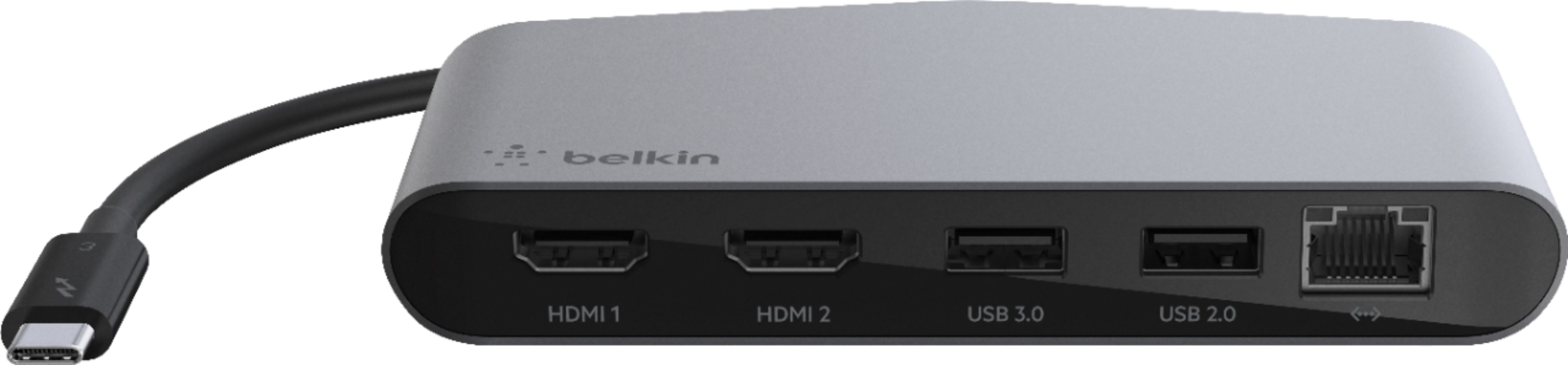
|Posted .This reviewer received promo considerations or sweepstakes entry for writing a review.Ok late review but here we go: First off this Belkin Thunderbolt 3 Mini Dock Station looks like an ordinary USB type hub extender with extra ports. However, that's not the case. This little device comes in handy and packs a good punch wrapped up inside an impressive style. The build quality that Belkin put into this device is top notch and does not feel cheap or plasticy. Has a nice heft to it, along with a nice aluminum enclosure. The main cord which is attached, is a USB-C connecter that plugs into your thunderbolt port on your PC. On the other ;side are 5 other ports: HDMI 1 HDMI 2 USB 3.0 USB 2.0 Gigabit Ethernet port Both of the HDMI ports support up to 4K quality devices, the USB ports are pretty much standard these days, and the Gigabit Ethernet port provides very strong and reliable speeds to your network. It is compatible with both Windows PCs as well as Mac; both of which I tried and tested. Great device and helps minimize clutter from multiple cords and dongles.
I would recommend this to a friend Expensive waste
||Posted . Owned for 6 months when reviewed.This reviewer received promo considerations or sweepstakes entry for writing a review.I've had this for about 6 months. Ethernet port no longer works and I can't get some USB devices to work on it.
No, I would not recommend this to a friendBrand response from BelkinStaff
Posted .Hi, cjg99,
We hear you. Try using another Ethernet cable and disconnecting all connected peripherals on the dock for isolation. If it's still the same, please call our phone support team for advanced troubleshooting. Our hotlines are listed here: https://www.belkin.com/us/support-article?articleNum=55022.
Regards,
MJ
Belkin Support
Faulty Product
||Posted . Owned for 1 month when reviewed.This reviewer received promo considerations or sweepstakes entry for writing a review.Inputs randomly stopped working 2 months after purchase. Hopefully there is a manufacturer warranty.
No, I would not recommend this to a friendBrand response from BelkinStaff
Posted .Hi,
The Belkin Thunderbolt 3 Dock Mini HD should work longer than described. But, allow us to have our Product Experts investigate the dock further. You can share more details at BelkinCares@belkin.com, including the link to this review for our reference.
Regards,
Jan
Belkin Support
Do not waste your time/money
||Posted . Owned for 3 weeks when reviewed.This reviewer received promo considerations or sweepstakes entry for writing a review.Have to download software and wouldn't allow me to download. Everything i have is 100% compatible as well....still no luck.
No, I would not recommend this to a friendBrand response from BelkinStaff
Posted .Hi,
We appreciate your feedback, but the Belkin F4U098 is just a plug-and-play device. Please send us an email at BelkinCares@belkin.com with your contact details and the link to this review. Our Escalation Engineers would love to hear more about the setback.
Regards,
JC
Belkin Support
Disappointed
||Posted . Owned for 1 month when reviewed.This reviewer received promo considerations or sweepstakes entry for writing a review.I had issues with this docking station. Monitors would often lose signal. I ended up returning product.
No, I would not recommend this to a friendBrand response from BelkinStaff
Posted .Hi MikeH,
We are sad to see things end here, but we fully respect your decision.
Feel free to contact our customer care team at BelkinCares@belkin.com or our support hotline if you need our assistance or if you have any questions, concerns, or comments that you would like us to pass along.
(Our hotlines are listed here: https://www.belkin.com/us/support-article?articleNum=55022)
Regards,
Chu
Belkin Support
- Pros mentioned:Build quality, Hdmi
well built, questionable port choices
|Posted .This reviewer received promo considerations or sweepstakes entry for writing a review.This lightning dock connects to your computer via USB-C dongle. It has two HDMI 4k ports has two USB A ports, one a 3.0 version and another 2.0. Not sure why they wouldn't make the 3.0 offering at least a 3.1 version. Also included is a Gigabit Ethernet port. All ports are fully functional and I had no problems using any and all at them at same time (although I did not have more that one 4k monitor to attach). I just wish the choices were a bit more varied, the main reason you purchase a docking station like this is to have a variety of ports. I know Display Port and DVI are is a pretty dead standards, but it might make sense to have one of them and possibly a USB-C passthrough and any of the various forms of USB mini A, mini B ports. Regardless, this is a well built docking station but I can't help but think it is not the most versatile.
No, I would not recommend this to a friend - Pros mentioned:Hdmi, Size
Awesome USB-C Dock
|Posted .This reviewer received promo considerations or sweepstakes entry for writing a review.Since getting this dock a couple of days ago, it has come in handy several times already. The USB-C connection will allow for many connections. It has 2 HDMI ports, one USB 3.0 and one 2.0 port along with an ethernet connection. Today I was able to connect two external monitors via the dual HDMI ports and felt like I was in another world. Both monitors were 28-inch widescreen attached to my 13-inch MBP and it handled it very well. I used the USB 2.0 port to connect my wireless USB mouse and keyboard and there was no hesitation or lag unlike another that I have tried. Lastly, I tested a backup to my external HDD using the USB 3.0 connection and was very happy with the speed. Great adapter and compact enough that I'm using this one as my travel dock. Definitely, recommend this if you have USB-C connectivity.
I would recommend this to a friend Didn’t work
||Posted . Owned for 3 weeks when reviewed.This reviewer received promo considerations or sweepstakes entry for writing a review.Unfortunately, this did not work and I’m outside the return window for a refund :(.
No, I would not recommend this to a friendBrand response from BelkinStaff
Posted .Hi,
Thank you for bringing this matter to our attention. If there's something that you want to share with us about your product experience, feel free to email BelkinCares@belkin.com. We would love to know more so that we can deliver a better experience next time.
Regards,
Mara
Belkin Support
- Pros mentioned:HdmiCons mentioned:Cable length
Does what it's supposed to
|Posted .This reviewer received promo considerations or sweepstakes entry for writing a review.This little guy does the trick. Gives you a lan port, usb and hdmi ports through thunderbolt. So far no serious complaints. I've been able to run my ultrabook to my desktop monitor which is nice. Having the lan port is handy in my office as well. My only complaint really is that it's so small that cords can actually tip it over and unbalance it. It maybe needs just a bit of heft to it so it will sit flat and not move around. The other complaint is that the cord is so short that it tends to get in the way of other ports/cords on my device. For instance, I have a Dell XPS13 and the power adapter and thunderbolt are right side-by-side so it looks a little messy coming out of that part of the device. In an ideal world, a thunderbolt dock would also supply power to the device so that way you eliminate the power cord as well. Overall though it does the trick and I'd recommend it if you had need of a quick and dirty lan adapter/port replicator for a small device.
I would recommend this to a friend Didn't work, tried it on multiple computers.
||Posted . Owned for 1 month when reviewed.This reviewer received promo considerations or sweepstakes entry for writing a review.Didn't work, tried it on multiple computers. I'm out over $100
No, I would not recommend this to a friendBrand response from BelkinStaff
Posted .Hi,
Making sure that the computer is compatible with the dock is crucial. Please ring our hotline support number, so we can assist you better with the challenge. You can check our contact information by clicking the ‘Contact Us’ option at the bottom part of our website.
We hope to hear from you soon.
Regards,
Rosalyn
Belkin Support
Does not work with razer blade stealth
||Posted . Owned for 6 months when reviewed.This reviewer received promo considerations or sweepstakes entry for writing a review.Needed duel monitor set up for razer blade stealth. Did not allow me to set up two monitors
No, I would not recommend this to a friendBrand response from BelkinStaff
Posted .Hi, Kwalsh,
The Belkin F4U098 is compatible with Windows computers that are equipped with Thunderbolt 3 technology. You can try to swap the HDMI cable for isolation, or update the Thunderbolt driver on the computer to see if that makes any difference. For further assistance, you can reach out to us at BelkinCares@belkin.com with the link to this review for our reference.
Regards,
Jan
Belkin Support
Unhappy
||Posted .This reviewer received promo considerations or sweepstakes entry for writing a review.The Ethernet port does not work. I am going to return it for a different product.
No, I would not recommend this to a friendBrand response from BelkinStaff
Posted .Hi there,
This is totally unexpected and we'd like to check this out further. Before setting it aside, our Product Experts would like to take a closer look at your experience and help you figure out what's causing this to happen. Please drop an email at BelkinCares@belkin.com along with your contact details and the link to this review for our reference.
Regards,
Carl
Belkin Support
only lasts 2 months
||Posted . Owned for 2 months when reviewed.This reviewer received promo considerations or sweepstakes entry for writing a review.stopped working after 2 months of normal use. will replace with different product
No, I would not recommend this to a friendBrand response from BelkinStaff
Posted .Hi,
We hear you! The Belkin Thunderbolt 3 Dock can last longer than that. Don't hesitate to email us at BelkinCares@belkin.com with the link to this post should you need help.
Regards,
Mara
Belkin Support
- Pros mentioned:HdmiCons mentioned:Heat
Great mini dock!
|Posted .This reviewer received promo considerations or sweepstakes entry for writing a review.For my work laptop, I have a nice a Thunderbolt Type-C dock that came with it, but that stays at work. I was wanting to have something just as easy to connect to my monitors and network when I work from home, and the Belkin ThunderBolt 3 Mini Dock delivers. It is nice only have to plug in the dock, and not all of the other video cables and network cable each time. The dock as 2 HDMI ports, with 4K resolution support, a 1Gbps Ethernet port, USB 2.0 (Type-A) and USB 3.0 (Type-A) ports. No drivers are necessary, just plug it in and configure your displays as necessary, and you're done. I have noticed that it does seem to run a little warm (not super-hot), and I'm just using both HDMI ports and LAN. Also, please be sure that your laptop has a Thunderbolt 3 Type-C port. It will not work on USB 3 Type-C or DisplayPort Type-C (I did try it out on both just to make sure).
I would recommend this to a friend - Pros mentioned:HdmiCons mentioned:Heat
Awesome connectivity and convenience
|Posted .This reviewer received promo considerations or sweepstakes entry for writing a review.This dock, as long as you have a Thunderbolt 3 port does exactly what you would expect it to, and it does it well! Using this I’m able to connect to Ethernet, two HDMI monitors (I’m only using one at the moment though) and two USB devices (one 3.0, one 2.0) with one simple connection. I have a gamin laptop that I like top take around, so now, instead of disconnecting a bunch of cables, I just pull the power and the dock and can move around the house. I have absolutely no complaints. The dock does get a little warm during use, but nothing too alarming.
I would recommend this to a friend - Pros mentioned:Hdmi
Works flawlessly
|Posted .This reviewer received promo considerations or sweepstakes entry for writing a review.Great addition to my work desk at home set up. Although I only have 1 monitor, I tried putting the other HDMI port to a TV and I did not experience any screen flickering or delays whatsoever. I also tried filling up all the ports, except the LAN, and each peripheral, 1 monitor, 1 TV, 1 mouse receiver and a charging tablet were all functioning well in the 2 hours straight they were all on. Oh and the quality of the main cable connecting to the thunderbolt port is nice (flexibility-wise). Overall a good product. My only concern is, it does not have another Thunderbolt or a USB-C port open. My personal PC is okay because it has two of these ports, so I can connect the charger in the other slot. My work PC though (ThinkPad) ony has one so I cannot charge while using the dock. Still a good one to have for your docking needs.
I would recommend this to a friend