Customer Ratings & Reviews


- Model:
- F4U098BT
- SKU:
- 6343826
Rating by feature
- Value
Rating 3.7 out of 5 stars
- Quality
Rating 3.9 out of 5 stars
- Ease of Use
Rating 4.1 out of 5 stars
Customers are saying
Customers enjoy the Thunderbolt 3 Docking Station's multiple HDMI ports, compact size convenient for travel, and its ability to support multiple monitors. Many appreciate the build quality and performance, although some find the price high and the cable could be longer. A few users experienced compatibility issues or excessive heat. The docking station's numerous ports are also a plus for many users.
This summary was generated by AI based on customer reviews.
- Pros mentioned:Hdmi

Decent USB C Thunderbolt expansion dock
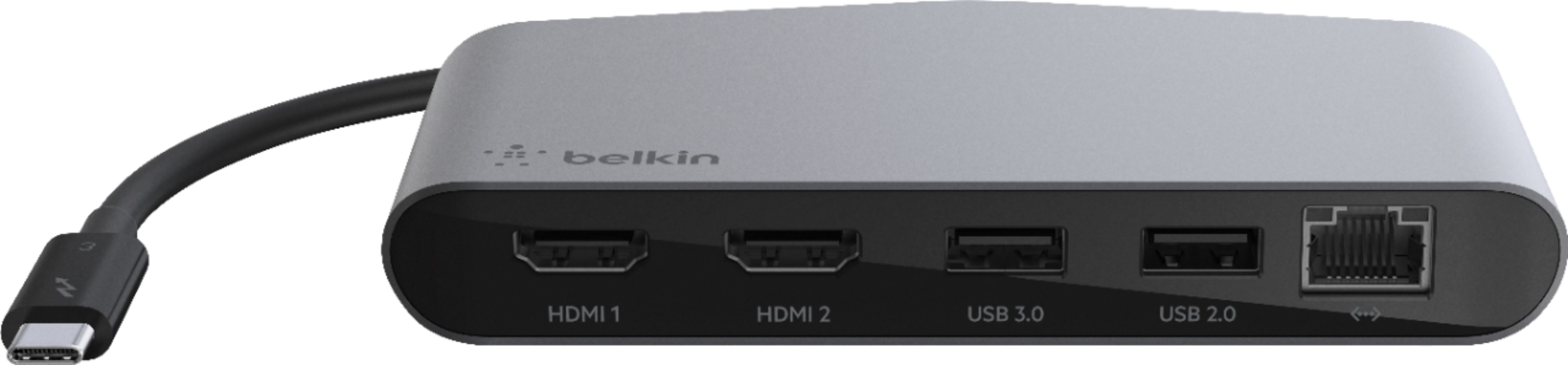
|Posted .This reviewer received promo considerations or sweepstakes entry for writing a review.The Belkin Thunderbolt 3 Mini Dock is a decent accessory to have who have laptops with no display or ethernet ports built-in. The dock allows two 4k monitors to be connected to the laptop (allows acceptable 60 Hz refresh rate in each channel) which is a great way to expand your workstation. I have used it with my personal laptop, an HP Spectre x360, as well as my work laptop, a Dell Precision 5520 thought he USB-C (Thunderbolt) port. Setup was almost instant, and I was using a triple display setup in no time with both laptops. The gigabit ethernet port is a nice thing to have if you are near the router as you get better performance compared to Wi-Fi. The other ports it offers are USB Type-A, but they come in two flavors - USB 2.0 and USB 3.0. The construction is solid, and the metal case give its some heft. The thing is not the smallest of the bunch, and being hefty means it’s got some weight too - not the best thing to carry everywhere. I think that’s the idea of this product - it’s a Mini Dock instead of being a hub/adapter. All in all, this is a good expansion for the new generation of ultra-light laptops who are ditching traditional ports left and right. Just make sure your USB-C port is Thunderbolt compatible - not all USB C ports are created equal (I learned it the hard way). For the size and weight, I wish it included a USB-C charging function so you can charge and use and external displays at the same time. Also, some card reader functionality would be a welcome addition.
I would recommend this to a friend A wonderful little device
|Posted .This reviewer received promo considerations or sweepstakes entry for writing a review.This Belkin 3 Dock Mini is a total pleasure. Setup could not be simpler, but there is one important caveat I’ll mention in a moment. The computer to which you wish to connect this must have a “Thunderbolt 3" (USB-C) port. Newer laptops do (mine does). If you want to attach this to a desktop computer that doesn’t have a USB-C port, you can get an add-in card to add USB-C connectivity. If your laptop does not have a USB-C port, USB-2 to USB-C adapters are available. You connect the Dock to this port, and you now have two HDMI ports which allow 4K resolution monitors (thus giving you three total monitors to work with as you can continue to use your laptop’s screen as well), a USB 3.0 port, a USB 2.0 port, and a Gigabit Ethernet port, which is a nice feature that allows a hardwire internet connection to a laptop that, like mine, doesn’t have one built in. The included instructions are nothing more than a single diagram, and it leaves out one important thing as I alluded to above. My usual approach when connecting peripherals is to add them one at a time. In other words, because I didn’t know any better and because the instructions did not address this, my first step in installing the Dock was to connect it to the laptop. Once the laptop recognized it and finished installing it, I then connected two monitors to the two HDMI ports. But this didn’t work! The two HDMI ports are labeled “HDMI 1" and “HDMI 2", and it was only the monitor connected to HDMI 2 that would work. I could do everything I might want to do with it, such as making it the primary or secondary display with the laptop’s display as the opposite, duplicate displays, or whatever. But I could not find a way in Windows Settings to get the third monitor to be recognized. So I went to the Belkin website and looked up support for this device, and the instructions there make a vital point not mentioned in the included instructions. The website installation instructions say to connect all peripherals to the Dock FIRST, then connect the Dock to the computer. When I installed it this way, everything worked fine. Both external monitors were recognized and lit up, and I now had three displays that I could arrange any way I wanted through the Display Settings in Windows. Very cool. I’ve used two monitors on both my home and work computers for some time now, and I’ll never go back to a single monitor because having two monitors is just so handy. Now I’ve got THREE monitors to play with. I’m gonna need a bigger desk! The other ports (USB and Ethernet) work fine as well. There is no power cable for this as it gets whatever power it needs through the USB port. Highly recommended!
I would recommend this to a friendA great Thunderbolt 3 dock, but with limitations
|Posted .This reviewer received promo considerations or sweepstakes entry for writing a review.In many ways, Belkin’s new “Thunderbolt 3 Dock Mini” is similar to their “USB-C Express Dock 3.1HD” & “Thunderbolt 3 Express Dock HD”. Like both of these, the Dock Mini has an Ethernet port, two USB-A ports, and video out on the back. But, that’s where the similarities end. The USB-C Express Dock has a single HDMI for video, and the Thunderbolt 3 Express Dock has two video outs (1x DisplayPort, 1x USB-C Thunderbolt), whereas the Dock Mini has 2x HDMI. Additionally, the Dock Mini has no headphone jack, or USB-C ports, but it also doesn’t require an external power supply. UNBOXING & INITIAL IMPRESSIONS: Honestly, not much to say here – unboxing was very simple, packaging is very environmentally-friendly, and the product is nice-looking & solidly-built. SETUP: Set-up doesn’t get any easier…talk about “plug & play”. As long as you have a Thunderbolt 3-enabled Mac, or Windows 10 PC, simply plug the unit into any Thunderbolt 3-enabled USB-C port, and you’ll be up & running in no time. Ok, with a Windows 10 PC, it might take a little longer, as the unit must first be ‘authenticated’, which is a multi-step process. If you’ve never connected a Thunderbolt 3 device before, you’ll need to check ‘Notifications’ (bottom of screen, right side) for “New Device”, then click <OK>, and the UAC pop-up appears. Click <Yes>, and an ‘approval’ pop-up appears. Select the Dock Mini, change “Do Not Connect” to “Always Connect”, the <OK>. Depending on your computer, you might need to update your firmware and/or download updates from ‘Windows Update’. After that, you should be good to go (I was)…and, if not, you might need to update your computer’s Thunderbolt 3 software and/or NVM firmware. ADDITIONAL THOUGHTS: If using a desktop (Mac or PC), the Belkin Thunderbolt 3 Dock Mini adds two additional USB ports. If using a Mac, or Thunderbolt 3-equipped PC (desktop, or laptop), you gain two HDMI outputs. While desktop users can benefit from this, this might really only mean something for those using laptops…especially MacBook users. All of our church’s campuses use MacBook Pros. The typical setup consists of a USB-C-to-HDMI adapter (for outputting the video to a projector), a USB-C-to-USB-A adapter (for moving videos from an external HHD, to the MacBook), and (for locations with Ethernet access) a USB-C-to-Ethernet adapter. Because of the Belkin Thunderbolt 3 Dock Mini, our campus can now eliminate these adapters, and use this one single unit. THE GOOD: • Easy to set up • Adds two additional HDMI video-out ports • If using a laptop without Ethernet port, adds an Ethernet port • Adds additional USB 3.1 port (Backwards compatible with 3.0 & 2.0), as well as USB 2.0 port • No external power supply needed THE BAD: • If using a computer without a Thunderbolt 3- equipped USB-C port, only the USB-A ports, and Ethernet port, will function • For Windows 10 PCs, additional steps (if no prior Thunderbolt 3 devices have been connected), additional steps are required to make the Dock Mini functional THE UGLY: • No additional USB-C ports FINAL VERDICT: If you’re in need of additional USB and/or HDMI ports, and have a Thunderbolt 3-equipped Mac, or Windows 10 PC, this WILL resolve your problems, especially if using a laptop. While desktops can benefit, this is really aimed at those with laptops. Best of all, unlike Belkin’s previous docks (of this type), no external power supply is needed. Lastly, BOTH HDMI ports provide 4K video @ 60Hz (others only support up to 30Hz, or 60Hz on one port & 30Hz on the other. While I answered ‘Yes’ to the “Would you recommend this” question (a ‘yes’, or ‘no’, answer is required by Best Buy), the truth is, I can neither recommend it, nor not recommend it. For what it’s designed to do, it does perfectly well. It will provide the features needed by some, but not for others. If it meets all your dock needs, and you have a Thuinderbolt 3-equipped computer, then buy it…it will serve you well. Disclaimer: This product was provided free, or at reduced cost, for the purpose of reviewing the product. Nevertheless, the above review, be it positive, negative, or anywhere in-between, is a 100% honest review, and the price paid played absolutely no part in my review.
I would recommend this to a friendLimited ports, but does the job well
|Posted .This reviewer received promo considerations or sweepstakes entry for writing a review.The first thing to understand about this dock is that it's a ThunderBolt 3 interface. If your machine is not specifically Thunderbolt 3 compatible, this dock will not work for you. Second, it's also clear the dock is not meant for devices that only have one Thunderbolt 3 port that's also needed for power. The Belkin dock does not have a USB-C power pass-thru or extra USB-C port. Whichever port the dock is plugged into, that port will be exclusive to the dock. With that out of the way, the dock provides 2 HDMI, 2 USB (3.0 and 2.0), and ethernet ports. This seems a bit lacking for a "dock," having no card reader or DisplayPort. That said, what it does it does it well. I was able to attach two standard 1080p external monitors with no issues and everything was smooth. The dock also handled a super-ultrawide 32:9 1440p monitor wonderfully. It looks like the real focus of this dock is for dual 4K HDMI monitor connectivity. For what I could test, the dock handled my monitors effortlessly. In addition, the USB 3 interface was as fast as one would expect, and the ethernet was perfectly fine. The dock definitely appears to be geared to a specific connectivity need; and while quite small, it feels very well-built and sturdy.
I would recommend this to a friend- Pros mentioned:Hdmi
A lot of different ports!
|Posted .This reviewer received promo considerations or sweepstakes entry for writing a review.This Thunderbolt 3 mini dock has different ports. It connects to your computer using a USB-C connection. It supports 4K HDMI, USB 3.0, USB-2.0 and an Ethernet port. This mini dock supports most of my gadgets that require a connection EXCEPT my blood glucose machine which connects using a USB mini type B. Otherwise, highly recommend.
I would recommend this to a friend Nice, compact Thunderbolt 3 dock
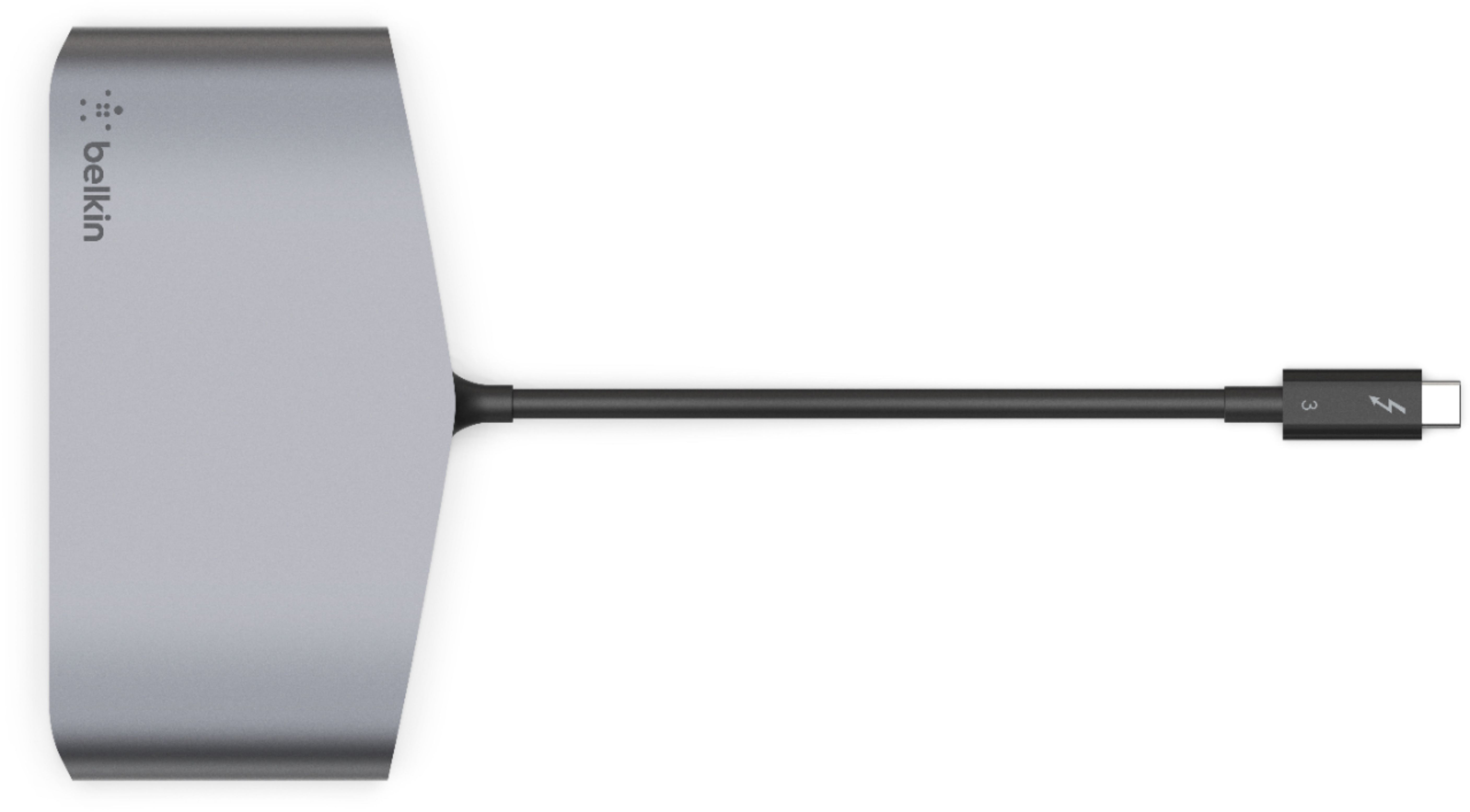
|Posted .This reviewer received promo considerations or sweepstakes entry for writing a review.Belkin's mini Thunderbolt 3 dock is a good-looking and convenient way to break out a Thunderbolt 3 port into a selection of the most common other ports. It gives you 2 HDMI and 2 USB type A ports (though, somewhat unusually, only one supports USB 3), plus a wired Ethernet port. More expensive, desktop-oriented docks will typically have more ports than this, but for a simple set-up this dock is sufficient (and certainly smaller and easier to carry around). (Full disclosure: Belkin provided this unit for me to review and provide my honest opinion.) On first impression, the design of this dock fits right in with a "Space Gray" MacBook Pro. (It would be no surprise if this was Belkin's primary target audience for this product, as traveling with adapters is nearly a requirement.) The dock has a short Thunderbolt 3 cable for upstream connectivity; this cable is not removable in order to replace with a longer one, but it seems reasonably sized for this dock's purpose. It feels sturdy, including good strain reliefs, so it seems like it will stand up to normal wear-and-tear from traveling. I can attest that the HDMI ports support 4K displays at a 60 Hz with no issues. This is pretty much expected for any Thunderbolt 3 to HDMI adapter nowadays, but nice to confirm anyway. The USB port selection seems a little unusual, as it sports one USB 2 and one USB 3 port (rather than two USB 3 ports). The USB 3 port is only a 5.0 Gbps port (aka USB 3.1 Gen 1). It worked fine with an external SanDisk USB 3 SSD, but did not provide enough power for an external USB 3 Blu-ray drive to spin up and read a disc. (The latter works fine when plugged directly into a Thunderbolt 3 port on the computer). I noticed no issues with the Gigabit Ethernet connection. This dock has a few small shortcomings that Belkin can hopefully address in new models - but from my research, the current competition isn't really any farther ahead of Belkin's dock in these areas. I think replacing the USB 2 port with another USB 3 port would be a nice improvement, and it would be great if they could support at least 10 Gbps USB 3.1 while they're at it. I personally wouldn't mind if Belkin added an additional USB port, for a type C connector. And finally, it would be especially nice to support power pass-through on the USB type C connector from a USB Power Delivery charger - then, I could opt to plug my laptop charger into the dock, and have only a single wire from the dock going to my computer's Thunderbolt 3 port. All-in-all, however, my complaints detract little from the overall quality.. This dock has a nice fit-and-finish, works well where it counts, and provides a convenient set of ports while minimizing how many separate dongles are required for a Thunderbolt 3 computer.
I would recommend this to a friend- Pros mentioned:Build quality
I was unable to review the dock
|Posted .This reviewer received promo considerations or sweepstakes entry for writing a review.I thought that my Windows desktop, gaming laptop or my Mac Mini (late 2014) supported Thunderbolt 3, but unfortunately I was mistaken. The USB-c connector and Thunderbolt 3 are the same, but the PC must have the lightning bolt symbol next to the port. I'll have to save it for a future build or return it. I rate it 5 stars because it offers the features I've been looking for. Dual HDMI ports for 4k monitors, a USB 3.0 and 2.0 port as well as a gigabit lan port. It would be wrong of me to lower the rating since I'm unable to put the dock through it's paces. In my opinion based on a few reviews I've read, the dock should perform well and very close to the reported specs for each port. It's well made with a nice metal housing, giving it a bit of heft. I definitely want to use it as soon as I have a system that supports it.
I would recommend this to a friend Ok, but only for a very specific use case
|Posted .This reviewer received promo considerations or sweepstakes entry for writing a review.This is an OK device for a very specific niche but it kind of left me baffled as to what it's real audience is. To me, the only real use of this was connecting a thunderbolt 3 device to 2 extra monitors that only support HDMI. The extra ports feel more tacked on to justify the price points than anything. Setup is pretty easy on a MacBook Pro. Plug it in and it's ready. That's it. From my understanding, there may be a couple more hurdles to jump through for a Windows 10 device. Everything seemed to work great. I'm not sure what else to comment here. Things worked as expected. But with that said, I still don't fully understand this product. Even the label "docking station" feels weird because it acts more like a "dongle" than anything. The ports that they include aside from the 2 HDMI ports are kind of baffling. Gigabit Ethernet makes the most sense because more portable computers just don't come with them anymore so throwing that in there just because you can makes at least a little sense. The 2 USB-A ports feel super weird as one of them is USB 2.0 and the other one is 3.0. I don't know why they aren't both USB 3.0 but I assume "reasons". The biggest draw back to this "docking station" is that you don't have any extra USB-C ports. At least one USB-C port would have been nice to make up for the USB-C port you're plugging this into. That was my biggest "what?" moment when I realized it didn't have at least one USB-C port... in 2019... on a "docking station". I just can't say it enough. I don't know what this device is really targeting. All I can safely say is it obviously isn't me. If you need to extra the capabilities of your laptop to output to two 4K HDMI screens while plugging in to gigagit ethernet and connecting an extra USB 2.0 device as well as a USB 3.0 device... and that's all you need... then this is the device for you! If that very specific niche isn't your use case, you can probably find a more specialized device that's cheaper and doesn't include the "extras".
No, I would not recommend this to a friend- Pros mentioned:Hdmi
Only thing missing is power pass through
|Posted .This reviewer received promo considerations or sweepstakes entry for writing a review.You get 2 HDMI that supports 2 4K monitors at 60Hz, a couple of USB ports and ethernet. What you don't get is power pass through. If this thing had power pass through, it would definitely be a 5 star product. Nevertheless, the features that this does have all work great.
I would recommend this to a friend A very nice solution for Thunderbolt 3 devices
|Posted .This reviewer received promo considerations or sweepstakes entry for writing a review.For those people who have devices (in my case, a Samsung laptop) that support Thunderbolt 3 connectivity, this might be a consideration for you. The Mini comes with five ports, plus one male Thunderbolt 3 connector. The five ports consist of 2 HDMI ports, a USB 3.0 port, a USB 2.0 port, and a gigabit Ethernet port. This unit is compatible with all MacOS X, Windows, and Chrome devices equipped with Thunderbolt 3 technology, and provides support for dual 4K displays @ 60Hz. I can think of various scenarios where the Mini could be helpful based on my testing: - If you don’t have access to Wi-Fi at your location, you could use the Ethernet port to connect to a network using an Ethernet cable. - If you want to use more than one monitor, the Mini supports 2 HDMI compatible displays. - If you have up to two USB devices you want to connect, the USB 2.0 and 3.0 are great for that. For example, you could connect a wired mouse or a USB compatible printer. Or, perhaps, an external USB drive, a DVD player and other USB-type devices. Here are some scenarios I tested out: - I connected the Mini to my laptop using a Thunderbolt port on the laptop. I turned off the laptop’s Wi-Fi and connected the Mini to my network using an Ethernet cable. Within moments, the laptop was communicating on my network. - I then connected an external monitor to one of the HDMI ports on the Mini. The external monitor immediately displayed what was on the laptop’s monitor. Using FN/F4 on the laptop, I was able to define how I wanted the external monitor to work. For example, to extend the laptop’s monitor. Using the same function, I could turn off the laptop’s monitor and use the external monitor only. And so forth. I didn’t have a second HDMI-compatible monitor to try out dual-monitor support. - I then connected a wired mouse to one of the USB ports on the Mini, and in but a second it was ‘mousing’ perfectly. (Is Mousing a word?) - I then disconnected the Ethernet cable and turned Wi-Fi back on the laptop. Once again without delay, the laptop was back on the network and working. I realize that this is a function of the laptop and its networking capabilities, but still – it worked without problem. All in all, the Mini was very easy to use and no configuring was required. I give Belkin 5 stars for a nicely thought out product. Note: keep in mind that this product does not support Wi-Fi or Bluetooth.
I would recommend this to a friend- Pros mentioned:Hdmi
Excellent build and performance!
|Posted .This reviewer received promo considerations or sweepstakes entry for writing a review.There isn't much to say about this one. It either works or it doesn't. I plugged it into my Yoga 920, plugged in two 4k monitors, and a wireless key/mouse combo receiver and voila! I now have a desktop PC experience with a small portable dock. It is constructed with a brushed aluminum body and high gloss plastic that will no doubt be scratched after a few uses. Everything is really snappy with file transfers and USB 3.0 speeds worked as advertised. If you are in the market for a thunderbolt 3 dock, you should start looking here first!
I would recommend this to a friend Perfect solution for expanding ports on a laptop
|Posted .This reviewer received promo considerations or sweepstakes entry for writing a review.When I decided to move from a mid-size SONY Vaio laptop to a slim profile HP Spectre x360-13, one thing I missed were USB ports. The Vaio had four USB A ports. The Spectre has one USB A and two USB C Thunderbolt ports, but I use one of the USB C ports for the power adapter. The Vaio also had HDMI and Ethernet ports, which the Spectre lacks. Since there were occasions when I wanted two USB A ports for the Spectre, I had to buy a dongle to convert one of the C ports to an A port. And I also had to get separate HDMI and Ethernet dongles. BUT—I could not use all the dongles at the same time because I had only one free USB C port. The perfect solution? The Belkin Thunderbolt 3 Dock Mini. Its hard-wired USB C Thunderbolt cable (about 6" long) fits into my free Thunderbolt port, and I can simultaneously connect not one, but two HDMI cables, a USB A 3.0 cable, a USB A 2.0 cable, and an Ethernet cable. Such is the power of Thunderbolt. I tested all the connections and they worked like a charm. Windows prompted me to grant permission for the Dock, and also for the USB ports the first time I connected devices to them. When I use the Windows safely disconnect feature, it shows both the Dock and the separate connected devices. As I tested the various connections, I found only one that did not work, an attempted HDMI connection to my Samsung SmartTV by way of my Pioneer receiver's front HDMI input. I simply got a "no input" message on the Samsung display. In contrast when I used the HP HDMI dongle I had purchased earlier, my screen successfully displayed on the TV. Not sure why the Dock would not work when the dongle did. However, this is probably not important for most people, who would be plugging the HDMI cable directly into a monitor, not an A/V receiver. When I ran a cable from the Belkin Dock to an HDMI port on my TV, it displayed just fine. I realize that these days there are other wireless solutions that make a hardware dock such as the Belkin unnecessary. But there are situations (e.g., running dual-display monitors or hooking up your laptop to a TV in your hotel room) where the Belkin Thunderbolt 3 Dock Mini could come in really handy. I can strongly recommend it.
I would recommend this to a friend- Pros mentioned:Hdmi
Dock Solid
|Posted .This reviewer received promo considerations or sweepstakes entry for writing a review.The Belkin ThunderBolt 3 Mini Dock works great. It connects to your device via a TB3 cable, which also doubles as a standard USB-C connection. It also contains 2 HDMI ports (which can support dual 4k monitors), a USB 3.0 port, a USB 2.0 port, and GB ethernet port. In other words,Belkin made the ports Apple didn't include. It all works great. This is a pricey device, but if you are a power user, it is well worth the investment.
I would recommend this to a friend - Cons mentioned:Compatibility, Power
Doesnt seem to play nice with Mac
|Posted .This reviewer received promo considerations or sweepstakes entry for writing a review.I ordered this dock to use with my MacBook Pro. Unfortunately, it isn't capable of powering any of my peripherals. I connected my Apple SuperDrive to the Belkin mini dock and I received a message that it needs more power. I also inserted several thumb drives into the mini dock and none were even recognized by my MacBook. I don't have a need right now to connect two 4k displays, so that feature, while nice isn't really a big deal to me. I have another dock that i take with me back and forth to work, so my goal was to have one for home and one for work. Unfortunately this is basically going to be an oversized paperweight for me, which is disappointing because Belkin really makes great products. This may work well for a Windows device, but I primarily use Mac. According to the webpage for this device, it says its compatible for Mac and Windows, so maybe i just received a faulty one. I would not recommend this.
No, I would not recommend this to a friend - Pros mentioned:Monitor support
The Big Miniature Gadget!!!
|Posted .This reviewer received promo considerations or sweepstakes entry for writing a review.This little gadget is a dream to me as a classroom instructor who readily needs resources to make things work, connect, and happen! My employer uses Apple’s products, so this is a welcome edition when connecting of multiple monitors. The big plus for me is that it is so small and portable, which is a big win for me as I am a mobile instructor who teaches at multiple locations.
I would recommend this to a friend Best On Market
|Posted .This reviewer received promo considerations or sweepstakes entry for writing a review.Belkin ThunderBolt 3 Mini If you are like me, you are always on the move and working on the go can be difficult without the full desktop setup. Belkin steps in and allows you to transform your laptop into a powerful workstation on the go! The package was easy to open and plug in to my laptop and instantly hook it up to ethernet and two beautiful monitors my real estate for workspace just tripled! Having a one plug solution that is small and portable is convenient for being on the go and traveling, but also if you don’t want to have the bulkiness of a massive desktop. Review: I was really impressed with the way the product looked sleek and modern and was built from high quality components. It was sleek enough that I could slide it next to laptop and no be to much of an eye sore when connecting to monitors. I was able to hook up two 4k 27” monitors through this unit and it worked flawless. I was able to do the same on my MacBook pro. Performance, I didn’t notice and slow down or any weird glitches using this setup, and the wired ethernet port was a welcomed addition. Speeds were not impacted, I used hotel ethernet for this test on travel). Overall: If you are looking at this product then you already have a need! This is the best product on the market that will fill your requirements and you won’t regret it! Pick it up today!
I would recommend this to a friendUSB 2.0?
Posted .This reviewer received promo considerations or sweepstakes entry for writing a review.Why would any manufacturer include a USB 2.0 anymore? We are on 3.1. At least have two 3.0 ports or another thunderbolt
I would recommend this to a friend- Pros mentioned:Performance
Works flawlessly - two HDMI outputs are hard to fi
Posted .This reviewer received promo considerations or sweepstakes entry for writing a review.There are only a few options with 2 HDMI outputs and they are quite expensive. There are a lot of cheap splitters that can duplicate the signal but I needed one to run two separate monitors and extend them off a laptop. I bought this, plugged it in and had my displays running in 15 seconds. Works perfectly!
I would recommend this to a friend - Pros mentioned:Hdmi
Excellent docking station!
Posted .This reviewer received promo considerations or sweepstakes entry for writing a review.I use this docking station at work. It is great for driving two HD displays, ethernet connection for higher speed internet, and connecting a USB headset.
I would recommend this to a friend Is it a desktop or portable dock? Neither
|Posted .This reviewer received promo considerations or sweepstakes entry for writing a review.The Belkin ThunderBolt 3 Mini Dock is good at what it was designed to do (providing two 4K 60Hz HDMI ports, one gigabit Ethernet port, and a pair of USB ports [one 2.0 and one 3.0]). However, it seems to be undecided as to whether it was designed as a desktop or a portable device and it's hard to imagine a situation in which it would be well suited. Desktop device?: It has a gigabit Ethernet port. This is one feature that any desktop dock should contain and it functions perfectly in this capacity. As most stationary workstations have at least one dedicated Ethernet port, the Belkin ThunderBolt 3 Mini Dock appears to be designed for use with laptop computers with no such port. As I much prefer a wired to wireless connection when using my laptop at home and at work, this is a must-have feature. +1 It has two 4K 60Hz HDMI ports. That’s a great feature for a desktop setup with two 4K monitors. If you don’t already have a 4K HDMI port on your desktop system, that’s an advantage. The problem is that you likely already have one such HDMI port on your computer and I can’t convince myself that three 4K monitors on a single system is that much more useful than two. +0 It has two USB ports (2.0 & 3.0). That’s great if you can afford to give up one USB C port to get them. As USB 3.0 is backward compatible with USB 2.0, why not two USB 3.0 ports? Why not a USB C pass-through port? If the intention was to provide local USB disk connections, you have actually lost I/O capability. -1 It has no power supply. A desktop dock should provide power for the device to which it is connected. The Belkin ThunderBolt 3 Mini Dock does not have this capability. Your system must have a separate power supply. -1 Portable device?: It has a gigabit Ethernet port. As noted above, the only positive attribute of the Belkin ThunderBolt 3 Mini Dock is its suitability to provide wired Ethernet capability to a laptop. I used to see Ethernet ports a lot in hotel rooms. Now, wireless connectivity is the norm. The Ethernet port may still be of use in remote work locations, but is of minimal value while traveling. +0.5 It has two 4K 60Hz HDMI ports. When was the last time you took two 4K displays with you somewhere? -1 It has two USB ports (2.0 & 3.0). The USB 3.0 port may be useful for a portable storage device, but the USB C port occupied by the dock would be more capable and most portable storage comes with USB C capability (or a suitable 3.0 adapter). -1 It has no power supply. That’s not expected in a portable dock. +0 Overall, the Belkin ThunderBolt 3 Mini Dock seems a bit schizophrenic. It is not a fully capable desktop dock, nor a well-conceived portable USB C port extender. Its niche would be in a desktop situation for a tablet (with power supply and USB C port) and two 4K HDMI displays. Otherwise, there are better designed docks for desktop use and port extenders for portable use.
No, I would not recommend this to a friend