Customer Ratings & Reviews


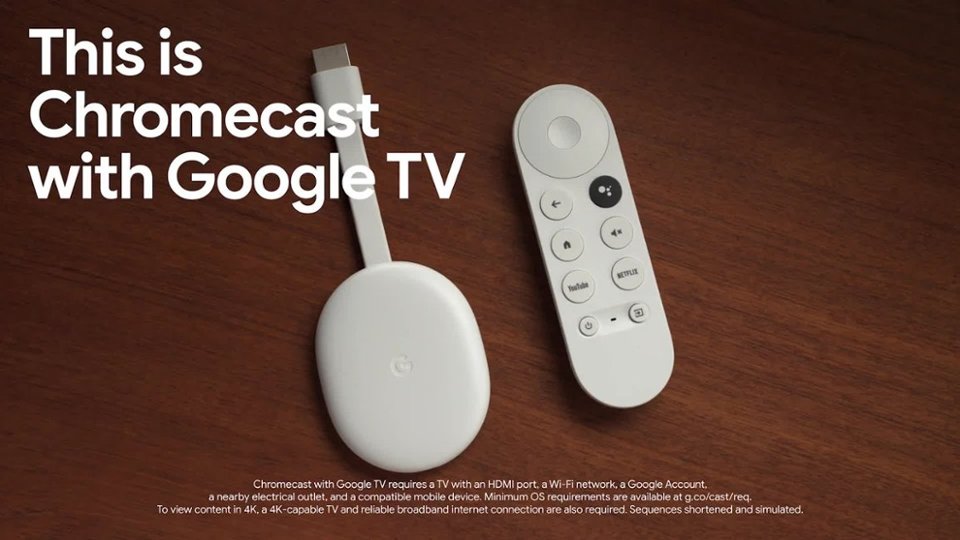
- Model:
- GA01919-US
- SKU:
- 12377596
Rating by feature
- Value
Rating 4.7 out of 5 stars
- Quality
Rating 4.7 out of 5 stars
- Ease of Use
Rating 4.7 out of 5 stars
to a friend
For oculus quest 2
||Posted . Owned for 3 months when reviewed.This reviewer received promo considerations or sweepstakes entry for writing a review.Needed this to display my oculus quest 2 on the TV and it worked.
I would recommend this to a friendNot a Firestick
||Posted . Owned for 1 week when reviewed.This reviewer received promo considerations or sweepstakes entry for writing a review.I've only owned an Amazon firestick so far, so I decided to give the Chromecast a try. Interface is clean, but you don't have as many options as on a firestick. Seems to have less available apps. I also noted that the internet connectivity had multiple interruptions that I don't have with the firestick. But, as of right now, I can get HBO Max and Peacock on the Chromecast and I can't on the firestick.
No, I would not recommend this to a friendBrand response from Google Team
Posted .Hi KMON,
Thanks for reaching out. We're sorry to hear of your connectivity issue with the Chromecast with Google TV.
Chromecast with Google TV will have more than 6,500 apps available. To view which apps are available, you may visit tv.google
Some connectivity issues can be resolved by restarting your connected device and Wi-Fi router. We suggest performing a power cycle on your Chromecast, and Wi-Fi router to refresh your Wi-Fi connection and fix the issue:
- Unplug Chromecast and router from their power source.
- Leave them unplugged for one minute before plugging them back in.
If you still encounter the same issue after doing the steps above, then we recommend performing a factory reset on your Chromecast to fix it. Here are some helpful steps to reset it:
- While the Chromecast is plugged into the TV and powered, press and hold the button on the back of the Chromecast. The LED will start blinking yellow.
- When the LED light turns solid white, release the button and the Chromecast will then reset.
We'd love to learn more about your feedback as this can help us improve your experience. Please reach out to us here: https://support.google.com/chromecast/contactflow
Would recommend to anyone!
||Posted . Owned for 1 month when reviewed.This reviewer received promo considerations or sweepstakes entry for writing a review.Very good purchase! Works better than I thought it would and very user-friendly!
I would recommend this to a friendGreat device definitely recommend
||Posted . Owned for 1 month when reviewed.This reviewer received promo considerations or sweepstakes entry for writing a review.Great device! Upgrades your tv without have to buy a new one with all your services and apps in one spot
I would recommend this to a friendRequires power cycle every few days.
||Posted . Owned for 1 month when reviewed.This reviewer received promo considerations or sweepstakes entry for writing a review.Every few days, I need to power cycle the Chromecast 4k to get it to work again.
I would recommend this to a friendBest of the Best
||Posted . Owned for 8 months when reviewed.This reviewer received promo considerations or sweepstakes entry for writing a review.Best TV adapter ever! Integrates multiple streaming apps in one ( Netflix, YouTube,…).
I would recommend this to a friendHappy with this
||Posted . Owned for 2 weeks when reviewed.This reviewer received promo considerations or sweepstakes entry for writing a review.Finally was in stock to get the new version! We love this now that we are not paying for cable anymore.
I would recommend this to a friendGood
||Posted . Owned for 1 week when reviewed.This reviewer received promo considerations or sweepstakes entry for writing a review.Good , I returned it as I bought Google tv. I would recommend this to buy.
I would recommend this to a friendGoogle chromecast
||Posted . Owned for 2 months when reviewed.This reviewer received promo considerations or sweepstakes entry for writing a review.Do the firmeware update and works great. Using on the road and at home
I would recommend this to a friendAlt Cable
||Posted . Owned for 1 month when reviewed.This reviewer received promo considerations or sweepstakes entry for writing a review.Great device dropped my cable provider and this device on YouTube TV rocks save at least 60%
I would recommend this to a friendGreat product.
||Posted . Owned for 4 months when reviewed.This reviewer received promo considerations or sweepstakes entry for writing a review.Replaced older generation product. This one works great with phone and computer and it's own apps.
I would recommend this to a friendGreat buy!
||Posted . Owned for 2 months when reviewed.This reviewer received promo considerations or sweepstakes entry for writing a review.This has been the perfect solution with our projector! We use it all the time to entertain!
I would recommend this to a friendBest Choice
||Posted . Owned for 2 weeks when reviewed.This reviewer received promo considerations or sweepstakes entry for writing a review.Better than the Firestick! I’m finding myself using my new Google TV Chromecast more than my firestick!
I would recommend this to a friendGood
||Posted . Owned for 3 weeks when reviewed.This reviewer received promo considerations or sweepstakes entry for writing a review.A little laggy at time but good device to watch movies on
I would recommend this to a friendBrand response from Google Team
Posted .Hi Oddrodr, we appreciate the feedback you posted about the Chromecast with Google TV (4K). We’re glad that you like watching movies on it, but we’re sorry to hear it’s a little laggy at times.
A range issue or wireless interference can cause your Chromecast to have performance issues. Sometimes it may pass the connection test during setup, but will struggle to stay connected if it’s just a bit too far away. You may also check for objects such as mirrors and refrigerators between the Chromecast and your router as these items could block the connection. For more help, read Troubleshooting wireless interference here: https://support.google.com/googlenest/answer/9276282
We also suggest clearing the app cache that might help as having a sizable amount of cache stored, would affect its performance. Here’s how:
- From the Google TV home screen, in the top right, go to the user profile icon and select Settings.
- Select Apps and choose the app you're having trouble with.
- If you can't find it, select See all apps.
- Select Clear cache and then Ok.
- If clearing the app cache didn't work, you can try to reset your Chromecast with Google TV by following the steps here: https://support.google.com/chromecast/answer/6254654
If additional assistance is required after trying the simple steps above, please contact us at the Google Chromecast Help page for further assistance: https://support.g,oogle.com/chromecast/gethelp
Google TV
||Posted . Owned for 5 months when reviewed.This reviewer received promo considerations or sweepstakes entry for writing a review.My chromecast is so convenient works great with my TV love the accessability it provides
I would recommend this to a friendGreat Product
||Posted . Owned for 1 month when reviewed.This reviewer received promo considerations or sweepstakes entry for writing a review.I liked this product. The software that comes with it is a great experience. Buy it and try it out.
I would recommend this to a friendbest streaming device currently available
||Posted . Owned for 1 month when reviewed.This reviewer received promo considerations or sweepstakes entry for writing a review.works real well. is showing some of Googles AI features well. Wish would integrate with Nest door bell to automatically show visitors at door on TV screen
I would recommend this to a friendSolved the problem
||Posted . Owned for 3 weeks when reviewed.This reviewer received promo considerations or sweepstakes entry for writing a review.Salesman was great recommending this to me. Solved the problem I had.
I would recommend this to a friendGooood
||Posted . Owned for 4 months when reviewed.This reviewer received promo considerations or sweepstakes entry for writing a review.New google tv. I have purchase several of these and they are fantastic. Would recommend to all.
I would recommend this to a friendLimited
||Posted . Owned for 2 weeks when reviewed.This reviewer received promo considerations or sweepstakes entry for writing a review.Very easy to use but also very limited what to get on it so most the free channels are not that good
I would recommend this to a friendBrand response from Google Team
Posted .Hi there, thanks for reaching out to our support team. We´re sorry to hear about your disappointing experience with the limited support for streaming apps on Chromecast with Google TV.
We'd like to learn about the streaming apps that you would like to add on Chromecast with Google TV. We´re always searching for ways to improve our products and we´ll make sure to pass along the information that you will be providing us. Please do contact our support team here: https://support.google.com/chromecast/gethelp