Customer Ratings & Reviews


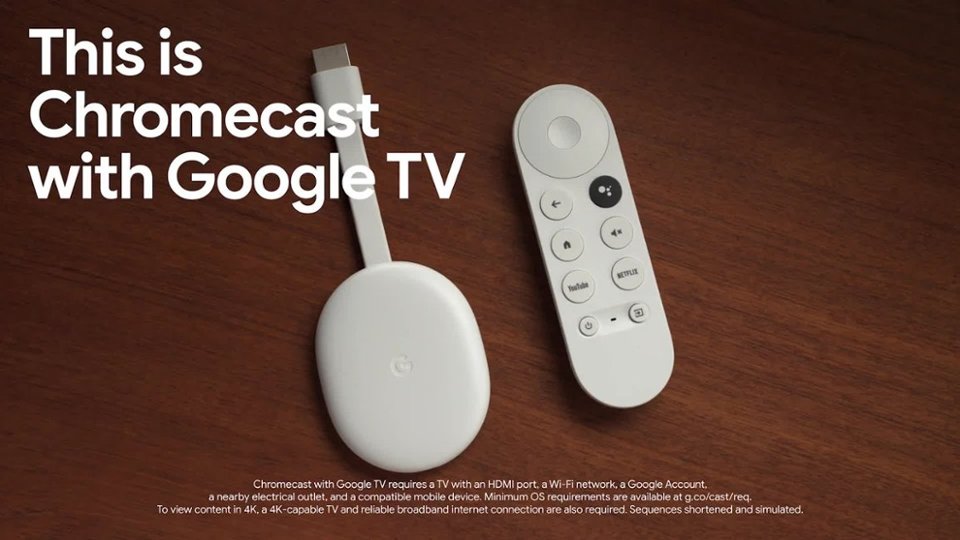
- Model:
- GA01919-US
- SKU:
- 12377596
Rating by feature
- Value
Rating 4.7 out of 5 stars
- Quality
Rating 4.7 out of 5 stars
- Ease of Use
Rating 4.7 out of 5 stars
to a friend
internet
||Posted .This reviewer received promo considerations or sweepstakes entry for writing a review.love it and would buy more and all loud as hell...
I would recommend this to a friendBrand response from Google Team
Posted .Hi Gabby, thanks for sharing your experience with us. We're glad that your love your Chromecast with Google TV. We’d be happy to answer any questions you may have. You’re more than welcome to reach out to us here: https://support.google.com/chromecast/gethelp

Slightly better...but also worst.
||Posted . Owned for 1 month when reviewed.This reviewer received promo considerations or sweepstakes entry for writing a review.Worst then the older chromecast ultra...the old chromecast ultra...you can change the volume simply by using the volume button on your phone...this new chromecast 4k...you cant.
No, I would not recommend this to a friendBrand response from Google Team
Posted .Hi there, Geekguy. Thank you for posting your review on Chromecast with Google TV. We're sorry to hear that you're experiencing some difficulties with controlling the volume from your phone. The device works like the previous Chromecast version when it comes to casting or controlling the volume from your smartphone. We want to know more details when you use your phone to control the device and provide you with some troubleshooting tips that may improve your experience. Please contact us on our Google Help page for immediate support here: https://support.google.com/googlenest/gethelp
Chromecast
||Posted . Owned for 1 month when reviewed.This reviewer received promo considerations or sweepstakes entry for writing a review.Works properly but a smart tv has the same functions.
No, I would not recommend this to a friendTechnical Problems Galore
||Posted . Owned for more than 2 years when reviewed.This reviewer received promo considerations or sweepstakes entry for writing a review.This would be the easiest 5 star review of my life if not for the fact that I have to unplug this stupid thing at least once a day cause it just decides it doesn't want to work.
No, I would not recommend this to a friendGreat potential
||Posted .This reviewer received promo considerations or sweepstakes entry for writing a review.Good product and apps, but doesn't seem to sync up with the refresh rate of my LG Smart LED TV. Have to run the TV in Game picture mode to eliminate all choppiness. Other than that, the product has been great and could potentially beat all other streaming boxes.
I would recommend this to a friendNot able to connect with Google nest
||Posted . Owned for 1 week when reviewed.This reviewer received promo considerations or sweepstakes entry for writing a review.You can't play the sound of the Chromecast in a Google nest. That doesn't make sense to me both are devices from Google, should not be that hard.
No, I would not recommend this to a friendBrand response from Google Team
Posted .Hi there, ErickH. Thanks for posting a review about the Chromecast with Google TV (4K). We don't officially support pairing Nest speakers with Chromecast with Google TV as an audio output for video playing on the TV. You may get it to work a few times, but we can't guarantee that it will always pair successfully. We suggest submitting a feedback using the keywords Pairing Nest speakers with Chromecast devices for video, using the Google Home app or voice command. Your feedback will help us improve our products and services.
For support concerns, you’re always welcome to visit us anytime here: https://support.google.com/chromecast/gethelp
For support concerns, you’re always welcome to visit us anytime here: https://support.google.com/chromecast/gethelp
No improvement for me.
||Posted . Owned for 3 weeks when reviewed.This reviewer received promo considerations or sweepstakes entry for writing a review.Buffering over my wifi network. Only device in the house that has issues. My service is 10up and a 100down. Retuning if there's not an update. Interface looks like a firestick, which I hated.
No, I would not recommend this to a friendBrand response from Google Team
Posted .Hi kiveysc,
Thanks for letting us know of the issue you’re experiencing with your Chromecast with Google TV. We know how important it is for you and we apologize for the inconvenience.
While the firmware updates are being applied automatically, we suggest performing a power cycle on your Chromecast, and Wi-Fi router to refresh the connection:
- Unplug Chromecast and router from their power source.
- Leave them unplugged for one minute before plugging them back in.
If you're still experiencing the issue after doing the steps above, perform a factory reset on your Chromecast, then re-setup.
To reset:
- While the Chromecast is plugged into the TV and powered, press and hold the button on the back of the device. The LED will start blinking orange.
- When the LED light turns solid white, release the button and the Chromecast will then reset.
We care about your experience with our products and services. If you’re willing, you can reach out to our support team and we’d be happy to troubleshoot any issues with it here: https://support.google.com/chromecast/contactflow
Not a good purchase
||Posted . Owned for 1 year when reviewed.This reviewer received promo considerations or sweepstakes entry for writing a review.Easy to set up but device stopped working after a month or 2. Would go past the loading screen.
No, I would not recommend this to a friendBrand response from Google Team
Posted .Hi there, MasonK. Thank you for your feedback. We are sorry to hear that your Chromecast with Google TV (4K) stopped working after a few months. We understand how frustrating this must be and appreciate you taking the time to share your experience. We want to help you get back to enjoying your Chromecast as soon as possible. Here are some suggestions that may resolve the issue:
- Restart your device
- Unplug from the power outlet and HDMI port.
- Wait for 2-3 minutes then plug it back in.
If these steps did not work, we recommend reaching out to our dedicated team specialists on the Google Help Center page: https://support.google.com/googlenest/gethelp
Too easy
||Posted . Owned for 1 month when reviewed.This reviewer received promo considerations or sweepstakes entry for writing a review.I love this product. Easy to install and easy to set up. Plus it works seamlessly with all our other Google products.
I would recommend this to a friendTotal Rubbish and a Waste of Money
||Posted . Owned for 1 month when reviewed.This reviewer received promo considerations or sweepstakes entry for writing a review.This thing is complete rubbish. It freezes up regularly. The navigation is a nightmare. The memory capacity is pitiful so you can't install many channels and there's no option to expand it. When selecting a channel, instead of starting that channel, it instead jumps to another channel. The volume control often doesn't work and I have to keep pressing it to get it to change the volume plus the position of those buttons is dreadful. There's more to complain about but I'm not going to waste my time. My advice, get an Apple TV device. I have one on another TV and it's a charm compared to this piece of crap.
No, I would not recommend this to a friendBrand response from Google Team
Posted .Hi RadlerKC, thanks for giving us a review on Chromecast with Google TV, and we’re sorry to hear it didn’t meet your expectations and needs. We can imagine how difficult it could have been for you, and this is definitely not the user experience we intended to share with you. Your feedback helps us identify areas we can improve, and we’ll pass it along to the right team to work on improvements.
Meanwhile, we’d like to have an opportunity to investigate your concern about the Voice Remote and see how we can provide a better experience for you. Please feel free to find us anytime here: https://support.google.com/chromecast/gethelp
The WORST!
||Posted . Owned for 2 months when reviewed.This reviewer received promo considerations or sweepstakes entry for writing a review.I've owned Google Chromecasts since the first Gen1 came out years ago. I currently have three in use. All I wanted was a device that supports 4K for my newest TV and that supports all the 4K apps I use...so I bought this one. This is the WORST Google device I've ever owned. It's buggy, it starts/stops at will. When it stops for over 10sec...you have to reboot it. You CANNOT stop the GoogleTV ads even when you turn that "feature" off and the remote is a piece of junk. If I could...I'd return it, but it's too late now. SUPER disappointed!
No, I would not recommend this to a friendBrand response from Google Team
Posted .Hi there DrCyKosis, thanks for being a loyal advocate of our Google Chromecast devices. We´re sorry to hear that you are disappointed with the buggy performance issues on Chromecast with Google TV.
Chromecast with Google TV typically requires a high speed Internet connection of at least 20 Mbps and a reliable Wi-Fi network. A limited Internet bandwidth may cause performance issues, especially when playing high resolution content. We recommend checking if your current Internet bandwidth is possibly congested, or that it may not be enough to enable the best viewing experience. Removing some of your connected devices to free up some bandwidth space, and trying out Chromecast with Google TV will help verify the issue. Once you verify congestion, we suggest contacting your Internet service provider to check your connection and upgrade it if needed.
If the issue persists even after upgrading your connection, please consider contacting our support team for further help here: https://support.google.com/chromecast/gethelp
No longer supported. Buggy.
||Posted . Owned for 1 year when reviewed.This reviewer received promo considerations or sweepstakes entry for writing a review.I regret this. I should have bought a Firestick. Shortly after purchasing, it got discontinued. There are still several bugs. Not buying any more Google stresming devices. None of the older ones are supported anymore either.
No, I would not recommend this to a friendBrand response from Google Team
Posted .Hey there, ShadoweX. Sorry to hear your experience with the Chromecast with Google TV (4k) hasn’t been the best. We’d like to provide some insight on the getting updates: the device will be receiving updates and bug fixes for the foreseeable future. Here’s a link for the latest information: https://support.google.com/chromecast/answer/7124014?hl=en#zippy=;
Not what I was expecting, Very disappointed.
||Posted . Owned for 1 month when reviewed.This reviewer received promo considerations or sweepstakes entry for writing a review.I am having trouble casting from desktop to tv and from phone to tv. the old version worked great without issue. Other than using it for streaming services its ok. but for its namesake casting did not work for me.
No, I would not recommend this to a friendBrand response from Google Team
Posted .Hi there, thanks for letting us know about your casting experience. We're sorry to hear about the Chromecast with Google TV.
This can be caused by several factors and we recommend performing these steps, and see if these will improve your experience:
- Weak or congested networks. Removing some of your connected devices may help relieve congestion.
- Check for possible sources of interference such as microwave ovens, refrigerators or other equipment.
- If you have a dual band router, try setting up Chromecast with Google TV on either the 2.4GHz or 5GHz bands and see which band is more stable.
Also you can check more info on how to cast using your PC or laptop using this help page: https://support.google.com/chromecast/answer/3228332
If you need further assistance or have some questions, please feel free to reach out to our support team here: https://support.google.com/chromecast/gethelp
Content all in one place!
||Posted . Owned for 2 months when reviewed.This reviewer received promo considerations or sweepstakes entry for writing a review.I love this new device. Super easy to find what I want to watch without having to click through to the apps - Google TV just aggregates all my subscriptions!
I would recommend this to a friendIt’s ok but audio issues are there
||Posted . Owned for 3 weeks when reviewed.This reviewer received promo considerations or sweepstakes entry for writing a review.It’s an easy product to get started with. However, I experience split second audio gaps while streaming content. I hv used Amazon Firestick and never had that issue
No, I would not recommend this to a friendBrand response from Google Team
Posted .Hi there ShashankB, thanks for trying out Chromecast with Google TV (4K). We apologize for any audio delays you are experiencing while streaming your favorite content. If you haven't tried yet, here are some recommended steps that may be helpful with the audio delay issue:
- Try using Chromecast with Google TV on another TV to see if you can recreate the issue.
- If the issue is persistent even after trying out another TV, try resetting Chromecast with Google TV (4K). Keep in mind that this will erase all data and that you may need to set it up again. To reset, follow the steps below:
With the Chromecast Voice Remote: In the upper right of your TV screen, select your profile and then Settings. > Select System and then About and then Factory Reset.
From the Chromecast device:
While the Chromecast is plugged into the TV and powered, press and hold the button on the back of the Chromecast. The LED should start to blink yellow. > When the LED light turns solid white, release the button, and the Chromecast should then reset.
If the issue is persistent, please consider contacting our support team for additional help. You're always welcome to reach out to us here: https://support.google.com/chromecast/gethelp
Didn't really help find content.
||Posted . Owned for 1 year when reviewed.This reviewer received promo considerations or sweepstakes entry for writing a review.75% of the content it shows need to be rented, or a service I'm not subscribed to. I do prefer the roku over this and firestick.
No, I would not recommend this to a friendBang for the buck
||Posted . Owned for 3 weeks when reviewed.This reviewer received promo considerations or sweepstakes entry for writing a review.Great product and more functional to use than a normal Chromecast. Hopefully with future software updates, they will add more functionalities and ease of use like customizing home screen or switching between different accounts.
I would recommend this to a friendGreat TV streaming
||Posted . Owned for 3 weeks when reviewed.This reviewer received promo considerations or sweepstakes entry for writing a review.I love this now has a remote compared to older versions so that i dont have to use my phone to control.
I would recommend this to a friendChromecast TV very easy to use
||Posted . Owned for 2 weeks when reviewed.This reviewer received promo considerations or sweepstakes entry for writing a review.The display settings on the Chromecast are much easier to adjust than on our TV. We get a full screen displayed now. The voice search is very easy to use.
I would recommend this to a friendPerfect for casting oculus
||Posted . Owned for 3 weeks when reviewed.This reviewer received promo considerations or sweepstakes entry for writing a review.Only bought it because it was cheaper than buying the oculus link cable to be able to cast my oculus.
I would recommend this to a friend