Customer Ratings & Reviews








- Model:
- GA03131-US
- SKU:
- 10511744
Rating by feature
- Value
Rating 4.8 out of 5 stars
- Quality
Rating 4.7 out of 5 stars
- Ease of Use
Rating 4.7 out of 5 stars
to a friend
I wish it worked
||Posted . Owned for 1 month when reviewed.This reviewer received promo considerations or sweepstakes entry for writing a review.Stopped working within 1 months and BestBuy says it is nonreturnable after 2 weeks so now trying to figure out what to do with this...Gave it 2 stars based on Google products reputation only so wish me luck
No, I would not recommend this to a friendBrand response from Google Team
Posted .Hi there, FtLaudBud. It's unfortunate to hear that your initial experience with Chromecast with Google TV (HD) has been less than ideal. We want to know more details about your device so we can help you with troubleshooting steps that may resolve the issue. Please reach out to our team of dedicated specialists on our Google Help page for immediate support here: https://support.google.com/googlenest/gethelp

Don’t waste your money
||Posted . Owned for 1 month when reviewed.This reviewer received promo considerations or sweepstakes entry for writing a review.I used to love Chromecast but now google has discontinued its services to this device and I can no longer cast videos on the web or from my iPhone like I used to. Its basically useless.
No, I would not recommend this to a friendA great way to update a older smart tv.
||Posted . Owned for 1 month when reviewed.This reviewer received promo considerations or sweepstakes entry for writing a review.The Android TV platform is one of the best, and this is a simple and inexpensive way to get on board. Perfect for TV's that aren't 4k.
I would recommend this to a friendNice Price!!
||Posted . Owned for 3 weeks when reviewed.This reviewer received promo considerations or sweepstakes entry for writing a review.I wanted to get away from high price cable, so I pick this up. You pick what you want to subscribe to. Much cheaper, then cable.
I would recommend this to a friendGreat for older TV's
||Posted . Owned for 1 month when reviewed.This reviewer received promo considerations or sweepstakes entry for writing a review.Does everything the original Chromecast with Google TV does for 4K TV but for HD TV's and at a lower price than the 4K version
I would recommend this to a friendToo slow
||Posted . Owned for 7 months when reviewed.This reviewer received promo considerations or sweepstakes entry for writing a review.While i love the 4k version of this same device, i found this HD version to be too slow. Spend the extra cash for the higher end unit.
No, I would not recommend this to a friendBrand response from Google Team
Posted .Hello there, DimeuserGJ. Thanks for your feedback on Chromecast with Google TV (HD). We appreciate that you love the 4K version, and we’re sorry to hear that your experience with the HD version didn’t meet your expectations.
A range issue or wireless interference can cause your Chromecast to have performance issues. Sometimes it may pass the connection test during setup, but will struggle to stay connected if it’s just a bit too far away. You may also check for objects such as mirrors and refrigerators between the Chromecast and your router as these items could block the connection. For more troubleshooting tips, read Troubleshooting wireless interference here: https://support.google.com/googlenest/answer/9276282
We also suggest clearing the app cache that can help as having a sizable amount of cache stored, would affect its performance. Here’s how:
- From the Google TV home screen, in the top right, go to the user profile icon and select Settings.
- Select Apps and choose the app you're having trouble with.
- If you can't find it, select See all apps.
- Select Clear cache and then Ok.
- If clearing the app cache didn't work, you can try to reset your Chromecast with Google TV by following the steps here: https://support.google.com/chromecast/answer/6254654
You’re always welcome to contact us here if more help is needed: https://support.google.com/chromecast/gethelp
Chromecast simple and easy
||Posted . Owned for 3 weeks when reviewed.This reviewer received promo considerations or sweepstakes entry for writing a review.The Chromecast is simple and easy to setup. I love it because it just works. I used it for traveling at hotels and aurbnbs.
I would recommend this to a friendDo Not Purchase This!!
||Posted . Owned for 1 month when reviewed.This reviewer received promo considerations or sweepstakes entry for writing a review.The screen freezes and that’s because we use fiber internet 1000g. Wanted to return but too much trouble to get up and go back to Bestbuy
No, I would not recommend this to a friendBrand response from Google Team
Posted .Hi there, MacBook. Thanks for taking the time to share your feedback with us. We're sorry to hear that you're experiencing a freezing issue on Chromecast with Google TV (HD).
Freezing issues on Chromecast can be affected by either congestion or insufficient bandwidth of your network. Chromecast devices typically require a high speed Internet connection of at least 20 Mbps. Removing some of your connected devices will free up some bandwidth space, and enable you to test and verify if you will still encounter the same issue. If you will verify the presence of congestion, we recommend contacting your Internet service provider to check your connection and upgrade the bandwidth if needed.
You may also try resetting Chromecast with Google TV (HD). Keep in mind that this will erase all data and that you may need to set it up again. To reset, follow the steps below:
With the Chromecast Voice Remote:
- In the upper right of your TV screen, select your profile and then Settings. > Select System and then About and then Factory Reset.
From the Chromecast device:
- While the Chromecast is plugged into the TV and powered, press and hold the button on the back of the Chromecast. The LED should start to blink yellow.
- When the LED light turns solid white, release the button, and the Chromecast should then reset.
We'd like to help you further if none of the steps we provided prove to be helpful with the freezing issue. You're more than welcome to reach out to our support team via this link: https://support.google.com/chromecast/gethelp
Google Chromecast
||Posted . Owned for 3 weeks when reviewed.This reviewer received promo considerations or sweepstakes entry for writing a review.LOVE this item! We have a lot of Google devices in our home, so this was a great addition, and at a great sale price.
I would recommend this to a friendWould Not Recomend
||Posted . Owned for 1 month when reviewed.This reviewer received promo considerations or sweepstakes entry for writing a review.Very difficult to setup and use to 'cast' from iPad to tv. Instructions are not clear or easy to follow and seem to be written by 4th graders and for a completely different device. Google provides no support whatsoever and any google search ends with instructions as described above. When using just to stream the Google device tries too hard to 'help' and guide towards content, apps, features, etc that I don't want...just stream what I want and leave me alone otherwise.
No, I would not recommend this to a friendSweet product. Easy setup.
||Posted . Owned for 2 weeks when reviewed.This reviewer received promo considerations or sweepstakes entry for writing a review.$15 for this was a steal. Couldn't recommend it more. Turns any screen with an HDMI port into a smart screen.
I would recommend this to a friendAwesome
||Posted . Owned for 1 week when reviewed.This reviewer received promo considerations or sweepstakes entry for writing a review.I had a broken remote so i wasnt able to use my tv before but this product allows me to use it once again
I would recommend this to a friendChromecast
||Posted . Owned for 5 months when reviewed.This reviewer received promo considerations or sweepstakes entry for writing a review.Chromecast I don’t know about this maybe it’s just me I had trouble trying to hook it up. I hook fire stick right up. maybe it’s just me
No, I would not recommend this to a friendBrand response from Google Team
Posted .Hi there, Angelo. Thank you for sharing your review on Chromecast with Google TV (HD). We can see that you're experiencing some difficulties with setting up the device.We suggest checking this Google Help article for steps you can follow to set up the device: https://support.google.com/chromecast/answer/10109990
If you need further assistance with setting up your device, please feel free to contact us on our Google Help page here: https://support.google.com/googlenest/gethelp
will not last
||Posted . Owned for 10 months when reviewed.This reviewer received promo considerations or sweepstakes entry for writing a review.It last About 6 months before crash. I have to factory reset it and now the remote keep failing every day even after firmware update.
No, I would not recommend this to a friendBrand response from Google Team
Posted .Hi there, DonaldLam. We're sorry to learn that you're having some difficulties with the remote of your Chromecast with Google TV (HD). This is not the experience we want you to have. If you've already tried pairing the voice remote before and are still getting the same issue, then we recommend reaching out to our team of specialists so we can investigate further the cause and help find a better resolution for you. Please contact us on our Google Help page for immediate support here: https://support.google.com/googlenest/gethelp

Great 1080P streaming device
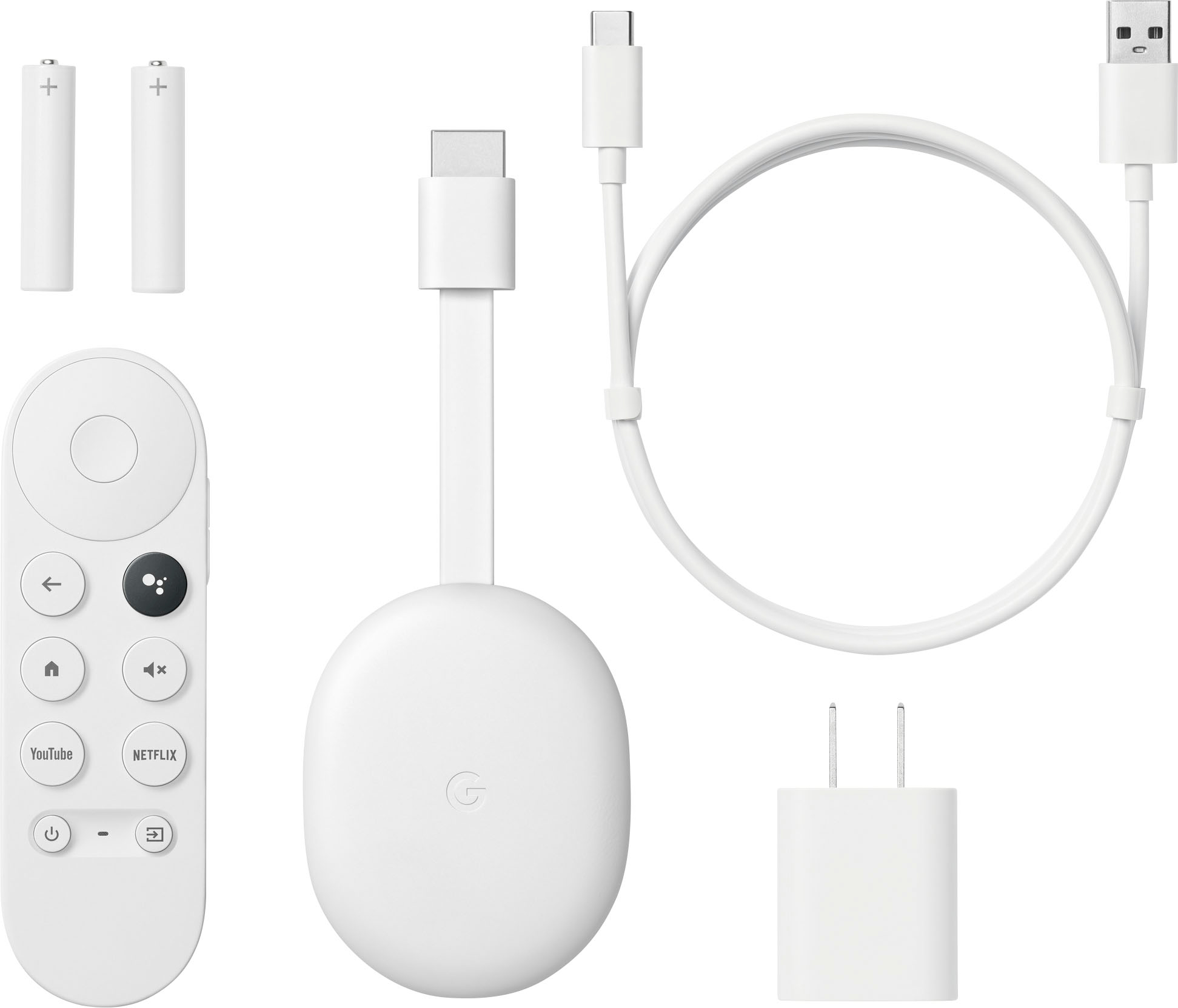
|Posted .This reviewer received promo considerations or sweepstakes entry for writing a review.The Google Chromecast with Google TV in HD seems to be a very good streaming device. I own several Amazon and Roku video streaming devices, but this is the first Google streaming device I have had. In the past, I have had some issue with streaming sticks that drop my wifi connection or seem to be very slow at times. Maybe it has to do with distance or maybe there is some type of electrical interference, either way, there have been issues. So far, the Google Chromecast puck that I am using now has not shown any of these tendencies. Setup with the Google home app is not complicated. I only had to open the home app and add the google Chromecast to my home devices and then go through the remainder of the setup process. Google will ask what apps you use the most and once you make your selections, they will be downloaded to the Chromecast. Then its just a matter of going into each one and signing in which is probably the most time consuming part of the whole process. This unit is the HD model. Even though it is only HD the picture quality on my Sony 4K Television is still really good. There is also a high definition model of the Chromecast if you would prefer a bit higher resolution. The remote is small but extremely useful. Probably the most used button on the remote is the voice command button that is used to search all of your streaming apps for whatever show you are interested in. The Chromecast is a nice streaming device and has earned its place on my primary television. Whether you choose the HD or the high definition version, I believe you will be happy. There is also the ability to cast to this unit via your android phone, making any app on your phone that is google cast compatible a big screen app.
Easy peasy
||Posted . Owned for 1 month when reviewed.This reviewer received promo considerations or sweepstakes entry for writing a review.We live in an age that revolves around apps and internet with this item I don’t have to use my phone
I would recommend this to a friendGreat for travel
||Posted . Owned for 1 month when reviewed.This reviewer received promo considerations or sweepstakes entry for writing a review.This works great for travel and our condo near the kids to use our Hulu subscription and cast.
I would recommend this to a friendTerrible - Google Ruined Chromecast
||Posted . Owned for 1 week when reviewed.This reviewer received promo considerations or sweepstakes entry for writing a review.I have to use a controller which is ridiculous, have to sign in to every Google account you've ever had. Tried to cast from my phone but then found out I have to be logged in to the app on my phone and through the Chromecast. Defeats the whole purpose of the Chromecast. The first couple Chromecasts were the best. I returned it and bought an old one off eBay. So much better.
No, I would not recommend this to a friendBrand response from Google Team
Posted .Hi there, Rufus. Thanks for sharing your experience on the Chromecast with Google TV (HD). We're sorry to hear about your frustrating experience with your device. It's disappointing that you encountered difficulties with the setup process and found the requirement to sign in to multiple Google accounts cumbersome. If you have more questions and other concerns, please reach out to our dedicated team of specialists on the Goofle Help Center: https://support.google.com/googlenest/gethelp
Don't waste money
||Posted . Owned for 2 months when reviewed.This reviewer received promo considerations or sweepstakes entry for writing a review.Purchased this in November 2023, and at first it worked well. Not anymore. Time to give amazon fire stick a try
No, I would not recommend this to a friendBrand response from Google Team
Posted .Hi there, Linda. Thanks for sharing your feedback on the Chromecast with Google TV (HD). It's unfortunate to know that your device hasn't been working lately. We're sorry for the inconvenience this has caused. This is not the experience we would like you to have. We would like to get more details so we can provide a better solution. We recommend reaching out to our dedicated team of specialists on the Google Help Center here: https://support.google.com/googlenest/gethelp
Great product
||Posted . Owned for 1 month when reviewed.This reviewer received promo considerations or sweepstakes entry for writing a review.Geeat product to upscale a functioning old smart TV to have all the latest streaming apps
I would recommend this to a friendBrand response from Google Team
Posted .Hi Pepper, thank you for posting your review on your Chromecast with Google TV (HD) and we're glad to hear that you're having a great time with the device. If you want to know more about the device, please don't hesitate in reaching us so we can help improve your overall experience. You contact us anytime on our Google Help page here: https://support.google.com/chromecast/gethelp