Customer Ratings & Reviews
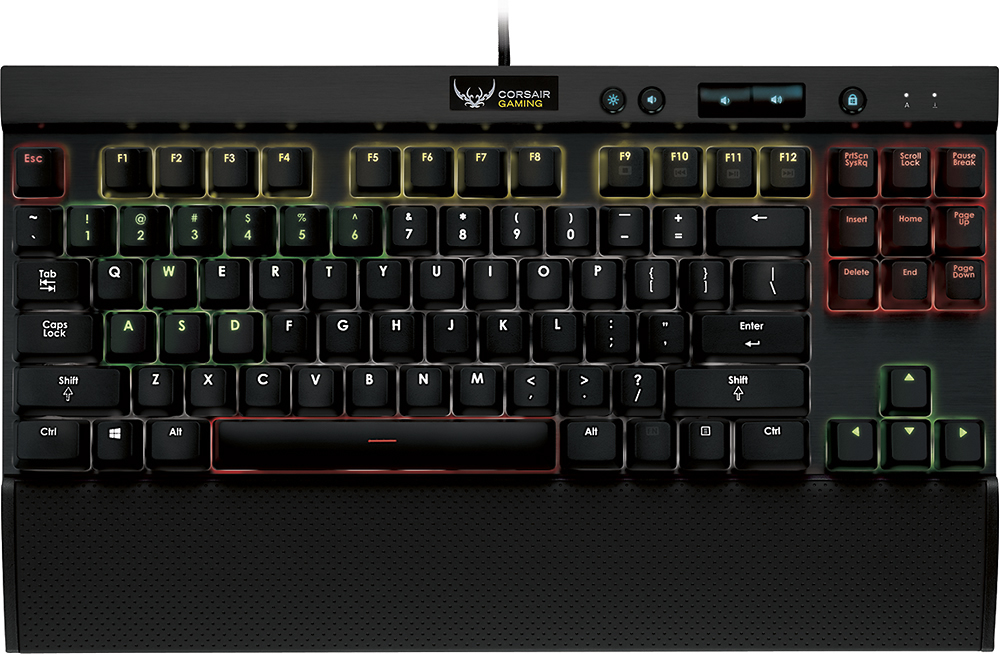
- Model:
- K65 RGB
- |
- SKU:
- 7547002
Customer reviews
Rating 4.6 out of 5 stars with 247 reviews
(247 customer reviews)to a friend
Customers are saying
Customers recognize the high quality, RGB lighting, and satisfying key feel of the Gaming K65 RGB Mechanical Keyboard, frequently praising its compact size and ease of use. However, some users experienced challenges with the keyboard's software and the need for two USB ports. The audible click of the keys during typing was also noted by a few users.
This summary was generated by AI based on customer reviews.
Rated 5 out of 5 stars
Awesome keyboard
||Posted .This reviewer received promo considerations or sweepstakes entry for writing a review.The keyboard has a great feel and is very easy to use and set up
I would recommend this to a friendRated 5 out of 5 stars
buy it
||Posted .This reviewer received promo considerations or sweepstakes entry for writing a review.love this product. I really enjoy it and I highly recommend.
I would recommend this to a friendRated 5 out of 5 stars
I love it
||Posted .This reviewer received promo considerations or sweepstakes entry for writing a review.I've always been a big fan of keyboards without the numpad.
I would recommend this to a friendRated 5 out of 5 stars
Mechanical keyboard
||Posted .This reviewer received promo considerations or sweepstakes entry for writing a review.Wonderful keyboard at this price. I used it for play Dota2.
I would recommend this to a friendRated 5 out of 5 stars
great keyboard if you like reds
||Posted .This reviewer received promo considerations or sweepstakes entry for writing a review.perfect in everyway especially love the tenkeyless design
I would recommend this to a friendRated 5 out of 5 stars
Great keyboard
||Posted .This reviewer received promo considerations or sweepstakes entry for writing a review.Great for gaming very smooth key strokes like it very much
I would recommend this to a friendRated 5 out of 5 stars
Great
||Posted .This reviewer received promo considerations or sweepstakes entry for writing a review.Corsair,Corsair,Corsair,Corsair,Corsair,Corsair,Corsair.
I would recommend this to a friendRated 1 out of 5 stars
Great keyboard, but LEDs are junk
||Posted .This reviewer received promo considerations or sweepstakes entry for writing a review.About 50 days after I purchased this item a bunch of the LED are stuck blue, so it pretty much ruins any cool setup you would want to have with it, I mean at 150 after tax the LEDs should work for more then a couple months. I attached a pic with all keys as white, so you can see the keys that are locked a different color.
No, I would not recommend this to a friendRated 4 out of 5 stars
great for my 12 year old son
||Posted .This reviewer received promo considerations or sweepstakes entry for writing a review.bought this for my 12 year old son and he was really happy to receive it.
I would recommend this to a friendRated 4 out of 5 stars
software is buggy, good keyboard
||Posted .This reviewer received promo considerations or sweepstakes entry for writing a review.sometimes the lighting profiles crash and doesn't save
I would recommend this to a friendRated 3 out of 5 stars
Okay
||Posted .This reviewer received promo considerations or sweepstakes entry for writing a review.The keyboard works fine but it seems to forget the theme I have chosen and returns to the factory settings often. It has also said to have updates but fails to install.
No, I would not recommend this to a friend- Pros mentioned:Keyboard qualityCons mentioned:Switch noise
Rated 5 out of 5 stars
Almost perfect
Posted .This reviewer received promo considerations or sweepstakes entry for writing a review.I love this keyboard. I got it to fix shoulder pain moving my arm from keyboard to mouse and back, now my mouse is closer. It is the only tenkeyless keyboard which has a wrist rest which is usable for typing as well as gaming. I can type quite fast. Being able to light up certain keys you use for certain games or regular typing is awesome. I had to use a YouTube video to figure out the lighting but I got it now. The back lighting looks pretty but it's a bit distracting when you want to find just one key. The spiffy changing color patterns are cool but I expect it will get old fast. The red switches are good enough, but they are not quiet. They are louder than my high quality old Logitech membrane keyboard. I thought the whole point of Red switches is they are quiet, but it just makes a noise when the key travels down and hits the bottom instead of when it actuates. I would prefer a key that makes no noise when it bottoms out but makes a very faint click when it sends the message to the computer. It's like hearing the sound of the crack of a bat hitting a baseball after the swing is done rather than when it hits the bat. I don't get it.
I would recommend this to a friend - Pros mentioned:Keyboard quality, Size
Rated 5 out of 5 stars
Great gaming keyboard
Posted .This reviewer received promo considerations or sweepstakes entry for writing a review.My son loves this keyboard! Great build quality, just one of many great products from Corsair. I own the K70 RGB and my son loved my keyboard and wanted one so I picked up the K65 for him and he's as happy as can be. The size is perfect for him.
I would recommend this to a friend - Pros mentioned:Key feel, Rgb lightingCons mentioned:Software
Rated 4 out of 5 stars
Awesome keyboard, but there are issues
Posted .This reviewer received promo considerations or sweepstakes entry for writing a review.PROS: -The keys feel and sound amazing -Keyboard has a very good weight; it's not going anywhere -Colors are beautiful, especially in a dimly lit room or at night CONS: -Software is buggy -LEDs stay lit even when my machine is in Sleep mode -Unable to wake machine from sleep mode with this keyboard -Any key that has more than one symbol on it (such as the numbers keys, question mark, etc) is not lit consistently; that is to say, the top of the key is lit well, but the bottom of the key is really dim. Doesn't make much sense to me to have the numbers really dim but the symbols really well lit All that said, the keyboard is awesome, but I don't feel like it's really ready for prime time. I'll most likely be returning this.
No, I would not recommend this to a friend - Pros mentioned:Keyboard quality
Rated 5 out of 5 stars
Very compact!
Posted .This reviewer received promo considerations or sweepstakes entry for writing a review.Great small keyboard for gaming if you don't use macro keys. It saves a lot of room for you on your desk. It comes with 2 USB ports, though It works with just having one plugged in. The combination of colors are endless. I find my self playing with Corsair utility engine because it's simple and easy to use. You can set up profiles to color code some important keys that you use in a game to make it easier to recognize the keys faster if you haven't gotten used the game keys yet.
I would recommend this to a friend Rated 4 out of 5 stars
working with what I've got
Posted .This reviewer received promo considerations or sweepstakes entry for writing a review.My preference has always been for larger 10-key keyboards, and more to the point, Logitech as a brand. I purchased one of the gorgeous new Logitech G series models, but it left no room for my mouse in my very crowded setup. Disappointed, I jumped on this one due to build quality. It is an immensely well built product. The keys have a fantastic feel, the backlighting is pretty decent, the body is milled aluminum and the wrist rest is a comfortable soft touch plastic. I had minor frustration with the software, but only minor. Pros- -durable -programmable easily per program -easy to fit into a narrow keyboard tray -good key feedback and lovely "clack" sound is very satisfying to type documents on. Cons- -requires two USB sockets -lighting software is a bit of a system hog, idles at 200mb of memory. Not problematic on beefier systems, but slightly annoying on principle. Works fine, just inefficient. -lighting is at the top edge and base of each key, digits on number keys do not show up especially well. This is a shortcoming with the Cherry MX switch, which is good enough to justify this irritation. Short version- I think I would still prefer the Logitech if they made a comparable product, but I am happy with my purchase.
I would recommend this to a friend- Pros mentioned:Keyboard quality
Rated 5 out of 5 stars
Great keyboard which fit my place so well
Posted .This reviewer received promo considerations or sweepstakes entry for writing a review.Like the 87 key design, this keyboard is much smaller than my old razer keyboard. typing and gaming both feel great with this one. the light was nice and not so burning for my eyes. like it.
I would recommend this to a friend Rated 5 out of 5 stars
Amazing Keyboard!
Posted .This reviewer received promo considerations or sweepstakes entry for writing a review.I've been looking into the New RGB K series keyboards from Corsair for sometime now. I was having trouble deciding which I would want; k65,k70, etc. Ultimitely I went to BestBuy and decided on the K65. Some people might question why I would not want the side numberpad - Simply put it wasn't worth it to me, I don't use it and it adds extra space. Anyways lets go onto pros and cons Pros: - Excellent build quality - Great keys (CherryMX) - Wrist rest is comfortable! - SO MUCH CUSTOMIZATION - EVERY KEY CAN BE REBOUND TO ANY ACTION - Satisfying typing, that doesn't cause a "hard push" or "finger fatigue" caused by traditional keyboards. Cons: - Software: Let me first start off by saying, this software is extremely buggy. From my initial setup I had to reboot the program because the firmware kept failing. Once I got it working, there was not any helpful tool tips, and the manual is online and literally over 100 pages. HOWEVER -- this was not enough for me to take a star off. Why you might ask? Because I eventually figured out how everything worked, and once I did -- IT WAS AWESOME. There is so manydifferent layouts, patterns etc. tl;dr - if you don't want the larger version of this, and are looking for a great RGB keyboard - GET THIS. Skip the Razer Chroma. Every key is reboundable as well, so there's no need to spend the extra cash on the extra F keys on the more expensive model.
I would recommend this to a friend- Pros mentioned:Keyboard quality
Rated 5 out of 5 stars
if you're in doubt don't be buy this keyboard
Posted .This reviewer received promo considerations or sweepstakes entry for writing a review.amazing quality and design another home run from corsair would highly recommend if you're looking to invest in a new gaming keyboard.
I would recommend this to a friend - Pros mentioned:Keyboard quality
Rated 4 out of 5 stars
awesome keyboard! The Program..well..
Posted .This reviewer received promo considerations or sweepstakes entry for writing a review.Don't get me wrong, everything about this keyboard is the best investment I've made in a while next to my M65 RGB mouse this thing is flashy and a great product. comes with great feel and perfect blend of ability to be customizable and be a great gaming keyboard. The only real problem I've had with this keyboard is the (CUE) corsair utility engine. This program all in all even though it has a great learning curve, is a great program. but even though a great program does come with flaws. the program itself made my mouse scroll first go down one segment every 10 seconds after having the program installed for about 5 days. aftar that the next day it would just scroll all the way down as fast as possible. thinking it was my M65 RGB mouse i trroubleshot it on a different computer and no problems appeared on there. tried a different mouse on the computer and was doing the same thing. all in all after uninstalling the program (which i found out was the culprit of this) with some keyboard navigating. I unisntalled and it just stoped scrolling by itself. procedded to reinstall the program is working again. As a summary, the hardware on this keyboard as well asn the M65 RGB are flawless and great companions for anyone who wants a quality product. The program itself needs alot of work. PS. i did find that after a while. after setting up effects on the keyboard the LED flashing lights and what not, would stop and stay stuck. i would have to change BIOS modes and go back to the normal one or unplug and plug it in back again. I'm not sure what causees this but it does dissapear from (CUE) when this happens. (I'm assuming it is again the program and not the hardware itself).
I would recommend this to a friend