Customer Ratings & Reviews
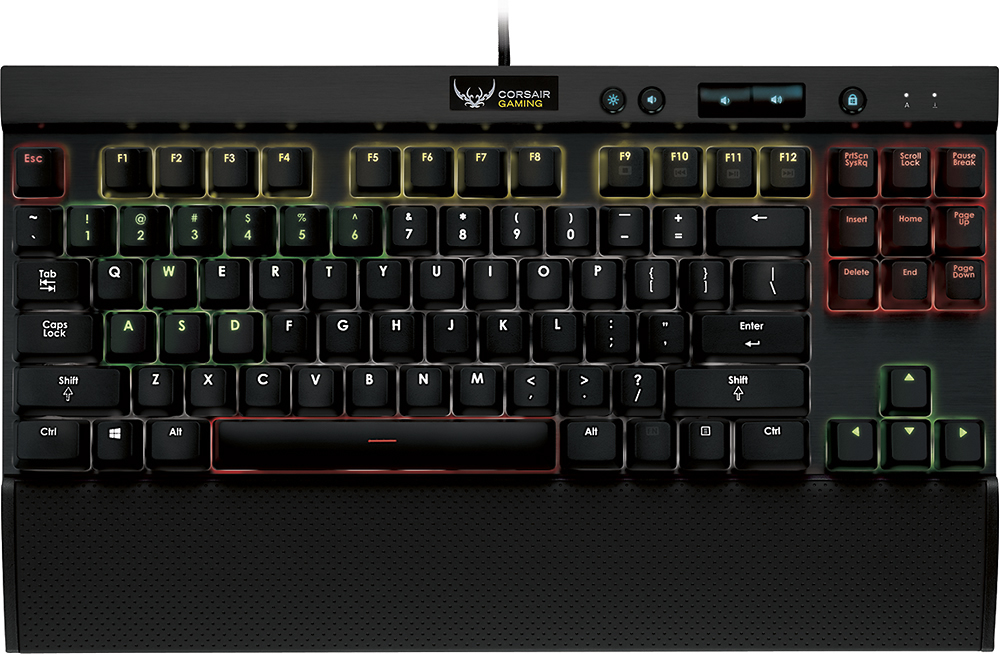
- Model:
- K65 RGB
- |
- SKU:
- 7547002
Customer reviews
Rating 4.6 out of 5 stars with 247 reviews
(247 customer reviews)to a friend
Customers are saying
Customers recognize the high quality, RGB lighting, and satisfying key feel of the Gaming K65 RGB Mechanical Keyboard, frequently praising its compact size and ease of use. However, some users experienced challenges with the keyboard's software and the need for two USB ports. The audible click of the keys during typing was also noted by a few users.
This summary was generated by AI based on customer reviews.
Rated 5 out of 5 stars
Best keyboard I have ever used!
Posted .This reviewer received promo considerations or sweepstakes entry for writing a review.This is actually my first gaming keyboard I have purchased but have used others and I must say I love it. All the color patterns and LED's. I can set color patterns strategically/specifically for a certain game whether fps or mmo's or pvp. Great product and buy for me.
I would recommend this to a friendRated 5 out of 5 stars
Great Keyboard
Posted .This reviewer received promo considerations or sweepstakes entry for writing a review.This keyboard is awesome. Pro: RGB back lighting allowing tons of key colors and effects Cherry MX Reds sold construction only needs one USB 3.0 cord to run it The software is amazing, the customization options are endless Cons: The profiles for the K70 and K96 are not interchangeable meaning the huge database of pre-made effects on corsairs forum are not available for this keyboard, currently there are only 4 pre-made effects for the K65 The lighting for the number keys are not light properly. This keyboard is a really nice keyboard that you wont be disappointed with.
I would recommend this to a friendRated 1 out of 5 stars
Worst experience with Corsair keyboard ever...
Posted .This reviewer received promo considerations or sweepstakes entry for writing a review.Just as the title implies, I've owned multiple Corsair keyboards. I've owned (4) Vengeance K70's, and now this, thing. I have never, EVER experiences double taps (or double registers) this early in the life of any mechanical keyboard. Two of the four K70's that I owned eventually (after about a year of use) started to double tap. One double tapping pretty moderately, but even still no where NEAR as much as this keyboard does and with as many keys showing the issue. The other K70 that eventually started double tapping would occasionally do so, and it was with only one key. This thing, the "Corsair Gaming", or whatever they've rebranded themselves as, K65 RGB "Best Buy Exclusive" started showing double taps just past one month of use. They were not that bad as first, but within the next month they became horrible. To give you an idea about how bad this thing is, it will double tap a majority of the switches, and on average it does it every 50-70 characters. Sometimes much more often. Just writing this review alone I've had to backspace and retype, having to retype the retypes even, almost every single sentence. It's a bit ridiculous. I am baffled as to what the cause may be, but I'm starting to lean toward it being these new RGB switches. Other than this ridiculously horrible double tap issue, everything else seems to be alright. Well, everything's about the same as a K70, just minus the num pad and a roller volume wheel. The "press up/press down" volume keys on this keyboard are okay, but when you're changing volume moderately it's a bit of a pain having to "tap tap tap tap tap tap tap tap tap tap tap tap" instead of giving it a swipe of the finger. One other very minor thing I wasn't very pleased with was the fact that in order to take advantage of the RGB feature, and adjust your colors and such it requires you to plug in two separate USB cables. I'm guessing one's a data cable or some such, because there is no USB pass through on this thing like there was on the K70's. But, what you can do iis simply just temporarily plug in both while you're adjusting your colors and such, then when you're done simply unplug one of the USB's and it will hold the setting... I'm really not fond of the software needed to adjust the colors on the board (in particular how it functions) and the brightness of the LEDs. If you choose any color other than the brightest colors, such as the brightest red, the brightest blue, brightest green, yellow or white the LEDs are not nearly bright enough. So if I want to actually see my keys light up and have them look nice, I get to choose between a few colors. Not a lot of customization. Also, the way the software works it has to CONSTANTLY be running in the background in order to hold some settings, such as intensity/brightness settings. Which is kind of a pain because some of the media keys will show up a LOT brighter than others, so if you want to adjust the intensity you have to have yet another piece of useless software constantly running in the background taking up resources, all to have a fancy keyboard. I'm not sure if the software must be running 24/7 in order to hold reactive lighting settings or flash patterns and such, but I have a feeling it might. Also I want to mention, as I don't know if anybody else has noticed this themselves also, or if it's just my imagination. But these "Cherry MX Red" RGB switches don't feel like classic Cherry MX Red switches. They are a lot quieter, especially when bottoming out. I believe that has something to do with the body design of the switch acting as a buffer or some such. But that was one of the things I liked about red switches the most. The clack clack when it would bottom out. So there you have it. Granted, I might have just won the "Garbage Keyboard of the Batch Lottery" and others might not have this problem, but it's really putting me off. This thing apparently carries a decent average rating here on Best Buy's website (though people who write reviews on BestBuy.com usually tend to be more "casual users", and to casual users, some problems may not show up, or they may never notice them. Good luck!
No, I would not recommend this to a friendRated 5 out of 5 stars
Bravo Corsair
Posted .This reviewer received promo considerations or sweepstakes entry for writing a review.I've been very impressed with how well this keyboard looks, feels, and performs. It was incredibly easy to setup. Haven't even had a hiccup with getting it to work. The key press is very smooth. And the lights are beautiful. The software that comes with, to set up profiles and light configurations is very sleek. I was much more impressed than that of the corsair link software. I strongly believe all gamers would be impressed with this keyboard. So long as they don't require a number pad.
I would recommend this to a friendRated 3 out of 5 stars
Keys wear out
Posted .This reviewer received promo considerations or sweepstakes entry for writing a review.The keys have worn out within 6 months. Some don't work at all while others type multiple when only striking once. Other than that it's ok.
No, I would not recommend this to a friendRated 5 out of 5 stars
Very Nice Gaming Keyboard
Posted .This reviewer received promo considerations or sweepstakes entry for writing a review.I was looking at the k70 keyboard but didn't care for the 10 number key aspect of that keyboard, so I bought this k65 for a fraction if the price. Great keyboard with many lighting effects and dimming modes. Also liked that it has media buttons (play pause next etc). Overall solid.
I would recommend this to a friend- Pros mentioned:Rgb lighting
Rated 1 out of 5 stars
Awful
Posted .This reviewer received promo considerations or sweepstakes entry for writing a review.I got my k65 rgb for Christmas and it is a piece of garbage. When plugged in to a 2.0 usb like said it will not work, but at least it lights up because who needs to type when you can look at its lights (: I hate this this piece of garbage!
No, I would not recommend this to a friend