Customer Ratings & Reviews



- Model:
- SCIMITAR PRO RGB
- SKU:
- 5708926
Rating by feature
- Value
Rating 4.5 out of 5 stars
- Quality
Rating 4.6 out of 5 stars
- Ease of Use
Rating 4.4 out of 5 stars
Customers are saying
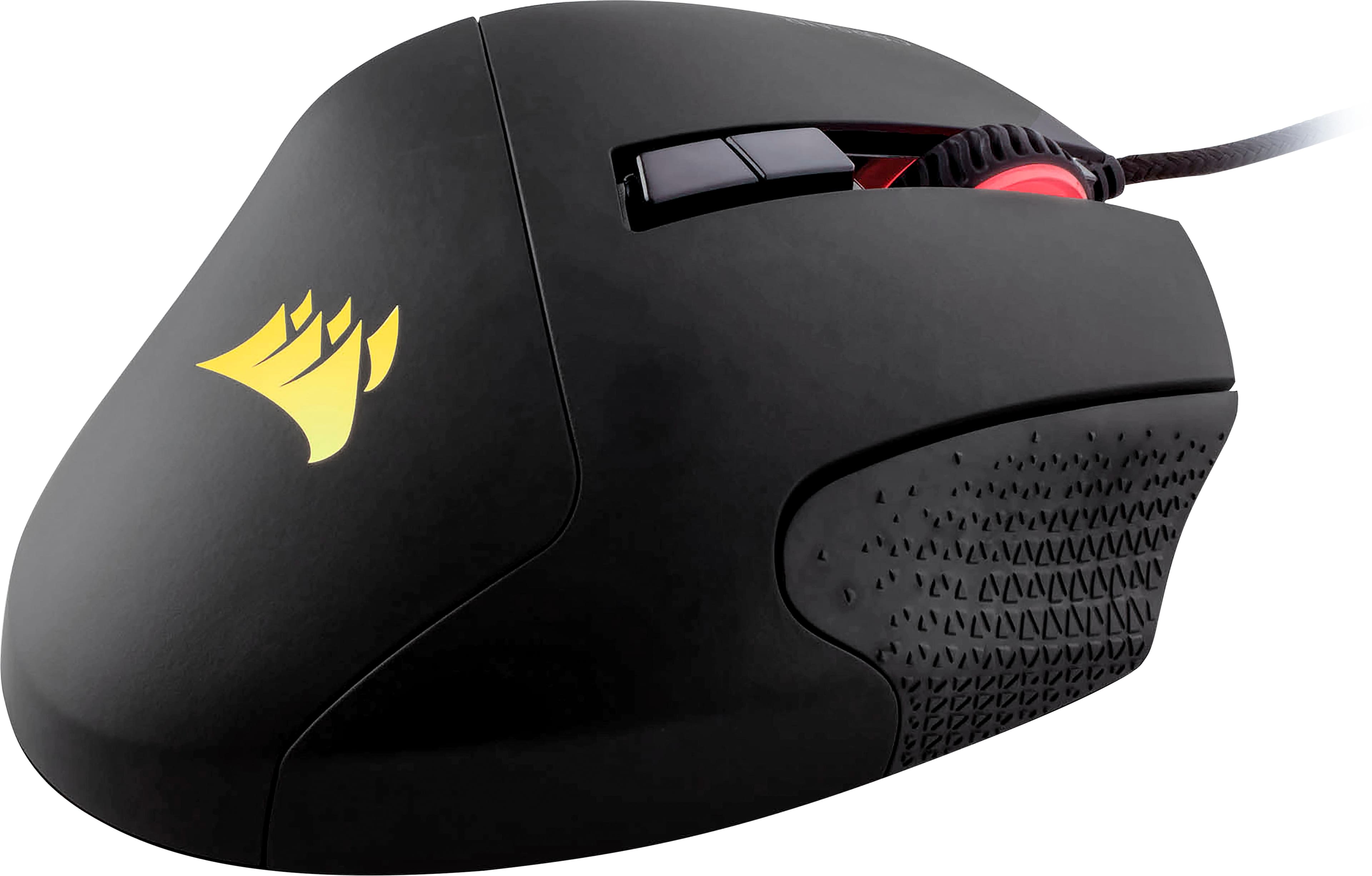
Customers are satisfied with the Scimitar PRO's customizable side buttons, ease of use, RGB lighting, and overall build quality, frequently citing these aspects as positive features for gaming. Many appreciate the extensive customization options available, although some found the accompanying software somewhat complex. A few users noted the mouse's size and weight as potential drawbacks, while others experienced issues with the scroll wheel's functionality. Despite these minor concerns, the positive feedback on the Scimitar PRO's performance and features is significant.
This summary was generated by AI based on customer reviews.
Firmware ruins mouse
||Posted .This reviewer received promo considerations or sweepstakes entry for writing a review.The firmware completely disabled the side buttons and lighting settings. After an hour on the phone with support they told me to wait for the next firmware update and hope the issue is fixed.
No, I would not recommend this to a friendBrand response from Corsair Art
Posted .Sorry to hear that, please reach out to our support via a ticket on support.corsair.com and they could potentially provide you instructions and the file to reflash the firmware.

- Pros mentioned:Side buttonsCons mentioned:Size
Great mouse for all games
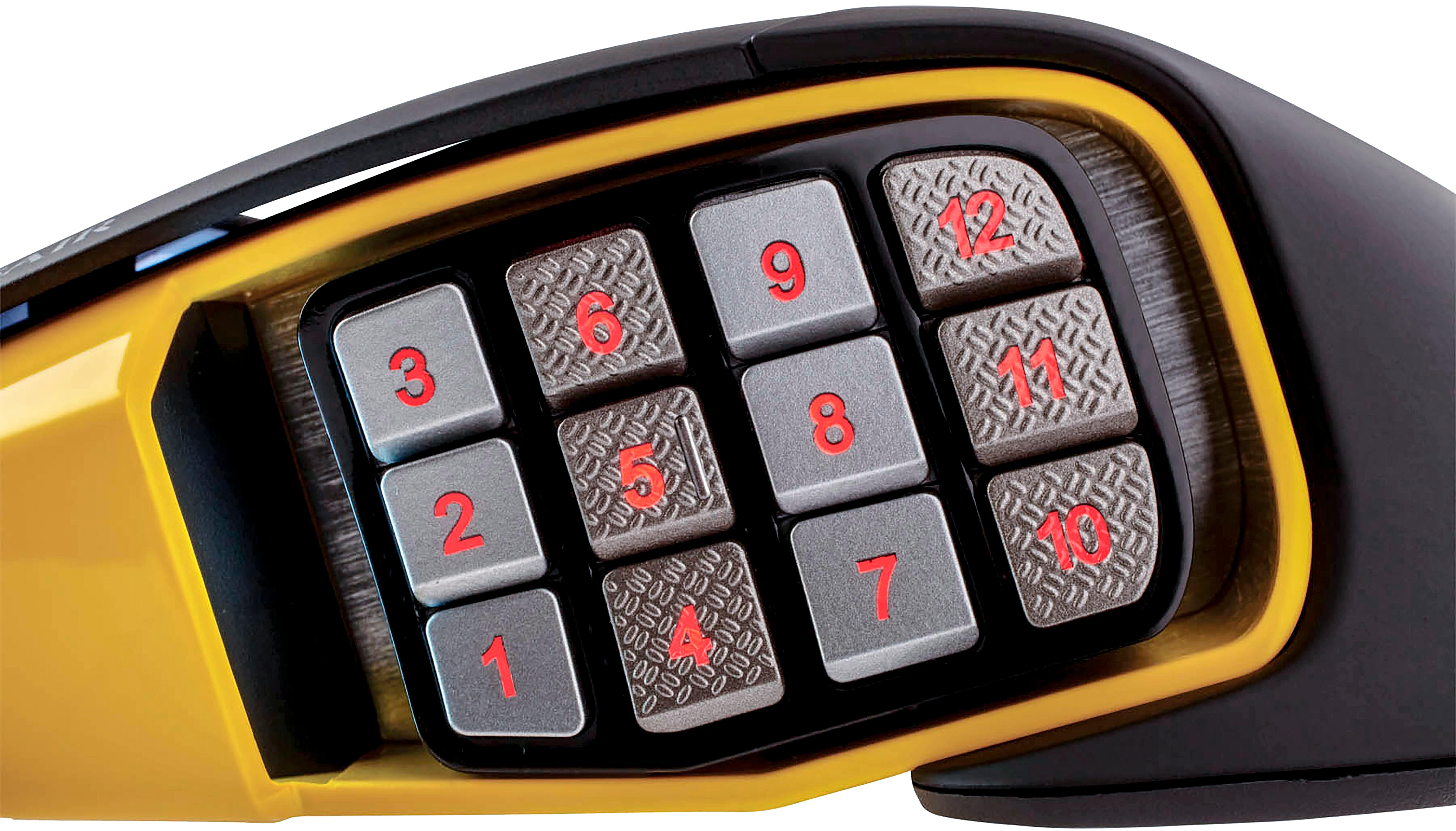
Posted .This reviewer received promo considerations or sweepstakes entry for writing a review.I was sceptical about a 12 button mouse since the most buttons I have ever delt with was the G502 but this mouse makes gaming easy and natural and the biggest thing gamers hate is reaching for keys and looking for ways to rebind for a fuild set up which this mouse does . Perfect for Games with several weapon slots, fortnite you can build quicker and naturally without sacrificing wsad movement and slots, PUBG you can bind a Left and right peak along with weapons slots, you can even play one handed in some games like league. The software is easy to understand and each input and led is fully customizable and includes a macros for guys trying to turn single fire into auto fire or making your fortnite builds quicker by binding F1-F4 and left click together to instantly place ramps with less effort. Cons are buttons are too close to each other and flat so if your trying roll certain points on your thumb to click 1,2,3 there is a chance you will click 2 buttons at once , practice will overcome this issue , the mouse is tiny and the number slider needs to go forward more so if you like to play with your entire palm hurdled over the mouse than buttons will take effort to press but if you claw grip or rest your fingers more on the mouse it's prefect.
I would recommend this to a friend Number pad
||Posted .This reviewer received promo considerations or sweepstakes entry for writing a review.I brought this item on Friday and on Tuesday the number pad gave out on me
No, I would not recommend this to a friendbroke down quickly
||Posted . Owned for 1 year when reviewed.This reviewer received promo considerations or sweepstakes entry for writing a review.not useful, my son used for a few months and then it stop working
No, I would not recommend this to a friendBrand response from Corsair Art
Posted .Hello Clau,
How did it stop working? Please reach out so we can help: support.corsair.com
-Art
Cosair mouse
||Posted .This reviewer received promo considerations or sweepstakes entry for writing a review.Not what i expected way to many button and not easy to program. Also felt cheap while using.
No, I would not recommend this to a friendMouse
||Posted .This reviewer received promo considerations or sweepstakes entry for writing a review.Was not the best as well corsair crash such crap it is
No, I would not recommend this to a friendThis thing lasted 6 years!!
Posted .This reviewer received promo considerations or sweepstakes entry for writing a review.This thing last until 2024!! I've seen a lot of reviews saying this mouse is bad, but it last me from 2018 to 2024. My guess is people having issues with this mouse complaining about the grips falling off etc just are extremely rough on it. Bought this in 2018 and after years of daily use it's finally starting to double click. I'm about to buy the new version and hopefully get another 6 years out of it!!
I would recommend this to a friend- Pros mentioned:Ease of use
g
Posted .This reviewer received promo considerations or sweepstakes entry for writing a review.good!.............................................
I would recommend this to a friend - Pros mentioned:Quality
Good with some issues
Posted .This reviewer received promo considerations or sweepstakes entry for writing a review.I have larger hands and coming from a Logitec G602. The Corsair is a little smaller but still feels good. The side buttons cause a little problem. The Logitech side buttons have more space between the buttons so you can clearly identify which button you are on. The Corsair's buttons don't have much space between so it is a bit difficult to tell which button you are actually hitting. Other reviewers have commented on the lowest buttons and I can confirm they need some work. In order to press the buttons my thumb is all the way on the mouse pad. Build quality feels really good. Software has a learning curve but better than most others. I gave it a 4 because of the buttons and will keep it and see if I can get used to the thumb buttons but designing the actual button shape to be more of a pyramid might help to differentiate a bit more. If you have larger hands, this might not be the one for you.
I would recommend this to a friend Great!
Posted .This reviewer received promo considerations or sweepstakes entry for writing a review.Great moba/mmo mouse, much better and has Lasted longer than any other style of mouse i own.
I would recommend this to a friend- Cons mentioned:Software
CORSAIR - Scimitar PRO Wired RGB USB Optical Gamin
Posted .This reviewer received promo considerations or sweepstakes entry for writing a review.The mouse is great. The CUE software is a raging dumpster fire. The software is pretty klunky, and was clearly designed by people who are utterly clueless when it comes to software design and tool implementation. One example that bears this out: You can't do obvious, simple tasks such as copying a presets or parts of presets to other profiles. You can build a library of common functions, but the fact you can't really do anything else (like, if you have Corsair headphones...you can't copy EQ presets, or if you own a Corsair KB, making use of things you've done with other profiles in new ones is obtuse, and really difficult as you have to recreate it for every profile) Horribly documented. You have one real choice: trawl and search through the corsair forums. Considering the prices for Corsair products....the lack of documentation is pretty staggering.
No, I would not recommend this to a friendBrand response from Corsair Art
Posted .Sorry to hear you've had difficulty with the software. It's not our plan at all and we can assist if you reach out: support.corsair.com
- Cons mentioned:Software
Solid at first, but then software issues.
Posted .This reviewer received promo considerations or sweepstakes entry for writing a review.This thing worked good at first, but then the software / drivers started to act up. I've done everything to eliminate any other reasons for these issues. Factory reset my PC and later on a fresh install of windows 10, but the issues kept happening. Sometimes when I turn the PC on the mouse just won't light up or work as if it's not plugged in. I have to unplug it and plug back in to get it working. I have the buttons on the side programmed a specific way for certain games I play and each one has it's own profile saved. Randomly this will all stop working. The mouse will keep working, but the buttons I reprogrammed stop. Once this happens the only possible fix is to uninstall / reinstall the software. It works fine for a while then the issues repeat. I like corsair and have some of their other products in my main pc, but I probably will never purchase another corsair mouse again. Apparently this is a common issue with windows 10 and this mouse. It does work fine if I don't install the software which is what I've been doing for the last couple of months. I lose use of all the side buttons which makes some of my games unplayable right now.
No, I would not recommend this to a friend - Cons mentioned:Scroll wheel
Lasted 5 years
Posted .This reviewer received promo considerations or sweepstakes entry for writing a review.I could remember how long ago I purchased this mouse. I was looking to see if it was still warrantied. Turns out it was 5 years ago. The microswitch on the mouse wheel just failed. Everything else is working fine. It's been great value.
I would recommend this to a friend - Cons mentioned:Scroll wheel
Great mouse, random fault.
Posted .This reviewer received promo considerations or sweepstakes entry for writing a review.This mouse has been perfect for everyday use and gaming sessions. While the scroll wheel is a little heavy, it is not a deal breaker. Yesterday the mouse wheel made a click noise and now the heavy pull it used to have is gone and the scroll function is broken. The middle mouse button still works for now..
No, I would not recommend this to a friend great product meh on software setup
Posted .This reviewer received promo considerations or sweepstakes entry for writing a review.just bought this today and I have tried all 12 side button mice to date and stuck with the G600 until today just due to its smaller size I have really short fingers so it worked great for me but this is even better in weight and overall feel while using it although I miss my double left sided button that the g600 had, the furthest one over used to be my control modifier for keybindings. So yea feel wise it is great setup wise its a pain, where naga and G600 had essentially all buttons set in one profile sweep of it this one you have to individually set each action button you want to use granted it did come in handy while I was trying to figure out which one of the three center buttons was going to be my new control modifier whilst in the middle of some of the harder mmo content I tackle now a days. So ya the software works but it is just lacking the streamlining that puts the other ones over the top on ease of use. comfort wise I can honestly think of no better so will be dealing with the software for a while
I would recommend this to a friend- Cons mentioned:Software
Good hardware ruined by bad software.
Posted .This reviewer received promo considerations or sweepstakes entry for writing a review.The hardware is good, and it fits my hand well. The iCUE software ruins it though. It's very confusing to set up, and if you ever do manage to get it set up they will roll out a software update so that your device is no longer recognized. It's not obvious until you are in a critical gaming situation, and the buttons you are counting on are unresponsive.
No, I would not recommend this to a friend Fast, Reactive, Corsair Quality Mouse
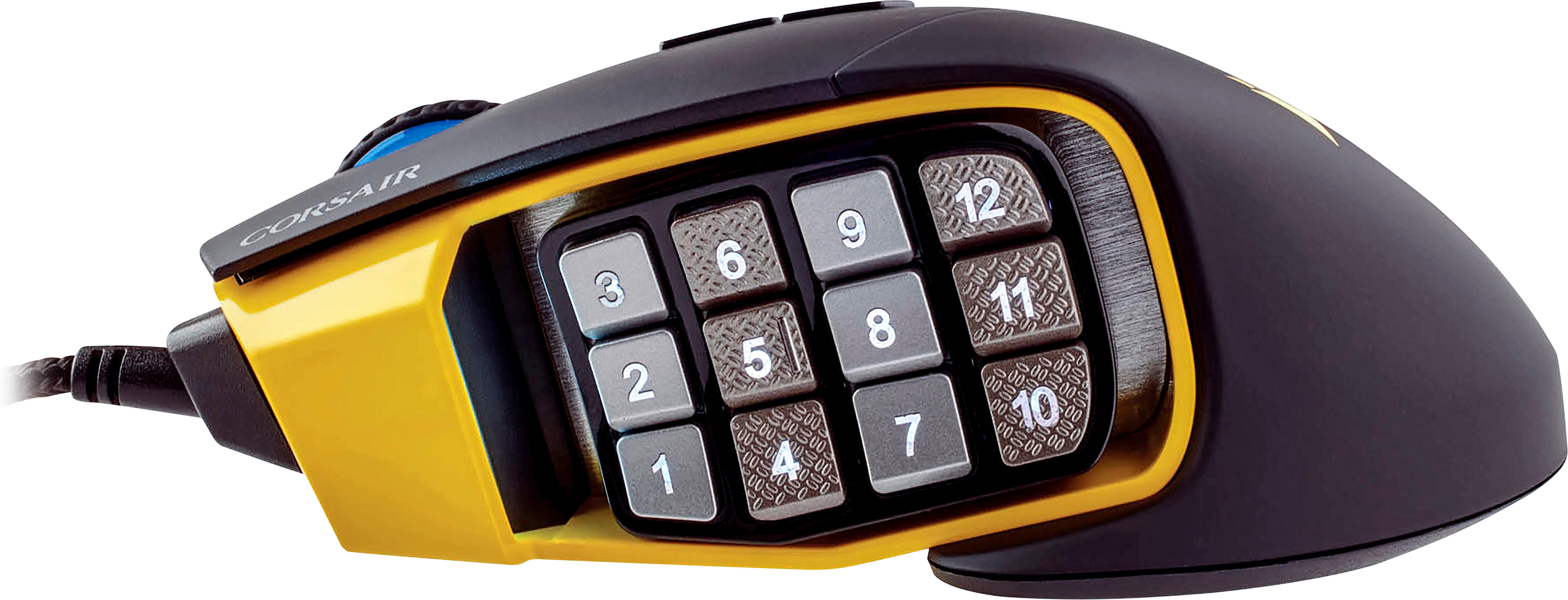
Posted .This reviewer received promo considerations or sweepstakes entry for writing a review.Straight to the point: Pros: -Most RGB customization options for an MMO gaming mouse with Corsair Utility Engine (CUE). -Sturdy cables, buttons, USB plugs. -Rubber covered scroll mouse for ease on the fingers. -Ribbed side buttons to help identify numbers in the dark without looking. Cons: -Thumb mouse buttons slightly offset causing increased thumb reach when gaming (will get used to it). -Requires CUE which has been very buggy lately. -Once single LED that can only be white and I wish it was RGB. -Not more color options for thumb-side plating (yellow/black) Summary: Still one of the best MMO gaming mouse that I've ever purchased. Quick and responsive when playing all my FPS games. I really wish that Corsair would revamp their CUE program due to it still having many bugs and conflicts with programs at this time, but there are always work-arounds if you're willing to take the time and do the research.
I would recommend this to a friend- Pros mentioned:Ease of use
Awesome and best purchase
Posted .This reviewer received promo considerations or sweepstakes entry for writing a review.This mouse is really fast DPI realist mode really soft very easy to navigate I would recommend it to anybody if you're into MMO's I would buy it
I would recommend this to a friend Great but one issue
Posted .This reviewer received promo considerations or sweepstakes entry for writing a review.Hi my name is Brad I bought this mouse for playing games like fortnite and it was great until I switched from Xbox to PlayStation. The problem is when I played on Xbox it worked perfectly but when I switched to playstation it didn’t work at all. One other issue was that the Optical Gaming sensor doesn’t light up but I’m not sure if it was supposed to in the first place. Overall this mouse is amazing I love it so much it’s the best mouse I have literally ever had.
I would recommend this to a friendVery comfortable mouse
Posted .This reviewer received promo considerations or sweepstakes entry for writing a review.Got this for the buttons but also the size..while I do have smallish hands, I was finding that with my other mouse my hand was very painful and stiff when I woke up after gaming. This mouse allows my hand to rest open and comfortably across the top and use the mouse without having to squeeze ir grip it hard at all. Have had zero hand pain since using this mouse. Very responsive and side buttons are well placed, no accidental pushes.
I would recommend this to a friend