Customer Ratings & Reviews

- Model:
- I7588-7385BLK-PUS
- SKU:
- 6212436
Rating by feature
- Value
Rating 4.4 out of 5 stars
- Quality
Rating 4.4 out of 5 stars
- Ease of Use
Rating 4.5 out of 5 stars
Customers are saying
Customers praise the G7 15.6" Gaming Laptop's performance, graphics capabilities, and build quality. Many appreciate its price point and the included solid-state drive, although some find the storage capacity limited. However, the laptop's weight and potential for elevated fan noise during use are frequently cited as drawbacks. Battery life is generally considered acceptable, though opinions vary.
This summary was generated by AI based on customer reviews.
Good for those new to gaming
||Posted .This reviewer received promo considerations or sweepstakes entry for writing a review.I think it's a good gamming computer for beginners. Our son compliant that it was lagging but when we changed the internet services it worked much better.
I would recommend this to a friendBrand response from YourDellTeam
Posted .lou19,
Thanks for your feedback. We're glad that the speed of the computer has gotten a little better for your son. If you experience slower speeds in the future you can run the Windows Performance Troubleshooter here:
1. Close all open windows.
2. Press the Windows logo key + X key on the keyboard.
3. Click Control Panel.
4. Click System and Security.
5. Under Security and Maintenance, select Troubleshoot common problems.
6. Under System and Security, click Run maintenance tasks.
7. Follow the on-screen instructions and prompts to complete the process.
8. Restart the PC.
You can read the full article here - http://dell.to/2tSulGV.
Best,
Bryan
1-800-624-9896
- Cons mentioned:Fan noise
Battery completely dead after just one year
||Posted . Owned for 1 year when reviewed.This reviewer received promo considerations or sweepstakes entry for writing a review.I am not a heavy user of this laptop. I am just using it for web browsing and sometimes a little bit of gaming. The tech spec is good for the money. The fan is very loud when gaming. But I can live with it. I am very disappointed at the battery. It just lasted for a little bit more than one year to pass the manufacture warranty and died completely.
No, I would not recommend this to a friendBrand response from YourDellTeam
Posted .Sheldon,
Thanks for your review. We're sorry to hear about your computer's battery not lasting as long as it used to. Here are some tips to consider:
Change the Power Plan:
1. On the notification area of the taskbar, right-click the Battery icon.
2. On the options list, click Power Options.
3. Select a power plan on the battery meter, such as Power Saver or Balanced. Windows 10 has a built in 'Battery Saver' mode that can be activated to extend your system's battery life. The Battery Saver mode will monitor and limit background activity and other features such as push notifications. You do have the option to enable or disable this mode within settings or within advanced Battery Saver settings, you can customize the mode to best suit your needs.
a) Click on the Action Center icon in the taskbar and select the tile for Battery Saver.
b) If running Cortana then type Battery Saver into the search box and select from the results.
Within the Battery Saver settings page, you will be able to turn on and off the feature and customize the feature to best meet your needs.
c) Turn Battery Saver On or Off.
d) Additional settings available via the Battery use and Battery saver settings links.
e) Battery use shows further info on apps and their power usage.
f) Battery Saver Settings screen allows you to customize further Battery Saver feature.
You can read the full article here - http://dell.to/2vfXWf4.
If your computer's fans continue to run loud we'd recommend trying to update your computer's BIOS: An out-of-date BIOS can cause loud fan noises by having an outdated temperature table for the system. Refer to update BIOS and follow the instructions to update the BIOS on your computer. You can also follow up with our Technical Support Team here - 1-800-624-9896.
You can read the full article here - http://dell.to/2ENlXfz.
Best,
Bryan
1-800-624-9896
Good product
||Posted .This reviewer received promo considerations or sweepstakes entry for writing a review.Decent, work well. But windows that came installed flipped and wouldn't authenticate I had to repair myself as the geek squadron was too busy.
I would recommend this to a friendBrand response from YourDellTeam
Posted .Hi Gerald,
Thanks for your review. We're sorry to hear about the trouble that you had with Windows. We'd recommend reaching out to Microsoft if you continue to have any additional Operating System concerns: http://bit.ly/2KBOM4c.
Best,
Bryan
1-800-624-9896
Bought Open Box Item - Power button defective
||Posted . Owned for 3 weeks when reviewed.This reviewer received promo considerations or sweepstakes entry for writing a review.Computer shuts down upon several times upon start. Power button had reinitiated 3-4 times before pc is ready to work. Will return.
No, I would not recommend this to a friendA good laptop
||Posted .This reviewer received promo considerations or sweepstakes entry for writing a review.I tried to use this laptop as a gaming computer. It was not as fast as I thought it could be. I only used this laptop now to do web searches
No, I would not recommend this to a friendBrand response from YourDellTeam
Posted .Hi Stev2001,
If you'd like to see if there are ways for your computer to run faster we'd recommend running the Windows Performance Troubleshooter:
1. Close all open windows.
2. Press the Windows logo key + X key on the keyboard.
3. Click Control Panel.
4. Click System and Security.
5. Under Security and Maintenance, select Troubleshoot common problems.
6. Under System and Security, click Run maintenance tasks.
7. Follow the on-screen instructions and prompts to complete the process.
8. Restart the PC.
You can read the full article here - http://dell.to/2tSulGV.
Best,
Bryan
1-800-624-9896
it works
||Posted .This reviewer received promo considerations or sweepstakes entry for writing a review.Average. As long as it works what can I say. nothing life altering here. at least the bloatware is a little less that HP
I would recommend this to a friendBrand response from YourDellTeam
Posted .mbhurley,
Thanks for your review. We're happy that your computer is working well for you. If you have questions you can visit our Product Support Page here: https://dell.to/2G7CcU6.
Best,
Bryan
1-800-624-9896
- Cons mentioned:Heat
Beware
||Posted . Owned for 1.5 years when reviewed.This reviewer received promo considerations or sweepstakes entry for writing a review.Overheating and shutting down after a year of hardcore gaming.
No, I would not recommend this to a friend not bad..
||Posted .This reviewer received promo considerations or sweepstakes entry for writing a review.I must say I'm not a gamer,so i choose this one just for its performance, but tell the truth, it is not so good...
I would recommend this to a friendBrand response from YourDellTeam
Posted .Hi Valued Customer,
We're sorry that your new computer is not meeting all of your needs. We'd recommend running the Windows Performance Troubleshooter to see if there are ways to speed up your computer:
1. Close all open windows.
2. Press the Windows logo key + X key on the keyboard.
3. Click Control Panel.
4. Click System and Security.
5. Under Security and Maintenance, select Troubleshoot common problems.
6. Under System and Security, click Run maintenance tasks.
7. Follow the on-screen instructions and prompts to complete the process.
8. Restart the PC.
You can read the full article here - http://dell.to/2tSulGV.
We hope this helps your computer perform better for you.
Best,
Bryan
1-800-624-9896
Nothing special
||Posted . Owned for 2 months when reviewed.This reviewer received promo considerations or sweepstakes entry for writing a review.Did not have enough memory to even run my go pro fusion software. Pretty slow performance.
No, I would not recommend this to a friendBrand response from YourDellTeam
Posted .Golfms,
Thanks for your review. We're sorry to hear that this laptop is not meeting your needs. Please consider running the Windows Performance Troubleshooter if you'd like to try to speed up your computer:
1. Close all open windows.
2. Press the Windows logo key + X key on the keyboard.
3. Click Control Panel.
4. Click System and Security.
5. Under Security and Maintenance, select Troubleshoot common problems.
6. Under System and Security, click Run maintenance tasks.
7. Follow the on-screen instructions and prompts to complete the process.
8. Restart the PC.
You can read the full article here - http://dell.to/2tSulGV.
Best,
Bryan
1-800-624-9896
Good gaming laptop
||Posted .This reviewer received promo considerations or sweepstakes entry for writing a review.I bought this for by samsung HDM VR headset and works really well.
I would recommend this to a friendBrand response from YourDellTeam
Posted .Khozem,
Thanks for your feedback and we're happy to hear that your laptop is working well for you. If you'd like to find out more about your laptop you can always visit our Product Support Page here: https://dell.to/2G7CcU6.
Best,
Bryan
1-800-624-9896
Needs more storage space
||Posted .This reviewer received promo considerations or sweepstakes entry for writing a review.Besides it needing more Storage space I would recommend this laptop
I would recommend this to a friendBrand response from YourDellTeam
Posted .Justaguy,
We appreciate your review. We'd recommend removing some pre-installed programs that you may not use. Here are some programs to consider: https://dell.to/2JruiaG. This should help free up some space on your computer.
We'd also recommend storing files in the cloud using Microsoft OneDrive.
Best,
Bryan
1-800-624-9896
Decent for the price, but...
||Posted .This reviewer received promo considerations or sweepstakes entry for writing a review.It's decent for the price in terms of specs only. I tried using it for the past couple days and it's already blue-screened 2x, frozen in standby mode 5x (or possibly more), takes a considerably long time to boot up, and even once it boots up, it takes a while to let me input my password. Once I finish entering my password, it lags me into my home screen. I tried to move my mouse following and it freezes ever 1/2 second so I end up seeing a trail of cursors on my screen and it refuses to do anything for the first minute for me to be able to do anything. The only things I have installed on it are Steam, Google Chrome, and Microsoft Office (Came with it). I don't know why this would cause it to work this badly, but I just thought context would be best when reviewing something
No, I would not recommend this to a friendBrand response from YourDellTeam
Posted .Andy,
Thanks for your review. We're sorry to hear about the issues that you've experienced with your computer so far. If you continue to have Blue Screen Errors you can diagnose them with the following steps:
1. At the desktop, click the Search the web and Windows box and type "problem reports".
2. Select View all problem reports to view a list of errors that have occurred on your computer and possible solutions for them, such as updating drivers, flashing your system BIOS, or checking for updates to the software.
3. Under the Source column, look for Windows and under Summary, look for Shut down unexpectedly.
4. Right-click the line item and select Check for a solution.
We'd also suggest checking to make sure that your software and drivers are up to date on Dell's Product Page - https://dell.to/2M6byO8.
You can read the full article here - http://dell.to/2u98Cct.
If you have issues with your computer freezing, here are some steps to try:
1. Run a Computer Diagnostic. To determine if your computer is experiencing a hardware problem, run the Dell Preboot System Assessment (PSA) Diagnostics. For information on how to run Diagnostics, and to determine the issue, refer to Dell Knowledge Base Article: http://dell.to/2iaiujA.
2. Check Safe Mode for Symptoms. To boot into safe mode, please follow the instructions below:
a) Start the computer.
b) Tap 'F8' on the keyboard immediately and every one second until the Dell logo screen disappears. From there you will see the Windows Advanced Options Menu on the screen. (If the Windows Advanced Options Menu does not appear, restart the system and try again.)
c) Select Safe mode with Networking and press Enter.
d) Log on as the administrator or as a user with administrative access.
e) Open applications and test the computer in safe mode. If the symptoms exist in safe mode, please continue the troubleshooting steps in this article. If the symptoms do not exist in safe mode, the issue is likely related to a driver or software and you may wish to complete step 3 to see if you are able to resolve the lockups or freezing.
3. Check for Malware. Malware (Virus, Spyware, etc.) can definitely cause a Windows system to lock up or appear to hang. To check for malware on your system and to ensure that your computer is up to date on security software, visit Dell Knowledge Base Article: http://dell.to/2wWP1zI.
You can read the full article here - http://dell.to/2tW5m33.
Lastly, if you want to re-calibrate your mouse so that it is more responsive, you can follow these steps: Some Notebooks and Tablets with Keyboards have added gesture features to the touchpad hardware and drivers. A few of these features are two or three finger scrolling, pinch zoom, circle zoom, rotate and swiping. These new features may be the reason for the erratic cursor movement since most are turned on by default. You can disable or modify the way the features work in the touchpad driver properties. Here are some tips to modify these settings:
1. In the Search box, type main.cpl.
2. Touch or click main.cpl in the list of programs.
3. Touch or click the Dell Touchpad tab.
4. Touch or click on the picture of the touchpad.
5. Touch or click Gestures (depending on your computer there may not be a Gestures option).
6. Change the options as preferred.
7. Touch or click Save.
8. Touch or click the X in the upper-right corner to close the Dell Touchpad Utility.
9. Touch or click OK on the Mouse Properties window.
10. If the touchpad still does not work after following the preceding steps, refer to Dell Knowledge Base article - http://dell.to/2iaiujA.
You can read the full article here - http://dell.to/2tqmS02.
Best,
Bryan
1-800-624-9896
Good graphics
||Posted .This reviewer received promo considerations or sweepstakes entry for writing a review.I like the product. Specially the resolution it’s nice.
I would recommend this to a friendBrand response from YourDellTeam
Posted .Patchenk,
We're so happy to hear that your computer is running well for you. If you have questions about your computer you can check our Product Support Page here - https://dell.to/2G7CcU6.
Best,
Bryan
1-800-624-9896
- Cons mentioned:Heat
Had overheating issues
||Posted . Owned for 1 year when reviewed.This reviewer received promo considerations or sweepstakes entry for writing a review.I had my laptop for 1 year and always had trouble running games. My frames would constantly drop, the games were unplayable. Had it repaired 3 times and still overheated. 1/10
No, I would not recommend this to a friendBrand response from YourDellTeam
Posted .Raina,
Thanks for your review. We're sorry to hear about the overheating and performance issues that you've experienced with your computer. We'd recommend the following tips to help with the overheating concerns:
Tips for Proper Usage:
1. Dell does not recommend placing portable systems directly on your lap. Due to reductions in the thickness of modern portable systems, heat transfer can be an issue.
2. Using a portable system (Laptop) on a hard, flat, non-cloth surface will increase airflow and reduce heat from underneath and inside the system.
Using the portable system on a blanket, pillow, or other types of cloth will cover up the fan cause the computer to overheat and can cause permanent damage.
3. It is recommended to use the portable system in a Room temperature of 0°C to 35°C (32°F to 95°F) with a Humidity level no greater than 90%.
4. Use compressed air to clean the vents on a regular basis.
5. Using a cooling pad can decrease heat and increase performance.
6. If you want to know the temperature limitations for your system, go to the Dell Support Website, look up your system model then open the user guide under the manuals link.
You can read the full article here - http://dell.to/2uJ8AdG.
If you continue to experience issues please reach out to Dell's Technical Support Team here: http://dell.to/2sH7Qlm.
Best,
Bryan
1-800-624-9896
- Cons mentioned:Weight

Great Laptop!
|Posted .This reviewer received promo considerations or sweepstakes entry for writing a review.This laptop was very easy to set up and start using immediately. It is very fast using any program. The battery life is better than other gaming laptops I've used. It is a bit bulky and heavy but it is sturdy and has a nice size screen and light up blue keyboard so easy to use in the dark. Overall I would recommend this laptop.
I would recommend this to a friend Not what i wanted but had to buy
||Posted .This reviewer received promo considerations or sweepstakes entry for writing a review.First a gaming machine with win 10 home edition what a waste had to upgrade. Really needed business but nothing on selves but gaming machines. Our other machine failed had no choice couldn't wait for the business machine.
No, I would not recommend this to a friendBrand response from YourDellTeam
Posted .Jimv,
We're sorry that your new laptop is not meeting your needs. We'd recommend contacting our Technical Support Team for additional assistance. You can also view our Product Support Page here: https://dell.to/2G7CcU6.
Best,
Bryan
1-800-624-9896
Dissappointed
||Posted .This reviewer received promo considerations or sweepstakes entry for writing a review.Bought what I thought would be an excellent laptop based on the specs. it worked for the first few days and now constantly crashes. I am trying to process a replacement with best buy .com and am having problems. I have been a best buy customer for almost 20 years and dont think I want to continue doing business with them if they cant resolve something as simple as replacing a defective product satisfactorily!
No, I would not recommend this to a friend- Pros mentioned:Graphics, Ssd
A Great Gaming Laptop
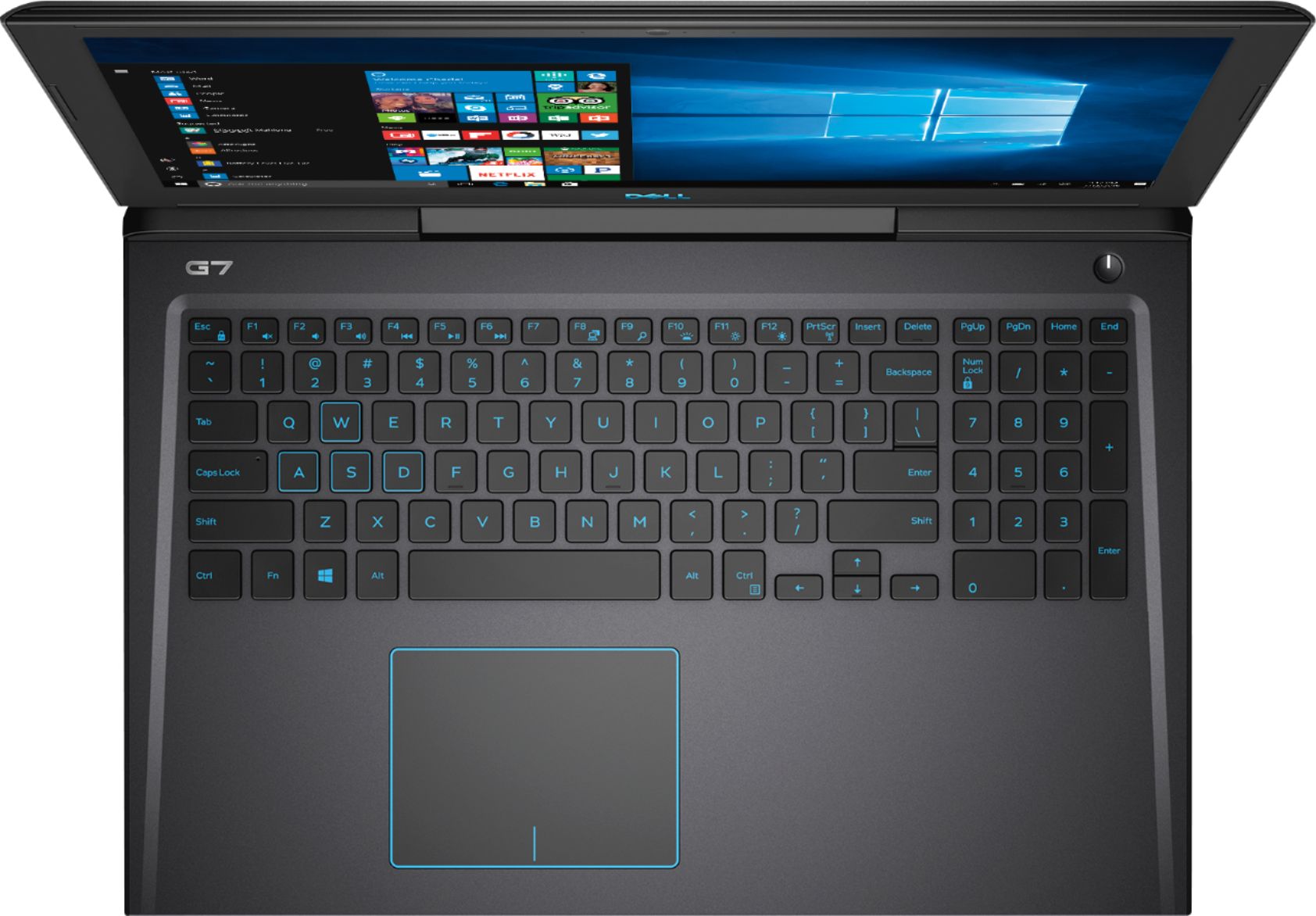
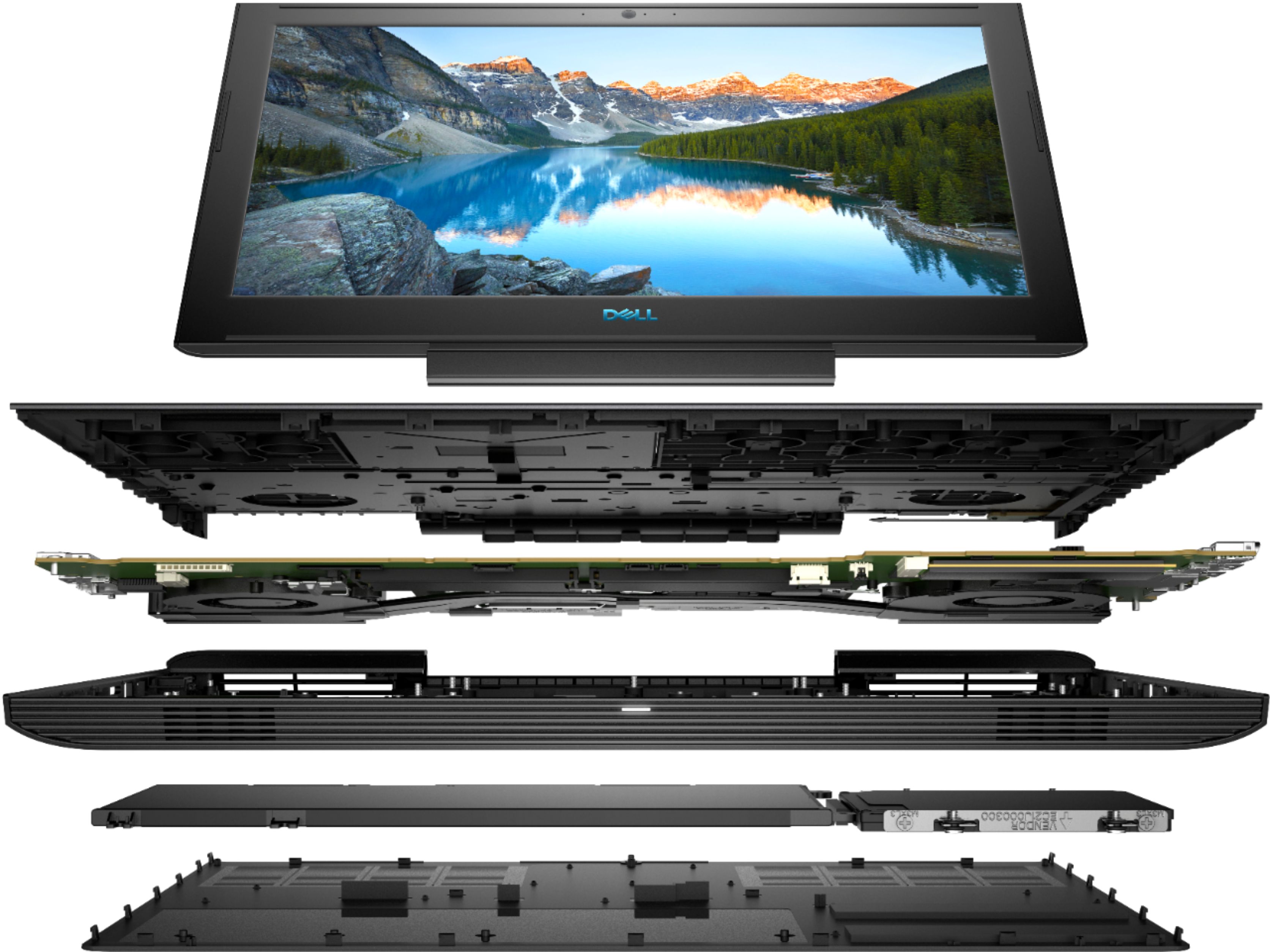
|Posted .This reviewer received promo considerations or sweepstakes entry for writing a review.The Dell G7 is a great laptop, suitable for just about anything, but really shines with gaming. Since it has a solid-state drive, it has incredibly snappy startup times, and programs load quickly. The hard drive is 256GB, but if you need more storage space, you can always expand it with an SD card. My favorite feature is having a backlit keyboard. I didn't really understand why anyone would want or need this feature, but now that I have it, I LOVE it. It makes working in dark rooms easy and convenient. Gaming is also totally doable on this system, thanks to its Nvidia GeForce 1060 graphics card. The large air vents and dual fan system helps the laptop stay cool while playing graphically demanding games, but it can get a bit loud, although this is to be expected with any current generation gaming laptop. The Waves MaxxAudio sound system is superb. I was very impressed with the clear sound that actually had some "umph" behind it.
I would recommend this to a friend - Cons mentioned:Heat
Don’t buy
||Posted . Owned for 7 months when reviewed.This reviewer received promo considerations or sweepstakes entry for writing a review.Junk. Don’t even try if you’re considering a gaming pc. Overheated within the first 10 minutes
I would recommend this to a friendBrand response from YourDellTeam
Posted .K0904,
Thanks for your review. We're sorry to hear that your computer is not meeting your needs. If you'd like tips on how to keep your computer operating at a cooler temperature we'd suggest following these tips:
Tips for Proper Usage:
1. Dell does not recommend placing portable systems directly on your lap. Due to reductions in the thickness of modern portable systems, heat transfer can be an issue.
2. Using a portable system (Laptop) on a hard, flat, non-cloth surface will increase airflow and reduce heat from underneath and inside the system.
Using the portable system on a blanket, pillow, or other types of cloth will cover up the fan cause the computer to overheat and can cause permanent damage.
3. It is recommended to use the portable system in a Room temperature of 0°C to 35°C (32°F to 95°F) with a Humidity level no greater than 90%.
4. Use compressed air to clean the vents on a regular basis.
5. Using a cooling pad can decrease heat and increase performance.
6. If you want to know the temperature limitations for your system, go to the Dell Support Website, look up your system model then open the user guide under the manuals link.
You can read the full article here - http://dell.to/2uJ8AdG.
Best,
Bryan
1-800-624-9896
I returned it
||Posted .This reviewer received promo considerations or sweepstakes entry for writing a review.The screen, graphics were dark....hard o see when playing games. For general use it is a good lap top but for gaming no way.
No, I would not recommend this to a friend