Customer Ratings & Reviews

- Model:
- I7588-7385BLK-PUS
- SKU:
- 6212436
Rating by feature
- Value
Rating 4.4 out of 5 stars
- Quality
Rating 4.4 out of 5 stars
- Ease of Use
Rating 4.5 out of 5 stars
Customers are saying
Customers praise the G7 15.6" Gaming Laptop's performance, graphics capabilities, and build quality. Many appreciate its price point and the included solid-state drive, although some find the storage capacity limited. However, the laptop's weight and potential for elevated fan noise during use are frequently cited as drawbacks. Battery life is generally considered acceptable, though opinions vary.
This summary was generated by AI based on customer reviews.
I KNEW IT
||Posted .This reviewer received promo considerations or sweepstakes entry for writing a review.Something felt off as soon as I got this laptop. And my suspicions were proven correct as soon as I opened up the back of the laptop and found RUST inside of it. Now, 2 months after purchase a dead pixel on the monitor. This thing is a lemon through and through.
No, I would not recommend this to a friendBrand response from YourDellTeam
Posted .Andrew,
Thanks for your review and we're sorry to hear about your experience with your computer so far. We'd recommend reaching out to Dell's Technical Support Team to find out what your options are: http://dell.to/2sH7Qlm.
Best,
Bryan
1-800-624-9896
HORRIBLE SPEAKERS
||Posted .This reviewer received promo considerations or sweepstakes entry for writing a review.I BOUGHT THIS LAPTOP FOR GAMING BUT I'M HARDLY AT HOME AND WHEN I FINALLY GOT TO PLAY WITH IT I NOTICED THE SPEAKER SUCKED, THERE ARE NOT LOUD ENOUGH AND EVEN WITH HEADPHONES I COULDN'T HEAR FINE. I WANTED TO RETURN IT BACK TO BEST BUY BUT I DID NOT KNOW IT WAS 15 DAYS POLICY AND COULDN'T RETURN IT AND NOW I'M STUCK WITH IT.
No, I would not recommend this to a friendBrand response from YourDellTeam
Posted .JD69,
We're sorry that the sound quality of your new Dell computer is not what you had hoped it would be. If you do have questions about your new computer you can always visit our Product Support Page here - https://dell.to/2G7CcU6.
Best,
Bryan
1-800-624-9896
Wante dto love this, but was plagued with problems
||Posted . Owned for 1 year when reviewed.This reviewer received promo considerations or sweepstakes entry for writing a review.Way too many driver issues. I wanted to love this machine, but had to return it as it was always crashing and the screen glitching out. My particular unit could have just been a lemon. Best Buy was great about the return, but didn't trust this model enough to replace with identical one.
No, I would not recommend this to a friend- Pros mentioned:Speed, Ssd

Solid performance & quality
|Posted .This reviewer received promo considerations or sweepstakes entry for writing a review.I use Dell laptops at work and needed a new laptop for personal use. This Dell G7 machine features a solid state hard drive which is unlike any other personal laptop I've owned. Since I use a lot of Cloud products, I don't need a large hard drive. From the feel of the keyboard which has wider spacing than most laptops, to the quality of the screen, this is a great laptop for gaming or personal use. The I7 processor has more than enough horsepower than you need. For the price, this laptop compares favorably to most competitors.
I would recommend this to a friend Slow
||Posted .This reviewer received promo considerations or sweepstakes entry for writing a review.I bought two computer for my kids but one of them runs the games very slowly
No, I would not recommend this to a friendBrand response from YourDellTeam
Posted .Earphones,
We're sorry to hear that your computer is running slowly for you. We'd recommend running the Windows Performance Troubleshooter to see if there are ways to speed up your computer:
1. Close all open windows.
2. Press the Windows logo key + X key on the keyboard.
3. Click Control Panel.
4. Click System and Security.
5. Under Security and Maintenance, select Troubleshoot common problems.
6. Under System and Security, click Run maintenance tasks.
7. Follow the on-screen instructions and prompts to complete the process.
8. Restart the PC.
You can read the full article here - http://dell.to/2tSulGV.
We hope these tips help your computer perform better for you.
Best,
Bryan
1-800-624-9896
Amazing Value in a Gaming Laptop
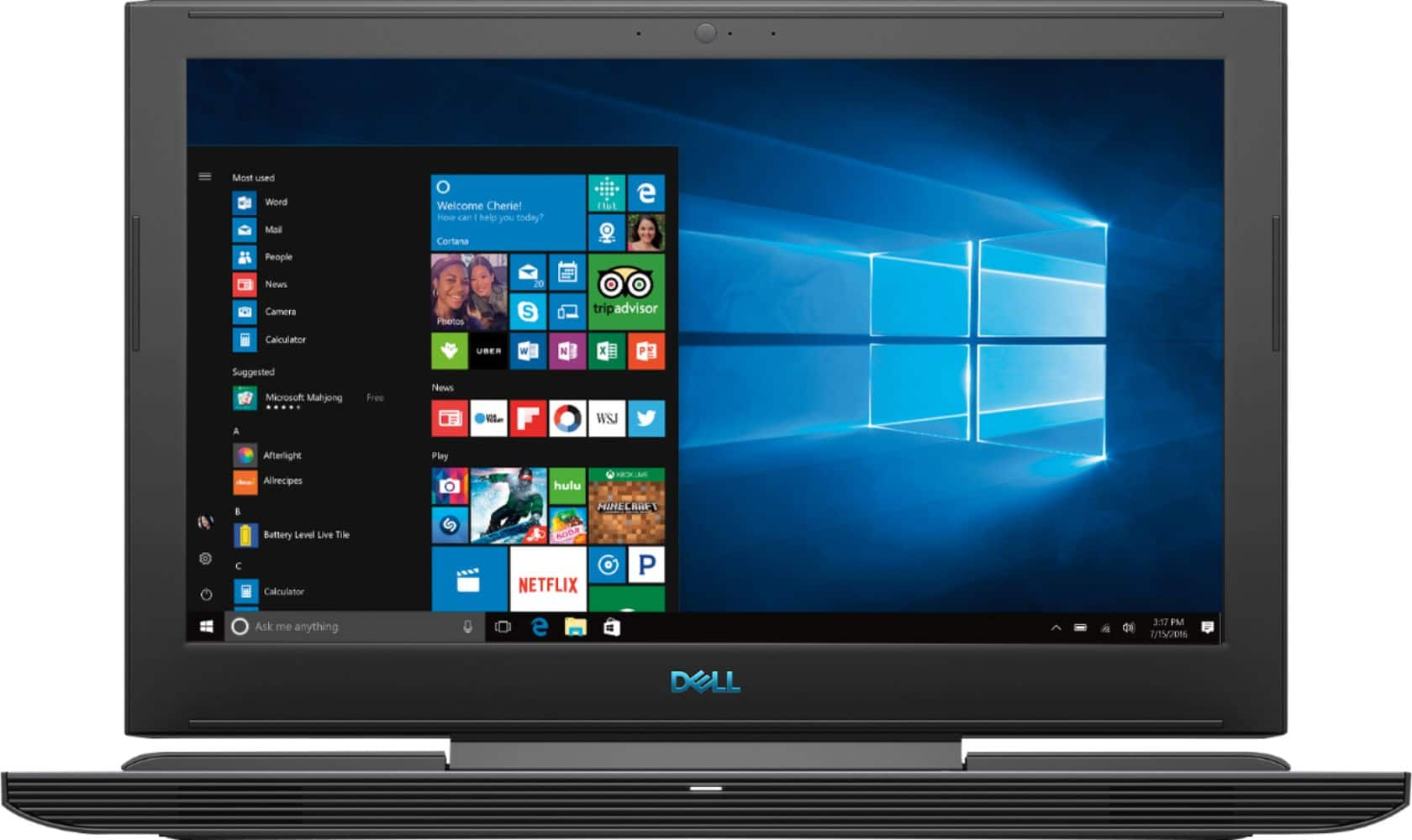
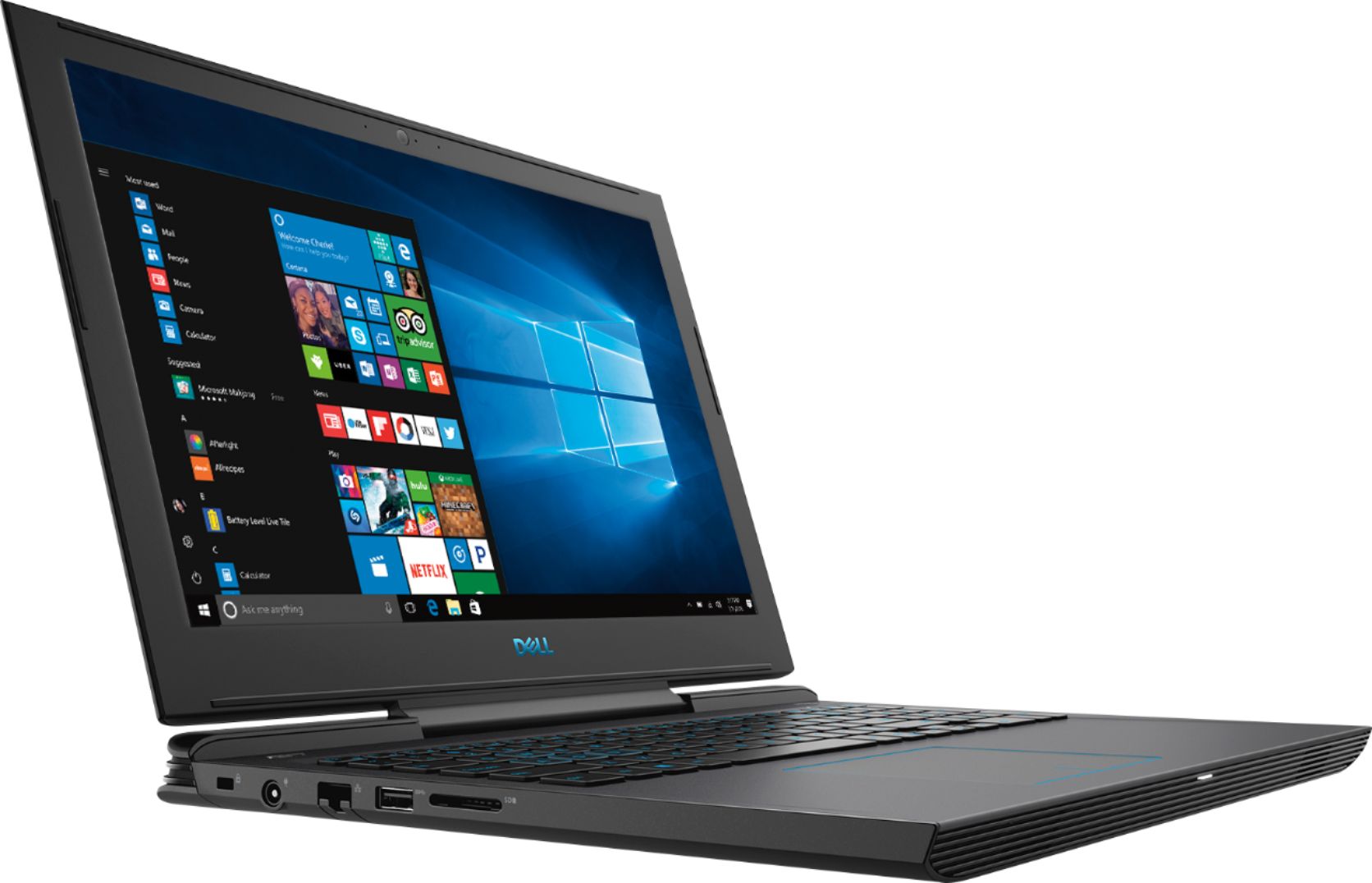
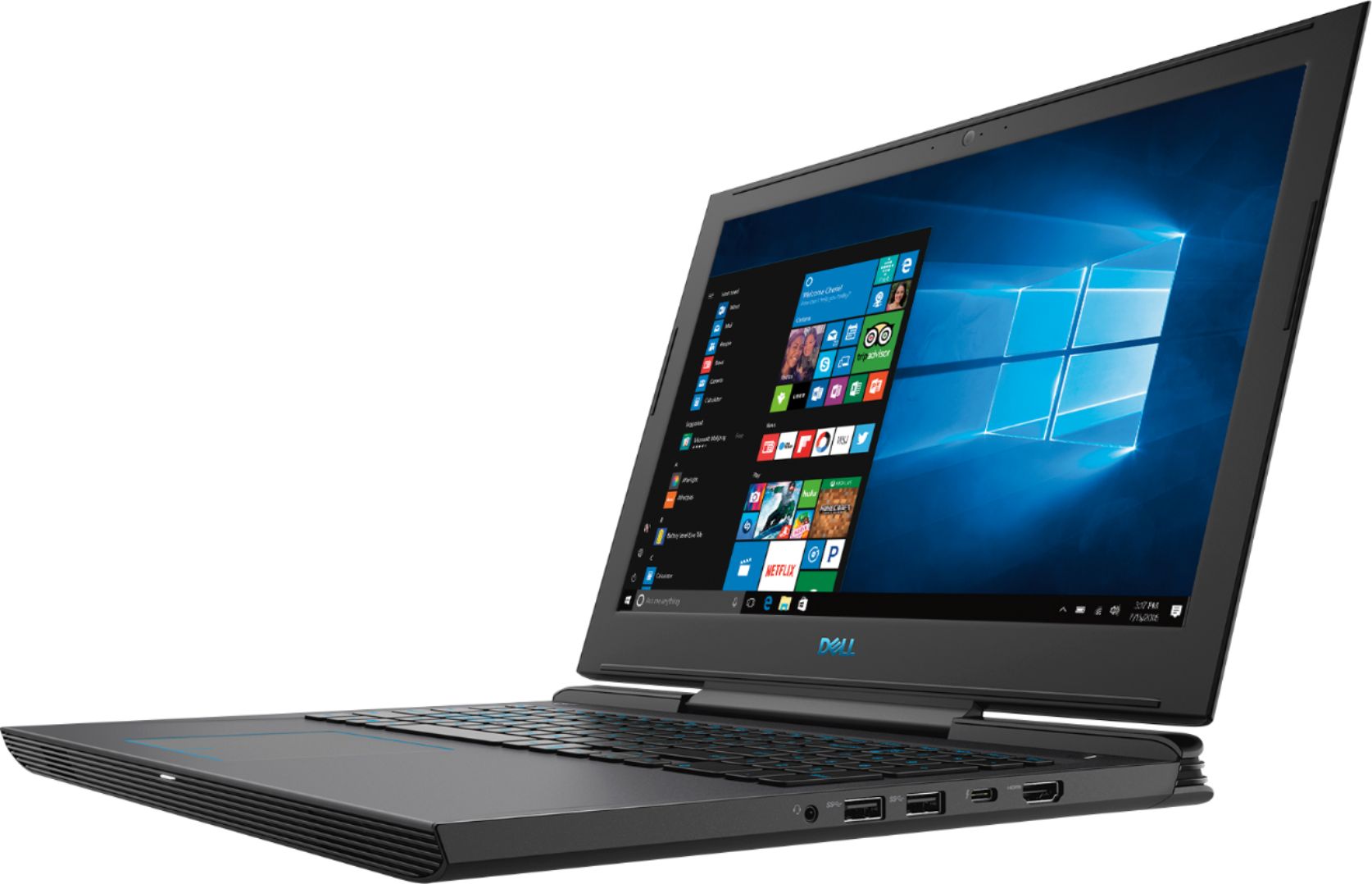
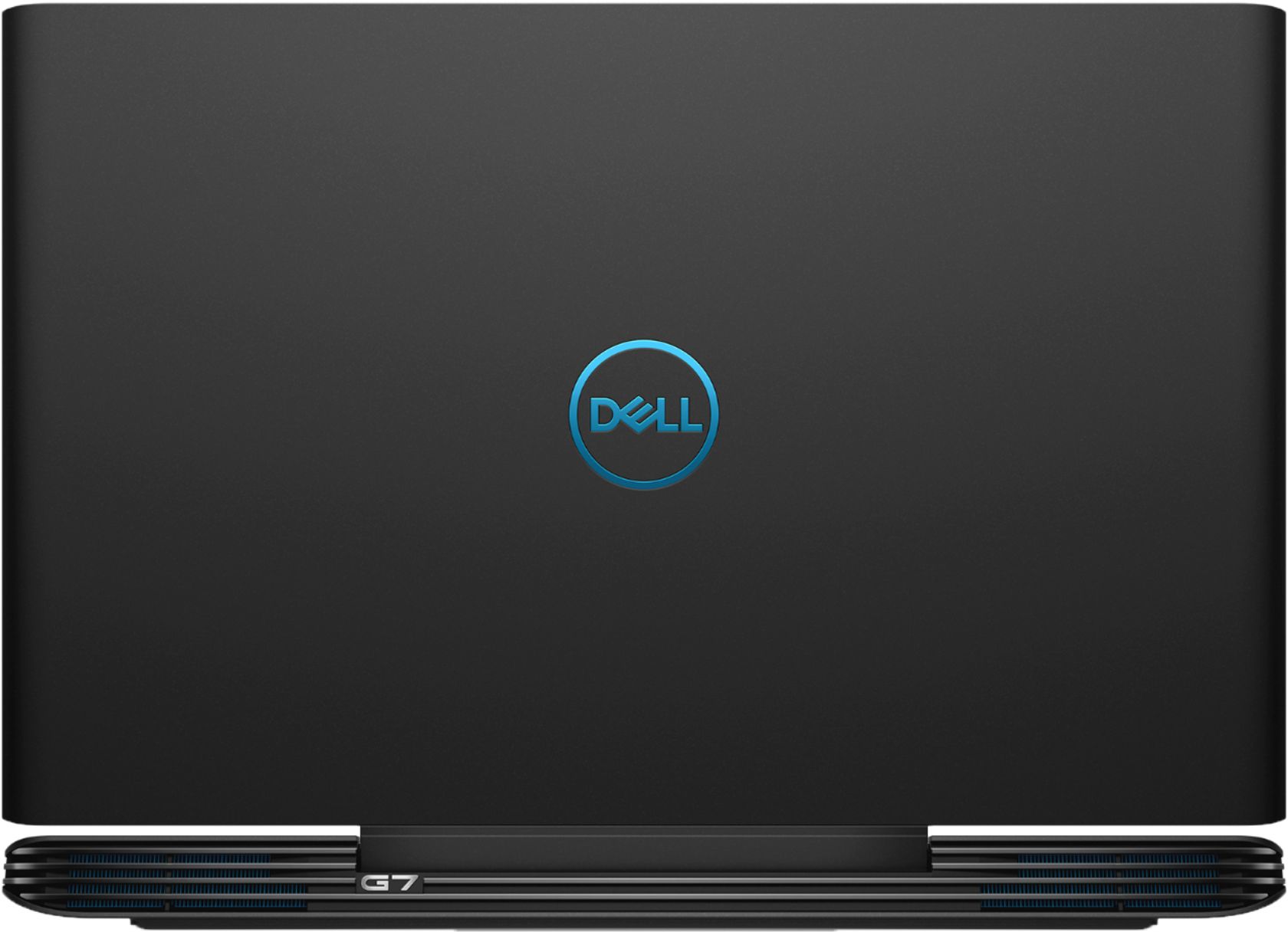
|Posted .This reviewer received promo considerations or sweepstakes entry for writing a review.For the money, this laptop is really tough to beat. You get high end specs at a very reasonable price. I won't go into too much detail regarding the specs as they can easily be found online, but just to highlight the careful consideration that Dell took to pick the correct specs for this laptop, I love how they decided to choose the 8th generation six core i7 8750H versus the 8th generation quad core i7 8550U CPU. Most "high end" or budget oriented "gaming" laptops in the market right now included the little brother of the 8750H which is the 8550U. Dell didn't comprise and is giving you one of the best mobile processors in the market. The rest of the specs, like the GTX 1060 with 6GBs of VRAM and speaks for itself. Couple that with a fast 256GB SSD, and you also have a laptop that boots into windows within a few seconds and also makes for some incredibly fast load times in gaming. Ok, enough about the specs, what is the actual gaming and productivity experience like? Well, let's just say it was able to handle all the games I threw at it at moderate frame rates. Impressive for a laptop at this price point. I put the laptop through the ringer and ran CS:GO, League, Overwatch, Dark Souls, Witcher 3, Quake Champions, and Bioshock Infinite. It was able to run all games in medium to high settings with an average of about 45 to 60 fps (and in some cases higher than 60 fps). This is perfect considering the display is only 60hz so any more than 60fps and it's not yielding any benefits to you anyway (unless of course you're connecting an external monitor). Speaking of the display, I was very pleased that Dell included a beautiful Full HD 1920 x 1080 IPS display. So glad that Dell gave us an IPS display and not TN. Being IPS, the colors look rich and vivid with deep blacks. It would have been nice to see a 120hz G-Sync panel but for the price I am willing to easily look past that. One thing I'd like to note is that during long gaming sessions or during graphically intense scenes, the fans can spin up pretty loud. However, this is expected from any gaming laptop due to the limited airflow. Dell did a good job though including performance grade fans with rear exhaust vents. This is the added bulk that you'll have to live with, but if you're a gamer, then you know that no gaming laptop is without compromise (with the exception of an ethernet port of course; I mean c'mon who wants to play an online twitch shooter over a Wi-Fi connection). In terms of build quality and aesthetics, I think Dell did a great job keeping the design clean and going with a matte black. I love that the matte black finish doesn't attract any finger print smudges. The keyboard is a dream to type on. Dell did a FANTASTIC job on this keyboard. Each key is individually backlit with a blue LED. However, I would have LOVED for Dell to have made this RGB. If not RGB, I would have preferred a white LED backlit keyboard since it's more neutral, blends in with your current decor a lot better, looks cleaner and more professional, and in my opinion, is just much easier on the eyes. In any case, the blue LEDs still do a fine job of providing stylish illumination at night. Some final features I'd like to touch on was the sound. The speakers actually surprised me a bit. They are probably some of the crispest and clearest sounding speakers I've heard on a laptop. They don't get very loud, but hit just the right volume for me. In terms of productivity, well, if the laptop can eat up any game I threw at it, you can rest assured that it will devour any heavy multi threaded applications you throw at it and is also a multi tasking beast. After all, the 8750H does have twelve threads!! The last thing I'd like to mention....THANK YOU DELL for including a 1Gb Ethernet port!!! It is a major gripe of mine when "gaming" laptops don't include an Ethernet port. A great example is the gaming laptop that one of Dell's competitors just released for fifteen hundred dollars. It appears to be a gorgeous laptop, but the only gaming you'll be doing on it is over a wireless connection. Can you imagine playing Overwatch, CS:GO, or League over a Wi-Fi connection?!?! I certainly can't. The first thing I actually look for when a vendor markets a "gaming" laptop is a dedicated ethernet port. If i see it, I know the type of thought process that went into it. And while yes, you could use a USB to LAN adapter, this setup would require incoming packets on the wire to be converted from copper (RJ-45) to the USB medium on the LAN adapter. While for most people the real world results are likely negligible, this is certainly not the case when playing fast twitch e-sport games like CS:GO. Don't get me wrong, aesthetics, thin profiles, etc. are great, but when it comes to gaming, performance always comes first. Overall, I am very impressed with what Dell has to offer at this price point. I can take this laptop on weekend trips and fire up quick gaming session at hotels. I don't have to worry about my internet connection for competitive e-sport games like CS:GO since most hotels provide a wired LAN connection.I also know that whatever task I throw at this laptop, it will easily handle it and then some!
I would recommend this to a friendHorrible game perfomance
||Posted .This reviewer received promo considerations or sweepstakes entry for writing a review.My older laptop that is an ultrabook, not a gaming laptop with a radeon 540 out perfoms this. I don't know if it's all the dell bloatware or only having 8 gb ram but its seriously underwhelming. I took mine back the next day.
No, I would not recommend this to a friend- Pros mentioned:Graphics, Speed
Awesome gaming pc!!!
Posted .This reviewer received promo considerations or sweepstakes entry for writing a review.I purchased for $502 plus tax about a couple days ago as the display model. We had some difficulty locating it at the Knoxville, TN store. Chris was very helpful in figuring out where it was because it had been mislabeled as Open Box Fair. I prefer the Apple ecosystem, but a Macbook Pro with these specs would have costed around $2400. The computer has worked seamlessly for my purposes.....PS NOW games, photo editing, email, Xfinity steaming, and word processing. I finished the Lego Movie game and plan on playing more games and using it for work. I would recommend this computer. It does not feel cheap like the budget computers around $300-500. After using several high end Macbooks, I feel like those do not go as fast and would not have suited my gaming purposes. It is nice to see a laptop with a dedicated graphics card....:). The only problem I had was getting some of my Icloud stuff to sync. I resolved the issue after about an hour of clicking and searching for the root cause. I expect to get about 5-8 years out of this laptop.
I would recommend this to a friend - Pros mentioned:Build quality
Good multi-tasking for gaming and productivity
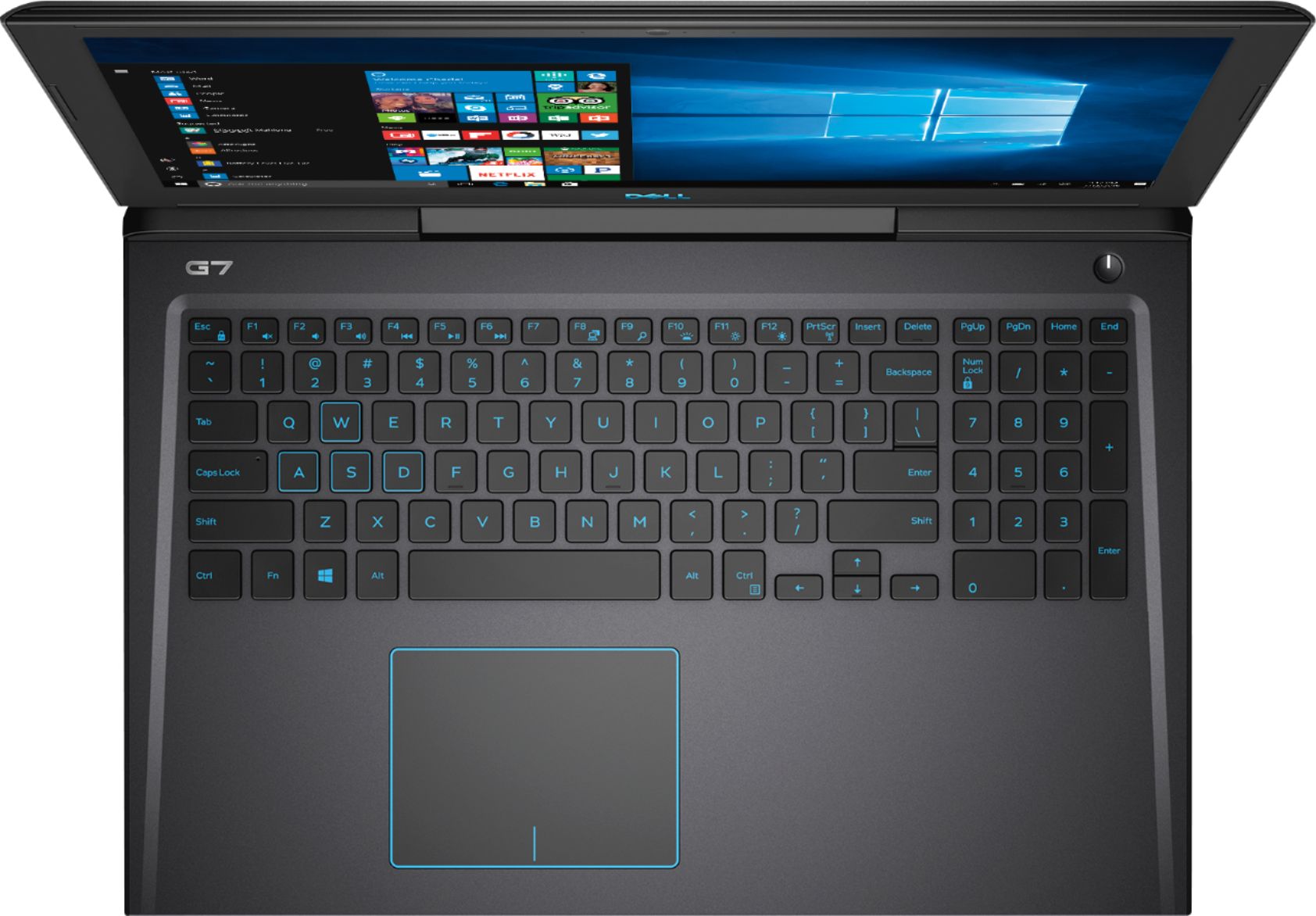
|Posted .This reviewer received promo considerations or sweepstakes entry for writing a review.The build quality and feel of the Dell G7 is pretty solid and comfortable for extended use. It is somewhat heavy and does not seem to be built for easy portability even though it’s a laptop. However it is dimensioned enough to comfortably take on a trip and use on a train, plane, or in the car. The track pad is great, perfect size and placement to multitask and get the job done whether gaming or productivity. The keyboard is fairly standard and feels good to the touch. I like the blue outlining and backlight of the trackpad and keys. The extra large surface on the keyboard makes it comfortable for the palms to rest and not get fatigued while gaming or typing. The screen is nice with great viewing angles and a nice matte looking finish. The bezels are a little big for my taste but it seems to add to the overall solid build of the laptop. I actually like the bigger thickness of the rear of the laptop for the rear fans which in my opinion provide adequate cooling for my usage. The fans are not obnoxiously loud but are noticeable. The onboard speakers could be improved but I usually utilize a Bluetooth setup for audio so not a deal breaker. Battery life is as expected, 4-5 hours with moderate use. The CPU speed and all other specs are awesome for my needs in basic gaming and software productivity. I have not peeked around on the internals for upgrades as the initial specs are very adequate and meet all expectations at this point. I am very pleased with Dells production of this laptop so far. Haven’t had any major issues with heating or bogged performance.
I would recommend this to a friend - Pros mentioned:Build quality, Speed, Ssd
Great Gaming Laptop for the Money!
Posted .This reviewer received promo considerations or sweepstakes entry for writing a review.The build quality is very nice on this unit. Great trackpad, and keyboard. Very fast unit for multitasking and even gaming. Upgradable m.2 ssd and ram. Can even add a 2.5in hdd or ssd. The thermals seem to hold very nicely. Even undervolting works with this machine and can lower the cpu temp alittle more. Fans are a lot quieter than my previous notebook the Razer Blade 14. It’s not going to be completely silent with the hardware it has but the speakers and headphones can easily overpower the fan noise. You can get better notebooks, but honestly for the money it’s a great bang for your buck deal. Packed with power and features.
I would recommend this to a friend Ruined by proprietary drivers
||Posted .This reviewer received promo considerations or sweepstakes entry for writing a review.Dells use of proprietary raid software made this machine useless for my needs. Horrible backlight bleedthrough on dark screens. Shoddy construction. All of my nope.
No, I would not recommend this to a friendBrand response from YourDellTeam
Posted .CrabbyPaddy,
We appreciate your feedback. We're sorry to hear that you're disappointed with your new Dell laptop. If you have technical questions you'd like to look up you can always check out or Product Support Page here: https://dell.to/2G7CcU6.
Best,
Bryan
1-800-624-9896
Not that great
||Posted . Owned for more than 2 years when reviewed.This reviewer received promo considerations or sweepstakes entry for writing a review.I’ve had this laptop for awhile now and have had issues with the screen and sound. Not pleased and will bring It in for service again.
No, I would not recommend this to a friendGreat Gaming and general use machine
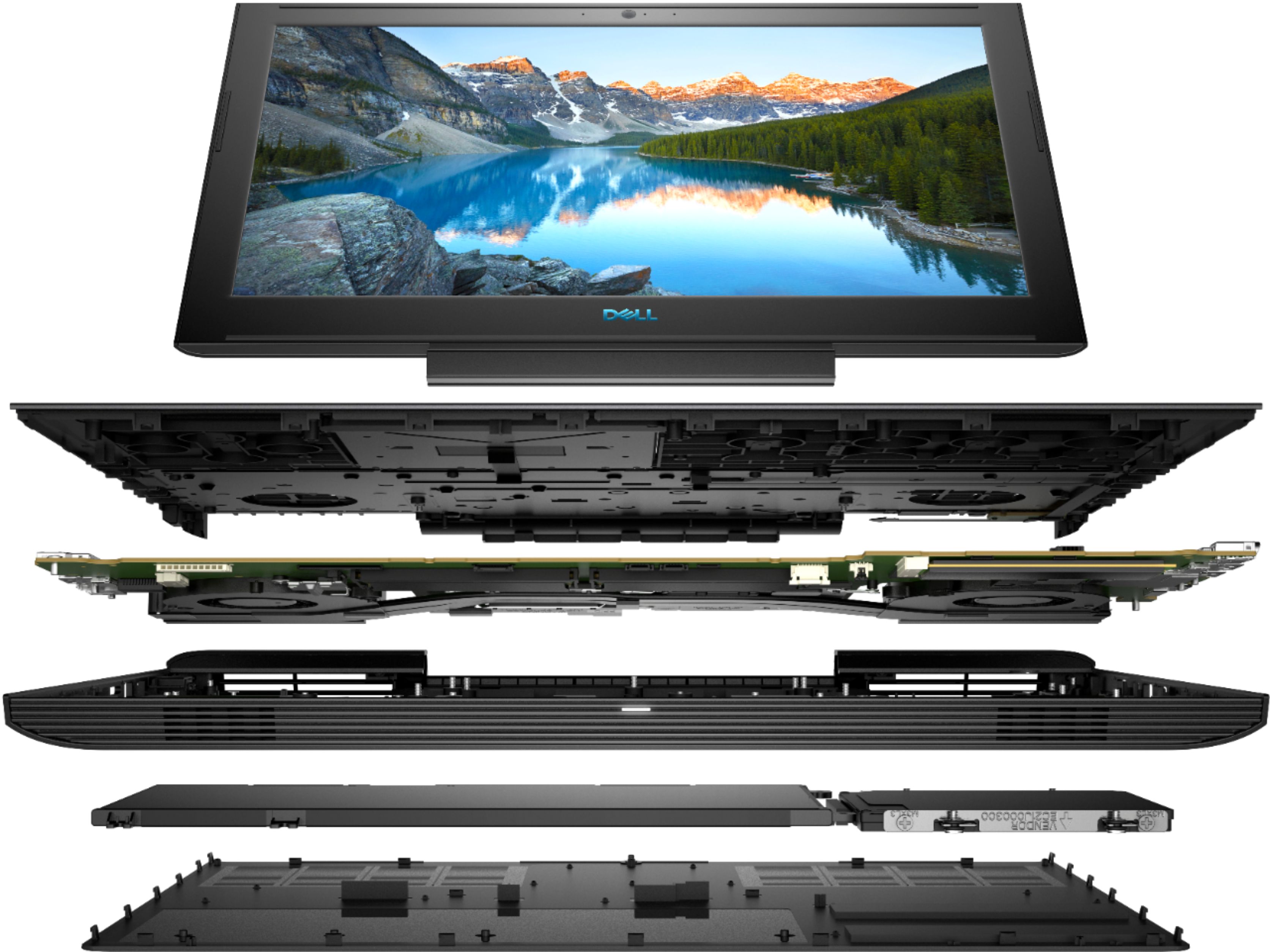
|Posted .This reviewer received promo considerations or sweepstakes entry for writing a review.First Impression – The Dell G7 comes in a fairly plain box with no frills… kind of underwhelming compared to some of its competitors! That’s OK, because what comes out of the box is a very nice machine that is ready to get down to business. Setup – Initial setup is typical of just about any Windows computer. In addition to the regular Windows setup routine, Dell has their own and McAfee adds even more to initialize their year of coverage. The blue color of the backlight is a pleasant shade that doesn’t distract but does make every key easy to see. Use – The touchpad is very large compared to some other brands, allowing easy multi-finger gestures. I reversed the two-finger direction for scrolling so that I can drag down to scroll down and up to go up. The keyboard has the keys in the “right” place, something I’ve come to be aggravated by with some laptops that insist on cramming keys together or putting “Home” and “End” keys as functions of other keys. The backlight turns off after a few seconds and is something that does take a little getting used to, but it comes right back on by just swiping the touchpad or tapping a key. Under normal use, the machine stays quite cool but I still use a cooler fan pad to make sure the vents remain unobstructed. Upgrading any of the parts is as simple as backing out a single screw and then unsnapping almost the entire bottom of the case. This allows complete access to the M.2 slot, RAM, HD bay, wireless slot and battery. I just wish the machine came with 16GB of RAM since there are reports of difficulties with finding compatible RAM, a machine of this level should come with more than 8GB. Specs – The G7 is slightly larger than some other 15” laptops with similar specs, but looks even larger because of the angled front and rear edges. The GPU is slightly faster on several benchmarks than an ASUS ROG with a “regular” 1060 video card, even though this is the detuned, cooler version. I updated drivers on both machines and ran them several times to be sure. Battery life is pretty impressive for normal use, but it goes away very quickly when the 1060 is used, as expected. The screen is very bright and clear, as should be with any modern machine. Connection – The wireless card is stable and connects quickly at startup. I connected the G7 to an Epson EX9220 projector wirelessly and it performed very well, without the need to run cables. As a teacher, the need to connect to my projector is extremely important. I was impressed by how easy it was to connect Windows 10 to the projector! Conclusion – I personally prefer the dark color of this model as opposed to the white version, as well as the lack of a gaudy light-up logo on the lid... it has a classy, understated look. After adding a 2.5” 2TB SSHD for storage space (screws and bracket already installed in the bay – thank you, Dell!!!), I have a very powerful machine for both work and play. I look forward to spending more time with this machine, it will be a great asset for me.
I would recommend this to a friend- Cons mentioned:Weight
Good computer, nice keyboard
|Posted .This reviewer received promo considerations or sweepstakes entry for writing a review.Easily set up, as most MS Windows computers are, and easy to use. The screen is bright, crisp, and big enough to make viewing easy. The CPU speed easily meets my needs and then some. My main interest in this computer was its keyboard. I do a fair amount of number work and having a numeric keyboard makes my life easier (also makes gaming easier). This keyboard doesn't disappoint. In addition to the numeric keyboard, the full keyboard is lit up and sleek. The whole package looks great. If I have one complaint, it's that the computer is on the heavier side for a laptop. I knew that when I got it, but, after a couple years of carrying tablets back and forth, this weight still surprises me. I'm sure that most of it must come from the stellar cooling, the great audio, and the extra numeric keyboard encompassing frame, but I still think twice before traveling with it. My one complaint being aired, I would still certainly recommend this computer to a friend. Heck, I often bring it out with me because I know that it will make them jealous.
I would recommend this to a friend Not just good value
|Posted .This reviewer received promo considerations or sweepstakes entry for writing a review.So this Dell G7 is kind of like an update of the Dell Inspiron 7577 from last year. I guess it did so well that Dell decided to just start its own line. It comes in two color schemes. White/blue and a black/blue version. Both look really nice although I think the white/blue is a nice change-up from usual gaming laptops. Build quality - the chassis is predominantly plastic which is to be expected at this price point. However, the build quality is still very good. There isn't much flex to it. The hinge feels solid and stiff. It feels durable but only time will tell if it holds up. Keyboard and Trackpad- I really like the keyboard. The layout is good. Usually 15 inch keyboards with number pads throw me off but I could type easily on this. It feels really good to type on. They're not as responsive as mechanicals or higher end laptops for sure but definitely not a weak point. The backlighting is blue which looks really good. It goes well with the overall look of the laptop. However, it does get a little tiring to the eyes. I actually kept it off at night because the blue light was bothersome which I guess ruined the purpose of backlighting. I think white would have worked better and been less fatiguing on the eyes. Trackpad is ok. Windows precision drivers are always the way to go. The plastic surface is a downer but still good. Display - The screen has respectable brightness at 250 nits. Definitely the display is one of the weaker points of the laptop. It is hard to see in sunlight. The color gamut is respectable, but nothing amazing. It is a 60 Hz panel which is pretty standard. The bezels are thick. Makes you go "what are those??" in this world of bezeless displays. Ports - This laptop has standard ports. It has HDMI which is great. It also has the latest Thunderbolt 3 with 4 lanes of PCI-E so you can run external GPU's like a boss. Also has a headphone jack which may disappear altogether soon. Customizing - It is really easy to get into the internals of the laptop and upgrade the internals. This is great in case anything needs replacing or simply if you want to upgrade. I really think more companies should do this...coughcough instead of making people pay higher premiums for bigger specs. Battery life - This is one of the compromises. It isn't that great at 56 watt hours. It's mediocre compared to the ultrabooks of today. I was getting 4 hours of battery just browsing the internet. Speakers - Ok. I always compare to the Macbook Pros which isn't fair. They can get modestly loud. Performance - Yes. This performs so well! It has to do with the new 8th gen 6 core CPU that runs like a beast. Most normal people don't need a quarter of this processing power. However, if you need to run things that need multiple cores then this can do it. That being said, it does run hot. GTX 1060 Max Q is good performance for the money. The fan noise is decent. Definitely lower than I would expect but still audible. This is probably "loud" by today's standards. All in all, I don't think you can beat the value for the money. Even without that, it is still a decent entry-level gaming laptop for anyone.
I would recommend this to a friendDell computer
||Posted . Owned for 1.5 years when reviewed.This reviewer received promo considerations or sweepstakes entry for writing a review.Not happy with this product. Have had to replace three screen's from inner cracks. Very sensitive.
No, I would not recommend this to a friend- Pros mentioned:GraphicsCons mentioned:Weight
Great Computer!
Posted .This reviewer received promo considerations or sweepstakes entry for writing a review.I bought this computer for my son for his birthday. It is his first computer for school and gaming. I am very impressed with it! It seems to be fast and the graphics are just wonderful! I cannot say enough about it. I bought it the same time as my MSI GS63 and this Dell has a better battery life (not by too much) and is just as equally impressive as the MSI. Save your money and go with the Dell! I wish I did! It is a bit on the heavier side but I am sure anyone could live with that to save some good money! Bloatware is a pain in the butt as in any windows computer.
I would recommend this to a friend Excellent laptop with powerful specs
|Posted .This reviewer received promo considerations or sweepstakes entry for writing a review.Overall, this is Dell G7 Laptop is pretty decent for its MSRP. It packs a powerful 6 core processor with a decent graphics card that can drive most if not all current games at 1080p. There are a few minor gripes here and there, but nothing major that would dismiss this laptop entirely. PROS: -Laptop is built good enough. There is absolutely no flex in the keyboard area. The screen does feel a little flimsy since it's all plastic. -The fan is basically always off when doing light tasks like watching a movie or web browsing. This just means it'll run at a slightly warm temperature - CPU temperatures seems to stay just below 60 degrees Celsius. -Palm rest stays cool even after long gaming sessions. Same cannot be said for the right side of keyboard though. -Power cable plug is on the left side. I can't even begin to explain how annoying it is when it's on the right side and interfering with my mouse. CONS: -8 Gb of ram is quite a bummer. Right after startup and opening chrome, I'm already running near 5 Gb of ram. While it is two 4 Gb dimms meaning dual channel, it also means upgrading to 16 Gb would require you to purchase a whole 16 Gb stick instead of just one 8 Gb stick. -The included SSD is also nothing to brag about. A quick benchmark shows a sequential read and write of 469 MB/s | 213 MB/s. While seemingly ok, I have run into performance lag when windows does an antimalware scan. -The thermals when gaming get surprisingly hot. I see max temps of 100 degrees Celsius for the CPU and 85 degrees for the GPU after a couple hours of gaming. Intel specifications for the 8750H says max temperature is 100 degrees Celsius. Playing things a little risky here if you ask me. USER EXPERIENCE: As far as laptop user experience goes, I've definitely seen worse. There's only a few unwanted bloatware that come default (McAfee, handful of installed windows apps that takes up space). The included SSD is only 256 Gb, and it's quite limiting. I'm already down to half after installing a couple of games. If you do plan on using this laptop a bit, I'd suggest putting in a secondary hard drive. There also no much lag / freezes during normal usage (apart from when the scans run as mentioned above). It has run every game I've thrown at it, although this is more of a testament to the GTX 1060 than the laptop itself. The keyboard feels pretty good to type on. The keys itself are responsive and have a nice bouncy feeling to them. I didn't realize how much I disliked the keyboard turning off the backlight after a couple minutes of inactivity until it happened to me constantly. Another thing to notice is that there is a lock FN function on the ESC key. I had not realized this earlier and thought the FN functions weren't working. There are two front facing speakers that are good enough. They don't get very loud though, but at the same time they don't sound tinny. Putting the speakers there means more room for a larger touchpad. My final thoughts are that this a decent laptop with good upgradability. It has the specs to compete with the rest of the high end gaming laptops, while being modest with the price. With some ram upgrades and a secondary drive, there's no reason this can't be a high end workstation laptop at a fairly low price.
I would recommend this to a friendGreat Mid-Level Gaming Laptop
|Posted .This reviewer received promo considerations or sweepstakes entry for writing a review.Good price-point, solid components, adequate features to get you up and running. Recommend adding a secondary hard-drive since the SSD will fill up fast. Tested playing SIMS 4, Planet Coaster and City Skylines with no issues encountered. RAM upgrade would be beneficial however there is currently a known issue recognizing all but Dell specific RAM. A BIOS update to remedy this is needed. The dual cooling fans do a good job of keeping this laptop cool but a cooling tray would a plus. Otherwise this is a decent rig and I am happy with its performance.
I would recommend this to a friend- Cons mentioned:Weight
Great Laptop But Be Ware of Specs
Posted .This reviewer received promo considerations or sweepstakes entry for writing a review.Just bought the Dell G7 256GB 8 GB RAM w/ GTX 1060. I have spent several days now setting it up and using it. After a lot of research and looking I decided on the G7 because of the keyboard layout and the types of ports it has. It is heavier than I had been considering but could not find anything lighter that had all the features that I wanted. I like that it had the GTX 1060 instead of the 1050TI. One big problem that I have is that the 256 GB SSD is not NVMe PCIe, now it is M.2, , but just a standard cheap SSD. I had specifically asked the sales people at Best Buy if it was NVMe PCIe and not just M.2 on a PCIe connection. After spending quite a bit of time checking I was assured by them that it is a M.2 2280 NVMe PCIe SSD. Just opened it up and got the Hynix model number and looked it up - nope its a plain SSD. Very Disappointing. I dont need a lot of storage on the laptop because I have external drives and a NAS, but I did want the speed. Also, after the Windows Update ran all it could, I had to update quite a few drivers from Dells site. The graphics drivers turned out to be a pain to install - there are two Nvidea drivers that both say for Windows 10 and are labeled A01 and A02. A01 will install but not A02. Dell support could not get it to either. I would have liked to know if both needed to be installed since they did not have the same exact name. Dell Support Assistant (Program) isnt working and gives errors. It originally was installled but I could not find it anywhere on the Start Menu. The Dell Support Website tries to run the program and asks to install it - so it is not being recognized. Dell Tech finally was able to get a shortcut icon on the Start Menu and open the program but it has issues with saying that updates are needed and they fail to install. When I try to run any of the other tools I get errors. I guess I can get a a 256 Samsung EVO NVMe etc. and just do a fresh install of Windows. Some other issues I have not figured out yet is the manual says that the keyboard backlighting can be dimmed and brightened but I can' get that to work either - may be a difference in the BIOS seting for it and a Windows configuration. I do like the keyboard and the backlighting is okay as it is. The USB ports where very tight and had a problem getting some of the USB devices to go in, but I use them just scared I'll break something. Another thing is the ethernet port - who thought that was a good idea. The bottom is on a spring hinge and it's not hard to put in but again hard to get out and I don't know how long it will last before it breaks off. It is a little heavy so I would go to Best Buy and pick up a few laptops in this class to decide what heavy is. Well after all that rambling I still like the laptop and wil get these issues addressed cause I just could not find anything else that was this close to what I wanted. I looked at the Lenovo Y530 but I did not like the keyboard layout and the camera location. Plus the G7 just had better features. If you have read this far I hope this helped without boring you too much. That SSD thing really did get me!
I would recommend this to a friendBrand response from YourDellTeam
Posted .NB35,
We're sorry to hear that you're not completely satisfied with your new Dell purchase. We'd recommend the following steps to adjust the brightness of your keyboard lighting:
1. Press <Fn> + <F10> (Fn key not needed if function key <Fn> lock is activated) to initialize the keyboard backlight switch.
2. The first use of the above key combination will turn on the backlight to its lowest setting.
3. Additional pressing of the key combinations will cycle the brightness settings through 25%, 50%,75% and 100% .
4. Cycle through the key combination to either adjust the brightness or completely turn off the keyboard backlight.
If you have additional questions about your computer you can always check our Product Support Page here: https://dell.to/2G7CcU6.
Best,
Bryan
1-800-624-9896