Best Buy Tech Fest SaleEnds Sunday. Limited quantities. No rainchecks.Shop now

Main Content

Customer Ratings & Reviews

$169.99

Customer reviews

Rating 4.8 out of 5 stars with 243 reviews

Rating Filter

Rating by feature

  • Display Quality

    Rating 4.8 out of 5 stars

  • Ease of Use

    Rating 4.8 out of 5 stars

  • Features

    Rating 4.7 out of 5 stars

Pros mentioned filter

Cons mentioned filter

96%would recommend to a friend

Customers are saying

Customers are delighted by the S2725H 27" monitor, particularly its exceptional sound quality. The screen size is also well-received, with users finding it ideal for office environments. Furthermore, customers appreciate the monitor's ease of setup and fast refresh rate, as well as the effective cable management that contributes to a clean workspace.

This summary was generated by AI based on customer reviews.

The vast majority of our reviews come from verified purchases. Reviews from customers may include My Best Buy members, employees, and Tech Insider Network members (as tagged). Select reviewers may receive discounted products, promotional considerations or entries into drawings for honest, helpful reviews.
Page 12 Showing 221-240 of 243 reviews
  • Rated 4 out of 5 stars

    Dell monitor

    |
    |
    Posted .
    This reviewer received promo considerations or sweepstakes entry for writing a review.

    Good screen quality but speed is low and sound quality is not satisfactory

    I would recommend this to a friend
  • Rated 3 out of 5 stars

    Aesthetically pleasing but…

    |
    |
    Posted .
    This reviewer received promo considerations or sweepstakes entry for writing a review.

    Aesthetically pleasing but the screen lacks clarity. I wanted to like this monitor, but the image lacks detail and appears fuzzy. The outside is very nice looking but that’s about it.

    No, I would not recommend this to a friend
  • Rated 3 out of 5 stars

    Works but Better Options Available

    |
    |
    Posted .
    This reviewer received promo considerations or sweepstakes entry for writing a review.

    This monitor was nice but once you have something that’s like ultra HD or in general better quality, it doesn’t compare. I ended up returning this item.

    No, I would not recommend this to a friend
  • Rated 3 out of 5 stars

    Decent

    |
    |
    Posted . Owned for 2 weeks when reviewed.
    This reviewer received promo considerations or sweepstakes entry for writing a review.

    Good monitor for the price but don't expect great quality.

    I would recommend this to a friend
  • Rated 3 out of 5 stars

    It’s ok

    |
    |
    Posted . Owned for 2 weeks when reviewed.
    This reviewer received promo considerations or sweepstakes entry for writing a review.

    The low refresh rate did not work for my home office.

    No, I would not recommend this to a friend
  • Pros mentioned:
    Cable management, Ease of use, Sound quality
    Tech Insider Network Member

    Rated 5 out of 5 stars

    Stylish and very functional

    |
    Tech Insider Network Member
    Posted .
    This reviewer received promo considerations or sweepstakes entry for writing a review.

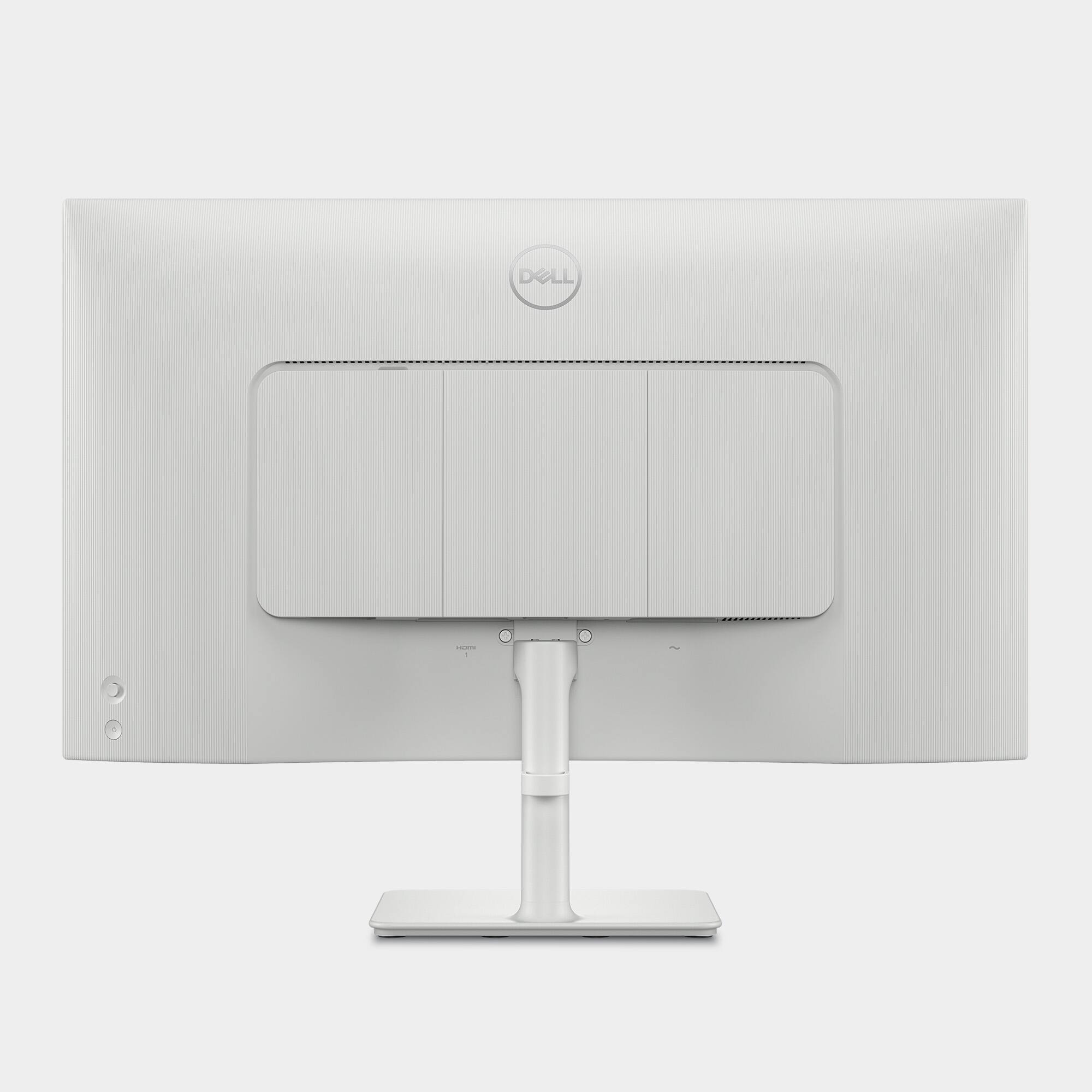
    The Dell S2725H is a 27" monitor with an ultra-thin bezel. The white color is a nice change compared to so many black/silver monitors. Set-up is easy - simply insert the upright into the back of the monitor and attach to the weighted base - no tools required. The monitor is adjustable - tilting up 21 degrees and down 5 degrees, but does not have a height adjustment. I use this with my laptop as the primary monitor and simply tilt my laptop screen down so the height adjustment wasn't a big deal. The monitor has two HDMI inputs but if you're using it with an older desktop with VGA, you'll need to purchase a VGA to HDMI adapter for a few bucks. There are removable panels that help hide cords and make for a clean look on the backside of the monitor. I was surprised that this monitor had built-in speakers since so many monitors these days do not! Even more surprising was that they sound pretty good despite being only 5 watts each. The toggle menu switch is located on the back, just above the recessed on/off button. The toggle takes you to the menu where you can adjust brightness, color, input source, volume, and audio. Adjusting the audio setting really seemed to make a difference. I could definitely tell the difference between the voice setting and the game setting. There's also a music setting so try the different settings out and choose what sounds best to you. All-in-all, this is a great monitor that won't break the bank and performs very well!

    I would recommend this to a friend
  • Rated 1 out of 5 stars

    Compatibility

    |
    |
    Posted . Owned for 3 weeks when reviewed.
    This reviewer received promo considerations or sweepstakes entry for writing a review.

    Was not compatible with HP Laptop and had to return it.

    No, I would not recommend this to a friend
  • Rated 1 out of 5 stars

    Will never purchase from BestBuy again

    |
    |
    Posted .
    This reviewer received promo considerations or sweepstakes entry for writing a review.

    I will go out of my way to never order anything from BestBuy again. I am an IT manager with many years of experience in application development, and I can tell you your website is horrible. Also, your deliver team was rude, disrespectful.

    I would recommend this to a friend
  • Pros mentioned:
    Ease of use, Sound quality
    Tech Insider Network Member

    Rated 5 out of 5 stars

    Great value for a 27" IPS Monitor

    |
    Tech Insider Network Member
    Posted .
    This reviewer received promo considerations or sweepstakes entry for writing a review.

    I work from home in the software industry and have a four-monitor setup. Three of them are 27-inch full-HD screens, and the fourth one is an older 24” that isn’t very good quality. I came across this Dell S2725H 27" IPS LED FHD monitor and liked the specs, so I ordered it. There are many great things about this monitor, and a few not so good aspects. Overall, it’s a very good value and will likely meet the needs of most people. The first thing I noticed about the monitor when unboxing it was its great looks. If you use this on a desk where others will see the monitor from behind, it looks very nice. I has removable panels that cover the VESA mount as well as the second HDMI port so it looks very clean. The base does have an integrated cable management loop, but it would have been so much nicer if it had an internal channel to totally hide the cords. That would have really added to the clean, modern looks. Speaking of the stand, it has only one adjustment, which is tilt. It does not allow for height or swivel. The height of the monitor on the stand is decent, placing the bottom edge almost four inches off the desk. I’d say at this price point, the lack of stand adjustment is acceptable. The controls are decent and easy to use. The rear-mounted joystick is easy to find and operate with a single finger. The menus are intuitive and offer a good range of settings. If you use the built-in speakers, the volume adjustment is easy to access by clicking joystick to the left. Clinking to the right brings up the sound profile selections. Clickin up or down goes straight into the brightness setting. To access the full compliment of setting, press in on the joystick button and then use the joystick navigate to the desired submenu. In terms of the audio quality, I am unimpressed. My normal audio device is 40” soundbar with a dedicated subwoofer, so the tiny speakers in the Dell S2725H sound very hollow and lack any decent bass response. They’d be fine for general office audio, like computer feedback sounds and maybe conferences, but for music, you’ll want something better. The primary use of a monitor is to produce video output, and this Dell does that very well. Out of the box, the colors, brightness and contrast are perfect and matched my other monitors. The viewing angle is very good – typical of IPS monitors. The matte anti-glare coating on the screen does an excellent job. Of course this is no gaming monitor, so it’s 8ms response time and 100mhz refresh rate are just average, but it offers plenty of performance for typical business applications and streaming video. The bezel around the top and sides formed by the plastic housing is incredibly thin, so that the overall screen border is just under ¼ of an inch which makes it look great. The bottom edge is thicker as it accommodates the Dell logo and the power light, but the screen has no border at the bottom, so it looks very uniform – just slight larger than the black area of the sides and top edge. Overall, this Dell S2725H 27" IPS LED FHD monitor is a great option. At current prices, it’s a good value and looks great on the desk. It’s performance is more than adequate for most business users and it can handle light gaming. I highly recommend this monitor.

    I would recommend this to a friend
  • Pros mentioned:
    Refresh rate, Sound quality
    Tech Insider Network Member

    Rated 5 out of 5 stars

    A feature-rich monitor for a great price

    |
    Tech Insider Network Member
    Posted .
    This reviewer received promo considerations or sweepstakes entry for writing a review.

    First impression: My first impression of the HP 524SH monitor is that it is an attractive looking, feature-rich monitor that is built well and is sturdy on its base. It has a thin border on the front, reducing distraction while viewing the monitor, and a black monitor with a contrasting white base. But a really cool feature is the texture on the back of the monitor. It is inspired by Japanese sand raking. It is cool. What’s in the Box: • 1 x Monitor • 1 x Stand riser and base • 1 x Side I/O Cover • 1 x VESA cover • 1 x Quick setup guide • 1 x HDMI Cable • 1 x Power Cable Specifications: • Display type: IPS • Diagonal Size: 27" • Aspect Ratio: 16:9 • Resolution: 1920 x 1080 • Refresh rate: 100 Hz • Response Tine: 4 ms • Contrast Ratio: 1500: 1 (typical) • Brightness: 300 cd/m2 (typical) • Color Support: 16.7 million colors • Audio: Integrated 2 x 5W speakers • Ports: 2 x HDMI (HDCP1.4) ( Supports up to FHD 1920 x 1080 100Hz • Voltage Req: 100 to 240 VAC/50 or 60 Hz @ 1.5 A • Weight: 16.11 lb Performance: This monitor is an affordable monitor but not a basic monitor by any means. The display is very bright at 300 nits, and the colors vivid without being tiring. The panel does well at eliminating glare while producing a sharp image. And the built-in speakers do a good job of producing good audio. I started with PowerPoint, making a small presentation with a video slide. The presentation looked very nice, and the video slide was smooth with good audio, The audio isn’t audiophile level, and I never expected it to be, especially coming from a thin monitor. But it was a lot better than I expected. I then did photo editing with Adobe Photoshop. Again, the monitor produced bright, clear, and accurate colors. There were no issues at all during this test. I did not do any video editing which I normally do, but based on the next test, I expect this monitor will do just fine with video editing. Finally, I tested the monitor with Real Flight flight simulator. The colors were accurate, and the graphics were smooth with the 100 Hz refresh rate. I turned all the options on, and there was no glitching, stuttering, or any evidence of stress on the monitor. With 100 Hz refresh, this monitor is good for casual and intermediate gaming. Conclusion: I really like this monitor. It’s a good all-around monitor with good image quality, color accuracy, and a wide viewing area thanks to the IPS panel. It’s 100 Hz refresh with a 4 ms response time make it good for most gaming except for competitive gamers. And I like that this monitor has 2 HDMI ports, rather than 1 HDMI and 1 DP. It’s so much easier to have one cable type rather than two. If there are 3 or more inputs, then I don’t care. But with 2, they should match. And the way the ports are arranged at the back makes it easy to route and connect the cables while keeping it clean. I really like the small border on the monitor, along with the contrasting black monitor with the white stand. Overall, I am really impressed with this monitor. It is a feature-packed monitor with a great image at a decent price. I highly recommend this monitor.

    I would recommend this to a friend
  • Pros mentioned:
    Refresh rate, Sound quality
    Tech Insider Network Member

    Rated 5 out of 5 stars

    Good Mult-Purpose Entry Monitor

    |
    Tech Insider Network Member
    Posted .
    This reviewer received promo considerations or sweepstakes entry for writing a review.

    Unboxing and Setup: Unboxing the Dell S2725H was pretty easy. I just needed to plug the included standard power cord. It is nice that Dell did not get proprietary with the power cord like other monitors that can use a smaller barrel connector. The built in cable management is nice for the Hdmi connection to my laptop however it is in the back of the monitor so I am not sure if it really was innovative but still nice to hide the cables. My experience: I found the monitor to be a good blend of content creation, gaming and media consumption. I liked that there are decent internal speakers which sound pretty full and you can hear audio from voices to bass from games/movies. I found the color accuracy very good, and I like the fact that it displays all of the sRGB color spectrum since I do use Adobe Lightroom and it made my photo editing at least more accurate. The 100hz refresh rate allowed for smooth scrolling and a overall better experience from the standard 60hz monitors. I can see a difference. However, for gaming I would want more frames since I was limited by the 100hz when gaming since my laptop can go much higher. Understandable for the price point of this monitor. I do like the white color as it seems like a cleaner looking monitor. However, I am not sure over time if that will be yellow or stay white. The monitor was just ok for brightness and since it is edge lit the contrast was just ok. Again, above average for a monitor at this price point but I was not expecting OLED quality from this screen. I also liked the additional HDMI since I was able to connect my Apple TV to this to be able to watch content when I was not using my laptop. In summary this is a very good multipurpose monitor, and I would recommend it if you do not need high frame rate gaming or need the best picture quality. I do wish they sold a bold on webcam since I still had to mount my after market and that would have made the screen more functional.

    I would recommend this to a friend
  • Pros mentioned:
    Cable management, Screen size, Sound quality
    Tech Insider Network Member

    Rated 4 out of 5 stars

    Very practical monitor !

    |
    Tech Insider Network Member
    Posted .
    This reviewer received promo considerations or sweepstakes entry for writing a review.

    I picked up this Dell 2725H as a second monitor mainly for stock tracking and watching YouTube while working, and overall it’s a solid choice. The 27-inch size is perfect—not too big, not too small. It gives me plenty of room to split the screen into halves or thirds, which I love for multitasking. I’ve usually got charts on one side, video on the other, and maybe a web browser tucked in somewhere. The full HD resolution might not be jaw-dropping in 2025, but it’s plenty sharp for what I use it for. Color-wise, I couldn’t quite get it to match the brightness and color tone of my MacBook’s display, which bugged me a little when dragging windows back and forth. It’s not a dealbreaker, especially for a secondary screen, but worth noting if you’re picky about color consistency. The built-in speakers are surprisingly decent—great for casual video watching while I’m working on my main display. And the cable management is clean, which keeps my desk less cluttered. All in all, a practical monitor that does what I need it to do.

    I would recommend this to a friend
  • Rated 1 out of 5 stars

    Low resulution

    |
    |
    Posted . Owned for 1 month when reviewed.
    This reviewer received promo considerations or sweepstakes entry for writing a review.

    I threw the box so, unable to return within 30 days. Do not buy this product.

    No, I would not recommend this to a friend
  • Pros mentioned:
    Cable management, Sound quality
    Tech Insider Network Member

    Rated 5 out of 5 stars

    Great bright monitor

    |
    Tech Insider Network Member
    Posted .
    This reviewer received promo considerations or sweepstakes entry for writing a review.

    The first thing I noticed about the Dell S2725H 27” monitor is that it has a nice small rectangular base. It's not too big, and not too small. It holds the monitor very sturdy which is what it's supposed to do. The monitor does not have the ability to go up or down. It’s at a fixed height and is able to tilt forwards a backwards. It does have a cable management bracket on the back of the base so that cables don’t get cluttered when you’re using it. There are panels that snap in place on the back to cover where the cables actually plug into the monitor, which gives it a nice clean look. I found the video to be nice and bright, but it still has dark blacks, so it has a wide range of display colors. The viewable part of the monitor is exactly 27 inches and it has a 1/4 inch bezel all the way around it. The monitor has a resolution of 1920 by 1080, and can operate at up to 100 megahertz. This is sufficient for most people. The sound is very good for coming from a monitor. I’ve listened to a lot of music on it and it all sounds wonderful. What I found interesting about the monitor was the way that you control the settings. There’s a joystick on the back of the monitor that you can use with one finger. That joystick allows you to access all of the settings for the monitor, and they have a lot of them. You can control brightness, contrast, you can choose the input source, color settings and audio settings. They also allow you to create a personalized menu and there’s other things that you can do with it as well. The joystick is a unique option over having multiple buttons to work with. I found it very easy to navigate. I really like the monitor and think that it would be a great monitor for somebody looking for this size. It’s great for a Home Office or even a business

    I would recommend this to a friend
  • Pros mentioned:
    Refresh rate, Sound quality
    Tech Insider Network Member

    Rated 5 out of 5 stars

    Perfect Work Monitor

    |
    Tech Insider Network Member
    Posted .
    This reviewer received promo considerations or sweepstakes entry for writing a review.

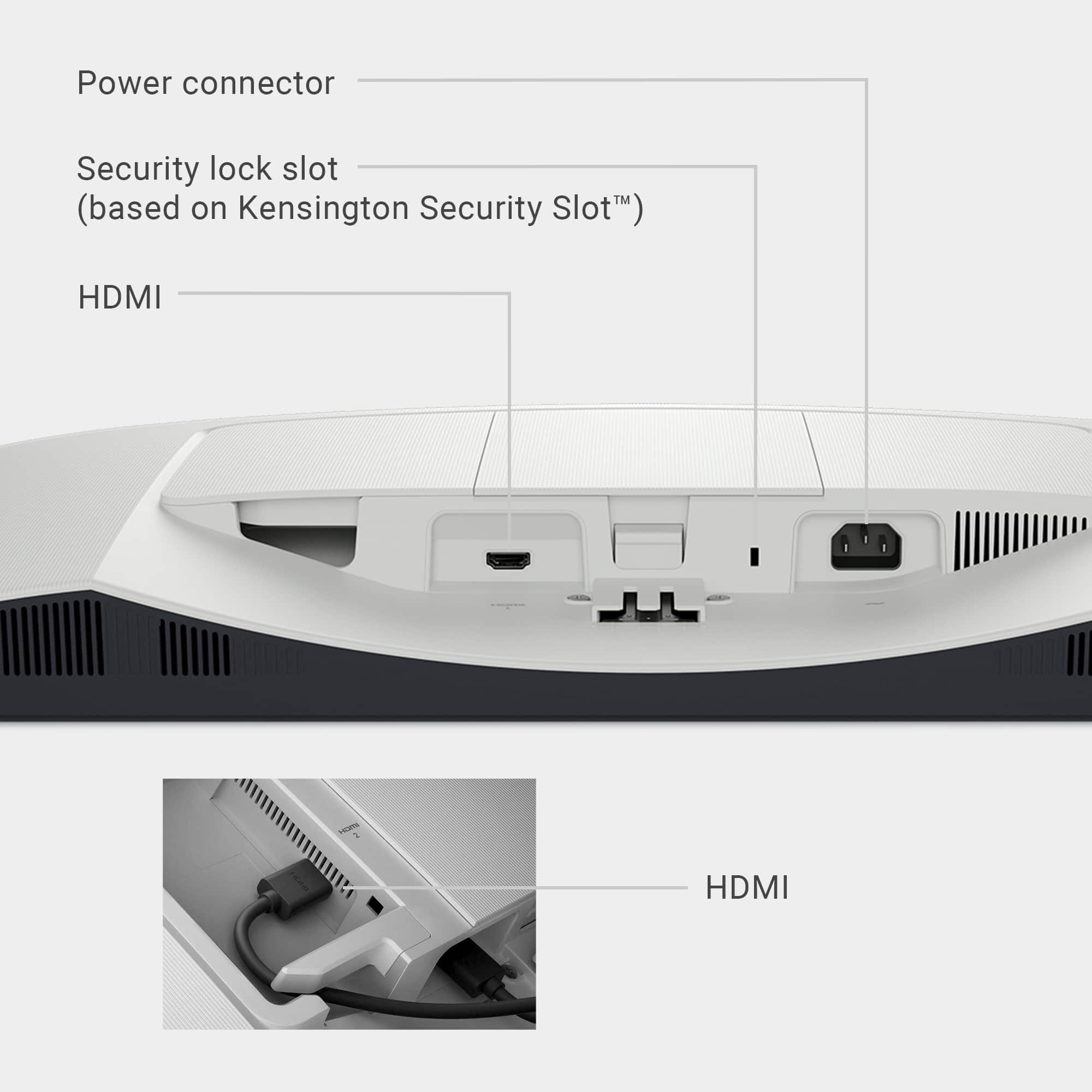
    The Dell S2725H is not a high-end gaming monitor, nor is it a basic brand low end monitor. The Dell sits perfectly in the middle and is quite happy there. Starting with the unboxing (which was almost a disaster), the box was sturdy and supported the monitor well. What it didn't do is clearly identify how to open. As I was used to TVs and larger monitors standing on the edge, I placed it on the long edge to open. Only when the entire top fell over with the monitor did I realize it was a clamshell box! Luckily for me, it was well packed and suffered no damage. The assembly was SIMPLE, with a thumbscrew at the base of the stand to attach to the monitor. The rear has three cover panels in order to hide cables and attachments. Under one of the covers is one of two HDMI inputs. The back is an off-white with a "sand-pattern" design. I don't plan on being the back very often, so that wasn't important. Along the bottom edge is the other HDMI, a security lock slot and power connection. Fully assembled and ready to go, it took me looking at the manual to figure out how to turn it on! It has the Dell eraser-type rocker controller for input selection and menus, but to turn it on and off is a little indented button below that. Other than that, the picture for this price is outstanding! Clear, 100hz refresh with 1920 by 1080 resolution allows for a great IPS display for my fruity new mini computer. No ghosting or bloom was noted and text/colors are perfectly rendered. It also has enhanced speakers with 5 watts of power which does help with sound output, but still separate speakers are necessary for me. The stand is adjustable with height and rotation available. This is not a portrait type monitor however. Need a top end gaming monitor or bargain basement basic monitor? Please move along. Need a good solid monitor with good resolution and attractive display? You can't go wrong with this very solid release from Dell!

    I would recommend this to a friend
  • Pros mentioned:
    Cable management, Sound quality
    Tech Insider Network Member

    Rated 5 out of 5 stars

    Solid performance, attractive design

    |
    Tech Insider Network Member
    Posted .
    This reviewer received promo considerations or sweepstakes entry for writing a review.

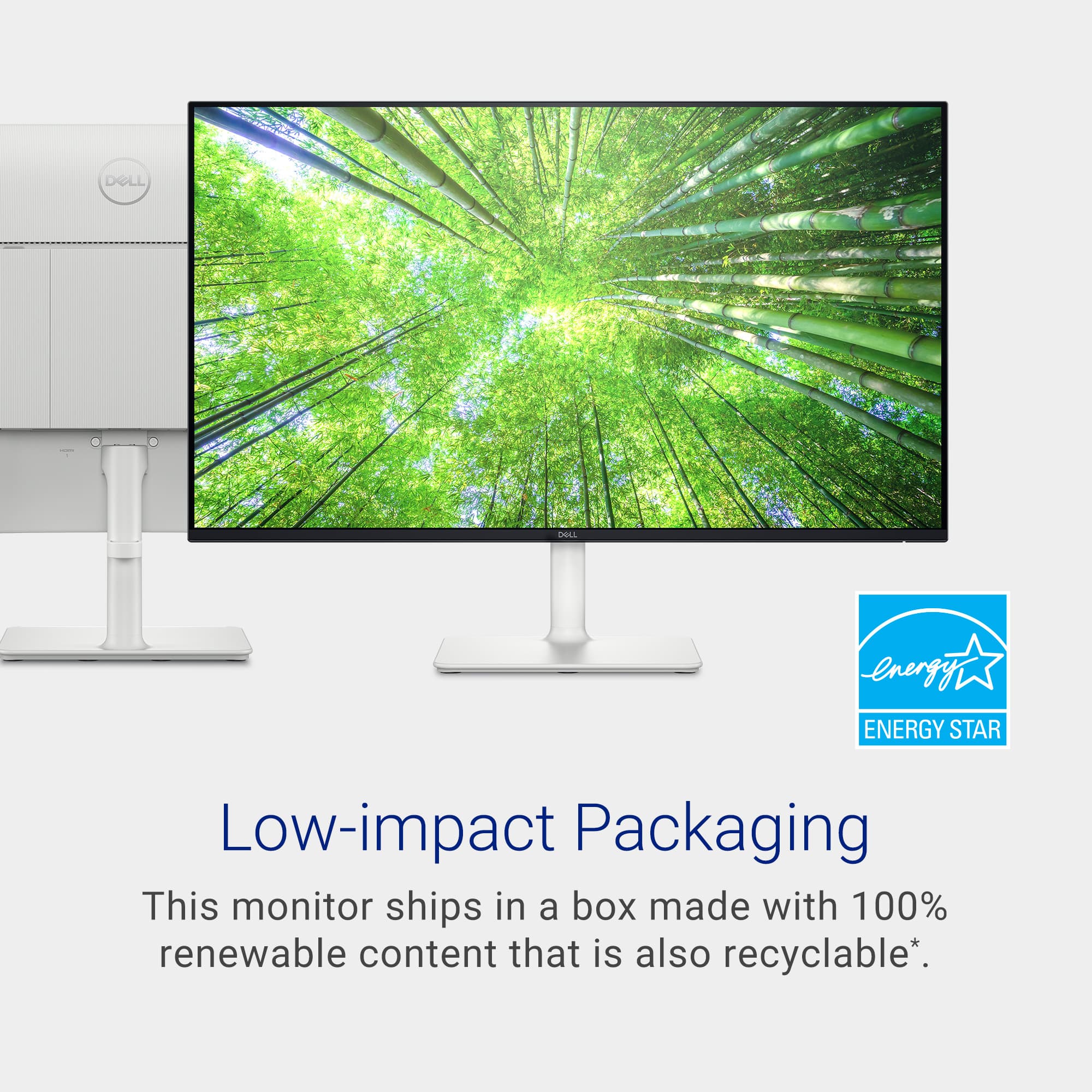
    The Dell S2725H IPS display is a solid performer at a fairly low price for a IPS display. I'm so glad that more companies are releasing displays that aren't "gamer styled" and still offer higher refresh rates than 60hz. #Unboxing# The Dell S2725H comes in a pretty standard monitor box, with mostly cardboard recyclable packaging. Included in the box are the stand (in two pieces that require no tools for assembly), the cover for the VESA mount, the cover for the extra inputs, the power cable, and an HDMI cable. The monitor has a very thin bezel and an attractive white finish on the back and on the stand. #Using the S2725H# The Dell S2725H is a pretty straightforward productivity display. It doesn't support HDR, so connecting and using it are pretty much plug and play. I did have to go into Advanced Display settings on Windows to enable the 100hz refresh rate, as it defaulted to 60hz. It doesn't support FreeSync or VRR, so while the 100hz refresh rate does benefit gaming somewhat, it isn't a gaming display first and foremost. One notable improvement on the S2725H are the speakers. For those looking to equip a workspace where sound might be needed but standalone speakers will be too loud or too bulky, the S2725H's speakers sound really good for built-in speakers. I compared the sound to a pair of 5W USB powered speakers and it was close enough that I wouldn't use extra speakers with this display. #Final thoughts# Dell knows their market for this display, and they have made a monitor which perfectly fits that market. This is a flexible, attractive, solid performing monitor for productivity where higher resolution or more inputs are unneeded. It can be either mounted or use the simple, attractive white stand, and has built-in cable management and decent 5W speakers. I'd recommend this to anyone looking for an upgraded office display but isn't wanting to go to 1440p or 4K.

    I would recommend this to a friend
  • Pros mentioned:
    Screen size, Sound quality
    Tech Insider Network Member

    Rated 5 out of 5 stars

    Budget monitor with surprising feature-rich specs

    |
    Tech Insider Network Member
    Posted .
    This reviewer received promo considerations or sweepstakes entry for writing a review.

    I decided to upgrade my 24-inch to this 27-inch monitor for my PC. Based on the price alone, this monitor provides great value and features I wouldn’t expect. First, the size is great whether I am working on spreadsheets or gaming through Xbox game pass. I personally use the ‘cloud’ feature and their max screen resolution is currently set at 1080p, so I was fine with this monitor being only 1920x1080. The picture quality looks just fine to me. I tested out a few nature YouTube videos and they look vibrant and colorful. The bonus feature of this monitor are the built-in speakers. I was not expecting them to sound so good. I have always used external left/right speakers on my PC, but I no longer need them. I did a comprehensive side by side of my standalone speakers versus the built-in speakers on the monitor. I was surprised by the quality, base, and detail I was able to hear with the Dell speakers. I will be using the monitor speakers as my go-to from now on. I only wish it had a headphone jack since I still use plug-in headphones when I am gaming and don’t want to disturb the family. Overall, I would easily recommend this to anyone needing a budget monitor with great features that you may not expect at this price point.

    I would recommend this to a friend
  • Pros mentioned:
    Sound quality
    Tech Insider Network Member

    Rated 5 out of 5 stars

    An excellent low cost monitor for everyday use

    |
    Tech Insider Network Member
    Posted .
    This reviewer received promo considerations or sweepstakes entry for writing a review.

    The monitor is quite nice to look at with a white stand and back. It makes my desk feel brighter and sunnier. The front of the screen has a black bezel, which I didn’t even find noticeable, but I wonder how using it would be with a white frame on the screen. The stand for this monitor only has front to back tilt, but there is another model for about $10 more that offers more adjustment flexibility. The rear panel also has VESA mount capability, so it went onto my monitor mount with no sweat. One wish I would have would be the inclusion of color matched cables to keep the clean look, but black cables will have to do. Connectivity is HDMI only. There are 2 HDMI ports in the standard spot on the back, and at 1080p/100Hz, there is no penalty for using HDMI over DP. I had no problems connecting to my laptop, gaming desktop, or the cable box. The HDMI connection also carries audio, and the S2725h has speakers built in! The back of the screen has the power button on the bottom right corner, very easy to find. Adjustments to monitor and picture settings are accessed via the excellent 5-way intuitive button on the back. The picture is as clean and sharp as I would expect an IPS panel to be. Dark blacks, bright whites, and vivid color is all there. I found that darker details, say in space movies or spooky video games, were not particularly well defined. I think the 27” screen size is good if you are going to be gaming a lot with this Dell, but not so great working with text heavy work. The 1080p resolution means that text and some images can appear blocky with jagged edges. This isn’t a mark against the monitor at all, just the nature of 27” FHD monitors. The 100Hz refresh rate is quite nice, but it does not make this a good choice for very fast paced gaming, as the picture does not quite keep up with the action. Casual games look great on here, Civilization VII, Minecraft, and Star Trek Online play well on this panel. As with every Dell monitor I’ve ever owned, I look forward to years of trouble free service! Recommended.

    I would recommend this to a friend
  • Pros mentioned:
    Sound quality
    Tech Insider Network Member

    Rated 5 out of 5 stars

    Typical Dell Innovation and Quality

    |
    Tech Insider Network Member
    Posted .
    This reviewer received promo considerations or sweepstakes entry for writing a review.

    For most of us, work from home full time is a thing of the past. We still get a day or 2 per week and of course when we are not in the office due to illness so a quality home monitor is a necessity I chose Dell since it is a long standing name that I can trust and the display looked appealing. The price too was in line with the lesser known brands (or unknown ones) Getting it home and unboxing was not dramatic. Packaging was sufficient to protect and not excessive to frustrate The monitor itself is actually appealing to look at. They advertise “Japanese sand casting” and it actually looks good. Not a gimmick Hooking it up is simple even for the electronic challenged. A HDMI and power cord My laptop recognized it immediately and performed a few updates First off, the color and richness of the screen surprised me. Either the one this replaced was not as good or just didn’t age gracefully, the color was much “cleaner” if that makes sense I tried out the speakers and I can see why we no longer need external ones. These sounded great Lastly, I messed with the blue light filter and found that it really made a difference. This will be a help later in the day Overall I could not be happier with this purchase

    I would recommend this to a friend
  • Tech Insider Network Member

    Rated 5 out of 5 stars

    Impressive look and vibrant colors.

    |
    Tech Insider Network Member
    Posted .
    This reviewer received promo considerations or sweepstakes entry for writing a review.

    I've had prior Dell displays, and I cannot remember one that has failed. I will upgrade for the size of the screen or for connectivity aspects. Installation for this monitor was near blindfold easy. There are two HDMI hook ups. There are two small panels that cloak some of these connections but give a nice smooth appearance to the white back. As I have not had a Dell monitor like this, I do not know how long the white will remain white instead of yellowing. I used this monitor as a second screen to a laptop and the laptop detected and adjusted for this display though I did have to change one setting from displaying 150% to 100% to increase what was seen on the display. Other than this, the overall performance was about as good as I could expect for the price that this cost. Viewed in conjunction with the Dell quality, this monitor should give many years of service for the average user. Viewing angles were good viewing movies and animations looked good as well with no dead pixels.

    I would recommend this to a friend
Sponsored