Customer Ratings & Reviews
- Model:
- B11B258201
- SKU:
- 6442937
Rating by feature
- Value
Rating 4.5 out of 5 stars
- Quality
Rating 4.7 out of 5 stars
- Ease of Use
Rating 4.6 out of 5 stars
Customers are saying
Customers frequently mention the WorkForce ES-580W Wireless Duplex Touchscreen Desktop Document Scanner's impressive scan speed and ease of use. The overall performance and touchscreen are also well-received. However, some customers have expressed concerns regarding the price, occasional jamming, and paper handling.
This summary was generated by AI based on customer reviews.
- Pros mentioned:Ease of use, Overall performance, Scan speed
Great Quality and Reliable
Posted .This reviewer received promo considerations or sweepstakes entry for writing a review.This is a quality scanner and it is very easy to use. It was easy to set up and it works fast. The wireless touchscreen allows me to scan documents and photos easily from my smartphone, tablet or computer. I am very pleased with this scanner as I find it to be very reliable and saves time. "This is a review for the Epson Workforce ES-580W Wireless Duplex Touchscreen that I received free of charge to do a beta test and review."
I would recommend this to a friend Iffy Wireless Mode
||Posted . Owned for 3 weeks when reviewed.This reviewer received promo considerations or sweepstakes entry for writing a review.Wireless mode does not work very well with my HP desktop
No, I would not recommend this to a friendBrand response from Epson
Posted .Hello LloydfC, we appreciate your feedback on the ES-580W scanner. Epson considers all feedback to improve the performance and quality of our products. Epson also provides helpful information on FAQs and self-help tools on the product support web page at https://epson.com/Support/Scanners/ES-Series/Epson-WorkForce-ES-580W/s/SPT_B11B258201#questions. Your scanner also includes a 1-year Limited Warranty plus free lifetime technical support. Please contact our support team at (562) 276-4382 between 7 am - 4 pm (PT), Monday - Friday, if you need further assistance.
Sincerely, Sam - The Epson Team
- Pros mentioned:Ease of use, Scan speed, TouchscreenCons mentioned:Jamming
Great Desktop Scanner with a few hiccups.
Posted .This reviewer received promo considerations or sweepstakes entry for writing a review.I am very happy with this scanner for the most part. The ES-580W is fairly simple to setup with only minor assembly. It comes with a USB cable so that you can get going right away, however this did not seem to work with my pc as it would not read the drivers at all. Wirelessly however it connected right away after installing the software and has not let me down since. The scans are very high resolution and it scans quickly. I love that it has an auto feeder and scans double sided without flipping the page. I ran into an issue when scanning my ID however as it kept jamming in the scanner. After some research I found that there is a certain button you have to press so that it doesn't jam. This would have been helpful to note in the setup to avoid issues. The touch screen is the most helpful of all it's features. The large screen size makes it easy to see and makes scanning much quicker without the need of using my pc. This is a review for the Epson WorkForce ES-580W Wireless Duplex Touchscreen Scanner that I received free of charge to do a beta test and review.
I would recommend this to a friend unreliable
||Posted . Owned for 4 months when reviewed.This reviewer received promo considerations or sweepstakes entry for writing a review.I have always had an Epson scanner. The last one for about 10 years. This ES-580W is not good. The first ES-580W I purchased would scan sometimes and others not. I took it back and got another. Now this one runs the paper though and says paper jam. I will have to take it back but will not get another ES-580W.
No, I would not recommend this to a friendBrand response from Epson
Posted .Hi MartinH, we apologize that you are having issues with your scanner. Your Epson WorkForce ES-580W includes free technical support for the life of your product. Our Epson Support Team would be happy to help and can be reached at (562) 276-4382 between 7 am - 4 pm (PT), Monday - Friday. Sincerely, Tony – The Epson Team.
Terrible Scanner
||Posted . Owned for 1 month when reviewed.This reviewer received promo considerations or sweepstakes entry for writing a review.This is quite honestly the worst scanner I have ever owned. It is slow, it loses the wifi connection repeatedly, and I can't get through a 30 page document no matter what I try. Epson is no help as no one picks up. I think next time, I'll go with another brand.
No, I would not recommend this to a friendBrand response from Epson
Posted .Hello Bruce, we apologize for the disappointing experience you’ve encountered with your Epson scanner's wireless connection. Your ES-580W includes free technical support for the life of your product. Please call and let our Epson Support Team assist. Our support number is (562) 276-4382. Our support hours of operation are Monday – Friday, 7 a.m. to 4 p.m. (PT). We’re here to help. Sincerely, Joseph – The Epson Team.
- Pros mentioned:Scan speed, Touchscreen
Love This
Posted .This reviewer received promo considerations or sweepstakes entry for writing a review.First I would like to say I am excited about this scanner! I have never used one that can scan multiple documents at once even front and back. It makes my life a whole lot easier. The touchscreen is very simple to understand and use. Also the the fact that it’s wireless no need for all them cords everywhere. It did not take me long to set up and understand all the features. This device is so wonderful to have in my home for work and personal use. The speed is awesome and connects to my WiFi quick which is a plus. Duplex is in full color and is so fast. I love this product! And would highly recommend this. This is a review for the Epson WorkForce ES-580W Wireless Duplex Touchscreen Scanner that I received free of charge to do a beta test and review
I would recommend this to a friend - Pros mentioned:Ease of use, Scan speed, Touchscreen

Hugely improved, excellent all around scanner!
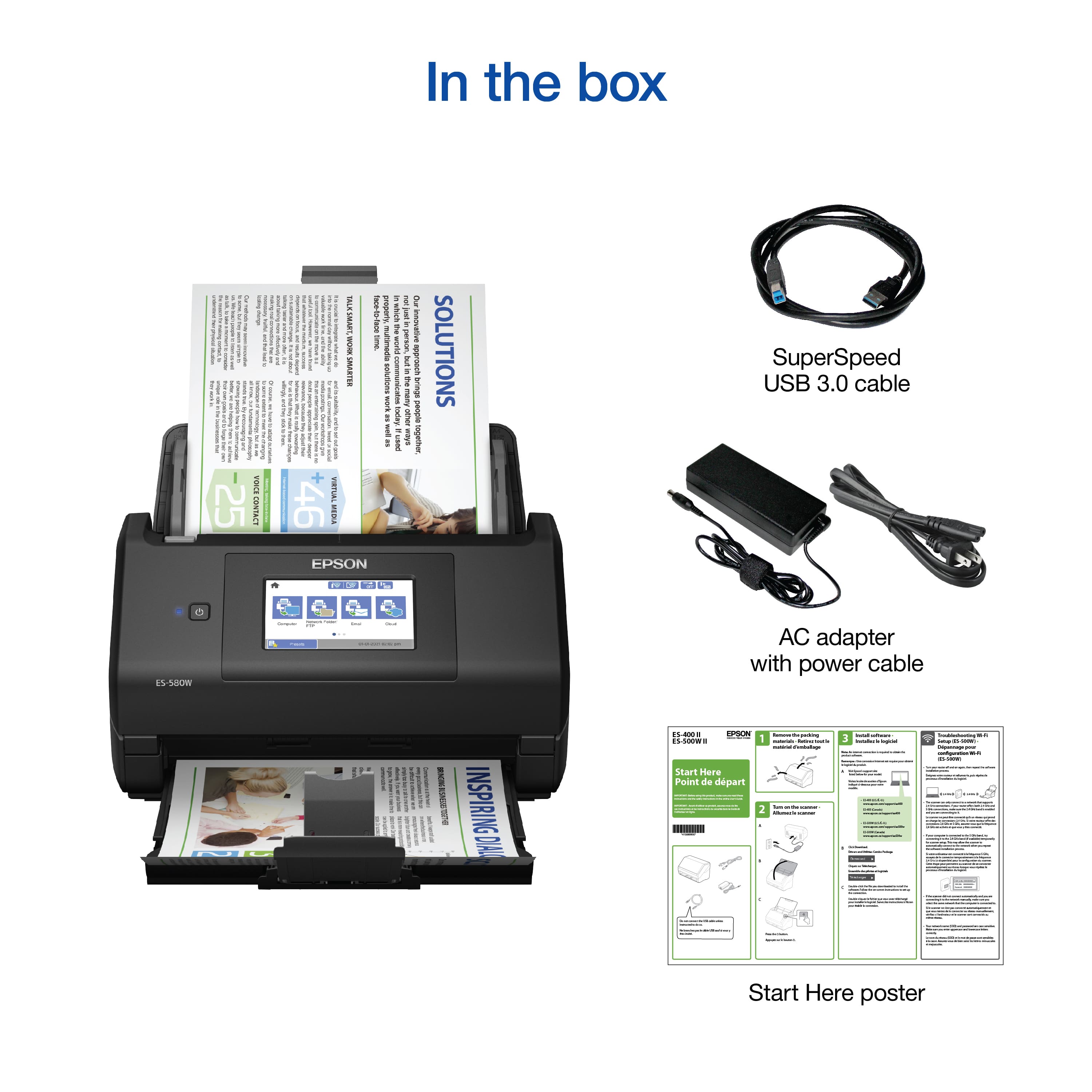
|Posted .This reviewer received promo considerations or sweepstakes entry for writing a review.The struggle to easily, correctly, and without frustration scan multipage documents has finally be solved! This scanner blows away every other scanner I’ve come across or used in my entire life, and that says a lot considering I do IT work for my day job. Opening up the box you'll find the scanner, power cord and adapter, and a USB cable for direct connecting to your computer. Initial set up was very easy, I chose to join over Wi-Fi instead of direct with the USB so the unit was more portable. I initially tested without installing the Epson scan smart software, but you do really need to utilize the software suite for full functionality. If you're only looking to scan things to a USB drive, a network folder, or a cloud service, you don't have to install the software on your computer. It really depends on what you're looking to utilize the scanner for. The touchscreen makes the device extremely user friendly to use and the feedback is appreciated. Using a scanner that doesn’t allow you to control any settings right on the scanner is very frustrating, especially when something goes wrong. There are a ton of settings you can tweak ranging from skipping blank pages, ultrasonic double feed detection, automatic skew correction, and more! The amount of tiny features integrated into this scanner solely to improve your experience and save you time is tremendously appreciated. Upon actually testing the scanning capability of this scanner, I was throughly impressed. The speed at which this device can scan double sided with complete accuracy really blew me away! I scanned most things at 200dpi which is solid quality while still scanning at a crazy speed. Even when you maxed out the quality to 600dpi and scanned things like pictures, the unit just sucks things through and gets the job done very quickly. I thoroughly tested all the scenarios and issues I could think of. I scanned odd sizes of things, some flimsy crooked things, pages that were stuck together, multipage documents with blank pages in between things, and the scanner handled everything like a champ and caught or fixed the issues I supplied. This scanner really is the best scanner I’ve ever used. If you’re someone who spends a lot of their day scanning documents, digitizing their paper world, scanning receipts, scanning multipage bank statements, etc, you won’t be disappointed at how much this scanner has to offer in such a compact and affordable package. Epson has really knocked it out of the park with this model, they really stepped up their game and have figured out how to build a scanner made to make your day simply easier.
I would recommend this to a friend Wireless is faulty
||Posted . Owned for less than 1 week when reviewed.This reviewer received promo considerations or sweepstakes entry for writing a review.We had nothing but trouble with the wireless connection. It errors out due to weak signal and losses the settings (password) so we had to go through the setup several times. I have a quality mesh network and almost 50 devices in my home, so I doubt it was user error... I Setup a Wyze lock on the same day with out issue. Learn from Wyze Epson :)
No, I would not recommend this to a friendBrand response from Epson
Posted .Hello saskatoonster, we appreciate your feedback on the Epson ES-580W scanner. Epson considers all feedback to improve the performance and quality of our products. Epson also provides helpful information on FAQs and self-help tools on the product support web page at https://epson.com/Support/Scanners/ES-Series/Epson-WorkForce-ES-580W/s/SPT_B11B258201#questions. Additionally, your scanner includes a 1-year Limited Warranty plus free lifetime technical support. Please get in touch with our support team directly at (562) 276-4382 between 7 am - 4 pm (PT), Monday - Friday, if you need further assistance.
Sincerely, Sam - The Epson Team
Wifi Connectivity Poor
||Posted . Owned for less than 1 week when reviewed.This reviewer received promo considerations or sweepstakes entry for writing a review.The scanner works great when it’s connected via USB cable, but worthless when trying to connect via WiFi. Also, customer service terrible.
No, I would not recommend this to a friendBrand response from Epson
Posted .Hello mcorf, we apologize for the disappointing experience you’ve encountered with your Epson scanner's wireless connection. Your WorkForce ES-580W includes free technical support for the life of your product. Please call our Epson Support Team and ask for advanced support. Our support number is (562) 276-4382. Our support hours of operation are Monday – Friday, 7 a.m. to 4 p.m. (PT). We’re here to help. Sincerely, Dylan – The Epson Team.
Connection issues with Windows 11
||Posted . Owned for 1 week when reviewed.This reviewer received promo considerations or sweepstakes entry for writing a review.Terrible machine for Windows 11. Spent 8-10 hours trying to get this machine to be scene on my computer. Never had any issues with any other brand of printer/scanner. Geek Squad was terrible, got disconnected twice, and then after spending an hour and a with a remote session they gave up too. Returning ASAP
No, I would not recommend this to a friend- Pros mentioned:Scan speed, Touchscreen
So awesome and easy!!!
Posted .This reviewer received promo considerations or sweepstakes entry for writing a review.Hello I have used this for a couple weeks and let me tell you this product saved my life and sanity! I’m a single mom of four amazing kids and when I need to quickly scan something for E Learning, it does the job! I also have my own business and I used it A Lot and it never disappointed me not one bit. It also has wireless/duplex/touchscreen capability which is so easy. I would most definitely buy one. Also, the fact that you can basically do everything from your phone is such a major plus! This is a review for the Epson WorkForce ES-580W Wireless Duplex Touchscreen Scanner that I received free of charge to do a beta test and review.
I would recommend this to a friend #2
||Posted . Owned for less than 1 week when reviewed.This reviewer received promo considerations or sweepstakes entry for writing a review.I am just starting to figure it all out. So far its better then the first scanner i tryed. I can connect to wifi and scan from computer app but trying to save it after scanner it doesnt give a destination file only share. I will update when i figure out more.
I would recommend this to a friendEpson service
||Posted . Owned for 1 year when reviewed.This reviewer received promo considerations or sweepstakes entry for writing a review.Good product until there is a problem. The Service from EPSON is terrible. I will not recommend it
No, I would not recommend this to a friendBrand response from Epson
Posted .Hello Albatros, we are sorry to hear that we were not able to resolve this issue. For further assistance, please contact Epson Support and include your name and support ticket number, if available. Ask to be escalated to our Epson Advanced Support Team. Please call (562) 276-4382; Hours: Monday – Friday, 7 a.m. to 4 p.m. (PT). Thank you for your patience. Sincerely, Dylan – The Epson Team.
Great product
||Posted . Owned for 1 month when reviewed.This reviewer received promo considerations or sweepstakes entry for writing a review.Works great, but if they’re sticky notes on paper that you’re trying to scan, it doesn’t scan them only drawback.
I would recommend this to a friend- Pros mentioned:Scan speed, Size, Touchscreen
Powerful, compact for 1 user, software needs work
|Posted .This reviewer received promo considerations or sweepstakes entry for writing a review.. Before the pandemic we had a slow, limited capacity, document scanner good enough for the occasional use at home. When home became the office, it was time to upgrade to the Epson - WorkForce ES-580W Wireless Duplex Touchscreen Desktop Document Scanner. Set up was easy when I used USB to connect directly to my computer, not so easy when I wanted to enable the WIFI option that required separate software. But once set up, I was impressed with how easily it scanned black and white documents even adjusting for paper size. Not so well with color pictures where I found myself having to use the software to tweak quite often. Unfortunately, color was mission critical to my work. The touch screen was actually big enough to be usable. And who doesn’t like 100 pages at a time? Another thing that impressed me, was that it handled paper jams well. This may seem strange to be impressed by, but the jams were my fault due to missed staples. Easy to fix. Pros -Black and white scanning is very fast even in duplex (does both sides as the same time). -Great for twain scanning directly into my documents. -Great document feeder capable of more than 100 pages at a time, and multiple scan sessions can be combined easily into one file. Technology has come a long way here. -Large, usable touch screen. -Compact, fits on desk nicely. Cons -Figuring out the software can be a pain if you want to do anything that isn’t standard. For example, adjusting contrast and saturation for color photos is a pain. -WIFI is slow and requires separate software that is not as functional. -WIFI supports only 1 computer. -Setting up to scan to the cloud directly is a pain and requires a computer. Tip: Save yourself some frustration, yes, it is WIFI capable, but hard wire it in for best speed, flexibility, and ease of use. This really means it is best when used with only one computer. And skip the included software and use Adobe Acrobat if you can. Bottom Line: If you can live with the limitation of linking it to one computer for maximum use, it’s a good value. It would be 5 stars if they put more effort into their software.
I would recommend this to a friend Wireless connection inconsistent
||Posted . Owned for 3 weeks when reviewed.This reviewer received promo considerations or sweepstakes entry for writing a review.Wireless connections keeps dropping, I ended up using the cable to connect with desktop ! ...seriously considering returning it !
No, I would not recommend this to a friendBrand response from Epson
Posted .Hi LuisT, we are sorry to hear that you are having issues with the wireless setup for your Epson WorkForce ES-580W. In order to perform the wireless setup, you may follow the steps in this document: https://epson.com/Support/Scanners/ES-Series/Epson-WorkForce-ES-580W/s/SPT_B11B258201#questions. If this does not resolve the problem, please contact Epson Support at (562) 276-4300; Hours: Monday – Friday, 7am – 4pm PT. Sincerely, Tony – The Epson Team.
Still in question
||Posted . Owned for 3 weeks when reviewed.This reviewer received promo considerations or sweepstakes entry for writing a review.Can't get Epson software to work. Geek squad only got Windows Scan working properly.
No, I would not recommend this to a friendBrand response from Epson
Posted .Hi Elizabeth, thank you for your feedback. We are sorry to hear that you are having issues with the software for your Epson WorkForce ES-580W. If the issue continues, please contact Epson Support at (562) 276-4382; Hours: Monday – Friday, 7 a.m. to 4 p.m. (PT). Sincerely, Dylan – The Epson Team.
frustration, no help. Buyer Beware
||Posted . Owned for 2 months when reviewed.This reviewer received promo considerations or sweepstakes entry for writing a review.disconnects every day and you have to reinstall it. We've struggled with it for 2 months, paid an IT pro to look at it, and the response is a hardware problem with the scanner. Best Buy won't let us return it after the first 2 weeks! BUYER BEWARE
No, I would not recommend this to a friendBrand response from Epson
Posted .Hello scannerbuy; we apologize for your disappointing experience with your Epson WorkForce ES-580W. Your Scanner includes free technical support for the life of your product. Don't hesitate to contact our support team directly at (562) 276-4382 between 7 am - 4 pm (PT), Monday - Friday, if you need further assistance. Sincerely, Tony - The Epson Team
Document Scanner Epson
||Posted . Owned for 1 month when reviewed.This reviewer received promo considerations or sweepstakes entry for writing a review.I have not been able to use the Scanner. The information provided by store employee was very useful in purchasing the item.
I would recommend this to a friendWorks great
||Posted . Owned for 2 weeks when reviewed.This reviewer received promo considerations or sweepstakes entry for writing a review.Works great this is the third one we bought would buy again
I would recommend this to a friend