Customer Ratings & Reviews
- Model:
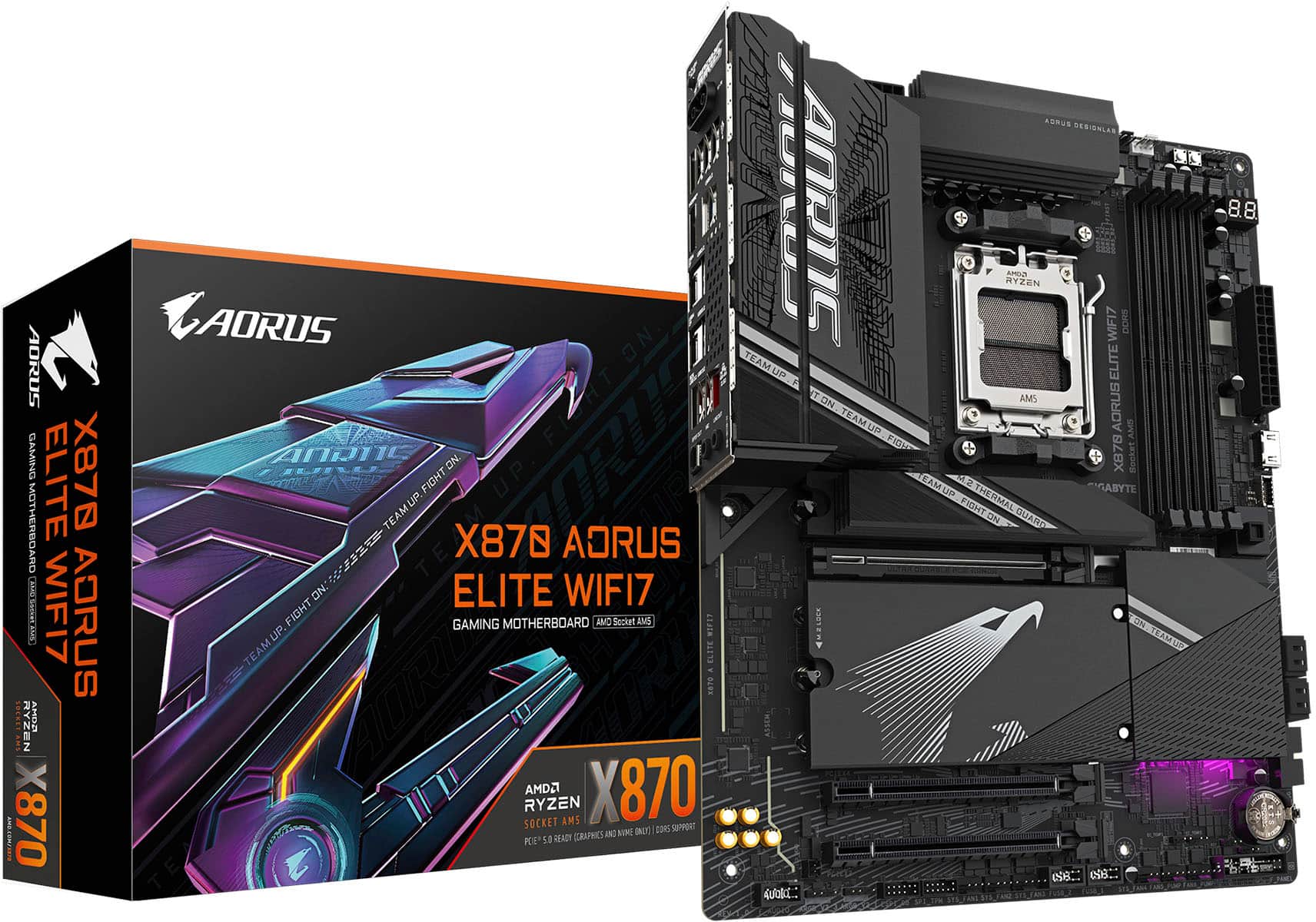
- X870 AORUS ELITE WIFI7
- SKU:
- 6602645
Rating by feature
- Value
Rating 4.6 out of 5 stars
- Quality
Rating 4.8 out of 5 stars
- Ease of Use
Rating 4.7 out of 5 stars
Customers are saying
Customers frequently mention the excellent overall performance of the product, noting that it works flawlessly. They highly value the extensive connectivity options, particularly the Wi-Fi 7 support, and find the BIOS easy to update and the installation process straightforward. The product is also praised for its general ease of use, effective heat dissipation, and ample storage capacity with multiple M.2 slots.
This summary was generated by AI based on customer reviews.
Solid board
||Posted .This reviewer received promo considerations or sweepstakes entry for writing a review.Excellent rear IO, easy to build with. Looks sleak.
I would recommend this to a friendGood product.
||Posted .This reviewer received promo considerations or sweepstakes entry for writing a review.Everything I needed and more with room for expansion.
I would recommend this to a friendmeh
||Posted . Owned for 1 week when reviewed.This reviewer received promo considerations or sweepstakes entry for writing a review.Great board has a lot of features don't mind the lane splitting
No, I would not recommend this to a friendNew gigabyte fan
||Posted . Owned for less than 1 week when reviewed.This reviewer received promo considerations or sweepstakes entry for writing a review.A hefty motherboard compared to my asus strix b550-f So far running my 9800x3d great. And way better software for rgb on gigabytes end. Never going back to asus so they can suck it!!!
I would recommend this to a friendgreat budget board
||Posted .This reviewer received promo considerations or sweepstakes entry for writing a review.great budget board for 9800x3d! have 0 issues with 64gb of 6000 mhz ram, 9800x3d, 4080.
I would recommend this to a friendWorthwhile Upgrade
||Posted . Owned for 3 weeks when reviewed.This reviewer received promo considerations or sweepstakes entry for writing a review.One of the best motherboards I've ever used, upgraded from the Elite AX and it's a lot more stable.
I would recommend this to a friend- Pros mentioned:Connectivity, Installation, Overall performance

Can't go wrong with this AMD (AM5) motherboard!
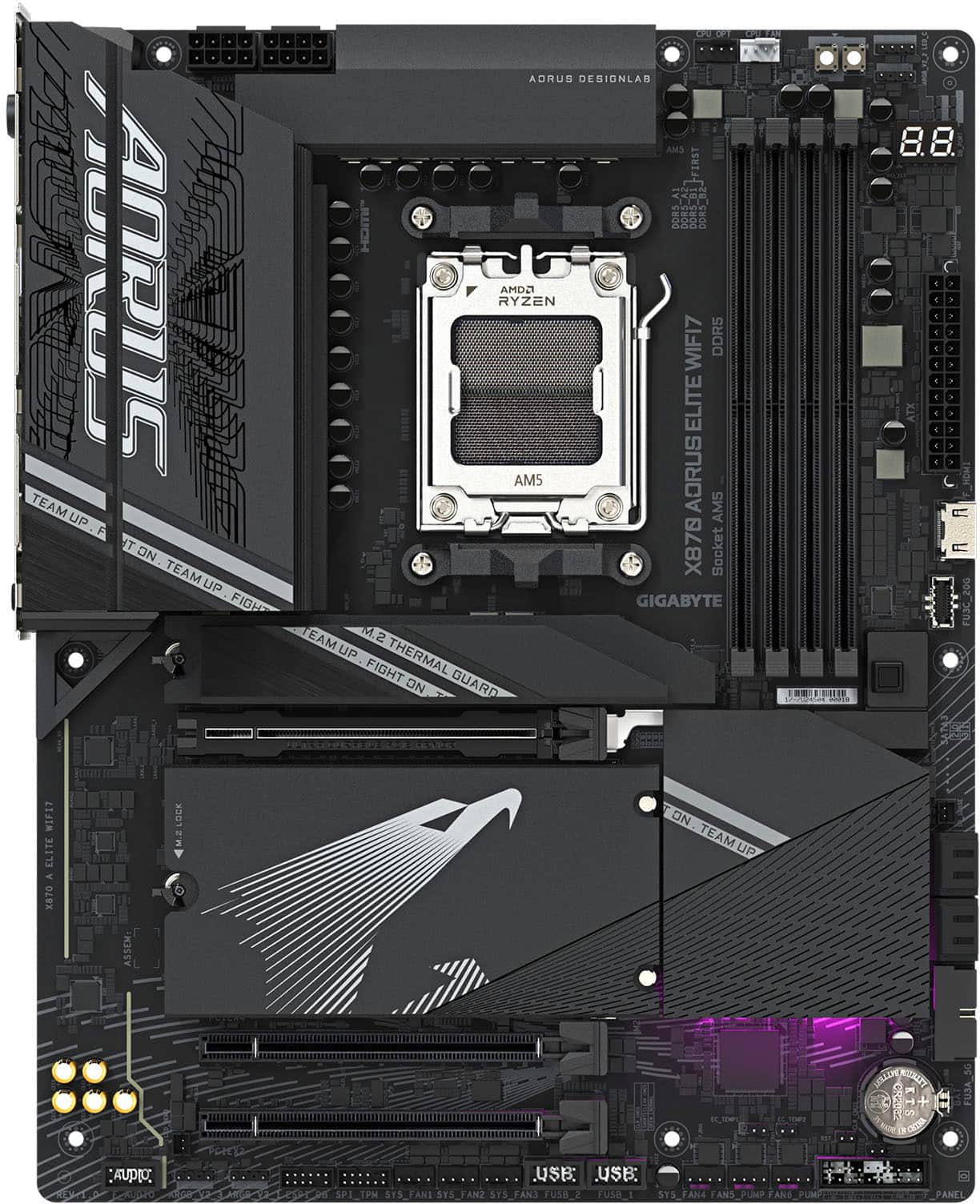
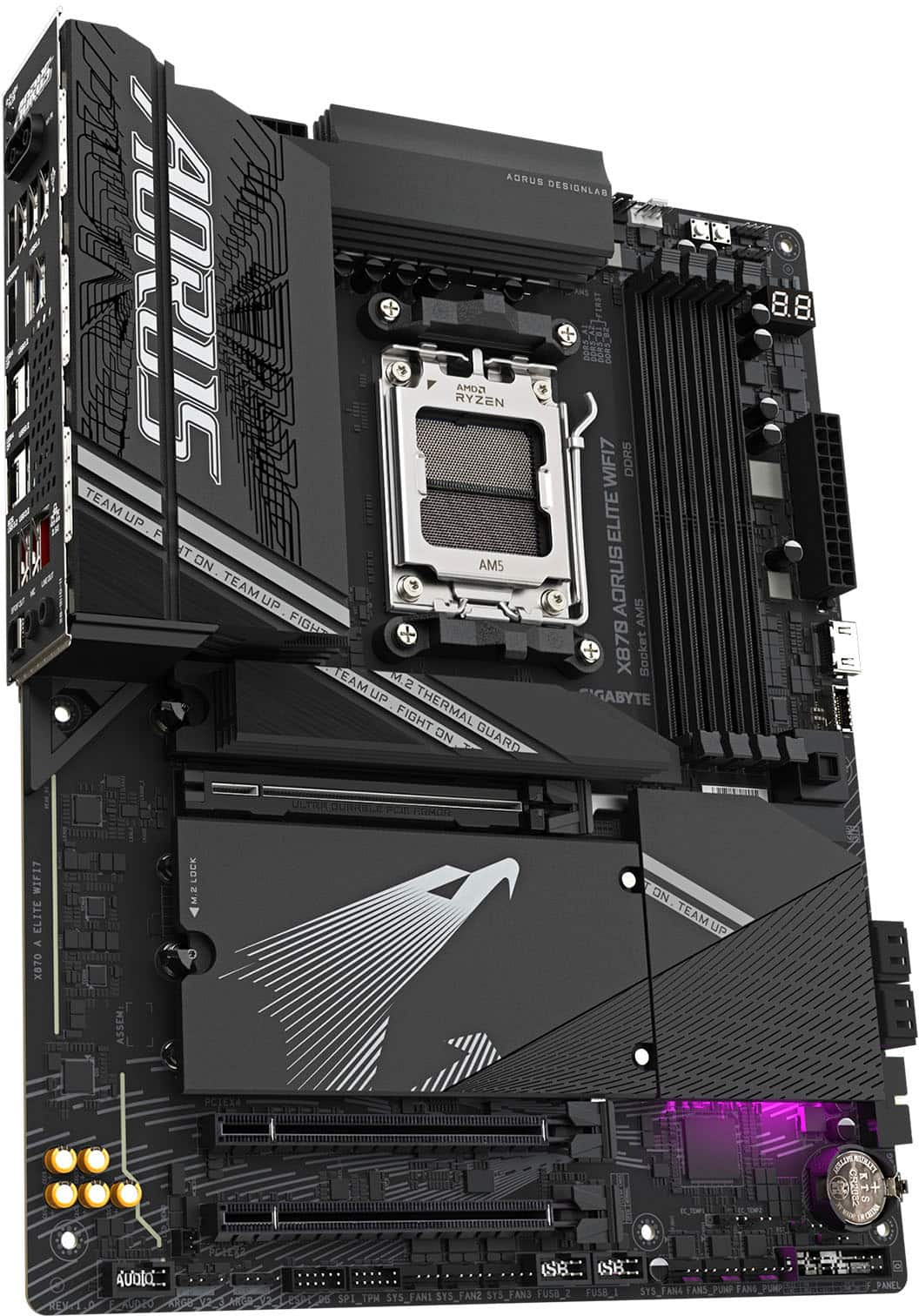
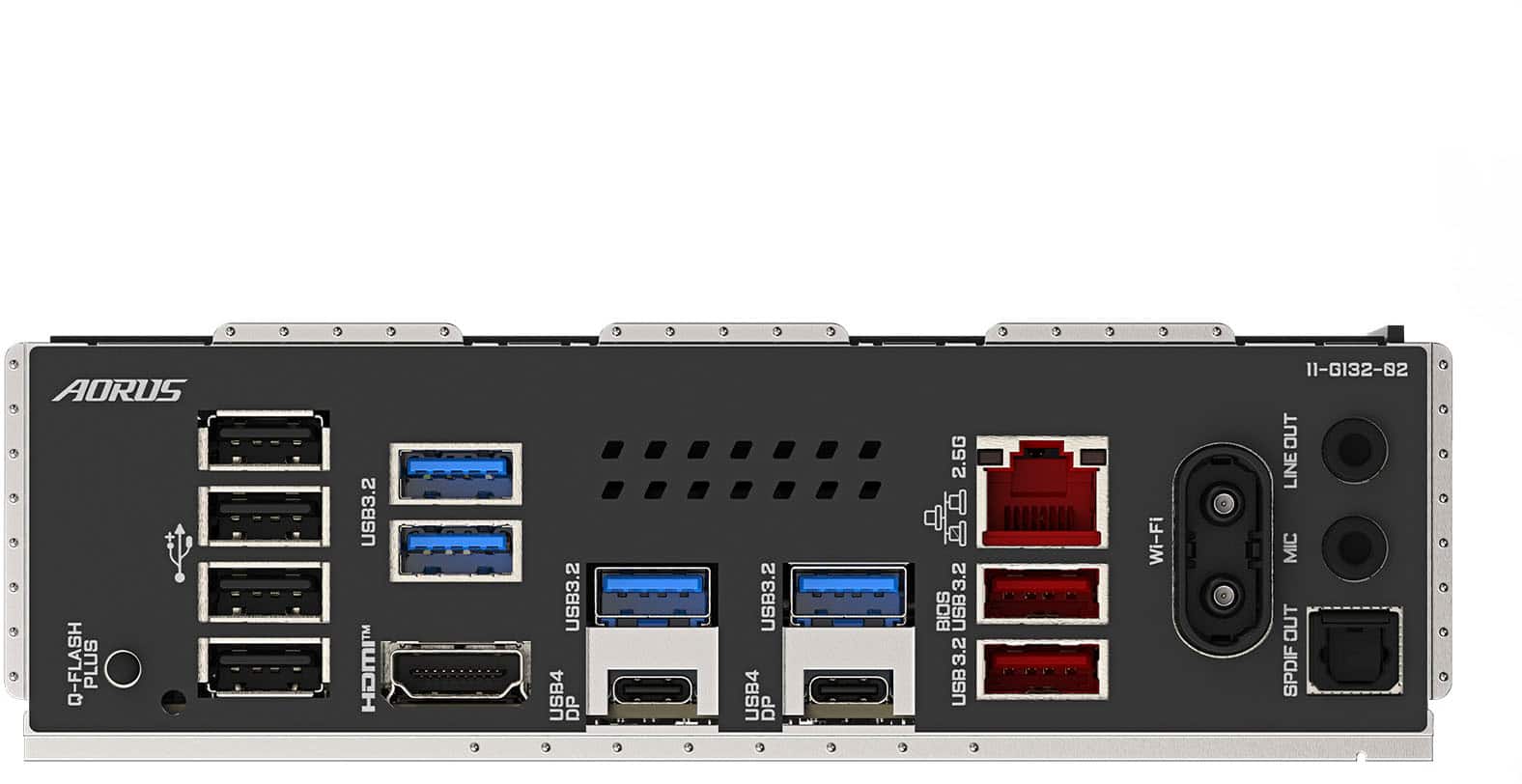
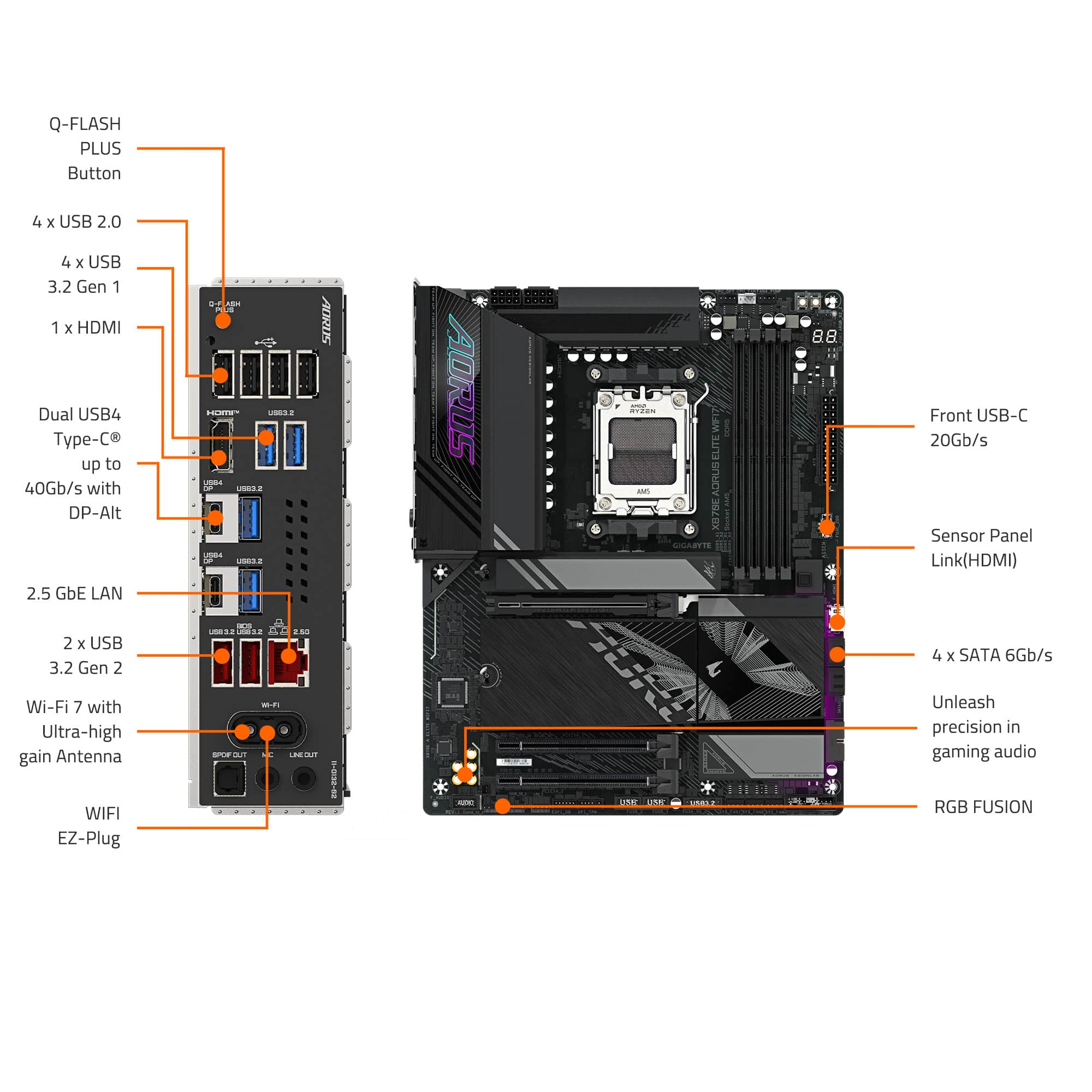
|Posted .This reviewer received promo considerations or sweepstakes entry for writing a review.After doing a partial upgrade of my son's gaming system over the recent holidays, he decided that it was time to finally finish the upgrade of the core components that were still left over to really get the playing experience he wanted: CPU, GPU. With the new CPU, that also required a new motherboard. While I have used many different motherboard brands over the last 30+ years of building computers with a couple of brands as my favorites, I never took the opportunity to use one from Gigabyte. While you can't really go wrong with most of the top brands, looking over the specs and features (and the looks) of the latest from Gigabytes AORUS line, the X870 AORUS ELITE WIFI 7 for AMD (AM5) CPUs, we decided this should work great! When I first opened the box and got the motherboard out, I was a little surprised by the weight. Yes, it is a full ATX (be aware of that to make sure it would fit in your case), but that wouldn't add too much more weight. The extra bulk comes from all the extra heat dissipation added throughout. Most entry level motherboards will only have a heatsink for the main NVMe drive, this also comes with a full plate that covers all 3 of the extra M.2 slots (and that plate wasn't light), which impressed me. Not only is the motherboard hefty in weight, but it is also designed with some extra reinforcement for the PCIe 5.0 x16 slot, with support on top on both sides of the slot, as well as a support plate on the bottom side the full length of the slot, to be able to handle any-sized GPU. There are 3 PCIe slots: the 5.0 x16, a 4.0 x4 and a 3.0 x2. Note: the Gen 5 Slots 2 and 3 will share bandwidth with the 5.0 PCIe slot and if using the Gen 4 M.2 slot, it shares bandwidth with the 4.0 x4 slot. So, it is possible that if you have a second NVMe drive that is not Gen 5, using the Gen 4 M.2 slot may allow things to work better with it not sharing the bandwidth with the GPU in the PCIe 5.0 slot. For the M.2 slots, there are 3x Gen 5 slots (1 is near the CPU for the main drive) and a Gen 4 slot. One thing I liked over some of the previous motherboards I've used recently is that everything is screwless as it uses their EZ-latches for the drives as well as the heatsinks. Oh, and be aware that there is one of the mounting screw holes this is only accessible when the main drive heatsink is removed. For networking, the wired LAN is 2.5GbE and wireless uses Wi-Fi 7. While it will only use the wired LAN connection, I did give the Wi-Fi 7 a try as we've had a Wi-Fi 7 capable router for a couple of years, but no devices. I liked the easy plug-in for the antenna compared to the screw-on connections from the previous motherboard. Unfortunately, there are too many walls between the computer and the router, so it wasn't able to get the best connection and speed, only connecting via 5Ghz instead of 5Ghz/6Ghz combined and only getting 460Mbps download (vs 960Mbps wired with our 1Gbps fiber service). The back I/O panel has plenty of USB ports, with 6x 3.2 Type-A, 4x 2.0 Type-A, and 2x USB4 Type-C which both will also serve as DisplayPort 1.4 if using built-in graphics. It mentions that those ports will support up to 4K at 240Hz with HDR. There is also an HDMI 2.1 (along with an extra HDMI 1.4 port near the front of the mother board to connect to a front case panel HDMI or to use a Sensor Panel (if viewing details in software isn't enough). If using internal graphics, it can support up to4 displays, of course depending on the CPU. The Audio ports are reduced to just a Mic In, Line Out and S/PDIF Out (since most are probably using USB or Bluetooth headsets). After getting the motherboard installed, along with a new AMD Ryzen 9 9900x CPU, a new Gigabyte GeForce RTX 5060 Ti 16GB GPU, and new set of 32GB DDR5 6000 RAM, getting everything set up was fairly easy. On the first boot, it did mention something about needing to reset the TPM/vTPM (since this was using a previous installation of Windows 11). If you come across this as well, be aware and follow the instructions shown if the drives are using BitLocker or any other drive encryption. Then, after getting used to the BIOS menu setup, we set the XMP profile for the memory (leaving the related settings at Auto), verified the boot device along with all the other settings, then Save & Exit. It booted into Windows fine the first time. After running Windows Update and rebooting, the second time it prompted to install the Gigabyte Control Center. This app manages many things, including the installation of all the motherboard related drivers (which the first item is Norton Internet Security, so be aware of that an deselect if you prefer not to have that installed, along with any of the other items listed), RGB Lighting controls (which this motherboard has 3 ARGB headers to connect to, which our previous motherboard had none available since it was a pre-built brand system that didn't need them which caused some issues with all the new RGB fans that were installed with the initial upgrade and forced some creative engineering), Fan speed controls, and the custom tweaking of the CPUs setup. As we're comfortable with the default settings for everything, we didn't (and never plan to) do any overclocking for any component. Overall, with all the new, much faster components all tied into this motherboard, we are very pleased with the results. Comparing benchmarks with the previous system, the final upgrade was definitely what my son was looking for. And after running some of the games, there is no doubt this full setup is now just right. If you are ready for a full ATX motherboard, with support and about as much heat dissipation as can be had, this is definitely a motherboard that should be in contention for your build/upgrade!
I would recommend this to a friend Great buy
||Posted . Owned for 1 month when reviewed.This reviewer received promo considerations or sweepstakes entry for writing a review.Upgraded for previous gen and this blows it away. They made it pretty easy to add and upgrade on this board.
I would recommend this to a friendGreat mobo
||Posted . Owned for 2 weeks when reviewed.This reviewer received promo considerations or sweepstakes entry for writing a review.Comes with pcie 5 and am5 with good heat syncs now issues and for x870 definitely good price
I would recommend this to a friendGreat Motherboard
||Posted .This reviewer received promo considerations or sweepstakes entry for writing a review.Amazing motherboard, nice black color, easy cpu and especially m.2s installation,
I would recommend this to a friendEasy
||Posted . Owned for 2 weeks when reviewed.This reviewer received promo considerations or sweepstakes entry for writing a review.Very easy to install, easy to download drivers, its a quality motherboard.
I would recommend this to a friendVery Poor Packaging
||Posted .This reviewer received promo considerations or sweepstakes entry for writing a review.The package and box containing the item came damaged with tears and holes. Since this is a computer part, I was concerned that the electronic itself may be damaged as well so ended up returning it. They accepted my return and gave me my money back.
No, I would not recommend this to a friend- Pros mentioned:Connectivity, Overall performance, Wi-fi 7
Fantastic Motherboard
|Posted .This reviewer received promo considerations or sweepstakes entry for writing a review.The Gigabyte Aorus Elite is a fantastic motherboard that would be great for any gaming setup. This motherboard has all the latest tech, including wifi 7, ddr5 ram slots, and 4 m.2 ssd slots. There are ample connections for fans, lights, usbs, etc. It even includes built-in heat sinks for the ssd slots, which is a nice touch. Installation is as simple as any other motherboard I've installed. All of the connections feature clear labels so you don't accidentally plug system fans into the cpu fan slot for instance. Performance of this motherboard is top notch, as expected. Once it was installed in my system, everything started up with no problem, and the cpu, ram, and videocard all performed really well. Overall performance will of course depend on your particular setup, but in my setup, I was really impressed with the overall performance. It was exactly what I was expecting out of my components. I really like the addition of the heatsinks not just on the m2 slots, but across the motherboard in general. I think it helps keep the heat dissipated and overall keep the motherboard performing at the highest levels. If you are looking for a high end motherboard for gaming, I would easily recommend the Gigabyte Aorus Elite.
I would recommend this to a friend - Pros mentioned:Wi-fi 7
Great motherboard, slightly high price
|Posted .This reviewer received promo considerations or sweepstakes entry for writing a review.The GIGABYTE X870 AORUS Elite WiFi7 motherboard offers a solid foundation for AMD AM5 builds, supporting Ryzen 7000, 8000, and 9000 series CPUs. Its 16+2+2 phase VRM design ensures stable power delivery, making it suitable for both gaming and productivity tasks. The board supports DDR5 memory up to 8200 MHz (OC) and features four M.2 slots, three of which are PCIe 5.0 x4, catering to high-speed storage needs. I’ve had good luck with Aorus motherboards in the past for Intel sockets, so I’m hoping to see the same performance and smooth operating procedure with the AM5 version here. As expected, motherboard's build quality is notable, featuring robust heatsinks and a reinforced PCIe 5.0 x16 slot. User-friendly features like EZ-Latch mechanisms for tool-free installation of GPUs and M.2 SSDs enhance the DIY experience. Everything is really easy to use and build in, making the process of installing anything a little less frustrating. Additionally, the inclusion of Wi-Fi 7 and 2.5GbE LAN ensures fast networking. In real world tests I was able to push 800mpbs download and 600mpbs upload on WiFi, closer to 1200 download and 800 upload over gigabit, though YMMV based on where your computer is located and overall internet speeds (and make sure you connect the antenna!) Speaking of real world benchmarks, the X870 AORUS Elite WiFi7 demonstrates commendable performance for using all available bandwidth in higher-end GPU’s. For instance, paired with an AMD 7900XT, I had no issues pushing max performance through the PCI slot, delivering smooth gameplay experiences. However, it's worth noting that populating certain M.2 slots may share bandwidth with the primary PCIe x16 slot, potentially reducing its bandwidth to x8. I didn’t personally experience this, but it’s confirmed to be true and could affect the highest end cards out there, such as the 4090. Overall, the X870 AORUS Elite stands out as a well-rounded motherboard, and the feature set you get for the $300 price tag is reasonable. Finding it on sale would make it much better, however, and I believe there has been a slight price increase since release.
I would recommend this to a friend - Pros mentioned:Wi-fi 7
feature packed motherboard ready to be built
|Posted .This reviewer received promo considerations or sweepstakes entry for writing a review.The X870 AORUS ELITE WIFI7 is a feature packed motherboard ready to be built into a powerful machine. The build quality of this motherboard is great. It is made out of quality materials including durable plastic and metal. The various slots seem sturdy and not like they would break during an installation. When I’m looking to purchase a motherboard, I’m looking for the future proof option. This board easily meets that standard. The processor socket supports the AM5 socket which is all of AMD’s newest processors (9XXX, 8XXX, and 7XXX series), it supports PCIE 5.0 which means you can run the newest graphics cards, this motherboard supports up to DDR5 memory which allows for very quick memory, there are 4 M.2 slots to add a large amount of storage with fast read and write speeds, the board has USB 4.0 and USB-C for extremely quick connectivity and charging. It also includes WiFi 7 and a 2.5gb LAN port which should allow for very quick internet speeds. A few other random things I appreciate about this motherboard: (1) It has a well thought out thermal design, which includes thermal protection for the for the voltage regulator module and m.2 slots. (2) It comes with a 5 year warranty. (3) It is designed with DIY enthusiasts in mind, which includes easy plugs for wifi and quick release/screwless designs for the PCIE and M.2 slots. (4) The bios is easy to use and a very nice UI. Overall this is a great motherboard if you are looking to build a top of the line PC.
I would recommend this to a friend - Pros mentioned:Bios, Overall performance, Wi-fi 7
Solid Reliability & Performance for a Solid Price
|Posted .This reviewer received promo considerations or sweepstakes entry for writing a review.After years of gaming on a 5900x/RTX 3080 system, now felt like the appropriate time to upgrade. After deciding on the 9950x, I next decided that the foundation of the entire build would be the Gigabyte X870 Aorus Elite. It offers a stout feature set at a price that, in 2025, feels like a borderline bargain given the precipitous increase in pricing over the past two generations. The Aorus Elite isn’t without faults, but it is a solid contender and should be in consideration for anyone looking to upgrade their rig without breaking the bank on a motherboard. Performance with this board is as expected with a X870 level board; it handles the 9950X with ease. The 16+2+2 phase VRM design, even with its parallel power arrangement, provides stable delivery to the CPU. I can’t speak much to the overclocking performance with this board, but for consistent multi-core workloads and gaming, the power delivery hasn't been even close to a bottleneck. EXPO profiles for my 6000MHz RAM also worked flawlessly, getting me right to advertised speeds with zero issue. In terms of thermal performance, it’s clear that Gigabyte put some thought into the cooling setup of this board. VRM cooling is robust, with a heatpipe connecting the two main heatsinks, and they integrate with the rear I/O shroud. Even under heavy Cinebench loads, my 9950X stays within reasonable temperatures, and the VRMs don't show any signs of thermal stress or concern. The included M.2 heatsinks are also substantial, especially the primary PCIe 5.0 slot, which is crucial for 5.0 drives that are notorious for running hot. Reliability here has been good. The board feels solid, and the Q-Flash button and diagnostic LEDs have been helpful during initial setup and minor tweaks. BIOS updates have been straightforward, and the system has been stable, which is what I truly value for a gaming machine. Of note, the Q-Flash feature allows for BIOS upgrades without the need to have a CPU installed. Anyone that’s gone through the pains of trying to update your BIOS to make your motherboard compatible with your CPU, only to realize that you need a previous generation CPU to do it, understands just how amazing this feature is. Connectivity is where things start to get a bit mixed. Wi-Fi 7 support is fantastic (and that antenna quick connect is AWESOME), offering excellent speeds, stability and overall reliability, and the 2.5GbE LAN is a welcome addition. The two USB4 Type-C ports on the back are a definite plus for high-speed external devices. However, the rear I/O layout is a bit lacking in overall USB inputs. In particular, having four USB 2.0 ports feel a bit outdated for a modern high-end board, especially when you only have 6 USB 3.2 ports. Additionally, audio connections are quite limited as well, with only two 3.5mm audio jacks (mic in and line out) and an optical output, so it's not ideal for complex audio setups without additional peripherals. Overall, the port selection here is adequate, but just barely so. I suppose this is how they were able to make this competitively priced. Beyond the connectivity, my primary issue with this board is the M.2/PCIe lane sharing setup. This is the primary shortcoming. The X870 Aorus Elite Wifi7 boasts four M.2 slots, with three supporting PCIe 5.0, which is an objectively solid number of slots and support. However, if you plan on using more than two M.2 drives, you'll run into lane sharing issues. Specifically, populating the second or third CPU-connected M.2 slots (M2B_CPU or M2C_CPU) will drop your primary PCIe x16 slot (where your GPU goes) down to x8 mode. While a PCIe 4.0 x8 connection is still theoretically sufficient for most current GPUs, especially for gaming, it's a theoretical performance hit that you might want to avoid if you're chasing every last frame or doing demanding professional workloads. With my particular setup, I had to decide whether utilizing all 4 of my existing M.2 drives (a 2tb for he OS, a 4tb and a 2tb for games, and a 4tb for media editing) was worth the hit to my GPU. For now, it seems like it is, but this is something I’d rather not have to contend with given what generation of AMD CPU we’re currently on. Overall, the Gigabyte X870 Aorus Elite is a strong performer for a 9950X build, offering excellent thermal performance and solid reliability. The inclusion of Wi-Fi 7 and USB4 ports are great, but the somewhat limited rear I/O and the PCIe lane sharing when all M.2 slots are utilized are definite points to consider before buying.
I would recommend this to a friend - Pros mentioned:Bios, Connectivity
Price, Performance, Quality = Great Value. 5 STARS
|Posted .This reviewer received promo considerations or sweepstakes entry for writing a review.I recently finished a PC build using the Gigabyte X870 AORUS ELITE WIFI7 motherboard, and I'm here to share my experiences. This board really stands out as a great option for anyone looking to put together a powerful and future-proof gaming rig on a budge. It's got a ton of cutting-edge features, delivers excellent performance, and the assembly process was surprisingly smooth and straightforward. I installed it into a Cooler Master Elite 301 Micro-ATX case, along with a EK-Nucleus CR360 AIO cooler, and everything came together in about four hours. Gigabyte’s EZ-Latch system for the GPU and M.2 drives made installation easier, and the standoffs aligned perfectly, so there were no unexpected issues. Even for those new to PC building, Gigabyte’s design makes the process intuitive. Intuitive BIOS and Setup The UEFI BIOS is a highlight—it’s clean, user-friendly, and packed with options. I did have to perform a quick BIOS update, but Gigabyte’s process made it a non-issue. The BIOS includes features like AIO fan control, customizable themes, and Active OC Tuner, which offers flexibility for both casual users and those who want to overclock. My setup, which included a Ryzen 7 7700X and four G.Skill Trident DDR5-6400 sticks, worked flawlessly. My Build Specs CPU: AMD Ryzen 7 7700XRAM: 4x G.Skill Trident Z5 Neo RGB DDR5-6400GPU: SAPPHIRE Pulse Radeon RX 6600 XTPSU: Thermaltake GF1 850WStorage: Gen 4 NVMe SSDsOS: Windows 11. All the components integrated seamlessly, and the board's robust Digital Twin VRM and VRM Thermal Armor ensure stable power delivery and good thermal performance, even under heavy loads. The Wi-Fi 7 (MediaTek MT7925) and Bluetooth 5.4 are a big plus. I’ve experienced very low latency and fast speeds, which is excellent for gaming and VR. The USB4 ports and PCIe Gen 5 slots handled everything I threw at them, from high-speed storage to peripherals. This board feels future-proof and ready for new tech. Surprisingly Great Audio. The Realtek ALC1220 is audiophile-grade and delivers rich and immersive sound (through a BOSE SLIII). Whether I’m gaming, streaming music, or watching movies, the audio quality is crisp and detailed (headphone experience is amazing). For most users, a separate sound card isn’t necessary since the onboard solution is solid. The X870 AORUS ELITE WIFI7 has a high-quality feel. It's outfitted with durable heatsinks, has a clean layout, and sleek design make it look good in my build, especially with RGB LEDs. It’s built to last and offers a premium value overall. Stellar Gaming Performance. I tested the system with demanding games like Resident Evil Village, Borderlands 3, Far Cry New Dawn, and Assassin’s Creed Valhalla. All ran smoothly at high/ultra settings, without any performance issues. The motherboard’s stability and performance provide a responsive and immersive gaming experience. Even without overclocking, the system feels very fast on Windows 11. Customer Support. I contacted Gigabyte’s support team with a few setup questions, and they responded quickly with helpful answers. It’s good to know they offer reliable support. Pros: Streamlined installation with EZ-Latch and Sensor Panel Link. Intuitive, feature-rich BIOS. Cutting-edge connectivity (Wi-Fi 7, USB4, PCIe Gen 5). Exceptional onboard audio. Robust thermals and power delivery. Premium build quality. Responsive customer support. Cons: Requires a BIOS update out of the box (but it’s a minor issue). Overall, the Gigabyte X870 AORUS ELITE WIFI7 is a phenomenal motherboard. Its combination of performance, features, and ease of use makes it an easy recommendation for anyone building a PC. Whether you’re focused on high frame rates, future-proof connectivity, or a stable foundation for your rig, this board is a great choice. I’m extremely satisfied with it.
I would recommend this to a friend - Pros mentioned:Bios, Overall performance
Delightful Motherboard
|Posted .This reviewer received promo considerations or sweepstakes entry for writing a review.I've always been a fan of Gigabyte motherboards. They've always struck a good balance for price and features. Setup was straight forward enough. The previous build I had I was using a B550M Aorus board and there was a lot of redundancy with BIOS settings. This board's settings were much improved over the AM4 boards. I paired it with a 7800X3D and a 7900 XTX with 64GB of 6000MT/s RAM. Memory training didn't take very long, roughly a minute or two. It's got plenty of NVME slots so you shouldn't have enough issues with storage options. I'm currently utilizing all 4 slots. There is a caveat with this and that is the lanes are shared with the PCIE slots, so if you're wanting to utilize a Gen 5 NVME, you're going to have to make some concessions. You shouldn't notice a performance hit going from X16 down to X8 with most modern GPUs with the exception of maybe a 5090. Speeds were peak for my drives, I've only got a mix of Gen 3 and Gen 4's so of course I was not in danger of bottlenecking my GPU. There's more than plenty of I/O with a pair of USB4 ports. I have nearly all the USB ports in use as I have numerous USB devices setup on the system. I do like the more restrained appearance of the board. I'm not too keen on overly flashy boards with lots of graphics or really busy. Seeing as I did a fully blacked out build this really fit the design/motif I was going for. For the price, it's a great buy. Despite not being an X870E board, having 2 USB4 ports is a major win especially when many non E boards either have 20 Gbps ports or only 10 Gbps ports. If you're looking for a good board with plenty of options and expandability, this is an easy recommendation.
I would recommend this to a friend Sad experience with what I thought was a greamobo
||Posted .This reviewer received promo considerations or sweepstakes entry for writing a review.BIOS error 02 boots into windows but won't boot into bios
No, I would not recommend this to a friend- Pros mentioned:Wi-fi 7
Great Medium Range Workhorse
|Posted .This reviewer received promo considerations or sweepstakes entry for writing a review.I have the opportunity to use this in my most recent build, I must say right off the start I was pleasantly pleased with the build quality. The computer isn't up and running yet and I hope to update the review when it is. The board itself has a very hefty weight and has very little flex which made it easy to maneuver when installing it in a mid-tower case and I felt more comfortable handling it. The chunky VRM thermal design is pretty standard but it is pretty considerable and it the design appears like it will do a good job with heat dissipation. The upgraded WIFI7 is a nice boost from the WIFI6E, AM5 Socket, BT 5.4 and DDR5 are nice upgrades to get you future proof. The almost standard PCIe and M.2 tool-less design is nice even though I don't tend to mess with the components too much once installed. The WIFI EZ plug is a nice touch but again it's not a major deal for me. It has the standard rear connections aside form the WIFI EZ plug. The solid connectors are pretty standard and there are plenty of connections available on the board. The only downside for me, is I was perfectly fine with windows 10 and I didn't want to upgrade but the B.T. and WIFI7 will not work without an upgrade to windows 11...if you do not upgrade you will not get full use of WIFI 7, BT and all the newest drivers. OVERALL Great motherboard with zero complaints so far.
I would recommend this to a friend