Black Friday is hereShop new DoorbustersShop now

Main Content

Customer Ratings & Reviews
Your price for this item is $179.99
The comparable value price is $239.99

Customer reviews

Rating 4.5 out of 5 stars with 125 reviews

Rating Filter

Rating by feature

  • Value

    Rating 4.5 out of 5 stars

  • Quality

    Rating 4.5 out of 5 stars

  • Ease of Use

    Rating 4.4 out of 5 stars

Pros mentioned filter

Cons mentioned filter

90%would recommend to a friend

Customers are saying

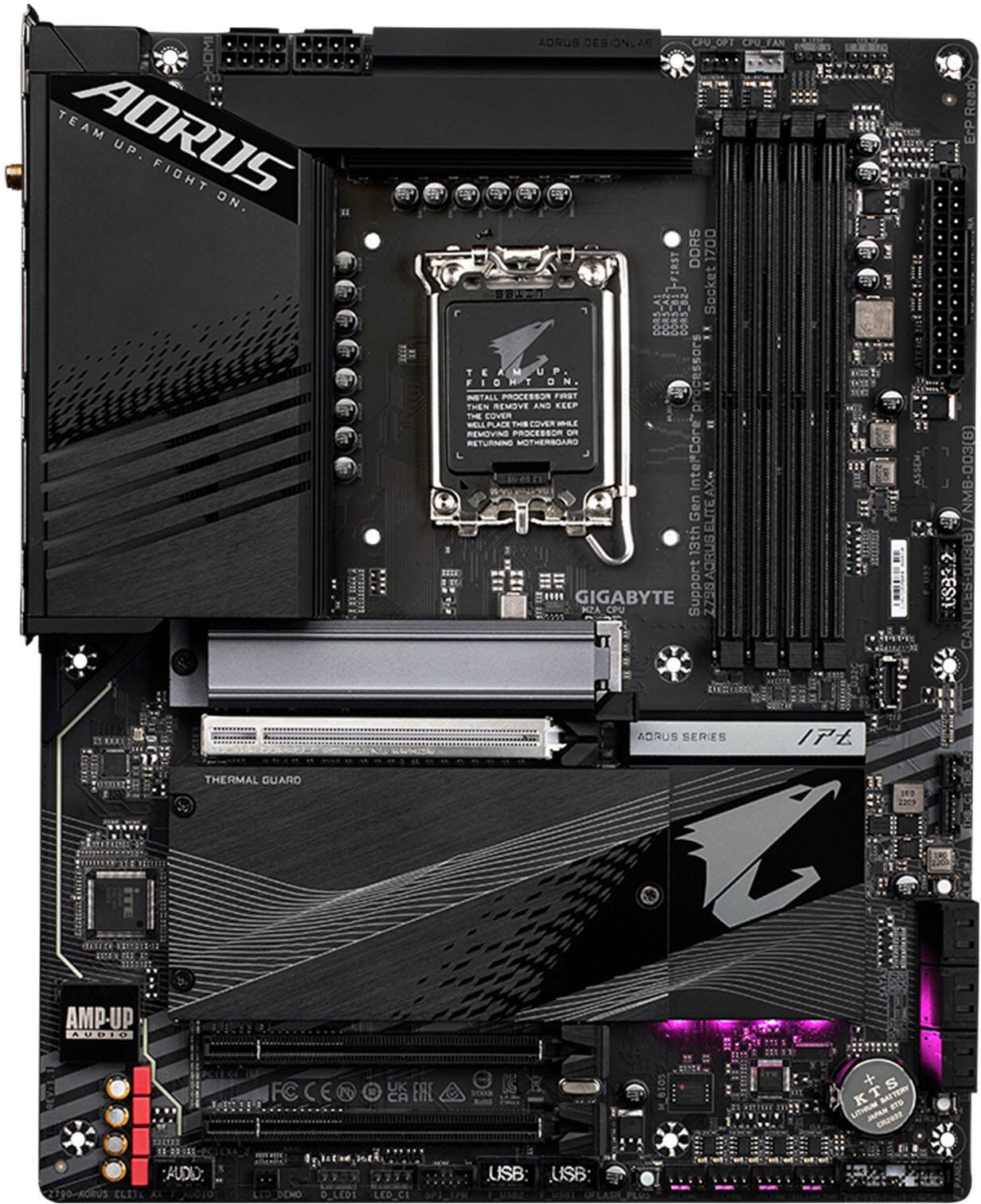
Customers admire the Z790 AORUS ELITE AX motherboard's overall performance, robust build quality, and extensive features, including multiple M.2 SSD slots and a user-friendly BIOS. The board's compatibility with various components and its effective thermal solution are also frequently praised. Positive feedback highlights the ease of use and the comprehensive connectivity options. Many users appreciate the motherboard's sleek design and the numerous features it offers.

This summary was generated by AI based on customer reviews.

The vast majority of our reviews come from verified purchases. Reviews from customers may include My Best Buy members, employees, and Tech Insider Network members (as tagged). Select reviewers may receive discounted products, promotional considerations or entries into drawings for honest, helpful reviews.
Page 6 Showing 101-120 of 125 reviews
  • Rated 5 out of 5 stars

    Great board for the price

    |
    |
    Posted . Owned for less than 1 week when reviewed.
    This reviewer received promo considerations or sweepstakes entry for writing a review.

    Very good. No frills no extra luxuries motherboard does the job it needs to do

    I would recommend this to a friend
  • Rated 5 out of 5 stars

    Great product with a very good price

    |
    |
    Posted . Owned for 1 week when reviewed.
    This reviewer received promo considerations or sweepstakes entry for writing a review.

    Great motherbord very easy to install easy transaction

    I would recommend this to a friend
  • Pros mentioned:
    Bios, M.2 ssd, Overall performance
    Tech Insider Network Member

    Rated 5 out of 5 stars

    Z790 Performance On A Budget!!

    |
    Tech Insider Network Member
    Posted .
    This reviewer received promo considerations or sweepstakes entry for writing a review.

    For computer enthusiasts, building your own machine is often an exciting experience where performance and budget are often linked. Therefore, it should not come as a surprise that aside from your CPU and GPU, the motherboard will be the most important component you choose. It will determine your upgradability in the future as well as your current performance aspirations. As such, and given the recent pricing of motherboards, I was extremely excited to test one of the current midrange boards: the Z790 AORUS Elite AX! As with all ATX boards, the Aorus Elite AX features a similar layout that most should be familiar with; considering its price point, I was extremely pleased to see that the board supports up four M2 slots that run via PCIe 4.0. In addition, I was also really excited to that it has one USB Type-C 3.2 Gen 2x2 that supports 20 Gbps. Furthermore, another positive is that there are two 8 pin power connections for the CPU, especially given how power hungry the 12-14th generation chips are. Another surprising observation was that the back panel plate was already pre-attached to the motherboard; this actually seemed to facilitate the installation in the case as it aligned perfectly. Additionally, I was also glad that the board features some LEDs, yet they are not extremely bright so while they do provide a nice glow, it should not take away from any other LEDs or RGB fans that you may have. With my GSKILL Trident Z5 Royals 32 GB DDR5-6400 MHz installed, all of the LEDs looked awesome! Moving on to the BIOS, I was fairly pleased with the layout of all the main settings. As with most boards, the BIOS will boot to an easy mode view. Upon entering advance mode, all of the CPU and RAM performance settings along with voltages are all organized under the Tweaker tab. On the right hand side of the screen, you will note your CPU temp, voltages, RAM speed, and your main system voltages. For those who want to configure their PL1 and PL2 settings, you can change those by going to the tweaker tab then click on advance CPU settings and scroll down to turbo power limits and set it to enabled and proceed accordingly. You can also disable any one of the P-Cores and E-Cores as well as hyper-threading. Lastly, upon first boot if your mouse speed is slow, you can change it via the Boot tab. Overall, the BIOS was fairly straightforward and organized; most should be fairly content with the number of options provided. Moving on to performance, I wanted to provide some idea on what to expect with the Z790 Aorus Elite AX. While naturally I could not test every setting, I ran Cinebench R23 and CPU-Z benchmark using all of the stock BIOS settings. However, I did set my GSKILL Royals to their XMP profile so they could run at their proper timings. Lastly, I want to mention that this is replacing a twelve year old custom built computer so there should be a drastic performance increase. The results were as follows: I7-14700K - Single: 2,200/ Multi: 35,724 (20 Cores / 28 Threads) I7-3770K - Single: 747/ Multi: 3,816 (4 Cores / 8 Threads) CPU-Z 2.09 Benchmark I7-14700K - Single: 906.8/ Multi: 15,008.5 (20 Cores / 28 Threads) I7-3770K - Single: 401.8 / Multi: 1,976.8 (4 Cores / 8 Threads) As expected, my upgrade was pretty substantial. Connectively, I do want to point out that while running Cinebench R23, HW Info reported a burst of over 300 watts during the multi-core test as expected. The PL1 setting was listed at 280 watts, so you will probably need to spend some time configuring the power settings/voltages via the BIOS. For my last test, I wanted to run was to benchmark on my Crucial X10 Pro SSD and test the speed of the USB Type-C 2x2 port. I manually transferred an 8 GB ISO to the X10 and it finished in about 8 seconds, holding constant at 1.17 GB/s! Lastly, I went ahead and ran CrystalMark 8.0.4 and got the following results: Sequential Read Q8T1: 2,032.24 MB/s / Sequential Write Q8T1: 1,785.94 MB/s Sequential Read 4K Q1T1: 28.91 MB/s / Sequential Write 4K Q1T: 79.81 MB/s In conclusion, the Aorus Z790 Elite AX is an excellent choice for a new motherboard if you are thinking about building a new computer. The board features a minimalistic design, plenty of storage and connectivity options, and is priced fairly well; cheaper in fact than the Z77 Maximus V motherboard I purchased in 2012. While the Z790 chipset will be replaced soon, as expected, this shouldn’t dissuade anyone who is looking to build right now if a computer if needed. However, you should expect to spend some time optimizing the power consumption and/or voltages, especially if you are eyeing the i7 or i9 14th generation. With that said, if this fits the budget, the Z790 Aorus Elite AX comes recommended.

    I would recommend this to a friend
  • Rated 3 out of 5 stars

    Good for value

    |
    |
    Posted . Owned for less than 1 week when reviewed.
    This reviewer received promo considerations or sweepstakes entry for writing a review.

    Good once you get it running, only issue I had was the ram every time I set it to the speed the ram is advertised at the system would freeze on boot up. Recommend setting the ram speed to 4800 the system defaults any higher then there will be issues.

    I would recommend this to a friend
  • Rated 2 out of 5 stars

    Avoid unless you like frustration

    |
    |
    Posted . Owned for 1 week when reviewed.
    This reviewer received promo considerations or sweepstakes entry for writing a review.

    Instruction/BIOS written by kindergartener. Practically no usable instructions. Manual not included. First one had Ethernet die after a few hours.

    No, I would not recommend this to a friend
  • Rated 3 out of 5 stars

    Work fine until it didn't.

    |
    |
    Posted . Owned for 1 week when reviewed.
    This reviewer received promo considerations or sweepstakes entry for writing a review.

    Worked good initially and then I could not recessitate it sadly it died on me. Now i am left with no choice but to return it:-(

    No, I would not recommend this to a friend
  • Rated 3 out of 5 stars

    Get a strix

    |
    |
    Posted . Owned for 1 week when reviewed.
    This reviewer received promo considerations or sweepstakes entry for writing a review.

    Still can’t get more than 1 ram stick to work. Replaced this and cpu. But at this point it works so I’m just dealing with it. Go with the strix

    No, I would not recommend this to a friend
  • Rated 3 out of 5 stars

    Average.

    |
    |
    Posted . Owned for 2 weeks when reviewed.
    This reviewer received promo considerations or sweepstakes entry for writing a review.

    Average, I do not recommend this motherboard for new pc builders

    No, I would not recommend this to a friend
  • Rated 1 out of 5 stars

    Not really an open box. But a return.

    |
    |
    Posted . Owned for 1 week when reviewed.
    This reviewer received promo considerations or sweepstakes entry for writing a review.

    Disappointed in the fact that I thought I was buying an open box. It was really a return. You could tell. Because. where the two slots? look like they have indication like they were use before. Would not buy an open box again. I'll buy a brand new and make sure that it doesn't have the same effects I'll be buying the CPU In around two months. and hopefully. the motherboard will be working correctly. hopefully because of tighter money I will be buying a 12 jen I 9

    No, I would not recommend this to a friend
  • Rated 1 out of 5 stars

    Bad motherboard, Bestbuy fault..

    |
    |
    Posted . Owned for less than 1 week when reviewed.
    This reviewer received promo considerations or sweepstakes entry for writing a review.

    Didn’t boot …faulty board,,, I exchanged for an Asus board.. no problem… Gigabyte is a good brand but this time didn’t make it… I noticed that the box of the motherboard wasn’t sealed, somebody returned previously and best buy in Auburn sold it to me…I complained about it…but they said it was okay…nope, it wasn’t… got the Asus(sealed) everything is good… my advise,, if the box is open do not accept that…

    No, I would not recommend this to a friend
  • Rated 1 out of 5 stars

    Poor documentation lead to a destroyed product

    |
    |
    Posted . Owned for 3 weeks when reviewed.
    This reviewer received promo considerations or sweepstakes entry for writing a review.

    Documentation for this motherboard is VERY poor. I'm unsure of why or how, but I managed to short this board out IMMEDIATELY upon plugging it in and attempting to power on my new build. Presumably, I had something plugged in wrong, but without documentation to tell me what gets plugged in where, which plugs are optional, things like that, I feel like a mistake like that was inevitable, for myself and all other non-seasoned builders.

    No, I would not recommend this to a friend
  • Pros mentioned:
    Bios, Compatibility, Overall performance
    Tech Insider Network Member

    Rated 5 out of 5 stars

    Great features with an affordable price tag

    |
    Tech Insider Network Member
    Posted .
    This reviewer received promo considerations or sweepstakes entry for writing a review.

    If you are a beginner and looking into building your own gaming rig, the GIGABYTE - Z790 AORUS ELITE AX is a great board to build upon. Even at its pricepoint, the GIGABYTE - Z790 AORUS ELITE AX offers great bios, ample fan connections, is compatable with the latest Intel chips (LGA 1700 socket), and massive heatsinks to help with the heat. For this build, I wanted to build something that was a bit higher end than my previous build. With that in mind, I went with the intel I7 14700k, 32GB Ram (will eventually go higher in the future), RTX 4070, and 8tb Black HDD to keep within budget. Since this was a build for my son, it was also a great opportunity to get him involved and join in the process. I know that this might be minimal, but the connectors and slots feel really sturdy on the Z790. I'm a bit paranoid about breaking things ever since I messed with a pre-built, big brand, gaming rig. Assembly was great with everything fitting perfectly fine. BIOS setup was also not too complicated and the new rig was up and running in no-time. For the price, you really can't go wrong with the Review for GIGABYTE - Z790 AORUS ELITE AX. You get premium features and great performance from a budget conciense board. This allows you to put a bit more money into your build. I would definitely recommend the GIGABYTE - Z790 AORUS ELITE AX to anyone, but especially to those who are looking into building their first gaming computer.

    I would recommend this to a friend
  • Rated 1 out of 5 stars

    Horrible board

    |
    |
    Posted . Owned for 2 months when reviewed.
    This reviewer received promo considerations or sweepstakes entry for writing a review.

    horrible board would not see any of my DVD drives and had no way to disable the WiFi or Bluetooth in the bios so I had to send this thing packing and returned it

    No, I would not recommend this to a friend
  • Pros mentioned:
    Bios, M.2 ssd
    Tech Insider Network Member

    Rated 4 out of 5 stars

    Great motherboard with little quirks

    |
    Tech Insider Network Member
    Posted .
    This reviewer received promo considerations or sweepstakes entry for writing a review.

    I've had this motherboard for several weeks now and I really like it. I'm running a i5-12400 CPU, RTX3060, 64GB 6000MHz ram and 2 NMVe drives. I will add that this is my second board. The first one would not boot with more than 1 stick of ram installed (3 different sets of RAM so definitely a board problem). Gigabyte was responsive and after a few trial and error checks ended up exchanging the board for a new one and the 2nd board works fine. It was easy to work with and put together. The layout of the connectors and board is good and makes sense. There are RGB located under the Aorus logo'd heat spreader and it's a cool feature. There seem to be plenty of heat spreaders/blocks that I can't see any problem with cooling on this board. The BIOS is laid out well and easy to work in. There have also been several BIOS updates already which is good to see the board has the manufacturers attention. The one problem I've had with this setup is the RAM. I've never had a board where I had to check the RAM compatibility list, most RAM just worked. This board is much pickier though. I had to return my first 64GB set (2x32GB Corsair) because the system would not boot. I ended up being able to use another RAM that was not listed but almost identical in specs to a listed set. The trick was I had to boot the system the first time with only 1 stick in A2 (it took several minutes to boot). After it loaded and sorted itself out I was able to shut down and put the second stick in B2. Since then it's worked great and I was able to use the XMP presets to up the native 4800 ram to the advertised 6000 speed. The board is setup in a way that you can have a very wide videocard without affecting any other PCIe ports. My RTX3060 also runs at full speed with no bottlenecks from limited bandwith. The board has 4 NMVe ports and is great for splitting up programs and data. I currently have 2 drives, one for operating system and some programs, the other for programs and data. The speeds are incredible between them. I had an 18GB game install on the wrong drive and Steam moved it to the other drive in a matter of seconds. I'm still intending to install my 4 3.5in disk RAID onto this board but haven't had time yet. When I do this though and start using the SATA ports it does limit how many NMVe ports you can use, just FYI. The other surprise I had with this board was that there are 2 power connectors up by the CPU and they both have to be used. I know of other boards that have 2 but give you the option to only use 1, just with limited power limits. This board requires both are used or it will not boot. I ended up having to upgrade my power supply to a new one that offers 2 plugs for CPU as my old only one had 1. The WIFI that's built in works well and has very good range with the external antenna. I also got full speed off my WIFI 6 routers. The Bluetooth on the other hand was disappointing. My tower is located on the other side of the wood frame wall from my office desk, but only about 5' away from my chair. If I move my head to much with my wireless headphones it will start chopping up the audio which basically makes the Bluetooth useless for sound. I've had much better luck and will probably go back to the USB bluetooth doggles that work well in that same configuration. There are a ton of USB ports located on the board and they are all marked very clearly as to speed and generation which is very nice. The board offers several video connectors if needed and the wired network port is as fast as I'll ever need. One feature that is nice on this board is the warning LED lights. They will light up if there is a problem with the CPU, RAM, Video card or Drive I believe. It was what I ended up using to get the RAM problem figured out on both board and was a very useful feature. Overall it's a great board. While it's annoying that the RAM doesn't just boot initially, it's a one time dance you have to do to get it working so it's not a deal breaker for me. I would recommend this to anyone looking for an upper level board with a lot of customization options.

    I would recommend this to a friend
  • Rated 1 out of 5 stars

    Horrible. Instantly Returned

    |
    |
    Posted . Owned for 2 weeks when reviewed.
    This reviewer received promo considerations or sweepstakes entry for writing a review.

    absolutely terrible motherboard. Not compatible with any ram/cpu

    No, I would not recommend this to a friend
  • Pros mentioned:
    Overall performance
    Tech Insider Network Member

    Rated 4 out of 5 stars

    Nice with a couple quirks

    |
    Tech Insider Network Member
    Posted .
    This reviewer received promo considerations or sweepstakes entry for writing a review.

    I'm stepping up from a B650 board to this Z790. For the most part, I'm really happy with the upgrade, but there are a few quirks to be aware of. Default fan curves and consolidated fan headers make for a bit of extra work if you're replacing an existing motherboard. Installation was pretty straight forward if you've built a system before. Everything is clearly labeled and there's a lot of space for expansion. If your heart is set on this motherboard, make sure you're using NVMe drives without heat sinks as the 4 (FOUR!) NVMe slots are all covered. I put 2 drives in so far and they both had heat sinks already so I just left the large middle plate off. One of the biggest quirks I found was the fan header locations. You do have a decent amount of them, but their locations make for some tricky builds or (in my case) extension cables.There are 4 fan headers located at the very bottom of the motherboard and 2 CPU headers located at the top. There isn't a special header for a CPU pump also located at the time so you need to use the normal CPU header or route all the way down to the 4th "system pump" fan header at the bottom. For your rear exhaust fan, you'll also need either really long cables or an extension to reach the bottom of the motherboard (unless you want cables just floating in the middle of your build). This was really the only big pain point when it came to installing everything. The motherboard works great. There are a ton of settings in the BIOS if you are looking to overclock with great detail. I had a strange issue with my 2.5" SSDs not being recognized when they were plugged into the first 2 SATA slots. Changing their port made them show up but I still am not sure what was up with that. If you're looking to maximize and use every single SATA port, you may need to do some extra configuration. Since I was only using 2 of the ports right now, it wasn't a deal breaker to just plug them into other ports. One more quirk that isn't a dealbreaker but is a bit annoying to need to tinker with was the built in fan curves. The "silent" option just wasn't. I needed to manually do most of my curves to keep my system quiet. With my old motherboard, everything ran almost whisper quiet and only subtly ramped up when a lot of stress was put on the CPU. Without manually setting curves, my system sounds like a jet engine any time even a little stress is put on it. One last pain point for me was the control center application it asks to install automatically (you can turn this off in the BIOS). It's a pretty bare bones application and offers to download the updates for your motherboard (which is really nice) but the app in general just feels undeveloped. There's a whole tab that didn't have any labels or titles to say what it did. The application would often treat my multiple monitors as one and open up in the middle of multiple screens. It also has Norton as an always available update and no way to tell it to ignore that update so you'll always see a little dot saying there's an update when there isn't. And the BIOS update screen didn't show me there were any updates when there was (I had to download it manually and load it on to a USB drive). It's probably something I'll still download in the future when I reformat this system but just to easily download all of the drivers and then check it every month or so for updates to those drivers. Even with those quirks stated, this motherboard is a joy to work with. The amount of USB ports built in, the amount of expansion available with the huge supply of NVMe slots as well as SATA and multiple extra USB headers. The heat sinks that basically cover everything to keep things nice and cool. The sleek black and red look. The BIOS is easy to navigate. I'm happy with the upgrade as most of the quirks are just things I needed to work around once and I won't have to think about them again. If you're looking for a high end motherboard that allows a lot of overclocking capability, this is one you should throw in the ring.

    I would recommend this to a friend
  • Pros mentioned:
    M.2 ssd
    Tech Insider Network Member

    Rated 4 out of 5 stars

    Premium board for its class.

    |
    Tech Insider Network Member
    Posted .
    This reviewer received promo considerations or sweepstakes entry for writing a review.

    Pro: -Number of I/O ports -Up to 4 M.2 with EZ Latch -Big heatsink Con: -Control Center This is my fourth build with a Gigabyte board, and so far I have yet to have any major issues. They always have good features for the price. The Z790 Aorus Elite AX is no different, having a great build quality and a cleaner design aesthetic. This board is compatible with the LGA 1700 chipset, so Intel’s 12th to 14th gen. It has all the internal connection you’d expect from a motherboard of this class, and has more USB ports than competitors. The EZ Latch for the M.2 is great for quick installations, and something that should be standard on all motherboards. Their current software Control Center, in my opinion, is a downgrade from earlier versions removing some useful features. It also keeps trying to install unwanted software. Build and Features The board is well built, and has a premium look to it. The various heatsinks throughout the board are robust while keeping the design clean. There are plenty of headers, starting with six PWM fan headers, two at the top and four at the bottom. There’s headers for a front USB 3, front USB C, and two USB 2. For RGB headers, there’s a total of four. A 3 pin and a 4 pin at the top, and another set on the bottom. There are three PCIe slots, with the top GPU PCIe 5 slot being reinforced. There are a total of four M.2 slots, all of which are EZ Latch making it much quicker to install a drive. Every motherboard should have this feature. The top slot, with a chunky heatsink, connects directly to the CPU. The other three, hidden under one big heatsink, connect to the chipset. These are still PCIe gen 4 though. Towards the bottom of the board, right under the heatsink for the M.2, there’s a little bit of RGB that shines the light onto the bottom of the case. One of the reasons I prefer Gigabyte boards is the higher number of USB ports in the back panel. I have a lot of peripherals, so the more ports, the better. There are a total of ten USB ports, 4x USB 2, 3x USB blue 3.2, 2x USB red (10g), and a type C. Other ports include HDMI, DisplayPort, Optical audio, a mic in, and a line out. Functionality I have this paired up with the Intel 14700k and an AIO cooler and temperatures are looking good. All internal components are within normal range. At idle, it stays at about 30℃ and while gaming (except the CPU) stays between 35℃-40℃. Setting up was super easy as most of it is automated. The BIOS starts in easy mode so it’s less intimidating to configure. In this mode, I just needed to turn on the XMP profile for my memory and it was good to go. However, I did encounter a bug when I switched the memory profile. Even though it did switch it properly, I had to switch over to Advance mode to see the changes. A fan curve could also be set up within the BIOS, or later via Control Center. Advanced mode is where you can fully tune the system specs for overclocking. I didn’t mess with it that much outside the memory settings and mostly left it to auto. The Control Center software is a bit of a mixed back for me. It’s an all in one that lets you install or update drivers, control the RGB through Fusion, control fans, and overclock your system. On that, it works fine. However, when compared to previous versions, it no longer has the feature to show the system monitor panel (SIV from older version) to see all the temperatures. I now have to click on a system fan in Fan Control so that it’ll show the temperature readings from the board. It also keeps trying to install unwanted software like Norton during updates. In summary, this is a great board for its class. It looks good and has good features and performance. Simple things like the EZ Latch and many USB ports makes it an easy recommendation over other brands. There’s some bugs in the BIOS and their Control Center can use some improvements, but overall still a good choice.

    I would recommend this to a friend
  • Pros mentioned:
    Bios, M.2 ssd
    Tech Insider Network Member

    Rated 5 out of 5 stars

    Well layed out quality built board!

    |
    Tech Insider Network Member
    Posted .
    This reviewer received promo considerations or sweepstakes entry for writing a review.

    I have long been a fan of Gigabyte motherboards and have used B and Z series before. However, the Gigabyte - Z790 Aorus Elite AX (Socket LGA 1700) Intel Z790 ATX DDR5 Wi-Fi 6E motherboard is a big step up from my past motherboards. Right away I felt the weight of this motherboard and thought man this thing has some serious heat sinks. I am just amazed at how well laid out this motherboard is. The fact that it has 4 M.2 slots is amazing and I like the new EZ- Latch system. I have always loved running SSD’s in Raid 0 but with two more slots I can now run Raid 10 or 1+0. I also like that all of the PCI-Express slots are X16. I like adding on extra PCI-E cards for sound and extra ports so I like how they are situated with the main one by itself and the other two beside each other far enough away from the main one to allow plenty of space for any Graphics card. This board comes with built-in Bluetooth and WIFI which is awesome because previously I had to use a PCI-E card for those features. It also comes with an antenna along with a couple of Sata cables and the handy G Connector to simplify your front panel connections. The Auros Elite Ax also has plenty of high speed USB connections with a USB-C Gen 2, three USB 3.2 Gen 1 and Two USB 3.2 Gen 2 ports along with four standard USB type-A ports, HDMI and Display Port for those that may have to use on board CPU graphics in a pinch. The sound section includes a Mic in, line out 3.5mm as well as a S/PDIF optical digital audio out for premium sound output. This board is very well built and thoughtfully laid out inspiring confidence during the build process. I aslo like the Bios Gygabyte has compared to another top manufacturer I have used because it seems easier to use to me. Once your build is done you will have to download some drivers and you may want to update the Bios. All of these things are pretty straightforward if you know where to look on the Gigabyte website and are familiar with the BIOS update utility. In my opinion, this is a good choice for someone looking to build their own gaming or productivity rig. I would not hesitate to recommend it.

    I would recommend this to a friend
  • Pros mentioned:
    M.2 ssd

    Rated 4 out of 5 stars

    A newly upgraded mobo for a great price.

    Posted .
    This reviewer received promo considerations or sweepstakes entry for writing a review.

    Replaced a mobo from 2021 socket lga 1200. Great to finally have all 4 m.2 slots at gen 4 speed now. The last mobo I had was 1 gen 4 via cpu and the other 2 gen 3. Now I cant finally say goodbye to my old wd 2tb hdd (from 2012) as it needs to be retired even though its still kicking. The all in G connector is an awesome touch for that quick install of the front io connectors. The faceless plate is new to me as well and is a nice touch.

    I would recommend this to a friend
  • Pros mentioned:
    Compatibility
    Tech Insider Network Member

    Rated 5 out of 5 stars

    High-quality, feature-packed motherboard

    |
    Tech Insider Network Member
    Posted .
    This reviewer received promo considerations or sweepstakes entry for writing a review.

    The Gigabyte Z790 Aorus Elite AX Intel Socket LGA 1700 DDR5 Wi-Fi 6E ATX motherboard is a high-quality PC component with wide-ranging compatibility and tons of great features. It was one of the last pieces I needed for a new desktop system I’ve been slowly collecting parts for and I couldn’t be happier with the end result. This particular system I have been working on was intended to be used for a wide range of things including gaming, remote work, and even a media server. This Gigabyte Z790 Aorus Elite AX motherboard has done a great job of bringing all of the other pieces together to form a system that will not only last me a long time as is, but which also gives me the flexibility to upgrade many of the other parts along the way because of its compatibility with both 13th and 14th generation Intel processors. I am currently using an Intel Core i7-13700K 13th generation CPU with this system but I really like the fact that with this Z790, I can upgrade to one of the newer 14th generation processors down the road when they come down a bit more in price. In addition, since this Z790 offers four DDR5 memory slots, upgrading the RAM, if needed, will also be easy to do down the road. For now, I went with two 32GB sticks of Corsair Vengeance DDR5-5200 CL40 memory. Speaking of compatibility, it should be noted that it was very easy to find the compatibility lists for the memory and storage options that this motherboard support. I simply searched the internet for this exact motherboard and easily found the support page on the Gigabyte website. Once there, it was easy to find the compatibility lists which I used to make sure the parts I was using for my build are officially compatible with the Z790. One of the other important things you will find on this website is the installation package for the Gigabyte Control Center software. After setting everything up and installing Windows 11 on my newly built system, I noticed a pop-up suggesting that I download and install this software but when I clicked on the notification, I received a message stating there was a problem downloading the installer and that I should download it directly from the Gigabyte website which was easy enough to do and one of the first things I did since it makes it extremely easy to update the various drivers that are needed for everything to work properly. In addition to being able to easily update the various drivers, the Gigabyte Control Center software allows you to monitor the temperature of the system, modify fan speeds, and even control the RGB functionality of the motherboard if you have ARGB-compatible components. I ended up using the Cooler Master Hyper 622 Halo Black CPU cooler in my system which I was able to connect to one of the ARGB headers on the motherboard. As a result, I can control the RGB lighting for the two fans as well as any other lighting I may add down the road all in one place. I was initially a bit concerned with whether or not this particular CPU cooler would fit on the Z790 motherboard because of the integrated fully-covered MOSFET heatsinks right next to where the CPU sits but it actually fit perfectly which is another testament to just how compatible this motherboard is. While I’m on the topic of heatsinks, I also really like the thermal guard which covers the M.2 connectors. Once again, it is sized just right so that it does not interfere with the graphics card I installed directly above this section and it will help ensure the NVME hard drives I installed stay nice and cool and last a long time. Another really awesome feature is the EZ-Latch system that is used for both the main PCI-E graphics card connector (which is also designed to be much stronger than standard PCI-E slots due to its use of “Ultra Durable Armor”) and the M.2 connectors. There is a little lever that sticks up to make it much easier to release the graphics card since it is in a small little area between two thermal guards. The M.2 connectors also have an EZ-Latch Plue design which make it easy to install M.2 drives without needing any tools or screws. It is minor details like this that really show the quality and thought that was put into this Z790 motherboard. Overall, I am very impressed with this Gigabyte Z790 Aorus Elite AX Intel Socket LGA 1700 DDR5 Wi-Fi 6E ATX motherboard and I highly recommend it!

    I would recommend this to a friend
Sponsored