Customer Ratings & Reviews


- Model:
- GA05662-US
- SKU:
- 10732040
Rating by feature
- Value
Rating 4.4 out of 5 stars
- Quality
Rating 4.6 out of 5 stars
- Ease of Use
Rating 4.7 out of 5 stars
Google tv streamer
||Posted . Owned for 1 week when reviewed.This reviewer received promo considerations or sweepstakes entry for writing a review.I recently switch from ROKU to Google tv streamer. It surprised me how fast the device was and the easy to setup as well.
I would recommend this to a friendGreat Product!
||Posted . Owned for 2 weeks when reviewed.This reviewer received promo considerations or sweepstakes entry for writing a review.I love this thing! The setup was easy and even my kids use it effortlessly! I definitely recommend this!
I would recommend this to a friendGood but too expensive
||Posted . Owned for 3 months when reviewed.This reviewer received promo considerations or sweepstakes entry for writing a review.Amazing device, but overpriced for what you get vs what you get with the new Onn 4K device.
No, I would not recommend this to a friend- Pros mentioned:Overall performance
THE Streamer
||Posted . Owned for 1 month when reviewed.This reviewer received promo considerations or sweepstakes entry for writing a review.Way better than the firestick without all the changes
I would recommend this to a friend Streams well most of the time
||Posted . Owned for 3 weeks when reviewed.This reviewer received promo considerations or sweepstakes entry for writing a review.The Google TV streamer mostly works well. However, it sometimes freezes and needs a reboot. The 4k looks great.
I would recommend this to a friendBrand response from Google Team
Posted .Hi Eric, thanks for sharing your thoughts about the Google TV Streamer (4K). We're sorry to know that sometimes the device is freezing up. Here are some troubleshooting steps you can take:
Ensure your Google TV Streamer (4K) has the latest firmware installed.
Reboot the streaming device and your Wi-Fi router.
Make sure your TV is tuned to the correct HDMI input where the streaming device is connected.
If your TV has a motion compensation mode, try disabling it temporarily to see if it improves performance.
Please don't hesitate to contact us for further assistance.
https://support.google.com/googlenest/gethelp
- Pros mentioned:Ease of use
Chrome cast
||Posted . Owned for 1 month when reviewed.This reviewer received promo considerations or sweepstakes entry for writing a review.I love how eazy it work on my tv. I highly recommend it to anyone who wants a good view experience.
I would recommend this to a friend Minor Improvement in Google TV
||Posted . Owned for 1 month when reviewed.This reviewer received promo considerations or sweepstakes entry for writing a review.Google TV is faster than on regular Chromecast but I expected a more responsive UI. There are still some lags and freeze at times.
I would recommend this to a friendEasy to find content
||Posted .This reviewer received promo considerations or sweepstakes entry for writing a review.I have been using both the Google and Ruko devices, and the Google streaming device is easier to find the content I am looking for. The home page has more than just the apps.
I would recommend this to a friendGoogle TV Streamer
||Posted . Owned for 1 month when reviewed.This reviewer received promo considerations or sweepstakes entry for writing a review.Love this thing so much!!!! It totally sorts out all your movies and shows into one perfect interface
I would recommend this to a friend- Pros mentioned:Ease of use
Awesome
||Posted . Owned for 1 week when reviewed.This reviewer received promo considerations or sweepstakes entry for writing a review.Love it easy to install walks you right through could give up my regular remote and all connected to my google
I would recommend this to a friend So much more hassle than a Chromecast
||Posted .This reviewer received promo considerations or sweepstakes entry for writing a review.I bought this as a replacement for an aging Chromecast. For me, it's been extremely frustrating. The Chromecast was so simple. Just cast from my phone - done! With this device? Nope! As I've seen mentioned in another user's review, this device annoyingly requires a separate Netflix sign in to the app on the device. I tried removing the Netflix app from the device and casting directly from Netflix on my phone, as I would with a Chromecast, but that did not work. I'm forced to use an awkward arrangement with Netflix logged in both on this device and my phone, and the two sometimes seem to conflict. Even the setup was annoying. I had to search the web and then navigate through layers of settings to be able to control audio from my phone's app. I realize there is a separate "remote" in Google Home, but why should I use that when I'm already in the app I want to cast from? Why not just let me control the very basic functions that I always could, and the only ones I need, like Chromecast used to? Many times I want to throw this device against the wall. The device probably has many features that I'm not using, as others leaving high reviews seem to experience. For me, though, it makes me want to scream in frustration almost daily, and I hate that I feel like I was coerced into getting a device with degraded functionality and charged extra for it.
No, I would not recommend this to a friendBrand response from Google Team
Posted .Hi there, JSSinNE. We’re sorry to hear your experience with the Google TV Streamer (4K) hasn’t been the best. We’d like to hear more about your time with the device and see what may be happening — when you get a second, talk to us here: https://support.google.com/googlenest/gethelp
- Pros mentioned:Overall performance
Great!
||Posted . Owned for 1 month when reviewed.This reviewer received promo considerations or sweepstakes entry for writing a review.Love it so far. Definite upgrade to the last version of google tv.
I would recommend this to a friend Excellent upgrade from a 2015 Shield TV
||Posted . Owned for 3 weeks when reviewed.This reviewer received promo considerations or sweepstakes entry for writing a review.Was looking for something to replace a 2015 Shield TV. The Shield is a good streaming box, but its still selling for a premium price. Not worth it for being so old. So far the Google TV Streamer works like a charm. Even though the specs aren't as good? as the Shield, its faster and smoother and less laggy. Also cheaper than a Shield TV Pro and Apple TV. Note: that if you are upgrading from a Shield TV, its remote will auto pair to the Google TV!
I would recommend this to a friendHome run streaming box
||Posted . Owned for 1 month when reviewed.This reviewer received promo considerations or sweepstakes entry for writing a review.I have used Fire TVs and Chromecasts back and forth, I think Google TV is it. Googles current interface hits it out the park. I feel like Amazon's ui is just slow and looks dated
I would recommend this to a friendWorks well
||Posted . Owned for 3 weeks when reviewed.This reviewer received promo considerations or sweepstakes entry for writing a review.Only thing is sometimes the resolution gets messed up after switching tvs.
I would recommend this to a friendGreat option for those who want to cut the cord!
||Posted . Owned for 7 months when reviewed.This reviewer received promo considerations or sweepstakes entry for writing a review.This a great streamer, lots of options, easy to use. Overall a great experience. Great quality and easy to use. There is not a long uptime to ramp up to use it.
I would recommend this to a friend- Pros mentioned:Overall performance
Good picture but annoyingly laggy
||Posted .This reviewer received promo considerations or sweepstakes entry for writing a review.Good picture quality. A definite improvement over the Google TV Chromecast it replaced. It's surprisingly laggy. Which is asinine given that it has more memory & a faster processor than the older Google Chromecast TV. Consider an alternative if you have one available?
No, I would not recommend this to a friendBrand response from Google Team
Posted .Thanks for reaching out about your Google TV Streamer (4K), Daniel. Normally a quick reboot will solve several issues — here’s how:
1. Unplug the power cable from the streaming device.
2. Leave it unplugged for one minute.
3. Insert the cable back into the streaming device.
If you need an extra hand, reach out to us here: https://support.google.com/googlenest/gethelp
Steam it even better!
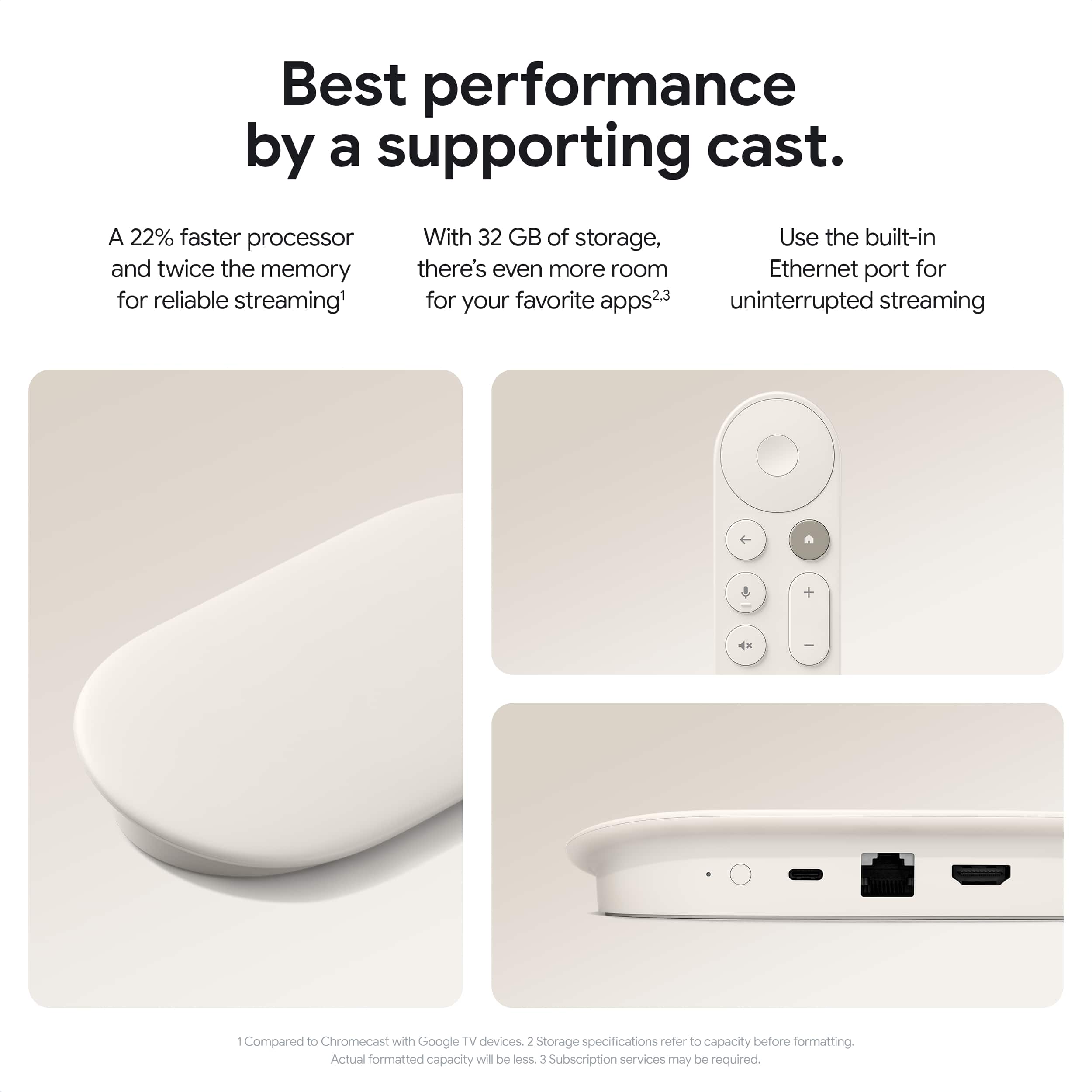
||Posted . Owned for 1 week when reviewed.This reviewer received promo considerations or sweepstakes entry for writing a review.I love the unit it is faster than the old 4K version and has a ethernet port so I don't have to use Wi-Fi!
I would recommend this to a friend- Pros mentioned:Ease of use
My favorite Device
||Posted . Owned for 1 month when reviewed.This reviewer received promo considerations or sweepstakes entry for writing a review.Easy to use,have more features. Improved device,worth the money
I would recommend this to a friend Good value, but slower than Apple TV
||Posted .This reviewer received promo considerations or sweepstakes entry for writing a review.The Google TV Streamer offers solid 4K HDR quality and great features for the price. However, I noticed some lag when navigating menus compared to the Apple TV, which feels quicker and more seamless. It’s a good budget-friendly option, but I’ll likely switch back to Apple TV for better speed and ease of use.
I would recommend this to a friendBrand response from Google Team
Posted .Hi there, Harish. We’re sorry to see the Google TV Streamer (4K) may not have been the best fit for you. We’d like to learn more about your experience so we may be able to improve — when you get a second, here’s our survey: https://google.qualtrics.com/jfe/form/SV_2aStd8wsbcLGvwG