Customer Ratings & Reviews




- Model:
- CHDHZ-203-TH
- SKU:
- 6620086
Rating by feature
- Value
Rating 4.7 out of 5 stars
- Quality
Rating 4.8 out of 5 stars
- Ease of Use
Rating 4.7 out of 5 stars
to a friend
Customers are saying
Customers are positive about the MAX 360 Action Camera's video quality, ease of use, and overall performance. Many users also appreciate the battery life, water resistance, and stabilization features. The only concern mentioned by some users is the lens cap design.
This summary was generated by AI based on customer reviews.
Recommend
||Posted . Owned for 1 week when reviewed.This reviewer received promo considerations or sweepstakes entry for writing a review.Pretty cool how it records both ways at the same time (front and back )
I would recommend this to a friendGopro
||Posted . Owned for 2 months when reviewed.This reviewer received promo considerations or sweepstakes entry for writing a review.Love this camera just not good battery life for me
I would recommend this to a friendGreat camera at a great price.
||Posted . Owned for 1 week when reviewed.This reviewer received promo considerations or sweepstakes entry for writing a review.Great camera at a great price. Comes with exceptional features.
I would recommend this to a friendTruck drivers dream
||Posted .This reviewer received promo considerations or sweepstakes entry for writing a review.The recording is amazing and you can use it anywhere
I would recommend this to a friendGo pro
||Posted . Owned for 1 week when reviewed.This reviewer received promo considerations or sweepstakes entry for writing a review.Great Go pro on sale for $250 on sale cant beat it good value
I would recommend this to a friendSeems good
||Posted . Owned for 1 week when reviewed.This reviewer received promo considerations or sweepstakes entry for writing a review.Seems great so far. Haven’t gotten to use it much yet.
I would recommend this to a friendGoPro!!
||Posted . Owned for 2 weeks when reviewed.This reviewer received promo considerations or sweepstakes entry for writing a review.Enjoyed the 360! Much better to see all around my bike when riding.
I would recommend this to a friendcamera
||Posted .This reviewer received promo considerations or sweepstakes entry for writing a review.it seems good, I need to use it more and update the review
I would recommend this to a friendGopro
||Posted .This reviewer received promo considerations or sweepstakes entry for writing a review.I bought it to wear to a gathering, I thought I could just clip it on my shirt. It just wasn't what I needed.
I would recommend this to a friendMy GoPro
||Posted .This reviewer received promo considerations or sweepstakes entry for writing a review.I like the quality of the frame perfect for the road trip
I would recommend this to a friendMeh but ok
||Posted . Owned for 1 month when reviewed.This reviewer received promo considerations or sweepstakes entry for writing a review.It’s cool to be able to record 360 degrees. But that line of division is kray. I haven’t tried any other brand of 360 degree cameras so I can’t compare atm. Again it’s still nice to record all over and decent for the money if on sale.
No, I would not recommend this to a friendIt’s not for me.
||Posted . Owned for 3 weeks when reviewed.This reviewer received promo considerations or sweepstakes entry for writing a review.The videos are OK. Ease of use it’s pretty easy to use. However, the videos even in 5K seems mid level.
No, I would not recommend this to a friendIt will do for the price
||Posted . Owned for 3 months when reviewed.This reviewer received promo considerations or sweepstakes entry for writing a review.Its ok. Not horrible quality, but not great either.
No, I would not recommend this to a friendReturned.
||Posted . Owned for less than 1 week when reviewed.This reviewer received promo considerations or sweepstakes entry for writing a review.Returned it. I’m a scuba diver. They do not make a waterproof housing for this camera. I emailed the company asking for help. I was told they do not make a waterproof housing or a waterproof remote for this camera.
No, I would not recommend this to a friend
Love it!!!
|Posted .This reviewer received promo considerations or sweepstakes entry for writing a review.I have owned a couple different go pros the last few years and they have always been great. This 360 MAX by them is even better. The looks of it are what you'd expect from go pro, simple, sleek and small. The small form factor is a plus cause it allows for easy use in any environment. Using this 360 camera is so easy. It's pretty simple to setup the go pro app and to get the camera going. I started testing it with content I want to make for a Vlog I am starting. It performed very well. The telescoping handle I used with it made it easy to get a clear view of all the footage I wanted to capture. I used the 3k mode so I can make my videos 60fps and it looks great. The stabilization feature works very well and really made a difference in my videos. I recorded so much content on a single charge and it still has life left. The battery is definitely excellent. The audio, both vocals and sounds of the environment, were very clear and easy to understand. The app is phenomenal. All the features for editing and how quick it is, really made creating and editing my content a breeze. I am so impressed. Great job on another great product GO PRO!
I would recommend this to a friendA Value Added Update
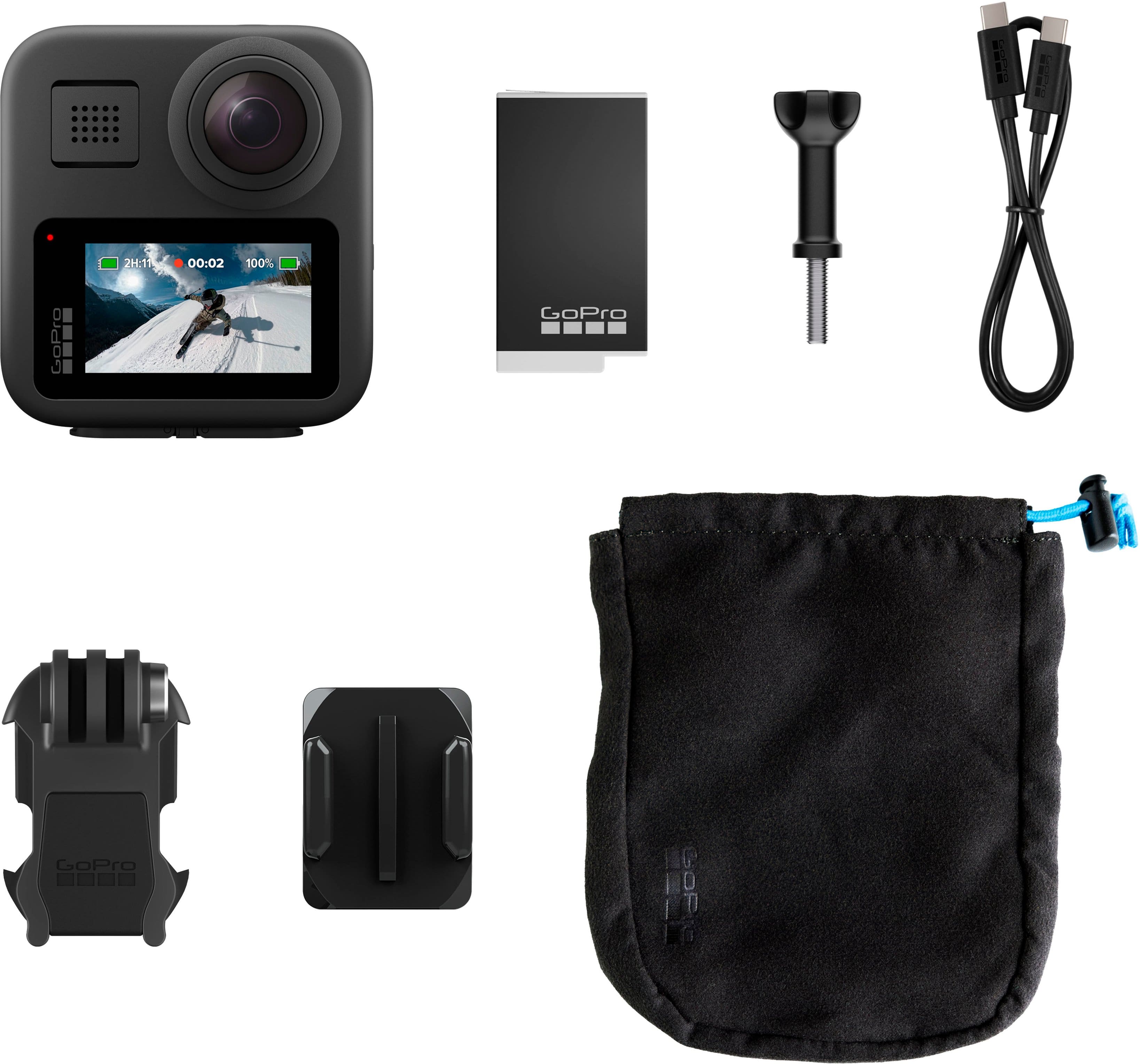
|Posted .This reviewer received promo considerations or sweepstakes entry for writing a review.I have a couple of action cameras including older versions of GoPro. On a previous Hero I had an overheating problem that would shut the camera off while in use but a firmware upgrade corrected that issue. Since the upgrade I haven't had any issues. I've used a suction mount on my car for long road trips with my car club and always had some pretty cool results. Using time lapse The new kid on the block is an update of the original MAX. I've never had a 360 camera so this has been fun to play with to see the different results. Of course you can use it in Hero mode as a regular camera but the fun starts when you switch it to 360 mode. Using the telescoping pole mount really kicks the action videos into a new realm. There is a mode that virtually eliminates the pole from your videos resulting in some close up drone like imaging. Stabilization helps smooth out the bouncy captures and with the Quik app you can capture your shots directly on your paired phone. With previous GoPros I would do road trips and set up the camera with still action shutter to record hours of driving. Using the Quik phone app I can make sure I frame the camera view perfectly and switch between multiple cameras. Pretty slick. I can't wait to get a pole attachment for my suction cup mounts for my car and do some cruising, maybe 3 Sisters or Tail of the Dragon or that stretch of road outside Oatman, Arizona. Should make for some epic action shots. It's waterproof as well so I'll grab this for kayaking and fishing but I'm too old to surf or ski so I won't be using this under extreme wet conditions. Also in the box you get a helmet mount base and camera attachment. The Max 360 itself now accepts a standard 1/4" x 20 camera mounts and with the flip down tabs you are able to install it on other GoPro mounts. You also get an adapter for the 1/4" pole mount to the camera tabs so you can tilt the camera for better selfie videos shot. The included battery has longer life than previous models. I haven't used it long enough to verify the claims. It is recommended that you use high speed memory cards and in the box it came with a 64GB SanDisk Extreme card. Perfect for most applications and you can download to your phone or the cloud (with optional subscription). A nice little bag comes with the kit so can stow unused mounts and the charging cable when not in use. A couple of wishes or complaints... - I wish the lens caps had a small tab to make it easier to remove. I had to fiddle with them for a while to get them off. Not a big deal if you are sitting in your car or on a ski lift but if you are getting into some action then it can be a bit of a hassle. - I also wish is that somehow they could incorporate a button on the pole so you can snap pics or start/stop videos rather than relying on the camera button or phone app. - because the camera is waterproof the access hatch for the battery, memory card and charging port are in a very tight space. I find the hatch door makes it a bit more difficult to pull the battery if you need to do a quick swap and the same goes with the memory card. Call it fat finger syndrome I did have to struggle a bit to pull these things. The awesome features definitely outweigh the nuisances and with a price drop from the original Max I think this is a true winner. More camera than I need but a really good add to my GoPro stable of cameras.
I would recommend this to a friendGoPro Max 2025
|Posted .This reviewer received promo considerations or sweepstakes entry for writing a review.I was excited to try out the latest GoPro Max, but I was disappointed to find it looked identical to the original version released in 2019, with almost the same specs. Digging into this further, I found the 2025 version includes enhancements like better stabilization, improved battery life, and more advanced editing tools, but overall it was just a slightly refreshed device. The GoPro Max retains the compact and rugged design typical of GoPro cameras. It's slightly larger than the Hero but still fits comfortably in hand. The new color touchscreen is bright and responsive, making it easy to navigate through settings and preview shots. The camera is shockproof and waterproof up to 16 feet, suitable for underwater use. The camera offers detailed footage with its 5.6K video resolution. The Max Enduro Battery extends recording times, lasts longer in colder weather (very important for skiers/snowboarders, etc.) which is beneficial for longer shoots, however there is no advertised battery life given by GoPro that I can find. I’m also disappointed the Enduro battery cannot be swapped the regular enduro battery, so I can’t use all the batteries I have for my regular GoPros. The camera also features stabilization and horizon leveling, helping to keep shots smooth and level. The GoPro Max 2025 performs well in 360-degree recording mode. The PowerPano feature allows for panoramic shots without ghosting. Editing 360 footage is straightforward with the updated Quik App, which includes object tracking and automatic transitions. The GoPro Max captures spherical audio with multiple microphones, offering immersive sound quality. The wind noise reduction is effective, making outdoor recordings clearer. The mounting system is compatible with standard ¼-20 tripod mounts, and the invisible pole effect is useful for dynamic shots. The single MicroSD card slot simplifies storage management. The GoPro Max 2025 offers good value for its features. It is more affordable than its competitor the Insta360 X4 and X5, though it lacks the 8k resolution and some of the advanced features of those models. Overall I found the GoPro Max 2025 is a solid choice for capturing adventures in detail. Its combination of high-resolution video, durable build, and useful features make it suitable for both casual users and content creators. However, if you need the highest resolution and advanced features for professional use, the competition might be worth considering.
I would recommend this to a friendFun and Feature-Rich Cam. Opens Some New Doors…
|Posted .This reviewer received promo considerations or sweepstakes entry for writing a review.Even though I have used some GoPros over the years, I didn’t quite know what to expect with this one. To briefly sum up my thoughts, I am quite impressed, even if there are a few things I am unsure about. Shooting with this was really a lot of fun, and easy. This was my first time shooting 360-degree footage, and while there were some challenges, I enjoyed the new perspectives. The results were fantastic. I also really appreciated that it could still be used as a more conventional GoPro (Hero) as well (although more on that later) I liked the Quik software for a lot that it could do (editing, after the fact reframing, voice control, data overlays, panos), and “generally” found it intuitive, powerful, and, well…quick. That said, while it was good on the phone, I wish there were an easy/cheap way to do some of the editing on the desktop (where I prefer to do a lot of this type of work). Hardware-wise, it is about what you would expect from GoPro. Compact. Well-built. Rugged. Waterproof. The touchscreen is large, bright, and responsive. Nice, easy access physical buttons for the most essential needs. It is compatible with GoPro Mounts, of which there are a seemingly endless supply, but also has ¼ 20 mounting threads that open it up to tripods and standard camera accessories. A nice add, finally. Further, it comes with lens covers, which despite being somewhat hard to remove, are what I would consider essential given they need to remain unscratched. It would be nice if they would offer replacements for these lenses, as a competitor in the space has just done. We shall see. Lastly, while I have found battery life to be “good” so far, I am going to have to give it some time to see how it works longer term. I may need to pick up another battery or two. As I said earlier, shooting with this is a lot of fun. I do have some reservations about a few things, and to add to those, I do think you give up a bit with lower max resolutions and image quality than some others in the space. Ultimately though, I like this camera. It delivers good output, is built well, provides a high degree of versatility, and opens new doors of creativity with all of its capabilities…all at a more affordable prices than others in the market. As always, check your use case, but for all that you get I think the value is there.
I would recommend this to a friendOh how far these cameras have come!
|Posted .This reviewer received promo considerations or sweepstakes entry for writing a review.I do a LOT of trail hiking during my off hours and have always wanted to be able to get a good body-cam style video of my "adventures". This camera allows me to do just that, giving me all angles with just one camera, without having to constantly adjust point of view, and does it without showing my extension pole in the video as well. I wear the extension pole in a molle chest pack, which allows the cameras to see both me, to the sides of me, as well as in front of me and all angles in between. The only "blind spot" is directly behind me. I'm able to trudge through the woods on my favorite trail systems and have a full 360 degree video of everything I see, everything I hear (it has 6 microphones!), and anything I encounter. This would have been handy in the past as I've encountered some somewhat aggressive characters while on the trails and would have loved to have had a video recording of the encounter to give to the police! Other super- useful features are the slow-motion capture , single-lens capture (like the HERO cameras), and the capability to capture video in 1080p, full widescreen or 1440p scales. Image stabilization is also available which does an outstanding job of taking shaking/stepping issues out of the video and makes them buttery smooth. It's waterproof to 15ft so you don't have to worry about being rained on or if it gets splashed on , and the battery is made to perform even in the coldest of weather. This camera is like having a multi-camera setup all in one small portable unit !
I would recommend this to a friendMy first 360 action camera. So many possibilities
|Posted .This reviewer received promo considerations or sweepstakes entry for writing a review.Ive had my share of action cameras and have done my share of video logs, but never is 360 degrees. My main interest is logging electric scooter rides, and most recently logging my new motorcycle rides. My old set up was a camera attached to the chin of my helmet. This worked OK, but of course had a very limited view. Not anymore. This is my first 360 camera and it being a GoPro (the best in the business IMO), makes it one of the best out there. Its versatility is its main draw. With all the different ways to mount it you can get some really amazing footage. Im still experimenting with it and do plan on a more solid mount for my motorcycle but the stability of the footage is great even when the mount isnt. The camera itself is of course built very solid and hopefully can take a few falls. Although I dont plan on that happening. But GoPro makes their action cameras to last. Setup was simple and only takes a few minutes to get up and running. The video quality is excellent. It is so much better then my other cheaper action camera. And the footage is very stable as well. GoPro has this down to a science. Im really looking forward to trying out other methods of recording. And since this is so versatile Im sure Ill be experimenting a lot. But I now understand the huge boom in 360 cameras. They are just so much fun. If you are looking for a 360 action camera look no further!
I would recommend this to a friend