Customer Ratings & Reviews
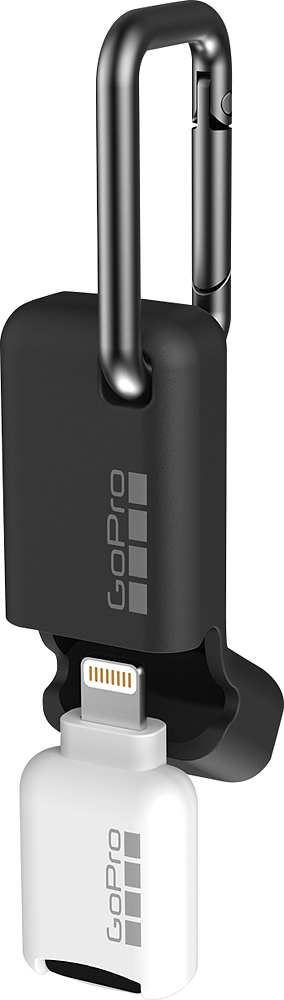
- Model:
- AMCRL-001
- |
- SKU:
- 5581737
Customer reviews
Rating 4.2 out of 5 stars with 407 reviews
(407 customer reviews)Rating by feature
- Value4.2
Rating 4.2 out of 5 stars
- Quality4.2
Rating 4.2 out of 5 stars
- Ease of Use4.5
Rating 4.5 out of 5 stars
Customers are saying
Customers express satisfaction with the Quik Key's ease of use and compact size, finding it convenient for transferring files from microSD cards to iPhones and iPads. However, some users report compatibility issues and occasional connection problems. A few also mention limitations regarding supported video resolutions.
This summary was generated by AI based on customer reviews.
Rated 1 out of 5 stars
Is not recognized
||Posted .This reviewer received promo considerations or sweepstakes entry for writing a review.iPhone does not recognize the GoPro lightning adapter.
No, I would not recommend this to a friend- Cons mentioned:Compatibility
Rated 5 out of 5 stars
Don't give up on it
Posted .This reviewer received promo considerations or sweepstakes entry for writing a review.Between my husband and I we have had 5 of these. He is on his 2nd one and it doesn't work. I just exchanged for the 3rd time and finally got one that works. (When plugged in it will ask if it can connect with the app when you select "allow" nothing shows up under your photos/videos) My husband emailed go pro and I called. He was given the option to send a photo of receipt and sd card for a replacement. After 30 min on the phone with a rep that couldn't figure out what the issue was, I was told I would be contacted by someone who knew more. I was going on 7 days of not being called back before exchanging for the 2nd and 10 days before exhanging for the third. I'm just glad I finally got one that works. If you get one that doesn't work make sure you keep exchanging it until you get one that works. This will extend your return time each time you exchange it, which sure beats being stuck with a item that doesn't work and can't be returned. Not sure what the deal is with these, but now that I have one that works it's a must have!
I would recommend this to a friend - Cons mentioned:Compatibility
Rated 2 out of 5 stars
Great Idea but lacks support for all Video formats
Posted .This reviewer received promo considerations or sweepstakes entry for writing a review.I read many reviews on this product and decided to take a chance on it. Ultimately, I returned this product because it did not meet my needs. That doesn't mean the product wouldn't work for you. Here's what you need to know about the devices, software versions, and video formats I tested with so that you can make an informed decision. My iPhone is getting a little long in the tooth so some newer Apple devices could potentially handle the transfer process better. - SanDisk Extreme Plus 64 GB MicroSD card - iPhone 6s 64GB w/ 20GB of avail mem & iOS 11.4.1 - GoPro Hero 6 w/ version 02.01 software - GoPro App w/ version 4.6.1 (2684) To start, I opened the box to the Quik Key and was surprised at how small the device was. It looked great and would have been great for travel; especially with the sleeve and carabiner that it came with. When I tried to plug it into my iPhone, the neck wasn’t long enough to reach through my OtterBox Commuter series case. That was strike one. I would be able to live with that if the product worked flawlessly, so I proceeded to take off the case. I plugged in the key and immediately it asked if I wanted to allow the device access. A simple confirmation and the GoPro app was launched. Very nice and simple. For the first test, I tried to download a 45 second video filmed at 1080p @ 60 fps. It failed to successfully download multiple times before finally providing a successful download. Strike two. I did some more testing because I really wanted this to work. I tried a 30 second video filmed at 1080P @ 120 fps as well as a third video filmed at 2.7K @ 60 fps. Both failed at the higher resolution and frame rate and I could not successfully download these videos through multiple attempts. I was able to successfully get a 15 second clip from the 1080p @ 120 fps video. Now part of the big reason I wanted this product to work is because download times to your device through WiFi can be a little slow. So I thought a direct connection via the lightning port should solve that. I was sorely disappointed and that was the third strike. In every case, WiFi transferred the videos faster than the Quik Key. Not to mention, WiFi was much more reliable. The good news is that most of these problems could likely be resolved via a software update, but I wouldn’t hold your breath as I noticed GoPro no longer has the Quik Key for iOS available on their web site. Hopefully they are working on a new and improved version to correct the shortcoming of this product. But it could be a sign that GoPro and Apple couldn’t agree on the communication software for the many different devices and video formats that people use. Below are download times and information. Download time info through WiFi (5Ghz connection): 45 second video shot at 1080p @ 60 fps – 27 second download time 30 second video shot at 1080p @ 120 fps – 56 second download time 30 second video shot at 2.7K @ 60 fps – 1 minute & 11 second download time Download time info through Quik Key iOS: 45 second video shot at 1080p @ 60 fps – 34 second download time (7 seconds slower) after multiple failed attempts 30 second video shot at 1080p @ 120 fps – Never successfully downloaded with at least 5 attempts 30 second video shot at 2.7K @ 60 fps – Never successfully downloaded with at least 5 attempts 15 second video shot at 1080p @ 120 fps – 44 seconds to convert the file to 60 fps, plus another 36 seconds of download time for a total of 1 minute & 20 seconds (24 seconds slower and it was only half the original 30 second clip)
No, I would not recommend this to a friend - Pros mentioned:Design
Rated 2 out of 5 stars
GOOD ONLY for Go Pro USER
Posted .This reviewer received promo considerations or sweepstakes entry for writing a review.I do not recommend this product unless you have a camera go pro and all go pro I was looking for the photofast in my local store and the one that was attending me came with this one that is compatible with iphone yes, but not because I have a DAsh cam and I want to see the videos on my iphone but as this is for gopro it lasts a lot of loading i can not be transferred to the iphone is a problem. THE ONLY GOOD IS THE DESIGN AND THE WEATHER COVER. This product makes my life impossible, I say it because before I had one of those who use the iUSB app I bought it in Amazon and it was so simple to use it until it stopped working.
No, I would not recommend this to a friend Rated 5 out of 5 stars
Amazing accessory for mi go pro
Posted .This reviewer received promo considerations or sweepstakes entry for writing a review.This is an amazing product very reliable and very well made, I bought for the price, awesome as always Best Buy
I would recommend this to a friend- Cons mentioned:Compatibility
Rated 1 out of 5 stars
What a waste of money.
Posted .This reviewer received promo considerations or sweepstakes entry for writing a review.It never worked, I hate this thing!! It was a good idea but mine doesnt work.
No, I would not recommend this to a friend Rated 1 out of 5 stars
Didn't work
Posted .This reviewer received promo considerations or sweepstakes entry for writing a review.Best Buy sold me the version that doesn't work. I got off work to drive there and just ended up wasting my time.Gopro customer service send me the one that works.
No, I would not recommend this to a friend