Customer Ratings & Reviews
- Model:
- HD28C-SILVER
- SKU:
- 6402925
Rating by feature
- Value
Rating 4.1 out of 5 stars
- Quality
Rating 4.4 out of 5 stars
- Ease of Use
Rating 4.4 out of 5 stars
Customers are saying
Customers regard the DUO 7-Port USB-C Hub favorably for its USB-C and other ports, compatibility with various devices, and ease of use due to its magnetic design. Many appreciate its quality and the additional ports it provides, along with its thoughtful design. However, some customers experienced issues with the fit and connection stability, and some reported that the device gets warm during use. The overall user experience appears to be positive, despite some reported drawbacks.
This summary was generated by AI based on customer reviews.
- Pros mentioned:Compatibility
A must have for MacBook Air and MacBook Pros
||Posted . Owned for 3 weeks when reviewed.This reviewer received promo considerations or sweepstakes entry for writing a review.Great product for my 2020 MacBook Pro, Best Buy may not be the best place for pricing but this product definitely does what you need it to do.
I would recommend this to a friend - Pros mentioned:Compatibility
Excellent!!!
||Posted . Owned for 1.5 years when reviewed.This reviewer received promo considerations or sweepstakes entry for writing a review.excellent product I use it all the time and a must have if you own a MacBook Pro to allow all of your connections you need!
I would recommend this to a friend - Pros mentioned:Usb-c
Ports Galore & Daisy Chain-able
||Posted .This reviewer received promo considerations or sweepstakes entry for writing a review.This is a oerfect companion for the 2020 M1 Macbook Pros- it is necessary to run usb-a and HDMI- and you can chain it so you don’t run out of needed ports.
I would recommend this to a friend - Pros mentioned:Usb-c
Works great!
||Posted . Owned for 4 months when reviewed.This reviewer received promo considerations or sweepstakes entry for writing a review.I use frequently (everyday with 3-5 plugins) works great! • 2 usb • 2 type C • Mini SD • SD • HDMI
I would recommend this to a friend Great lil' dock.
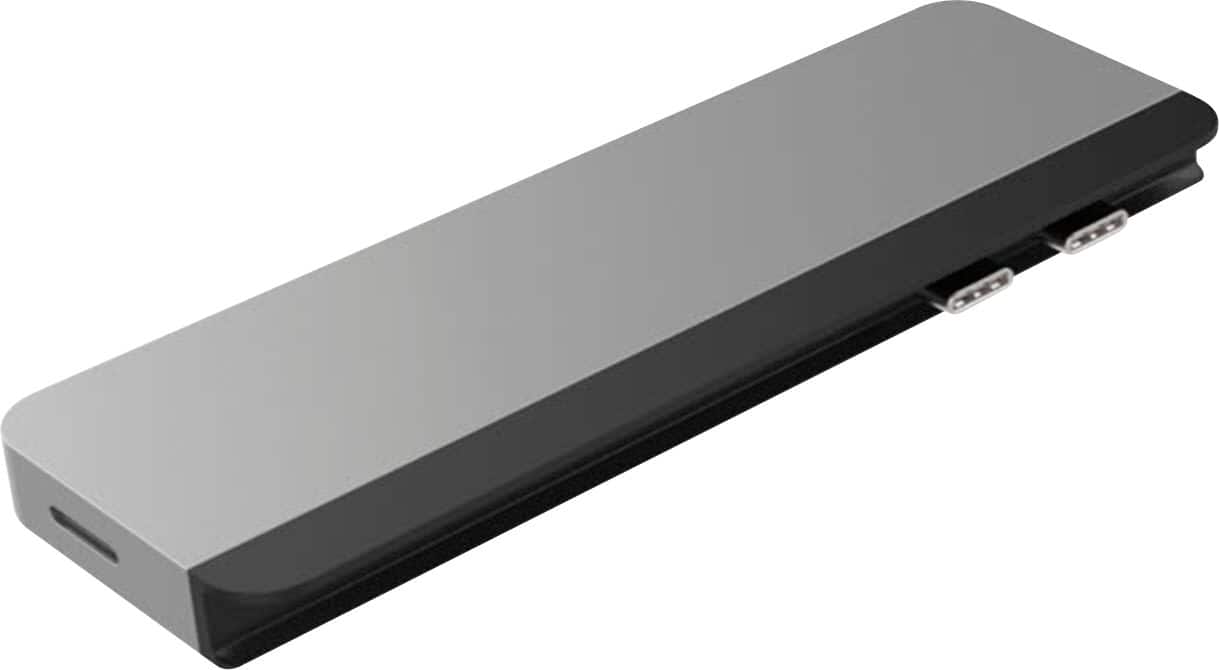
||Posted . Owned for 1 month when reviewed.This reviewer received promo considerations or sweepstakes entry for writing a review.Good product. Worth the money. Passes power via USB-C (not all hubs do). It's even reversible! The black "lip" slips on and off so it can be rotated 180 degrees to mount the dock on either side of a MacBook Pro. In fact, I might buy a second for the other side.
I would recommend this to a friend- Pros mentioned:Ports
You need this!
||Posted . Owned for 1 month when reviewed.This reviewer received promo considerations or sweepstakes entry for writing a review.Really helpful to have so many extra spots to plug into.
I would recommend this to a friend - Pros mentioned:Compatibility
Title
||Posted . Owned for 1 month when reviewed.This reviewer received promo considerations or sweepstakes entry for writing a review.Perfect! It does exactly what I wanted it for. I’m very happy
I would recommend this to a friend - Pros mentioned:Ports
Hyper drive MacBook Pro Accessory
||Posted . Owned for 2 weeks when reviewed.This reviewer received promo considerations or sweepstakes entry for writing a review.Very nice cool product don’t have any problems with it
I would recommend this to a friend Functions As Expected BUT . . .
||Posted . Owned for 1 month when reviewed.This reviewer received promo considerations or sweepstakes entry for writing a review.This performs as expected on my MacBook Air. The only issue I have with it is the black portion of the connector comes off every time I disconnect the HyperDrive DUO from the computer.
I would recommend this to a friendHighly recommend!
||Posted . Owned for 1 year when reviewed.This reviewer received promo considerations or sweepstakes entry for writing a review.Very useful and I’m happy I purchased this even though it was a year ago one of the best purchases I made!
I would recommend this to a friend- Cons mentioned:Connectivity
Not good for on the go
||Posted . Owned for 1 month when reviewed.This reviewer received promo considerations or sweepstakes entry for writing a review.It does not stay in your computer very well. if you use your computer on the go it can be a problem. If you keep your computer on your desk and don’t move it often then it might be okay.
No, I would not recommend this to a friend - Cons mentioned:Design
Risk of cracked screen
||Posted . Owned for 4 months when reviewed.This reviewer received promo considerations or sweepstakes entry for writing a review.I do not recommend this product. The hub itself worked fine. The issue is the design. It comes with a magnetic black piece that goes between the hub and the computer. When this is used, the screen cannot and should not be closed. I had the piece in place and my screen was slightly closed. Something fell on my computer and the hub managed to crack and damage my screen. Without the magnetic piece in place, you risk possibly jamming the hub or if something hits it, it can bend and damage your only ports on your MacBook Air. I've used the types that use a cable to connect the hub. They are cumbersome. But at least they don't break your screen. I wish apple would go back to giving us ports!
No, I would not recommend this to a friend USB
||Posted .This reviewer received promo considerations or sweepstakes entry for writing a review.Oh man help so go through so many things everything’s organized much better like this definitely get it
I would recommend this to a friend- Pros mentioned:Ease of useCons mentioned:Design, Heat

Well-designed, feature-packed USB-C hub
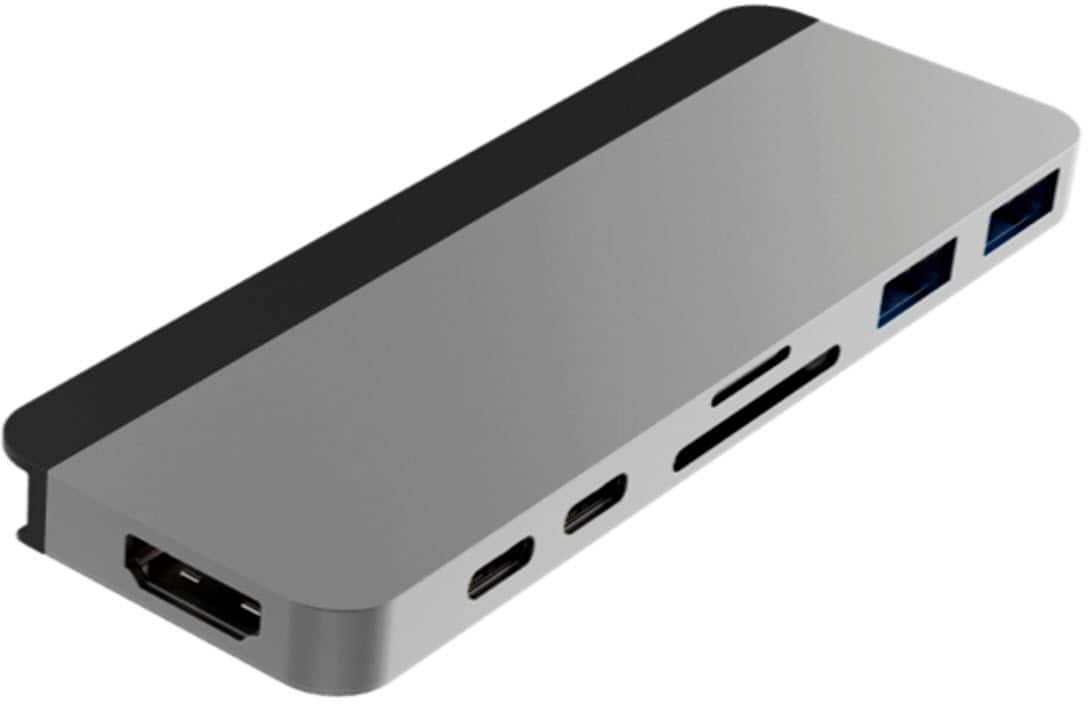
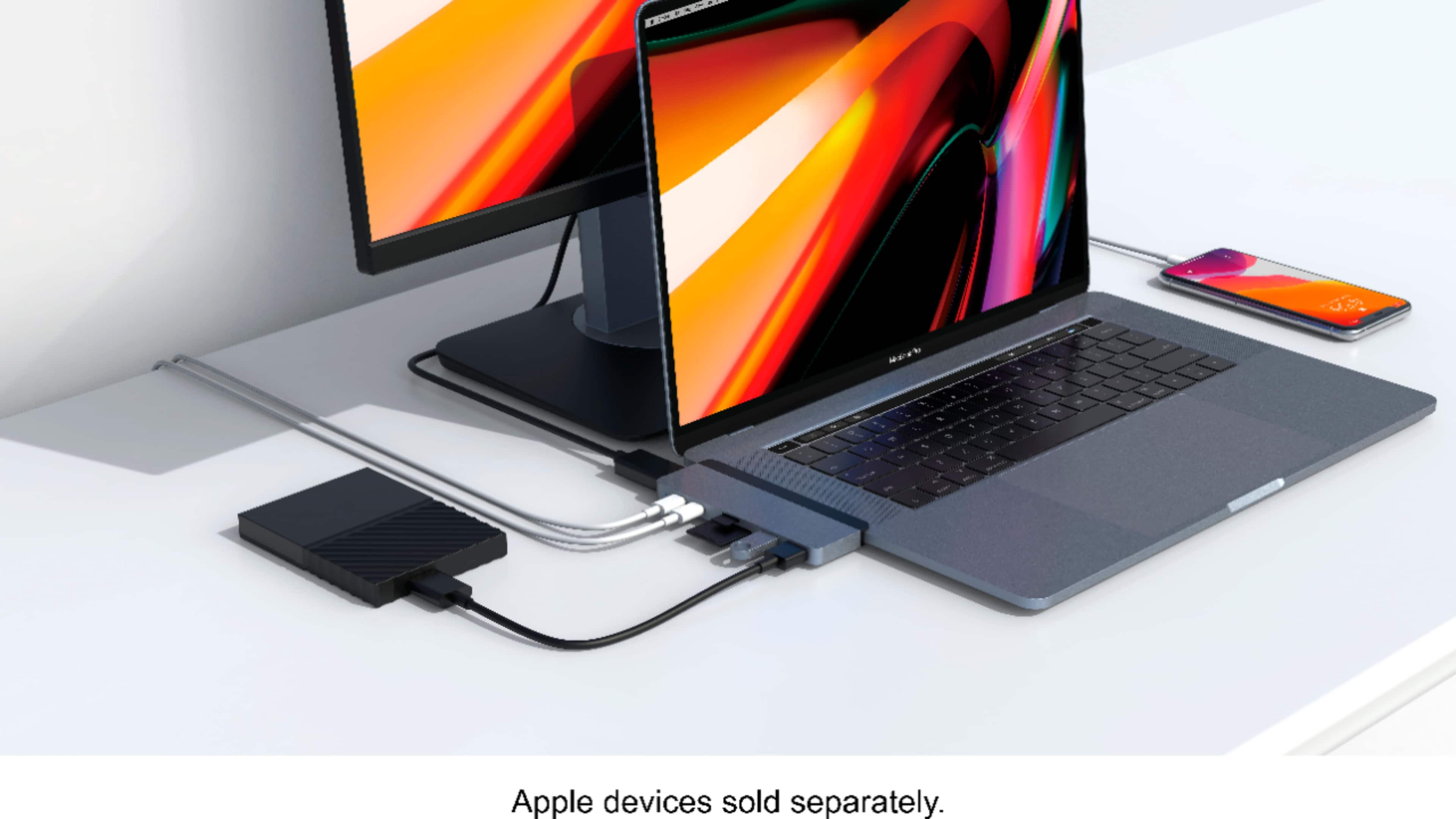
|Posted .This reviewer received promo considerations or sweepstakes entry for writing a review.The HyperDrive - DUO 7-in-2 USB Type-C Hub for MacBook Pro provides seven different ports in a small machined hub that plugs into your MacBook Pro's two USB-C ports. My typical studio setup includes a MacBook Pro with a 25" or larger monitor, an Intuous graphics tablet, a wireless keyboard and mouse. I have both USB-A and USB-C external hard drives plus several printers, some of which I use attach with USB-A plugs. For digital photography, the SD and Micro SD card slots will come in handy. I tested the HyperDrive DUO 7-in-2 with a MacBook Pro purchased last month. It passed the following tests with flying colors: - Attached a 25" HD monitor via the HDMI port - Attached the MacBook power adapter via a USB-C port - Inserted a USB-A thumb drive - Attached a USB-C external Solid State Drive (SSD) Pros: - Small and portable - Does not require batteries or a power adapter - Easy to use - "Plug and Play" with no software to load - Choice of two finishes (silver and space gray) - Included carrying case and USB-C connector Cons: - When the hub is inserted with the magnetic strip on, you cannot close the MacBook Pro lid - The finish does not truly match the MacBook Pro case - The MacBook gets warm when the hub is inserted I recommend this device. It replaces a handful of individual dongles and adapters and reduces clutter. The HyperDrive DUO 7-in-2 hub is an excellent solution for home, office, or creative design use for those who need more than the two available USB-C ports. And if you still need more ports, you can daisy-chain other devices via the USB ports.
I would recommend this to a friend Essential add-on
||Posted . Owned for 1 month when reviewed.This reviewer received promo considerations or sweepstakes entry for writing a review.Essential accessory for my MacBook Air. The magnetic docking is a huge improvement over the previous generation.
I would recommend this to a friend- Cons mentioned:Design
Very very poor design!
||Posted . Owned for less than 1 week when reviewed.This reviewer received promo considerations or sweepstakes entry for writing a review.This adapter is terrible! The functionality is fine but when the spacer is used and you try to close (clamshell) my 13” MacBook Pro it binds the screen (see picture). I’m not exactly sure how this clearly defective design managed to get off the drawing board. I have a 34” monitor to work at my desk and with this devise my only options are to leave my laptop screen up, leave it partially open(picture) or force the hing to flex and close. I’m sure Hyper Drive or Best Buy won’t be happy, or pay, if I send them a bill to repair my screen.
No, I would not recommend this to a friend - Cons mentioned:Connectivity
Bad quality
||Posted . Owned for 1 year when reviewed.This reviewer received promo considerations or sweepstakes entry for writing a review.The quality of the item is not good. It doesnt fully connect all the way in so the smallest movement throws off the connection, especially the HDMI port. I have a problem with every HDMI cable i connect to it. Bought a cheaper, better quality one on Amazon. Dissapointed for what I paid for it.
No, I would not recommend this to a friend - Pros mentioned:Ease of useCons mentioned:Connectivity
Great piece of gadget
|Posted .This reviewer received promo considerations or sweepstakes entry for writing a review.This tiny little gadget is all you need if you have nothing but 2 USB-C ports on your laptop. My work laptop is a Dell one but luckily, it has 2 regular USB-A ports and 1 ethernet port along with 2 USB-C ports. While it was enough for me but at times, I needed another USB port but the existing two were already occupied by my mouse and USB headphones. Life was still going on. My personal MacBook Pro (an older model) has been getting very slow, so it was time to get a new one but when I looked into the new MacBooks, they only had 2 USB-C ports. Needless to say, I was disappointed but I get it, it's the future. This did keep me from buying the new MacBook. But when I noticed this Hyperdrive attachment, I was flabbergasted. I didn't know something like this even existed. I immediately grabbed this and also ordered the new MacBook. Surprisingly, the hyperdrive came earlier than MacBook. So I only used this for like 4 days but it has impressed me so much. It opens whole new set of opportunities that are impossible with just the MacBook by itself. The box contains the hyperdrive hub, a magnetic grip (to secure hub better on MacBook), an extension cable and a beautiful leather pouch which makes it easy to carry around. The hub has an aluminum body and a great finish which matches with the MacBook Pro's. It has all the bells and whistles that one needs in a laptop. Below are the specs: -HDMI Video Output – 1080p @ 60 Hz up to 4k @ 30Hz -Thunderbolt 3 – up to 5k or 2x4k @ 60Hz Video, Up to 40Gb/s data speed, Max 100W Power Delivery -2 USB 3.1 Gen 1 ports – 5Gb/s data speed, As well as high power to your devices -USB-C port – 5Gb/s data speed -SD/Micro card reader – UHS-1 104MB/s The only thing missing is the ethernet port but that's not a big issue for me as I have a USB to ethernet convertor dongle which serves the purpose when I need to connect my MacBook with an ethernet cable which is very rare. Overall, I'm very much satisfied with this product and would definitely recommend it.
I would recommend this to a friend - Cons mentioned:Connectivity
Nddoice concept for a hub, but not full functional
|Posted .This reviewer received promo considerations or sweepstakes entry for writing a review.When I upgraded my laptop in 2016 to a 13-inch MacBook Pro, I was hesitant for one reason — the lack of ports. That model laptop only has USB-C/Thunderbolt 3 ports and I was worried that I wouldn’t be able to easily enjoy peripherals as I had in the past. Fortunately, technology prevailed and companies began designing docks to assist MacBook Pro users. One of the most revolutionary options available was the HyperDrive. When it was originally released in 2017, the HyperDrive was the first and only dock to feature Thunderbolt 3 as one of its connectivity ports. The dock was designed to tap into two Thunderbolt 3/USB-C ports on the MacBook Pro for maximum bandwidth delivery for users while maintaining a small footprint. The goal was to provide MacBook Pro users with the same UI they were used to on the 2015 model of the laptop. The hub was an innovative product that solved a lot of problems for MacBook Pro users including eliminating the need for multiple dongles. Early in May this year, Hyper released an updated version of the HyperDrive — the HyperDrive Duo — a 7-in-2 USB-C Hub for Mac Notebooks. This new HyperDrive includes the same wide variety of expansion ports as the original model. In total there are 7 ports to use for connection to your laptop. Those ports include two (2) USB-A, one (1) SD card slot, one (1) Micro SD card slot, one (1) HDMI, and two (2) USB-C ports (one capable of Thunderbolt 3 with 100W power delivery). These are the same ports that were included in the original HyperDrive, but the HDMI connection now supports 4K 60Hz HDMI. In addition to the updated HDMI technology support, the HyperDrive Duo comes equipped with a removable magnetic insert that rests between the dock and the connected computer. It’s designed to increase the sturdiness of the dock to decrease the number of accidental disconnects a user might experience. Hyper has included a similar grip with their iPadPro USB-C Hub. One of the reasons Hyper provided this extension grip is because the hub itself has longer than usual USB-C connectors. This was included to be able to accommodate different models of notebooks and any covers/cases they might have equipped. The HyperDrive Duo can be utilized with single-port USB-C devices by connecting the USB-C extension that is provided. This gives users with non-MacBook USB-C devices the opportunity to take advantage of all the features of the hub. Hyper also includes a vegan leather pouch for storage of the hub, its extension cable, and grip. Hyper is offering the HyperDrive Duo in two colors — silver and space grey. FIRST IMPRESSIONS I’ve been waiting a long time to try the HyperDrive. In the past 4 years, I’ve tested out a lot of hubs and docks that mimic what HyperDrive does, but they aren’t the original product. The HyperDrive Duo comes in a nicely designed retail box. A clear image of the product is provided on the front with a diagram of the different types of connections that are available with the hub. The cover of the package also highlights the magnetic strip feature. The back of the box has some additional details provided in multiple languages. I have to admit that I actually found this a little confusing because, at first glance, it looks like a lot more detail than it really is simply because there is so much text. The inside of the box is a pretty standard plastic molding that houses the hub and its extension cable. The vegan leather case is stored below the plastic. There is no manual or paperwork included with the device. This isn’t really a problem since the hub is essentially plug-n-play. FORM The hub is designed to be sleek, simple, and portable. It’s also designed to fit flush against the MacBook Pro when it’s connected along with the magnetic insert. I did connect it to my 13-inch MacBook Pro with and without the insert. I don’t currently have any sort of case installed on my laptop so I was directly connecting the dock to the laptop. There is a sizable gap between the body of the hub and the body of the laptop. This is by design though. As previously mentioned, Hyper wanted users to be able to use the hub no matter what type of computer is being used and whether or not it is housed in a case. Therefore, I wasn’t surprised that there was a gap. Next, I connected the insert to the dock and reconnected it to the MacBook Pro. The first thing I noticed was that the ‘magnetic’ function of the insert isn’t very magnetic. It’s really only magnetic on the ends and it’s very easy to detach the insert from the hub. In fact, the magnet resides in the hub itself. The insert is really just a simple piece of plastic. To me, this was a disappointing discovery. I expected the magnetic insert to really stay connected to the hub almost as if it were one piece. Since the two pieces detach from each other so easily, the dock as a whole doesn’t stay connected well. In addition to that, the design of the insert makes it impossible to close your screen when it’s attached. This causes two problems — one, working remotely and needing to travel from place to place and two, you can’t use the hub while the laptop is in closed-clamshell mode while connected to the computer. Since I frequently use my laptop in that mode, this was automatically a turn-off for me. FUNCTION Even though I had some issues with the form of the HyperDrive Duo, I have to say that its function worked remarkably well. I ended up using it in a couple of different ways. First, I used it with a ThinkPad T570 15-inch laptop running Windows 10. The laptop has a single USB-C/Thunderbolt 3 port and so I was able to use the USB-C extension cable with it. I had an issue where I had to use a very short HDMI cable to connect the Lenovo laptop to an external monitor. I plugged the USB-C extension into the laptop and then the other end onto the hub. Then I connected the HDMI cable into the hub and voila! The laptop synced up to the external monitor immediately. It was a pretty quick and painless process. With my MacBook Pro, I ran through some additional tests including disk speed tests with a USB-A flash drive, USB-C SSD, and an SD card. One thing I noticed right away is that the HyperDrive Duo is ill-supported. What I mean by that is it just doesn’t fit on the MacBook Pro well and can easily come apart from the computer. I noticed when I went to remove the USB-A stick I had plugged in that the wiggling to get it free caused the HyperDrive to become loose on the computer. It’s just not a tight fit. I’ve seen on other reviews that users report the HyperDrive Duo gets warm after extended use. I can confirm that this is true for me as well. When I was using it just to connect the external monitor, it was slightly warm, but when I connected it to the MacBook Pro and ran several devices through it — including power — the hub warmed up quickly. It never got ‘hot’ to the touch, but it was noticeably warmer than room temperature. In addition to the comments I noted in the FORM section of this review, I want to add that connected devices also had a gap between their body and the body of the hub. Again, I’m not a big fan of this since I believe that it can be easier for a device to become detached suddenly, and then there is a risk of data loss. As far as speed goes, I was encouraged by the results the Blackmagic Speedtest provided. I tested a SanDisk Ultra 8GB Class 6 SD card, 64GB Flash Drive by Silicon Power, and an external SSD by RAVPower. As far as speed goes, I was encouraged by the results the Blackmagic Speedtest provided. I tested a SanDisk Ultra 8GB Class 6 SD card (0.9MB/s WRITE & 42.3MB/s READ), 64GB Flash Drive by Silicon Power (31.4MB/s WRITE & 38.4MB/s READ) and an external SSD by RAVPower (396.6MB/s WRITE & 412.5MB/s READ) Each media type transferred at a rate that I was expecting based on the spec of the HyperDrive and the individual device. FINAL THOUGHTS While I love the concept of the HyperDrive Duo, I feel that there are still some improvements that can be made on it. When you look at the Form and Function of the device and compare that to the Features, it just doesn’t add up to a 5-star product in my mind. The hub being loose when connected to the MacBook Pro is a major con in my opinion. I want docks to be a tight fit because I don’t want there to ever be a concern that data might be lost. I hope that Hyper takes a good look at the design of this hub and improves on it for a next-generation option. When it was connected properly, the hub functioned really well. I do think it’s price-point of $79 (at the time of writing this review) is a little on the high side considering the faulty connection between the hub, insert, and computer.
I would recommend this to a friend - Pros mentioned:Overall performanceCons mentioned:Connectivity, Design
Works, but visually not a good fit on a MBP 16"
Posted .This reviewer received promo considerations or sweepstakes entry for writing a review.Sadly on my MacBook Pro 16" 2019 the included spacer did not allow the USB-C connections to click in place. I too had to push on the Hub forcibly before the LED light would come on and once I stopped pressing the light would sometimes go back off. A slight movement to the hub when connecting any USB device to its ports would make anything else disconnect during my attempts. There was no resistance when removing the Hub from my MBP ports. For me the piece of plastic made the hub useless. The hub however, without the spacer clicked in place and performed flawlessly with the two USB-C ports on the hub. (as expected with my hard drives) As for the approximate 2.56 mm gap between my MBP and the Hub. Not really something I wanted to see. The design was made to fit universally among the MBP, MBAir and cases, but on some MBP like the 16" version that I have. It didn't come close to a customized design that I was expecting. I will keep looking online to see if I can find a side dock that fits better for the 16" MBP. If I can't I will keep this one.
I would recommend this to a friend