Customer Ratings & Reviews

- Model:
- GN28B-SILVER
- |
- SKU:
- 5833402
Customer reviews
Rating 4.3 out of 5 stars with 3358 reviews
(3,358 customer reviews)Rating by feature
- Value4.2
Rating 4.2 out of 5 stars
- Quality4.4
Rating 4.4 out of 5 stars
- Ease of Use4.5
Rating 4.5 out of 5 stars
Customers are saying
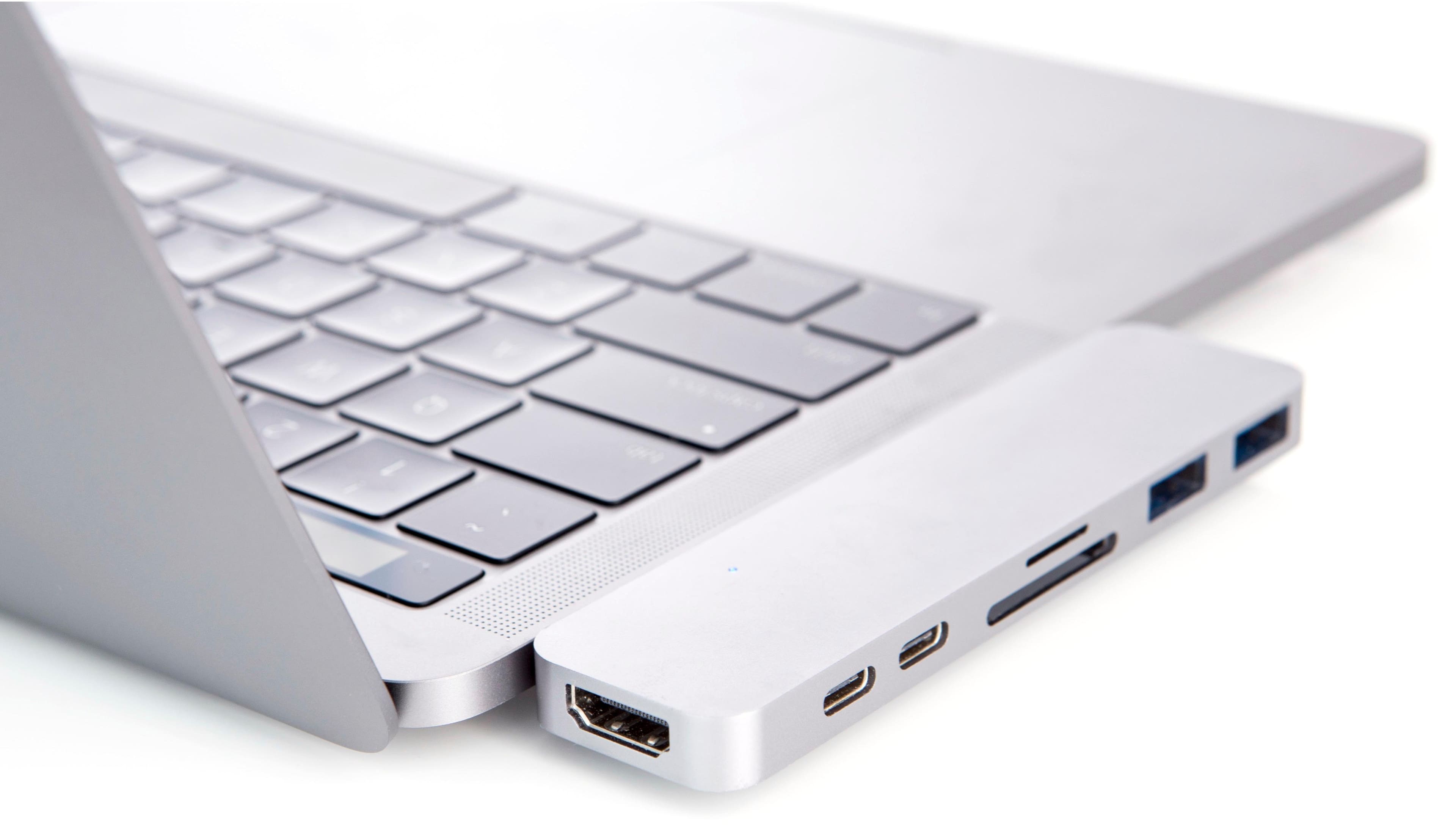
Customers enjoy the HyperDrive 7-Port USB C Hub's numerous USB ports, ease of use, and compact size, finding it convenient for expanding their MacBook's connectivity. However, some customers express concerns regarding compatibility issues, the price point, connection stability, and the device's tendency to generate heat. The sleek design is frequently praised. Despite some drawbacks, many appreciate the added ports and user-friendliness.
This summary was generated by AI based on customer reviews.
- Pros mentioned:Size
Rated 4 out of 5 stars
Great once it breaks in
||Posted .This reviewer received promo considerations or sweepstakes entry for writing a review.This is a great product but if you buy the 2018 MacBook Pro expect this to not fit well until it breaks in and loosens up. At first I couldn’t get the thing to stay in because it wouldn’t click in all the way, but after a few dozen times it finally loosened up and started to click in all the way.
This review is from Hyper - HyperDrive 7-Port USB C Hub - USB-C Docking Station for Apple MacBook Pro and Air - Space Gray
I would recommend this to a friend - Pros mentioned:Usb
Rated 4 out of 5 stars
Just What I Needed
||Posted .This reviewer received promo considerations or sweepstakes entry for writing a review.Bought the new MacBook Pro, but still wanted the HDMI, SD Card Slot, USBs, etc. This had exactly what I needed. Works great. I even bought an ethernet to USB adapter and it gives me gigabit internet speeds. Mac's New Thunderbolt ports are super powerful and this devise allows you to fully use all of its capabilities.
This review is from Hyper - HyperDrive 7-Port USB C Hub - USB-C Docking Station for Apple MacBook Pro and Air - Space Gray
I would recommend this to a friend - Pros mentioned:UsbCons mentioned:Compatibility
Rated 1 out of 5 stars
Disconnects frequently
||Posted .This reviewer received promo considerations or sweepstakes entry for writing a review.This adapter seemed very practical; it has 2 USB 2.0 ports, 2 USB-C 3.1 ports, 2 SD card slots, and a HDMI port. It was really the only dongle I would need to transition to the new MacBook Pro line. HOWEVER, this dongle has a major flaw. It will disconnect with the slightest movement. If you have a cable plugged in, it will disconnect as soon as you try to plug in another cable. This has happened 100% of the times for me, in fact, I connect all cables before using it, and cannot disconnect any cables until I am done using all my equipment. I plan on returning this, but as we know, Best Buy doesn't have the best return policy, so I may just have to keep this. Don't waste $100 on this.
This review is from Hyper - HyperDrive 7-Port USB C Hub - USB-C Docking Station for Apple MacBook Pro and Air - Space Gray
No, I would not recommend this to a friend - Cons mentioned:Compatibility
Rated 4 out of 5 stars
Good Product
||Posted .This reviewer received promo considerations or sweepstakes entry for writing a review.Love the product. The only reason I gave it a 4/5 is that you cant use a protective case on your Mac and attach this. I take my MB Pro everywhere. I have a protective shell on it. To attach the dock I have to remove the shell. If you don't use a protective case, this is a non-issue. Looks good and works well.
This review is from Hyper - HyperDrive 7-Port USB C Hub - USB-C Docking Station for Apple MacBook Pro and Air - Space Gray
I would recommend this to a friend - Pros mentioned:Size
Rated 4 out of 5 stars
Super Easy add on to new Macbook Pro
||Posted .This reviewer received promo considerations or sweepstakes entry for writing a review.Let's face it we ( mac people) if we choose to update to a newer model and faced with what is it that Apple decided to get rid of this time, All that aside this is an quick dock that does not take up a ton of space and does exactly what it says it does. light, offers what I need, and didn't cost and arm and a leg
This review is from Hyper - HyperDrive 7-Port USB C Hub - USB-C Docking Station for Apple MacBook Pro and Air - Space Gray
I would recommend this to a friend - Pros mentioned:Ease of useCons mentioned:Price
Rated 5 out of 5 stars
Must Have
||Posted .This reviewer received promo considerations or sweepstakes entry for writing a review.Had to buy it as the new Macbook Pro does not have any usb or card readers built in. little pricey but works great.....
This review is from Hyper - HyperDrive 7-Port USB C Hub - USB-C Docking Station for Apple MacBook Pro and Air - Space Gray
I would recommend this to a friend Rated 5 out of 5 stars
Its work for my mac pro
||Posted .This reviewer received promo considerations or sweepstakes entry for writing a review.see some negative review saying its might out of function some time. Have not found this situation yet. I purchased in this Thanksgiving, use it for 2 weeks now, its work perfectly fine with my mac pro 2017.
This review is from Hyper - HyperDrive 7-Port USB C Hub - USB-C Docking Station for Apple MacBook Pro and Air - Space Gray
I would recommend this to a friend- Pros mentioned:Usb
Rated 5 out of 5 stars
The needed adapter
||Posted .This reviewer received promo considerations or sweepstakes entry for writing a review.Apple does sell multipart adapters for its newer MacBook Pro's, but who wants to unplug a series of such adapters when you want to grab your computer and go? This one fits either the right or left side of my four port MacBook Pro, has two USB-C ports, and also has two regular USB ports and a HDMA port. So it is all there in one unit, which lights up when it is properly connected. Pull one from the right and one from the left, and I am ready to go. What could be simpler?
This review is from Hyper - HyperDrive 7-Port USB C Hub - USB-C Docking Station for Apple MacBook Pro and Air - Space Gray
I would recommend this to a friend - Cons mentioned:Compatibility
Rated 4 out of 5 stars
Great produce, Will be returning
||Posted .This reviewer received promo considerations or sweepstakes entry for writing a review.I really like this item, it allows be to connect other devices. But this item will have to be returned, This item is not compatible if MacBook Pro is surcured in a case. Now that I've purchased a case for pro I can't attach this hub and the only way I can use is if I remove case. But over all great produce!!
This review is from Hyper - HyperDrive 7-Port USB C Hub - USB-C Docking Station for Apple MacBook Pro and Air - Space Gray
I would recommend this to a friend - Pros mentioned:Usb
Rated 4 out of 5 stars
Hyper + Drive
||Posted . Owned for 4 months when reviewed.This reviewer received promo considerations or sweepstakes entry for writing a review.This SeAGate Hyper + Drive Duo 7-In-2 USB C HUB for MacBook Pro/Air was awesome! I loved all the features except the FAKE usb C hub that looked like you could put a apple lightening charger right into the lightening spot of this not seagate good mint condition box.
This review is from Hyper - HyperDrive 7-Port USB C Hub - USB-C Docking Station for Apple MacBook Pro and Air - Space Gray
No, I would not recommend this to a friend - Cons mentioned:Compatibility
Rated 4 out of 5 stars
Great product works well!
||Posted .This reviewer received promo considerations or sweepstakes entry for writing a review.I purchased this adapter for my 2016 MacBook Pro. I like how it has all the ports I need connected to usb type c. It lights up from the bottom when plugged in so I know it’s inserted correctly and ready. Only downside is that it doesn’t plug in if the laptop has a case. Other then that it works perfectly fine.
I would recommend this to a friend - Pros mentioned:Usb
Rated 4 out of 5 stars
Great for an all-in-one adapter.
||Posted .This reviewer received promo considerations or sweepstakes entry for writing a review.I love this item. The only reason I rated it a 4/5 is because you can’t use the bottom portion of a clip on case. The case needs to be notched out or removed in order to use this device. However, it’s worth every cent! It’s easier having one adapter rather than several to keep up with.
This review is from Hyper - HyperDrive 7-Port USB C Hub - USB-C Docking Station for Apple MacBook Pro and Air - Space Gray
I would recommend this to a friend Rated 5 out of 5 stars
One stop hub
||Posted .This reviewer received promo considerations or sweepstakes entry for writing a review.When purchasing a new Macbook, the only ports available are thunderbolt. Coming from the World of Windows, I still use HDMI, and USB items. This hub works flawlessly with the Macbook and the peripherals.
This review is from Hyper - HyperDrive 7-Port USB C Hub - USB-C Docking Station for Apple MacBook Pro and Air - Space Gray
I would recommend this to a friendRated 5 out of 5 stars
Necessary
||Posted .This reviewer received promo considerations or sweepstakes entry for writing a review.Key add on as MacBook Pro comes with only USB-C ports. Worked as promised for SD card slot (not sure why it’s designed so that card has to be inserted upside down), although have not tested other slots.
I would recommend this to a friend- Pros mentioned:Usb
Rated 5 out of 5 stars
Great product and a needed one
||Posted .This reviewer received promo considerations or sweepstakes entry for writing a review.My MacBook Pro has four USB-C ports. But I do not like having to pull four plugs out of it and some things are not USB-C. Enter this product: one HDMI, two regular USB, and two USB-C ports. I have gotten one for the right of the computer and one for the left. And they work. Pull right and pull left and I am off, with all my accessories sitting there ready to be plugged back in when I return - and it only takes two pushes, one right and one left. Great product.
This review is from Hyper - HyperDrive 7-Port USB C Hub - USB-C Docking Station for Apple MacBook Pro and Air - Space Gray
I would recommend this to a friend - Pros mentioned:Ports, Usb
Rated 5 out of 5 stars
Excellent
||Posted . Owned for 1 year when reviewed.This reviewer received promo considerations or sweepstakes entry for writing a review.Great usb c hub. Ot offers all the ports that I need and they work perfectly
This review is from Hyper - HyperDrive 7-Port USB C Hub - USB-C Docking Station for Apple MacBook Pro and Air - Space Gray
I would recommend this to a friend - Pros mentioned:Usb
Rated 5 out of 5 stars
All you need in one device
||Posted . Owned for 1.5 years when reviewed.This reviewer received promo considerations or sweepstakes entry for writing a review.I've had this for almost two years and it still works great! I looked for many alternatives before making the decision to buy it, with many other options being more affordable. The reason I bought this one is because it has the HDMI input. Having an all-in-one has been super helpful when I have presentations or meetings because I don't need an additional adaptor. It's easy to connect, matches my computer and has never failed me.
This review is from Hyper - HyperDrive 7-Port USB C Hub - USB-C Docking Station for Apple MacBook Pro and Air - Space Gray
I would recommend this to a friend - Pros mentioned:Ports
Rated 3 out of 5 stars
Great if you don't touch it.
||Posted .This reviewer received promo considerations or sweepstakes entry for writing a review.I use this with my MacBook Pro to manage and backup data on film sets. When it comes to ports, power and speed, this thing performs well. The downside is that it's very easy to accidentally unplug, especially when removing an SD card. However, a coworker of mine, uses it to dock his Mac while in the office. He uses a separate mouse and keyboard and therefore doesn't touch the actual laptop while in use. For that, it's really great. He only has to plug in one thing and he is connected to 2 monitors, power, a wired keyboard and a usb-out for charging his phone/camera/vape. Wish it clipped on to the edge of the air vent like many of the iMac versions do. Considering I use it in a variety of situations, in the future, I'll just stick with detached adapters.
This review is from Hyper - HyperDrive 7-Port USB C Hub - USB-C Docking Station for Apple MacBook Pro and Air - Space Gray
No, I would not recommend this to a friend - Cons mentioned:Compatibility
Rated 4 out of 5 stars
Needed for extra connection
||Posted . Owned for 1 week when reviewed.This reviewer received promo considerations or sweepstakes entry for writing a review.Since the new Mac only has Thunderbolt 3 connections, I needed a hub so I could use other devices. This is well worth the money if you do not put a case on the laptop. The only downfall is the connectors are not long enough to make connection with a case.
This review is from Hyper - HyperDrive 7-Port USB C Hub - USB-C Docking Station for Apple MacBook Pro and Air - Space Gray
I would recommend this to a friend - Pros mentioned:Design, Ease of use
Rated 5 out of 5 stars
Great product
||Posted .This reviewer received promo considerations or sweepstakes entry for writing a review.Great product works well and it is easy to carry small design and has all the bells and whistles.
This review is from Hyper - HyperDrive 7-Port USB C Hub - USB-C Docking Station for Apple MacBook Pro and Air - Space Gray
I would recommend this to a friend