Customer Ratings & Reviews
- Model:
- NS-PCNVMEHDE
- |
- SKU:
- 6500317
Customer reviews
Rating 4.4 out of 5 stars with 1136 reviews
(1,136 customer reviews)Rating by feature
- Value4.5
Rating 4.5 out of 5 stars
- Quality4.4
Rating 4.4 out of 5 stars
- Ease of Use4.5
Rating 4.5 out of 5 stars
Customers are saying
Customers are satisfied with the M.2 NVMe to USB-C SSD Enclosure, particularly its ease of use, overall performance, and speed. The USB-C connection, price, and size are also appreciated features. However, some customers have expressed concerns about heat, compatibility issues with newer models, and the locking mechanism for the SSD.
This summary was generated by AI based on customer reviews.
Rated 1 out of 5 stars
Poorly made
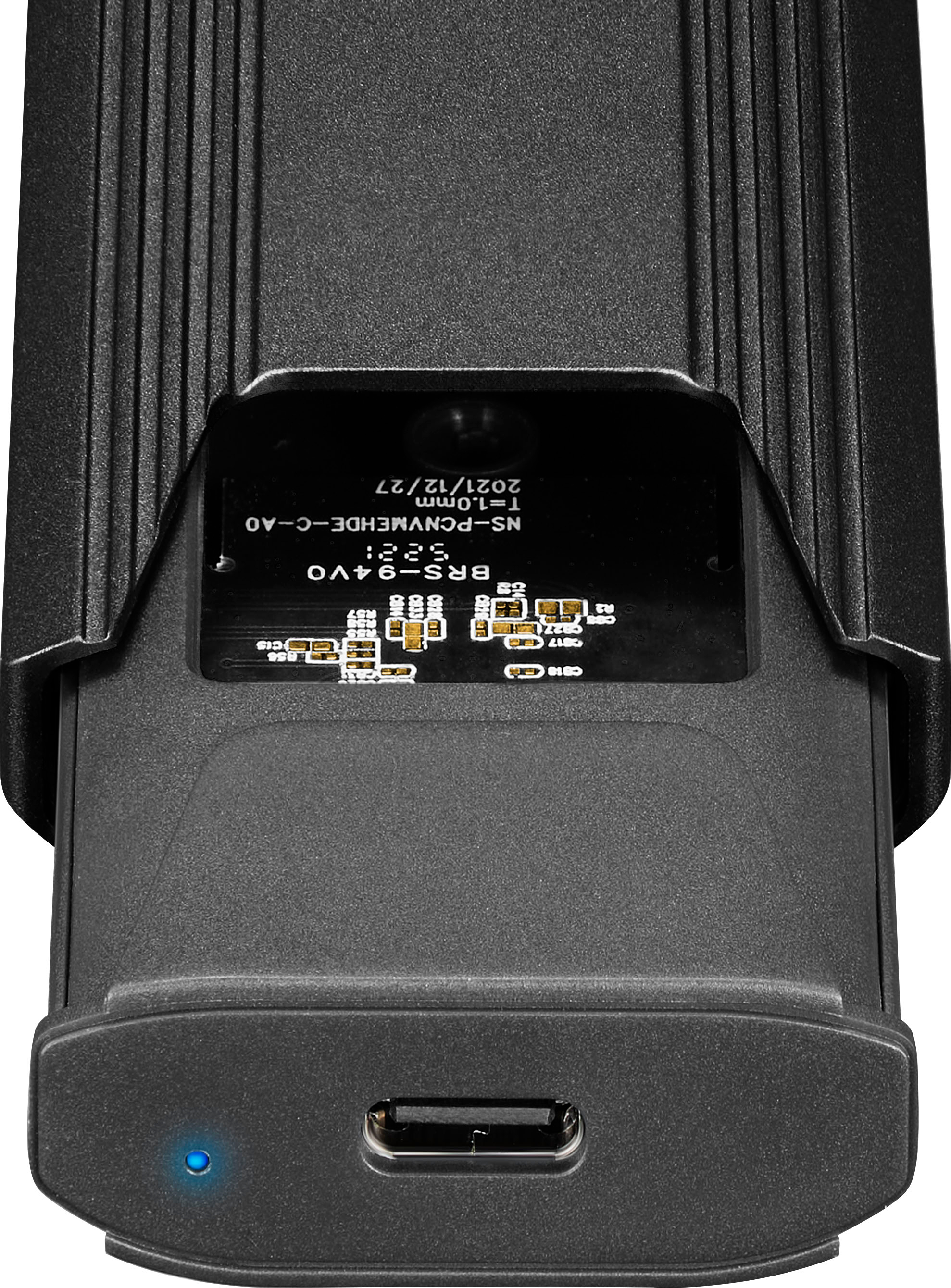
||Posted . Owned for less than 1 week when reviewed.This reviewer received promo considerations or sweepstakes entry for writing a review.It claims to fit a 2280 m.2, but it does not. The plastic piece that holds the ssd in place is ever so slightly too big, and doesn't allow you to actually hold the ssd down enough for you to put the housing over it. If you allow the m.2 drive to just stick up without the housing in place, your computer can read data from it, so I guess there's that. Removing the plastic piece prevents the drive from being held down, preventing installation of the metal housing.
No, I would not recommend this to a friendBrand response from InsigniaCustomerSupport
Posted .Thank you for sharing your experience. We’re sorry to hear about the issues you’re facing with fitting the 2280 m.2 SSD. We understand how frustrating it can be when the plastic piece doesn’t hold the SSD securely, preventing proper installation of the housing. Your feedback is valuable to us, and we will use it to improve our product design. If there’s anything we can do to assist you further, please don’t hesitate to reach out. Keith | Insignia Support
- Pros mentioned:Speed
Rated 1 out of 5 stars
Slow do not buy!
||Posted . Owned for more than 2 years when reviewed.This reviewer received promo considerations or sweepstakes entry for writing a review.Slow slow slow. Must be usb 3.0 or below speeds on a 9880 were sub 400 put it in Acasis enclosure and was getting near 4000
No, I would not recommend this to a friend Rated 3 out of 5 stars
?
||Posted . Owned for 1 month when reviewed.This reviewer received promo considerations or sweepstakes entry for writing a review.Instructions are not the discriptive on what platforms and programs work with the device.
I would recommend this to a friendRated 3 out of 5 stars
It's alright.
||Posted . Owned for 3 months when reviewed.This reviewer received promo considerations or sweepstakes entry for writing a review.I was quite surprised it worked with my 2230 drive.
I would recommend this to a friendRated 1 out of 5 stars
Usless
||Posted . Owned for 1 week when reviewed.This reviewer received promo considerations or sweepstakes entry for writing a review.The Insignia M.2 NVMe to USB SSD Enclosure is total trash. I purchased two units, the SSD retaining clip broke in the first, thinking it was my bad (physical handicap) I purchased a replacement and asked the Geek Squad to install my SSD. It did not work. Inspection shows the SSD was installed improperly (over not under the retainer). I took the unit to another store, showed the Geek Squad the instructions and asked that they reinstall the SSD. Still no function. I purchased a (cheaper) unit online, SSD install was easy and the unit worked perfectly. Do not waste your time and money on this unit.
No, I would not recommend this to a friendBrand response from InsigniaCustomerSupport
Posted .Hi HClay,
Thanks for taking the time and effort to leave a review. Hearing your feedback is important so we can continue to improve our products. Please contact us if there is anything that we can assist you with the # is 888-237-8289.
Renee,
Insignia Support
https://www.bestbuy.com/site/brands/best-buy-brands/pcmcat1596746025285.c?id=pcmcat1596746
Rated 3 out of 5 stars
Expensive potatoe
||Posted . Owned for 2 months when reviewed.This reviewer received promo considerations or sweepstakes entry for writing a review.Bought this thinking I could clone mv2 drives..... lol Lesson learned. I now have a very expensive usb drive
No, I would not recommend this to a friendRated 3 out of 5 stars
Works… Most of the time
|Posted . Owned for 1 month when reviewed.This reviewer received promo considerations or sweepstakes entry for writing a review.Item didnt work in a couple of my usb 3.0 slots but once it did, it was fine.
I would recommend this to a friendRated 3 out of 5 stars
Careful its delicate.
||Posted . Owned for 2 weeks when reviewed.This reviewer received promo considerations or sweepstakes entry for writing a review.Opening it was a drag and the lock for the m2 ssd almost gets broken, but it works well.
I would recommend this to a friendRated 1 out of 5 stars
Dissapointing
||Posted . Owned for 3 weeks when reviewed.This reviewer received promo considerations or sweepstakes entry for writing a review.I bought this to act as a backup device for my new install. I installed two different working NVME drives in it and tried it on two different computers where it refused to initialize. (one of them is currently installed inside my computer and I am downloading games to it as I write this.) I also deleted a half a terabyte of programs from my "E" drive so i could rename it as "H" drive and reinstall the programs . The thinking was to have drive letters "E" and "F" open for the device. Nothing worked. I tried Computer management/Disk Manager and Minitool with no results. I bought this on December 22nd and today is Jan 16th, apparently Best Buy does not have a 30 day return since my account shows it is no longer returnable (Since Jan 14th). This item was recommended in store for what I was doing. Don't wait long if you buy something to try it if you buy it from Best Buy. I have had good luck with my 75" LG TV I bought from them a year ago and the two 2tb ssd hard drives I bought recently.
No, I would not recommend this to a friendBrand response from InsigniaCustomerSupport
Posted .Hi StevenG,
Thank you for the review. We do apologize if the product did not work. For us to fix the issue please give us a call at 888-237-8289.
Insignia Support,
Renee
Rated 1 out of 5 stars
Cheap plastic clip to secure SSD is prone to break
||Posted . Owned for 1 week when reviewed.This reviewer received promo considerations or sweepstakes entry for writing a review.The case and cables are of good overall quality, but rather than using a screw to secure the SSD into the case, it uses a little plastic tab that you have to twist a bit to get out and then put back in. If you have to remove it for some reason, it's difficult to twist it back out without snapping it in half. It's a cheap bit of plastic that isn't very strong. I had to remove the SSD I originally installed in this and replace it, and that clip just tore in two! And because the hole it goes into is larger in diameter than common short screws, you can just use a screw to secure the SSD into the case. Stupid design.
No, I would not recommend this to a friendBrand response from InsigniaCustomerSupport
Posted .Hi there!
Thank you for taking the time to review our Insignia™ - M.2 NVMe to USB-C SSD Enclosure, we're very sorry to read you are experiencing this issue with one of our products, please contact us using the link below, we'll be more than happy to assist you regarding this matter.
Insignia Support
Shella
www.insigniaproducts.com/support
Rated 3 out of 5 stars
limit usage
||Posted . Owned for 3 weeks when reviewed.This reviewer received promo considerations or sweepstakes entry for writing a review.The enclosure has limited usage, did not fit my needs. Was forced to return
No, I would not recommend this to a friendRated 1 out of 5 stars
seems like it should work but really BAD design
||Posted . Owned for less than 1 week when reviewed.This reviewer received promo considerations or sweepstakes entry for writing a review.the design of the little post clip thing that holds the drive in place is GARBAGE! I could not get it back into the hole with the drive I have western digital sn810 which should fit but its like its a bit off and I can't get the post thing to get a solid connection to hold the drive down in the end I got frustrated and gave up I will be returning this
No, I would not recommend this to a friendBrand response from InsigniaCustomerSupport
Posted .Thank you for sharing your feedback. We're sorry to hear about the difficulties you experienced with the Insignia™ M.2 NVMe to USB-C SSD Enclosure. It sounds like the post clip design didn't meet your expectations, and we apologize for any frustration this caused.
We take your concerns seriously and are committed to improving our products. If you're open to it, we'd love to help troubleshoot the issue with your Western Digital SN810 drive. Please reach out to our customer support team for assistance.
Your feedback is invaluable, and we appreciate your patience. We hope to provide a better experience in the future. Rolf | Insignia Support https://www.bestbuy.com/site/insignia-m-2-nvme-to-usb-c-ssd-enclosure/6500317.p?skuId=6500317
Rated 3 out of 5 stars
Didn't work
||Posted . Owned for 3 weeks when reviewed.This reviewer received promo considerations or sweepstakes entry for writing a review.Didn't work looks like a nice little device though
No, I would not recommend this to a friendRated 1 out of 5 stars
Did not work well for me
||Posted .This reviewer received promo considerations or sweepstakes entry for writing a review.The transfer of files was slow when the device warmed. I don’t know if it was something I did or my M.2 or the device. Did not work well for me.
No, I would not recommend this to a friendRated 1 out of 5 stars
Nonfunctional across 4 computers and 3 drives
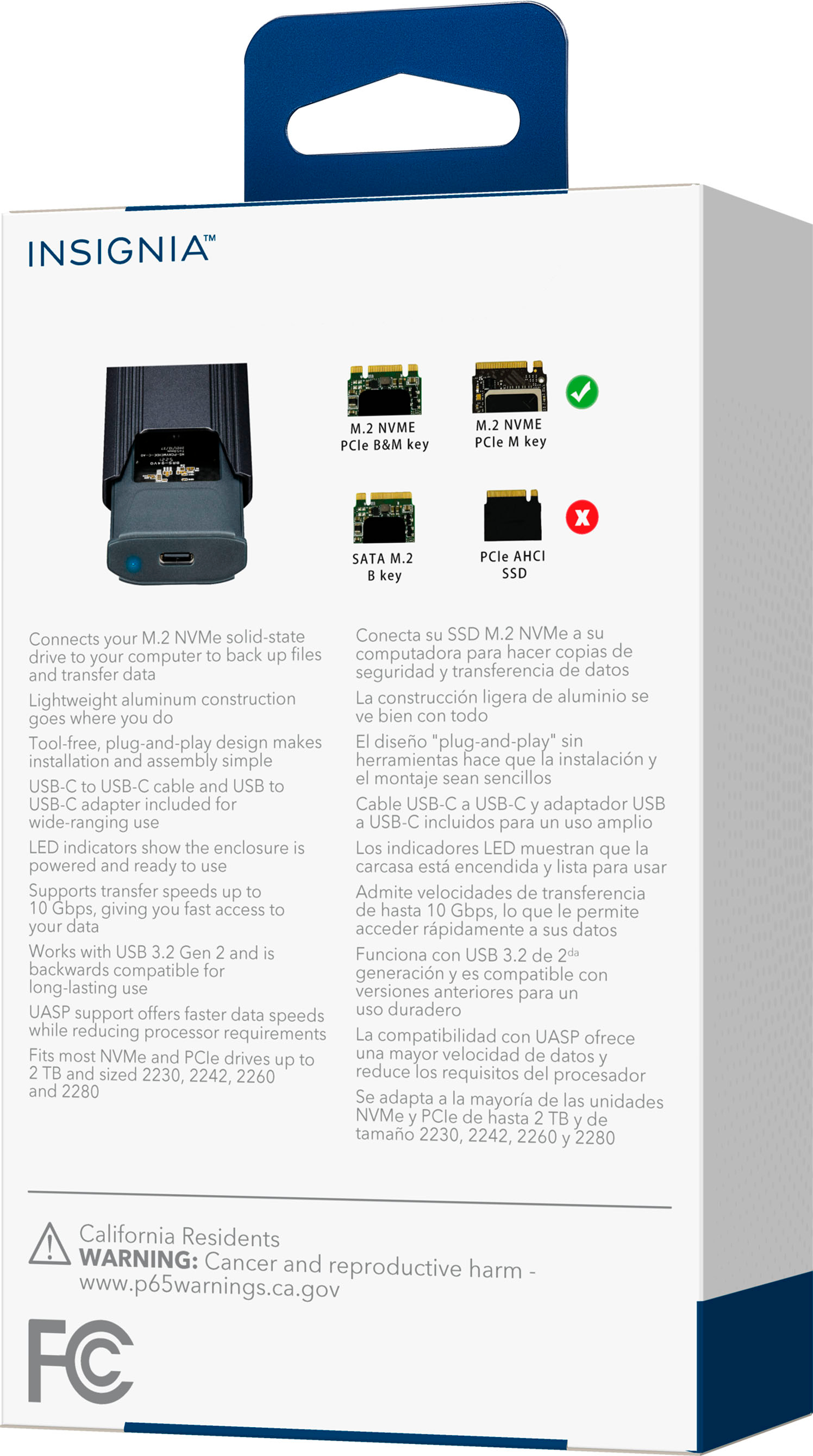
||Posted .This reviewer received promo considerations or sweepstakes entry for writing a review.I originally purchased this to move some files from an old mSATA drive I had used to boot from, primarily some builds of a game I play. Windows was capable of recognizing that there was, in fact, a device plugged in, but would constantly claim there was a "fatal hardware error". Plugging this back into the old computer would prove otherwise, as I could easily see the drive and access the files with no problem. Testing this with other M.2 drives would yield the same results regardless of which port I used on the computer, which computer I used, and which drive I used. I am greatly disappointed in this product.
No, I would not recommend this to a friendBrand response from InsigniaCustomerSupport
Posted .Hi there!
Sorry for your bad experience.this product didn't support mSATA interface. as user said he tried other drive and it didn't work on other PC. this situation suppose is the drive didn't do the format process.
Insignia Support
Rick
www.insigniaproducts.com/support
Rated 2 out of 5 stars
Didn't work for me
||Posted . Owned for 6 months when reviewed.This reviewer received promo considerations or sweepstakes entry for writing a review.Defective right out of the box. I'm giving it 2 stars since I didn't try another one and want to be fair. It could have just been bad luck that I bought a defective one and a replacement would have worked fine.
No, I would not recommend this to a friendBrand response from InsigniaCustomerSupport
Posted .Hello Terry,
Thank you for taking the time to leave a review of our Insignia™ - M.2 NVMe to USB-C SSD Enclosure. We apologize for the experience you have been through with the product. I know it can be dissatisfying that its not working as expected. Please know that we are improving the quality of this product by considering our customers feedback, if you need further assistance you can contact our customer service at 1 (877) 467-4289 Monday-Saturday 8am - 9pm CT.
Insignia Support
Molina
https://www.bestbuy.com/site/brands/best-buy-brands/pcmcat1596746025285.c?id=pcmcat1596746025285
- Pros mentioned:Usb-c
Rated 1 out of 5 stars
Insignia™ - M.2 NVMe to USB-C SSD Enclosure
||Posted . Owned for 1 month when reviewed.This reviewer received promo considerations or sweepstakes entry for writing a review.While I was discussing a computer problem with a Geek Squad representative, he suggested that I needed this item. Not sure why. He did not explain what its use was and how it worked.
No, I would not recommend this to a friend - Cons mentioned:Compatibility
Rated 1 out of 5 stars
Don't purchase to use with Windows 11 pro.
||Posted . Owned for 3 weeks when reviewed.This reviewer received promo considerations or sweepstakes entry for writing a review.Works with my old Windows 10, laptop but not at all with my new HP ENVY X360, Windows 11 laptop. Worthless to me. I have ordered a replacement elsewhere.
No, I would not recommend this to a friendBrand response from InsigniaCustomerSupport
Posted .Hi RobertO,
Thank you for taking time to write a review our Insignia™ - M.2 NVMe to USB-C SSD Enclosure. We are continuously working to improve the quality of our products and anticipate market demands that drive customer satisfaction.
Dina || Insignia Support || https://www.bestbuy.com/insignia
Rated 2 out of 5 stars
Not that good, spend your money elsewhere
||Posted . Owned for 3 weeks when reviewed.This reviewer received promo considerations or sweepstakes entry for writing a review.Honestly, kind of meh. Transfer speed is very slow. After using it a few times, something busted internally and now it doesn't read any of my m.2 drives. It worked, but I would stay away from this product and spend your money elsewhere.
No, I would not recommend this to a friend- Cons mentioned:Compatibility
Rated 1 out of 5 stars
Never again
||Posted . Owned for 3 weeks when reviewed.This reviewer received promo considerations or sweepstakes entry for writing a review.It kept going in and out. It also only works with certain m.2 sticks. Bought one an Amazon that was a LOT better.
No, I would not recommend this to a friendBrand response from InsigniaCustomerSupport
Posted .Hi there! Thank you for writing a review about our M.2 NVMe to USB-C SSD Enclosure! We understand that you're having issues with the product. We would love to check this situation further with you! Please feel free to contact us at the link below to get assistance with your SSD enclosure.
Rudson S.| Insignia Support. https://www.insigniaproducts.com/contact-us