Customer Ratings & Reviews
- Model:
- GCS632U
- |
- SKU:
- 6191569
Customer reviews
Rating 4 out of 5 stars with 143 reviews
(143 customer reviews)Rating by feature
- Ease of Use4.2
Rating 4.2 out of 5 stars
Customers are saying
Customers frequently mention the ease of use and the convenient USB connectivity of the MiniView Micro 2-Port USB Plus KVM Switch. Many appreciate its compact size and the included cables' length. However, some users experienced compatibility issues, particularly with certain operating systems and keyboards. A few reported instances of the product malfunctioning after a period of use.
This summary was generated by AI based on customer reviews.
- Pros mentioned:Audio, SizeCons mentioned:Compatibility
Rated 4 out of 5 stars
Once tweaked, works great with Logitech Unifying!
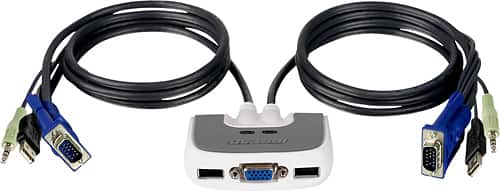
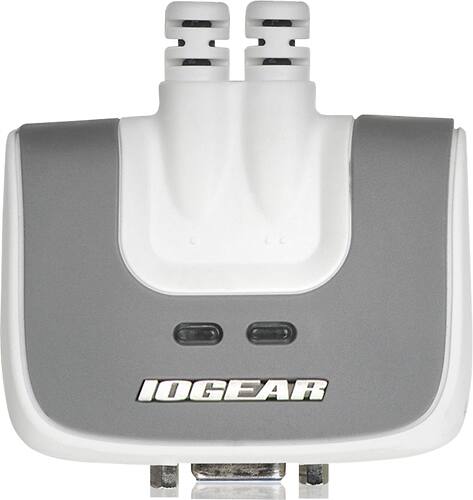
Posted .This reviewer received promo considerations or sweepstakes entry for writing a review.This Iogear GCS632U KVM Switch is now working beauttifully with my Logitech Unifying USB receiver plugged into the Keyboard-designated USB slot on the switch. It lets me use a hotkey switch between my laptop and my tower so I can use a single Monitor, Keyboard, and Mouse and control either computer, one at a time. I had to do quite a bit of setup and reading to figure out how to get all components to work, but once I got past that I've had zero issues so far. I am tech competent but not tech expert level. I had to read stuff at Iogear's site to figure out some of my issues and try several things to get everybody to work right. Here's my system, and those of you trying to use with Wireless Keyboard/Mouse might appreciate the details of how I solved my issues. I have a Logitech K520 Wireless Keyboard and an M510 wireless mouse. Both use a single USB receiver, Logitech's Unifying Receiver. I have an LG Monitor that has both DVI and VGA ports but I am using only the VGA port, connected between the KVM Switch. Video quality is fine for me, I'm not a gamer. The box for the KVM is small and has two green LED's on top. On front is a VGA 15-pin female port for the Video, and two USB slots but these are not true, anything -oes USB's; they are designed to accept a wired mouse on one and a wired keyboard on the other. There's an audio jack (light green) on the side for speakers but I'm not using that for reasons I explain later. I plugged the little Unifying receiver into the Keyboard-designated USB slot. Coming off the other end are two cables that each have 3 connections: VGA, USB, and Audio. Initially I plugged all 3 in to each computer. My tower uses DVI so I used a DVI-to-VGA adapter to connect to the KVM plug. When I followed the Manual's directions and turned my laptop on first, I got video display just fine but no Keyboard/Mouse (KM) control. I plugged in a USB mouse into the laptop and controlled from there. Of course the KM wouldn't control, I needed to re-connect now that my Unifying was in the KVM. I used my Logitech app to have it recognize the K and M and then, voila! I had KM wireless control. So, on I went to the tower, turning it on. Same issue, so I downloaded the Logitech Unifying app and again went through the steps to reconnect K and M. Now the first big test was a big FAIL. Pressing [Scroll Lock][Scroll Lock] as the hotkey indeed toggled me back to my laptop, and its video displayed fine, but now I once again had to KM control. Huh? Time to read up at Iogears site. They detailed how some wireless ID codes might not be recognized..and how you need sufficient power through each USB port to get everything to work. So, I decided to totally power down both computers as Iogear suggested, disconnect all cables as suggested, and wait five minutes. To give the power equation a better chance, I unplugged the audio jack. THAT WORKED! Now I powered up my tower first, and I had Video and KM control. Then I powered up my laptop, toggled via hotkeys, and had KM control here, too! Since my laptop is used for business, I have decided to not try to push my luck; I'll hook up my speakers directly to my tower if I want sound on that computer, used for personal. Since this is a KVM switch and not a KVMP switch, I am using a 4-port USB hub to take USB from each computer then connect 1 USB cable to my printer. I hope you found these details useful as you strive to figure out if this little KVM will work for you.
I would recommend this to a friend Rated 5 out of 5 stars
double Dells
||Posted .This reviewer received promo considerations or sweepstakes entry for writing a review.Received and installed the KVM and can now use the two computers on the same work surface, thanks for providing what I needed to accomplish that goal!
I would recommend this to a friendRated 5 out of 5 stars
Does exactly what it says it will do.
||Posted .This reviewer received promo considerations or sweepstakes entry for writing a review.Needed this to transfer between two computers and it does the job. Note that there is a 30 or so second delay before transfer is complete.
I would recommend this to a friendRated 5 out of 5 stars
Yup
||Posted . Owned for 3 weeks when reviewed.This reviewer received promo considerations or sweepstakes entry for writing a review.Returned it but I'm sure it would have worked fine if it was for the purpose I was trying to use it for.
I would recommend this to a friendRated 5 out of 5 stars
Fantastic
||Posted .This reviewer received promo considerations or sweepstakes entry for writing a review.It made my life so much better and so much more productive!!! THANK YOU!!!!
I would recommend this to a friend- Cons mentioned:Compatibility
Rated 1 out of 5 stars
MypreviousKVMswitch
||Posted . Owned for 11 months when reviewed.This reviewer received promo considerations or sweepstakes entry for writing a review.1 did not work when removed from box. Others stopped working after 2-3 months use. Some have worked for3 years or more. I have switched to another brand. Not as easy to use but so far no problem.(2 months)
No, I would not recommend this to a friend Rated 5 out of 5 stars
Works great but slow
||Posted .This reviewer received promo considerations or sweepstakes entry for writing a review.The device works well but takes around 10 seconds to switch inputs.
I would recommend this to a friendRated 5 out of 5 stars
Nice Product
||Posted .This reviewer received promo considerations or sweepstakes entry for writing a review.Easy to use and setup process. It works with two PC only.
I would recommend this to a friendRated 5 out of 5 stars
Excellent product
||Posted .This reviewer received promo considerations or sweepstakes entry for writing a review.Quick and easy to install, works exactly as I had hoped.
I would recommend this to a friendRated 5 out of 5 stars
Outstanding value for the money
||Posted .This reviewer received promo considerations or sweepstakes entry for writing a review.Easy to install and outstanding value for the money.
I would recommend this to a friendRated 1 out of 5 stars
Junk..didn't work
||Posted .This reviewer received promo considerations or sweepstakes entry for writing a review.I needed a KVM in a hurry on a Sunday just for switching keyboard and mouse inputs. I had no expectations of finding one locally that could switch a 2560x1600 monitor, so display switching was irrelevant. I've used IOGear devices in the past, and I'm currently using a rather expensive IOGear KVM that can switch WQXGA high resolution displays. But for just switching a keyboard and mouse, something KVMs have been doing for 20 years, this one couldn't do it, even without using keyboard shortcuts . Piece of junk and returned.
No, I would not recommend this to a friendRated 2 out of 5 stars
Doesn't switch after idle time until you restart
||Posted .This reviewer received promo considerations or sweepstakes entry for writing a review.This switch does not work when one or both systems have been idle for a while. You will have to restart at least one PC for the switch to work. Not sure how it passed QA.
No, I would not recommend this to a friend- Pros mentioned:Audio, Cable length
Rated 4 out of 5 stars
Does what it's supposed to do (so far)
Posted .This reviewer received promo considerations or sweepstakes entry for writing a review.I own a Mac (well, several actually) and a PC. I need to be able to use both, often at the same time. But I own only one monitor. I had an old manual a/v switch I used for years till it crapped out, and I'd been switching cables, keyboards, and mice ever since. This is a nice alternative that also allows me to eliminate a mouse and a keyboard, because I can use the same one for both the Mac and the PC. Yes, the Mac keyboard works fine on both. No, I haven't had any problems switching back and forth. I like the length of the cables unlike some here; my workstation is pretty spread out. Another KVM I looked at had 4 foot cables, which in my case wouldn't have been long enough. The manual is a bit skimpy but tells you enough to get it running. It took me all of five minutes to connect all the cables and set the hotkey. I switched the hotkey to Ctrl-F12 which seems to work better for me. There are a couple of downsides I see to this dongle. One, obviously, is cost...$53 is a bit steep, $40 would be more reasonable. Still, it works, and the cords are long and appear fairly robust. The second downside is that the USB ports on the Mac keyboard no longer function as they should, so popping a USB key is out of the question. Oh well, there's ways around that. Oh. And audio? That's a great plus, and it works just fine, switches back and forth seamlessly, so I can use my single set of speakers on both systems. The manual says it only works with "two piece powered speaker systems", but my three-piece with subwoofer seems to do okay. I haven't had this thing long enough to say anything about reliability, I'll chime back in a couple of months with what I hope is good news. So far, so good.
I would recommend this to a friend - Pros mentioned:Cable length, Ease of use, Usb
Rated 5 out of 5 stars
Works Perfectly, Very Convenient
Posted .This reviewer received promo considerations or sweepstakes entry for writing a review.I bought this so I could operate my new Windows 7 desktop and my Windows XP laptop from a single mouse, keyboard, and monitor. I'm a telecommuter and have to use my business laptop for work, but I use my personal desktop during the day for streaming music, personal e-mail, etc. Using this device, I was able to move my laptop off to the side and not have to make room for a second set of devices. The KVM switch comes with long cables, so I had no problem hiding the switch itself under my desk and connecting my monitor, my desktop, and my laptop, which are somewhat spread out across my work area. The connectors were conveniently labeled so that I was able to connect everything without referring to the instructions. An added bonus is that only one USB cable has to be connect to each computer, and it runs both the mouse and the keyboard. This freed up one USB port on each computer, which I desperately needed. Switching between computers is fast and easy. A quick double-push of the scroll lock key and the everything immediately switches to the other computer with only a momentary blanking of the monitor. I just installed this today, but I gave five stars under durability because the cables and connectors seem to be heavy-duty and the switch case also appears to be very solidly connected. This switch also powers audio, but I don't have that set up as I like to keep my main speakers tied to my desktop system. My laptop is tied into lower-quality speakers integrated into my monitor, so I don't need to swap out sound. If you want to switch back and forth between two computers but don't have room for two monitors, two keyboards, and two mice, this is a great way to go. It's more than I would have liked to have paid, but cheaper than buying a second set of devices to break myself away from the tiny laptop keyboard and monitor.
I would recommend this to a friend - Pros mentioned:Ease of use, Size
Rated 4 out of 5 stars
Great home user KVM
Posted .This reviewer received promo considerations or sweepstakes entry for writing a review.While doing some MCSE course work I needed the ability to switch between the domain controller and member/terminal server in the environment I had created. Since I needed to do this with one mouse, keyboard, and monitor, a KVM was the logical choice. This item fit the bill in that it is small, easy to connect, and has worked flawlessly; the thought of switching the mouse, keyboard, and monitor as frequently as would have been required made me cringe. A quick touble-tap on the scroll lock key and switching occurs near instantaneously. I have had no need of the audio connections on this KVM, so I can't comment to it's effectiveness in that regard. The only downside that I see is cost. For such a rudimentary two computer KVM, at just over $50 I find that to be a bit on the high side. I feel something in the $30-35 range would be much more realistic for a product of this nature.
I would recommend this to a friend - Pros mentioned:Audio, Ease of use, Size
Rated 5 out of 5 stars
Works Great
Posted .This reviewer received promo considerations or sweepstakes entry for writing a review.My few year old Dell 4700 died last fall with bizarre symptoms. Although I tried to diagnose the problems then, I was unsuccessful. I purchased a Gateway Quad 6600, loaded it with my back ups and continued on. Last weekend I gave the Dell one final try before making it landfill. I found and corrected several problems before the Dell would boot. But it did boot. Both systems are running Linux Ubuntu, BTW. With two systems and a limited desk space, I decided that I would get a KVM switch to share the keyboard, mouse and one of the two monitors on the Gateway with the newly resurrected Dell. The first try with the IOGEAR MiniView was a failure. The Dell had been configured to run the dual monitors through an ATI video card that was now on the Gateway. Trying to run a single monitor from the on board Intel graphics led to no end of fun. After a few feeble attempts to reconfigure the Dell, I gave up and reinstalled Ubuntu 8.10 from scratch on the Dell with a single monitor attached through the Intel 915 controller. (Remember that the Gateway already had the important data). That fixed all the issues on the Dell system. Not subtle, but it works. :) Initially the Gateway was not happy with the KVM switch either . My two Samsung monitors run at 1280 x 1024. With the KVM switch in place on one of the monitors, Ubuntu was insisting that I run both monitors at 1600 x 1280. The monitors were none too happy about that. The ATI video card in the Gateway has two ports - one HDMI and one VGA. I have a converter on the HDMI port to dumb it down to VGA. When I moved the KVM switch connection from the dumbed down HDMI port to the VGA port, both Ubuntu and the monitors agreed to run at 1280 x 1024. More happiness. I looked around before I bought the IOGEAR KVM. There are less expensive units, but nearly all of them need cables. That tends to bring their prices in line with the MiniView. The unit is relatively small and it is controlled by hot keys so there's no need for it to even be in sight. The most important part of the deal, however, is that the unit works with my equipment without degrading the video. I'd recommend this KVM unit. I'd also recommend less drama in your installation. ;)
I would recommend this to a friend - Pros mentioned:Ease of useCons mentioned:Compatibility
Rated 5 out of 5 stars
The BEST KVM Switch (USB)
Posted .This reviewer received promo considerations or sweepstakes entry for writing a review.I had been using a Belkin Flip with two Computers I use to play Music for Rodeos, and it worked fine. I built up 2 new Mini ITX Computers, nothing exotic, 1.5G Pentium on ITOX VB-7001 Motherboard. The Belkin Flip would not work on these Computers. Neither the external Flip Button nor the Scroll Lock Key would toggle between the computers. I could toggle using the software and double clicking the Flip Icon. However, when I shut the first computer down, there was no way to toggle to the second computer to shut it down. There is also a 5 second delay before the Keyboard and Mouse are available with the Belkin. I went back to the IO Gear KVM Switch, and it works flawlessly. Scroll Lock key toggles and the Keyboard and Mouse are available IMMEDIATELY. Also, when I shut one computer down, the Scroll Lock will still work to toggle to the second computer so that it can be shut down. I definitely recommend this KVM Switch over the Belkin.
I would recommend this to a friend - Pros mentioned:Ease of use, Usb
Rated 5 out of 5 stars
Just what I was looking for
Posted .This reviewer received promo considerations or sweepstakes entry for writing a review.When I bought a new computer, I guessed that I could use the LCD TV that was already in the room, but it was a chore moving and connecting it, and had to use 2 complete keyboards and mice etc. Since I had a great deal of Data to migrate, it required a few days, so I sought out a "Y" wire to connect both computers to my monitor and was informed of this product by the salesman. It was $60.00, but I was assured I could return it. Sealed in industrial plastic, as all electronics are today, I was skepical about returning it, but it had an easy rip open case, which could be re-sealed. It was all inclusive for keyboard, mouse, and even speakers for both computers! It connected easy through USB, VGA, and microphone plug, and held all the wires together to alleviate the "spaghetti" effect behind the scenes. Just a simple double click on the scroll lock key, and the other computer was displayed, even repeatedly. Great idea!
I would recommend this to a friend - Cons mentioned:Compatibility
Rated 3 out of 5 stars
Great for older setups, maybe not with new ones.
Posted .This reviewer received promo considerations or sweepstakes entry for writing a review.This does what it advertises- connects 2 computers with 1 keyboard, mouse, and speaker. Originally I had this connected to two older Dells. This configuration worked great, except that there is no way to control both computers at the same time. One computer *must* be shut down before the other one turned on in order for this product to switch over. However if you never need to run 2 computers at once this isn't an issue unless you have a situation like I am about to describe... The problem now is that I have replaced one computer with a new one equipped with a high-end motherboard (ASUS Rampage III Formula). This motherboard still draws power even when shut down, so the KMV switch never realizes my computer is off. When I turn on my older computer the KMV switch will not click over to it because it's still recognizing my other high-end machine. So now when I turn on my older computer I must manually unplug the USB from the back of my new computer to make it work. My recommendation: This product *does* technically work, however make SURE it works with your particular computer(s) before tossing out the receipt. Unfortunately I can't think of any way to see if this product will work with your setup other than just trying it and see what happens.
No, I would not recommend this to a friend - Pros mentioned:Audio, Usb
Rated 5 out of 5 stars
Works great!
Posted .This reviewer received promo considerations or sweepstakes entry for writing a review.I wanted to keep my older PS/2 keyboard and mouse. So I paired this KVM switch with a Dynex PS/2-to-USB converter - works great! You my have to get used to double-tapping the scroll-lock button very quickly though to make the switch from one PC to another. Regardless, the monitor image is not blurry and the shared audio is a great plus.
I would recommend this to a friend