Customer Ratings & Reviews


- Model:
- JVAW53Pro
- SKU:
- 6407848
Rating by feature
- Value
Rating 3.8 out of 5 stars
- Quality
Rating 3.9 out of 5 stars
- Ease of Use
Rating 3.8 out of 5 stars
Customers are saying
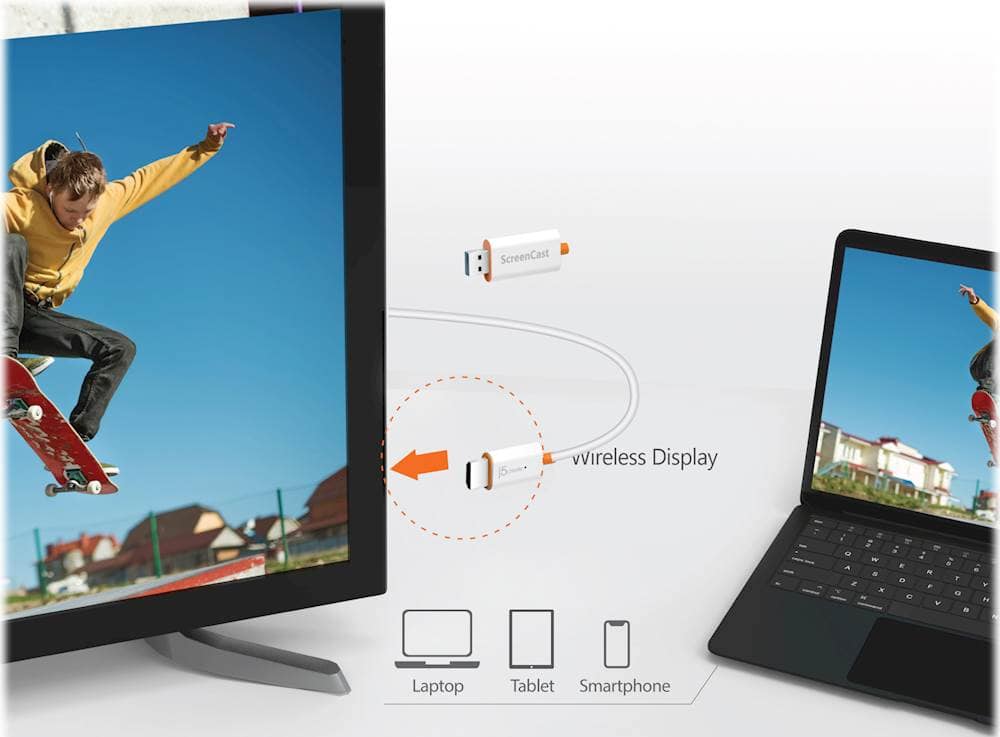
Customers are positive about the ScreenCast Wireless Display Adapter's ease of use, overall performance, and connectivity. Many find the setup quick and easy, and appreciate its compatibility with devices like iPhones. However, some customers have concerns regarding lag and video quality issues, particularly when there is movement.
This summary was generated by AI based on customer reviews.
- Pros mentioned:SetupCons mentioned:Video quality

Great to Extend My PC Screen
|Posted .This reviewer received promo considerations or sweepstakes entry for writing a review.This device was relatively easy to install. The instructions on screen made everything a breeze. It was a little slow when I cast videos from my Windows 10 laptop to my tv. It worked excellent when I used it to extend my screen, this is a great option when I bring my laptop into the den and I need another screen. It makes things easier since it is wireless. I also tested it with my Android phone and it was slow and the picture quality matched what was on my phone. The reason I only gave it 4 stars is that there better options out there that are also cheaper.
I would recommend this to a friendBrand response from J5create Team
Posted .Hello Roy,
We appreciate that you took the time to share your review on the j5create screencast. It's good to hear that the screencast worked well with your laptop. I hope you have a good day.
Thank you,
j5create
- Cons mentioned:Video quality
Great idea, but some issues ruin the experience
|Posted .This reviewer received promo considerations or sweepstakes entry for writing a review.My interest in the j5 Screencast device is as a teacher. With the widespread availability of big flat-screen TVs, it makes sense to make use of them to display a slideshow or graphical content while conducting a lecture. The problem is that it’s often inconvenient to use a long HDMI cable to do so. Enter the j5 Screencast. The Screencast is a small device with a USB connector at one end (for providing power), and an HDMI connection at the other end. Most modern TVs have both USB and HDMI ports not too far apart, and that’s the perfect setup for the Screencast. To get started, all you have to do is plug it in. j5create even includes a USB extension cable in case your USB port is too far away from the HDMI port to use the device as is. The way the Screencast works is that it creates its own little wifi network. You join the Screencast’s network by selecting its SSID from your wifi setup page and then entering the password. Here’s where I first ran into trouble: the device wouldn’t accept the wifi password that is on the screen and in the documentation! After trying to figure it out on my own, I called tech support, who suggested that I perform a factory reset. Fortunately, this worked and I was able to use the default password. I wasn’t impressed that I had to do a reset out of the box, but I was glad that it worked. When I realized that I had to join a different wifi network than what I normally use at home, I wondered how the device would support mirroring internet content from my phone to the TV. The answer is that you let the device join your home network, then that signal is provided to your phone when you join the device’s network. Once I was properly connected, it was time to give it a try. On my Apple iPhone, I swiped up from the bottom and chose “screen mirroring”. It listed the Screencast device as a viable option for casting, but that’s where the fun ended. My iPhone 8 using iOS 13.6 failed to connect to the Screencast. It’s possible that there is some sort of security policy on my corporate phone that is preventing that, but I could not find any documentation to help me with that, so using the iPhone was a no-go for me. To make sure that this wasn’t just a problem with iOS devices, I tried it with my iPad, and it worked fine, with the exception that I couldn’t cast HD content from Amazon Prime, and it wouldn’t work with Sling TV. It did, however, work with Hulu. I also dusted off an ancient iPod Touch, and screen mirroring worked just fine on that as well. Lastly, I tested it with an Android phone and had no problems. While watching video in an app on my iPad, I thought it would be good to see it on a larger screen. The devices were able to “talk” to each other, but only the audio from the app was cast to the TV. It seems that there are too many restrictions and/or glitches to reliably cast videos using this device. I am aware that some video services, such as Amazon Prime, protect their content with HCDP, but it’s still disappointing and limiting to run into this. For my original purpose of sharing slideshows in class, this device works just fine. I’m not sure I’d want to pay the full $55 just for that purpose, however. Chromecast serves the same purpose for less.
No, I would not recommend this to a friendBrand response from J5create Team
Posted .Hello,
We appreciate you taking your time to share your review. As an electronics manufacturing company we must abide by industry standards like HDCP. I regret to hear that you had the issues that you encountered with the device.
Thank you,
j5create
- Cons mentioned:Video quality
Great for Mixed-Device Environments
|Posted .This reviewer received promo considerations or sweepstakes entry for writing a review.Between my wife and I, we have an Android phone, an iPhone, an iPad, a Windows laptop, and a SurfacePro tablet in our house. My sister brings her MacBook laptop when she comes to visit. Trying to find a way for every one of those devices to display something on our living room TV used to be a royal pain. I could get an HDMI cable and a bunch of adapters to match each of those devices, but that’s just a mess of plugs, and the device needs to be close enough to the TV to connect with the cable. There are wireless products from Google, Apple, and other vendors, but nothing I’ve seen before works with everything. The j5create ScreenCast is unique in that it works (and works well), over WiFi, with all of our devices, whether they’re Windows, Android, MacOS, iOS, or iPadOS. And as great as this is in our living room, the j5create ScreenCast would also be really convenient to have in a conference room. At my office, most of us use Windows, but we often have visitors come in who need to present from a Mac or an iPad. The j5create ScreenCast, once properly setup, makes things so easy. Speaking of setup, I should note that getting the ScreenCast device setup was a bit of an effort. These days, I’m used to products with fairly slick user interfaces that walk users through each setup step on screen in real time. The ScreenCast is a little different. You turn it on and get a single screen with a LOT of text. In that text you’ll find several steps to follow. Those instructions walk you through connecting your device (phone, tablet, laptop, etc.) to the ScreenCast’s private WiFi network, then using that connection to direct the ScreenCast device to connect to your usual home or office WiFi network. Once that’s done, you then switch your device back to your usual home/office WiFi, and the ScreenCast device will meet you there. You only need to do this once, and the steps aren’t exactly difficult… it’s just that it takes some time and thought to get through. The good news is that once you've completed setup, all you need to do is make sure your device is on the same WiFi network as the ScreenCast, and whether you're using Android, iOS, Windows, or Mac, the ScreenCast just appears right in the screen mirroring menu... click or tap to connect... and you're in business. The other thing to note about the ScreenCast is that it’s really focused on screen mirroring. It works great for presentations, photos and slide shows, on-screen demonstrations, webinars, and even some videos online. It doesn’t seem to do as well with movie and TV streaming services. Some worked, others seemed like they were going to work at first, but then didn’t. Overall, the j5create ScreenCast is a great product for situations where you need to share the screen from a variety of device types. So long as you don’t mind setting aside some time to get through the initial setup, and don’t intend to use it for paid movie and TV streaming services, you’ll likely find it to be a very convenient addition to your living room or conference room.
I would recommend this to a friendBrand response from J5create Team
Posted .Hello,
Thank you for your detailed feedback on the JVAW56. it is designed to work well with Apple, Windows, and Android devices. As an electronics manufacturer we must abide by digital Copyright protection laws which I understand maybe a frustration to a consumer. I hope you have a great day.
Cheers,
j5create
- Cons mentioned:Lag
Decent with one drawback
|Posted .This reviewer received promo considerations or sweepstakes entry for writing a review.Pay close attention to the box. You will notice, or may not notice, that Chrome OS is not listed as a supported OS. This is a true statement, Chrome OS does not work with ScreenCast 5G. Ironically Android works like a champ. Beyond that, there is no notable lag especially over 5 ghz network. Windows, Android, iPhone all work great. I did have an odd issue where audio did not play from my Android at certain times. Plug and play works well and using the web interface to connect to the network works just as well. Really good range with Bluetooth and Wi-Fi signal strength. I like the design, the dongle connecting into an extension for power is a nice add to the design. You don't have to use the extension but it is great to have. Worst case, you have a extension for another short cable in need of length. Another warning, this does not work with a VPN from your device (PC, Android, etc). They need to be on the same network. A VPN will block that local network connection. If it just worked with Chrome this would be a no brainer.
I would recommend this to a friendBrand response from J5create Team
Posted .Hello,
Thank you for sharing your detailed review on the j5create screencast. We are glad to hear that you appreciate the video quality coming through this device. Yes, this device does not natively work with the Chrome operating system. If you have any further questions regarding this, you may consider contacting the j5create customer support team. You can find our contact information on the j5create website under the support dropdown. We appreciate your feedback.
Thanks,
j5create
- Cons mentioned:Lag
Great screen casting device
|Posted .This reviewer received promo considerations or sweepstakes entry for writing a review.The j5create is a nice screen casting device that works across multiple devices and platforms. It is quite the challenge to create a device that will work perfectly for different operating systems. With that in mind there are pluses and minuses for each platform. Below is a quick breakdown of what worked and didn’t work for me while using different devices. iPhone / iPad: Screen share worked and I was able to connect with no issues. The icons were clear and the clarity was good. I’m unable to watch YouTube videos using the YouTube app. I can hear audio, but the video will be black. I had to go to the YouTube website in the Safari browser, then I was able to watch YouTube videos while casting. Samsung / Android phone: Trying to connect worked most of the time, but there were a few times when it didn’t connect. The icons are a bit fuzzy and not as clear as using the iPhone. The plus side is that I’m able to watch YouTube videos using the YouTube app with no issues. MacBook Pro: I had no issues connecting to the device. I was able to mirror my laptop or use my TV as a second monitor. There was little to no lag. Everything worked well. This was the most reliable of all the options I tried using. Windows Laptop: Trying to connect to the j5 was hit or miss. Sometimes I would be able to connect to it as a wireless display worked OK, then other times it would not connect. I was able to mirror my laptop and I was also able to use my TV as a second monitor. Using it as second monitor was very laggy and the the mouse cursor was very choppy. I had the most issues trying to use it with Windows. Overall it’s a very solid device. Using it Mac OS and iOS tends to be the most reliable method to use.
I would recommend this to a friendBrand response from J5create Team
Posted .Good day to you,
We really appreciate your positive review of the JVAW53. It sounds like you have tested the device extensively. Thank you for your detailed feedback I hope it will help others that are looking for this kind of product.
Thanks,
j5create
- Pros mentioned:Ease of use
Easy Conenction!
|Posted .This reviewer received promo considerations or sweepstakes entry for writing a review.The cable is very simple to use, the installation was very simple. The cable is connected and connection to the laptop or phone is a breeze. I experience a few glitches while streaming but not enough to ruin the experience. I used it to stream media from my phone to a projector and it was a simple solution as opposed to running cables across the living room. Nifty little gadget for a quick solution!
I would recommend this to a friendBrand response from J5create Team
Posted .Hello,
We're glad to hear that the JVAW56 was easy for you to set up and use. This device is a great alternative to running cables through a living room or conference room. Thank you for sharing your review.
Cheers,
j5create
- Pros mentioned:Ease of use
From a 5inch to a 65inch just a quick plugin!
|Posted .This reviewer received promo considerations or sweepstakes entry for writing a review.Ever heard the phrase "so simple a caveman could do it?" That explains this perfectly. Simple plug and play into your HDMI and USB and your done. Even comes with an extension if your ports are further apart than other tvs or devices. Setup was simple. and effortless with onscreen directions. I was super impressed with the response time compared to the action I did on my phone compared to how in sync it was to the television. I'm no spring chicken so looking at a big screen compared to a small phone is a true Godsend . Would highly recommend to others
I would recommend this to a friendBrand response from J5create Team
Posted .Hello,
We are happy to hear that it was easy for you to set up the j5create screencast HDMI adapter. This is a great solution if you want to mirror a phone or a tablet to a TV screen without being connected by a wire. I hope you continue to enjoy the screencast adapter.
Thank you,
The j5create team
Works Great1
Posted .This reviewer received promo considerations or sweepstakes entry for writing a review.Works excellent!!!! Clear HDMI image!!!!! I recommend!!
I would recommend this to a friend- Pros mentioned:Connectivity
Wireless
Posted .This reviewer received promo considerations or sweepstakes entry for writing a review.This is a really cool wireless tool to stream and connect all devices to.
I would recommend this to a friend Operates Like Chromecast
Posted .This reviewer received promo considerations or sweepstakes entry for writing a review.Tried using this with my Iphone to mirror content, it requires wifi with working internet to operate. Bought it because I needed wireless screencasting with either no wifi or wifi without internet connectivity; the packaging doesn’t mention anything related to this requirement outside of airplay (which may require it on its own). It offers its own 2.4/5 ghz bands which I thought would be sufficient enough to just mirror content without another wifi connection. Chromecast does the same thing but cheaper.
No, I would not recommend this to a friendBrand response from J5create Team
Posted .Good Afternoon Sanctaidd, we sincerely apologize for the inconvenience this may have caused you. We will look into this matter and ensure that this requirement is properly labeled on the packaging for future purposes. If the iPhone contains a USB-C port on it, we would recommend the JCC153G USB-C to HDMI cable and that will mirror the screen to the TV with a simple plug in - no WiFi required. Please feel free to contact us at your earliest convenience for questions, comments, concerns
regarding your j5create device and someone will be more than happy to further assist you and potentially provide a solution to your situation.
We also provide both Spanish and English speaking Technical Support.Thank you.
T
Posted .This reviewer received promo considerations or sweepstakes entry for writing a review.Terrific product only problem is that it is not typically found in the tv department as with other casting devices such as ChromeCast or Roku. You'll need to check out in the computer accessories to find
I would recommend this to a friendAmazing gadget i didnt know i needed
Posted .This reviewer received promo considerations or sweepstakes entry for writing a review.Beat buy chat and associate when i had issues not only aided my “issues” with the correct installation but saved me money - so much money by educating me!!!
I would recommend this to a friendThis has been rendered obsolete with today's tech
|Posted .This reviewer received promo considerations or sweepstakes entry for writing a review.The j5create - ScreenCast 5G Wireless HDMI Adapter for MacOS, iOS, Android and Windows is a dongle to cast your device to your TV. Just plug it to a vacant HDMI port and connect the USB port to a power source whether on the TV or an external one. Then go to the input source and follow instructions. Simple enough? I beg to differ. First, it doesn’t work with my Pixel 4 XL with Android 11. It also doesn’t work my Atom based Windows tablet which has only a 2.4Ghz connection as it cannot discover the ScreenCast. (Do note the literature says it can connect through 2.4Ghz) It can connect though with my 5Ghz capable Ryzen based laptop but it is laggy and has no audio. It does mirror my iPhone XR though fairly well. And unfortunately I do not have a Mac so I cannot comment on that. Given that most TVs are smart TVs nowadays, I can pretty much cast everything without this dongle. And of course there is always your trusty HDMI cable to connect to your TV. And since this dongle uses wi-fi to connect to your TV, any internet based presentation such as a website or streaming is impossible. So not only is this has been rendered obsolete with current technology (wireless or wired) it does not even do a good job in connecting. As such I really cannot see any practical or real case use for this device.
No, I would not recommend this to a friendBrand response from J5create Team
Posted .Hello,
We appreciate your detailed review of the screen cast. There are several things that can affect the quality of mirrored audio/video. Some things to consider are other wireless signals in the area and any obstructions in the area. While this device is not cutting edge; not everyone has a full featured smart TV and during the transition from older TV’s to the time where every TV is a smart TV devices like this have their uses.
Thank you,
j5create
Easy set-up!
|Posted .This reviewer received promo considerations or sweepstakes entry for writing a review.This screencast adapter was ready to mirror my phone in less than 10 mins! Easily connected to my Hisense 55" tv via hdmi port. Streamed movies easily. Showed exactly what was on my phone. Highly recommend.
I would recommend this to a friendBrand response from J5create Team
Posted .Hello,
Thank you for picking up the j5create ScreenCast. It sounds like it was easy to set up for you and is working well. We appreciate you sharing your recommendation.
Thanks,
j5create
Works as described!
|Posted .This reviewer received promo considerations or sweepstakes entry for writing a review.Great little adapter to attach a small screen to a large screen. Very happy and would recommend this product.
I would recommend this to a friendBrand response from J5create Team
Posted .Hello Bill,
Thank you very much for recommending the JVAW56. This is an ideal device for mirroring a smart phone or tablet to a TV screen. Thank you for choosing this j5create device.
Cheers,
j5create
Great cable
Posted .This reviewer received promo considerations or sweepstakes entry for writing a review.This 5G hdmi adapter is great. Transfer data very quickly.
I would recommend this to a friendBrand response from J5create Team
Posted .Perfect for home, travel, office, and more. Thanks for your review.