Customer Ratings & Reviews
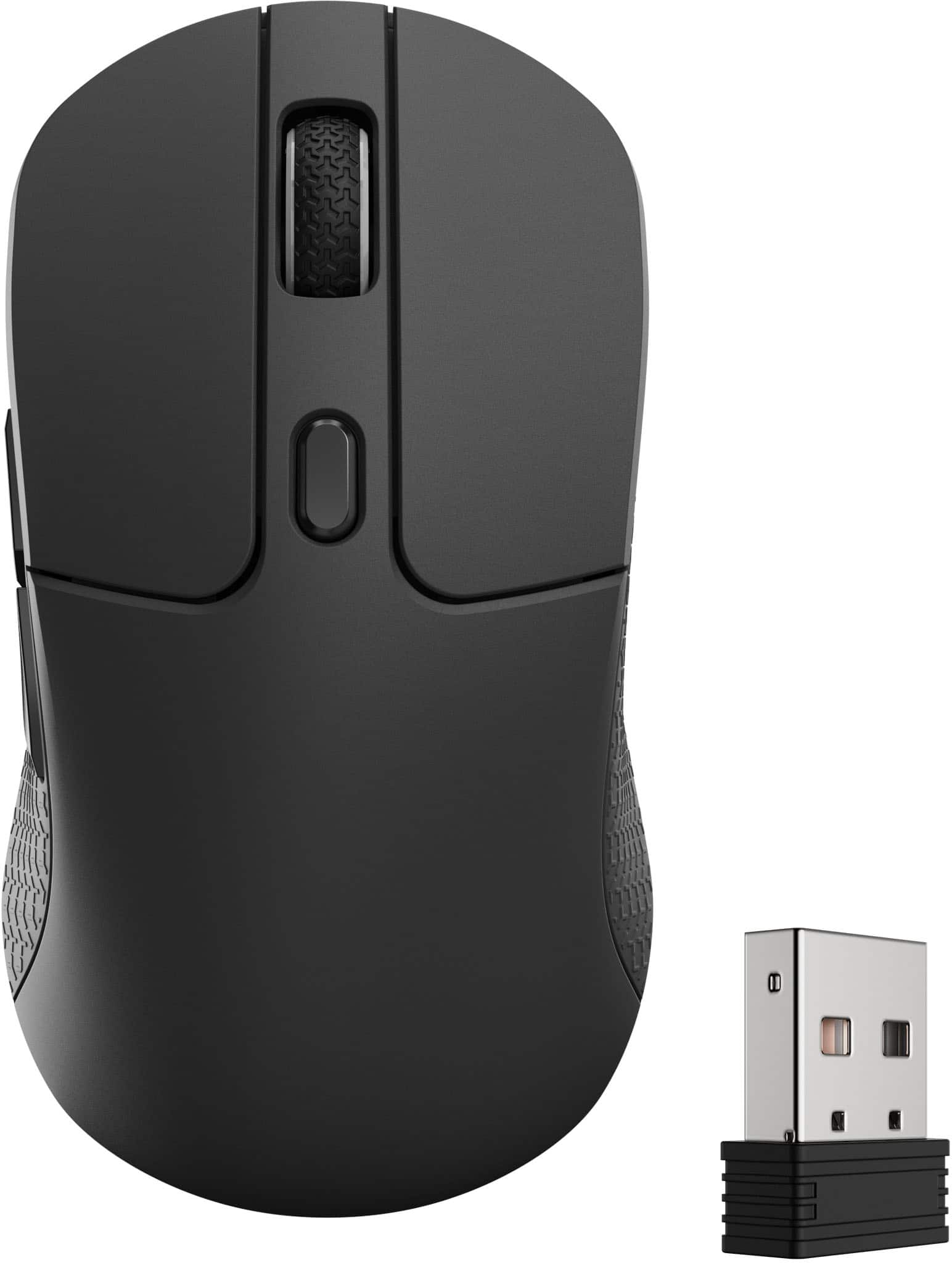
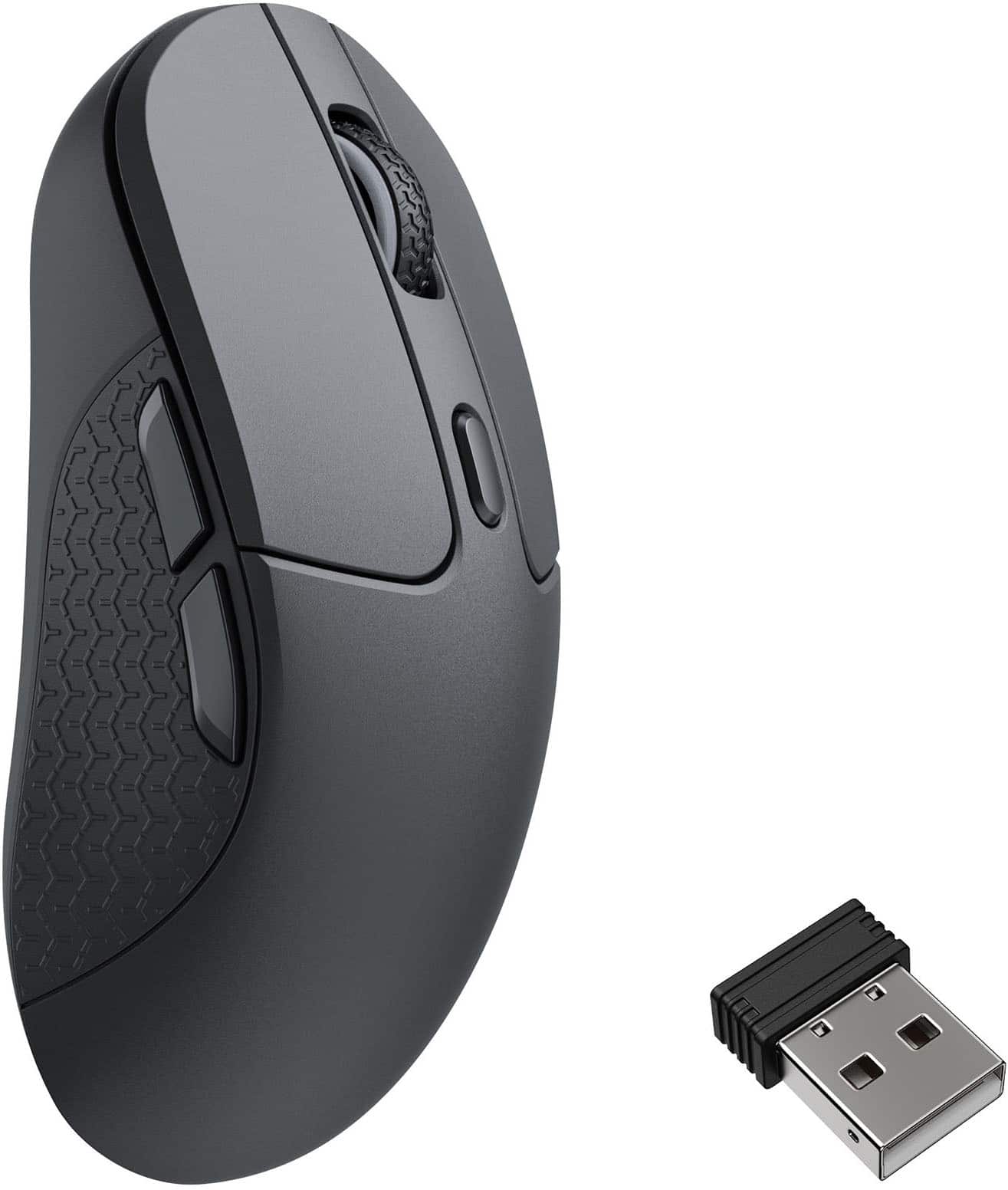
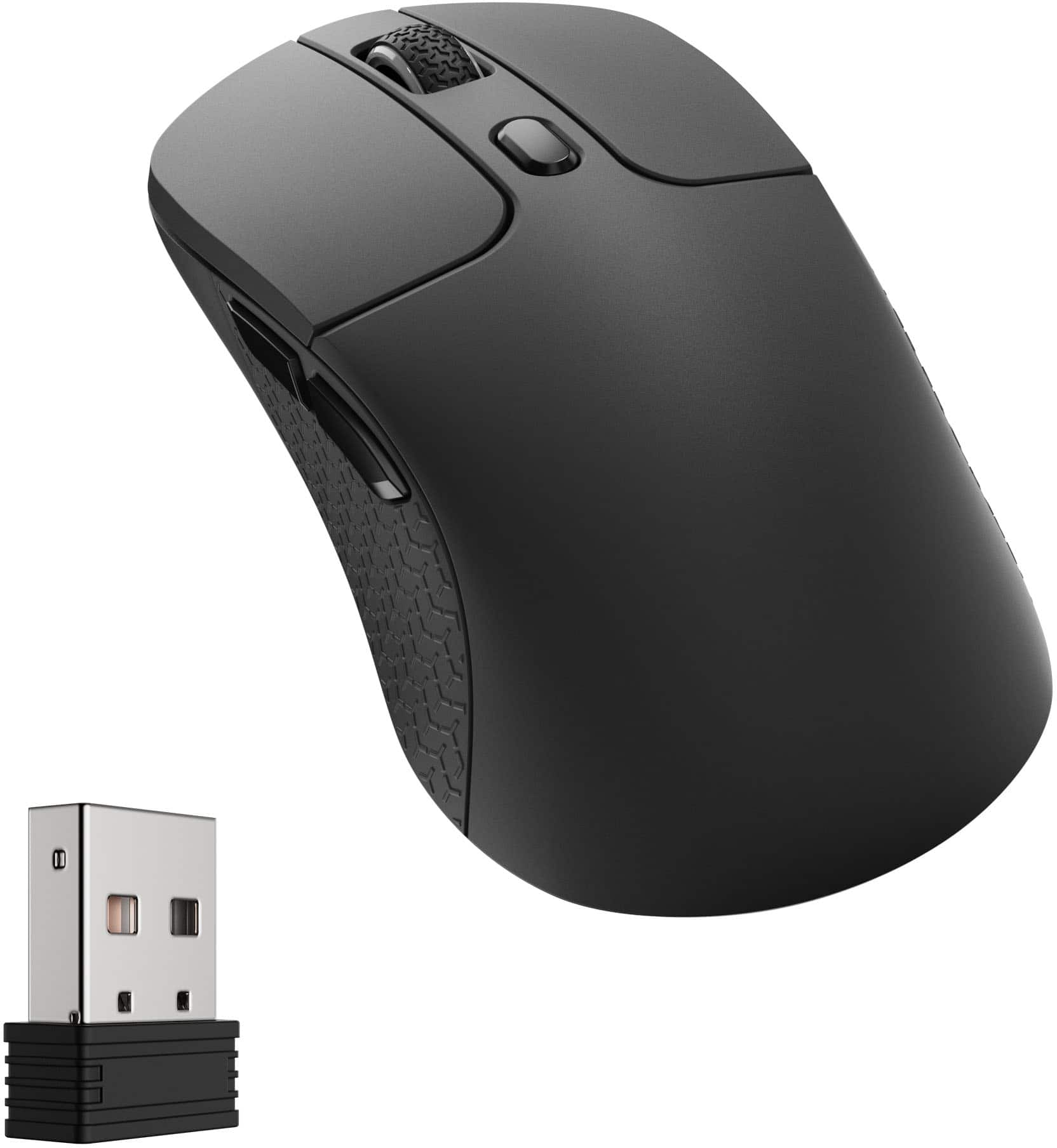
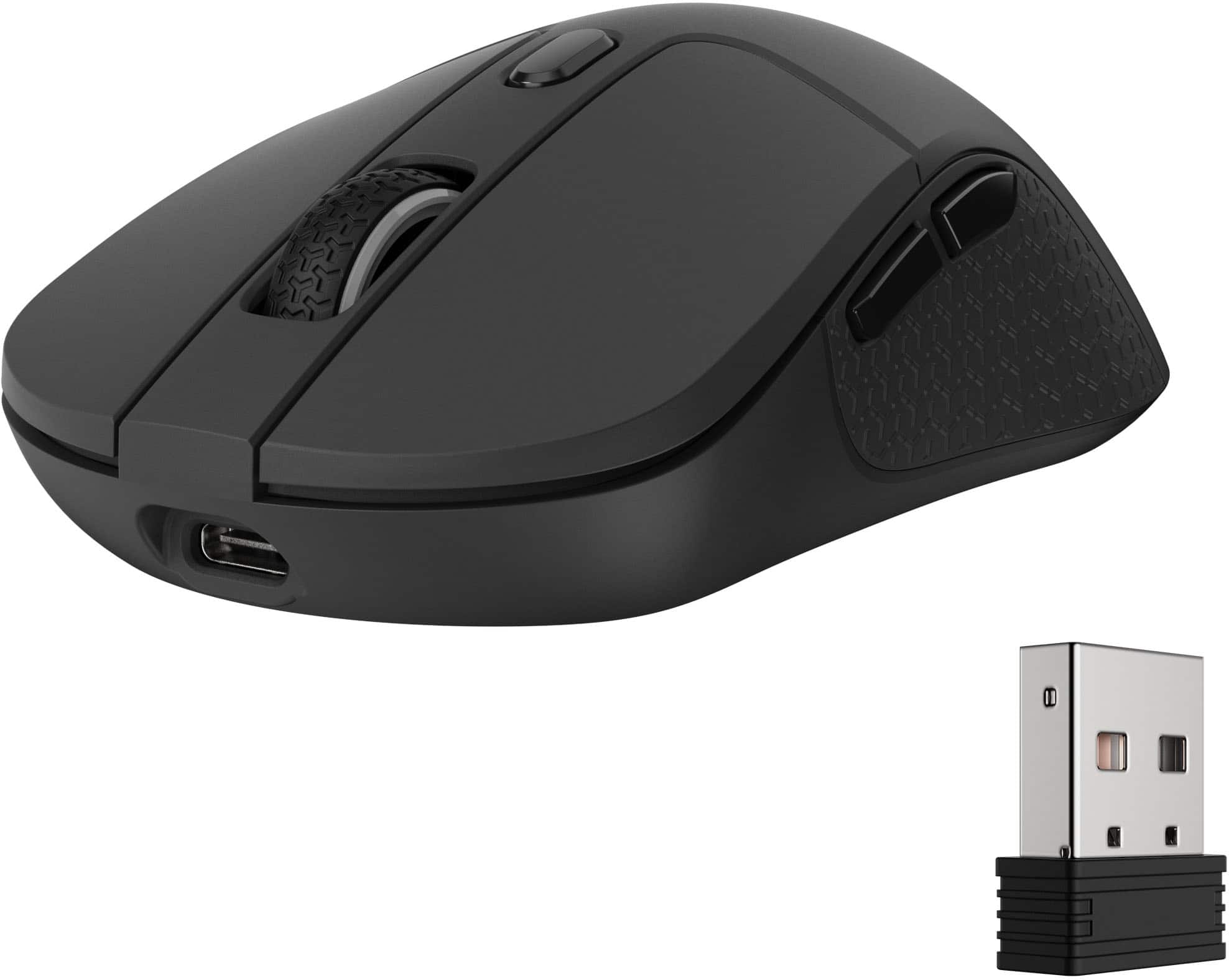
- Model:
- M3-A23
- SKU:
- 6644853
to a friend
- Pros mentioned:Connectivity, Ergonomics, Performance

Comfortable, Lightweight, And Supports 8K Polling
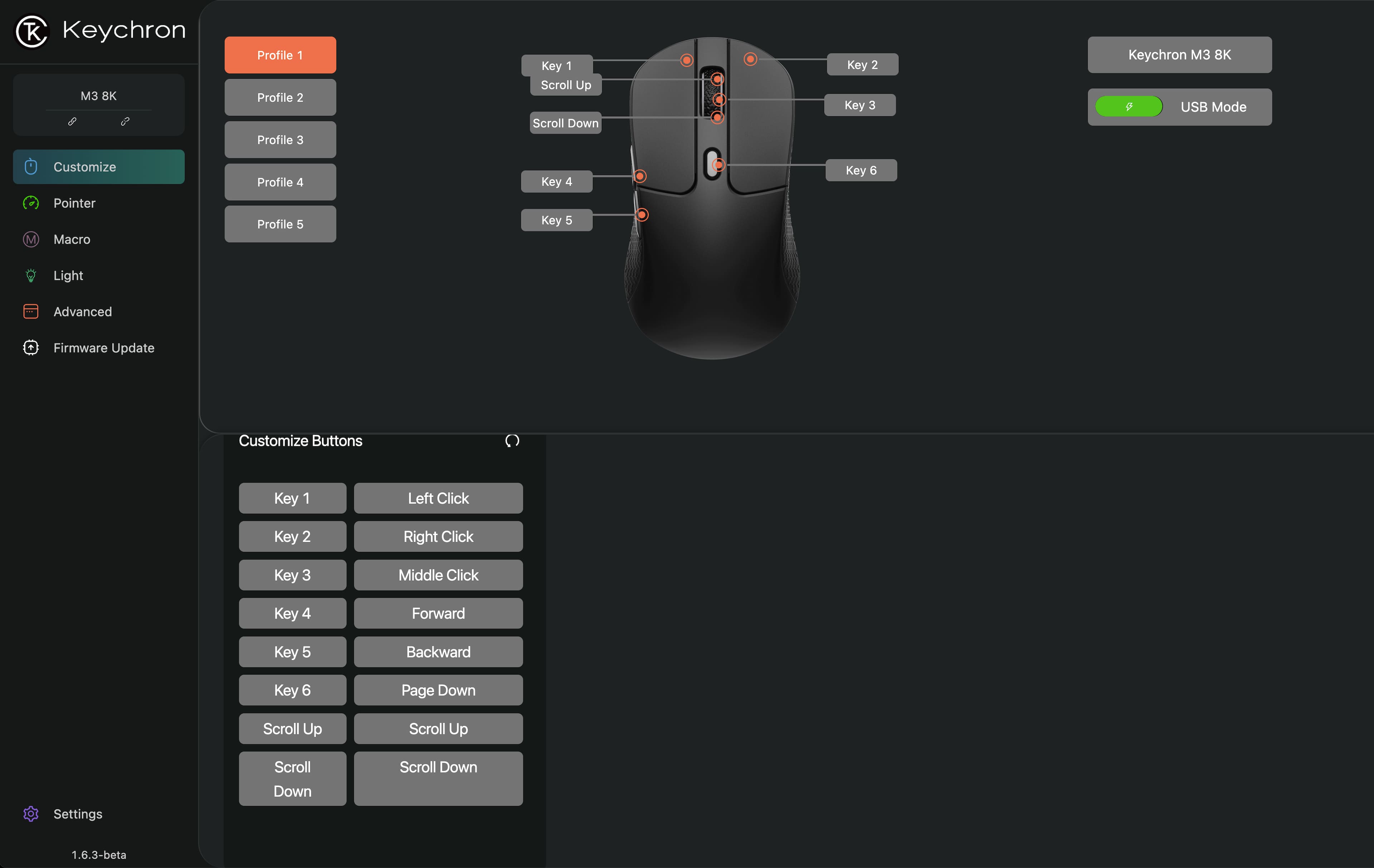
|Posted .This reviewer received promo considerations or sweepstakes entry for writing a review.Keychron’s M3 wireless mouse is a good choice for the user on the go who wants a lightweight mouse with multiple connection options as well as 8K polling. Performance The mouse performs well. It doesn’t have any resistance when moving the mouse around. Also, the bluetooth/RF/Off setting switch is on the bottom in between both the DPI button and the polling rate button, so I’m not at risk of accidentally making a change to those. I have to turn the mouse upside down to access those. The polling rate button doesn’t do anything unless I have the mouse connected through the included USB-C cable. If the cable is connected, I can change the polling rate, but if not, the polling rate is set to the default. Comfort The buttons and scroll wheel are located in a natural position for my fingers, so it’s easy to use the scroll wheel as well as the two side buttons. It fits my had well and the curvature along the side feels natural for my thumb. It’s lightweight and moves smoothly across my mouse pad, so I don’t feel any fatigue using it for long periods of time. Connectivity Keychron has included multiple connection options. You can connect the mouse via Bluetooth, RF module, and wired. A USB-C cable is included as well as a USB-C to USB-A adapter. You also get an RF module with it. I’m glad to see that I have multiple ways to connect the mouse which also means I can use it on one computer through Bluetooth and flip a switch to use it on another computer through the RF module, and turn off Bluetooth and RF and just use it through the cable on another computer without having to pair it again. Firmware Keychron’s method for updating the firmware is through the browser. I like that I don’t have to install additional software to be able to update the firmware or apply settings to the mouse. Both can be done through the browser and their Launcher website. They offer many settings for customization which was definitely a plus. I updated the mouse’s firmware without any issues and set some of the customization settings without any problems. Final Thoughts Keychron has a really good offering here with the M3. The 8K polling is becoming common and the support of that shows that Keychron is keeping up. The mouse is lightweight and feels comfortable for long periods of time. I like the mouse and would recommend it to someone looking for the features mentioned above in a lightweight mouse.
I would recommend this to a friend - Pros mentioned:Battery life, Performance, Weight
"Sleeper" gaming mouse
|Posted .This reviewer received promo considerations or sweepstakes entry for writing a review.I've owned the Keychron - M3 wireless Laser gaming mouse for almost a week now and admittedly. This was the first time I ever heard of this brand. The box the mouse comes in feels very generic and bland. It kind of feels like those boxes you'll find in a general store. I wasn't expecting to be too impressed with this product during unboxing. Inside you'll find a long braided usb c cable for charging the mouse and or using it wired. It includes a dongle for that usb C cable, in case you don't have a usb c port on your laptop or desktop. It also includes a wireless dongle for connecting the mouse wireless via.a 2.4ghz connection. I find that this method is the best for lowering any sort of latency ( besides connecting it with the wire). The tiny wireless dongle also feels kind of generic. I suppose that doesn't matter as long as it works properly, which it does. The mouse feels a little better built than I was expecting. It has a grippy texture on the right and left side of it, while the rest of it is smooth and cold to the touch. The scrolling wheel only seems to have one button, no left or right switches. But has a nice silicone grippy texture. The mouse is very lightweight and comfortable. I wear size 9/10 gloves and this mouse fits comfortably in my hand. Battery life is excellent, I haven't had to charge it in the week that I've been using it. While this mouse doesn't seem to impressive out of the box, its best feature is that it has "8,000 hz polling rate". meaning that it reports its position and clicks to the computer 8,000 times a second. So theoretically you should not experience input lag. I can confirm that clicks and scrolling feels instant and quite smooth. I am able to play my favorite FPS and RPG games like Marvel Rivals, Battlefield 6 and Dragons Quest without any issues. It doesn't make me a pro gamer lol, but It feels nice and responsive. I use the mouse on my table without any mouse pads and it works perfect. It's hard for me to give it a solid 5 star rating because I am doubtful about its long term reliability since the whole product overall feels a little "cheap" and connecting it wirelessly with the dongle took a couple of extra steps. Be sure to read the manual before setting it up as it isn't a simple plug and play setup. Overall, I think it is a good mouse and can recommend it if you want a no frills, no RGB, look at me I'm a gamer looking mouse.
I would recommend this to a friend - Pros mentioned:Connectivity, Ergonomics, Weight
A versatile mouse with great specs!
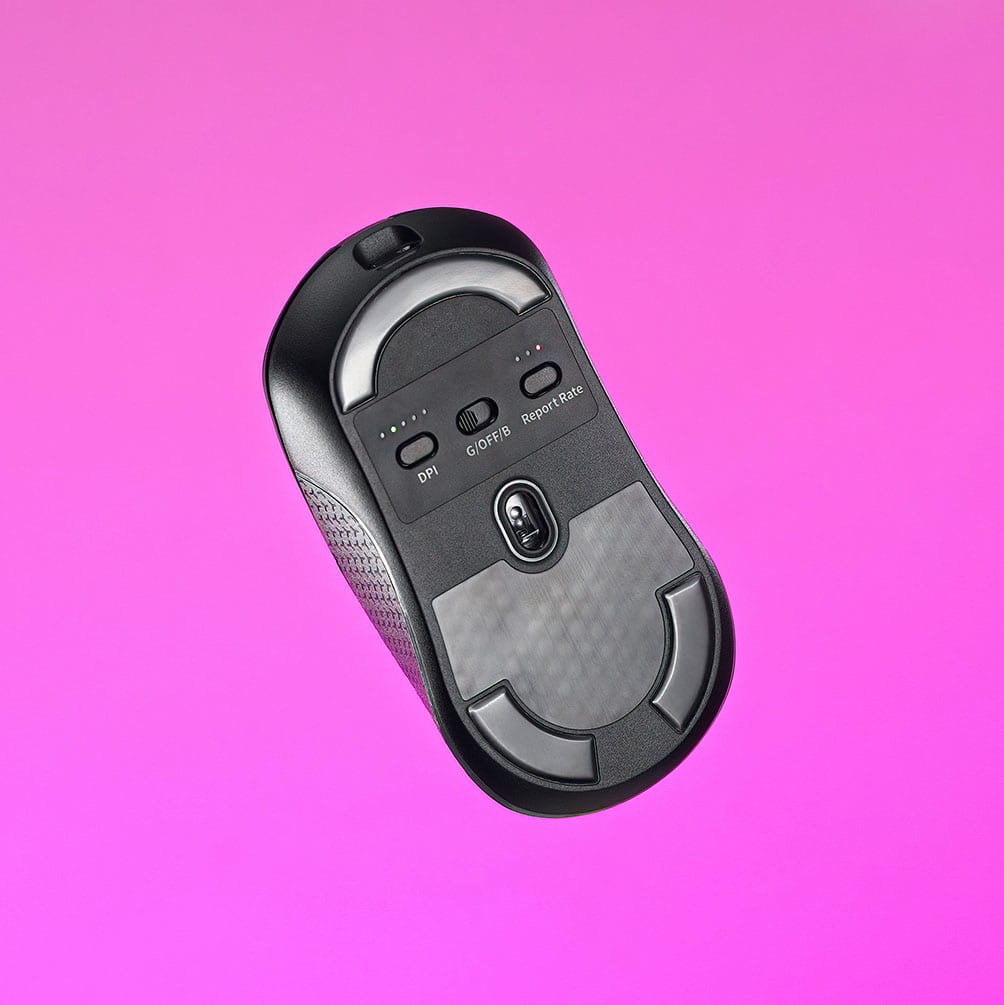
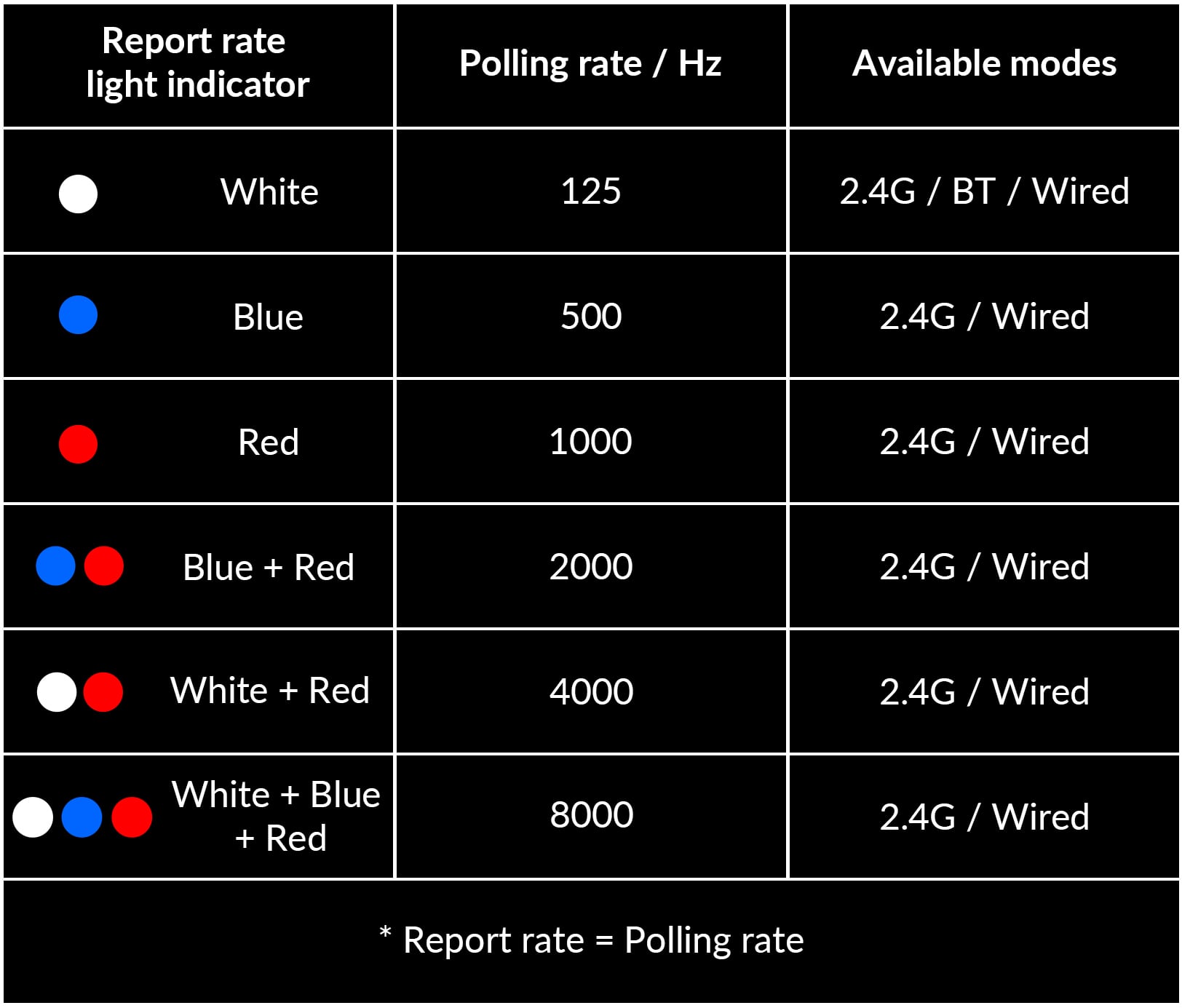
|Posted .This reviewer received promo considerations or sweepstakes entry for writing a review.The mouse features specifications found in gaming-grade devices. The 8K polling rate makes the mouse suitable for graphics applications, and great for playing RTS games. The mouse supports both 2.4 Ghz and Bluetooth connectivity. There are three buttons with small LED lights at the bottom of the mouse: one controlling connectivity type and the others controlling polling rate and DPI. As the manual provides no further details regarding these buttons, users must infer that pressing them increases both the polling rate and DPI. The mouse features an ergonomic design geared more toward users with larger hands. The top surface features a textured finish that enhances grip during use, while the sides feature a pronounced, ridged design that securely holds the mouse in place, minimizing accidental slips during fast movements. I would prefer a smooth mouse surface, unlike the textured top on this one. The clicks feel nice and responsive and they can certainly accommodate fast clicking in a game. The mouse has a slightly weighty feel in hand, and it glides smoothly, though not as effortlessly as some other mice. Overall, it is a great versatile mouse with a lot of potential. Like: Great specs Versatility Don’t Like: Textured feeling on the top surface
I would recommend this to a friend - Pros mentioned:Connectivity, Ergonomics, Weight
Keychron M3 High Performance Gaming Mouse
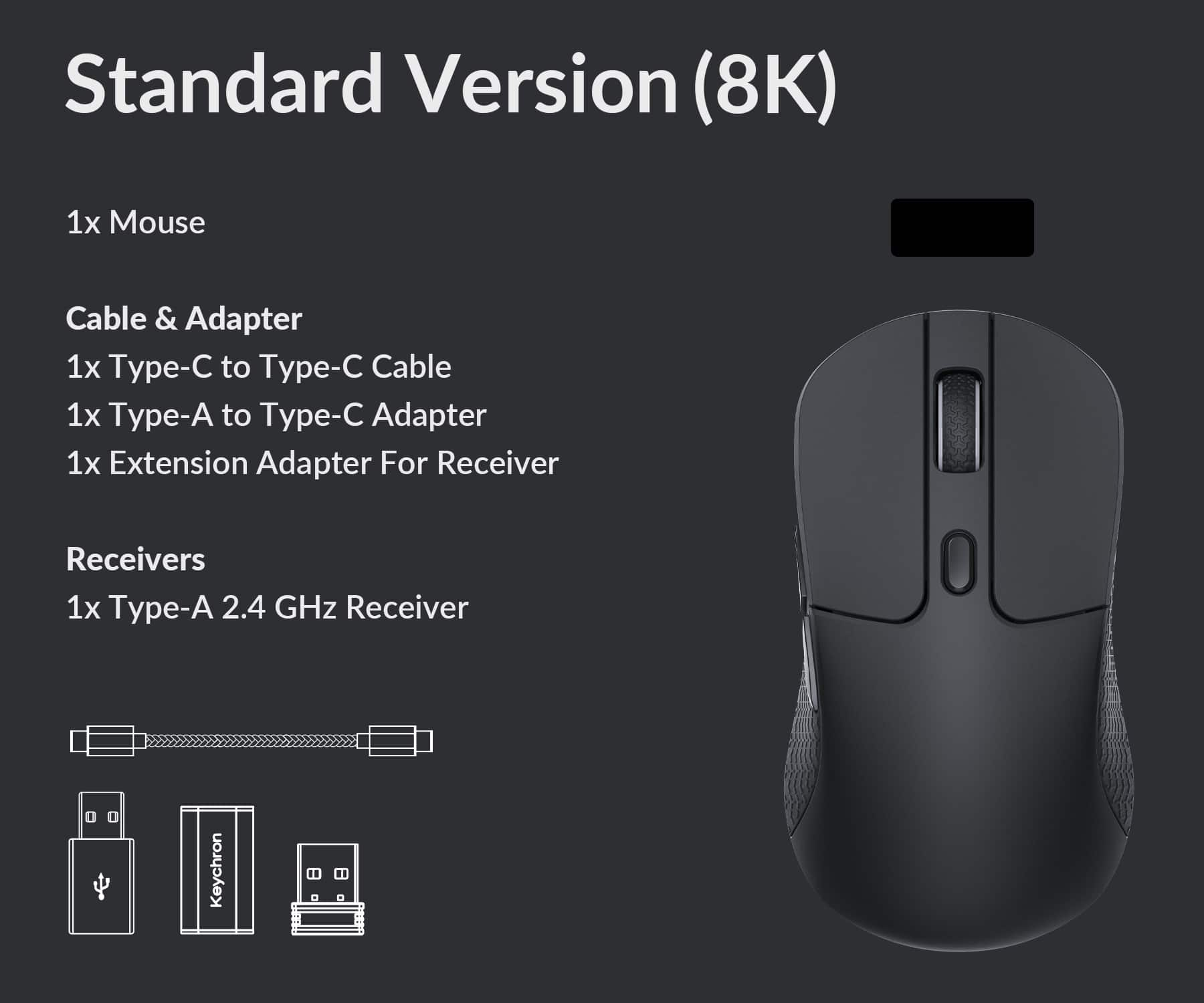
|Posted .This reviewer received promo considerations or sweepstakes entry for writing a review.M3 is the latest wireless Bluetooth mouse from Keychron, a leading company with a reputation for manufacturing feature-rich mechanical keyboards & mice at accessible prices. M3 is a laser gaming mouse with an 8K polling rate. The internal PixArt 3950 sensor chip performs up to 30,000 DPI, up to 750 IPS! A USB-C to USB-C ultra flexible paracord cable with USB-A adaptor is included. This enables the mouse to connect wired or wirelessly & serves as a charging cord for the internal Li-ion battery. It connects using 5.3 Bluetooth, or 2.4 Ghz / Low Latency Radio Frequency. The receiver & an extension adapter for the receiver are included. M3 measures 1.59”H x 4.93”L x 2.68”W. I prefer a mouse that is designed for large hands; this mouse is an ideal fit. It weighs 79 grams, which places it within the lightweight gaming mouse category (60g - 80g). There are no RGB LEDs. CONCLUSION: I love the feel of the Keychron M3 wireless mouse. The sides contain raised patterns that keep the mouse securely positioned in your hand during quick movements. The top has a matte finish that provides the perfect balance between smooth & rough, so it feels comfortable during a long gaming session. Keychron M3 earns my highest recommendation.
I would recommend this to a friend - Pros mentioned:Battery life, Performance
Fast, Responsive, Great for Large Hands
|Posted .This reviewer received promo considerations or sweepstakes entry for writing a review.I am always in a search of a reliable and good size mouse for my large hands. I decided to try out the Keychron mouse and was impressed of how accurate and responsive it was! The mouse was very easy to setup especially with the dongle. The packaging was simplistic which was fine since its a mouse and not something more fragile. Speaking of durability, the mouse feels like it was made very well and very durable at the touch. I was also very impressed at the battery length, since I have started using the mouse I have only had to recharge it once. The USBC charge port makes it easy and compatible with the majority of charge cables out there. Plus I like to use the fast chargers USBC which makes the charge time cut in half. I have been really impressed with gaming with this mouse. There appears to be no lag at all when playing shooter games online. When targeting or moving the cursor was very accurate and made the shot count every time. The mouse well also feels very durable which is important since I am one that uses the mouse wheel like crazy. I cant count the many times that I have worn out the mouse well way before any other part of a mouse. Overall this is a great product and I recommend it!
I would recommend this to a friend Accurate & Responsive
|Posted .This reviewer received promo considerations or sweepstakes entry for writing a review.The Keychron M3 is a simple wireless mouse that is accurate, responsive, and works exactly as expected. My one minor frustration is that the wireless receiver is USB-A and there is no place in the actual mouse to store the receiver. I ordered the wireless mouse to use on the go, and I would have liked to have the option of storing the receiver inside of the mouse so that nothing gets lost. I would have also preferred to have the wireless receiver be USB-C (and have an adapter to make it into USB-A for older computers). I like the placement of the shortcut buttons, the light weight, and the standard shape of the mouse, but the plastic construction feels cheaper than I expected due to the price. There is useful texture on both sides of the mouse, but I would have preferred a more premium feeling rubberized grip. ...Luckily the wheel does have a rubber texture that is easy to grip and is very responsive. Using the manufacturer's website to update the shortcut buttons works very well, but I wish they would have written the link on the bottom of the mouse (so that the user doesn't have to fumble around the website to find the correct link anytime they want to update shortcut buttons). I do appreciate that all of the shortcut buttons are easily accessible but are also located in positions where they are not accidentally bumped. The mouse doesn't feel premium, but is accurate, responsive, easy to use, versatile, and has the perfect amount of shortcut buttons.
I would recommend this to a friend- Pros mentioned:Performance

Amazing Mouse for Gaming and Day to Day
|Posted . Owned for 1 month when reviewed.This reviewer received promo considerations or sweepstakes entry for writing a review.[Employee of bestbuy] The mouse is incredibly responsive and the online customizing engine made by keychron is super intuitive and has far less bugs than applications like iCue, G-Hub, and Synapse. I will always recommend keychron products to my friends for their durable build, high performance, and affordable cost all in one package!
I would recommend this to a friend - Pros mentioned:Performance
10/10 mouse!
|Posted .This reviewer received promo considerations or sweepstakes entry for writing a review.[Employee of bestbuy] I have purchased a lot of mouses and this by far exceeded expectations at half the price of my other ones!
I would recommend this to a friend - Pros mentioned:Battery life, Ergonomics, Performance
Decent, not perfect. Light and full of features.
|Posted .This reviewer received promo considerations or sweepstakes entry for writing a review.The Keychron - M3 Wireless Bluetooth Laser Gaming Mouse is extremely light weight, comfortable, and highly configurable. Ergonomically speaking, I found it to be very comfortable to use even after all day use. Despite it's small size, the battery life is very impressive. I've used it heavily for about a week now and it's holding strong at about 80%. I estimate it'll be easily a month before I need to charge. This mouse is highly configurable, allowing you to customize almost every aspect of its many features. The configuration app lacked any sort of help documentation, so it took a while to figure out the optimal settings to suit my needs. My only real complaint is the texture pattern on the sides of the mouse. I found it to be fairly pronounced / rough causing some sensitivity in my thumb and pinky after extended use, I'm sure I'll get used to it over time, but something I felt needed to be mentioned. Despite the texture, the mouse overall was very comfortable to use. Despite its light weight design, this mouse is slightly larger than I had expected, which for me personally, was a pleasant surprise. I have larger hands and found that this mouse fit my grip perfectly, which based on my past experiences is a rare find! Overall, I'm very happy with the performance, multiple configuration options, and the included paracord cable (honestly, this cable is absolutely amazing!). I would have liked to have better documentation, if nothing else to highlight the many features and configuration options, and personally would prefer a smoother/less aggressive texture,. I was also a little disappointed that this version does not have RGB, which admittedly is a bit of a gimmick, but would have complemented my setup nicely. All this being said, I would still recommend this mouse to anyone looking for a decent, low-cost, feature rich, gaming/everyday mouse, perfect for those with larger hands.
I would recommend this to a friend - Pros mentioned:Connectivity, Ergonomics, Weight
All about customization for your gaming needs
|Posted .This reviewer received promo considerations or sweepstakes entry for writing a review.The Keychron M3 Wireless Mouse is a very solid mouse that can improve your gaming experience without abandoning the use while doing regular office work. The package includes the mouse itself, a cable, a 2.4 GHz Type A receiver, adapters, and a user guide. While it does include a QR code and an app that takes up some storage space, Keychron at least allows you to use the mouse right away without forcing you to spend an hour searching online for instructions, so credit where credit is due. The mouse offers three different connection options: a Type C to Type C cable (which can also be used for charging), the 2.4 GHz receiver, or Bluetooth. It is extremely lightweight, which is a big plus, and it has a very ergonomic design that makes it comfortable to use for long periods of time. In addition, the mouse features six buttons, all of which are customizable through the app, along with standard scrolling. The clicks feel satisfying and responsive, and the scroll wheel is tactile and comfortable thanks to its rubber coating. One downside, however, is the two buttons on the left side of the mouse. They are automatically bound to forward and backward, and due to their position and the limited space on the left side, I often press them accidentally, which takes me out of pages unintentionally (perhaps to consider in the next design). On the underside of the mouse, there is a slider that lets you switch between connection modes, along with two additional buttons. One controls the DPI (dots per inch: to measure the pixels the cursor moves in the screen), allowing you to adjust the sensitivity to your preference. I really like this feature because it adds another layer of customization. The second button adjusts the report rate, which further allows you to fine tune how the mouse performs best to suit your needs. Overall, the Keychron M3 is extremely comfortable and highly customizable, which solves a common issue I have with many products. While there are a few small bugs as the placement of the left side buttons that I mentioned, they do add up and the overall impact is a positive experience. That said, the mouse still lived up to my expectations. I would recommend this mouse to anyone looking for a high quality gaming mouse with plenty of features. It is well built, comfortable, and customizable, allowing you to use it exactly how you want. If you are in the market for a gaming mouse, this is definitely one worth considering.
I would recommend this to a friend - Pros mentioned:Battery life, Connectivity, Weight
Great Gaming Mouse/Worth the Money
|Posted .This reviewer received promo considerations or sweepstakes entry for writing a review.This mouse comes with a USB-C braided cable, a dongle for wireless connection and two adapters, so you can plug the mouse in to charge it just about anywhere. On the bottom of the mouse there is a DPI button, *report rate button/polling rate* and an on/off switch, which also allows for dongle or Bluetooth whichever you prefer. You can also use this wired by using the braided cable it comes with and you would be charging it at the same time. * A report rate button (polling rate) on a computer mouse, typically found on gaming mice, allows the user to instantly change how frequently the mouse sends position data to the computer, measured in Hertz (Hz). Higher rates (e.g., 1000Hz) improve responsiveness and reduce lag, while lower rates conserve battery. This is excellent for adjusting for a quicker response typically used in gaming.* This mouse has a very comfortable shape and is a good size. The quality is good and seems well made. The sides of the mouse are textured and feel good to the touch. On a single charge you can get many, many hours of play. So, if you played for 8 hours a day, you could easily go 2 weeks before needing to charge it again. The scroll wheel can be lit up so you can see it in low light. There are two added buttons on the left side of the mouse to navigate web pages and can be programmed for certain things in a game you may favor. If you want to program the mouse to use with gaming, you will need to download the Keychron Wireless Mouse Software. With this software you will be able to fully customize your mouse for games, change the DPI and *polling rates*, change RGB effects and save up to 5 profiles for different games you play. I feel this is a good mid range mouse for its lightweight, well made design and is very comfortable. This is excellent for gaming and the battery life is really great.
I would recommend this to a friend - Pros mentioned:Battery life, Connectivity, Weight
Best with usb A port
|Posted .This reviewer received promo considerations or sweepstakes entry for writing a review.The unboxing was very easy. They included a USBC cable and USBA to USBC adapter. Also, the mouse and USBA low latency adapter. The setup was a little odd in that I first looked for software but then realized it was just a web url and I could change the settings there. Obviously, it is very cool to have customizations to apply that do not require any software. I did change some of the shortcut buttons, for example I have the middle button on top for a screen shot and the left buttons are cut/paste. That helps me be more productive. Use: I had trouble getting the Bluetooth mode to show up in my laptop, so I had to use the USBc cable since I only had USBC ports, so I was not able to use the adapter or any other way to use the mouse. That being said I did try to change the polling mode to 8000 and the dpi from 1600-3200 was extremely responsive. I found beyond that the mouse was so sensitive it just moved too fast. In use when gaming I found the mouse to be nice and light and it can be set so high that it is extremely responsive but for me that was too high. I preferred polling 8000 and the dpi 1600 which is about the pace I move. Yeah, it can be more responsive, but it made the game play so fast my eyes could not keep up. I asked my son to try, and he was able to keep up with the max polling and dpi, but he is younger and has faster reactions. I guess it depends on who is using the mouse. Regardless, this is a good mouse, and I did not have any need to charge it, so the battery life is good. The grip pattern is also a nice touch to ensure the mouse stays put in your hand. Summary: I like the mouse for some office with light gaming, but I think there are other options that have more gaming value like RGB and other connectivity via Bluetooth or USBc. Still for the money it is a great mouse.
I would recommend this to a friend - Pros mentioned:Battery life, Connectivity
lightweight 8k web based software powerhouse
|Posted .This reviewer received promo considerations or sweepstakes entry for writing a review.I’ve known keychron for a long time with their line of keyboards for providing quality without denting your wallet. This mouse is much the same in that your getting a wireless 8k lightweight mouse with 3 connection options for an insane value. First off the software is web based which is amazingly useful as your no longer pigeon holed into using only a certain machine to change settings. For example this will work on a Mac as well since it’s through a browser window. It allows fine adjustment such as lift off distance, dpi, polling rate all the way to 8k, allows creation of macros, shortcuts and of course modifying of button assignments. This can all be saved to any of the onboard 5 profiles to memory. Connection you can use the dongle for 2.4 ghz lowest latency best performance or connect with Bluetooth 5.3 and you can also use the included usb paracord style cable to run it wired which also charges the internal 600mAh battery. With kailh G Master switches the clicks are crispy and tactile. Using the latest pixart 3950 is just a bonus on specs. It’s only 79g which isn’t the lightest in today’s world but with all the connection options long battery life and 8k polling you can’t really complain. Really good value to dollar ratio on this mouse for sure. If this is a shape you’ve been wanting to try I would take the leap. It’s great.
I would recommend this to a friend - Pros mentioned:Battery life, Connectivity, Ergonomics
Light weight, insanely fast, and inexpensive
|Posted .This reviewer received promo considerations or sweepstakes entry for writing a review.This mouse feels like an extension of your fingers. It has a grippy texture on both sides, and is the perfect size to my hand comfortably. I found I could use this for hours without tiring. The buttons have a responsive feel to them that’s amazing. The ergonomic design fit my hand well and the size would fit just about every hand. Being a wired/wireless mouse enables easy use across multiple systems. The wires connection recharges the built-in battery. I found that once charged, it easily lasted the published life of 140 hours. Software management is done through a web interface, making it easy to set up. There is an option to download software for more control. The 8K is really impressive, making it great for games. I also found it to be the perfect mouse for photo and video editing. With customization options it’s compatible with a variety of games and personal preferences. It’s really a no nonsense mouse ideal for a beginner to advanced gamer. I found this mouse to be an easy to use, high performance gaming mouse, with the capability to meet anything I might use it for in the future. Whether gaming, office work, or editing software, this is a no compromise mouse. I strongly recommend it.
I would recommend this to a friend - Pros mentioned:Battery life, Connectivity, Performance
Great Gaming Mouse
|Posted .This reviewer received promo considerations or sweepstakes entry for writing a review.This Keychron wireless gaming mouse is a really great gaming mouse. It features wireless connectivity via usb dongle or bluetooth. It comes with a USB-C to C charging cable and a USB-A to C dongle. Physically, this is a very unassuming mouse. You really wouldn't be able to tell just by looking at it that it's a "gaming" mouse at all. There are no lights, no aggressive designs, just the typical amount of buttons. Really, it just looks like a "regular" mouse. But as soon as you start using it, you realize that this is actually a really nice mouse. It just glides like butter along the mousepad. And the buttons click really nicely. They are nice and responsive. The scroll wheel also has a nice smooth feel to it, but not too loose. The performance of the mouse is really nice too. Just like most gaming mice, you can customize the dpi and polling rate of the mouse using Keychron's software and keep several profiles in memory on the mouse, which can be cycled through using a button on the mouse. The feel of the mouse is very comfortable. As stated before, it is a very basic, almost generic design, but it works. It feels very natural to hold in the hand. It says it is a lightweight mouse, at 79g, but I have recently used several other lightweight gaming mice, and honestly, this one felt almost heavy by comparison. It is definitely one of the heavier gaming mice I have used recently. However, that did not affect my performance at all. It still performed really well in my gaming sessions and was comfortable to use the entire time. Battery life of the mouse is really great too. They claim up to 140 hours of battery life, depending on how you have it all set up of course. In my testing, I charged it fully once and have been using it every day, for full 8 hour workdays, and it has been over two weeks and I have yet to need to charge it again. So, overall, it just has really great battery life. Overall, this mouse is a really great gaming mouse with fantastic battery life, great performance, and really nice build quality. Definitely recommend.
I would recommend this to a friend - Pros mentioned:Connectivity, Weight
One of the best mice in the game
|Posted .This reviewer received promo considerations or sweepstakes entry for writing a review.This mice is actually pretty surprising to me. I was used to the Logitech Superlight 1 and have gotten really accustomed to its weight and size and this mice was actually smaller in size and very similar in weight. It's just a little bit heavier than the Superlight 1. The connectivity is very simple. It's plug and play and the Bluetooth connection is always a very welcomed addition though, if you are trying to get the most of this mice, it's optimal to use the USB connection because the Bluetooth connection will limit your polling rate. This has rubber grips on the side that some might actually enjoy and appreciate but I personally am not a fan of it because I tend to clean my equipment often and I find that rubber is hard to clean properly and can degrade. It doesn't bother me much apart from that and it does help with the grip. The best part about this mice is that it doesn't include any invasive software to install to customize it. You just have to go online and voila, you can change the settings right with your web browser. My issue is what if you are offline or the website goes down, but you can also change all of your settings within the mice itself. You can change the polling rate and the DPI straight from the mice but without the online launcher, you'll be guessing on what the settings are at unless you memorize what the light indicators mean for each setting.
I would recommend this to a friend - Pros mentioned:Battery life, Weight
lightweight but precise
|Posted .This reviewer received promo considerations or sweepstakes entry for writing a review.This is the first time I ever used a Keychron mouse. It is light weight at 49g, which for some devices you might think it’s cheaply built but that is not really the case here, given its internal components and specifications. I mean, it is plastic, with textured rubber sides that help with grip and in terms of size, it’s probably most comfortable for medium to large hands. The high-end hardware components used in this mouse make it great for serious gamers, thanks to the PixArt 3950 sensor capable of 30,000 DPI resolution and 750 IPS. The 8,000 Hz polling rate enables nearly instant movement and clicking response time giving gamers an advantage over ordinary mice. You can achieve that while wired or with the included 2.4 GHz wireless dongle. Installation was simple. I first used it with the USB-C cable and USB-A adapter to charge its built-in lithium battery. Once it was fully charged, I also used it with the 2.4 GHz wireless dongle it came with. If you want to take advantage of all the customization settings, you can simply go to Keychron’s web based app. Button functions can be customized in addition to the Sensitivity DPI and Polling Rate. There are also small physical buttons and LEDs on the bottom of the mouse that can be used to set the DPI and Polling Rate, as well as switch between connection types. I have been using this mouse all day on my work laptop and with my gaming desktop over the weekend and I find it to perform really well and battery life so far has lasted for more than a week and is still going strong.
I would recommend this to a friend - Pros mentioned:Performance, Weight
Great gaming mouse that's lightweight
|Posted .This reviewer received promo considerations or sweepstakes entry for writing a review.The Keychron M3 Wireless Bluetooth Laser Gaming Mouse is a good mouse that comes with 8K Polling Rate. The polling rate is when the mouse sends a signal of its position. Higher rates means the mouse can offer lower latency and a smoother cursor experience. The mouse comes with a long braided USB-C cable, USB-C female to USB A male adapter, a USB-C female to USB A female adapter, and a Type - A 2.4GHz Receiver. The adapters give you many options of connecting the mouse to your devices. My laptop has USB-C ports, so I had several options other than connecting it to my computer. I can connect the USB-C cable to my MacBook, connect the other end of the cable to the USB-C dongle, then plug the 2.4GHz receive into the adapter. I can also connect to it using Bluetooth, or connect it using the USB-C cable in a hardwire setup. The mouse is very lightweight. It feels like your traditional battery powered mouse that uses 4 AA batteries when you remove the batteries. The mouse works great for the games I play, but if you need more control of the mouse setup, they offer an app that you download to customize it to your liking. Overall, it’s a good mouse that works fine for my needs.
I would recommend this to a friend Keychron customer service is terrible
||Posted . Owned for 2 months when reviewed.This reviewer received promo considerations or sweepstakes entry for writing a review.Mouse glitchy and u responsive at times. Good luck trying to get in touch with manufacturer. For any troubleshooting or warranty help.
No, I would not recommend this to a friend- Pros mentioned:Battery life
Quality 8K mouse that just works (even at work)
|Posted .This reviewer received promo considerations or sweepstakes entry for writing a review.The Keychron M3 is the first product from Keychron that I've personally used on a daily basis. My wife has a Keychron keyboard, but I don't think I've typed more than a few passwords and website URLs into it, so my experience with the brand is very basic at best. Given the price of the Keychron M3 wireless 8K mouse, I wasn't expecting it to be as effective a product as it has turned out to be. This is a mouse that works exceptionally well for gaming or for people who need to switch computers often - including to a corporate/managed PC. #Unboxing and first impressions# The Keychron arrives in a pretty low-frills box. I was a little disappointed that it comes with foam inserts instead of cardboard so the packaging is a little less recyclable. The foam is also not the super dense foam that other brands use to make things feel a little higher quality. However, the mouse arrived to me safe and sound so the packaging works as intended. The only other complaint I had with the packaging is the dongle and accompanying USB-C to USB-A adapter come together in a tiny little ziplock bag that was very difficult to open. Maybe I shouldn't have clipped my fingernails right before setting the mouse up! Not something to detract from the review of the mouse itself, but hopefully Keychron's packaging team take some notes for future releases. Build quality is very good, the mouse feels very solid if a little too heavy compared to other gaming mice I've gotten used to. On the flip side, it has about 3x the advertised maximum battery life of other 8K mice I've used. I like the textured finish on the sides of the mouse, as it will probably hold up better than stick on grip pads while also being good for keeping your fingers grippy if you are a bit sweaty. #Using the mouse# The Keychron M3 works exceptionally well in games with predictable flicks and tracking. I was able to easily swap to the M3 from my daily driver gaming mouse, despite that mouse being less than half the weight of the M3. Keychron gives you full control over the sensor algorithms, so you can disable or enable features like angle snapping or ripple control to your own preferences (I turned them off). What I was most impressed about with the keychron mouse is that their control interface worked even on my corporate owned, managed laptop. I was able to open the website, allow the connection to the local hardware, and make changes to the response rate and the different tracking settings immediately. The only thing I couldn't do from my work PC was update the firmware, as Keychron tries to download it from a Chinese endpoint. I think this is pretty awesome as it makes it easy to change the mouse to lower settings for maximizing battery life when you don't need gaming level response time. For this reason alone, the Keychron M3 gets top marks from me. #Final thoughts# I think the Keychron M3 is a fantastic mouse that will appeal to anyone comparing across other mice in this price point. The only caveat I have to my recommendation is that it's heavier than current top-end ultralight mice and if that's the style you prefer, the M3 will never appeal to you. If you haven't used a <50g mouse, then the M3 is going to feel "normal" to you and you get all the benefits of the quality sensor with minimal lag. And the fact that they've centered their software around the web interface that doesn't require a software install is just awesome. I look forward to seeing more hardware from Keychron in the future.
I would recommend this to a friend