Customer Ratings & Reviews







- Model:
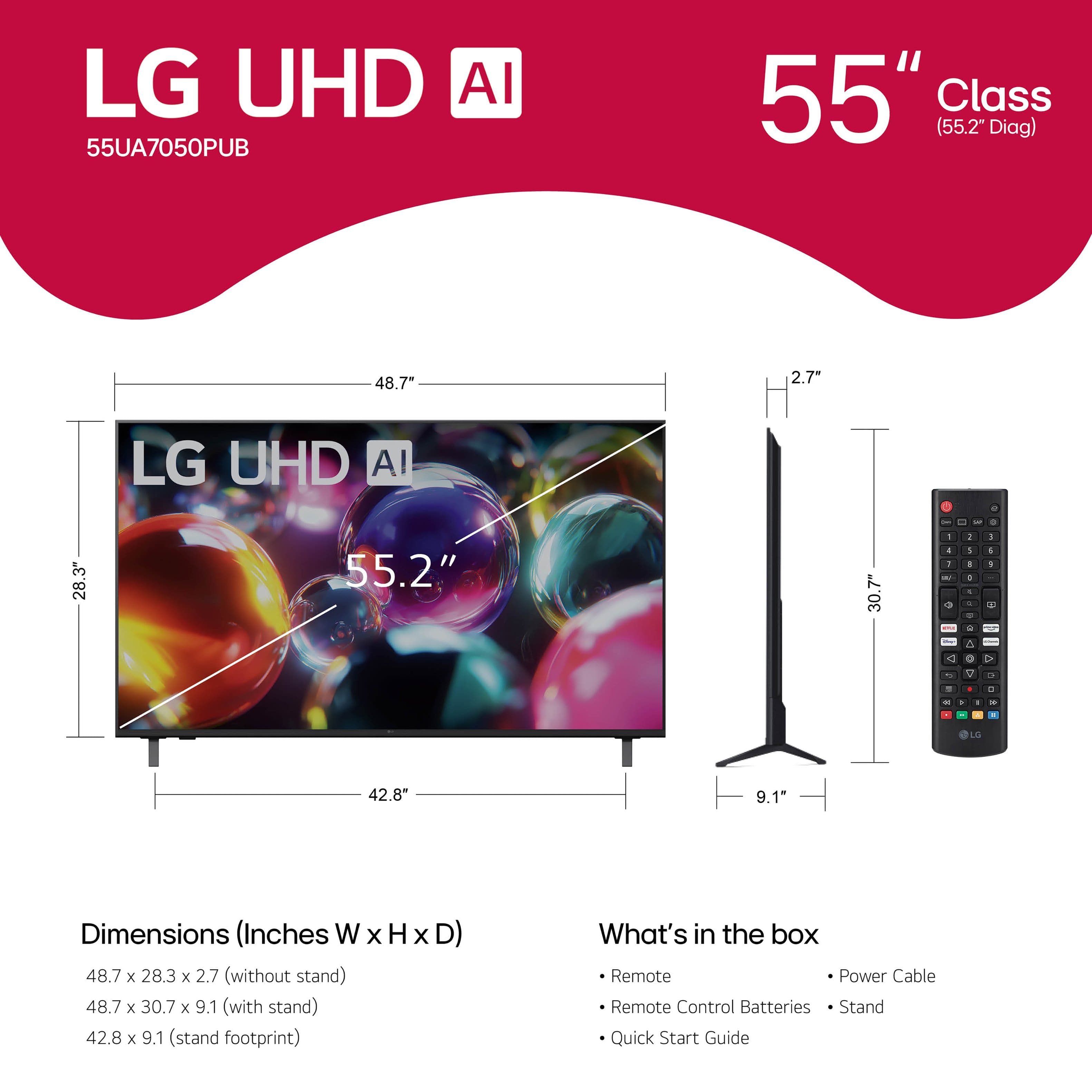
- 55UA7050PUB
- SKU:
- 12376981
Rating by feature
- Picture Quality
Rating 4.7 out of 5 stars
- Sound Quality
Rating 4.6 out of 5 stars
- Brightness
Rating 4.7 out of 5 stars
to a friend
HAPPY
Posted .This reviewer received promo considerations or sweepstakes entry for writing a review.I love Best Buy!!! Helpful no matter what you purchase ❤️
I would recommend this to a friendDecent TV, but LG could make set up easier!
Posted .This reviewer received promo considerations or sweepstakes entry for writing a review.Decent value. Configuration was more challenging than needed - if you go through LG set up and want to use cable (HDMI1) as default, took some effort to figure out. Points off for not including hardware for wall mount. Had to head to the hardware store for screws/bolts to use the existing mounting bracket.
I would recommend this to a friend55 inch LG T.V.
Posted .This reviewer received promo considerations or sweepstakes entry for writing a review.Loved the Large screen...but hated the remote control...
I would recommend this to a friendA Shame
Posted .This reviewer received promo considerations or sweepstakes entry for writing a review.This TV has been blurry for over 15 days, and now that it’s been 17 days total, Best Buy refuses to help because I’m outside their return window. This is the second TV I’ve purchased from Best Buy that’s had problems, which tells me this isn’t bad luck it’s bad quality and worse customer service. I’m stuck with a defective TV and zero support. Extremely frustrating experience. Beware before buying TVs from Best Buy.
No, I would not recommend this to a friendBrand response from LG Digital Customer Care
Posted .Hi, Ebles. Thank you for reaching out and sharing what’s been happening with your LG TV (55UA7050PUB) model. We understand the importance of having a clear and reliable TV. For the blurriness you’re seeing, one helpful step you can try is adjusting the Picture Mode and Sharpness settings to ensure the panel is displaying at its optimal clarity. You can also run the Picture Test built into the TV to help determine whether the issue is coming from the display or the connected source. You’ll find additional guidance here: https://www.lg.com/us/support/help-library/lg-tv-picture-quality-and-optimization--20152175493545. We’d be glad to take a closer look into this for you. Please send us an email at lgdigitalcare@lg.sprinklrsupport.com. We're here for you! ^Juvy

Poor wifi connection
Posted .This reviewer received promo considerations or sweepstakes entry for writing a review.I could not get this TV to connect to the WIFI. I had a neighbor with computer experience also try.
No, I would not recommend this to a friendBrand response from LG Digital Customer Care
Posted .Hi, Beth. Thank you for reaching out about your LG TV (55UA7050PUB) model. We understand the need for a dependable internet connection to fully enjoy the smart features and content on your TV. To address this, (1) ensure the TV is within router range and free from large metallic objects or barriers. (2) Perform a "Power Reset" on your router by unplugging it for 60 seconds, then reconnecting. (3) After the router reboots, try connecting the TV again. Also, check that the TV's date and time settings are correct, as inaccuracies can hinder network connection. For more guidance, visit https://www.lg.com/us/support/help-library/lg-tv-how-to-connect-to-wifi--20153710347199LST. We’d be glad to take a closer look. Please send us an email at lgdigitalcare@lg.sprinklrsupport.com. We're here for you! ^Juvy
Broken item delivered
Posted .This reviewer received promo considerations or sweepstakes entry for writing a review.Best Buy delivered a damaged tv. This after changing my delivery date and being inflexible. I'm done with Best Buy.
No, I would not recommend this to a friendBrand response from LG Digital Customer Care
Posted .Hi, Martha. Thank you for reaching out. We understand the importance of receiving your new LG TV (55UA7050PUB) model in perfect condition. For a TV that arrives damaged, one helpful step is to carefully inspect the packaging and take clear photos of any visible damage, as this documentation is useful when working with the retailer or delivery team. If you haven't done so yet, we recommend contacting Best Buy customer service at 888-237-8289 to report the damage. For more details, check out https://www.bestbuy.com/site/help-topics/return-exchange-policy/pcmcat260800050014.c?id=pcmcat260800050014. If you need more help, lease send us an email at lgdigitalcare@lg.sprinklrsupport.com with your delivery details and photos of the damage. We appreciate the opportunity to help. ^Juvy
Broken
Posted .This reviewer received promo considerations or sweepstakes entry for writing a review.I just opened the box and put it on yhe wall and its cracked. The box they put the hole against the wall. The delivery ppl clearly dropped it bc the hole in the box looks just like the crack on screen
No, I would not recommend this to a friendBrand response from LG Digital Customer Care
Posted .Hi, Laura. Thank you for reaching out about your LG TV (55UA7050PUB) model. We understand the importance of receiving a TV in perfect condition. Since the damage matches the hole in the box, one helpful step you can try is documenting the condition of both the box and the screen with clear photos from multiple angles. This helps support any damage‑on‑arrival claim with the retailer or delivery carrier. If you haven't done so yet, we recommend contacting Best Buy customer service at 888-237-8289 for potential solutions. We’d be glad to take a closer look at your experience and help guide you through the next steps. Please feel free to send us an email at lgdigitalcare@lg.sprinklrsupport.com so we can continue assisting you. ^Juvy
LG Scam
Posted .This reviewer received promo considerations or sweepstakes entry for writing a review.LG puts out a scam promotion said 100 off LG TV When you get to cashiers it only good on 77” or bigger
No, I would not recommend this to a friendBrand response from LG Digital Customer Care
Posted .Hi, Donald. Thank you for sharing your experience with your LG TV (55UA7050PUB) model. We understand the importance of having clear and accurate promotion details, especially when you're expecting a discount to apply at checkout and find out it only applies to select sizes.
One helpful step you can try is reviewing the promotion’s terms and conditions on the retailer’s website or advertisement, as many offers specify eligible sizes or models in the fine print. This can help confirm whether the promotion was limited to 77‑inch and larger TVs. You can also explore support resources for your model here: https://www.lg.com/us/support/product/lg-55UA7050PUB.AUS. If you need further assistance, please feel free to send us an email at lgdigitalcare@lg.sprinklrsupport.com. We're here for you! ^Juvy