Customer Ratings & Reviews
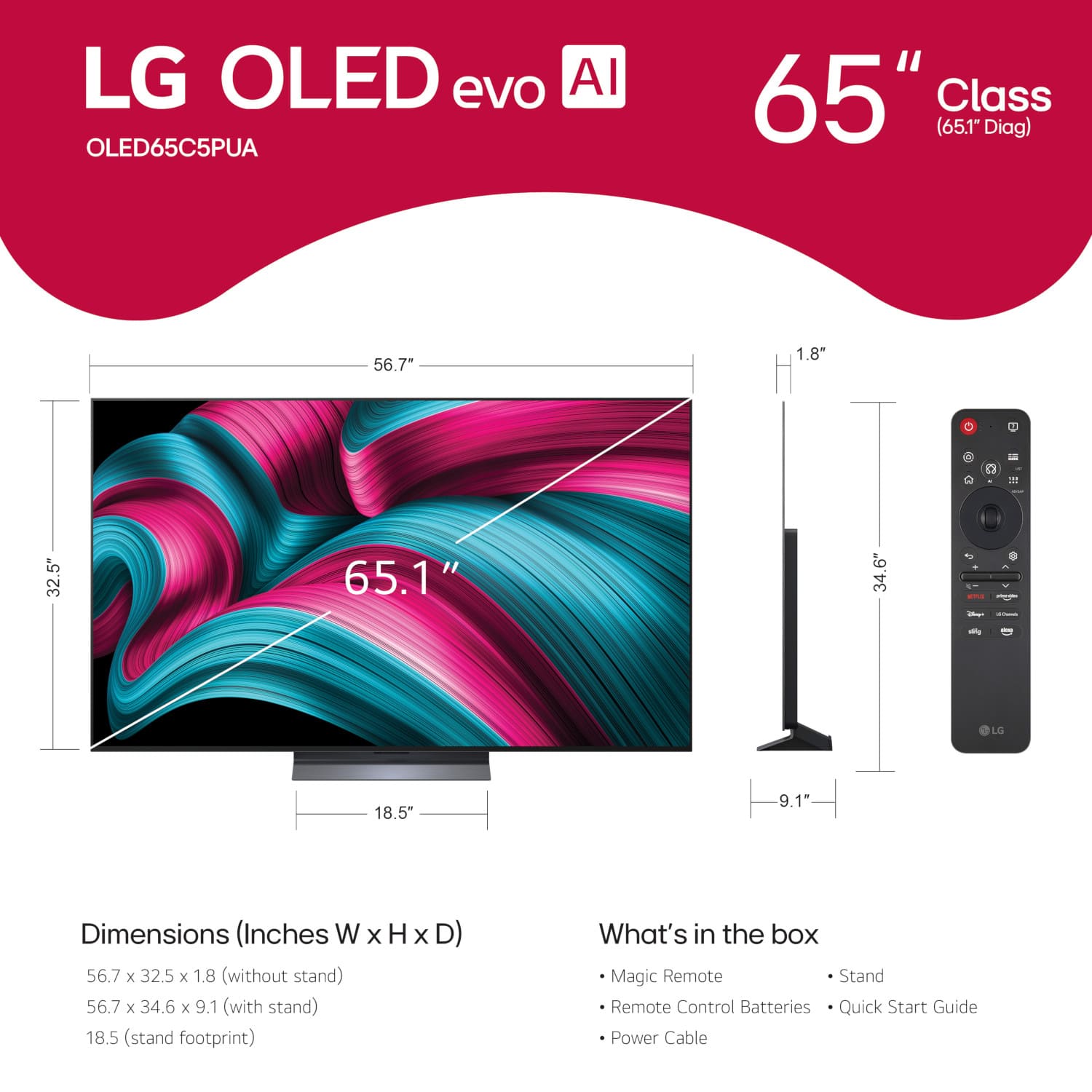




. Independently Tested for Quality and Workmanship CheckPlus: 100 % Color Volume to DCI-P3 oi PSSEANE Intertek [www.IntertekCheck.com](http://www.IntertekCheck.com). 100% Color Fidelity and '100% Color Volume to DCI-P3' applies to 2025 OLED TVs. *LG OLED Display is verified by UL for Perfect Color measured to IDMS 11.5 Ring-light Reflection standards. *100% Color Volume is defined as the performance of display which is equal or greater than the size of DCI-P3 standard color volume as verified independently by Intertek. *The LG OLED Panel is certified by Intertek for 100% Color Fidelity, measured to IDMS 11.5 Ring-light Reflection standards.](https://pisces.bbystatic.com/image2/BestBuy_US/images/products/3661ed5e-8d92-47a9-baef-65aa6eb5dcb9.jpg)














- Model:
- OLED65C5PUA
- |
- SKU:
- 10316771
Customer reviews
Rating 4.8 out of 5 stars with 1342 reviews
(1,342 customer reviews)Rating by feature
- Picture Quality4.9
Rating 4.9 out of 5 stars
- Sound Quality4.5
Rating 4.5 out of 5 stars
- Brightness4.9
Rating 4.9 out of 5 stars
Customers are saying
Customers value the picture quality of the product, with many commenting on how good the image looks. There were no negative aspects of the product mentioned in the provided data.
This summary was generated by AI based on customer reviews.
- Pros mentioned:Oled quality
Rated 5 out of 5 stars
Great product
||Posted .This reviewer received promo considerations or sweepstakes entry for writing a review.Great customer service, they made my purchase easy.
This review is from LG - 65" Class C5 Series OLED evo AI 4K UHD Smart webOS TV (2025)
I would recommend this to a friend Rated 5 out of 5 stars
LG TV
||Posted . Owned for 3 weeks when reviewed.This reviewer received promo considerations or sweepstakes entry for writing a review.LG, is a great product, additionally they have changed a standard for TV’s. Making it easier to have a flex sound system.
This review is from LG - 65" Class C5 Series OLED evo AI 4K UHD Smart webOS TV (2025)
I would recommend this to a friendRated 5 out of 5 stars
Should've bought 2a
||Posted . Owned for 2 weeks when reviewed.This reviewer received promo considerations or sweepstakes entry for writing a review.Excellent picture and sound quality! Great customer service as well!
This review is from LG - 65" Class C5 Series OLED evo AI 4K UHD Smart webOS TV (2025)
I would recommend this to a friend- Pros mentioned:Picture quality
Rated 5 out of 5 stars
Beautiful colors
||Posted . Owned for 3 weeks when reviewed.This reviewer received promo considerations or sweepstakes entry for writing a review.The price, size and quality of the color. Easy to ensamble.
This review is from LG - 65" Class C5 Series OLED evo AI 4K UHD Smart webOS TV (2025)
I would recommend this to a friend Rated 5 out of 5 stars
Made the switch to Lg
||Posted . Owned for 3 weeks when reviewed.This reviewer received promo considerations or sweepstakes entry for writing a review.Couldnt be more happier with the choice of this 65" lg oled tv. What a upgrade,always been a Samsung buyer,went with lg because they have been doing oled for awhile compared to Samsung which havent had oled until recently.
This review is from LG - 65" Class C5 Series OLED evo AI 4K UHD Smart webOS TV (2025)
I would recommend this to a friendRated 5 out of 5 stars
Hands Down Best Mid-Range OLED
||Posted .This reviewer received promo considerations or sweepstakes entry for writing a review.This TV is absolutely stunning! This is a huge upgrade from my old Samsung LED tv. The contrast is perfect, colors are vivid, interface is easy to use, and the design is sophisticated. Movie nights got way better!
This review is from LG - 65" Class C5 Series OLED evo AI 4K UHD Smart webOS TV (2025)
I would recommend this to a friend- Pros mentioned:Picture quality
Rated 5 out of 5 stars
Owner
||Posted . Owned for 1 week when reviewed.This reviewer received promo considerations or sweepstakes entry for writing a review.Great quality, I have never had a problem with LG products
This review is from LG - 65" Class C5 Series OLED evo AI 4K UHD Smart webOS TV (2025)
I would recommend this to a friend - Pros mentioned:Oled quality
Rated 4 out of 5 stars
Great television!
||Posted .This reviewer received promo considerations or sweepstakes entry for writing a review.Great television! Replacing an older plasma TV and there is no comparison. Purchased on sale for same price as a C4. Definitely worth it!
This review is from LG - 65" Class C5 Series OLED evo AI 4K UHD Smart webOS TV (2025)
I would recommend this to a friend Rated 5 out of 5 stars
Great Picture
||Posted . Owned for 2 weeks when reviewed.This reviewer received promo considerations or sweepstakes entry for writing a review.Great picture as expected! However, the initial setup wasn't the easiest, and the remote control functionality is a little funky. I would still highly recommend especially for the price.
This review is from LG - 65" Class C5 Series OLED evo AI 4K UHD Smart webOS TV (2025)
I would recommend this to a friendRated 4 out of 5 stars
Sound Volume Needs Booster.
||Posted . Owned for 2 weeks when reviewed.This reviewer received promo considerations or sweepstakes entry for writing a review.The one issue I have is the sound volume from the television, without a soundbar, is very quiet and not as loud as my previous television that I used to have. I guess that is intentional to force people to buy the soundbar, which I will buy too. I'm just surprised in this day and age that they cannot integrate the soundbar built right inside the television?
This review is from LG - 65" Class C5 Series OLED evo AI 4K UHD Smart webOS TV (2025)
I would recommend this to a friendRated 5 out of 5 stars
Best buy quite literally
||Posted . Owned for 2 weeks when reviewed.This reviewer received promo considerations or sweepstakes entry for writing a review.Great picture, color and sound. Blacks are incredible and contrast really brings out the best colors. UI is fantastic with the best feature being the mouse function. Lot of AI features to automate controls
This review is from LG - 65" Class C5 Series OLED evo AI 4K UHD Smart webOS TV (2025)
I would recommend this to a friend- Pros mentioned:Oled quality
Rated 5 out of 5 stars
OLED C5
||Posted .This reviewer received promo considerations or sweepstakes entry for writing a review.This is a great TV, you can’t do better than OLED!
This review is from LG - 65" Class C5 Series OLED evo AI 4K UHD Smart webOS TV (2025)
I would recommend this to a friend Rated 5 out of 5 stars
LG IS THE BEST
||Posted . Owned for 1 week when reviewed.This reviewer received promo considerations or sweepstakes entry for writing a review.Best lg oled I've owned super bright best tv on the market for the price
This review is from LG - 65" Class C5 Series OLED evo AI 4K UHD Smart webOS TV (2025)
I would recommend this to a friend- Pros mentioned:Picture quality
Rated 5 out of 5 stars
LG oiled 65” TV
||Posted . Owned for 1 week when reviewed.This reviewer received promo considerations or sweepstakes entry for writing a review.Fantastic picture, excellent sound, very thin. Best TV I have.
This review is from LG - 65" Class C5 Series OLED evo AI 4K UHD Smart webOS TV (2025)
I would recommend this to a friend Rated 5 out of 5 stars
Perfect TV for our master room.
||Posted . Owned for 1 month when reviewed.This reviewer received promo considerations or sweepstakes entry for writing a review.Great picture quality. Love how sleek the TV is. It looks beautiful. The sound is amazing (without any sound bar). Differently a great buy.
This review is from LG - 65" Class C5 Series OLED evo AI 4K UHD Smart webOS TV (2025)
I would recommend this to a friend- Pros mentioned:Picture quality
Rated 5 out of 5 stars
LG OLED TV
||Posted . Owned for 1 week when reviewed.This reviewer received promo considerations or sweepstakes entry for writing a review.Blilliant color and sharpness. Takes movies to the next level
This review is from LG - 65" Class C5 Series OLED evo AI 4K UHD Smart webOS TV (2025)
I would recommend this to a friend Rated 5 out of 5 stars
My favorite TV of all time
||Posted . Owned for 3 weeks when reviewed.This reviewer received promo considerations or sweepstakes entry for writing a review.The TV is really great, especially if you have a bright room it does amazing with glare
This review is from LG - 65" Class C5 Series OLED evo AI 4K UHD Smart webOS TV (2025)
I would recommend this to a friendRated 5 out of 5 stars
Excellent
||Posted . Owned for 3 months when reviewed.This reviewer received promo considerations or sweepstakes entry for writing a review.This is a great product. I love it and highly recommend it to anyone.
This review is from LG - 65" Class C5 Series OLED evo AI 4K UHD Smart webOS TV (2025)
I would recommend this to a friendRated 5 out of 5 stars
OLED 65
||Posted . Owned for 2 weeks when reviewed.This reviewer received promo considerations or sweepstakes entry for writing a review.Highly recommend OLED TV for clarity and great picture color. Upgraded from 14 year old Samsung and what a difference.
This review is from LG - 65" Class C5 Series OLED evo AI 4K UHD Smart webOS TV (2025)
I would recommend this to a friend- Pros mentioned:Picture quality
Rated 4 out of 5 stars
Anniversary present
||Posted .This reviewer received promo considerations or sweepstakes entry for writing a review.Great TV, awesome picture and sound. Had a bit of trouble trying to set it up though the app. Overall excellent
This review is from LG - 65" Class C5 Series OLED evo AI 4K UHD Smart webOS TV (2025)
I would recommend this to a friend