Customer Ratings & Reviews
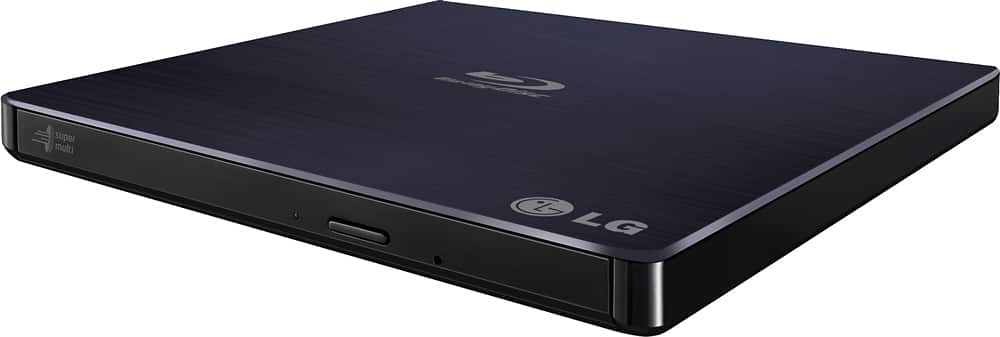
- Model:
- BP50NB40
- SKU:
- 9243009
Rating by feature
- Value
Rating 4.3 out of 5 stars
- Quality
Rating 4.4 out of 5 stars
- Ease of Use
Rating 4.5 out of 5 stars
Customers are saying
Customers love the 8x External USB 2.0 Blu-ray Disc Double-Layer DVD±RW/CD-RW Disc Rewriter for its ease of use, Blu-ray capabilities, and excellent performance in reading and writing discs. The product is also praised for its light and portable size, good speed, and compatibility across operating systems. However, some customers have expressed concerns about the included software and the noise level during operation. Overall, the product is well-received for its features and reasonable price.
This summary was generated by AI based on customer reviews.
- Pros mentioned:Ease of use
Writer USB Requirements
||Posted . Owned for 1 month when reviewed.This reviewer received promo considerations or sweepstakes entry for writing a review.Works great as a external drive for a laptop. Included software needs to be upgraded to allow fully potential of the drive to be used. It does require TWO USB connections via the provided cord due to power demands during burn.
I would recommend this to a friend - Pros mentioned:Overall performance
Portable is a plus!
||Posted . Owned for 2 weeks when reviewed.This reviewer received promo considerations or sweepstakes entry for writing a review.It works great! The best part is that I can use it between both my desktop and my laptop! (For whatever reason my desktop does not have space for an internal disc drive)
I would recommend this to a friend - Pros mentioned:Speed
Sturdy workhorse
||Posted . Owned for less than 1 week when reviewed.This reviewer received promo considerations or sweepstakes entry for writing a review.Great writer, never fails and I prefer this over my PCs internal drives. I burn DVDs and blue rays consistently for work.
I would recommend this to a friend Such a good buy!
||Posted . Owned for 1 month when reviewed.This reviewer received promo considerations or sweepstakes entry for writing a review.Love this diskdrive, able to watch amazing movies and with a little work you can even rip your collection!
I would recommend this to a friend- Pros mentioned:Blu-ray
Not for media archiving
||Posted . Owned for 1 month when reviewed.This reviewer received promo considerations or sweepstakes entry for writing a review.I will warn you now if you plan on doing hardcore media archiving with this save yourself the headache and the $100 and buy anything from pioneer other than this Blu-ray drive if you're like me you're going to be on Reddit by the end of the month figuring out why zero discs will be recognized by this drive the second that you update any of the aacs libraries or if you flash the firmware on this you have basically just absolutely killed your drive (and no I was not trying to do with the UHD flashing) I really loved how this drive worked it was better than anything I bought for the first 3 weeks of owning it and it is completely dead in the water now and I'm beyond warranty and a returnable date so I am no longer going to purchase anything made by LG this was my last attempt to give them my money and everything I've bought from them has fallen apart ridiculously fast... Unbelievably great DVD player ... The moment you try to get this to play all of your Blu-ray collection and start figuring out it's limitations there's a 95% chance you're going to break your drive. And if anybody's made it to this far in the review look up Billy on Reddit and he will give you preflashed uhd drives from pioneer that will last you the rest of your life.
I would recommend this to a friendBrand response from LG Digital Customer Care
Posted .Hello there. Thank you for sharing your experience with us. We understand your inquiry regarding the BP50NB40 Blu-ray drive. Since this concern involves purchase and warranty matters beyond the return window, we recommend contacting Best Buy directly for further assistance.
https://www.bestbuy.com/site/lg-8x-external-usb-2-0-blu-ray-disc-double-layer-dvdrw-cd-rw-disc-rewriter-black/9243009.p?skuId=9243009
Should you need help with the product’s features or setup, please send us a private message on Social Media @LGUSSupport and we’ll be glad to assist you further. —Renzo
Wife has the TV but now I have the PC
||Posted . Owned for 2 months when reviewed.This reviewer received promo considerations or sweepstakes entry for writing a review.This is my second LG - 8x External USB 2.0 Blu-ray Disc Double-Layer DVD±RW/CD-RW Disc Rewriter - Black. The first one is too old for a firmware update. *Be sure to keep the OEM software as it is impossible to replace. Not sure if I can use this on Windows 11 as it does not allow for OEM soft ware.
I would recommend this to a friendBrand response from LGAnswers
Posted .Thank you for taking time to review this product, Bernie. Your feedback is appreciated and important in helping us to identify practices that drive customer satisfaction. If you ever have any questions, please reach out to our support team on Facebook at @LGUSSupport. ^Jovelyn
Solid, works for most of what I want it to do.
||Posted . Owned for 3 weeks when reviewed.This reviewer received promo considerations or sweepstakes entry for writing a review.Works OK. I haven't tried all the functions. I've tried Music CDs, regular DVDs, and DVD-RAMs. They all worked fine. I also tried a Blu-Ray and could NOT get it to read the Blu-Ray. Perhaps this is user error, I don't know.
I would recommend this to a friendGood little player
||Posted . Owned for 3 weeks when reviewed.This reviewer received promo considerations or sweepstakes entry for writing a review.Good little player, does well with all formats. I couldn’t get the software that came with it to actually play anything. It would start up and then freeze. But after several updates and patches I finally got it. It will work using a single usb c lightening port but you’ll need an adapter. Otherwise it takes two regular usb slots to power it.
I would recommend this to a friendBrand response from LGAnswers
Posted .We appreciate your feedback. This helps us to improve in areas where we've missed the mark. We want to give you a great big thank you for helping us and the community. ~Tanisha
- Pros mentioned:Blu-ray
Works as intended
||Posted . Owned for 3 months when reviewed.This reviewer received promo considerations or sweepstakes entry for writing a review.So far so good. It works as intended and it was a better deal than the original Apple drive which can not read/write Blu-ray Discs.
I would recommend this to a friend Great external dvd drive
||Posted .This reviewer received promo considerations or sweepstakes entry for writing a review.Bought this today to use with my HP All in One computer . Very slim design taking up very little room on desk. Loaded super fast and works great. Love being able to play blu-ray DVD’s on computer!
I would recommend this to a friend- Pros mentioned:Blu-ray
LG - 8x External USB 2.0 Blu-ray Disc Double-Layer
||Posted . Owned for 7 months when reviewed.This reviewer received promo considerations or sweepstakes entry for writing a review.Great Blu-ray Disc Double-Layer! I recommend it to everyone!
I would recommend this to a friend Works as intended
||Posted . Owned for 1 month when reviewed.This reviewer received promo considerations or sweepstakes entry for writing a review.Works on my M1 mac mini. Is able to read CDs and DVDs, haven’t tried bluray yet. I am going to try to burn bluray discs soon. Build quality is ok, it is made of plastic which makes it feel less premium.
I would recommend this to a friendBrand response from LGAnswers
Posted .Thank you so much for your wonderful review! We’re thrilled to hear that you enjoyed experience with your LG - 8x External USB 2.0 Blu-ray Disc Double-Layer DVD±RW/CD-RW Disc Rewriter - Black. We look forward to your next review. ~Tanisha
- Pros mentioned:Ease of use
Great disc rewriter.
||Posted .This reviewer received promo considerations or sweepstakes entry for writing a review.I have been using it already and it is easy and works great.
I would recommend this to a friend LG PORTABLE Blu-ray
||Posted . Owned for 3 weeks when reviewed.This reviewer received promo considerations or sweepstakes entry for writing a review.I am very satisfied with the LG portable Blu-ray player. At first I had difficulty getting it to work properly but my son-in-law was able to help me
I would recommend this to a friendSarah’s review
||Posted . Owned for 2 weeks when reviewed.This reviewer received promo considerations or sweepstakes entry for writing a review.Works great. Sound is perfect for praise & worship.
I would recommend this to a friend- Cons mentioned:Connectivity
Comes with two USB ports I do not like
||Posted . Owned for less than 1 week when reviewed.This reviewer received promo considerations or sweepstakes entry for writing a review.I have to disconnect to port from the back of my computer to put two USB ports in the back of my computer for it to work and it did not work. It did not work on the top of my USB port on the computer. I called up LG they couldn’t figure it out either so I am returning this item, I hope this is helpful. I given this a one star .
No, I would not recommend this to a friendBrand response from LG Digital Customer Care
Posted .Hi, William. Thank you for sharing your experience with the LG DVD Rewriter (BP50NB40) model. We understand your concern about a product doesn’t work as expected and when customer support hasn’t resolved the issue. We strive to provide high-quality products and excellent services to ensure a smooth and seamless experience. For help, ensure all connections are securely plugged in. Sometimes, loose connections can cause devices to malfunction. If possible, test the device with different USB ports on your computer. Sometimes specific ports can have issues. Make sure your computer’s USB drivers are up to date. Outdated drivers can sometimes cause compatibility issues with peripherals. If these steps don’t resolve the issue or if you need further assistance, please send us a private message on social media @LGUSSupport. Our team will be happy to help you troubleshoot or provide additional support. ^Juvy
Great
||Posted . Owned for 2 months when reviewed.This reviewer received promo considerations or sweepstakes entry for writing a review.Great product exelent producto 5 stars very satisfactorio
I would recommend this to a friendRecommended highly by my Son
||Posted .This reviewer received promo considerations or sweepstakes entry for writing a review.Still Learning how use it, Thanks for asking, have a great day!
I would recommend this to a friendDefective
||Posted . Owned for 1 month when reviewed.This reviewer received promo considerations or sweepstakes entry for writing a review.Expensive, and had a manufacturing defect that scratched all disks I put inside it. Was able to hopefully self-repair, and luckily the discs were ones I have other copies of. Too bad I threw out the box, or I would have gone to return immediately.
No, I would not recommend this to a friendBrand response from LG Digital Customer Care
Posted .Hello, Christian. We appreciate you reaching out and sharing your experience. We understand your point of view regarding the issue with your LG DVD disc player and the inconvenience this has caused. If you require any further assistance, please feel free to send us a direct message at @LGUSSupport. In the meantime, you can also explore our support options and resources on our website at [https://www.lg.com/us/support](https://www.lg.com/us/support. -Shae
Don't buy for mac
||Posted .This reviewer received promo considerations or sweepstakes entry for writing a review.Be sure you know you have to buy a download for it to work. Product slot doesn't open easily.
No, I would not recommend this to a friend