Customer Ratings & Reviews
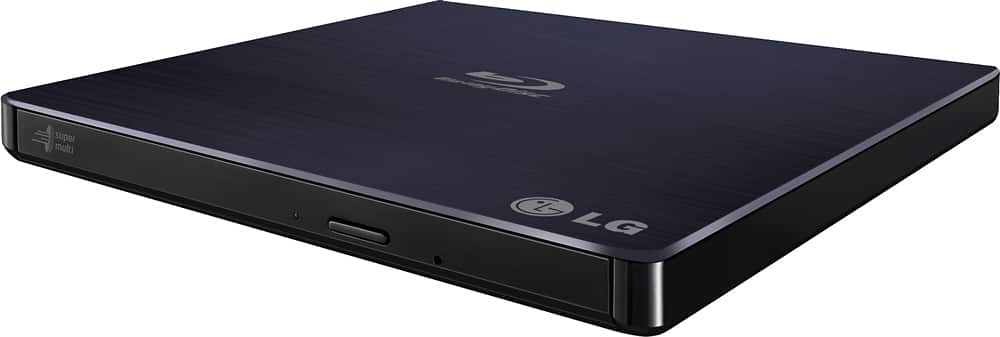
- Model:
- BP50NB40
- SKU:
- 9243009
Rating by feature
- Value
Rating 4.3 out of 5 stars
- Quality
Rating 4.4 out of 5 stars
- Ease of Use
Rating 4.5 out of 5 stars
Customers are saying
Customers love the 8x External USB 2.0 Blu-ray Disc Double-Layer DVD±RW/CD-RW Disc Rewriter for its ease of use, Blu-ray capabilities, and excellent performance in reading and writing discs. The product is also praised for its light and portable size, good speed, and compatibility across operating systems. However, some customers have expressed concerns about the included software and the noise level during operation. Overall, the product is well-received for its features and reasonable price.
This summary was generated by AI based on customer reviews.
Disappointed. Had to be returned.
||Posted .This reviewer received promo considerations or sweepstakes entry for writing a review.My new computer does not have a DVD slot, so had to purchase this external one. The USB cord included Did not fit the unit. Store verified and we were all amazed.
No, I would not recommend this to a friendBrand response from LGAnswers
Posted .Hello, thank you for your review it is extremely important to us. It is terrible to hear that your External Disc Drive did not fit your computer resulting in returning it. I can understand how inconvenient this situation must be for you and I would love to help out. If there is anything we can do to assist in the near future feel free to reach out to us directly at 1(800)243-0000 via Facebook https://www.facebook.com/LGUSSupport or Twitter @LGUSSupport. ^TH

2nd one
||Posted . Owned for 1 week when reviewed.This reviewer received promo considerations or sweepstakes entry for writing a review.Had to return the first blue ray player skipped when playing movie. Now 2nd one skips not a good buy.
No, I would not recommend this to a friendBrand response from LGAnswers
Posted .We are sorry to see you are having issues with your disc drive. For assistance, please give our computer specialists a call at 800-243-0000. ^CP
USB power cables not long enough
||Posted .This reviewer received promo considerations or sweepstakes entry for writing a review.I was looking forward to using this product. It takes a split USB cable to power it, using 2 ports. The Y split was not long enough to fit 2 ports on my laptop and I had to return it.
No, I would not recommend this to a friendWas supposed to be new
||Posted . Owned for less than 1 week when reviewed.This reviewer received promo considerations or sweepstakes entry for writing a review.Got it in the mail today. Was supposed to be new got a used one a dvd was still inside it.
No, I would not recommend this to a friendBrand response from LGAnswers
Posted .We are disappointed to see that you were not satisfied with your recent purchase and would like to learn more from you. However we need to move to a platform that supports back and forth messaging. Please send us a private message on Facebook or Twitter using @LGUSSupport and use #VOC, and share your feedback with us. Thank you. ^Jennifer
No instructions included
||Posted . Owned for 1 month when reviewed.This reviewer received promo considerations or sweepstakes entry for writing a review.I cant use it because installation instructions were not included.
No, I would not recommend this to a friendBrand response from LGAnswers
Posted .We highly appreciate your honest feedback regarding your experience. We read from your feedback that you were having trouble with the product, and we would be pleased to assist you with this further, but we must switch to a platform that allows us to have back-and-forth conversation. Send us a private message on Facebook or Twitter with the handle @LGUSSupport, and your contact information, and we'll be pleased to see what we can do to help. Thanks. ^Jolly
Not a good choice
||Posted . Owned for 2 weeks when reviewed.This reviewer received promo considerations or sweepstakes entry for writing a review.The drive would go to sleep when it shouldn’t. It did not seem to be defective.
No, I would not recommend this to a friendBrand response from LGAnswers
Posted .We are disappointed to see that you were not satisfied with your recent purchase and would like to learn more from you. However we need to move to a platform that supports back and forth messaging. Please send us a private message on Facebook or Twitter using @LGUSSupport and use #VOC, and share your feedback with us. Thank you. ^Jennifer
mr
||Posted . Owned for 3 weeks when reviewed.This reviewer received promo considerations or sweepstakes entry for writing a review.plays no blu-ray disc on lg gram hdmi intel core 17 !!
No, I would not recommend this to a friendBrand response from LGAnswers
Posted .We would like to opportunity to give you some suggestions to help with your issues by calling us at 800-243-0000.~Tanisha
12 days after returnable, dies on me
||Posted . Owned for 1 month when reviewed.This reviewer received promo considerations or sweepstakes entry for writing a review.12 days after it was no longer returnable it quit working, media not valid, tried several dvds to no avail.
No, I would not recommend this to a friendBrand response from LGAnswers
Posted .We are continuously working to improve the quality of our products and anticipate market demands that drive customer satisfaction. Your feedback is especially important to us and your concerns will be shared with our product team. If you have questions or further concerns, please reach out to our support team on Facebook at @LGUSSupport. We apologize for any inconvenience this caused. ^Venette
Wrong cord
||Posted .This reviewer received promo considerations or sweepstakes entry for writing a review.Due to the fact that this device was being sold with a USB cord that didn't even fit the unit, we didn't have a chance to use it, but returned it.
No, I would not recommend this to a friendBrand response from LGAnswers
Posted .Thank you for your review. I hate to hear that you were unable to use the Blu-Ray Player resulting in returning it due to the USB cord not fitting the unit properly. I can understand how frustrating this may be for you. If there is anything we can do to help out in the near future feel free to reach out to us directly at 1(800)243-0000 via Facebook https://www.facebook.com/LGUSSupport or Twitter @LGUSSupport. ^TH
this product sucks
||Posted .This reviewer received promo considerations or sweepstakes entry for writing a review.the first time i used this product i could only burn 3 or 4 blue ray discs. this time i could burn only one before it broke
No, I would not recommend this to a friendnever worked
||Posted .This reviewer received promo considerations or sweepstakes entry for writing a review.this drive is not worth the money, it sounds like its having a heart attack trying to play a blu ray if it plays at all. its like its under powered.
No, I would not recommend this to a friendBrand response from LGAnswers
Posted .If you're in need of some guidance with using your drive, please reach out to our computer specialist by calling 800-243-0000 so a specialist can help out. ^CP
DO NOT BUY THIS DEVICE
||Posted . Owned for 1 month when reviewed.This reviewer received promo considerations or sweepstakes entry for writing a review.Bought this April 13 and it has already failed. Won't play discs, just spins in circles making noises.
No, I would not recommend this to a friendBrand response from LGAnswers
Posted .We are sorry to hear that your unit is not working as designed. We are continuously working to improve the quality of our products, availability while anticipating market demands that drive customer satisfaction. If the problem hasn't resolve, please reach out to our support team on Facebook at @LGUSSupport. We apologize for any inconvenience this caused. ^Venette
Not good for Macs
||Posted .This reviewer received promo considerations or sweepstakes entry for writing a review.This item requires two USB cables to be connected. Doesn't work on a mac laptop...and also a very dumb design.
No, I would not recommend this to a friendBrand response from LGAnswers
Posted .We are sorry to hear of your experience with your unit. Please know that we are continuously working to improve the quality of our products and anticipate market demands that drive customer satisfaction. Your feedback is especially important to us and your concerns will be shared with our product team. We hope that you will consider LG for your future product needs. For the latest updates on LG Home video, please visit https://www.lg.com/us/home-video. You can always reach out to LG Customer Support by direct message via Twitter (@LGUSSupport) or Facebook (https://www.facebook.com/LGUSA/) with any product questions or concerns. We apologize for any inconvenience this caused. ^Daphane
Does not work with Macs
||Posted .This reviewer received promo considerations or sweepstakes entry for writing a review.Item claimed to work with Apple products, but it only worked to play regular DVDs.
No, I would not recommend this to a friendDidn't work
||Posted .This reviewer received promo considerations or sweepstakes entry for writing a review.I've bought LG products before and never had any problems. This failed at the start. I found it to be a bad connection at the USB port on the burner.
No, I would not recommend this to a friendBlu Rays didn't play for me
||Posted . Owned for 3 weeks when reviewed.This reviewer received promo considerations or sweepstakes entry for writing a review.I wasn't able to play Blu Rays. I even purchased the upgraded program. It played a DVD fine.
No, I would not recommend this to a friendBrand response from LGAnswers
Posted .We are sorry to hear that your unit is not working as designed. We are continuously working to improve the quality of our products, availability while anticipating market demands that drive customer satisfaction. If the problem hasn't resolve, please reach out to our support team on Facebook at @LGUSSupport. We apologize for any inconvenience this caused. ^Venette
Hard to use
||Posted .This reviewer received promo considerations or sweepstakes entry for writing a review.Wouldn't play new blu-rays. Always needs to be upgraded.
No, I would not recommend this to a friendReview
||Posted .This reviewer received promo considerations or sweepstakes entry for writing a review.Horrible firmware that doesn’t let you do anything. Don’t buy this drive get the archgon from amaZon
No, I would not recommend this to a friendBrand response from LGAnswers
Posted .We are sorry to hear that your unit is not working as designed. We are continuously working to improve the quality of our products, availability while anticipating market demands that drive customer satisfaction. If the problem hasn't resolve, please reach out to our support team on Twitter via @LGUSSupport or on Facebook at https://www.facebook.com/LGUSA/. We apologize for any inconvenience this caused. ^Venette
waiting on TotalTech
||Posted . Owned for 1 month when reviewed.This reviewer received promo considerations or sweepstakes entry for writing a review.Still wait on TotalTech to install and set up yhis device
I would recommend this to a friendBrand response from LGAnswers
Posted .We are sorry to hear your experience with the delivery and installation was less than satisfactory. Thank you for bringing this to our attention. It help us continue to work towards improving the overall customer experience. If you have questions or further concerns, please reach out to our support team on Facebook at @LGUSSupport and use #VOC in your first message to our social media support team.. To speak with an agent via phone, you can call 800.243.0000. There are policies and procedures in place to ensure resolutions are consistent and fair. I am confident that we will work to provide an agreeable resolution. ^Venette
Didn’t work
||Posted . Owned for 1 month when reviewed.This reviewer received promo considerations or sweepstakes entry for writing a review.Didn’t work with my new MacBook Pro and didn’t come with any trouble shooting information I had to return it
No, I would not recommend this to a friendBrand response from LG Digital Customer Care
Posted .Hi, there. Thank you for sharing your experience with us. We understand that the LG Blu-ray Disc (BP50NB40) model didn't work as expected with your new MacBook Pro, and we’re sorry to hear it didn’t meet your needs. We always aim to provide a seamless experience, and your feedback is invaluable.
To help resolve this, we suggest checking that the firmware on your unit is up to date and ensuring the USB connection is secure. Sometimes, connecting the drive directly to your laptop instead of through a USB hub can also help improve compatibility.
Please send us a private message on social media @LGUSSupport so we can assist you further and explore possible solutions. We’re here to help. ^Juvy